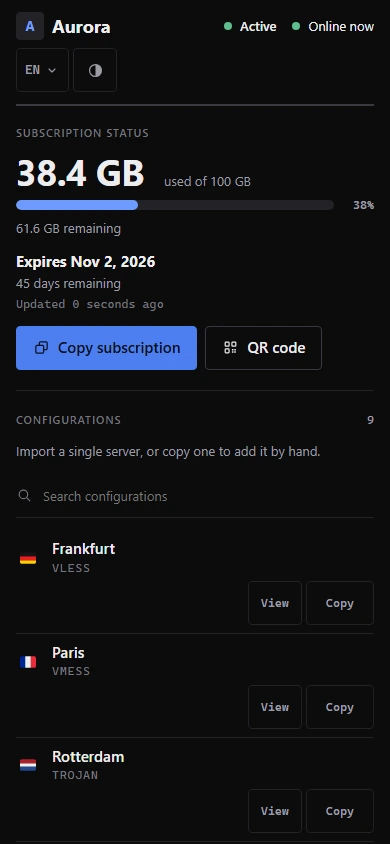
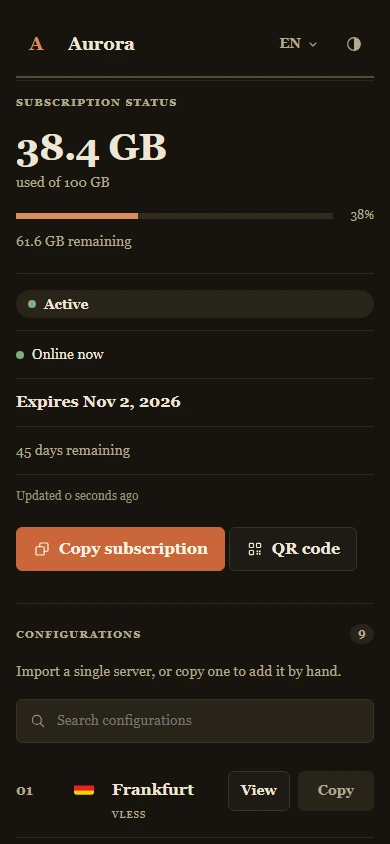
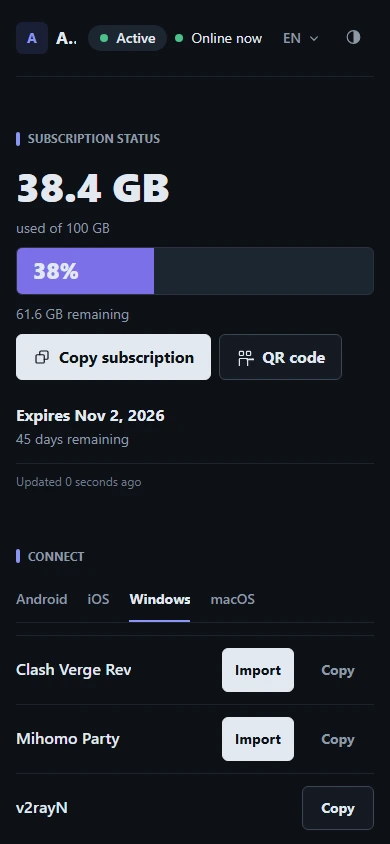
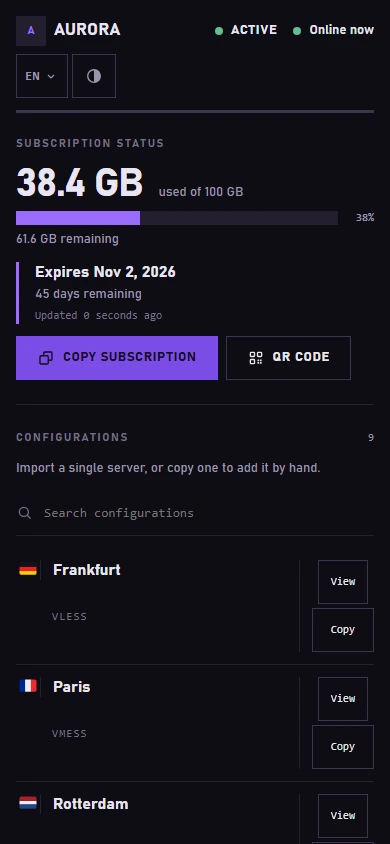
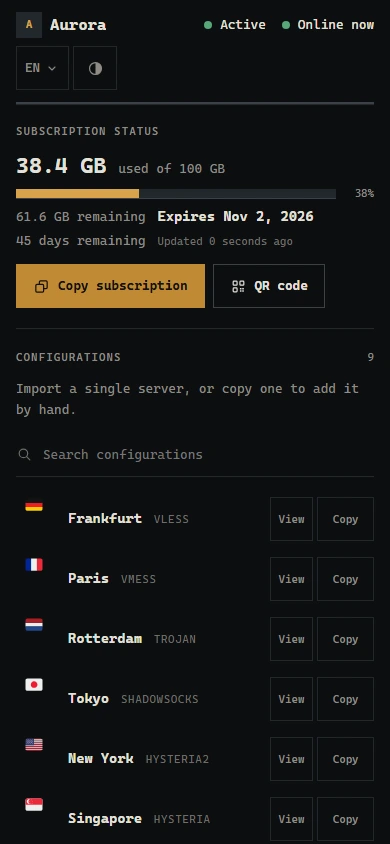
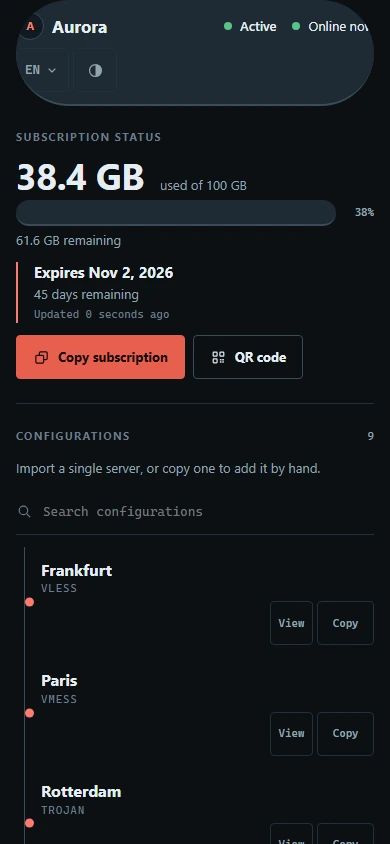
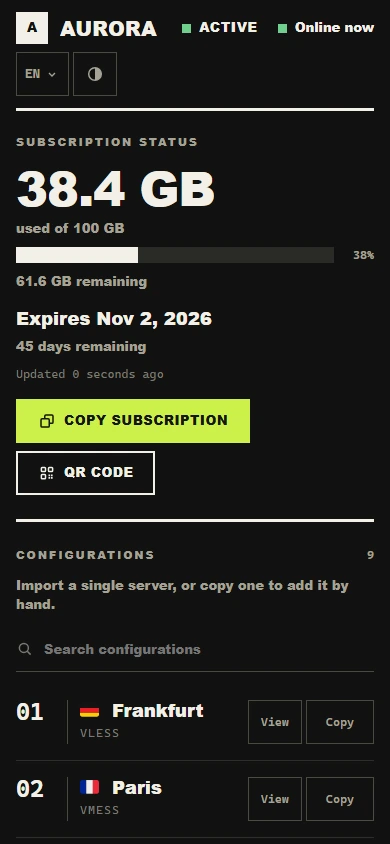
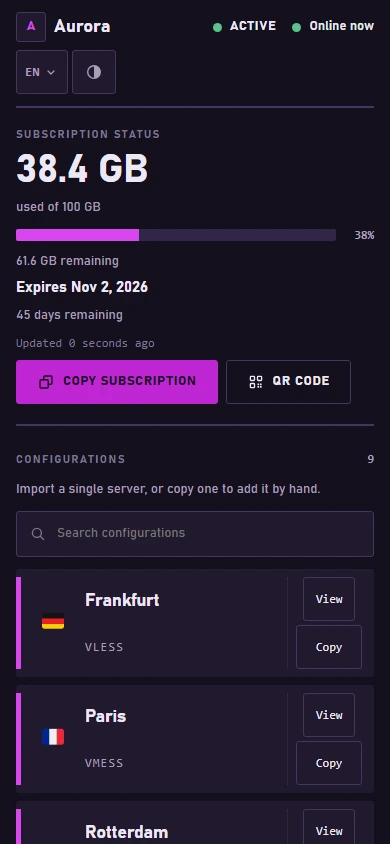
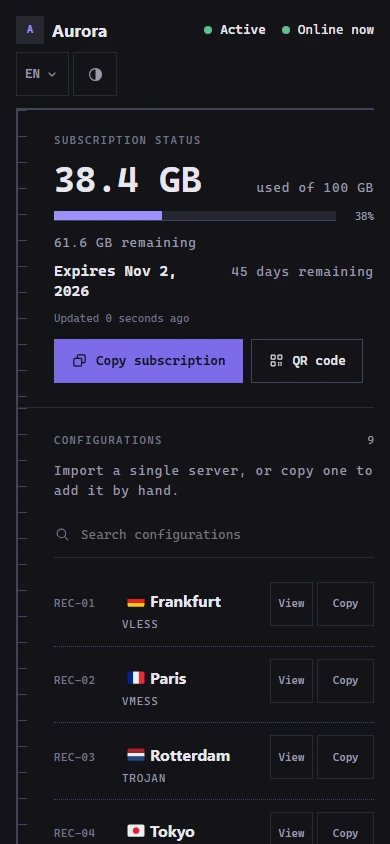
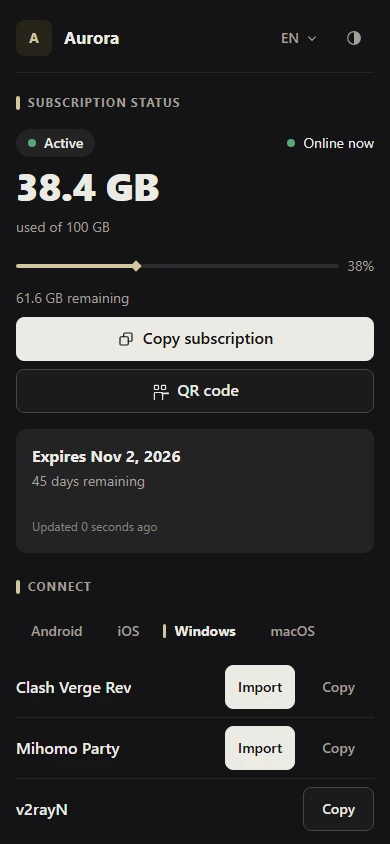
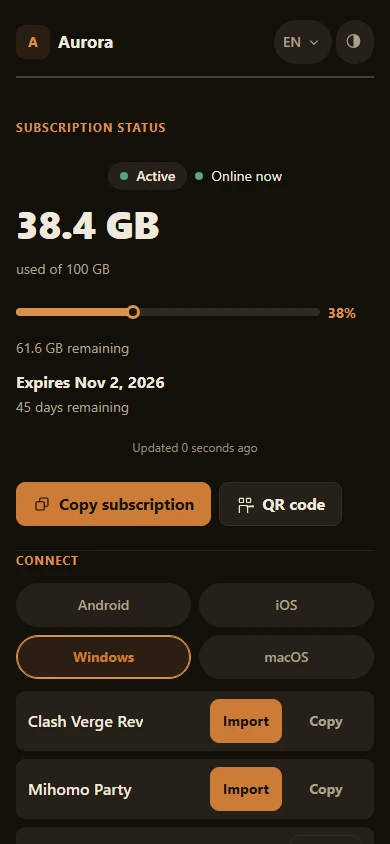
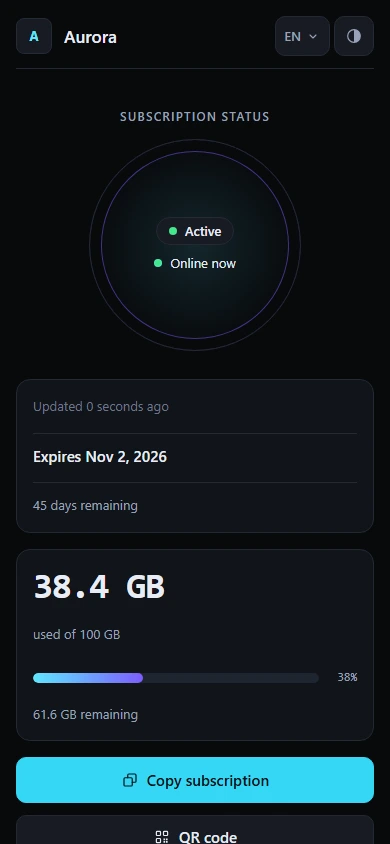
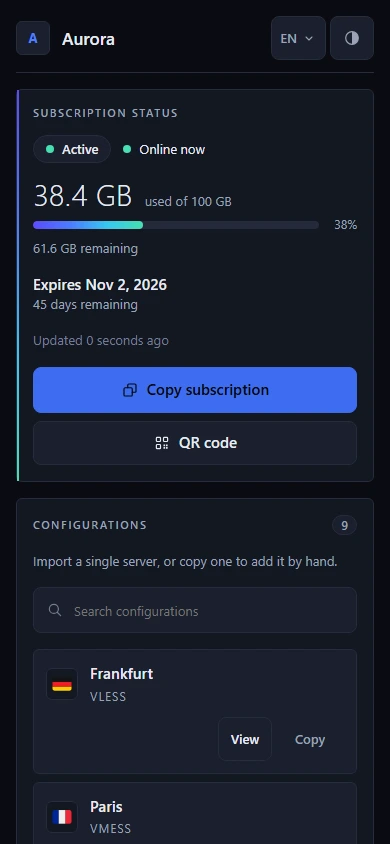
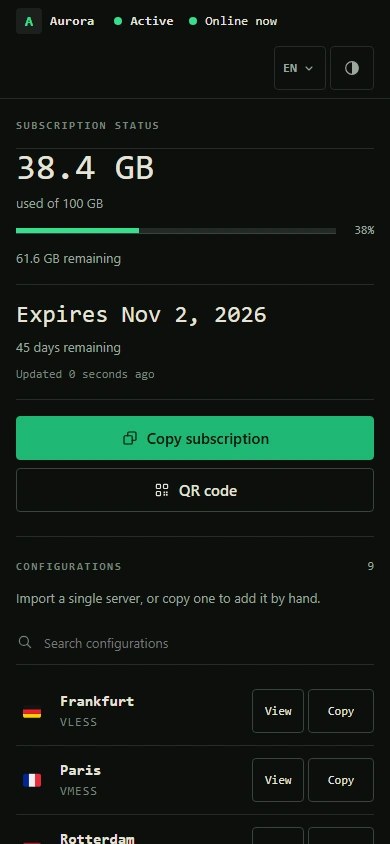
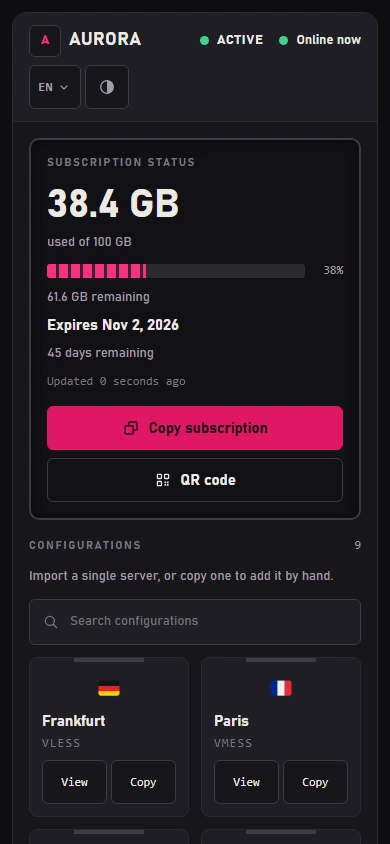
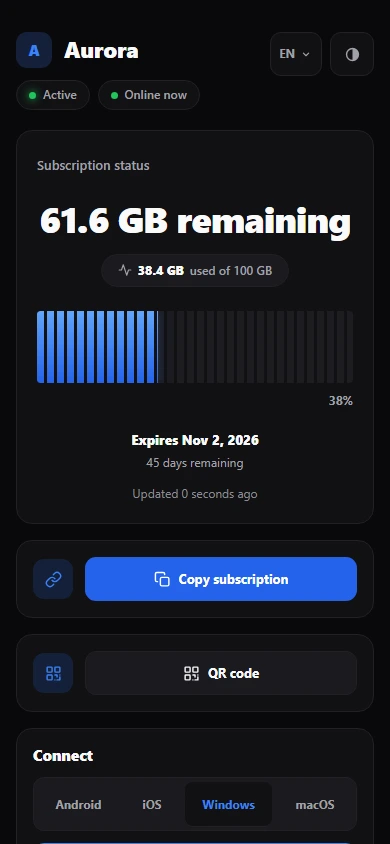
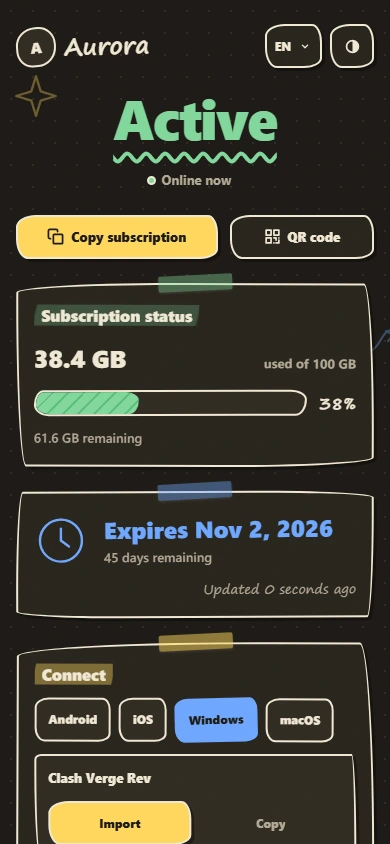
A polished, self-contained subscription page for 3X-UI, PasarGuard and Rebecca panels — seventeen designs, each a single HTML file, fully white-label, with no third-party requests from the page your subscribers open.
---
## What it is
3X-UI, PasarGuard and Rebecca can each serve a custom page to subscribers instead of their built-in one. Row-Template is that page: a subscriber opens their subscription link and sees their plan, their usage, their expiry date, and one-tap ways to add the subscription to the app they use.
It ships as one self-contained HTML file per design, with every style, script, font, and the QR code generator inlined, and a version of each design in every panel's own template language. A single command detects your panel, installs the page next to it, points the panel at it, and gives you a `row-template` manager for branding, updates, and rollback.
## Why Row-Template?
- **Private by design.** The page your subscribers open makes no third-party requests. QR codes are generated on the page, and your branding is injected as text — never executed, never sent anywhere.
- **Genuinely white-label.** Your service name, your support link, your logo. Nothing on the served page identifies Row-Template.
- **Seventeen designs, one file each.** Pick the look that fits your service. Every design shares the same features, languages, and safety checks — on every supported panel.
- **Made for your subscribers.** Live usage and expiry, one-tap import into popular apps, and a searchable list of individual configurations for adding a single server by hand.
- **Safe to operate.** Checksum-verified releases, transactional activation that restores the panel exactly if any step fails, and one-command rollback. It never patches your panel: on 3X-UI it changes one setting (`subThemeDir`), on PasarGuard it adds one marked block to `.env`, and on Rebecca it sets two fields of its subscription settings.
## Designs
Row-Template 1.4.0 ships seventeen designs. Row is the default.
Row
Editorial
Canvas
Prism
Terminal
Pulse
Brutal
Arcade
Sketch
Signature
Saffron
Pulse Nova
Prism Nova
Terminal Nova
Arcade Nova
Meter
Notebook
Previews are rendered from the project's own placeholder data. Desktop and mobile previews of every design are in the template gallery.
Choose a design during a fresh interactive install, set `RT_TEMPLATE` for a scripted one, or change it later from the manager (**Reconfigure branding → Template**). Updates keep your choice. The `RT_TEMPLATE` values are `row`, `editorial`, `canvas`, `prism`, `terminal`, `pulse`, `brutal`, `arcade`, `sketch`, `signature`, `saffron`, `pulsenova`, `prismnova`, `terminalnova`, `arcadenova`, `meter`, and `notebook`.
## Features
**For your subscribers**
- **Live status.** Plan state, traffic used and remaining, and expiry, refreshed from your panel while the page is visible — on 3X-UI, PasarGuard and Rebecca alike.
- **One-tap import** into popular apps, grouped by platform: v2rayNG, Happ and sing-box on Android; Streisand, V2Box and Shadowrocket on iOS; Clash Verge Rev, Mihomo Party and v2rayN on Windows; Clash Verge Rev, Streisand and V2Box on macOS. On PasarGuard, the applications you list in the panel (Settings → Subscription → Applications) take their place, with your descriptions and download links.
- **Copy and QR.** Copy the subscription link or scan it as a QR code generated on the page.
- **Configuration Explorer.** Every server on its own row, with a country flag or monogram and a protocol label (VLESS, VMess, Trojan, Shadowsocks, Hysteria/Hysteria2, WireGuard, AmneziaWG, Telegram MTProto), plus per-configuration QR and copy, and search for long lists. Flags are drawn by an embedded Twemoji font, so every country's flag shows on every platform — Windows included.
- **Five languages** — English, Persian, Arabic, Russian, and Chinese — with right-to-left layout, and a System / Light / Dark theme choice.
**For you**
- **White-label branding.** Service name, support link, and logo, all optional, stored as data and injected as text. On PasarGuard and Rebecca, a fresh install offers the name and support link already set in the panel.
- **A manager for everything.** An interactive menu and direct commands for branding, updates, verification, rollback, and uninstall.
- **Stable-channel updates.** `row-template update` installs the latest stable release, verified, whenever you run it — which also makes it a quick repair.
**Privacy and safety**
- **No third-party requests** from the served page: no CDNs, no external QR or geolocation lookups, no telemetry. Live status comes from your own panel.
- **Mandatory SHA-256** verification of every release download, with no option to skip it.
- **Atomic activation.** A new page is generated and validated before it replaces the live one, so a failed step never leaves a broken page live.
- **Fail-closed panel detection.** A panel counts as installed only when independent signals agree; a half-installed panel, or a panel database that is not a valid SQLite database, is refused rather than guessed at.
## Supported panels
| Panel | Status | Notes |
| ----- | ------ | ----- |
| [3X-UI](https://github.com/MHSanaei/3x-ui) (MHSanaei) | ✅ Supported | Requires version **>= 3.6.0** |
| [PasarGuard](https://github.com/PasarGuard/panel) | ✅ Supported since 1.3.0 | PasarGuard **5.x** — the official Docker install or a source install (`pasarguard.service`) |
| [Rebecca](https://github.com/rebeccapanel/Rebecca) | ✅ Supported since 1.3.0 | Rebecca **1.x**, the Go edition (Rebecca's binary install). Automatic activation with SQLite and `sqlite3`; with MySQL/MariaDB, one setting to enter in the dashboard. **Not supported:** the Docker image, which is still Rebecca 0.0.x (the Python edition) — the installer refuses it and changes nothing |
The three panels use three different template engines — Go `html/template`, Jinja2 and pongo2 — so every design is built once per panel, and each version is tested by rendering it with that panel's real engine. The installer detects which panel is on the server; on a server with more than one, it asks (or reads `RT_PANEL`). **Supported** means all seven capabilities are present on that panel — detect, install, activate, verify, backup, restore and uninstall — and each one is exercised by the test suite. See [Compatibility](https://iitzseridev.github.io/Row-Template/compatibility/) for the details of each panel.
**Limitations in 1.4.0:**
- **Rebecca's Docker image is refused.** It is still 0.0.x, the Python edition; install Rebecca 1.x with its binary installer (`rebecca-binary.sh`).
- **One setting by hand** when automatic activation is not possible: 3X-UI without `sqlite3`, and Rebecca on MySQL/MariaDB or without `sqlite3`.
- **Panel settings still take precedence** on PasarGuard and Rebecca: an admin's own subscription template, and PasarGuard's **disable subscription template** setting. `row-template verify` reports both.
- **Clash templates** are not produced; only the subscription page is.
- **PasarGuard application icons are not shown.** The page loads nothing from another site, so an icon address set in the panel is not used.
- **Flags come from a code or an emoji, never from a name.** An ISO 3166-1 alpha-2 code in the node name (`TR | Istanbul`, `RU-01`, `GB-LON-1`, `DE`) draws that country's flag, as does a flag emoji. Country *names* and *city names* (`Turkey - Istanbul`, `Finland Helsinki`) are **not** inferred and keep the monogram.
- **One panel per server.** An installation serves the panel it was installed for; to serve a different one, run `row-template uninstall` first.
## Architecture
```mermaid
flowchart TB
subgraph build ["Build and release"]
direction LR
SRC["src/ runtime, styles, locales, 17 design layouts"] --> BUILD["tools/build.mjs"]
BUILD --> ART["One self-contained HTML file per design, per panel"]
ART --> REL["tools/make-release.sh tarball + SHA256SUMS"]
end
subgraph host ["Your panel server"]
direction LR
INST["install.sh / row-template verify checksum, detect panel, back up, activate, verify"] --> DIR["3X-UI: subThemeDir PasarGuard: .env block Rebecca: subscription settings"]
DIR --> XUI["The panel renders the page with the subscriber's data"]
end
build -- "GitHub Releases" --> host
host -- "serves the page" --> BROWSER["Subscriber's browser"]
BROWSER -. "live status: ?format=info (3X-UI), /info (PasarGuard, Rebecca)" .-> host
```
- **One file per design.** `tools/build.mjs` inlines the shared runtime, the translations, the fonts, and the QR generator into a design's layout, and refuses a layout that is missing any hook the runtime needs. `tools/verify.mjs` then rejects an artifact that loads anything remote or carries a forbidden construct.
- **The panel does the rendering.** The page is a template: the panel fills in the subscriber's data when it serves it. For PasarGuard (Jinja2) and Rebecca (pongo2) each design is wrapped in a small prelude that maps the panel's own data onto the page and escapes every value.
- **The installer never patches your panel.** On 3X-UI it points `subThemeDir` at its own directory; on PasarGuard it places the page in the templates directory and appends one marked block to `.env`; on Rebecca it places the page and sets the page and directory fields of its subscription settings. Each change is snapshotted first and restored exactly if anything fails.
| Path | What lives there |
| ---- | ---------------- |
| `src/` | The page's runtime, styles, and translations; each design in `src/templates//` |
| `template/index.html` | The built Row page, committed |
| `tools/` | Build, verification, release, and the Go fixture renderer |
| `installer/` | `install.sh`, the `row-template` command, its management library, and one adapter per panel in `installer/panels/` |
| `tests/` | The test suites |
| `docs/` | The documentation site; design records in [`docs/design/`](docs/design/README.md) |
## Installation
> **Recommended OS: Ubuntu 24.04 LTS (x86_64).** Other modern Linux distributions may work but have not had the same validation coverage.
**Requirements:** a server running 3X-UI **>= 3.6.0**, PasarGuard **5.x**, or Rebecca **1.x** (its binary install; the 0.0.x Docker image is not supported); root access to it; and `curl`, `tar`, and `sha256sum` (present on virtually all Linux systems). Automatic activation on 3X-UI and Rebecca also needs `sqlite3`.
Run as **root** on the server that hosts your panel:
```bash
bash <(curl -fsSL https://github.com/iitzSeriZdev/Row-Template/releases/latest/download/install.sh)
```
The installer:
1. Downloads the latest stable release from GitHub.
2. Verifies its SHA-256 checksum (mandatory — no bypass).
3. Detects your panel, extracts the release safely and installs to `/etc/3x-ui/sub_templates/row-template` (3X-UI) or `/etc/row-template` (PasarGuard, Rebecca).
4. On a fresh install, offers the design chooser (Enter keeps Row).
5. Prompts for your branding (service name, support link, logo — all optional).
6. Generates and validates the page, then activates it in the panel where possible.
To choose a design without the chooser, for example in a script:
```bash
RT_TEMPLATE=editorial bash <(curl -fsSL https://github.com/iitzSeriZdev/Row-Template/releases/latest/download/install.sh)
```
On a server that runs more than one supported panel, the installer asks which one to serve. A scripted (non-interactive) fresh install on such a server **must** name it with `RT_PANEL` (`3xui`, `pasarguard` or `rebecca`); without it, the installer stops before changing anything:
```bash
RT_PANEL=pasarguard bash <(curl -fsSL https://github.com/iitzSeriZdev/Row-Template/releases/latest/download/install.sh)
```
`RT_PANEL` must name a panel that is installed on that server. A re-run or an update keeps the panel Row-Template was installed for.
On PasarGuard and Rebecca, a fresh install also offers the service name and support link already set in the panel's own subscription settings. To take them in a script, set `RT_PANEL_BRANDING=1` (`RT_PANEL_BRANDING=0` never offers them, and `RT_SERVICE_NAME` and `RT_SUPPORT_URL` always win):
```bash
RT_PANEL_BRANDING=1 bash <(curl -fsSL https://github.com/iitzSeriZdev/Row-Template/releases/latest/download/install.sh)
```
If you prefer not to pipe from the network, download the four release assets (`install.sh`, `manifest.txt`, `SHA256SUMS`, and `row-template-.tar.gz`) from the [Releases page](https://github.com/iitzSeriZdev/Row-Template/releases/latest) into one folder, verify the checksum yourself as described in [PROVENANCE.md](PROVENANCE.md), and point the installer at that folder:
```bash
RT_RELEASE_DIR=/root/row-template-release bash /root/row-template-release/install.sh
```
### Activation
An interactive install shows what activation will change and asks first. On PasarGuard and Rebecca, activation runs as a transaction: the panel's state is snapshotted, changed, verified, and — if any step fails — restored exactly.
**3X-UI.** Row-Template installs to a directory that the panel serves as its subscription page:
```
/etc/3x-ui/sub_templates/row-template
```
- **Automatic:** when `sqlite3` is available, Row-Template sets it for you. It briefly stops the panel service, writes the setting, starts the service again, and checks the value.
- **Manual:** otherwise, open **Panel Settings → Subscription → Profile → Sub Theme Directory** and enter exactly:
```
/etc/3x-ui/sub_templates/row-template
```
**PasarGuard.** The page is placed at `/var/lib/pasarguard/templates/row-template/index.html` (or inside your own `CUSTOM_TEMPLATES_DIRECTORY`, if you set one), and a marked block is appended to `/opt/pasarguard/.env`:
```
# >>> row-template (managed by Row-Template; do not edit) nl=0 >>>
CUSTOM_TEMPLATES_DIRECTORY = "/var/lib/pasarguard/templates"
SUBSCRIPTION_PAGE_TEMPLATE = "row-template/index.html"
# <<< row-template <<<
```
PasarGuard reads `.env` at start-up, so a running panel is restarted once. None of your own lines are edited; uninstall removes the block and returns `.env` to its exact previous bytes. An admin with their own subscription template, or the **disable subscription template** setting, still takes precedence — `row-template verify` tells you when either applies.
**Rebecca.** The page is placed at `/var/lib/rebecca/templates/row-template/index.html` (or inside your own custom templates directory), and Rebecca's subscription settings are set to `row-template/index.html`. Rebecca reads them on every request, so no restart is needed.
- **Automatic** with the default SQLite database and `sqlite3` installed.
- **Manual** with MySQL/MariaDB (or without `sqlite3`): the page is still placed; in the Rebecca dashboard open **Settings → Subscription → Templates** and set **Subscription page template** to `row-template/index.html` and **Custom templates directory** to `/var/lib/rebecca/templates`.
Row-Template supports Rebecca **1.x**, the Go edition, which Rebecca publishes for its binary install (`rebecca-binary.sh`). Docker Hub's `rebeccapanel/rebecca` image is still the 0.0.x Python edition, which cannot render this page; the installer refuses it and changes nothing. Install Rebecca 1.x with Rebecca's own binary installer (`rebecca-binary.sh`) to use Row-Template.
## Usage
Run the manager with no arguments in a terminal to open the interactive menu:
```bash
row-template
```
Or use a command directly:
| Command | What it does |
| ------- | ------------ |
| `row-template config` | Change the service name, support link, or logo, then regenerate the page |
| `row-template update` | Download, verify, and activate the latest stable release (checksum enforced) |
| `row-template rollback` | Restore a previous version (`--auto` or `--to `) |
| `row-template verify` | Check the install, the panel wiring, and the live page (as root, it also puts back missing or misplaced designs) |
| `row-template version` | Show the installed version and the panel it serves (on 3X-UI, also the minimum-supported and detected versions) |
| `row-template uninstall` | Remove Row-Template and return the panel to the page it had before |
| `row-template help` | Show usage |
Commands that change the system (`config`, `update`, `rollback`, `uninstall`) must run as root.
- **Branding** is stored as data, never executed, and injected into the page as text. Leave a field blank for an unbranded page. The support link accepts only schemes a browser should open, such as `https://…`, `tg://…`, or `mailto:…`.
- **Updates** come from the public stable channel. `row-template update` always applies the latest stable release, even the version you already run; the manager's **Update** compares versions first and asks before changing anything. If the release source is unreachable, nothing is changed and your installation is never treated as damaged.
- **Updating from 1.1.0, 1.2.0 or 1.3.x** takes one `row-template update`. 1.1.0's own updater copies only part of the new release, so the next `row-template`, `row-template config`, or `row-template verify` run as root first downloads the rest of that same release — every design, checksum-verified. Your design, branding, and panel wiring are kept. Earlier releases did not install on PasarGuard or Rebecca; there, run the installer.
- **Rollback** restores a previous version from a validated backup. The current version is snapshotted first, so a failed rollback can be recovered, and your branding is preserved. Backups record the panel they were made on and are never restored onto another; a backup from an older release that does not name its design restores as Row. A rollback restores the page and the version it records, not the `row-template` manager itself: after rolling back to a 1.1.0 backup, `row-template version` reports 1.1.0 while the 1.4.0 manager stays in place, and the next `row-template update` returns to 1.4.0. Only the two newest backups are kept — each update, design switch, and rollback makes one.
- **Uninstall** removes Row-Template's files and returns the panel to the page it had before: on 3X-UI it clears `subThemeDir` only if it points at Row-Template; on PasarGuard it removes its `.env` block and its page; on Rebecca it restores the two subscription settings it changed (leaving them alone if you have since chosen another page). Your users, inbounds, clients, nodes, and certificates are not touched.
The [documentation](https://iitzseridev.github.io/Row-Template/) covers configuration, branding, and troubleshooting in more depth.
## Development
The pages are built from readable sources in `src/`. You need Node.js 22 or newer; to run the tests, also Go 1.22 or newer and Python 3 with Jinja2 (`pip install jinja2`), which render the PasarGuard and Rebecca pages with those panels' real engines.
```bash
npm run build # regenerate template/index.html from src/
npm run verify # check the built page against the safety gates
npm test # render the fixture pages, then run every test suite
npm run fixtures:all # render every design's fixture pages on their own
npm run lint:sh # ShellCheck every shell script
npm run preview # preview the fixture pages at http://127.0.0.1:8787
```
The build is deterministic — the same sources always produce a byte-identical `template/index.html`. The documentation site is a separate workspace in `docs/`; see [docs/README.md](docs/README.md).
## Testing
- **`npm test`** renders every design's fixture pages with the Go renderer, then runs the suites: the page's scripts, the build, every design's artifact, the PasarGuard and Rebecca pages rendered by real Jinja2 and pongo2 (including hostile and malformed data), the release payload, and the installer — which runs the shipped shell library and every panel adapter in real `bash` against throwaway hosts laid out like each panel's official install.
- **`npm run verify`** checks a built page against its safety gates, including: a whole document, every build marker substituted, everything inlined, no remote references, no forbidden constructs, intact translations, and no invisible characters in the sources.
- **`npm run lint:sh`** fails on any ShellCheck error; `npm run lint:sh -- -S warning` shows the full report.
- **The Docs workflow** builds the documentation site on every pull request that changes it.
## Roadmap
Direction, not promises:
- **Custom templates** — a proposal for adding your own design: [`docs/design/CUSTOM-TEMPLATES-PROPOSAL.md`](docs/design/CUSTOM-TEMPLATES-PROPOSAL.md).
## Contributing
Bug reports, translations, and documentation fixes are very welcome. Read [CONTRIBUTING.md](CONTRIBUTING.md) before opening a pull request, and follow the [Code of Conduct](CODE_OF_CONDUCT.md).
**Bug reports:** open an issue at . Include your Row-Template version (`row-template version`), your panel and its version, operating system and version, CPU architecture, the output of `row-template verify`, and clear steps to reproduce.
> **Do not include secrets.** Never paste subscription URLs, `subId` values, client UUIDs, panel usernames or passwords, cookies, tokens, the panel `webBasePath`, the contents of `.env`, database URLs, TLS keys, or real server addresses. Redact logs before sharing them.
## Security
Found a vulnerability? Please report it privately — see [SECURITY.md](SECURITY.md). Do not open a public issue for security problems. [PROVENANCE.md](PROVENANCE.md) explains how releases are built and how to verify them.
## Support the project
Row-Template is free and open source. If it saves you time, you can support its development:
- **USDT (BEP20 / BNB Smart Chain):**
```
0x2606551375987cec71F5fC033968B638A7a4bae4
```
- **TRON:**
```
TYD5RFfiYrcETzWNSkAhfwgmRu1wQBbs6W
```
- **NOWPayments:**
Thank you.
## License
Released under the [MIT License](LICENSE). The bundled QR code generator (`src/vendor/uqr`) is included under its own MIT license, and the embedded Vazirmatn font subset under the SIL Open Font License (`src/fonts/OFL.txt`). The embedded flag font is Twemoji artwork under CC-BY 4.0 (`src/fonts/TWEMOJI-LICENSE.txt`).
## Developer
Built and maintained by **iitzSeriZdev** —