
[![License][license-shield]][license-url] [![Release][release-shield]][release-url] [![Build][build-shield]][build-url] [![Container][container-shield]][container-url] [![Last commit][commit-shield]][commit-url]
Pixies logo

Pixies

Self-hosted internet speed test analytics.

Pixies runs speed tests on your own schedule, keeps the results for as long as you configure, and turns them into charts, exports and metrics you can query.

## Table of Contents - [Features](#features) - [Screenshots](#screenshots) - [Quick Start](#quick-start) - [Configuration](#configuration) - [Architecture](#architecture) - [Development](#development) - [Deployment](#deployment) - [Contributing](#contributing) - [License](#license) ## Features **Measurement** - Runs Ookla, LibreSpeed or Cloudflare speed tests and records ping, jitter, download and upload. - Manages multiple speed test servers (nodes) and lets you switch between them from the dashboard. - Downloads and manages the provider CLIs and server lists itself. **Analytics** - Dashboard with a test list and statistics over time for speed, ping and jitter. - Configurable retention period; expired results are pruned automatically (default: 365 days). - CSV and JSON export for any date range. **Automation** - Cron-based scheduling with an optional start offset, plus manual test runs from the UI. - Optional test run on server startup. **Integrations** - Prometheus metrics (`pixies_*`) for Grafana dashboards and alerting. - Health check pings for test started, test finished, test failed and minute-passed events. - Notifications through Discord, Telegram, Gotify, ntfy, Pushover, InfluxDB and generic webhooks. **Deployment** - One Bun server that serves the dashboard, the REST API and the Prometheus endpoint. - SQLite by default, MySQL supported through environment variables. - Docker image, prebuilt binaries for Linux, macOS and Windows, an MSI installer and an install script. - Installable dashboard (PWA) available in 13 languages. ## Screenshots | Dashboard | Test history | | --- | --- | | ![Pixies dashboard](docs/assets/images/en/interface.png)
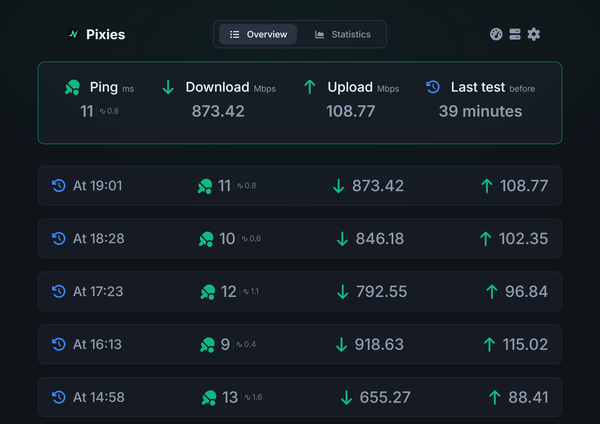
*Dashboard* | ![Pixies test history](docs/assets/images/en/tests.png)
*Test history* | | ![Pixies settings](docs/assets/images/en/settings.png)
*Settings* | ![Pixies statistics switcher](docs/assets/images/en/view.png)
*Statistics switcher* | ## Quick Start ### Prerequisites - [Bun](https://bun.sh) 1.x (runtime and package manager for both the server and the dashboard build) - Docker, only if you prefer running the container image ### From source ```sh git clone https://github.com/ikhsanddy/pixies.git cd pixies bun install # Start the API and the dashboard dev server together bun run dev ``` `bun run dev` generates the migration and integration indexes, starts the server on port `5216` (`5217` for HTTPS once certificates exist in `data/certs`) and starts the Vite dev server, which serves the dashboard on its default port `5173` and proxies `/api` to `5216`. Production build from source: ```sh bun run build:binary ./Pixies ``` The binary embeds the dashboard, so it can be copied to any machine with a Bun runtime. ### Docker ```yaml services: pixies: image: ghcr.io/ikhsanddy/pixies:latest container_name: Pixies ports: - "5216:5216" volumes: - pixies:/pixies/data restart: unless-stopped volumes: pixies: ``` Then open `http://localhost:5216`. The data volume holds the SQLite database, certificates, logs and the provider server lists, so keep it when upgrading. ## Configuration All configuration is read from environment variables at startup. | Variable | Default | Description | | --- | --- | --- | | `SERVER_PORT` | `5216` | HTTP port for the dashboard and API | | `HTTPS_PORT` | `5217` | HTTPS port, only started when `data/certs/cert.pem` and `key.pem` exist | | `DB_TYPE` | `sqlite` | Database dialect: `sqlite` or `mysql` | | `DB_NAME` | – | MySQL database name (required for MySQL) | | `DB_USER` | – | MySQL user (required for MySQL) | | `DB_PASS` | – | MySQL password (required for MySQL) | | `DB_HOST` | `localhost` | MySQL host | | `RUN_TEST_ON_STARTUP` | `false` | Run one speed test when the server starts | | `PREVIEW_MODE` | `false` | Serve the instance as a demo (uses `data/storage_preview.db`, disables admin login) | | `PREVIEW_MESSAGE` | – | Message shown to visitors while preview mode is active | With the default SQLite setup the database is `data/storage.db` next to the working directory. ## Architecture ``` pixies/ ├── client/ React 19 + Vite dashboard (PWA; translations in public/assets/locales) ├── server/ Bun + Express 5 API, Sequelize models, migrations and integrations ├── web/ Marketing landing page (React + Vite) ├── docs/ VitePress documentation (English) ├── scripts/ Installer, uninstaller and code generators ├── Dockerfile Multi-stage image: dashboard build, server build, runtime └── package.json Scripts and server dependencies ``` The server exposes `/api/*` for the dashboard and `/api/prometheus` for scraping. Models, migrations and integration modules are indexed by generated files (`server/migrations/index.js`, `server/integrations/index.js`), which is why the generators run before the server starts. ## Development | Script | Purpose | | --- | --- | | `bun run dev` | Generate indexes, start the API and the dashboard dev server | | `bun run server` | Start the API in watch mode | | `bun run client` | Start the dashboard dev server only | | `bun run build` | Generate indexes and build the dashboard into `client/build` | | `bun run build:binary` | Build and embed the dashboard, then compile the `Pixies` binary | | `bun run generate-migrations` | Regenerate `server/migrations/index.js` | | `bun run generate-integrations` | Regenerate `server/integrations/index.js` | | `bun run generate-client-embed` | Embed the built dashboard into the server bundle | Additional apps: ```sh # Documentation site cd docs && bun install && bun run dev # Landing page cd web && bun install && bun run dev ``` The repository has no automated test suite; verify changes with the builds above and a manual run of the affected feature. Launch video and brand assets: [brand/](brand/) — see `brand/launch.mp4` and `brand/brand.md`. ## Deployment - **Docker** – build the image locally with `docker build -t pixies .`, or use the published `ghcr.io/ikhsanddy/pixies` image from the compose file above. - **Prebuilt binaries** – release assets include `Pixies` for Linux and macOS (x64 and arm64) and `Pixies.exe` for Windows, plus `Pixies.zip` for running from source with Bun. - **Installer script** – `scripts/install.sh` installs to `/opt/pixies`, registers the `pixies.service` systemd unit and starts it. `scripts/uninstall.sh` removes the service and the container setup, and keeps the data with `--keep-data`. - **MSI** – Windows installer built from the workflow in `.github/workflows/build-msi.yml`. ## Contributing - Open an issue for bugs and feature requests: - Read [`.github/PULL_REQUEST_TEMPLATE.md`](.github/PULL_REQUEST_TEMPLATE.md) before submitting. - All locale files in `client/public/assets/locales/` are maintained in this repository and can be updated with a pull request. - Keep pull requests focused and describe how the change was verified. ## License Released under the MIT license. See [`LICENSE`](LICENSE) for the full text. [license-shield]: https://img.shields.io/github/license/ikhsanddy/pixies [license-url]: https://github.com/ikhsanddy/pixies/blob/master/LICENSE [release-shield]: https://img.shields.io/github/v/release/ikhsanddy/pixies [release-url]: https://github.com/ikhsanddy/pixies/releases/latest [build-shield]: https://img.shields.io/github/actions/workflow/status/ikhsanddy/pixies/ci.yml?branch=master [build-url]: https://github.com/ikhsanddy/pixies/actions/workflows/ci.yml [container-shield]: https://img.shields.io/badge/ghcr.io-ikhsanddy%2Fpixies-2496ED&logo=docker&logoColor=white [container-url]: https://github.com/ikhsanddy/pixies/pkgs/container/pixies [commit-shield]: https://img.shields.io/github/last-commit/ikhsanddy/pixies [commit-url]: https://github.com/ikhsanddy/pixies/commits/master