
A Editor for Local Storage and Session Storage.
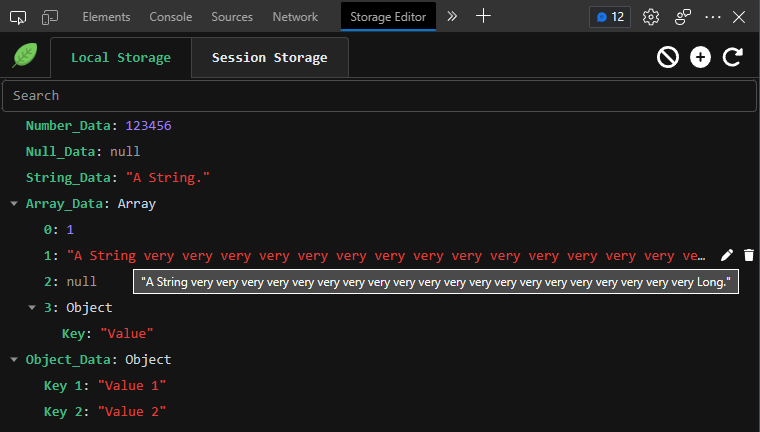
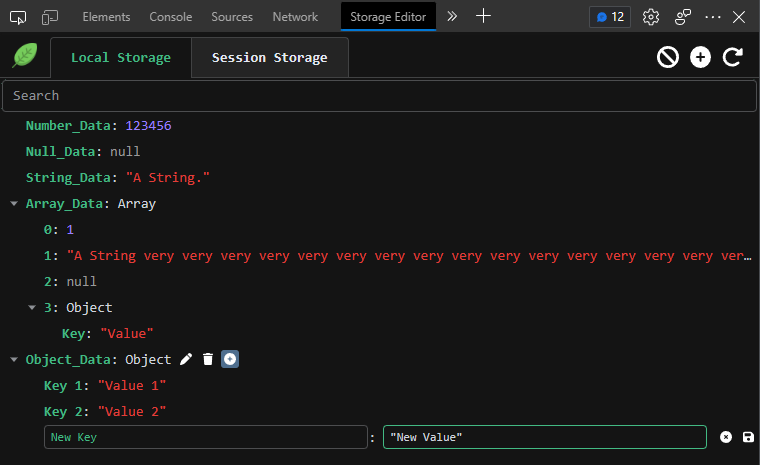
## ✨ Feature 1. 🙈 Preview Local Storage and Session Storage Data as a tree. 2. ✏️ Edit, Add, Remove or Clear Storage Data. 3. 🔌 Add a New Node or Data to Object or Array. 4. 🔍 Search Value or Key in Storage Data Tree. ## ⚙️ Debug 1. Clone git repository in local. 2. Execute `npm install` to install dependencies. 3. Execute `npm run dev`. 4. Open browser and enable "Developer mode". 5. Click load an unpacked directory, and then choose `//dist`.
6. Restart Browser.
## 👀 Preview
1. Data Preview:
2. Edit Preview:
## 🔔 Others
* Chrome Web Store: https://chrome.google.com/webstore/detail/lpmmcjhefcghagdhnpbodfdamfmlicfn
* Icon made by [Freepik](https://www.flaticon.com/authors/freepik) from www.flaticon.com