# dsh-mcp-manager-ui
[中文](README.md) | English






An **MCP management panel** for DeepSeek Harness Web: click the floating button (bottom-right) or the sidebar **MCP** entry to inspect connection status, add servers, and edit configuration. The panel floats above the session — **it never interrupts an ongoing conversation**.
> In-depth design notes (shared-connection model, connection-state semantics, known limits) are currently Chinese-only: [docs/design.md](docs/design.md).
## Screenshots
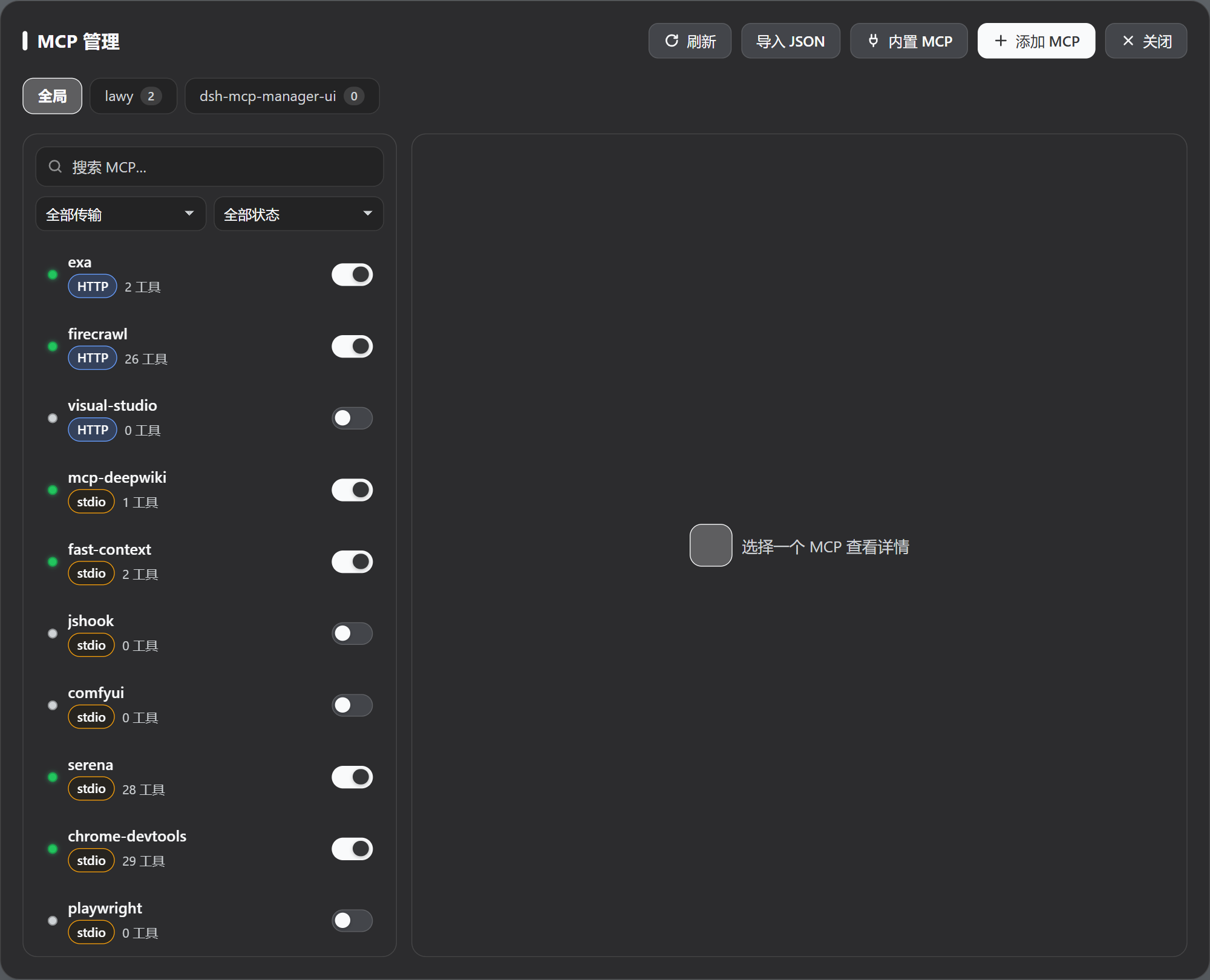
### Global panel
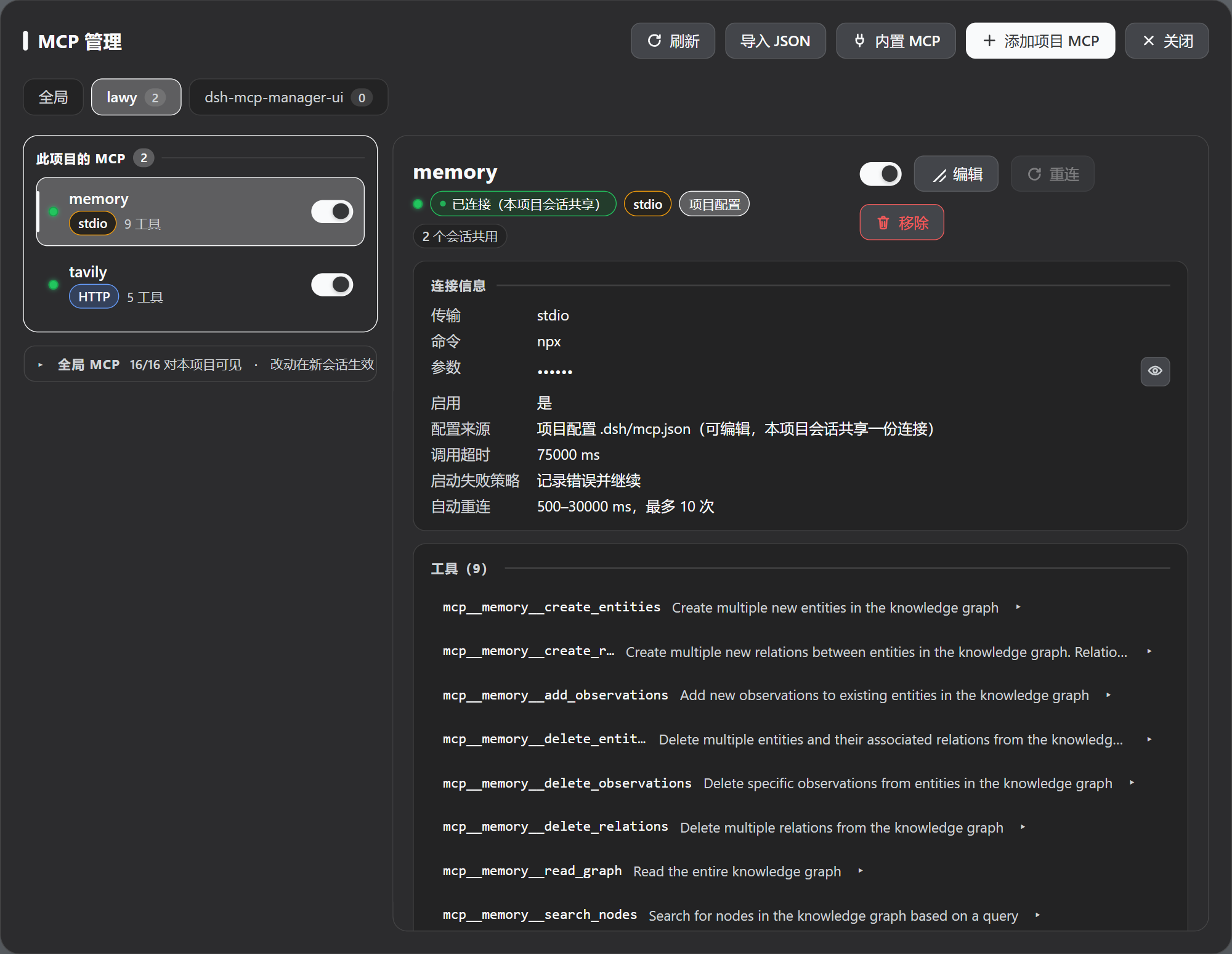
### Project scope (`.dsh/mcp.json`)
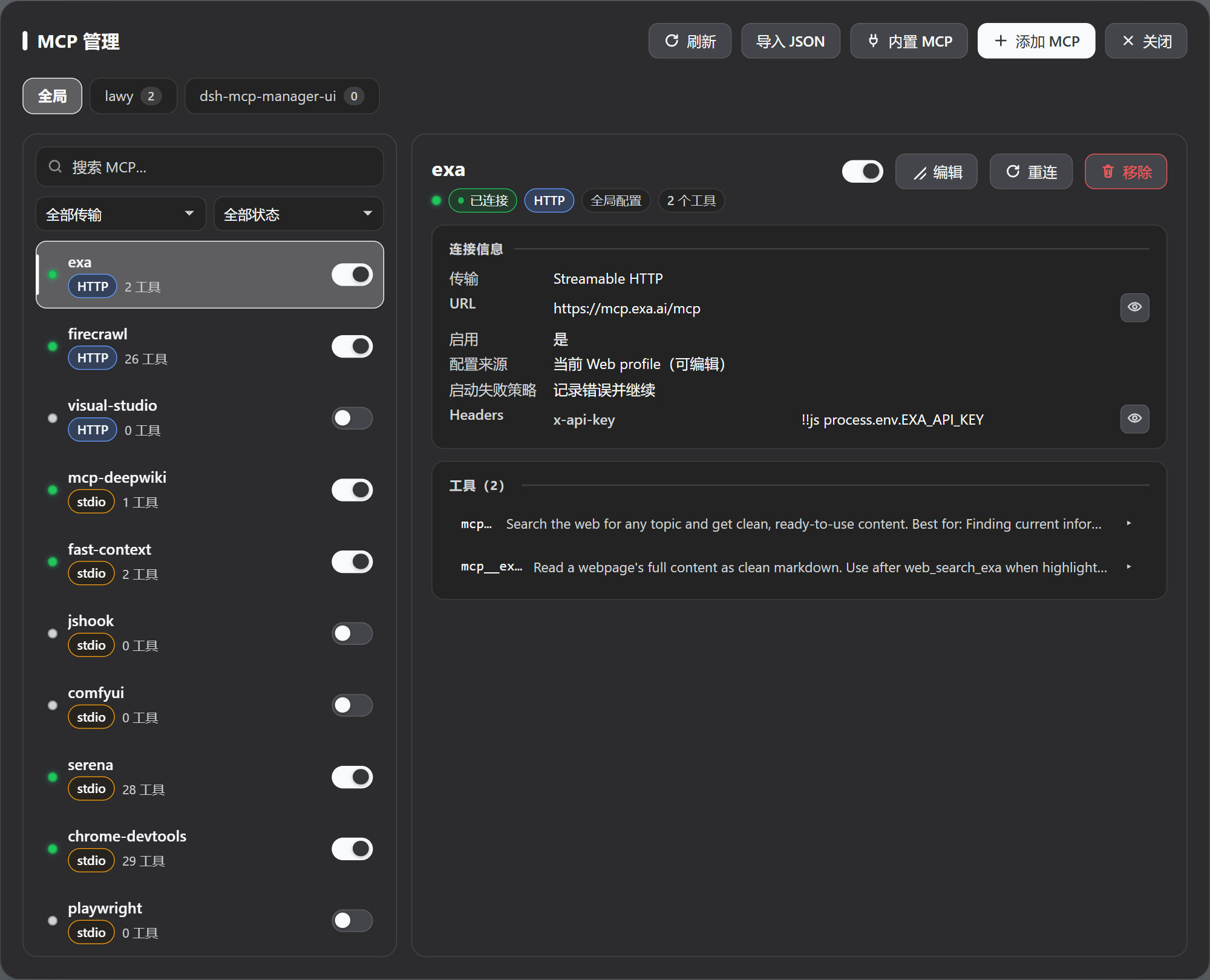
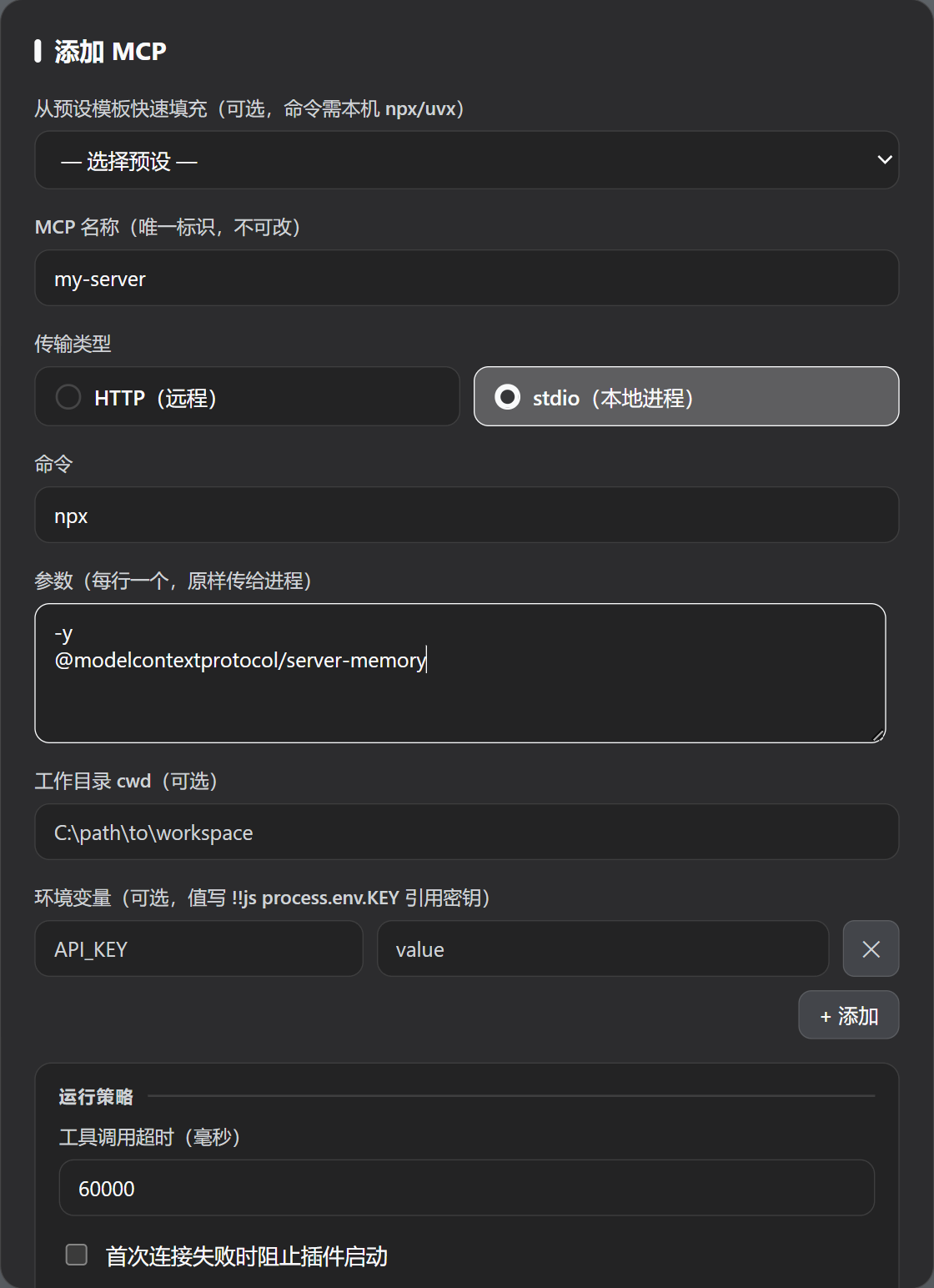
### Connection details and adding a server
## Features
- Inspect every MCP server's status, transport, connection parameters, and tool list; expand a tool to see its full input JSON Schema (required/optional, types, enums, defaults, raw JSON)
- Filter by transport (HTTP/stdio) and status, search by name/command/URL
- Enable, disable, reconnect, add, edit, remove; reveal masked credentials temporarily with the eye button and copy with one click
- **Global + project scopes**: global servers live in the Web profile and are available to every project; project servers live in that project's `.dsh/mcp.json` and are visible only to its sessions. A project can also hide any global MCP
- **Two entry points, one panel**: the draggable floating button (position remembered) and the official sidebar entry share the same state; the "Entry" control in the panel header can keep just one of them (never neither)
- Install Exa, Tavily, Firecrawl, Chrome DevTools, or Playwright from the built-in catalog in one step (already-configured entries are detected and skipped, never overwritten)
- Import MCP configuration from other clients installed on this machine: Claude Code, Codex (`config.toml`), OpenCode (including `.jsonc`), pi, Claude Desktop, Cursor, Windsurf, VS Code, Gemini CLI, Roo Code, and the cross-tool shared config are detected and listed, and one click imports from any of them; you can also paste `mcpServers` JSON from Claude, Cursor, Cline, or Roo, or `servers` JSON from VS Code. Everything is previewed before writing, with "merge" and "replace" modes
- Follows the DSH dark/light theme and adapts to narrow/mobile widths
- Non-intrusive update notice: a dismissible banner when a newer release exists (at most one check per day, never auto-updates, disable with `DSH_MCP_MANAGER_DISABLE_UPDATE_CHECK`)
- **What changed, said once**: after the version changes, the first time you open the panel a small card lists what's new and where to find it (e.g. that the "Entry" control sits in the panel header); confirming it never shows it again, and it uses no network and sends nothing
## Install
```sh
# Recommended: install from npm — `dsh plugin update` then upgrades within ^1.x automatically
dsh plugin --profile web add dsh-mcp-manager-ui@^1.4.0
# Or pin a GitHub release tag (no automatic upgrades; re-add with a new tag to upgrade)
dsh plugin --profile web add github:Imzl-zl/dsh-mcp-manager-ui#v1.4.0
```
Then **restart `dsh web`**. To upgrade:
```sh
dsh plugin --profile web update dsh-mcp-manager-ui
```
To uninstall (your configured MCP entries stay in place):
```sh
dsh plugin --profile web remove dsh-mcp-manager-ui
```
Details, local development installs, and troubleshooting: [docs/installation.md](docs/installation.md) (Chinese).
> Do not add `mcp-manager-ui` to the profile's `cordis.patch.yml`, an agent preset, or an extra `--patch` file by hand — the plugin command already does that, and duplicating it fails loudly on purpose.
## Usage
### Opening the panel
Two entry points, one panel:
- **Floating button (bottom-right)**: draggable, position remembered;
- **Sidebar "MCP"**: above "Settings" when expanded, icon-only in the 56px rail.
The panel floats above the session; closing it ("Close" or Esc) does not affect the conversation.
Both entries can be turned off independently: the panel header's "Entry" control offers `Floating button + sidebar` (default), `Floating button only`, or `Sidebar only`. They **cannot both be hidden** — the panel is only reachable through these two entries, so this is a three-way choice, not two independent switches. The choice is stored in the browser (localStorage), so a different browser or a cleared cache starts from the default again.
### Global vs project
Tabs switch between "Global" and each project:
| Tab | Stored in | Visible to | When changes take effect |
|---|---|---|---|
| Global | The Web profile's `cordis.patch.yml` | every project | DSH hot-reloads, usually immediately |
| A project | That project's `.dsh/mcp.json` | only that project's sessions | the next newly created connection (see below) |
`serverName` is scoped: different projects, and global vs project, **may reuse the same name** with independent connections; duplicates inside one scope are rejected.
### Common actions
From a row or the detail pane:
- **Toggle**: enable / disable (global writes the profile patch's `disabled`, project writes `.dsh/mcp.json`);
- **Reconnect**: global only (project connections are held by sessions and `mcp-client` reconnects them on its own);
- **Edit / Remove**: removal only affects the current scope;
- **Hide** (a global MCP, from a project tab): writes `exclude` so that project's new sessions no longer see it — the global instance keeps running, so other projects are unaffected.
### Adding a server
Three ways, all from the panel toolbar:
1. **Add MCP**: fill in `command`/`args`/`env`/`cwd` (stdio) or `url`/`headers` (HTTP), optionally set the call timeout, startup-failure policy, and reconnect policy; presets are available for common servers.
2. **Import JSON**: paste another client's configuration, preview, then write. "Merge (update by name)" and "replace" modes; field mapping and limits in [docs/json-import.md](docs/json-import.md) (Chinese).
3. **Built-in MCP**: tick the servers you want (Exa, Tavily, Firecrawl, Chrome DevTools, Playwright). The first three work without a key and need no local dependencies; the last two are local tools requiring Node.js and a browser.
### Tools and credentials
The detail pane lists the tools a server currently registers; expand one for its full input schema. Credential fields are masked by default — the eye button asks the Host for the **effective runtime value** (environment references already resolved) and shows it temporarily, with one-click copy. If you do not actually edit a field, saving keeps the original reference instead of writing secrets back into the configuration file.
## When configuration changes take effect (important)
| Scope | When a change takes effect |
|---|---|
| Global | DSH hot-reloads it, usually immediately (including running sessions) |
| Project | **The next newly created connection**; running sessions are unaffected |
Project MCPs are assembled into a session from `.dsh/mcp.json` as it was at creation/resume time, and configuration is not re-read mid-session — **editing inside a session not taking effect is expected** (Claude Code, Codex, and friends also require a new session for project-level MCPs). "Hide" behaves the same way: it applies to later sessions only. No "reconnect" click and no Host restart is needed.
> **Boundary of the shared connection**: a project's MCPs are shared by all of that project's sessions, and the connection is established from the configuration in effect when the **first** such session opened. So "open a new session" does not always mean "pick up new configuration": if the project has **no sessions running**, the new session creates a fresh connection and uses the new configuration immediately; if the project **still has sessions running**, the new session reuses the existing connection and keeps the old configuration, and the panel marks that project's row `配置待生效` (pending configuration). Once all sessions end, the next session connects with the new configuration. The panel only reports this; it never swaps the connection out from under a live conversation.
## FAQ
**The panel says a server is "disabled", but the model reports `unknown tool "mcp__xxx__..."`.**
That server is disabled, so it registers no tools. Enable it in the panel (global writes the profile patch and hot-reloads; project writes `.dsh/mcp.json` and applies to new sessions).
**A row shows "mount failed", "connection failed", or "scope isolation failed" — what is the difference?**
Three different things, and the detail pane gives the specific reason: **mount failed** = the plugin could not mount it during session setup (a `${VAR}` resolved to empty, startup failed under `failOnStartupError`, tool registration was rejected); **connection failed** = `mcp-client` could not connect or exhausted its reconnect budget (the reason comes from its logs); **scope isolation failed** = the connection is fine but the tools are not in the shared scope layer (two copies of `@deepseek-ai/dsh-scope` ended up loaded in the Host). See [docs/design.md](docs/design.md) (Chinese) for the diagnosis.
**What do "waiting for a session", "pending configuration", and "N sessions sharing" on a project row mean?**
Respectively: no session of that project holds the shared connection yet / the configuration changed but the old connection is still being reused (see above) / how many sessions currently share it.
**How do I upgrade? Why did the panel not notify me?**
If you installed from npm, `dsh plugin --profile web update dsh-mcp-manager-ui` upgrades within `^1.x`; you do not need the notice. The banner only queries GitHub Releases, at most once a day, is dismissible, and never auto-updates. Tag-pinned installs never cross versions — re-add with the new tag.
**Will editing touch my other configuration?**
No. Global edits only rewrite the entries declared by `@deepseek-ai/dsh-mcp-client` that this plugin manages, preserving other plugin rows, comments, and `!!js` expressions; "replace" imports only replace that part and never delete MCPs owned by another bundle or agent preset.
**Does uninstalling remove my configured MCPs?**
No. Uninstalling the plugin leaves existing `@deepseek-ai/dsh-mcp-client` rows in the profile untouched, and a project's `.dsh/mcp.json` stays where it is (it is an ordinary JSON file).
## Compatibility
| Item | Verified |
|---|---|
| DeepSeek Harness | `0.1.5-rc.1` and above (verified through `0.1.7-rc.2`) |
| Node.js | whatever runtime DSH ships/supports |
| Platform | Windows; Linux/macOS share the same DSH Web contracts |
Only 0.1.5 and above are supported (earlier versions lack "`serverName` uniqueness per registration scope" and "`setup` receives the agent"); there are no fallback branches for older versions. Rationale and dependency details: [docs/design.md](docs/design.md) (Chinese).
## Development
```sh
npm test # full suite (includes real-host integration tests)
dsh --profile web --dump-config # inspect the effective profile configuration
dsh web # run the Web UI for real verification
```
Besides fixture-based tests (which check internal consistency), `npm test` includes **real-host integration tests** that run genuine `cordis` + `dsh-tools` + `dsh-scope` + `dsh-mcp-client` plus a real stdio MCP child process, covering "two sessions of one project share a single connection, tools are projected into each session, nothing leaks into the global view, and the child process exits with the last session". CI (push to `main` / pull requests, and tag pushes for releases) runs the same gate; see [docs/installation.md](docs/installation.md#发布流程维护者) (Chinese) for the release flow.
## Documentation
- [Installation and upgrades](docs/installation.md) (Chinese)
- [JSON import](docs/json-import.md) (Chinese)
- [Design and limits](docs/design.md) (Chinese)
- [Official DeepSeek Harness plugin publishing guide](https://github.com/deepseek-ai/deepseek-harness/blob/master/docs/user/develop/basic/publish.md)
## Links
- [LINUX DO](https://linux.do/)
- [DeepSeek Harness](https://github.com/deepseek-ai/deepseek-harness)
- [GitHub `dsh-plugin` topic](https://github.com/topics/dsh-plugin)
## License
MIT