
Type blaze wherever you'd type cargo.
Blazingly fast Rust, literally.
Install · Try it · How fast · How it works · Docs
## Install ```sh curl -fsSL https://ix.dev/blaze | sh ``` For macOS on Apple silicon and Linux, with or without Rust installed: blaze builds with its own Rust, whatever rustup or the project pins, and downloads it once (about 125 to 160 MB; none when rustup already has that same nightly). Rather use crates.io or Nix? [Other ways to install](docs/install.md). That installs **stable**: a release that passed the heavy tests (real projects on macOS and Linux: cargo, zed, servo, bun, NVIDIA Dynamo, fff, fframes and flox each build, build again after an edit faster than with cargo, and pass their tests). **Canary** is the newest release, out as soon as it is built and promoted to stable unchanged once it passes them ([release.md](docs/release.md)): ```sh curl -fsSL https://ix.dev/blaze | sh -s -- --channel canary ``` ## Try it In any Rust project: ```text blaze run # like cargo run blaze test # like cargo test blaze build # like cargo build ``` The first build loads your project and compiles every crate of it, with no cargo build and no rustc. Then change a function and build again: it's back in milliseconds, and the `Finished` line says `[blaze]`. The other cargo commands (`fmt`, `clippy`, `doc`, `tree` and the rest) are blaze's own too, and run no cargo. ## How fast - Edits rebuild **10× faster** on macOS arm64, **24× faster** on Linux aarch64 and **11× faster** on Linux x86-64 than with `cargo build`, on average over real projects. - **About 20 ms** from saving a file to a running program using the new code, with [live edits](docs/usage.md#change-a-running-program). | Edit one function, then build (Linux x86-64) | `cargo build` | `blaze build` | |---|---:|---:| | ripgrep | 508 ms | **56 ms** (9.1× faster) | | nushell | 1.25 s | **236 ms** (5.3× faster) | | helix | 2.15 s | **116 ms** (19× faster) | | bun (1.25M lines of Rust) | 9.11 s | **451 ms** (20× faster) | Every project, platform, chart, and the memory and disk it takes: [benchmarks](docs/benchmarks.md). ## How it works blaze runs beside cargo and keeps your project compiled in memory. After an edit it compiles only the functions you changed and writes them into the program cargo already built, instead of linking it again from scratch. A program that opts in can take the new code while it keeps running. [More](docs/architecture.md). ## Good to know - **macOS on Apple silicon and Linux.** Windows x86-64 (MSVC) builds and takes live edits through blaze too, run by hand and not in CI, with no installer and no sandbox yet ([platforms.md](docs/platforms.md#windows-x86-64-msvc)). - **blaze is its own toolchain.** It builds every project with its own Rust, `blaze-2026-10-27` (today the nightly of that date), whatever the project pins; stable code and `#![feature(...)]` code build. Your toolchain and CI stay the final word ([why](docs/toolchain.md)). - **It trades memory for speed:** a few GB for a small project. - **It's young.** Keep `cargo check` or your CI as the final word, and [tell us](https://github.com/indexable-inc/blaze/issues) when something differs from cargo. All the details: [what works and what doesn't yet](docs/usage.md#what-works-and-what-doesnt-yet). ## Learn more - [Install](docs/install.md): requirements, crates.io, Nix - [Using blaze](docs/usage.md): day to day, rebuild on save, making plain `cargo build` use blaze - [Benchmarks](docs/benchmarks.md): every number, how it's measured, and on what machines - [How it works](docs/architecture.md): a map of the code - [Cargo compatibility](docs/cargo.md): every command, flag and setting - [Hot reload](docs/live.md): changing a running program - [CI runner](docs/ci-runner.md) and [roadmap](docs/roadmap.md): where blaze is going - [Contributing](docs/contributing.md) ## Demo: a Game of Life you can edit ```sh nix run github:indexable-inc/blaze#life ``` This opens a Game of Life window. On macOS on Apple silicon you can change its rules, colours and speed while it runs; elsewhere the window runs without live edits. It needs Nix, and builds blaze from source the first time. 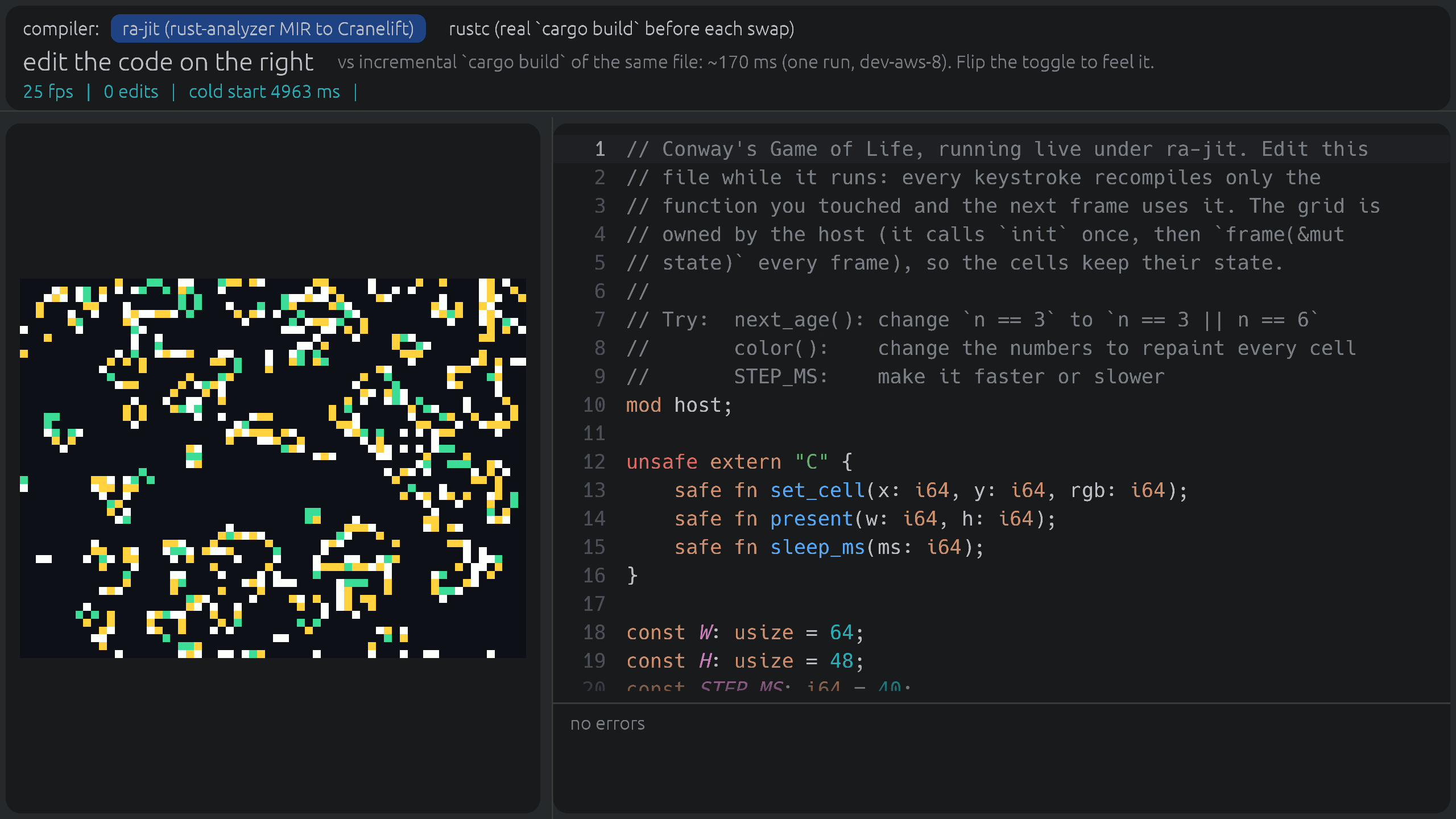 ## Updates [What's new](https://ix.dev/blaze/updates) has every change worth knowing, each as a short lesson on the course, with the ones new since your last visit marked. For release news: Watch → Custom → Releases on GitHub. ## Using blaze at work? We're working with a few teams on fast Rust CI and remote builds, built on blaze. If your team waits on Rust builds, tell us what slows you down: [andrew@ix.dev](mailto:andrew@ix.dev). Teams we work with get early access and a direct say in what we build next. ## Contributing How to build blaze from a checkout, run its tests and send a change: [docs/contributing.md](docs/contributing.md). To report a security problem: [.github/SECURITY.md](.github/SECURITY.md). ## Credits blaze stands on the shoulders of giants. Thank you to the people who built: - [rust-analyzer](https://github.com/rust-lang/rust-analyzer), whose analysis and MIR blaze compiles from - [Cranelift](https://cranelift.dev) (Bytecode Alliance), the fast code generator - [LLVM](https://llvm.org) and [inkwell](https://github.com/TheDan64/inkwell), for the optimised tiers - [salsa](https://github.com/salsa-rs/salsa), the incremental engine underneath - [object](https://github.com/gimli-rs/object), for reading and writing executables - [Rust](https://github.com/rust-lang/rust) and its compiler crates - [rustd](https://github.com/DioxusLabs/rustd) (DioxusLabs), whose code blaze includes - [Makepad](https://github.com/makepad/makepad), whose live-coding work inspired much of blaze, and its JIT [relax](https://github.com/makepad/makepad/tree/work/libs/relax), behind `makepad run` None of these projects endorses blaze. blaze was called blaze until 2026-10-24; `blaze` still works. Made at [ix](https://ix.dev) for den's native app. MIT or Apache-2.0.