---
layout: default
title: Contributing to the Guides
nav_order: 99
---
# Contributing to the Guides
👍🎉 First off, thanks for taking the time to contribute! 🎉👍
The goal of the open-source
[AFWERX Guides project](https://github.com/infinity-spark-jbmdl/afwerx-guides)
is for members of the community to contribute and improve the guides.
The project is beginner-friendly and we hope many people are able to make their
first open-source contribution through this project.
You can help improve the guides in three ways:
* [Report a bug (error)](#report-a-bug-error)
* [Submit a suggested improvement](#submit-an-edit)
* [Develop a guide on a new topic](#develop-a-guide-on-a-new-topic)
You need a [Github account](https://github.com/join) to contribute, but you can
do everything entirely through your web browser.
The guides are written using [Markdown](https://daringfireball.net/projects/markdown/).
Markdown is a way to style text on the web. If you are not familiar with
Markdown, check out this short article, [Mastering Markdown](https://guides.github.com/features/mastering-markdown/)
(3 min read).
#### Thank you to our GitHub contributors...we're always looking for more!
{% for contributor in site.github.contributors %}
-

{% endfor %}
## Report a Bug (Error)
Bugs (errors) are tracked as [GitHub issues](https://guides.github.com/features/issues/). First,
check the [existing issues](https://github.com/infinity-spark-jbmdl/afwerx-guides/issues)
to see if someone has already reported the problem. If they have and the issue is still open,
add a comment to the existing issue instead of opening a new one.
If there isn't an existing issue, create a
[new issue](https://github.com/infinity-spark-jbmdl/afwerx-guides/issues/new). Explain the
problem and include additional details to help maintainers of the project fix it.
## Submit an Edit
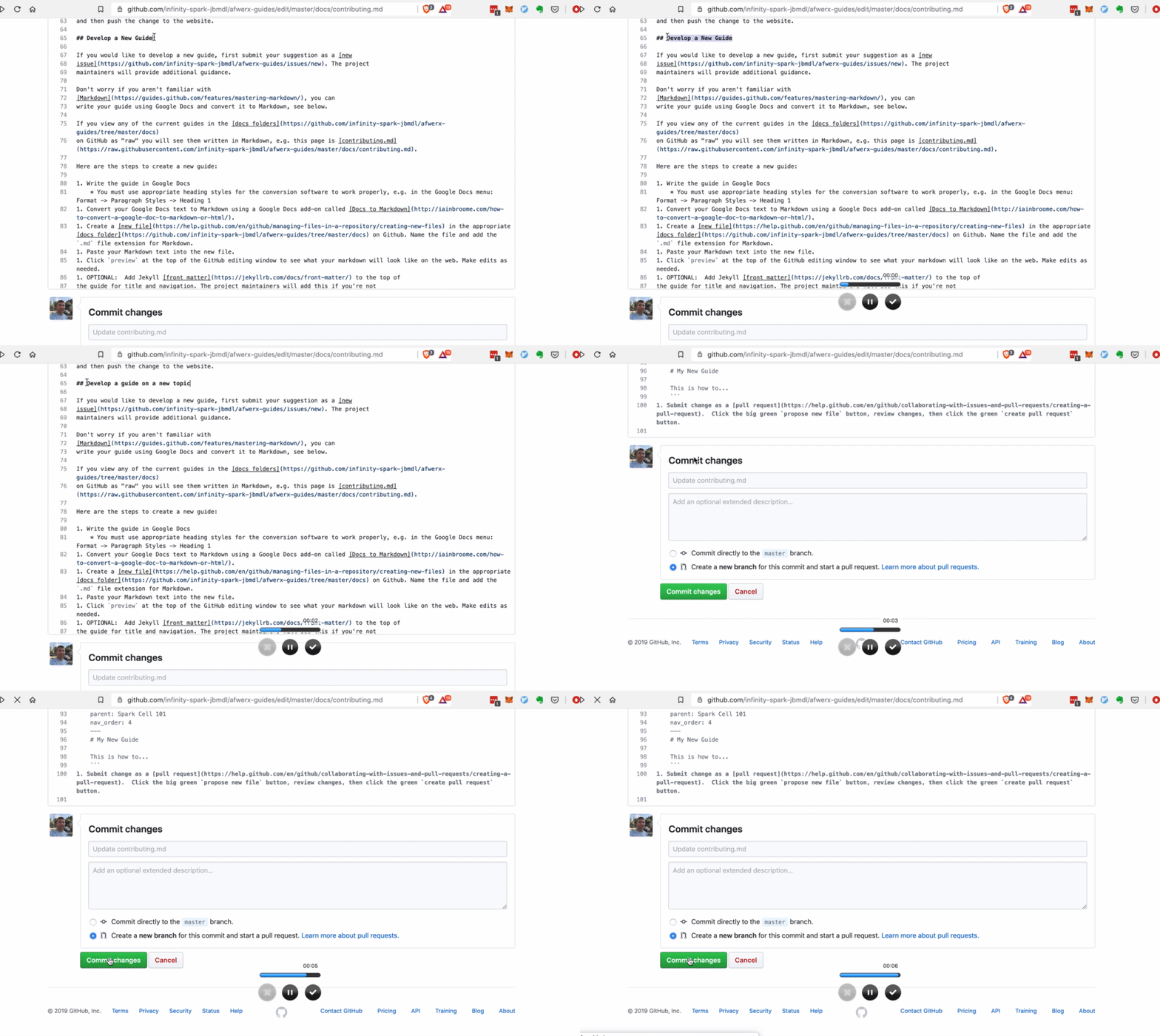
If you see a way to improve a guide (e.g. fix typo or add a paragraph/link), you can submit a
[pull request](https://help.github.com/en/github/collaborating-with-issues-and-pull-requests/about-pull-requests)
which will tell the maintainers of the project you have a suggested improvement.
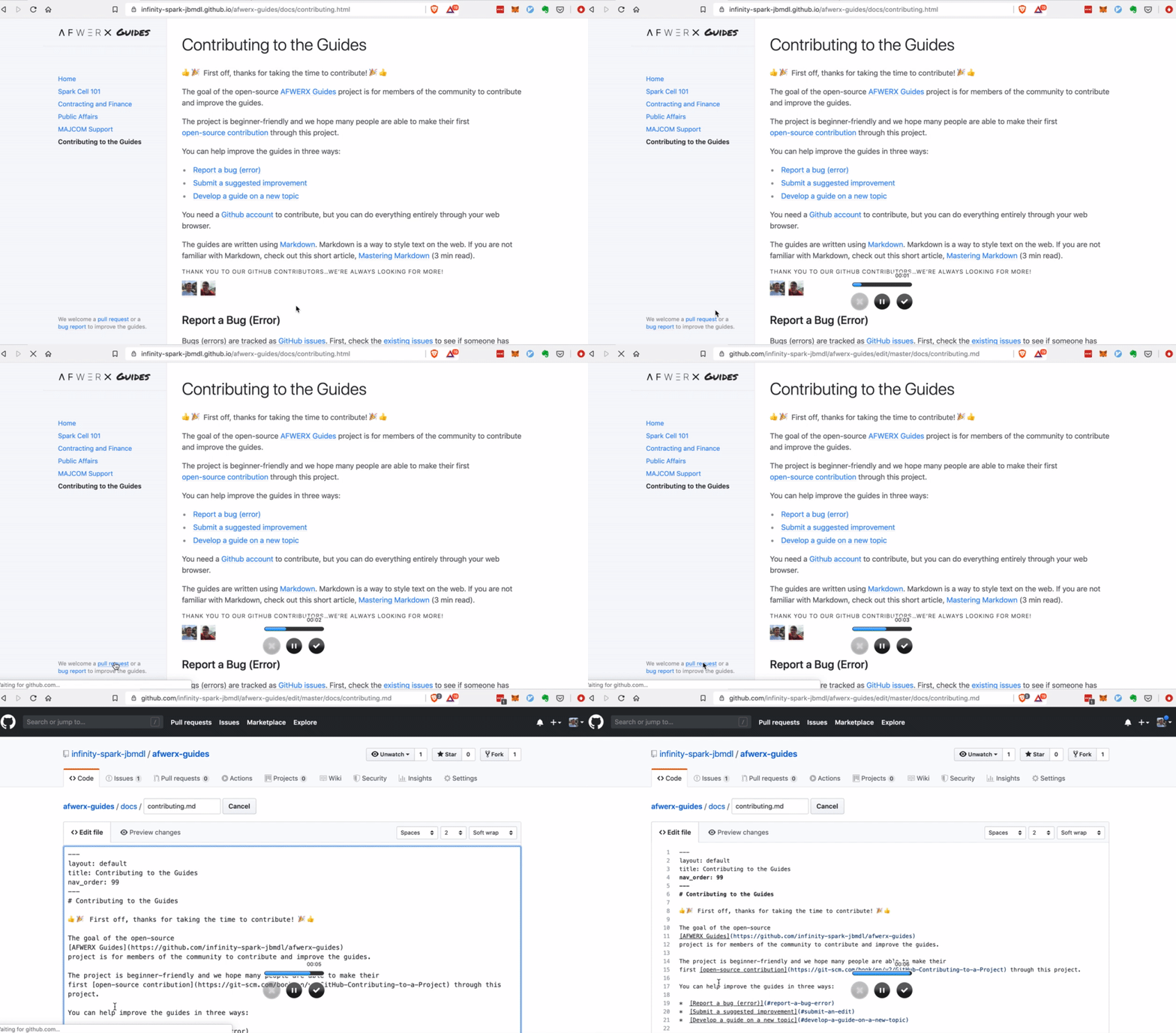
Each page in the site has a `pull request` link in the footer or sidebar which will start the process of
[creating a pull request from a fork](https://help.github.com/en/github/collaborating-with-issues-and-pull-requests/creating-a-pull-request-from-a-fork)
to edit that page of the website.
### Start pull request from sidebar or footer:
 ### Make edits & submit commit:
 ### Create pull request:
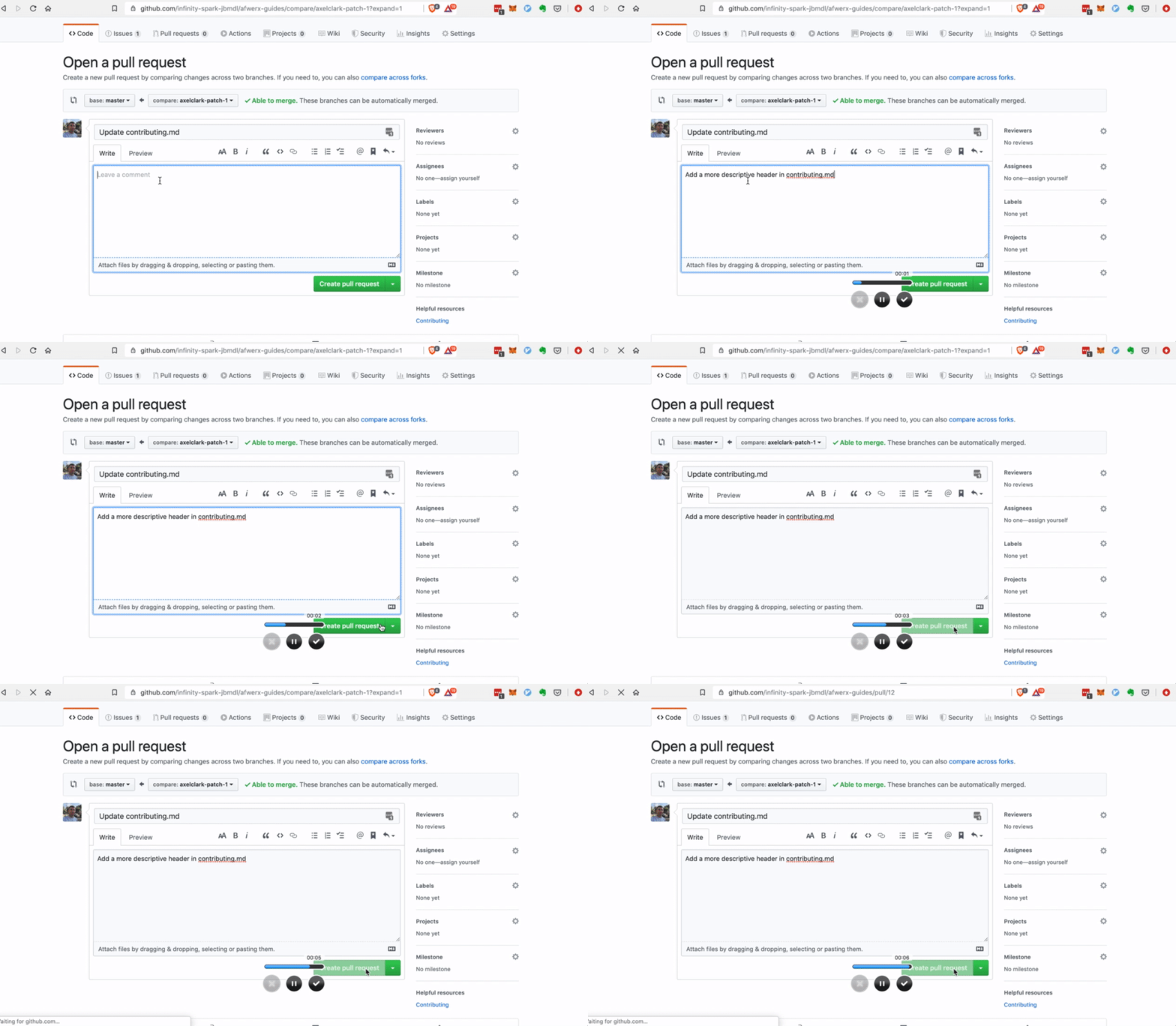 Once you submit the pull request, the maintainers will review, edit (if needed),
and then push the change to the website.
## Develop a guide on a new topic
If you would like to develop a new guide, first submit your suggestion as a [new
issue](https://github.com/infinity-spark-jbmdl/afwerx-guides/issues/new). The project
maintainers will provide additional guidance.
Don't worry if you aren't familiar with
[Markdown](https://guides.github.com/features/mastering-markdown/), you can
write your guide using Google Docs and convert it to Markdown, see below.
If you view any of the current guides in the [docs folders](https://github.com/infinity-spark-jbmdl/afwerx-guides/tree/master/docs)
on GitHub as "raw" you will see them written in Markdown, e.g. this page is [contributing.md](https://raw.githubusercontent.com/infinity-spark-jbmdl/afwerx-guides/master/docs/contributing.md).
Here are the steps to create a new guide:
1. Write the guide in Google Docs
* You must use appropriate heading styles for the conversion software to work properly, e.g. in the Google Docs menu: Format -> Paragraph Styles -> Heading 1
1. Convert your Google Docs text to Markdown using a Google Docs add-on called [Docs to Markdown](http://iainbroome.com/how-to-convert-a-google-doc-to-markdown-or-html/).
1. Create a [new file](https://help.github.com/en/github/managing-files-in-a-repository/creating-new-files) in the appropriate [docs folder](https://github.com/infinity-spark-jbmdl/afwerx-guides/tree/master/docs) on Github. Name the file and add the `.md` file extension for Markdown.
1. Paste your Markdown text into the new file.
1. Click `preview` at the top of the GitHub editing window to see what your markdown will look like on the web. Make edits as needed.
1. OPTIONAL: Add Jekyll [front matter](https://jekyllrb.com/docs/front-matter/) to the top of
the guide for title and navigation. The project maintainers will add this if you're not
sure. For example:
```
---
layout: default
title: My New Guide
parent: Spark Cell 101
nav_order: 4
---
# My New Guide
This is how to...
```
1. Submit change as a [pull request](https://help.github.com/en/github/collaborating-with-issues-and-pull-requests/creating-a-pull-request). Click the big green `propose new file` button, review changes, then click the green `create pull request` button.
Once you submit the pull request, the maintainers will review, edit (if needed),
and then push the change to the website.
## Develop a guide on a new topic
If you would like to develop a new guide, first submit your suggestion as a [new
issue](https://github.com/infinity-spark-jbmdl/afwerx-guides/issues/new). The project
maintainers will provide additional guidance.
Don't worry if you aren't familiar with
[Markdown](https://guides.github.com/features/mastering-markdown/), you can
write your guide using Google Docs and convert it to Markdown, see below.
If you view any of the current guides in the [docs folders](https://github.com/infinity-spark-jbmdl/afwerx-guides/tree/master/docs)
on GitHub as "raw" you will see them written in Markdown, e.g. this page is [contributing.md](https://raw.githubusercontent.com/infinity-spark-jbmdl/afwerx-guides/master/docs/contributing.md).
Here are the steps to create a new guide:
1. Write the guide in Google Docs
* You must use appropriate heading styles for the conversion software to work properly, e.g. in the Google Docs menu: Format -> Paragraph Styles -> Heading 1
1. Convert your Google Docs text to Markdown using a Google Docs add-on called [Docs to Markdown](http://iainbroome.com/how-to-convert-a-google-doc-to-markdown-or-html/).
1. Create a [new file](https://help.github.com/en/github/managing-files-in-a-repository/creating-new-files) in the appropriate [docs folder](https://github.com/infinity-spark-jbmdl/afwerx-guides/tree/master/docs) on Github. Name the file and add the `.md` file extension for Markdown.
1. Paste your Markdown text into the new file.
1. Click `preview` at the top of the GitHub editing window to see what your markdown will look like on the web. Make edits as needed.
1. OPTIONAL: Add Jekyll [front matter](https://jekyllrb.com/docs/front-matter/) to the top of
the guide for title and navigation. The project maintainers will add this if you're not
sure. For example:
```
---
layout: default
title: My New Guide
parent: Spark Cell 101
nav_order: 4
---
# My New Guide
This is how to...
```
1. Submit change as a [pull request](https://help.github.com/en/github/collaborating-with-issues-and-pull-requests/creating-a-pull-request). Click the big green `propose new file` button, review changes, then click the green `create pull request` button.