 # Single-cell analysis using Low Resource (scaLR)
[](https://github.com/infocusp/scaLR?tab=GPL-3.0-1-ov-file#)
[](https://infocusp.github.io/scaLR/)
[](https://doi.org/10.5281/zenodo.13767942)
## 📖 Overview
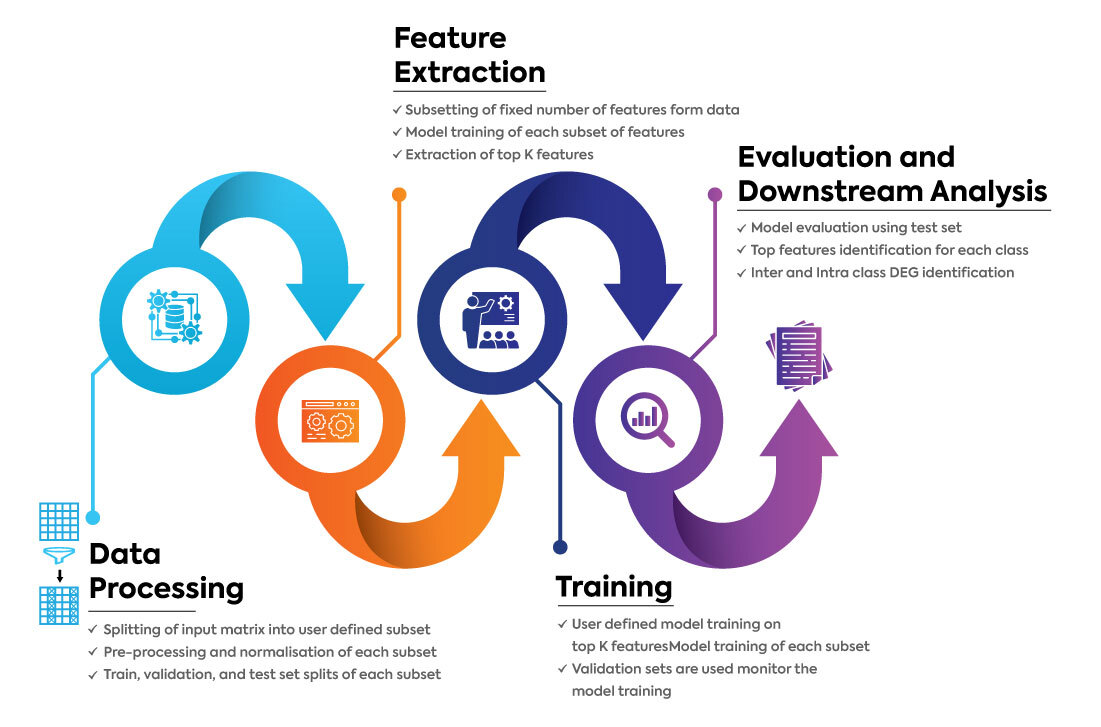
scaLR is a comprehensive end-to-end pipeline that is equipped with a range of advanced features to streamline and enhance the analysis of scRNA-seq data. The major steps of the platform are:
1. Data Processing: Large datasets undergo preprocessing and [normalization](https://colab.research.google.com/github/infocusp/scaLR/blob/main/tutorials/preprocessing/normalization.ipynb) (if the user opts to) and are segmented into training, testing, and validation sets.
2. Features Extraction: A model is trained on feature subsets in a batch-wise process, so all features and samples are utilized in the feature selection process. Then, the top-k features are selected to train the final model, using a feature score based on the model's coefficients/weights or [SHAP analayis](https://colab.research.google.com/github/infocusp/scaLR/blob/main/tutorials/analysis/shap_analysis/shap_heatmap.ipynb).
3. Training: A Deep Neural Network (DNN) is trained on the training dataset. The validation dataset is used to validate the model at each epoch, and early stopping is performed if applicable. Also, a [batch correction](https://colab.research.google.com/github/infocusp/scaLR/blob/main/tutorials/preprocessing/batch_correction.ipynb) method is available to correct batch effects during training in the pipeline.
4. Evaluation & Downstream Analysis: The trained model is evaluated using the test dataset by calculating metrics such as precision, recall, f1-score, and accuracy. Various visualizations, such as ROC curve of class annotation, feature rank plots, heatmap of top genes per class, [DGE analysis](https://colab.research.google.com/github/infocusp/scaLR/blob/main/tutorials/analysis/differential_gene_expression/dge.ipynb), and [gene recall curves](https://colab.research.google.com/github/infocusp/scaLR/blob/main/tutorials/analysis/gene_recall_curve/gene_recall_curve.ipynb), are generated.
**The below flowchart also explains the major steps of the scaLR platform.**
## Pre-requisites and installation scaLR
- ScaLR can be installed using git or pip. It is tested in Python 3.10.20 and it is recommended to use that environment.
```
conda create -n scaLR_env python=3.10.20
conda activate scaLR_env
```
- Using git
```
git clone https://github.com/infocusp/scaLR.git
pip install -r requirements.txt
```
- Installation using pip
```
pip install pyscaLR
```
**Note:** If the user wants to run the entire pipeline via installing pip pyscalr, they should clone/download these files(`pipeline.py` and `config.yaml`) from the git repository.
## Input data format
- Currently the pipeline expects all datasets in [anndata](https://anndata.readthedocs.io/en/latest/tutorials/notebooks/getting-started.html) formats (`.h5ad` files only).
- The anndata object should contain cell samples as `obs` and genes as `var. '
- `adata.X`: contains normalized gene counts/expression values (`log1p` normalization with range `0-10` expected).
- `adata.obs`: contains any metadata regarding cells, including a column for `target` which will be used for classification. The index of `adata.obs` is cell_barcodes.
- `adata.var`: contains all gene_names as an Index.
## How to run
1. It is necessary that the user modify the configuration file, and each stage of the pipeline is available inside the config folder [config.yml] as per your requirements. Simply omit/comment out stages of the pipeline you do not wish to run.
2. Refer **config.yml** & **it's detailed config** [README](https://github.com/infocusp/scaLR/blob/main/config/README.md) file on how to use different parameters and files.
3. Then use the `pipeline.py` file to run the entire pipeline according to your configurations. This file takes as argument the path to config (`-c | --config`), along with optional flags to log all parts of the pipelines (`-l | --log`) and to analyze memory usage (`-m | --memoryprofiler`).
5. `python pipeline.py --config /path/to/config.yaml -l -m` to run the scaLR.
## Example configs
### Config for cell type classification and biomarker identification
NOTE: Below are just suggestions for the model parameters. Feel free to play around with them for tuning the model & improving the results.
An example configuration file for the current dataset, incorporating the edits below, can be found at '`scaLR/tutorials/pipeline/config_celltype.yaml`. Update the device as cuda or cpu as per the requirement.
- **Device setup***
- Update device: 'cuda' for GPU enabled runtype, else device: 'cpu' for CPU enabled runtype.
- **Experiment Config**
- The default exp_run number is 0.If not changed, the celltype classification experiment would be exp_run_0 with all the pipeline results.
- **Data Config**
- Update the full_datapath to `data/modified_adata.h5ad` (as we will include GeneRecallCurve in the downstream).
- Specify the num_workers value for effective parallelization.
- Set target to cell_type.
- **Feature Selection**
- Specify the num_workers value for effective parallelization.
- Update the model layers to [5000, 10], as there are only 10 cell types in the dataset.
- Change epoch to 10.
- **Final Model Training**
- Update the model layers to the same as for feature selection: [5000, 10].
- Change epoch to 100.
- **Analysis**
- Downstream Analysis
- Uncomment the test_samples_downstream_analysis section.
- Update the reference_genes_path to `scaLR/tutorials/pipeline/grc_reference_gene.csv`.
- Refer to the section below:
```
# Config file for pipeline run for cell type classification.
# DEVICE SETUP.
device: 'cuda'
# EXPERIMENT.
experiment:
dirpath: 'scalr_experiments'
exp_name: 'exp_name'
exp_run: 0
# DATA CONFIG.
data:
sample_chunksize: 20000
train_val_test:
full_datapath: 'data/modified_adata.h5ad'
num_workers: 2
splitter_config:
name: GroupSplitter
params:
split_ratio: [7, 1, 2.5]
stratify: 'donor_id'
# split_datapaths: ''
# preprocess:
# - name: SampleNorm
# params:
# **args
# - name: StandardScaler
# params:
# **args
target: cell_type
# FEATURE SELECTION.
feature_selection:
# score_matrix: '/path/to/matrix'
feature_subsetsize: 5000
num_workers: 2
model:
name: SequentialModel
params:
layers: [5000, 10]
weights_init_zero: True
model_train_config:
trainer: SimpleModelTrainer
dataloader:
name: SimpleDataLoader
params:
batch_size: 25000
padding: 5000
optimizer:
name: SGD
params:
lr: 1.0e-3
weight_decay: 0.1
loss:
name: CrossEntropyLoss
epochs: 10
scoring_config:
name: LinearScorer
features_selector:
name: AbsMean
params:
k: 5000
# FINAL MODEL TRAINING.
final_training:
model:
name: SequentialModel
params:
layers: [5000, 10]
dropout: 0
weights_init_zero: False
model_train_config:
resume_from_checkpoint: null
trainer: SimpleModelTrainer
dataloader:
name: SimpleDataLoader
params:
batch_size: 15000
optimizer:
name: Adam
params:
lr: 1.0e-3
weight_decay: 0
loss:
name: CrossEntropyLoss
epochs: 100
callbacks:
- name: TensorboardLogger
- name: EarlyStopping
params:
patience: 3
min_delta: 1.0e-4
- name: ModelCheckpoint
params:
interval: 5
analysis:
model_checkpoint: ''
dataloader:
name: SimpleDataLoader
params:
batch_size: 15000
gene_analysis:
scoring_config:
name: LinearScorer
features_selector:
name: ClasswisePromoters
params:
k: 100
test_samples_downstream_analysis:
- name: GeneRecallCurve
params:
reference_genes_path: 'scaLR/tutorials/pipeline/grc_reference_gene.csv'
top_K: 300
plots_per_row: 3
features_selector:
name: ClasswiseAbs
params: {}
- name: Heatmap
params: {}
- name: RocAucCurve
params: {}
```
### Config for clinical condition-specific biomarker identification and DGE analysis
An example configuration file (`scaLR/tutorials/pipeline/config_clinical.yaml`). Update the device as CUDA or CPU as per the requirement.
- Experiment Config
- Make sure to change the exp_run number if you have an experiment with the same number earlier related to cell classification. As we have done one experiment earlier, we'll change the number now to '1'.
- Data Config
- The full_datapath remains the same as above.
- Change the target to disease (this column contains data for clinical conditions, COVID-19/normal).
- Feature Selection
- Update the model layers to [5000, 2], as there are only two types of clinical conditions.
- epoch as 10.
- Final Model Training
-Update the model layers to the same as for feature selection: [5000, 2].
- epoch as 100.
- Analysis
- Downstream Analysis
- Uncomment the full_samples_downstream_analysis section for example config file.
- We are not performing the 'gene_recall_curve' analysis in this case. It can be performed if the COVID-19/normal specific genes are available, but there are many possibilities of genes in the case of normal conditions.
- There are two options to perform differential gene expression (DGE) analysis: **DgePseudoBulk and DgeLMEM**. The parameters are updated as follows. Note that DgeLMEM may take a bit more time, as the multiprocessing is not very efficient with only 2 CPUs in the current Colab runtime.
- Refer to the section below:
```
analysis:
model_checkpoint: ''
dataloader:
name: SimpleDataLoader
params:
batch_size: 15000
gene_analysis:
scoring_config:
name: LinearScorer
features_selector:
name: ClasswisePromoters
params:
k: 100
full_samples_downstream_analysis:
- name: Heatmap
params:
top_n_genes: 100
- name: RocAucCurve
params: {}
- name: DgePseudoBulk
params:
celltype_column: 'cell_type'
design_factor: 'disease'
factor_categories: ['COVID-19', 'normal']
sum_column: 'donor_id'
cell_subsets: ['conventional dendritic cell', 'natural killer cell']
- name: DgeLMEM
params:
fixed_effect_column: 'disease'
fixed_effect_factors: ['COVID-19', 'normal']
group: 'donor_id'
celltype_column: 'cell_type'
cell_subsets: ['conventional dendritic cell']
gene_batch_size: 1000
coef_threshold: 0.1
```
## Interactive tutorials
Detailed tutorials have been made on how to use some pipeline functionalities as a scaLR library. Find the links below.
- **scaLR pipeline** [](https://colab.research.google.com/github/infocusp/scaLR/blob/main/tutorials/pipeline/scalr_pipeline.ipynb)
- **Differential gene expression analysis** [](https://colab.research.google.com/github/infocusp/scaLR/blob/main/tutorials/analysis/differential_gene_expression/dge.ipynb)
- **Gene recall curve** [](https://colab.research.google.com/github/infocusp/scaLR/blob/main/tutorials/analysis/gene_recall_curve/gene_recall_curve.ipynb)
- **Normalization** [](https://colab.research.google.com/github/infocusp/scaLR/blob/main/tutorials/preprocessing/normalization.ipynb)
- **Batch correction** [](https://colab.research.google.com/github/infocusp/scaLR/blob/main/tutorials/preprocessing/batch_correction.ipynb)
- **An example of jupyter notebook to [run scaLR in local machine](https://github.com/infocusp/scaLR/blob/main/tutorials/pipeline/scalr_pipeline_local_run.ipynb)**.
## Experiment output structure
- **pipeline.py**:
The main script that performs an end-to-end run.
- `exp_dir`: root experiment directory for the storage of all step outputs of the platform specified in the config.
- `config.yml`: copy of config file to reproduce the user-defined experiment.
- **data_ingestion**:
Reads the data and splits it into Train/Validation/Test sets for the pipeline. Then, it performs sample-wise normalization on the data.
- `exp_dir`
- `data`
- `train_val_test_split.json`: contains sample indices for train/validation/test splits.
- `label_mappings.json`: contains mappings of all metadata columns between labels and IDs.
- `train_val_test_split`: directory containing the train, validation, and test samples and data files.
- **feature_extraction**:
Performs feature selection and extraction of new datasets containing a subset of features.
- `exp_dir`
- `feature_extraction`
- `chunked_models`: contains weights of each model trained on feature subset data (refer to feature subsetting algorithm).
- `feature_subset_data`: directory containing the new feature-subsetted train, val, and test samples anndatas.
- `score_matrix.csv`: combined scores of all individual models for each feature and class. shape: n_classes X n_features.
- `top_features.json`: a file containing a list of top features selected / to be subsetted from total features.
- **final_model_training**:
Trains a final model based on `train_datapath` and `val_datapath` in config.
- `exp_dir`
- `model`
- `logs`: directory containing Tensorboard Logs for the training of the model.
- `checkpoints`: directory containing model weights checkpointed at every interval specified in config.
- `best_model`: the best model checkpoint contains information to use model for inference/resume training.
- `model_config.yaml`: config file containing model parameters.
- `mappings.json`: contains mapping of class_names to class_ids used by model during training.
- `model.pt`: contains model weights.
- **eval_and_analysis**:
Performs evaluation of best model trained on user-defined metrics on the test set. Also performs various downstream tasks.
- `exp_dir`
- `analysis`
- `classification_report.csv`: contains classification report showing Precision, Recall, F1, and accuracy metrics for each class on the test set.
- `gene_analysis`
- `score_matrix.csv`: score of the final model, for each feature and class. shape: n_classes X n_features.
- `top_features.json`: a file containing a list of selected top features/biomarkers.
- `test_samples/full_samples`
- `heatmaps`
- `class_name.svg`: heatmap for top genes of a particular class w.r.t those genes association in other classes. E.g., B.svg, C.svg, etc.
- `roc_auc.svg`: contains ROC-AUC plot for all classes.
- `gene_recall_curve.svg`: contains gene recall curve plots.
- `gene_recall_curve_info.json`: contains reference genes list which are present in top_K ranked genes per class for each model.
- `pseudobulk_dge_result`
- `pbkDGE_celltype_factor_categories_0_vs_factor_categories_1.csv`: contains Pseudobulk DGE results between selected factor categories for a celltype.
- `pbkDGE_celltype_factor_categories_0_vs_factor_categories_1.svg`: volcano plot of Log2Foldchange vs -log10(p-value) of genes.
- `lmem_dge_result`
- `lmemDGE_celltype.csv`: contains LMEM DGE results between selected factor categories for a celltype.
- `lmemDGE_fixed_effect_factor_X.svg`: volcano plot of coefficient vs -log10(p-value) of genes.
## Citation
Jogani, S., Pol, A. S., Prajapati, M., Samal, A., Bhatia, K., Parmar, J., ... & Gupta, S. (2025). scaLR: a low-resource deep neural network-based platform for single cell analysis and biomarker discovery. Briefings in Bioinformatics, 26(3), bbaf243.
# Single-cell analysis using Low Resource (scaLR)
[](https://github.com/infocusp/scaLR?tab=GPL-3.0-1-ov-file#)
[](https://infocusp.github.io/scaLR/)
[](https://doi.org/10.5281/zenodo.13767942)
## 📖 Overview
scaLR is a comprehensive end-to-end pipeline that is equipped with a range of advanced features to streamline and enhance the analysis of scRNA-seq data. The major steps of the platform are:
1. Data Processing: Large datasets undergo preprocessing and [normalization](https://colab.research.google.com/github/infocusp/scaLR/blob/main/tutorials/preprocessing/normalization.ipynb) (if the user opts to) and are segmented into training, testing, and validation sets.
2. Features Extraction: A model is trained on feature subsets in a batch-wise process, so all features and samples are utilized in the feature selection process. Then, the top-k features are selected to train the final model, using a feature score based on the model's coefficients/weights or [SHAP analayis](https://colab.research.google.com/github/infocusp/scaLR/blob/main/tutorials/analysis/shap_analysis/shap_heatmap.ipynb).
3. Training: A Deep Neural Network (DNN) is trained on the training dataset. The validation dataset is used to validate the model at each epoch, and early stopping is performed if applicable. Also, a [batch correction](https://colab.research.google.com/github/infocusp/scaLR/blob/main/tutorials/preprocessing/batch_correction.ipynb) method is available to correct batch effects during training in the pipeline.
4. Evaluation & Downstream Analysis: The trained model is evaluated using the test dataset by calculating metrics such as precision, recall, f1-score, and accuracy. Various visualizations, such as ROC curve of class annotation, feature rank plots, heatmap of top genes per class, [DGE analysis](https://colab.research.google.com/github/infocusp/scaLR/blob/main/tutorials/analysis/differential_gene_expression/dge.ipynb), and [gene recall curves](https://colab.research.google.com/github/infocusp/scaLR/blob/main/tutorials/analysis/gene_recall_curve/gene_recall_curve.ipynb), are generated.
**The below flowchart also explains the major steps of the scaLR platform.**

## Pre-requisites and installation scaLR
- ScaLR can be installed using git or pip. It is tested in Python 3.10.20 and it is recommended to use that environment.
```
conda create -n scaLR_env python=3.10.20
conda activate scaLR_env
```
- Using git
```
git clone https://github.com/infocusp/scaLR.git
pip install -r requirements.txt
```
- Installation using pip
```
pip install pyscaLR
```
**Note:** If the user wants to run the entire pipeline via installing pip pyscalr, they should clone/download these files(`pipeline.py` and `config.yaml`) from the git repository.
## Input data format
- Currently the pipeline expects all datasets in [anndata](https://anndata.readthedocs.io/en/latest/tutorials/notebooks/getting-started.html) formats (`.h5ad` files only).
- The anndata object should contain cell samples as `obs` and genes as `var. '
- `adata.X`: contains normalized gene counts/expression values (`log1p` normalization with range `0-10` expected).
- `adata.obs`: contains any metadata regarding cells, including a column for `target` which will be used for classification. The index of `adata.obs` is cell_barcodes.
- `adata.var`: contains all gene_names as an Index.
## How to run
1. It is necessary that the user modify the configuration file, and each stage of the pipeline is available inside the config folder [config.yml] as per your requirements. Simply omit/comment out stages of the pipeline you do not wish to run.
2. Refer **config.yml** & **it's detailed config** [README](https://github.com/infocusp/scaLR/blob/main/config/README.md) file on how to use different parameters and files.
3. Then use the `pipeline.py` file to run the entire pipeline according to your configurations. This file takes as argument the path to config (`-c | --config`), along with optional flags to log all parts of the pipelines (`-l | --log`) and to analyze memory usage (`-m | --memoryprofiler`).
5. `python pipeline.py --config /path/to/config.yaml -l -m` to run the scaLR.
## Example configs
### Config for cell type classification and biomarker identification
NOTE: Below are just suggestions for the model parameters. Feel free to play around with them for tuning the model & improving the results.
An example configuration file for the current dataset, incorporating the edits below, can be found at '`scaLR/tutorials/pipeline/config_celltype.yaml`. Update the device as cuda or cpu as per the requirement.
- **Device setup***
- Update device: 'cuda' for GPU enabled runtype, else device: 'cpu' for CPU enabled runtype.
- **Experiment Config**
- The default exp_run number is 0.If not changed, the celltype classification experiment would be exp_run_0 with all the pipeline results.
- **Data Config**
- Update the full_datapath to `data/modified_adata.h5ad` (as we will include GeneRecallCurve in the downstream).
- Specify the num_workers value for effective parallelization.
- Set target to cell_type.
- **Feature Selection**
- Specify the num_workers value for effective parallelization.
- Update the model layers to [5000, 10], as there are only 10 cell types in the dataset.
- Change epoch to 10.
- **Final Model Training**
- Update the model layers to the same as for feature selection: [5000, 10].
- Change epoch to 100.
- **Analysis**
- Downstream Analysis
- Uncomment the test_samples_downstream_analysis section.
- Update the reference_genes_path to `scaLR/tutorials/pipeline/grc_reference_gene.csv`.
- Refer to the section below:
```
# Config file for pipeline run for cell type classification.
# DEVICE SETUP.
device: 'cuda'
# EXPERIMENT.
experiment:
dirpath: 'scalr_experiments'
exp_name: 'exp_name'
exp_run: 0
# DATA CONFIG.
data:
sample_chunksize: 20000
train_val_test:
full_datapath: 'data/modified_adata.h5ad'
num_workers: 2
splitter_config:
name: GroupSplitter
params:
split_ratio: [7, 1, 2.5]
stratify: 'donor_id'
# split_datapaths: ''
# preprocess:
# - name: SampleNorm
# params:
# **args
# - name: StandardScaler
# params:
# **args
target: cell_type
# FEATURE SELECTION.
feature_selection:
# score_matrix: '/path/to/matrix'
feature_subsetsize: 5000
num_workers: 2
model:
name: SequentialModel
params:
layers: [5000, 10]
weights_init_zero: True
model_train_config:
trainer: SimpleModelTrainer
dataloader:
name: SimpleDataLoader
params:
batch_size: 25000
padding: 5000
optimizer:
name: SGD
params:
lr: 1.0e-3
weight_decay: 0.1
loss:
name: CrossEntropyLoss
epochs: 10
scoring_config:
name: LinearScorer
features_selector:
name: AbsMean
params:
k: 5000
# FINAL MODEL TRAINING.
final_training:
model:
name: SequentialModel
params:
layers: [5000, 10]
dropout: 0
weights_init_zero: False
model_train_config:
resume_from_checkpoint: null
trainer: SimpleModelTrainer
dataloader:
name: SimpleDataLoader
params:
batch_size: 15000
optimizer:
name: Adam
params:
lr: 1.0e-3
weight_decay: 0
loss:
name: CrossEntropyLoss
epochs: 100
callbacks:
- name: TensorboardLogger
- name: EarlyStopping
params:
patience: 3
min_delta: 1.0e-4
- name: ModelCheckpoint
params:
interval: 5
analysis:
model_checkpoint: ''
dataloader:
name: SimpleDataLoader
params:
batch_size: 15000
gene_analysis:
scoring_config:
name: LinearScorer
features_selector:
name: ClasswisePromoters
params:
k: 100
test_samples_downstream_analysis:
- name: GeneRecallCurve
params:
reference_genes_path: 'scaLR/tutorials/pipeline/grc_reference_gene.csv'
top_K: 300
plots_per_row: 3
features_selector:
name: ClasswiseAbs
params: {}
- name: Heatmap
params: {}
- name: RocAucCurve
params: {}
```
### Config for clinical condition-specific biomarker identification and DGE analysis
An example configuration file (`scaLR/tutorials/pipeline/config_clinical.yaml`). Update the device as CUDA or CPU as per the requirement.
- Experiment Config
- Make sure to change the exp_run number if you have an experiment with the same number earlier related to cell classification. As we have done one experiment earlier, we'll change the number now to '1'.
- Data Config
- The full_datapath remains the same as above.
- Change the target to disease (this column contains data for clinical conditions, COVID-19/normal).
- Feature Selection
- Update the model layers to [5000, 2], as there are only two types of clinical conditions.
- epoch as 10.
- Final Model Training
-Update the model layers to the same as for feature selection: [5000, 2].
- epoch as 100.
- Analysis
- Downstream Analysis
- Uncomment the full_samples_downstream_analysis section for example config file.
- We are not performing the 'gene_recall_curve' analysis in this case. It can be performed if the COVID-19/normal specific genes are available, but there are many possibilities of genes in the case of normal conditions.
- There are two options to perform differential gene expression (DGE) analysis: **DgePseudoBulk and DgeLMEM**. The parameters are updated as follows. Note that DgeLMEM may take a bit more time, as the multiprocessing is not very efficient with only 2 CPUs in the current Colab runtime.
- Refer to the section below:
```
analysis:
model_checkpoint: ''
dataloader:
name: SimpleDataLoader
params:
batch_size: 15000
gene_analysis:
scoring_config:
name: LinearScorer
features_selector:
name: ClasswisePromoters
params:
k: 100
full_samples_downstream_analysis:
- name: Heatmap
params:
top_n_genes: 100
- name: RocAucCurve
params: {}
- name: DgePseudoBulk
params:
celltype_column: 'cell_type'
design_factor: 'disease'
factor_categories: ['COVID-19', 'normal']
sum_column: 'donor_id'
cell_subsets: ['conventional dendritic cell', 'natural killer cell']
- name: DgeLMEM
params:
fixed_effect_column: 'disease'
fixed_effect_factors: ['COVID-19', 'normal']
group: 'donor_id'
celltype_column: 'cell_type'
cell_subsets: ['conventional dendritic cell']
gene_batch_size: 1000
coef_threshold: 0.1
```
## Interactive tutorials
Detailed tutorials have been made on how to use some pipeline functionalities as a scaLR library. Find the links below.
- **scaLR pipeline** [](https://colab.research.google.com/github/infocusp/scaLR/blob/main/tutorials/pipeline/scalr_pipeline.ipynb)
- **Differential gene expression analysis** [](https://colab.research.google.com/github/infocusp/scaLR/blob/main/tutorials/analysis/differential_gene_expression/dge.ipynb)
- **Gene recall curve** [](https://colab.research.google.com/github/infocusp/scaLR/blob/main/tutorials/analysis/gene_recall_curve/gene_recall_curve.ipynb)
- **Normalization** [](https://colab.research.google.com/github/infocusp/scaLR/blob/main/tutorials/preprocessing/normalization.ipynb)
- **Batch correction** [](https://colab.research.google.com/github/infocusp/scaLR/blob/main/tutorials/preprocessing/batch_correction.ipynb)
- **An example of jupyter notebook to [run scaLR in local machine](https://github.com/infocusp/scaLR/blob/main/tutorials/pipeline/scalr_pipeline_local_run.ipynb)**.
## Experiment output structure
- **pipeline.py**:
The main script that performs an end-to-end run.
- `exp_dir`: root experiment directory for the storage of all step outputs of the platform specified in the config.
- `config.yml`: copy of config file to reproduce the user-defined experiment.
- **data_ingestion**:
Reads the data and splits it into Train/Validation/Test sets for the pipeline. Then, it performs sample-wise normalization on the data.
- `exp_dir`
- `data`
- `train_val_test_split.json`: contains sample indices for train/validation/test splits.
- `label_mappings.json`: contains mappings of all metadata columns between labels and IDs.
- `train_val_test_split`: directory containing the train, validation, and test samples and data files.
- **feature_extraction**:
Performs feature selection and extraction of new datasets containing a subset of features.
- `exp_dir`
- `feature_extraction`
- `chunked_models`: contains weights of each model trained on feature subset data (refer to feature subsetting algorithm).
- `feature_subset_data`: directory containing the new feature-subsetted train, val, and test samples anndatas.
- `score_matrix.csv`: combined scores of all individual models for each feature and class. shape: n_classes X n_features.
- `top_features.json`: a file containing a list of top features selected / to be subsetted from total features.
- **final_model_training**:
Trains a final model based on `train_datapath` and `val_datapath` in config.
- `exp_dir`
- `model`
- `logs`: directory containing Tensorboard Logs for the training of the model.
- `checkpoints`: directory containing model weights checkpointed at every interval specified in config.
- `best_model`: the best model checkpoint contains information to use model for inference/resume training.
- `model_config.yaml`: config file containing model parameters.
- `mappings.json`: contains mapping of class_names to class_ids used by model during training.
- `model.pt`: contains model weights.
- **eval_and_analysis**:
Performs evaluation of best model trained on user-defined metrics on the test set. Also performs various downstream tasks.
- `exp_dir`
- `analysis`
- `classification_report.csv`: contains classification report showing Precision, Recall, F1, and accuracy metrics for each class on the test set.
- `gene_analysis`
- `score_matrix.csv`: score of the final model, for each feature and class. shape: n_classes X n_features.
- `top_features.json`: a file containing a list of selected top features/biomarkers.
- `test_samples/full_samples`
- `heatmaps`
- `class_name.svg`: heatmap for top genes of a particular class w.r.t those genes association in other classes. E.g., B.svg, C.svg, etc.
- `roc_auc.svg`: contains ROC-AUC plot for all classes.
- `gene_recall_curve.svg`: contains gene recall curve plots.
- `gene_recall_curve_info.json`: contains reference genes list which are present in top_K ranked genes per class for each model.
- `pseudobulk_dge_result`
- `pbkDGE_celltype_factor_categories_0_vs_factor_categories_1.csv`: contains Pseudobulk DGE results between selected factor categories for a celltype.
- `pbkDGE_celltype_factor_categories_0_vs_factor_categories_1.svg`: volcano plot of Log2Foldchange vs -log10(p-value) of genes.
- `lmem_dge_result`
- `lmemDGE_celltype.csv`: contains LMEM DGE results between selected factor categories for a celltype.
- `lmemDGE_fixed_effect_factor_X.svg`: volcano plot of coefficient vs -log10(p-value) of genes.
## Citation
Jogani, S., Pol, A. S., Prajapati, M., Samal, A., Bhatia, K., Parmar, J., ... & Gupta, S. (2025). scaLR: a low-resource deep neural network-based platform for single cell analysis and biomarker discovery. Briefings in Bioinformatics, 26(3), bbaf243.