# diff-tour
Walk through a diff the way a senior engineer reads it.
**English** | [日本語](README.ja.md)
[](https://github.com/init-co-jp/diff-tour/releases)
[](https://github.com/init-co-jp/diff-tour/actions/workflows/ci.yml)
[](LICENSE)
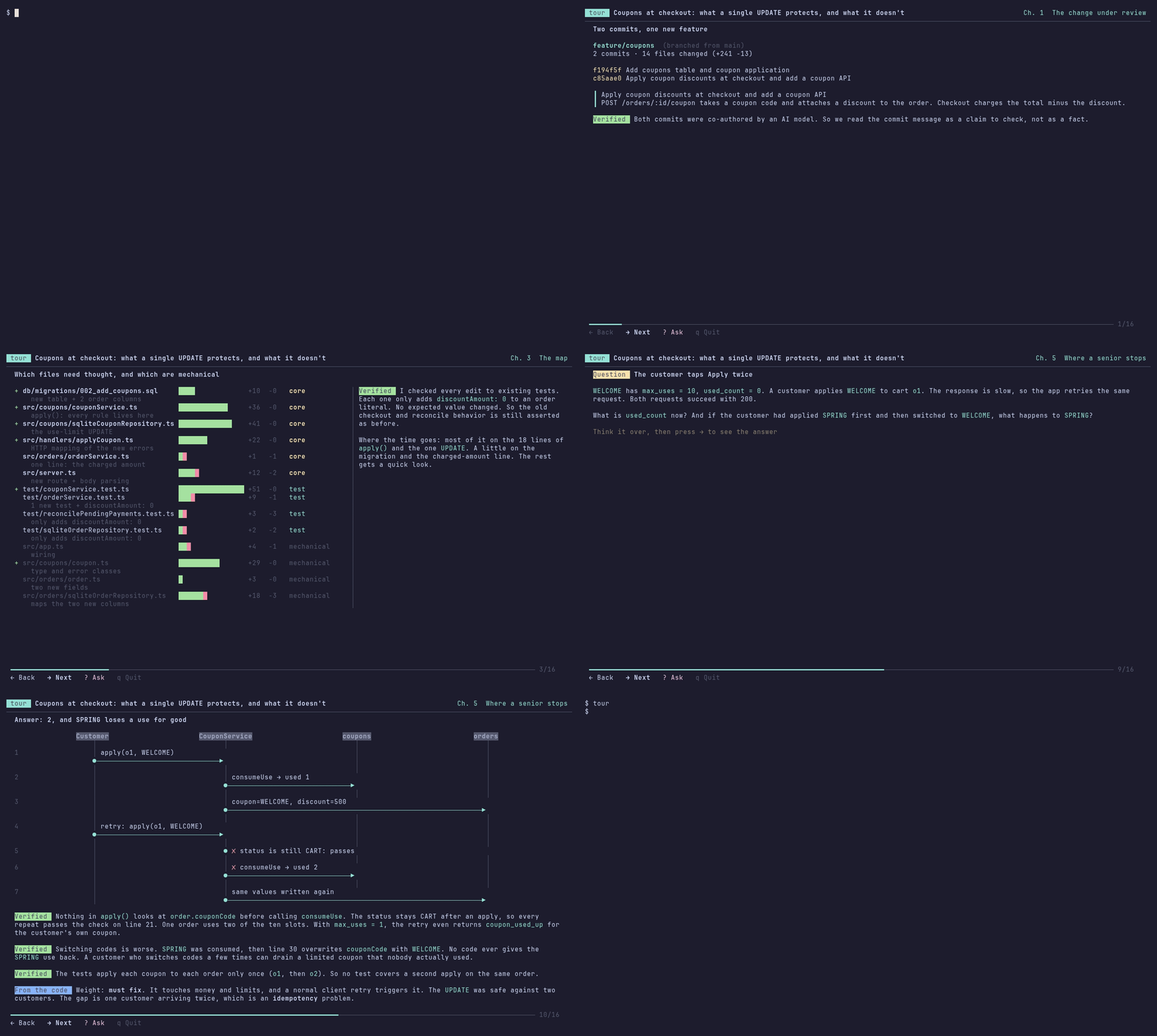
A tour of a branch that adds coupons: what the change is for, how the usage limit is enforced, a question to think about, and the answer: applying a coupon twice to one order uses it up twice.
> [!NOTE]
> diff-tour is growing fast. The tour format and the screens may still change from release to release.
## Quick start
You need git and one of [Claude Code](https://claude.com/claude-code), [Codex CLI](https://github.com/openai/codex), [Gemini CLI](https://github.com/google-gemini/gemini-cli), [OpenCode](https://opencode.ai) 2 or [Copilot CLI](https://github.com/github/copilot-cli), signed in.
```sh
curl -fsSL https://raw.githubusercontent.com/init-co-jp/diff-tour/main/install.sh | sh
cd your-repo
tour
```
Then it goes like this:
1. **Setup** (first time only): choose the display language and the LLM that writes the tour. Both have a recommended choice selected, so press Enter twice.
2. **Pick a change**: the changes you can tour are listed, with your current branch selected. Press Enter.
3. **Writing**: the LLM writes the tour. This takes 2 to 5 minutes.
4. **The tour**: **→** goes forward, **←** goes back, **q** quits.
If `tour` is not found, add the line the install script printed to your shell profile.
To see a finished tour first, with no LLM and no sign-in, play the one from the GIF. It opens at once:
```sh
git clone https://github.com/init-co-jp/diff-tour-example && cd diff-tour-example
curl -fsSLO https://raw.githubusercontent.com/init-co-jp/diff-tour/main/tours/example-coupons.en.json
tour example-coupons.en.json
```
Other ways to install are in [Install](#install), and an example repository to try is in [First run](#first-run).
## What it is
AI can write code that works. It does not teach you *why* the code is written that way, or what a reviewer would worry about.
`tour` turns a git change into a guided tour you step through with two keys, **→** and **←**. The tour shows what a senior engineer looks at when they read the change:
- **How they read it.** What the change is for, where to spend time, and which files to jump to next, including files that did not change.
- **What they ask.** Does it keep the promises the old code kept? What happens when something fails, or runs twice? Can it be rolled out and rolled back safely? Who can call it, and with what input? What happens at 100 times the data? Is the next change easier or harder? Would the tests fail if the code broke?
- **How they judge.** Which findings must be fixed and which are only suggestions or nits, what looks risky but is fine and why, what is done well, and whether the change makes the codebase better overall.
- **Where they stop and say "wait".** These come as questions, so you can predict the answer before you see it.
This view comes from what experienced engineers have written down about reading and reviewing code, collected in [`internal/generate/lessons`](internal/generate/lessons) (in Japanese). The LLM reads it before every tour.
The tour is written by an LLM you already use: Claude Code, Codex CLI, Gemini CLI, OpenCode or Copilot CLI. `tour` is read-only. It never changes your files or your repository.
## How it works
```text
your repository cache directory (deleted after writing)
─────────────── ──────────────────────────────────────
git archive ──────────────────▶ base/ files before the change
git archive ──────────────────▶ head/ files after the change
git diff ──────────────────▶ change.diff
git log ──────────────────▶ commits.txt
(built into tour) ──────────────────▶ lessons/ what senior engineers have learned
│
▼
Claude Code / Codex / Gemini / OpenCode / Copilot, started in that directory
with read-only permissions. It reads, then writes the
tour as JSON.
│
▼
tour checks every file and line the JSON points to. If something is wrong,
it asks the LLM to fix only that (up to 2 times). The tour is saved.
│
▼
tour shows the tour. The code on screen is read from git at the right commit,
never copied from the LLM's reply.
```
1. **Export.** `tour` reads your repository with `git archive`, `git diff` and `git log`, and writes the files into a new directory in your cache. Only files that git tracks are exported. When you tour uncommitted changes, untracked files that are not ignored are exported too. Files in `.gitignore`, such as `.env`, are never exported.
2. **Write.** `tour` starts the LLM's command-line tool in that directory with a fixed prompt and read-only permissions (see below). This takes 2 to 5 minutes, and the screen shows which files the LLM is reading.
3. **Check.** The tour is JSON that points to files and line numbers. `tour` checks that each one exists, and sends mistakes back to the LLM to fix, at most twice.
4. **Show.** Code, diffs and schemas on screen come from git, so the code you see is always the real code at that commit. Code that is not in the repository, such as a naive version or a possible fix, is always labeled **Example**.
The export directory is deleted once the tour is written. The finished tour is saved in your cache, so opening it again is instant.
## What the LLM can and cannot do
Sending your code to an LLM is a real decision, so here is exactly what happens.
**Sent to the LLM you chose:**
- the files of your repository at the two commits being compared, the diff, and the commit messages. Only tracked files, plus untracked files that are not ignored when you tour uncommitted changes
- the prompt in [`internal/generate/prompts`](internal/generate/prompts)
- when you press ?: your question and the whole tour, with the same files
They go to the provider of that tool (Anthropic, OpenAI, Google or GitHub; with OpenCode, the provider of the model you use), under the terms of your account with them. `tour` itself makes no network requests, has no server, and collects no telemetry.
**Not possible for the LLM:**
- reading files outside the export directory, including your real working tree, `.git` and your home directory
- reading files ignored by `.gitignore`, because they are never exported
- writing, editing or deleting any file
- running commands that change anything, or reaching the network
- using MCP servers, plugins, extensions or web search
This is enforced by the flags `tour` passes to each tool, not only by the prompt.
Claude Code: tools limited to Read, Grep and Glob
```text
claude -p --restricted --strict-mcp-config --tools Read,Grep,Glob
--permission-mode dontAsk --permission-prompts none --no-session-persistence
```
- `--restricted` removes the command and web tools, and keeps file tools inside the working directory
- `--strict-mcp-config` loads no MCP servers
- `--tools Read,Grep,Glob` leaves only the three read-only tools
- `--permission-mode dontAsk` refuses anything that would need permission, without asking
- `--no-session-persistence` saves no session
Source: [`internal/generate/claude.go`](internal/generate/claude.go)
Codex CLI: a sandbox that can only read the export directory
Codex reads files by running commands such as `cat` and `rg`, so the protection is the sandbox those commands run in. `tour` defines its own permission profile on the command line. Commands may read the export directory and system paths such as `/usr` and `/etc`. Nothing is writable, and the network is off.
- `--ignore-user-config` and `--ignore-rules` skip your `~/.codex` settings and rules, so your MCP servers and plugins are not loaded
- `-c approval_policy="never"` makes blocked actions fail instead of asking
- `-c web_search="disabled"` and `--disable` for apps, plugins, multi_agent, browser_use and others remove web search, connectors, sub-agents and browser tools
- `--ephemeral` and `-c history.persistence="none"` save no session or history
Tested on Linux, where Codex uses bubblewrap. On macOS, Codex uses its Seatbelt sandbox instead, which is not tested yet.
Source: [`internal/generate/codex.go`](internal/generate/codex.go)
Gemini CLI: an admin policy that allows only four read tools
- `--admin-policy` points to a temporary file that allows `read_file`, `glob`, `grep_search` and `list_directory` only inside the export directory, and denies every other tool. Admin policies take priority over your own policies.
- Temporary settings in the export directory register only those four tools, and turn off MCP discovery, sub-agents, hooks, checkpoints and telemetry.
- `--extensions none` loads no extensions. `--allowed-mcp-server-names` is set to a name no server has, so no MCP server starts.
Gemini CLI always saves the session to `~/.gemini/tmp`, and deletes it after 30 days by default. This cannot be turned off from the command line.
Source: [`internal/generate/gemini.go`](internal/generate/gemini.go)
OpenCode: an agent of its own that can only read and search
```text
opencode run --standalone --format json --agent diff-tour
```
- `tour` passes its own config in `OPENCODE_CONFIG_CONTENT`, which outranks yours. It denies every tool and then allows only `read`, `glob` and `grep`, and the agent `diff-tour` ends with the same rules. Reading outside the export directory is denied.
- Policies, which can only take permissions away, block every other tool too, and every MCP server, skill and plugin.
- `OPENCODE_CONFIG_DIR` points to an empty directory and project config is turned off, so nothing in `~/.config/opencode` (plugins, MCP servers, agents, `AGENTS.md`) and no `opencode.json` or `AGENTS.md` in the repository is loaded. Only `model` and the provider settings are copied from your config, so your model and sign-ins still work.
- `--standalone` runs a private server instead of the background service.
OpenCode keeps the session in its database (`~/.local/share/opencode/opencode.db`), like any other session. A system config in `/etc/opencode` outranks these settings.
Only OpenCode 2 is supported. If `opencode` is OpenCode 1, `tour` looks for `opencode2`, which OpenCode 2 also installs.
Source: [`internal/generate/opencode.go`](internal/generate/opencode.go)
Copilot CLI: three read tools, and none of your Copilot add-ons
```text
copilot --available-tools=view,grep,rg,glob --deny-tool=shell --deny-tool=write
--disallow-temp-dir --disable-builtin-mcps --no-custom-instructions --no-ask-user
--no-remote --no-remote-export --no-auto-update --output-format json
```
- `--available-tools` leaves only `view`, `grep` and `glob`. The model cannot ask for any other tool: no shell, no file changes, no web, no sub-agents, no skills
- `--deny-tool` denies shell and write again; deny rules win over every allow rule
- `--allow-all-tools` is not passed, so anything that needs approval, such as reading outside the export directory, is refused at once. `--disallow-temp-dir` keeps the system temporary directory out too
- `--disable-builtin-mcps` turns off the GitHub MCP server, and `--no-custom-instructions` skips `AGENTS.md`, `.github/copilot-instructions.md` and the like
- `COPILOT_HOME` points to a temporary directory holding only your sign-in from `~/.copilot/config.json`, so your hooks, plugins, extensions, MCP servers, skills, trusted folders and saved approvals are not loaded. Your model setting is passed with `--model`. The session and logs are written there and deleted afterwards. `COPILOT_ALLOW_ALL` is set to `false`
Settings managed by your organization still apply.
Source: [`internal/generate/copilot.go`](internal/generate/copilot.go)
The LLM still reads your code, so text in the code can try to steer what it writes (prompt injection). With these permissions it cannot act on that. Still, a tour is an explanation, not a guarantee: check what it says against the code it shows.
## Install
**macOS and Linux**
```sh
curl -fsSL https://raw.githubusercontent.com/init-co-jp/diff-tour/main/install.sh | sh
```
This downloads the latest release for your OS and CPU, checks it against `checksums.txt`, and puts `tour` in `~/.local/bin`. If that directory is not on your `PATH`, it prints the line to add. To choose the place or the version:
```sh
curl -fsSL https://raw.githubusercontent.com/init-co-jp/diff-tour/main/install.sh | TOUR_INSTALL_DIR=/usr/local/bin TOUR_VERSION=v0.1.0 sh
```
**With Go 1.27 or later** (any OS)
```sh
go install github.com/init-co-jp/diff-tour/cmd/tour@latest
```
This puts `tour` in `$(go env GOPATH)/bin`, usually `~/go/bin`.
**Windows** (PowerShell; not tested on Windows yet)
```powershell
$tag = (Invoke-RestMethod https://api.github.com/repos/init-co-jp/diff-tour/releases/latest).tag_name
$zip = "diff-tour_$($tag.TrimStart('v'))_windows_amd64.zip"
$dir = "$env:LOCALAPPDATA\Programs\tour"
Invoke-WebRequest "https://github.com/init-co-jp/diff-tour/releases/download/$tag/$zip" -OutFile "$env:TEMP\$zip"
Expand-Archive "$env:TEMP\$zip" -DestinationPath $dir -Force
[Environment]::SetEnvironmentVariable("Path", [Environment]::GetEnvironmentVariable("Path", "User") + ";$dir", "User")
```
Open a new terminal afterwards. On ARM, use `windows_arm64`.
Check the install with `tour --version`.
## First run
You need git and one of these, installed and signed in:
| LLM | Check | Sign in |
| --- | --- | --- |
| [Claude Code](https://claude.com/claude-code) | `claude --version` | run `claude` once |
| [Codex CLI](https://github.com/openai/codex) | `codex --version` | `codex login` |
| [Gemini CLI](https://github.com/google-gemini/gemini-cli) | `gemini --version` | run `gemini` once |
| [OpenCode](https://opencode.ai) 2 | `opencode --version` (2.0 or later), or `opencode2 --version` | `opencode auth login` |
| [Copilot CLI](https://github.com/github/copilot-cli) | `copilot --version` | `copilot login` |
Gemini CLI support is experimental. Its read-only setup was tested against the real Gemini CLI, but a full tour has not yet been written with a real Gemini model. If it fails, please [open an issue](https://github.com/init-co-jp/diff-tour/issues).
OpenCode support is new. A full tour was written with OpenCode 2.0.29 and one of its free models on Linux, but not yet on macOS or Windows.
Copilot CLI support is experimental. Its read-only setup was tested against the real Copilot CLI 1.0.98 on Linux, driven by a scripted stand-in model, but a full tour has not yet been written with a real Copilot model. If it fails, please [open an issue](https://github.com/init-co-jp/diff-tour/issues).
Then, in a repository:
```sh
cd your-repo
tour
```
The first time, `tour` asks for the language (detected from your terminal) and the LLM. Then it lists the changes you can tour. Your current branch is already selected, so press Enter.
To try it without your own code, use the example repository from the GIF:
```sh
git clone https://github.com/init-co-jp/diff-tour-example
cd diff-tour-example
git checkout feature/coupons
tour
```
## Choosing what to tour
| Command | Tours |
| --- | --- |
| `tour` | a branch you pick from a list, compared with the default branch. If you have uncommitted changes, the current branch **with** them comes first |
| `tour ` | that branch, e.g. `feature/x`, or `origin/feature/x` to review someone else's branch |
| `tour ` | that single commit |
| `tour ..` | that range |
| `tour .json` | a saved tour file, e.g. [`tours/example-coupons.en.json`](tours/example-coupons.en.json) |
| `tour setup` | choose the language and the LLM again |
## Keys
| Key | Action |
| --- | --- |
| → Space Enter | Next step |
| ← Backspace | Previous step |
| ? | Ask about this step: pick a suggested question or type your own. The answer becomes the next step |
| o | Open the code of this step in your editor |
| ↑ ↓ | Scroll, when a step does not fit on the screen |
| q | Quit |
## What a step can show
- code and diffs, read from git at the right commit, with syntax highlighting
- code that is **not** in the repository, such as a naive version or a possible fix, labeled **Example**
- flow and timeline diagrams
- database schemas before and after the change, computed by applying the migrations to an in-memory SQLite database (SQLite migrations only for now)
- tables of example data
- questions to think about before the answer appears on the next step
- answers to your own questions about a step, saved with the tour (when you play a tour file, they last only until you quit)
Every explanation is labeled with how it is known:
| Label | Meaning |
| --- | --- |
| **Verified** | backed by code, tests or commit messages in this repository |
| **From the code** | inferred from how the code is structured |
| **Senior view** | general design judgment, not checked against this repository |
## Configuration
| | Linux | macOS | Windows |
| --- | --- | --- | --- |
| Settings | `~/.config/tour/config.json` | `~/Library/Application Support/tour/config.json` | `%AppData%\tour\config.json` |
| Saved tours | `~/.cache/tour/tours/` | `~/Library/Caches/tour/tours/` | `%LocalAppData%\tour\tours\` |
On Linux, `XDG_CONFIG_HOME` and `XDG_CACHE_HOME` are respected. The cache is safe to delete. Tours are written again when needed.
**Editor.** o uses `$VISUAL` or `$EDITOR`, and knows how to jump to a line in vim, Neovim, Emacs, nano, VS Code, Cursor, Zed, Helix, Sublime Text and others. For any other editor, set a template:
```sh
export TOUR_EDITOR='code -g {file}:{line}'
```
If the file on disk differs from the commit being toured, `tour` opens a read-only copy from the cache instead, so you see the code the tour talks about.
**Language.** English, Japanese, Simplified Chinese (`zh`), Traditional Chinese (`zh-Hant`, worded for Taiwan), Spanish (`es`) and Russian (`ru`). The screens and the tours use it. `tour setup` changes it, and `tour --lang ja` changes it for one run. In Taiwan, Hong Kong and Macau, Traditional Chinese is picked from your locale.
## FAQ
**How much does a tour cost?**
It runs on your own Claude Code, Codex, Gemini, OpenCode or Copilot plan. With Claude Code, one tour of a change of about 250 lines used the equivalent of $1.00 to $1.50 at API prices. Opening a saved tour again costs nothing.
**Why does it take minutes?**
Before writing, the LLM reads the files around the change, not only the diff. That reading is what lets the tour explain code that did not change.
**Can I share a tour?**
Yes. A tour is a JSON file in the cache directory, and anyone with the same repository can open it with `tour .json`.
**When is `tour` not the right tool?**
For a one-line fix, reading the diff is faster. `tour` is for changes where the "why" is not obvious from the diff: new features, refactors, and code written by AI that you are now expected to own.
## Development
```sh
go test ./...
go run ./cmd/tour tours/example-coupons.en.json --repo path/to/diff-tour-example --dump --cols 140 --rows 44 --plain
```
`--dump` prints every step at a fixed screen size, which is handy for checking layouts without a terminal. [`demo/`](demo) records the GIFs, and [`experiments/generate`](experiments/generate) has the notes from tuning the prompts.
## Contributing
Requests and bug reports are very welcome as [issues](https://github.com/init-co-jp/diff-tour/issues/new/choose), in English or Japanese. We don't accept pull requests. We write the changes ourselves, so that every change gets the same review of what the LLM can read and do. [CONTRIBUTING.md](CONTRIBUTING.md) has the details.
## License
[MIT](LICENSE)