## 🚀 What is AutoRound?
AutoRound is an easy-to-use post-training quantization toolkit for Large Language Models (LLMs) and Vision-Language Models (VLMs).
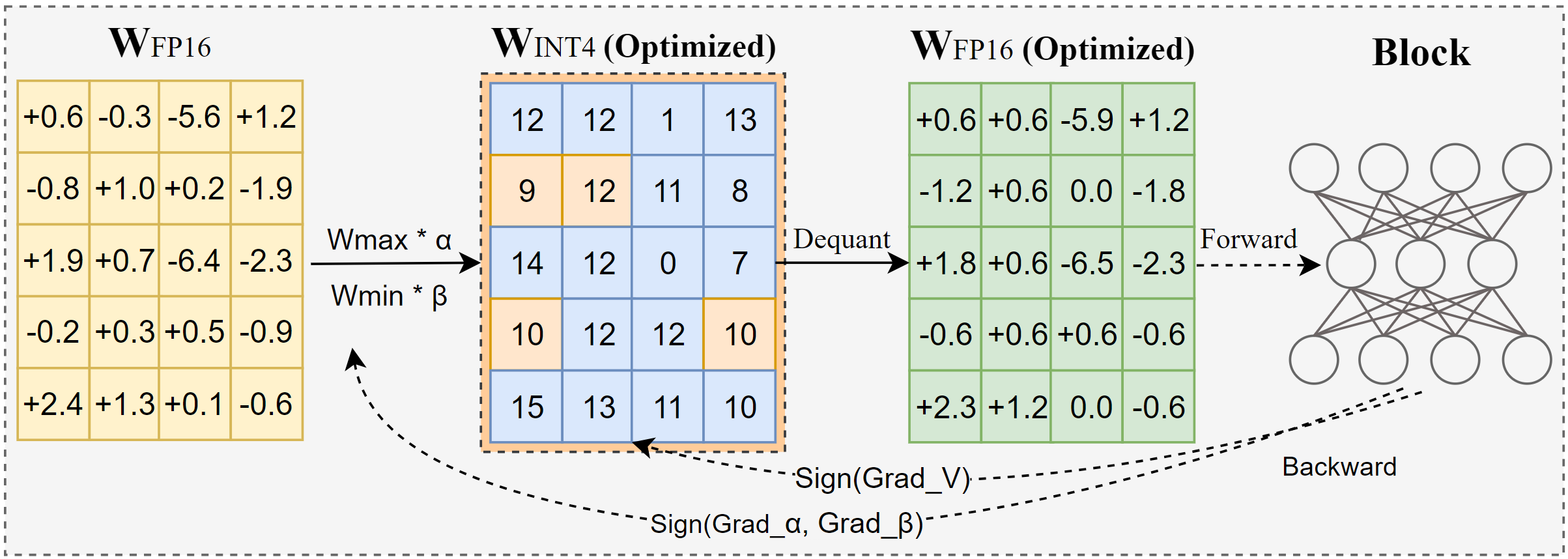
It supports several practical low-bit and adaptive-bit quantization algorithms, with a particular focus on [SignRoundV1](https://arxiv.org/pdf/2309.05516) and [SignRoundV2](http://arxiv.org/abs/2512.04746).
AutoRound is designed to deliver strong accuracy at ultra-low bit widths while keeping quantization costs reasonable. It supports widely used data types and quantization schemes, including WNA16, MXFP4, NVFP4, and FP8, as well as low-bit model formats such as GGUF.
It integrates with popular ecosystems including Transformers, vLLM, and SGLang, and supports deployment across Intel CPUs and XPUs, Gaudi accelerators, and NVIDIA GPUs.
## 🆕 What's New
* [2026/09] We improved MoE tuning speed by more than 3× and significantly reduced RAM usage. See the [doc](./docs/moe.md) for detailed results. Please note that this optimization may introduce some regressions or issues.
* [2026/09] We now support 5/6/7-bit WOQ models in vLLM and Transformers on CUDA devices, thanks to Humming Kernel.
* [2026/09] The **NeUQI** grid search ([arXiv 2505.17595](https://arxiv.org/abs/2505.17595)) is available for calibration-free quantization: `--enable_neuqi` with `--iters 0` runs a joint (scale, zero-point) search for asymmetric layers and a two-stage scale search for symmetric layers, and anchors the tuning grid when `iters > 0`. [*Results*](./docs/neuqi_acc.md)
* [2026/08] We experimentally support **algorithm composition** (e.g., `--algs awq,signround` or `--algs hadamard,awq,signround`) to improve accuracy [*Overview*](./docs/algorithm_combinations.md). We welcome any practical, deployable algorithms that are ready for real-world use. Feel free to submit a PR or leave a comment in Issues.
* [2026/06] AutoScheme has been refined to improve accuracy for gguf format. See [AutoScheme Accuracy](./docs/auto_scheme_acc.md) for details. This enhancement incurs additional tuning cost.
* [2026/06] **Community adoption update.** AutoRound is now fully integrated into vLLM-Omni [*vLLM blog*](https://vllm.ai/blog/2026-06-02-vllm-omni-autoround), following its adoption by Transformers, vLLM, and SGLang. See the [*vLLM blog*](https://vllm.ai/blog/2026-06-02-vllm-omni-autoround).
* [2026/05] We provide **free** devices for quantization; please visit [Intel Low Bit Open LLM Leaderboard](https://huggingface.co/spaces/Intel/low_bit_open_llm_leaderboard) for more details.
* [2025/12] The **SignRoundV2** paper is available. Turn on `enable_alg_ext` and use the **AutoScheme** API for mixed-precision quantization to reproduce the results: [*Paper*](http://arxiv.org/abs/2512.04746), [*Notes for evaluating LLaMA models*](./docs/alg_202508.md).
* [2025/10] AutoScheme is available to generate mixed-bit recipes in minutes: [*Usage*](https://github.com/intel/auto-round/blob/main/docs/step_by_step.md#autoscheme), [*Accuracy*](./docs/auto_scheme_acc.md).
* [2025/08] An **improved INT2** algorithm is available via `--enable_alg_ext`: [*Accuracy*](./docs/alg_202508.md)
* [2025/09] **MXFP4** and **NVFP4** dtypes is available: [*Accuracy*](./docs/mxnv_acc.md).
* [2025/07] **GGUF** format is supported: [*Usage*](./docs/step_by_step.md#gguf-format).
* [2025/03] The INT2-mixed **DeepSeek-R1** model (~200GB) retains 97.9% accuracy: [*Model*](https://huggingface.co/OPEA/DeepSeek-R1-int2-mixed-sym-inc).
## ✨ Key Features
✅ **Superior Accuracy**
Delivers strong performance even at 2–3 bits [example models](https://huggingface.co/collections/OPEA/2-3-bits-67a5f0bc6b49d73c01b4753b), with leading results at 4 bits [benchmark](https://huggingface.co/spaces/Intel/low_bit_open_llm_leaderboard).
✅ **Ecosystem Integration**
Seamlessly works with **Transformers, vLLM, SGLang** and more.
✅ **Multiple Formats Export**
Support **AutoRound, AutoAWQ, AutoGPTQ, and GGUF** for maximum compatibility. Details are shown in [export formats](https://github.com/intel/auto-round/blob/main/docs/step_by_step.md#supported-export-formats)
✅ **Fast Mixed Bits/Dtypes Scheme Generation**
Automatically configure in minutes, with about 1.1X-1.5X the model’s BF16 RAM size as overhead. Accuracy [results](./docs/auto_scheme_acc.md) and [user guide](https://github.com/intel/auto-round/blob/main/docs/step_by_step.md#autoscheme).
✅ **Optimized Round-to-Nearest Mode**
Use `--iters 0` for fast quantization with some accuracy drop for 4 bits; an optional NeUQI grid search (`--enable_neuqi`) improves the zero-shot scales. Details are shown in [opt_rtn mode](https://github.com/intel/auto-round/blob/main/docs/step_by_step.md#opt-rtn-mode)
✅ **Affordable Quantization Cost**
Quantize 7B models in about 10 minutes on a single GPU. Details are shown in [quantization costs](https://github.com/intel/auto-round/blob/main/docs/step_by_step.md#quantization-costs)
✅ **10+ VLMs Support**
Out-of-the-box quantization for 10+ vision-language models [example models](https://huggingface.co/collections/OPEA/vlms-autoround-675bc712fdd6a55ebaf11bfa), [support matrix](https://github.com/intel/auto-round/tree/main/auto_round/compressors/mllm#vlm-support-matrix)
✅ **Multiple Recipes**
Choose from `auto-round-best`, `auto-round`, `auto-round-light`, `auto-round-opt-rtn` (optimized RTN) and `auto-round-rtn` (pure RTN, fastest baseline) to suit your needs. Details are shown in [quantization recipes](https://github.com/intel/auto-round/blob/main/docs/step_by_step.md#recipe-recommendation)
✅ Advanced Utilities
Includes [multiple gpus quantization](https://github.com/intel/auto-round/blob/main/docs/step_by_step.md#devicemulti-gpu-setting-in-quantization), [multiple calibration datasets](https://github.com/intel/auto-round/blob/main/docs/step_by_step.md#default-dataset) and support for [10+ runtime backends](https://github.com/intel/auto-round/blob/main/docs/step_by_step.md#specify-inference-backend).
✅ Beyond weight only quantization. We are actively expanding support for additional datatypes such as **MXFP**, NVFP, W8A8, and more.
## Installation
### Install from pypi
```bash
# CPU(Xeon)/GPU(CUDA)
pip install auto-round
# CPU(Xeon)/GPU(CUDA) nightly
pip install auto-round-nightly
# HPU(Gaudi)
# install inside the hpu docker container, e.g. vault.habana.ai/gaudi-docker/1.23.0/ubuntu24.04/habanalabs/pytorch-installer-2.9.0:latest
pip install auto-round-hpu
# XPU(Intel GPU)
pip install torch --index-url https://download.pytorch.org/whl/xpu
pip install auto-round
```
Build from Source
```bash
# CPU(Xeon)/GPU(CUDA)
pip install .
# HPU(Gaudi)
python setup.py install hpu
# XPU(Intel GPU)
pip install torch --index-url https://download.pytorch.org/whl/xpu
pip install .
```
## Model Quantization (CPU/Intel GPU/Gaudi/CUDA)
>If you encounter issues during quantization, try using pure RTN mode with iters=0, disable_opt_rtn=True. Additionally, using group_size=32 or mixed bits is recommended for better results.
### CLI Usage
The full list of supported arguments is provided by calling `auto-round -h` on the terminal.
> **ModelScope is supported for model downloads, simply set `AR_USE_MODELSCOPE=1`.**
```bash
auto-round \
--model Qwen/Qwen3-0.6B \
--scheme "W4A16" \
--format "auto_round" \
--output_dir ./tmp_autoround
```
We offer another two recipes, `auto-round-best` and `auto-round-light`, designed for optimal accuracy and improved speed, respectively. Details are as follows.
Other Recipes
```bash
# Best accuracy, 3X slower, low_gpu_mem_usage could save ~20G but ~30%-100% slower
auto-round-best \
--model Qwen/Qwen3-0.6B \
--scheme "W4A16" \
--low_gpu_mem_usage
```
```bash
# 2-3X speedup, slight accuracy drop at W4 and larger accuracy drop at W2
auto-round-light \
--model Qwen/Qwen3-0.6B \
--scheme "W4A16"
```
```bash
# Optimized RTN (iters=0, opt_rtn enabled); fast baseline
auto-round-opt-rtn \
--model Qwen/Qwen3-0.6B \
--scheme "W4A16"
```
```bash
# Pure RTN (iters=0, no AutoRound optimization); fastest, lowest memory
# auto-routes to model-free mode for supported INT WOQ schemes
auto-round-rtn \
--model Qwen/Qwen3-0.6B \
--scheme "W4A16"
```
In conclusion, we recommend using **auto-round for W4A16 and auto-round-best with `enable_alg_ext` for W2A16**. However, you may adjust the
configuration to suit your specific requirements and available resources.
### API Usage
```python
from auto_round import AutoRound
# Load a model (supports FP8/BF16/FP16/FP32)
model_name_or_path = "Qwen/Qwen3-0.6B"
# Available schemes: "W2A16", "W3A16", "W4A16", "W8A16", "NVFP4", "MXFP4" (no real kernels), "GGUF:Q4_K_M", etc.
ar = AutoRound(model_name_or_path, scheme="W4A16")
# Highest accuracy (4–5× slower).
# `low_gpu_mem_usage=True` saves ~20GB VRAM but runs ~30%-100% slower.
# ar = AutoRound(model_name_or_path, nsamples=512, iters=1000, low_gpu_mem_usage=True)
# Faster quantization (2–3× speedup) with slight accuracy drop at W4G128.
# ar = AutoRound(model_name_or_path, nsamples=128, iters=50, lr=5e-3)
# Supported formats: "auto_round" (default), "auto_gptq", "auto_awq", "llm_compressor", "gguf:q4_k_m", etc.
ar.quantize_and_save(output_dir="./qmodel", format="auto_round")
```
Important Hyperparameters
##### Quantization Scheme & Configuration
- **`scheme` (str|dict|AutoScheme)**: The predefined quantization keys, e.g. `W4A16`, `MXFP4`, `NVFP4`, `GGUF:Q4_K_M`. For MXFP4/NVFP4, we recommend exporting to LLM-Compressor format.
- **`bits` (int)**: Number of bits for quantization (default is `None`). If not None, it will override the scheme setting.
- **`group_size` (int)**: Size of the quantization group (default is `None`). If not None, it will override the scheme setting.
- **`sym` (bool)**: Whether to use symmetric quantization (default is `None`). If not None, it will override the scheme setting.
- **`layer_config` (dict)**: Configuration for layer_wise scheme (default is `None`), mainly for customized mixed schemes.
##### Algorithm Settings
- **`enable_alg_ext` (bool)**: [Experimental Feature] Only for `iters>0`. Enable algorithm variants for specific schemes (e.g., MXFP4/W2A16) that could bring notable improvements. Default is `False`.
- **`alg_configs` (str|Config|list)**: Select one or more algorithms, such as `"awq"`, `"auto_round"`, or `['auto_round', 'quarot']`. Preprocessors run in list order and the block quantizer always runs last. Algorithm-specific options can be passed through their config objects, for example `SignRoundConfig(iters=50)`.
- **`disable_opt_rtn` (bool|None)**: Use pure RTN mode for specific schemes (e.g., GGUF and WOQ). Default is `None`. If None, it defaults to `False` in most cases to improve accuracy, but may be set to `True` due to known issues.
##### Tuning Process Parameters
- **`iters` (int)**: Number of tuning iterations (default is `200`). Common values: 0 (RTN mode), 50 (with lr=5e-3 recommended), 1000. Higher values increase accuracy but slow down tuning.
- **`lr` (float)**: The learning rate for rounding value (default is `None`). When None, it will be set to `1.0/iters` automatically.
- **`batch_size` (int)**: Batch size for training (default is `8`). 4 is also commonly used.
- **`enable_deterministic_algorithms` (bool)**: Whether to enable deterministic algorithms for reproducibility (default is `False`).
##### Calibration Dataset
- **`dataset` (str|list|tuple|torch.utils.data.DataLoader)**: The dataset for tuning (default is `"NeelNanda/pile-10k"`). Supports local JSON files and dataset combinations, e.g. `"./tmp.json,NeelNanda/pile-10k:train,mbpp:train+validation+test"`.
- I2V calibration uses real images paired with the default COCO2014 captions. Before sampling, it joins the official COCO metadata and retains only Creative Commons Attribution 2.0 images (license ID 4); the filtered manifest preserves the license and Flickr source URL. Its manifests and selected images are cached under `~/.cache/auto_round/datasets/coco2014`, or under `$AUTO_ROUND_CACHE/datasets/coco2014` when `AUTO_ROUND_CACHE` is set. T2V keeps parsing the caption manifest in memory and does not use this cache. A local TSV may instead provide `id`, `caption`, and `image` columns; `image` accepts absolute paths or paths relative to the TSV.
- **`nsamples` (int)**: Number of samples for tuning (default is `128`).
- **`seqlen` (int)**: Data length of the sequence for tuning (default is `2048`).
##### Device/Speed Configuration
- **`enable_torch_compile` (bool)**: Enabling `torch.compile` may speed up quantization, but compilation overhead can change peak memory and may increase it for some models or quantization schemes. It is enabled by default except on Windows, where it is disabled because TorchInductor requires the MSVC `cl.exe` compiler. On Windows, pass `enable_torch_compile=True` in Python or `--enable_torch_compile` on the CLI to force enable it. On other platforms, use `enable_torch_compile=False` or `--disable_torch_compile` to opt out.
- **`low_gpu_mem_usage` (bool)**: Whether to offload intermediate features to CPU at the cost of ~30%-100% more tuning time (default is `False`).
- **`low_cpu_mem_usage` (bool)**: [Experimental Feature] Whether to enable immediate-save mode to reduce RAM usage. It is enabled by default. In CLI, use `--disable_low_cpu_mem_usage` to turn it off (the legacy `--low_cpu_mem_usage` flag is kept only for compatibility).
- **`device_map` (str|dict|int)**: The device to be used for tuning, e.g., `auto`, `cpu`, `cuda`, `0,1,2` (default is `0`). When using `auto`, it will try to use all available GPUs.
- **`calibration_data_device` (str)**: Placement of the block calibration data in multi-GPU runs: `auto` (default) | `cpu` | `off` | `1,2` | `cuda:1,cuda:2`.
### Supported Schemes
> Gray indicates the absence of a kernel or the presence of only an inefficient/reference kernel. BF16 is mainly for AutoScheme
| Format | Supported Schemes |
|:-------------------|:--------------------------------------------------------------------------------------------------------------------------------------------------------------------------|
| **auto_round** | W4A16(Recommended), W2A16, W3A16, W8A16, W2A16G64, W2A16G32, `MXFP4`, `MXFP8`, `MXFP4_RCEIL`, `MXFP8_RCEIL`, `NVFP4`, `FPW8A16`, `FP8_STATIC`, `BF16` |
| **auto_awq** | W4A16(Recommended), BF16 |
| **auto_gptq** | W4A16(Recommended), W2A16, W3A16, W8A16, W2A16G64, W2A16G32,BF16 |
| **llm_compressor** | NVFP4(Recommended), `MXFP4`, `MXFP8`, `FPW8A16`, `FP8_STATIC`, `FP8_BLOCK`, `INT8`, `W4A16`, `W8A16` |
| **gguf** | GGUF:Q4_K_M(Recommended), GGUF:Q2_K_S, GGUF:Q3_K_S, GGUF:Q3_K_M, GGUF:Q3_K_L, GGUF:Q4_K_S, GGUF:Q5_K_S, GGUF:Q5_K_M, GGUF:Q6_K, GGUF:Q4_0, GGUF:Q4_1, GGUF:Q5_0, GGUF:Q5_1,GGUF:Q8_0 |
| **fake** | `all schemes (only for research)` |
### Adaptive Schemes (Experimental Feature)
AutoScheme provides an automatic algorithm to generate adaptive mixed bits/data-type quantization recipes.
Please refer to the [user guide](https://github.com/intel/auto-round/blob/main/docs/step_by_step.md#autoscheme) for more details on AutoScheme.
~~~python
from auto_round import AutoRound
model_name = "Qwen/Qwen3-8B"
layer_config = {"lm_head": "GGUF:Q6_K"}
# Change iters to 200 for non-GGUF schemes
ar = AutoRound(
model=model_name,
schemes=("GGUF:Q2_K_S", "GGUF:Q4_K_S"),
bits=3.0,
ignore_scale_zp_bits=True,
layer_config=layer_config,
iters=0,
)
ar.quantize_and_save()
~~~
Important Hyperparameters of AutoScheme
##### AutoScheme Hyperparameters
- **`bits` (float)**: Target average bit-width for the entire model when `schemes` is provided. Only quantized layers are included in the average bit calculation. Without `schemes`, `bits` is the plain weight bit width and must be an integer.
- **`schemes` (str | list[str] | list[QuantizationScheme])**: Candidate quantization schemes to choose from. It can be a single comma-separated string (e.g., `"W4A16,W2A16"`), a list of strings (e.g., `["W4A16", "W2A16"]`), or a list of `QuantizationScheme` objects. Providing schemes enables AutoScheme.
- **`ignore_scale_zp_bits` (bool)**: Only supported in API usage. Determines whether to exclude the bits of scale and zero-point from the average bit-width calculation (default: `False`).
- **`shared_layers` (Iterable[Iterable[str]], optional)**: Only supported in API usage. Defines groups of layers that share quantization settings.
- **`batch_size` (int, optional)**: Only supported in API usage. Can be set to `1` to reduce VRAM usage at the expense of longer tuning time.
### API Usage for VLMs
Click to expand
**This feature is experimental and may be subject to changes**.
By default, AutoRound only quantize the text module of VLMs and uses `NeelNanda/pile-10k` for calibration. To
quantize the entire model, you can enable `quant_nontext_module` by setting it to True, though support for this feature
is limited. For more information, please refer to the AutoRound [readme](auto_round/compressors/mllm/README.md).
```python
from auto_round import AutoRound
# Load the model
model_name_or_path = "Qwen/Qwen2.5-VL-7B-Instruct"
# Quantize the model
ar = AutoRound(model_name_or_path, scheme="W4A16")
output_dir = "./qmodel"
ar.quantize_and_save(output_dir)
```
## Model Inference
### vLLM (CPU/Intel GPU/CUDA)
```python
from vllm import LLM, SamplingParams
prompts = [
"Hello, my name is",
]
sampling_params = SamplingParams(temperature=0.6, top_p=0.95)
model_name = "Intel/DeepSeek-R1-0528-Qwen3-8B-int4-AutoRound"
llm = LLM(model=model_name)
outputs = llm.generate(prompts, sampling_params)
for output in outputs:
prompt = output.prompt
generated_text = output.outputs[0].text
print(f"Prompt: {prompt!r}, Generated text: {generated_text!r}")
```
### SGLang (Intel GPU/CUDA)
**Please note that support for the MoE models and visual language models is currently limited.**
```python
import sglang as sgl
llm = sgl.Engine(model_path="Intel/DeepSeek-R1-0528-Qwen3-8B-int4-AutoRound")
prompts = [
"Hello, my name is",
]
sampling_params = {"temperature": 0.6, "top_p": 0.95}
outputs = llm.generate(prompts, sampling_params)
for prompt, output in zip(prompts, outputs):
print(f"Prompt: {prompt}\nGenerated text: {output['text']}")
```
### Transformers (CPU/Intel GPU/Gaudi/CUDA)
AutoRound supports 10+ backends and automatically selects the best available backend based on the installed libraries and prompts the user to
install additional libraries when a better backend is found.
**Please avoid manually moving the quantized model to a different device** (e.g., model.to('cpu')) during inference, as
this may cause unexpected exceptions.
The support for Gaudi device is limited.
```python
from transformers import AutoModelForCausalLM, AutoTokenizer
model_name = "Intel/DeepSeek-R1-0528-Qwen3-8B-int4-AutoRound"
model = AutoModelForCausalLM.from_pretrained(model_name, device_map="auto", torch_dtype="auto")
tokenizer = AutoTokenizer.from_pretrained(model_name)
text = "There is a girl who likes adventure,"
inputs = tokenizer(text, return_tensors="pt").to(model.device)
print(tokenizer.decode(model.generate(**inputs, max_new_tokens=50)[0]))
```
## Publications & Events
[SignRoundV2: Closing the Performance Gap in Extremely Low-Bit Post-Training Quantization for LLMs](https://arxiv.org/abs/2512.04746) (2025.12 paper)
[Optimize Weight Rounding via Signed Gradient Descent for the Quantization of LLM](https://aclanthology.org/2024.findings-emnlp.662/) (2023.09 paper)
[TEQ: Trainable Equivalent Transformation for Quantization of LLMs](https://arxiv.org/abs/2310.10944) (2023.10 paper)
[Effective Post-Training Quantization for Large Language Models](https://medium.com/intel-analytics-software/effective-post-training-quantization-for-large-language-models-with-enhanced-smoothquant-approach-93e9d104fb98) (2023.04 blog)
Check out [Full Publication List](./docs/publication_list.md).
## Acknowledgement
Special thanks to open-source low precision libraries such as AutoGPTQ, AutoAWQ, GPTQModel, Triton, Marlin, and ExLLaMAV2 for providing low-precision CUDA kernels, which are leveraged in AutoRound.
## 🌟 Support Us
If you find AutoRound helpful, please ⭐ star the repo and share it with your community!


 [//]: # (