# Ionrift Library




**Core shared infrastructure, multi-system adapters, and creature taxonomy for the Ionrift module suite.**
### Support Ionrift
[](https://patreon.com/ionrift)
[](https://discord.gg/vFGXf7Fncj)
> Documentation, setup guides, and troubleshooting: **[Ionrift Wiki](https://github.com/ionrift-gm/ionrift-library/wiki)**
Ionrift Library provides common data contracts, multi-system adapters, tabletop roll requests, and creature taxonomy for all Ionrift modules.
---
## Core Capabilities
- **Multi-System Adapters.** Native normalization for DnD 5e, Pathfinder 2e, Starfinder 2e, Daggerheart, and Universal Tabletop systems. Keeps sheet data, rests, and roll calculations consistent across modules.
- **Tabletop Roll Requests.** Interactive prompt cards for ability checks, saving throws, and skill challenges. Includes live DC pulse cues, advantage selectors, and dice settle animations.
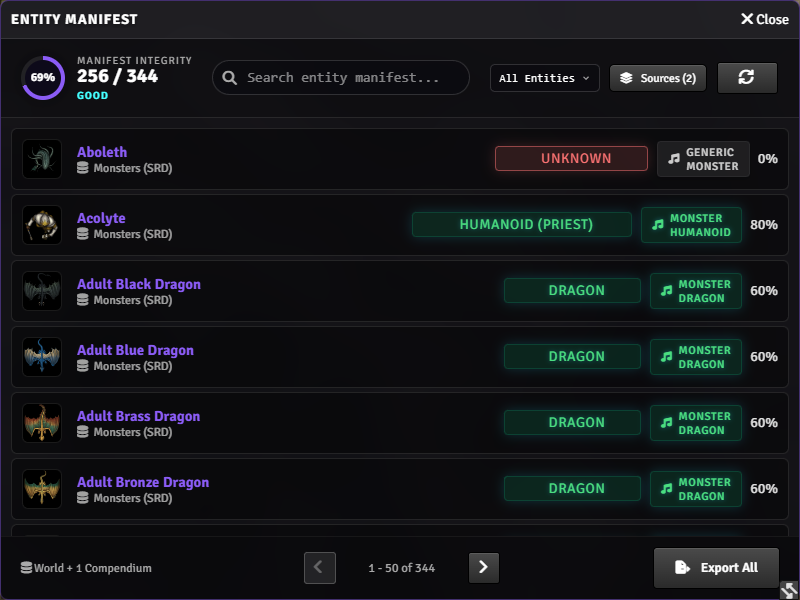
- **Creature Index & Taxonomy.** Standardizes actor data into concept identifiers (`undead`, `construct`, `beast`) and confidence ratings. Powers audio triggers in Resonance and recipe unlocks in Monstrous Feast.
- **Shared Cooking Engine.** Centralized ingredient classification, condition multipliers, and active effect buff resolution shared between Respite and Monstrous Feast.
- **Environmental & Species Registries.** Unified biome definitions (`TerrainRegistry`) and creature taxonomy tables (`SpeciesRegistry`) shared across the suite.
- **Party Roster Service.** Cross-module tracking for active adventuring party members, linked canvas tokens, and actor caching.
- **In-Game Bug Reporter.** Bundles console captures, active versions, and module states into structured support reports without exposing sensitive data.
 ---
## Setup & Configuration
1. Install **Ionrift Library** from the Foundry VTT package manager.
2. Enable the module in your world.
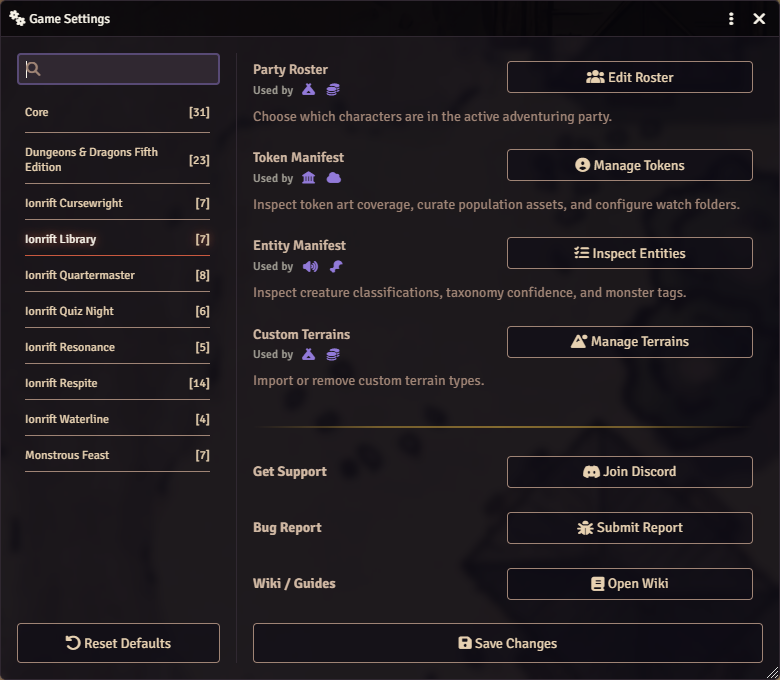
3. Access tools under **Game Settings > Module Settings > Ionrift Library**:
- **Party Roster:** Designate active party characters.
- **Entity Manifest:** Inspect creature classifications, confidence scores, and taxonomy tags.
- **Token Manifest:** Review curated token art coverage and directory paths.
- **Custom Terrains:** Manage custom terrain definitions for rest and loot generation.
---
## Setup & Configuration
1. Install **Ionrift Library** from the Foundry VTT package manager.
2. Enable the module in your world.
3. Access tools under **Game Settings > Module Settings > Ionrift Library**:
- **Party Roster:** Designate active party characters.
- **Entity Manifest:** Inspect creature classifications, confidence scores, and taxonomy tags.
- **Token Manifest:** Review curated token art coverage and directory paths.
- **Custom Terrains:** Manage custom terrain definitions for rest and loot generation.
 ---
## Developer Integration
Dependent modules declare Ionrift Library in `module.json`:
```json
"relationships": {
"requires": [
{
"id": "ionrift-library",
"type": "module",
"compatibility": { "minimum": "3.0.0" }
}
]
}
```
### Creature Classification API
```javascript
if (game.ionrift?.library?.classifyCreature) {
const result = game.ionrift.library.classifyCreature(actor.name);
if (result.id !== "unknown") {
console.log(result.id); // e.g. "skeleton"
console.log(result.sound); // e.g. "MONSTER_SKELETON"
console.log(result.tags); // e.g. Set {"undead", "skeleton", "bone"}
console.log(result.confidence); // 0.0 to 1.0
}
}
```
---
## Requirements
- **Foundry VTT:** v12 through v14.
- **Supported Game Systems:** DnD 5e, Pathfinder 2e, Starfinder 2e, Daggerheart, or Universal Tabletop systems.
---
## Bug Reports
1. Check the **[Ionrift Wiki](https://github.com/ionrift-gm/ionrift-library/wiki)** for common setup guides.
2. Post to the **[Ionrift Discord](https://discord.gg/vFGXf7Fncj)** with your Foundry version, module versions, and console output.
3. Open a **[GitHub Issue](https://github.com/ionrift-gm/ionrift-library/issues)**.
---
## License
Released under the [MIT License](./LICENSE).
---
**Part of the [Ionrift Module Suite](https://github.com/ionrift-gm)**
[Wiki](https://github.com/ionrift-gm/ionrift-library/wiki) · [Discord](https://discord.gg/vFGXf7Fncj) · [Patreon](https://patreon.com/ionrift)
---
## Developer Integration
Dependent modules declare Ionrift Library in `module.json`:
```json
"relationships": {
"requires": [
{
"id": "ionrift-library",
"type": "module",
"compatibility": { "minimum": "3.0.0" }
}
]
}
```
### Creature Classification API
```javascript
if (game.ionrift?.library?.classifyCreature) {
const result = game.ionrift.library.classifyCreature(actor.name);
if (result.id !== "unknown") {
console.log(result.id); // e.g. "skeleton"
console.log(result.sound); // e.g. "MONSTER_SKELETON"
console.log(result.tags); // e.g. Set {"undead", "skeleton", "bone"}
console.log(result.confidence); // 0.0 to 1.0
}
}
```
---
## Requirements
- **Foundry VTT:** v12 through v14.
- **Supported Game Systems:** DnD 5e, Pathfinder 2e, Starfinder 2e, Daggerheart, or Universal Tabletop systems.
---
## Bug Reports
1. Check the **[Ionrift Wiki](https://github.com/ionrift-gm/ionrift-library/wiki)** for common setup guides.
2. Post to the **[Ionrift Discord](https://discord.gg/vFGXf7Fncj)** with your Foundry version, module versions, and console output.
3. Open a **[GitHub Issue](https://github.com/ionrift-gm/ionrift-library/issues)**.
---
## License
Released under the [MIT License](./LICENSE).
---
**Part of the [Ionrift Module Suite](https://github.com/ionrift-gm)**
[Wiki](https://github.com/ionrift-gm/ionrift-library/wiki) · [Discord](https://discord.gg/vFGXf7Fncj) · [Patreon](https://patreon.com/ionrift)