# Ionrift Resonance




**Automated combat sound effects, two-beat weapon choreography, and creature audio for Foundry VTT.**
### Support Ionrift
[](https://patreon.com/ionrift)
[](https://discord.gg/vFGXf7Fncj)
> Documentation, setup guides, and troubleshooting: **[Ionrift Wiki](https://github.com/ionrift-gm/ionrift-library/wiki)**
Resonance triggers contextual sound effects for melee strikes, ranged shots, spells, and creature abilities from local audio files or Syrinscape cloud playback.
---
## Core Capabilities
- **Two-Beat Attack Sequences.** Plays distinct audio for the attack action (swing, bow draw, spell cast) and resolution (impact, miss, spell burst, pain or death vocals). Timing offsets are adjustable in Orchestration.
- **11 Tabletop Systems.** Built-in support for Daggerheart, Pathfinder 2e, Starfinder, DnD 3.5e, Pathfinder 1e, Old-School Essentials, Call of Cthulhu 7e, SWADE, Warhammer Fantasy Roleplay 4e, Cyberpunk RED, and Blades in the Dark. DnD 5e integrates with Midi-QOL for automated combat workflows.
- **Cross-Module Audio Triggers.**
- **Ionrift Respite:** Ambient campfire crackle, kindling ignition, stoking, whittling, and rest resolution cues.
- **Ionrift Quiz Night:** Audio cues for round starts, timers, answers, and ceremonies.
- **Ionrift Cursewright:** Curse cues for removal attempts, whispers, phase changes, devouring containers, tributes, and Remove Curse. Each plays to the bearer, the GM, or the whole table.
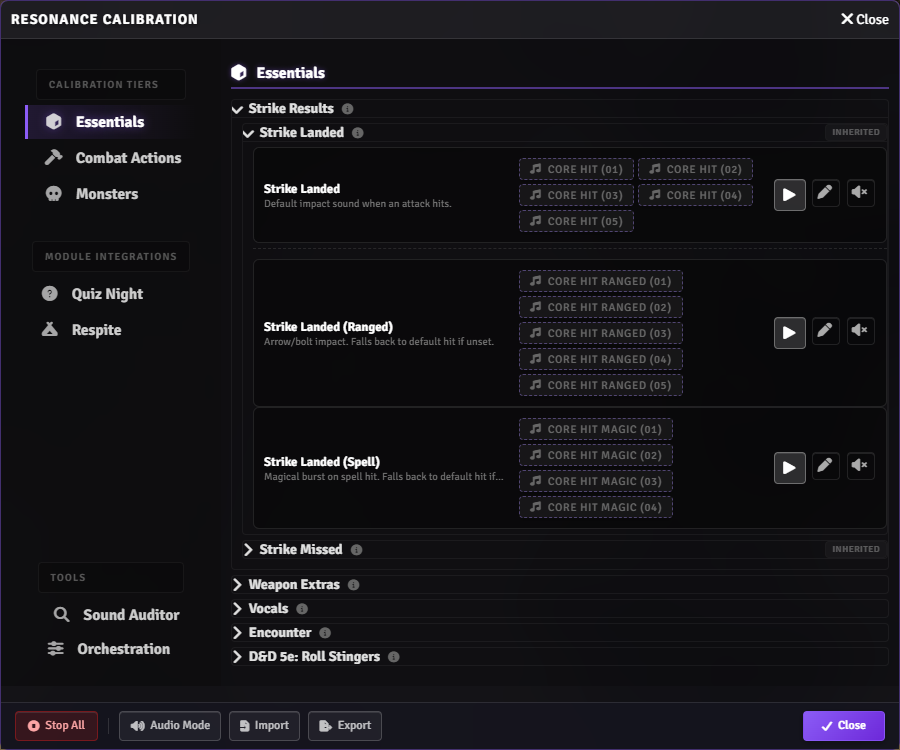
- **Calibration UI & Sound Auditor.** Map game events across Core Essentials, Combat Actions, Spells, and Monsters. The Sound Auditor tool scans world items for lingering sound flags.
- **Multi-Sound Randomization.** Ctrl+Click in the Sound Picker to assign multiple sounds to a single key for varied playback.
- **Fallback Mute Controls.** Silence generic swing sounds (`CORE_WHOOSH`) without clearing item or actor presets.
- **Category Volume Sliders.** Independent volume attenuation for melee attacks, ranged weapons, spells, and interface audio.
- **Per-Actor & Per-Item Overrides.** Assign bespoke audio to specific weapons, unique monster abilities, and PC vocal lines (Masculine / Feminine presentation).
 ---
## Setup & Audio Mode
1. Install **Ionrift Library** and **Ionrift Resonance** from the package manager.
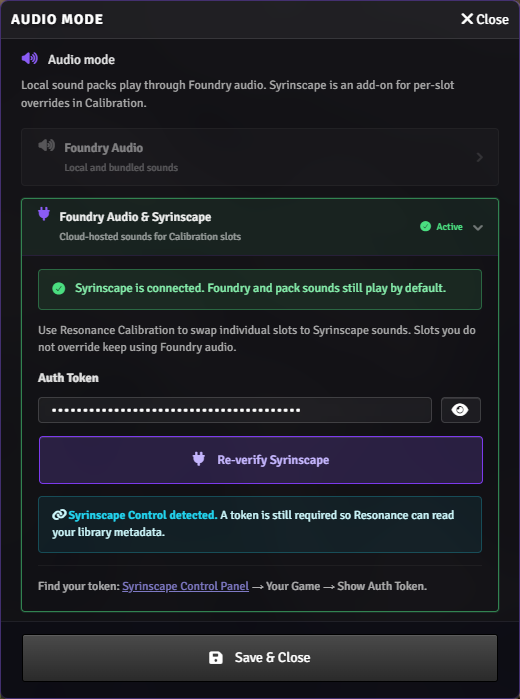
2. Open **Game Settings > Module Settings > Ionrift Resonance > Audio Mode**.
3. Choose your audio provider:
- **Local Sound Packs:** Uses audio files from installed sound packs.
- **Syrinscape Web API:** Connects via your Syrinscape auth token for cloud audio.
- **Custom / Manual:** Blank canvas for custom audio mappings.
---
## Setup & Audio Mode
1. Install **Ionrift Library** and **Ionrift Resonance** from the package manager.
2. Open **Game Settings > Module Settings > Ionrift Resonance > Audio Mode**.
3. Choose your audio provider:
- **Local Sound Packs:** Uses audio files from installed sound packs.
- **Syrinscape Web API:** Connects via your Syrinscape auth token for cloud audio.
- **Custom / Manual:** Blank canvas for custom audio mappings.
 ---
## Calibration & Tuning
Open **Resonance Calibration** from Module Settings:
- **Tier 1 (Essentials):** Critical hits, fumbles, strike misses, and PC pain and death vocals.
- **Tier 2 (Combat Actions):** Weapon sound assignments (Slashing, Piercing, Bludgeoning, Bows) and Magic Schools (Fire, Ice, Lightning, Necrotic, Radiant).
- **Tier 3 (Monsters):** Creature family vocals and default attacks via Library creature taxonomy.
- **Integrations:** Dedicated sound triggers for Ionrift Respite, Ionrift Quiz Night, and Ionrift Cursewright.
- **Tools:** Sound Auditor item scanner and Orchestration timing controls.
---
## Calibration & Tuning
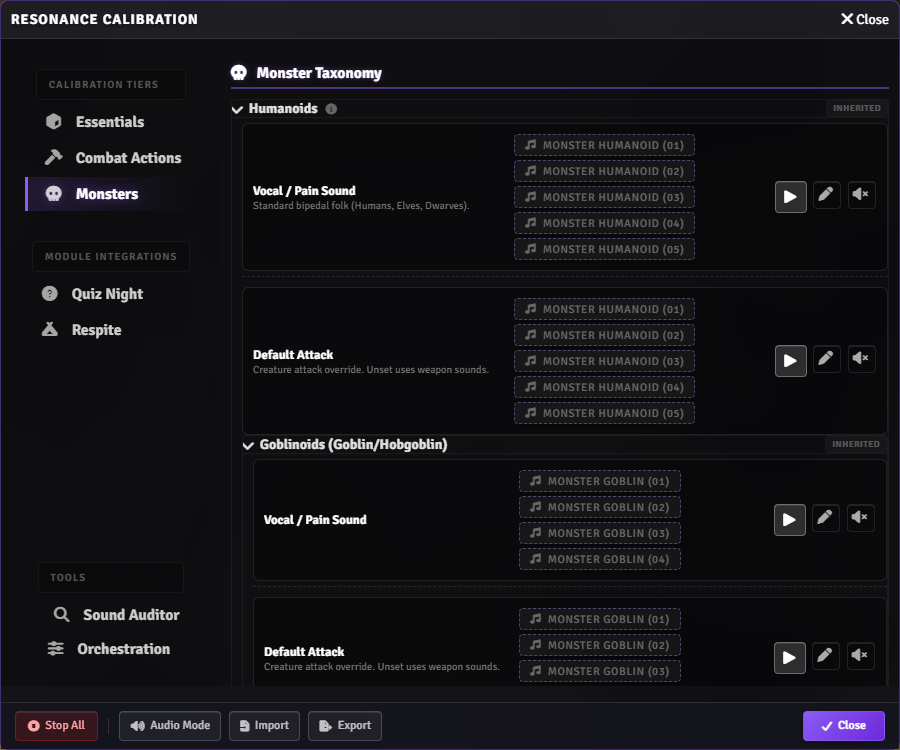
Open **Resonance Calibration** from Module Settings:
- **Tier 1 (Essentials):** Critical hits, fumbles, strike misses, and PC pain and death vocals.
- **Tier 2 (Combat Actions):** Weapon sound assignments (Slashing, Piercing, Bludgeoning, Bows) and Magic Schools (Fire, Ice, Lightning, Necrotic, Radiant).
- **Tier 3 (Monsters):** Creature family vocals and default attacks via Library creature taxonomy.
- **Integrations:** Dedicated sound triggers for Ionrift Respite, Ionrift Quiz Night, and Ionrift Cursewright.
- **Tools:** Sound Auditor item scanner and Orchestration timing controls.
 ---
## Supported Systems
- **Daggerheart:** Native support. Triggers on Duality Dice rolls (Fear, Hope, Criticals), Fear Tracker thresholds (1-4, 5-8, 9+), Hope and Stress resource changes.
- **DnD 5e:** Full automation via Midi-QOL (attack rolls, damage rolls, and automated HP-based pain and death vocals). Native DnD 5e fallback supports attack roll sounds.
- **Pathfinder 2e & Starfinder:** Native attack, spell, damage, and death triggers.
- **Expanded Systems:** Native sound hooks for DnD 3.5e, PF1e, OSE, Call of Cthulhu 7e, SWADE, WFRP 4e, Cyberpunk RED, and Blades in the Dark.
---
## Requirements & Optional Modules
- **[Ionrift Library](https://github.com/ionrift-gm/ionrift-library):** Required kernel dependency.
- **[Midi-QOL](https://foundryvtt.com/packages/midi-qol):** Required for DnD 5e damage and death automation.
- **[Dice So Nice](https://foundryvtt.com/packages/dice-so-nice)** (optional): 3D dice rolls introduce natural timing pauses between attack swings and results.
- **[Automated Animations](https://foundryvtt.com/packages/autoanimations)** (optional): Visual animations pair with audio cues.
---
## Bug Reports
1. Check the **[Ionrift Wiki](https://github.com/ionrift-gm/ionrift-library/wiki)** for common setup guides.
2. Post to the **[Ionrift Discord](https://discord.gg/vFGXf7Fncj)** with your Foundry version, module versions, and console output.
3. Open a **[GitHub Issue](https://github.com/ionrift-gm/ionrift-resonance/issues)**.
---
## License
Source code released under the [MIT License](./LICENSE).
---
**Part of the [Ionrift Module Suite](https://github.com/ionrift-gm)**
[Wiki](https://github.com/ionrift-gm/ionrift-library/wiki) · [Discord](https://discord.gg/vFGXf7Fncj) · [Patreon](https://patreon.com/ionrift)
---
## Supported Systems
- **Daggerheart:** Native support. Triggers on Duality Dice rolls (Fear, Hope, Criticals), Fear Tracker thresholds (1-4, 5-8, 9+), Hope and Stress resource changes.
- **DnD 5e:** Full automation via Midi-QOL (attack rolls, damage rolls, and automated HP-based pain and death vocals). Native DnD 5e fallback supports attack roll sounds.
- **Pathfinder 2e & Starfinder:** Native attack, spell, damage, and death triggers.
- **Expanded Systems:** Native sound hooks for DnD 3.5e, PF1e, OSE, Call of Cthulhu 7e, SWADE, WFRP 4e, Cyberpunk RED, and Blades in the Dark.
---
## Requirements & Optional Modules
- **[Ionrift Library](https://github.com/ionrift-gm/ionrift-library):** Required kernel dependency.
- **[Midi-QOL](https://foundryvtt.com/packages/midi-qol):** Required for DnD 5e damage and death automation.
- **[Dice So Nice](https://foundryvtt.com/packages/dice-so-nice)** (optional): 3D dice rolls introduce natural timing pauses between attack swings and results.
- **[Automated Animations](https://foundryvtt.com/packages/autoanimations)** (optional): Visual animations pair with audio cues.
---
## Bug Reports
1. Check the **[Ionrift Wiki](https://github.com/ionrift-gm/ionrift-library/wiki)** for common setup guides.
2. Post to the **[Ionrift Discord](https://discord.gg/vFGXf7Fncj)** with your Foundry version, module versions, and console output.
3. Open a **[GitHub Issue](https://github.com/ionrift-gm/ionrift-resonance/issues)**.
---
## License
Source code released under the [MIT License](./LICENSE).
---
**Part of the [Ionrift Module Suite](https://github.com/ionrift-gm)**
[Wiki](https://github.com/ionrift-gm/ionrift-library/wiki) · [Discord](https://discord.gg/vFGXf7Fncj) · [Patreon](https://patreon.com/ionrift)