


**Your always-on personal AI assistant. One pure-Swift daemon on hardware you own.**
`clawd` pairs a private Telegram bot with the LLM of your choice. It remembers what you
tell it and runs scheduled and proactive tasks. Consequential tool calls wait for your
approval. Everything it keeps stays in one directory on your own machine: a SQLite
database, encrypted secret envelopes, and Markdown files you edit by hand.
## Features
- **One binary. Your machine.** Run your always-on personal assistant as a single Swift
daemon, with persistent state stored on hardware you own.
- **Coding tasks from chat.** Opt in to Coder to delegate an approved task from your DM or a
configured group topic to your native Codex installation, then receive a structured result card
when the background job finishes. Local changes and GitHub pull requests use your installed tools
and repository rights.
- **Scheduled tasks that learn from feedback.** Opt in with `CLAW_LEARNING_ENABLED=true`.
Correct one result to start a bounded lesson trial; two positive runs can promote it.
Inspect lessons and roll back a promotion with `/learning`.
- **Proactive, on your clock.** "Every weekday at 07:00" schedules fire once per
occurrence across restarts and DST changes, and an opt-in heartbeat respects quiet hours.
- **Daily notes across sessions.** Set `CLAW_JOURNAL_ENABLED=true` for your personal deployment.
clawd batches decisions, results and unfinished work into dated Markdown files and loads today's
and yesterday's notes after `/new` or a restart. Inspect or delete them with `/journal`.
[Daily journals](docs/CUSTOMIZATION.md#daily-journal-files) explains delays and extra model usage.
- **Durable memory.** Facts you confirm persist in SQLite, and clawd recalls them by
importance and recency. Workspace Markdown files hold your profile and curated memory,
and conversation history is full-text searchable.
- **Tools behind a policy engine.** `web_fetch` sits behind an SSRF gate; writes and code
execution wait for an explicit tap-to-approve in Telegram. clawd enforces policy in
code and treats inbound content as data, never as instructions.
- **Bring your own model.** Any OpenAI-compatible endpoint works, and `clawd auth login`
can run an eligible model on a ChatGPT subscription.
- **Skills you write once.** A `skills//SKILL.md` file shows up in context as its name
and one line about when to use it; when a task matches, clawd loads the body and follows
your procedure instead of asking you to paste it again. Send `/skills` to see every
accepted skill and each file the scanner rejected.
- **Tools from MCP servers.** List a server, store its token encrypted, and its tools join
the built-ins as the least-trusted tools clawd has. Calls ask by default; you may mark a
named tool safe, but the exfiltration gate can still require approval. Only you can add a
server or change what it exposes.
- **A real Telegram chat.** Answers stream in as live message drafts. Tap **Stop** to cancel
that turn and keep queued messages. `/stop` cancels current and queued turns; `/new` starts a
fresh session. clawd transcribes voice notes on-device
(macOS 26), and it looks at photos you send if your model can see them.
- **Sandboxed code execution.** Untrusted code runs in a fresh disposable VM per request
(macOS 26 arm64, off by default).
## The approval card
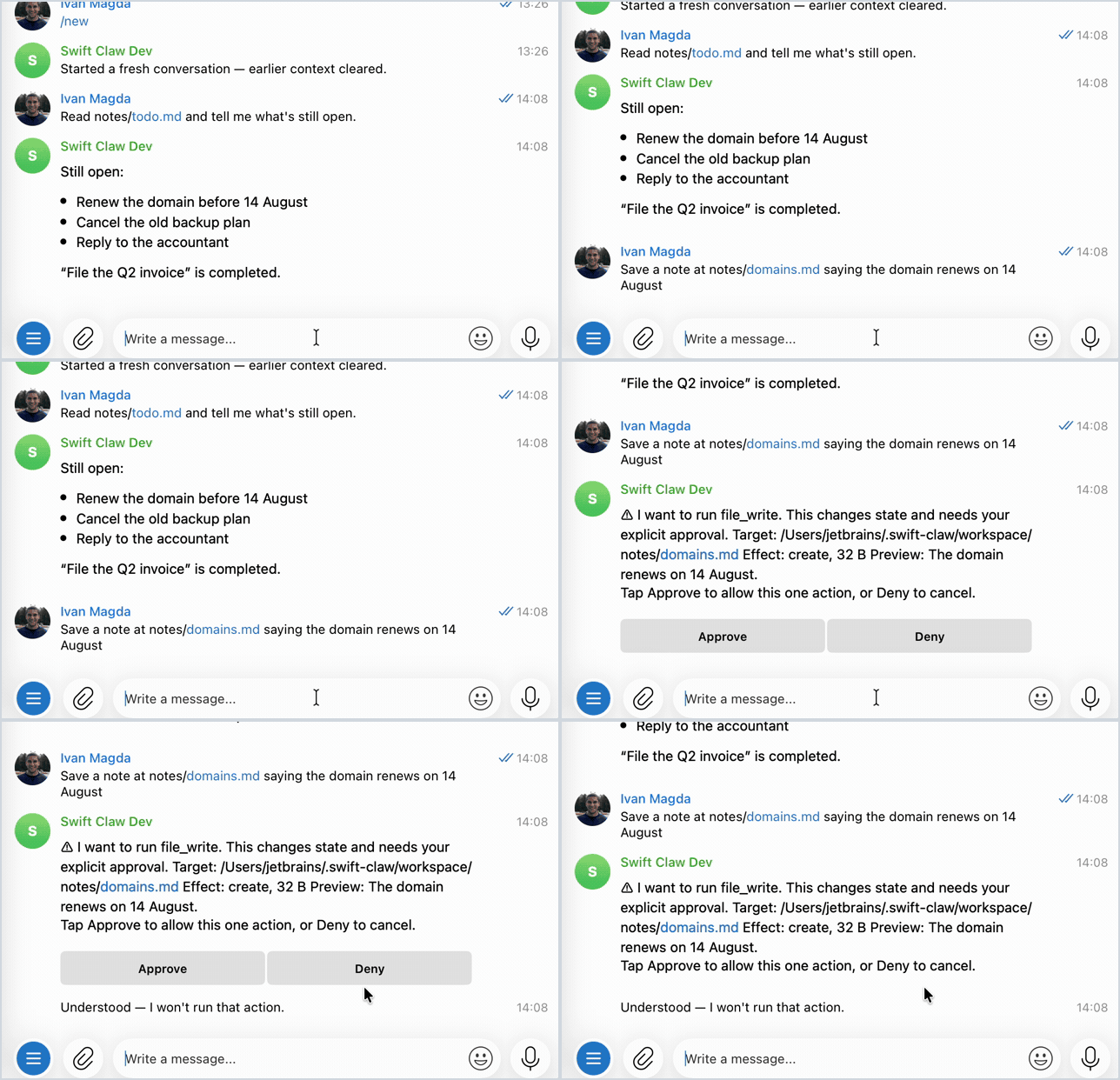
A file write suspends the run until you answer. Every field on the card comes from the daemon's own
record of the action: the target path after symlink and `..` resolution, the size, and a preview of
the content. Coder uses a dedicated card with the complete source, workspace, publication scope,
provided task or selected issue, and optional additional requirements; its completion card puts the
outcome first and keeps technical evidence compact. Tap Deny and clawd writes nothing.
## Install
```bash
curl -fsSL https://raw.githubusercontent.com/ivan-magda/swift-claw/main/install.sh | sh
```
Everything lands in `~/.swift-claw`, with no sudo. The script verifies every download
against the release checksums, stages the service files, and prints the next steps.
Pin a release with `curl … | CLAWD_VERSION=v0.2.0 sh`, read the
[script source](install.sh) first, or follow the manual route in
[docs/INSTALL.md](docs/INSTALL.md) (macOS 26+ arm64; Linux x86_64 with glibc 2.38+).
Or [build from source](docs/INSTALL.md#build-from-source) with the pinned Swift 6.4 toolchain.
Linux source builds also need `libsqlite3-dev`.
## Quick start
1. Get a bot token from [@BotFather](https://t.me/BotFather) (send `/newbot`).
2. Edit `~/.swift-claw/clawd.env`: set the token and your LLM provider
(`CLAW_LLM_BASE_URL`, `CLAW_LLM_MODEL`, `CLAW_LLM_API_KEY`).
3. Load the config and encrypt your secrets at rest:
`set -a && . ~/.swift-claw/clawd.env && set +a && clawd secrets seal`
4. Say hello once in the foreground: `clawd run`, then send `/start` to your bot. The
refusal shows your numeric ID; set it as `CLAW_ALLOWLIST=` in `clawd.env`, then
Ctrl-C.
5. Check health and start the service:
`set -a && . ~/.swift-claw/clawd.env && set +a && clawd doctor`, then run the start
command doctor prints.
The full walkthrough, including the ChatGPT-subscription route and troubleshooting, is
in [docs/GETTING_STARTED.md](docs/GETTING_STARTED.md).
In Telegram, `/schedule` creates or lists jobs; `/runnow ` runs one now;
`/pause`, `/resume`, and `/cancel` control a job. `/learning ` shows its lessons and
trial, and `/learning reset ` asks you to confirm an empty lesson set. `/help` lists
commands and confirmation rules. `/journal`, `/journal show YYYY-MM-DD`, and
`/journal delete YYYY-MM-DD` inspect and manage personal daily notes, including while automatic
journaling is disabled.
## Security model
swift-claw assumes you are the only person it serves in its normal personal deployment. Configured
groups are a supervised exception: use a separate nonpersonal state root, trust the participants,
and understand that their ordinary tool approvals are relaxed; see
[group Coder configuration](docs/CUSTOMIZATION.md#coder-configuration).
- **Default-deny.** Only allowlisted Telegram IDs get a conversation. clawd refuses
everyone else, and answers `/start` with the sender's own numeric ID so you can
allowlist them. `CLAW_ALLOWLIST` only ever adds, so revoking an ID means deleting its
row from the database ([details](docs/CUSTOMIZATION.md#everything-else)).
- **Secrets encrypted at rest.** `clawd secrets seal` wraps the bot token and API keys in
an AES-GCM envelope. Plaintext env secrets remain available as a dev fallback that
warns on every boot.
- **Approvals are durable and bound to their prompt.** In your DM, file writes, memory writes, code
execution, and native Coder submissions suspend into a durable state machine until you decide. In
a configured group, Coder submission is the one action that always asks: any current participant
can approve or deny from its original approval message, and clawd checks membership with Telegram
at the tap. Pending approvals expire to deny.
- **Prompt injection contained in the personal deployment.** Messages, web content, tool output,
and stored memory
enter the context as untrusted data. Once a session has both ingested untrusted content
and pulled your private files into context, fetching an arbitrary URL also needs your
approval. clawd pins your LLM and search providers in config, and the model cannot
redirect them.
Opt-in daily journals are private labeled data that preserve useful conclusions without setting
session taint. While enabled, clawd checks outbound tool arguments for MEMORY/USER substrings
independently of taint. This check adds no approvals and does not prevent every possible disclosure.
The full model is in [docs/ARCHITECTURE.md](docs/ARCHITECTURE.md) (§12). To report a
vulnerability, see [SECURITY.md](SECURITY.md).
## Customize your agent
Persona and behavior live in Markdown files under `~/.swift-claw/workspace/`:
| File | Shapes | Trust |
| ------------------------ | ---------------------------------------------------- | ------------------- |
| `SOUL.md` | Personality and tone | System prompt |
| `AGENTS.md` | Behavior rules | System prompt |
| `TOOLS.md` | When and how to use tools | System prompt |
| `USER.md` | Who you are | Untrusted, labeled |
| `HEARTBEAT.md` | The proactive heartbeat checklist | Heartbeat runs only |
| `skills//SKILL.md` | A procedure the agent loads when a task calls for it | Untrusted, labeled |
MCP servers go in `~/.swift-claw/mcp.yaml`, with their tokens stored encrypted by
`clawd mcp set-token`. Other runtime knobs are environment variables: the model route
(`CLAW_LLM_MODEL`), an optional fallback route (`CLAW_LLM_FALLBACK_MODEL`, off unless you
set it), USD budgets, schedules and quiet hours, voice locales, sandbox limits.
[`.env.example`](.env.example) documents every variable;
[docs/CUSTOMIZATION.md](docs/CUSTOMIZATION.md) is the guide.
## Documentation
| You want to | Read |
| -------------------------------- | ------------------------------------------------------------------------------------------------------------------------------------------------------------------------------------ |
| Set it up end to end | [docs/GETTING_STARTED.md](docs/GETTING_STARTED.md) |
| Install, update, or uninstall | [docs/INSTALL.md](docs/INSTALL.md) |
| Make it yours | [docs/CUSTOMIZATION.md](docs/CUSTOMIZATION.md) |
| Run it as a service | [docs/INSTALL.md](docs/INSTALL.md#4-running-as-a-service) |
| Develop and test locally | [docs/LOCAL_DEV.md](docs/LOCAL_DEV.md) |
| Follow the Swift style baseline | [docs/CODE_STYLE.md](docs/CODE_STYLE.md) |
| Understand the design | [docs/ARCHITECTURE.md](docs/ARCHITECTURE.md) |
| See the architecture as diagrams | [swift-claw-architecture.html](https://raw.githack.com/ivan-magda/swift-claw/main/docs/diagrams/swift-claw-architecture.html) ([source](docs/diagrams/swift-claw-architecture.html)) |
| Report a vulnerability | [SECURITY.md](SECURITY.md) |
Experimental benchmarks, corpora and the Swift evaluation harness live in
[swift-claw-evals](https://github.com/ivan-magda/swift-claw-evals). The daemon's scheduled-learning
implementation and product tests stay in this repository. Building and testing `clawd` does not
require the laboratory.
## Contributing
Contributions are welcome. Open an issue to discuss what you have in mind before
sending a pull request; [CONTRIBUTING.md](CONTRIBUTING.md) has the details and the
lint/test gate.
Please follow our [Code of Conduct](CODE_OF_CONDUCT.md) when participating in the project.
## License
[MIT](LICENSE) © Ivan Magda