
🌈Rainbow Brackets for IntelliJ-based IDEs/Android Studio/HUAWEI DevEco Studio And Fleet





| Language | Rainbowify Brackets | Indent Guidelines Highlighting(Free + Premium options) | Scope Highlighting(Free + Premium options) | Rainbowify Variables | Language-Specific Features |
|---|---|---|---|---|---|
| Java | ✅ | ✅ | ✅ | ✅ | |
| Scala | ✅ | ✅ ✨Premium for braceless style | ✅ | ✅ | |
| Kotlin | ✅ | ✅ | ✅ | ✅ | Function literal braces and arrow highlighting |
| Python | ✅ | ✨ Premium | ✨ Premium | ✅ | Keyword highlighting |
| JavaScript/TypeScript | ✅ | ✅ | ✅ | ✅ | JSX support |
| HTML/XML | ✅ | ✅ | ✨ Premium | ✅ Tag name highlighting | ✨ Svelte control flows |
| Vue.js | ✅ | ✅ | ✨ Premium | - | |
| C# | ✨ Premium | ✅ | ✨ Premium | ✨ Premium | ✨ Support .shader .cginc .hlsl .cshtml GDScript etc. |
| F# | ✨ Premium | ✨ Premium | - | ✨ Premium | |
| C++ (CLion Classic/ Android Studio) |
✅ | ✅ | ✅ | ✅ | ✨Premium: #if/#ifdef macros |
| C++ (CLion Nova/ Rider/ IntelliJ 2025.3+) |
✨ Premium in Rider | ✨Premium | ✨Premium | ✨Premium | ✨Premium: #if/#ifdef macros |
| YAML | ✅ | ✨ Premium | ✅ | ✅ Tag name highlighting | |
| Jinja2 | ✨ Premium | ✨ Premium | - | - | |
| Pug/Jade | ✅ | ✨ Premium | - | - | |
| Dart | ✅ | ✅ | ✅ | ✨ Premium | |
| Rust | ✅ | ✅ | ✅ | ✅ | |
| Go | ✅ | ✅ | ✅ | ✅ |
 ### Install it inside your IDE:
For Windows & Linux - File > Settings > Plugins > Marketplace > Search for "Rainbow Brackets" > Install Plugin > Restart IntelliJ IDEA
For Mac - IntelliJ IDEA > Preferences > Plugins > Marketplace > Search for "Rainbow Brackets" > Install Plugin > Restart IntelliJ IDEA
## Screenshots
### Java
### Install it inside your IDE:
For Windows & Linux - File > Settings > Plugins > Marketplace > Search for "Rainbow Brackets" > Install Plugin > Restart IntelliJ IDEA
For Mac - IntelliJ IDEA > Preferences > Plugins > Marketplace > Search for "Rainbow Brackets" > Install Plugin > Restart IntelliJ IDEA
## Screenshots
### Java
 ### Scala
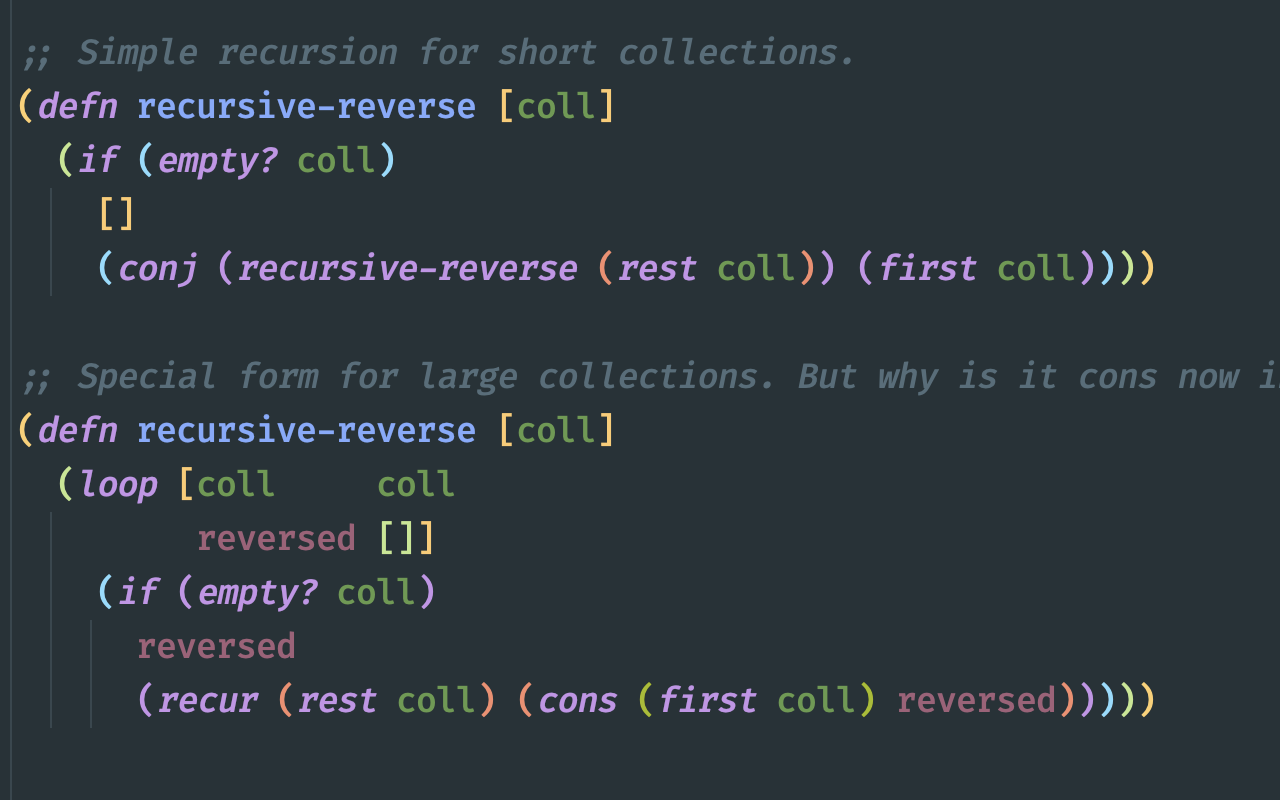
 ### Clojure
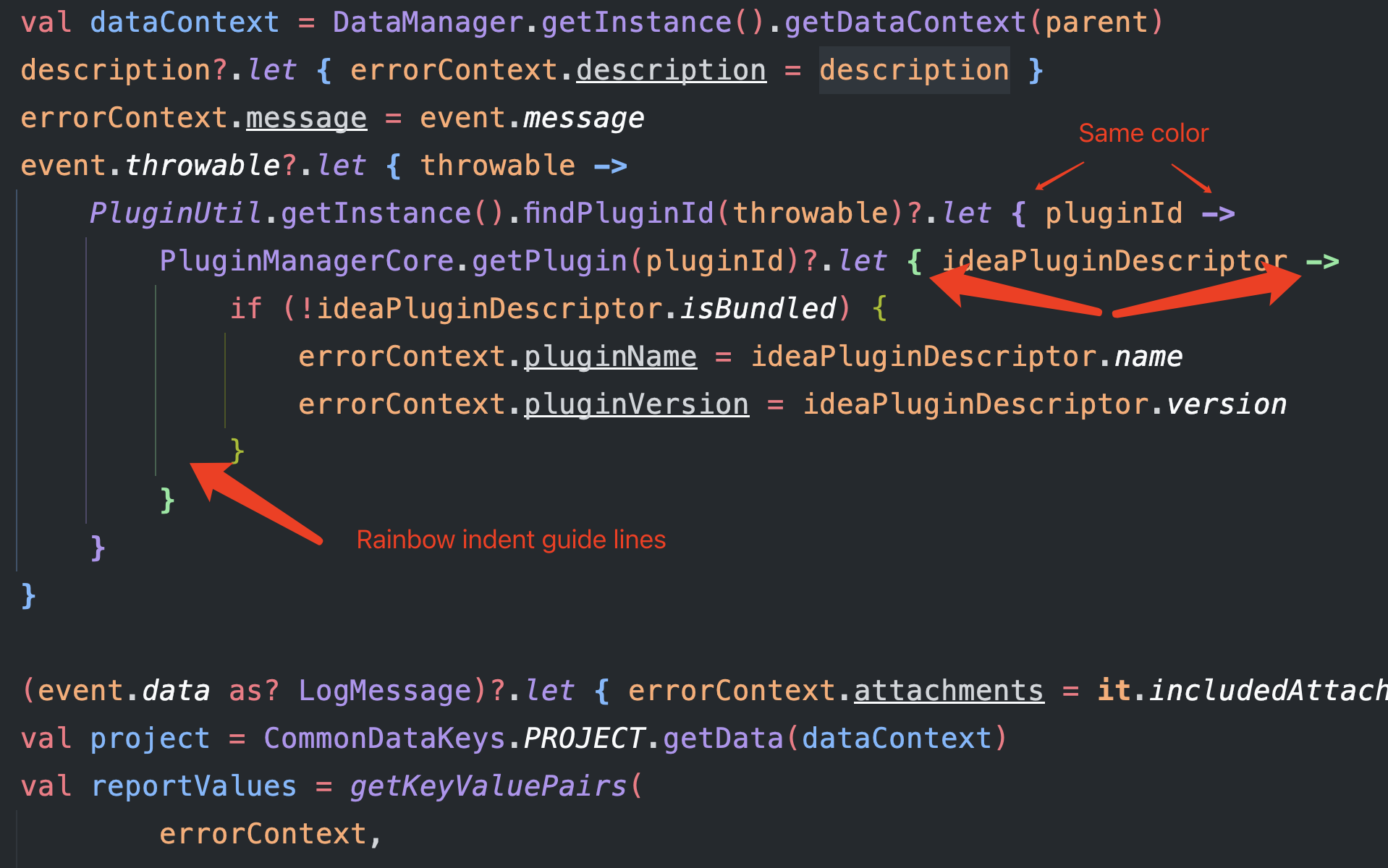
 ### Kotlin
 ### HTML/XML
**NOTE: need to turn on the 'Rainbowify tag name' option**
### HTML/XML
**NOTE: need to turn on the 'Rainbowify tag name' option**
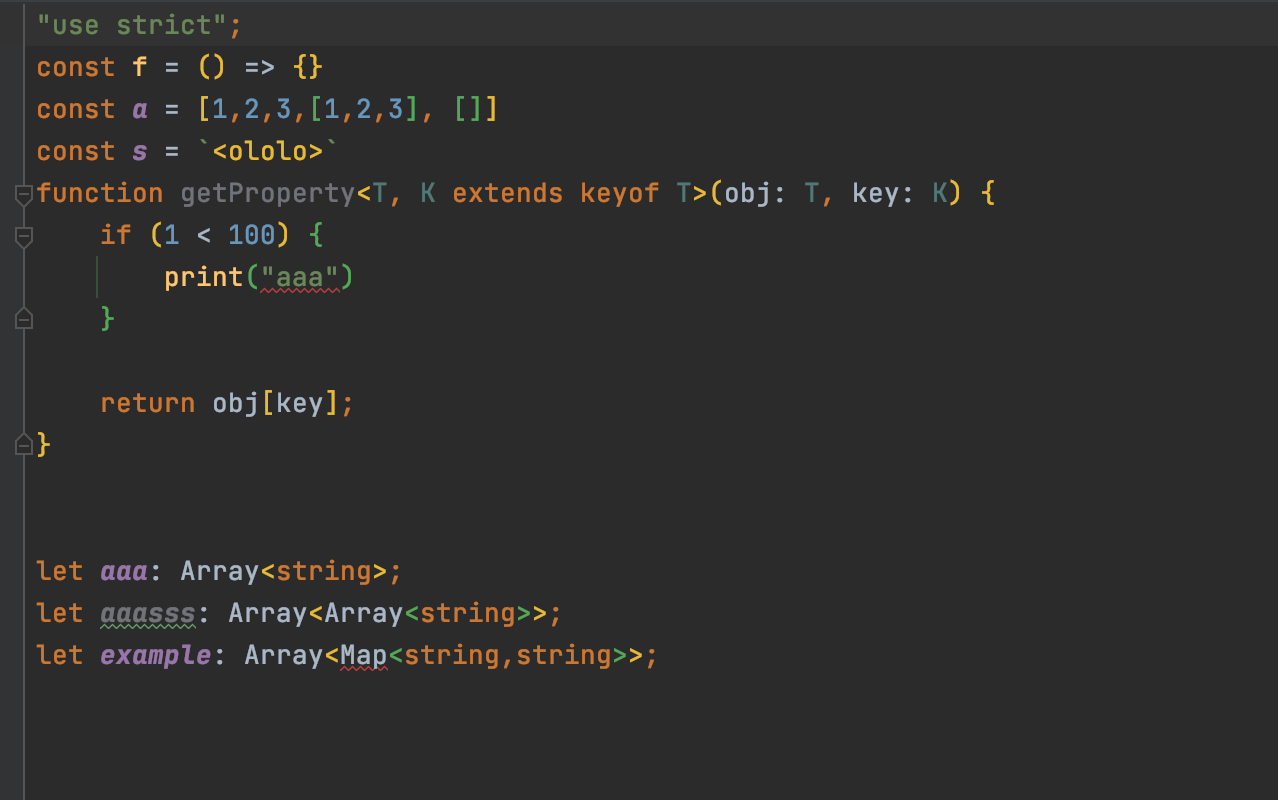
 ### Javascript & Typescript
**NOTE: need to turn on the 'Rainbowify tag name' option**
### Javascript & Typescript
**NOTE: need to turn on the 'Rainbowify tag name' option**

 ### C#
 ### Dart
 ### Python


 ### YAML
To disable rainbowify tags for yaml, please follow: https://github.com/izhangzhihao/intellij-rainbow-brackets/discussions/2639#discussioncomment-6106439
### YAML
To disable rainbowify tags for yaml, please follow: https://github.com/izhangzhihao/intellij-rainbow-brackets/discussions/2639#discussioncomment-6106439
 * Only current indent guide(premium)
highlighting indent guide lines for current lines
* Only current indent guide(premium)
highlighting indent guide lines for current lines
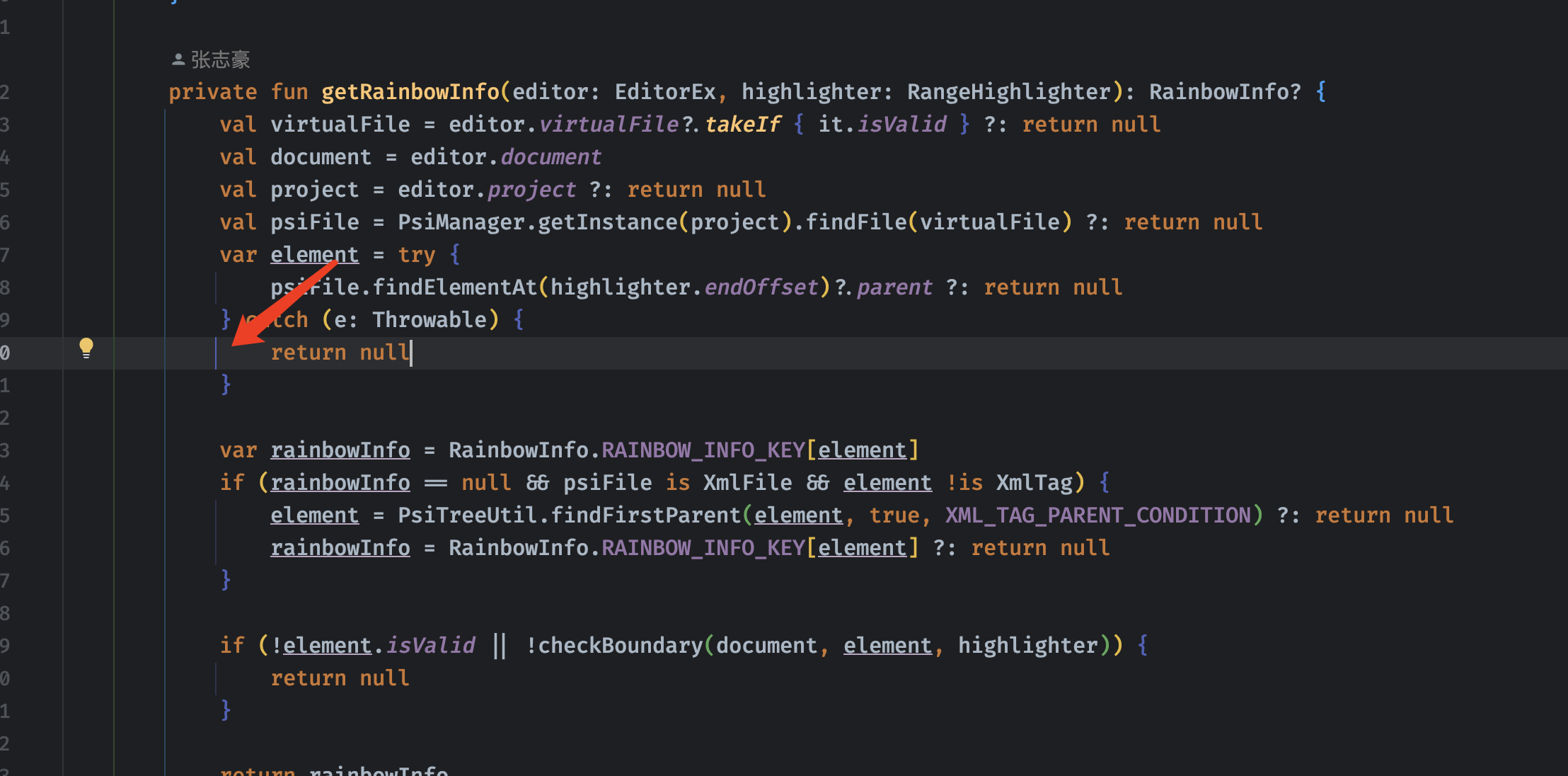 * All indent guide related(premium)
highlighting **all** indent guide lines for current lines
* All indent guide related(premium)
highlighting **all** indent guide lines for current lines
 ### Scope highlighting
**The highlight effects will not remove after releasing the shortcuts, but press the `ESC` key can do this. You could also config `Press any key to remove the highlighting effect` on the setting page.**
Ctrl + Button3(Windows & Linux) or Meta + Button3(Mac):
NOTE: Button3 means "Secondary Click (click or tap with two fingers)" on Mac os, "Right click" for Windows or Linux.
NOTE: Meta means command on Mac os.
### Scope highlighting
**The highlight effects will not remove after releasing the shortcuts, but press the `ESC` key can do this. You could also config `Press any key to remove the highlighting effect` on the setting page.**
Ctrl + Button3(Windows & Linux) or Meta + Button3(Mac):
NOTE: Button3 means "Secondary Click (click or tap with two fingers)" on Mac os, "Right click" for Windows or Linux.
NOTE: Meta means command on Mac os.
 
Alt + Button3(Windows & Linux) or option + Button3(Mac):
NOTE: Button3 means "Secondary Click (click or tap with two fingers)" on Mac os, "Right click" for Windows or Linux.

Alt + Button3(Windows & Linux) or option + Button3(Mac):
NOTE: Button3 means "Secondary Click (click or tap with two fingers)" on Mac os, "Right click" for Windows or Linux.
 
## Customize colors
Settings/Preferences > Editor > Color Scheme > Rainbow Brackets:

## Customize colors
Settings/Preferences > Editor > Color Scheme > Rainbow Brackets:
 ## Config the number of colors?
Settings/Preferences > Other Settings > Rainbow Brackets > Color > `Number of colors`: 5 or more
And you can use the color generator and configure your number of colors at the same time.
NOTE: For the default and Darcula color scheme(`Editor -> Color Scheme -> Rainbow Brackets -> Scheme`) the color number is 10, for the other scheme the number is 5, if your number is bigger than the number, you can config them in the config file.
If the color does not exist, we will use the color generator to generate it for you.
## Use the color generator
If you didn't like the built-in colors or want some new colors but don't want to try out and pick colors. Please use the color generator.
Settings/Preferences > Rainbow Brackets > Color > Use color generator
If you turn on this option, we will auto-generate some colors for you.
### Advanced options for color generator
## Config the number of colors?
Settings/Preferences > Other Settings > Rainbow Brackets > Color > `Number of colors`: 5 or more
And you can use the color generator and configure your number of colors at the same time.
NOTE: For the default and Darcula color scheme(`Editor -> Color Scheme -> Rainbow Brackets -> Scheme`) the color number is 10, for the other scheme the number is 5, if your number is bigger than the number, you can config them in the config file.
If the color does not exist, we will use the color generator to generate it for you.
## Use the color generator
If you didn't like the built-in colors or want some new colors but don't want to try out and pick colors. Please use the color generator.
Settings/Preferences > Rainbow Brackets > Color > Use color generator
If you turn on this option, we will auto-generate some colors for you.
### Advanced options for color generator
 ```hue``` – Controls the hue of the generated color. You can pass a string representing a color name: ```red```, ```orange```, ```yellow```, ```green```, ```blue```, ```purple```, ```pink``` and ```monochrome``` are currently supported. If you pass a hexidecimal color string such as ```#00FFFF```, the color generator will extract its hue value and use that to generate colors.
```luminosity``` – Controls the luminosity of the generated color. You can specify a string containing ```bright```, ```light``` or ```dark```.
## Config file path
If you want to customize the advanced configuration, you could edit the config file and then restart your IDE.
The config file path is in `APP_CONFIG/rainbow_brackets.xml`.
In MAC OS env maybe like `~/Library/Preferences/IntelliJIdea2020.2/options/rainbow_brackets.xml`.
If you are using the ToolBox, then it will be like `~/Library/ApplicationSupport/JetBrains/IntelliJIdea2020.2/options/rainbow_brackets.xml`
In Linux env maybe like `~/.IntelliJIdea/config/options/rainbow_brackets.xml`.
In Windows env maybe like `C:\Users\izhangzhihao\.IntelliJIdea2020.2\config\options\rainbow_brackets.xml`.
## JSX support
To enable rainbow brackets for JSX like this:
```javascript
var html = '
```hue``` – Controls the hue of the generated color. You can pass a string representing a color name: ```red```, ```orange```, ```yellow```, ```green```, ```blue```, ```purple```, ```pink``` and ```monochrome``` are currently supported. If you pass a hexidecimal color string such as ```#00FFFF```, the color generator will extract its hue value and use that to generate colors.
```luminosity``` – Controls the luminosity of the generated color. You can specify a string containing ```bright```, ```light``` or ```dark```.
## Config file path
If you want to customize the advanced configuration, you could edit the config file and then restart your IDE.
The config file path is in `APP_CONFIG/rainbow_brackets.xml`.
In MAC OS env maybe like `~/Library/Preferences/IntelliJIdea2020.2/options/rainbow_brackets.xml`.
If you are using the ToolBox, then it will be like `~/Library/ApplicationSupport/JetBrains/IntelliJIdea2020.2/options/rainbow_brackets.xml`
In Linux env maybe like `~/.IntelliJIdea/config/options/rainbow_brackets.xml`.
In Windows env maybe like `C:\Users\izhangzhihao\.IntelliJIdea2020.2\config\options\rainbow_brackets.xml`.
## JSX support
To enable rainbow brackets for JSX like this:
```javascript
var html = '