HYDRA Logo

Hydra Download Manager (HDM)

Fast, resilient, multi-source download manager and accelerator for Windows, macOS, and Linux.
https://hydra.javad.dev


Available in the Chrome Web Store Get it from Microsoft Edge Get the Firefox add-on

crates.io docs.rs Coverage CI Status License Rust Edition

--- ## Contents - [Overview](#overview) - [Key Features](#key-features) - [Engine](#engine) - [CLI](#cli) - [Desktop GUI](#desktop-gui) - [Installation](#installation) - [Quick Install (Bash / PowerShell)](#quick-install-bash--powershell) - [Homebrew (macOS / Linux)](#homebrew-macos--linux) - [Winget (Windows)](#winget-windows) - [Linux Packages (Ubuntu PPA / Fedora COPR / Arch Linux AUR)](#linux-packages-ubuntu-ppa--fedora-copr--arch-linux-aur) - [AppImage (portable, self-updating)](#appimage-portable-self-updating) - [From Source](#from-source) - [Browser Extension](#browser-extension) - [Uninstall](#uninstall) - [Quick Uninstall (prebuilt installs)](#quick-uninstall-prebuilt-installs) - [Usage](#usage) - [Portable GUI Profile](#portable-gui-profile) - [Plugins](#plugins) - [Plugin architecture](#plugin-architecture) - [Sandbox and native trust](#sandbox-and-native-trust) - [Plugin inputs and authoring](#plugin-inputs-and-authoring) - [Benchmark](#benchmark) - [A fair 100 ms path](#a-fair-100-ms-path) - [Four public mirrors](#four-public-mirrors) - [Desktop download managers](#desktop-download-manager) - [Embedding HYDRA — `libhydra`](#embedding-hydra--libhydra) - [Platform guides](#platform-guides) - [Contributing](#contributing) - [Code signing policy](#code-signing-policy) - [License](#license) --- ## Overview **Hydra Download Manager (HDM)** is an open-source, high-performance network file retriever and download accelerator designed for speed, resilience, and adaptability. It dynamically partitions downloads across multiple connections and independent mirror sources, continuously rebalancing work to maximize throughput without stalling on slow peers. It ships as both a `wget`/`curl`-compatible CLI and a cross-platform desktop download manager with browser integration.

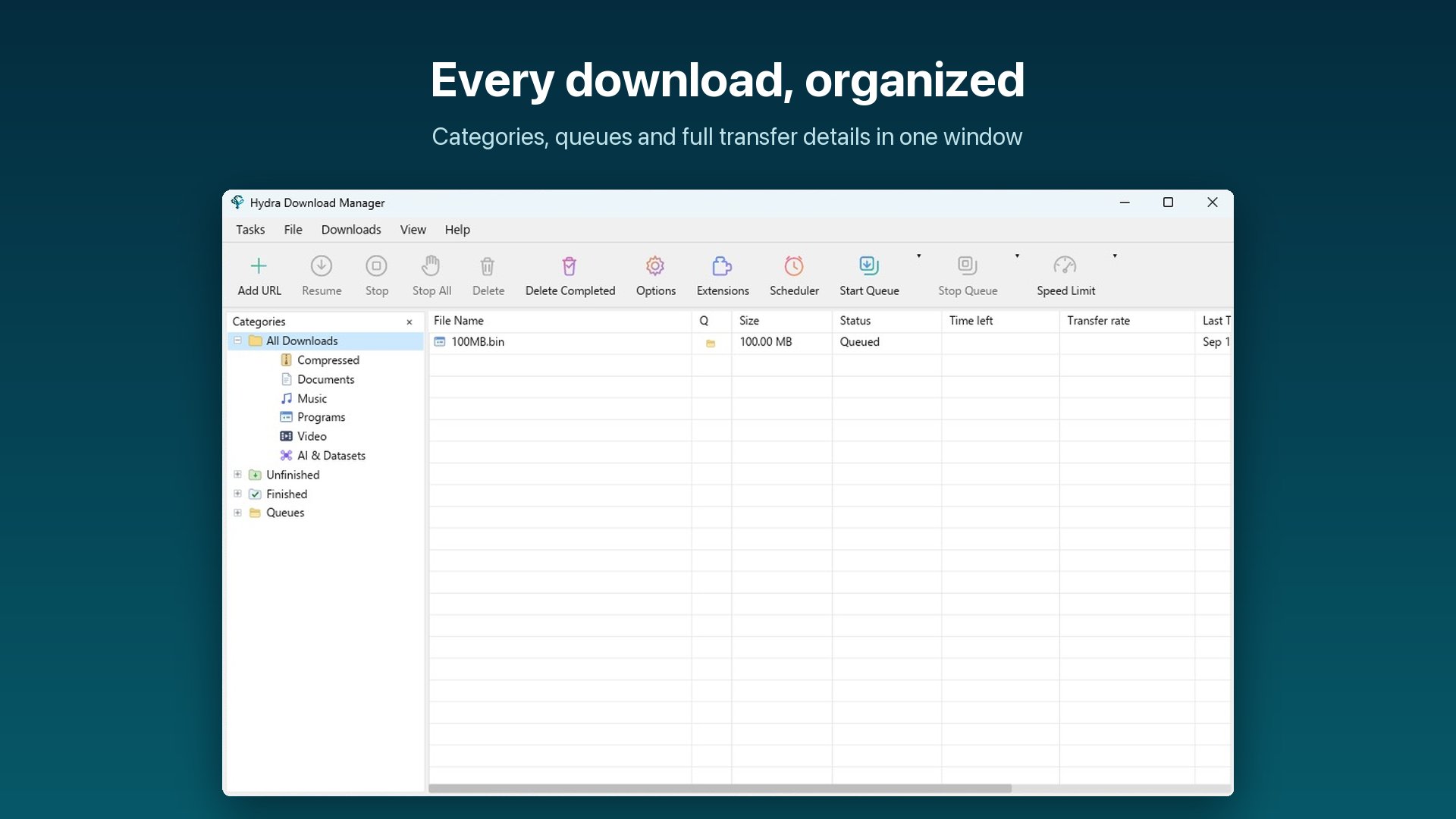
Hydra Download Manager

## Key Features
### Engine - **Adaptive Concurrency** — splits files across connections and mirrors, rebalancing live - **Range Stealing** — reassigns work from slow peers to fast ones automatically - **Stall Detection** — statistical estimators catch degraded connections early - **Broad Protocol Support** — HTTP(S), FTP, CONNECT tunneling, SOCKS4/4a/5 - **Integrity Checks** — checksum manifests plus Reed–Solomon bitrot protection - **Flat Memory Use** — direct positioned writes keep RAM usage constant ### CLI - **`hydra` or `hya`** — the same CLI under a short second name, on every platform - **`wget` / `curl` Compatible** — drop-in flag and dialect support - **Interactive TUI** — manage, pause, resume, and monitor queued downloads - **Smart File Sorting** — content-based type detection and auto-sort - **Remote Checksum Lookup** — verify server-advertised digests before or after download ### Desktop GUI - **Cross-Platform App** — Windows, macOS, and Linux with categories and progress detail - **Browser Integration** — Chrome, Edge, Firefox, and Safari extensions hand off downloads - **Queue & Scheduler** — scheduled start/stop times with retry tracking - **Desktop Niceties** — tray icon, sounds, launch-on-startup, localized UI - **Portable Profile** — `hydra-gui --config ./here` keeps settings, downloads list and logs in that directory
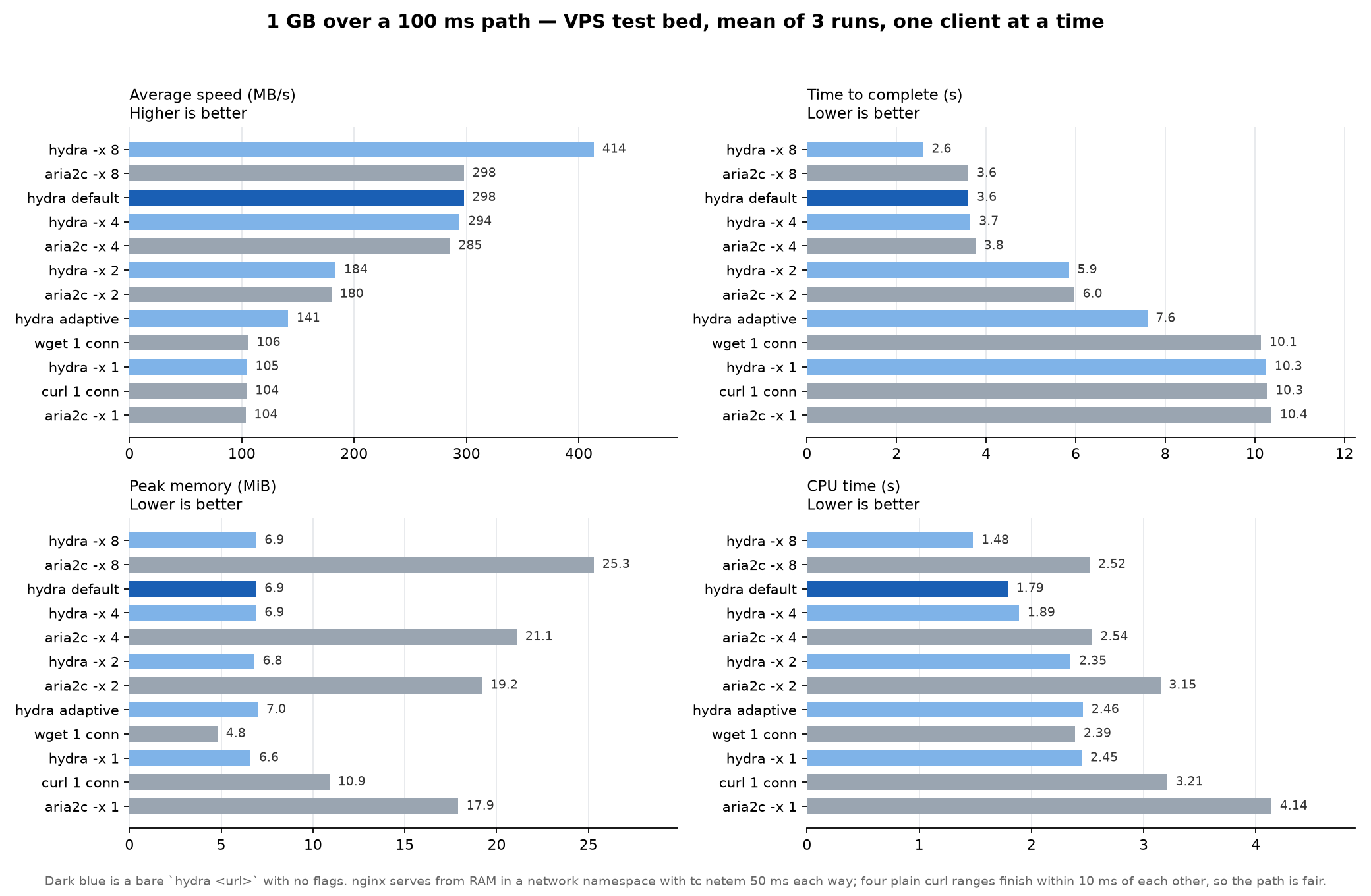
--- ## Installation ### Quick Install (Bash / PowerShell) **macOS / Linux** — installs the GUI bundle (GUI + CLI + browser extensions) by default: ```bash curl -fsSL https://raw.githubusercontent.com/ja7ad/hydra/main/install.sh | bash ``` CLI only: ```bash curl -fsSL https://raw.githubusercontent.com/ja7ad/hydra/main/install.sh | bash -s -- --cli ``` **Windows (PowerShell)** — installs the GUI bundle by default: ```powershell irm https://raw.githubusercontent.com/ja7ad/hydra/main/install.ps1 | iex ``` CLI only: ```powershell & ([scriptblock]::Create((irm https://raw.githubusercontent.com/ja7ad/hydra/main/install.ps1))) -Cli ``` The scripts detect your OS and architecture (amd64/arm64), fetch the matching archive from the [latest GitHub release](https://github.com/ja7ad/hydra/releases/latest), and install it — on Linux and macOS to `/usr/local` (falling back to `~/.local`; override with `--prefix DIR`), on Windows to `%LOCALAPPDATA%\Programs\Hydra`. The CLI lands under both `hydra` and the short `hya`; an existing `hya` on the same prefix is never overwritten. GUI installs also register the browser native-messaging host. Pin a release with `--version vX.Y.Z` / `-Version vX.Y.Z`, or download the archives yourself from the [releases page](https://github.com/ja7ad/hydra/releases). **Linux compatibility.** The CLI archive is a static musl build with no shared library of any kind, so `--cli` works on any distribution — old LTS releases, minimal containers, Alpine — regardless of its glibc. The desktop artifacts (GUI archive, `.deb`, `.rpm`) link the system's GTK, X11 and ALSA and are built on Ubuntu 22.04, which puts their floor at glibc 2.35: Ubuntu 22.04, Debian 12, RHEL 9 and newer. The AppImage is built on Ubuntu 20.04 and goes further back, to glibc 2.31: Ubuntu 20.04, Debian 11 and newer. A GUI install is a real desktop app, not a loose binary: - **Windows** — start-menu and desktop shortcuts (`-Desktop:$false` skips the desktop shortcut) and an **Apps & features** entry, so Hydra is listed and uninstallable from Settings like any other app. A `hydra--windows-portable-.zip` on the [releases page](https://github.com/ja7ad/hydra/releases) is the alternative for a machine you cannot install on: unpack it anywhere, run `HydraPortable.exe`, and the app keeps its configuration inside the bundle instead of `%APPDATA%\hydra`. - **macOS** — `Hydra Download Manager.app` is installed into `/Applications` (override with `--app-dir DIR`, e.g. `~/Applications`), with its icon and name in Launchpad, Spotlight, the Dock and the app switcher. `hydra`, `hya`, `hydra-gui` and `hydra-host` in `/bin` are symlinks into the app, so the CLI stays on `PATH` and one update refreshes both. - **Linux** — the logo lands in the hicolor icon theme and a `hydra.desktop` entry in your applications directory (plus the prefix's, for a system-wide install), so the app shows up in the launcher, the dock and the switcher with its own icon. Either way the GUI can update itself in place afterwards (**Options → General → Check for updates**), including an install that lives in a root-owned directory — it asks for authorisation before replacing those files. **Beta channel** — `--beta` (`-Beta` on Windows) installs the newest `-rc` pre-release when it is ahead of the latest stable release; otherwise it installs the stable release: ```bash curl -fsSL https://raw.githubusercontent.com/ja7ad/hydra/main/install.sh | bash -s -- --beta ``` ```powershell & ([scriptblock]::Create((irm https://raw.githubusercontent.com/ja7ad/hydra/main/install.ps1))) -Beta ``` The GUI's in-app updater follows the same rule: enable **Options → General → Download Beta channel** and update checks will also offer release candidates while one is ahead of stable. **macOS notes**: since the app isn't notarized yet, Gatekeeper may block it — see the [macOS Permissions Guide](https://github.com/ja7ad/hydra/wiki/macOS-Permissions-Guide-for-Hydra) for granting the required permissions. If you installed via the `.dmg` and macOS refuses to open the app ("damaged" or "unidentified developer"), clear the quarantine attribute: ```bash xattr -cr /Applications/Hydra\ Download\ Manager.app ``` ### Homebrew (macOS / Linux) **CLI**: ```bash brew install ja7ad/tap/hydra ``` **macOS Desktop App (GUI)**: ```bash brew install --cask ja7ad/tap/hydra ``` ### Winget (Windows) Hydra Download Manager is in the Windows Package Manager repository as `ja7ad.Hydra`: ```powershell winget install ja7ad.Hydra ``` Update it later with `winget upgrade ja7ad.Hydra`, or remove it with `winget uninstall ja7ad.Hydra`. ### Linux Packages (Ubuntu PPA / Fedora COPR / Arch Linux AUR) **Ubuntu / Debian-based (Launchpad PPA)**: ```bash sudo add-apt-repository ppa:sonycore/hydra sudo apt update sudo apt install hydra-download-manager ``` > The package is `hydra-download-manager`, not `hydra` — `hydra` in the > Ubuntu archive is THC-Hydra, the login cracker, and it is what > `apt install hydra` gives you. > PPA Repository: [launchpad.net/~sonycore/+archive/ubuntu/hydra](https://launchpad.net/~sonycore/+archive/ubuntu/hydra) **Fedora / RHEL-based (Fedora COPR)**: ```bash sudo dnf copr enable sonycore/hydra sudo dnf install hydra-download-manager ``` > COPR Repository: [copr.fedorainfracloud.org/coprs/sonycore/hydra](https://copr.fedorainfracloud.org/coprs/sonycore/hydra/) **Arch Linux (AUR)**: Build from source: ```bash paru -S hydra-download-manager # or: yay -S hydra-download-manager ``` Precompiled binary: ```bash paru -S hydra-download-manager-bin # or: yay -S hydra-download-manager-bin ``` > AUR Packages: [hydra-download-manager](https://aur.archlinux.org/packages/hydra-download-manager) | [hydra-download-manager-bin](https://aur.archlinux.org/packages/hydra-download-manager-bin) ### Flatpak (Flathub) Install from Flathub: ```bash flatpak install flathub io.github.ja7ad.hydra ``` Run Hydra: ```bash flatpak run io.github.ja7ad.hydra ``` ### AppImage (portable, self-updating) One file, no installation, no root. Download it from the [latest release](https://github.com/ja7ad/hydra/releases/latest), make it executable, and run it: ```bash chmod +x Hydra-*-x86_64.AppImage ./Hydra-*-x86_64.AppImage ``` `aarch64` images are published alongside the `x86_64` ones. Every release is built on Ubuntu 20.04 and verified to run on 20.04 through the current release, so one image covers the whole line and the distributions downstream of it. The image carries the GUI, the `hydra` CLI, the `hydra-host` native-messaging bridge and the update finisher. On its first start it writes a menu entry, a copy of the browser extensions and the native-messaging manifests into `~/.local/share/hydra` — all of them pointing at the image file, so moving or renaming it is repaired on the next launch. Nothing is written outside your home directory and nothing needs root. | Command | What it does | | --- | --- | | `./Hydra-*.AppImage` | run the GUI | | `./Hydra-*.AppImage --hydra-exec hydra …` | run the CLI inside the image | | `./Hydra-*.AppImage --hydra-install` | write the menu entry and browser manifests now | | `./Hydra-*.AppImage --hydra-uninstall` | remove them again (downloads and settings are kept) | | `./Hydra-*.AppImage --hydra-extensions` | print the directory to load the unpacked extensions from | Set `HYDRA_APPIMAGE_NO_INTEGRATION=1` for a run that writes nothing outside your download directory. For a fully self-contained copy — settings included — create a directory named after the image with a `.home` suffix next to it (`Hydra-0.3.14-x86_64.AppImage.home`); the AppImage runtime then uses it as `$HOME`, which is what makes the image portable across machines on a USB stick. **Updates.** This is the one Linux build Hydra can update itself: the deb and the rpm install into `/usr`, which only their package manager may rewrite, so the in-app updater offers you the new package instead of touching those files. An AppImage is a single file you own wherever you put it, so **Update Now** replaces that file and relaunches — including when it sits somewhere only root can write, where it asks for your password first. The image also advertises zsync update information, so `AppImageUpdate` and `appimaged` can update it too. Because it does not bundle GTK, the graphics stack or ALSA — those come from your desktop, where they are already correct — a portal-capable desktop is still what the file dialogs need. Nothing else is required. ### From Source Ensure you have Rust (1.80+) installed: ```bash git clone https://github.com/ja7ad/hydra.git cd hydra cargo build --release ``` The compiled binary will be located at `target/release/hydra`. To build the GUI and native-messaging host as well, run `make build`. ### Browser Extension Hydra integrates directly with web browsers to automatically capture downloads, provide right-click context menu options, and intercept media streams. The extension popup can also hand each captured download the proxy the browser itself is using, for that download only. #### Official Store Listings (Recommended) Install the extension directly from the official store for your browser: - **Chrome Web Store** (for Google Chrome, Microsoft Edge, Brave, Vivaldi, Opera, Arc, and Chromium-based browsers): [**Chrome Web Store: Hydra Download Manager Integration**](https://chromewebstore.google.com/detail/hydra-download-manager-in/oieelfilllghmbnhofajpgpmmilfihmo) - **Firefox Add-ons (AMO)** (for Mozilla Firefox): [**Firefox Add-ons: HDM Integration**](https://addons.mozilla.org/en-US/firefox/addon/hdm-integration/) - **Safari**: Ships inside the macOS desktop application bundle (enable under *Safari → Settings → Extensions*). > **Tip:** In the desktop GUI, you can also view status and open extension store listings directly from **Options → Extensions** or the **Extensions** toolbar button. #### Development & Manual Installation Extension source code and resources are maintained under the [`extensions/`](extensions/) directory: - [`extensions/chrome/`](extensions/chrome/) — Chromium MV3 extension source code (shared core). - [`extensions/firefox/`](extensions/firefox/) — Firefox MV3 event-page add-on source. - [`extensions/safari/`](extensions/safari/) — Safari Web Extension resources. Every installer also ships pre-built extension packages with the app in both packed (`.zip` / `.xpi`) and unpacked shapes: | Install | Extensions directory | | --- | --- | | Windows (setup.exe) | `%LOCALAPPDATA%\Programs\Hydra\extensions` | | Windows (portable .zip) | `HydraPortable\App\Hydra\extensions` | | macOS (.app / DMG) | `Hydra Download Manager.app/Contents/Resources/extensions` | | macOS (.pkg) | `/Library/Application Support/Hydra/extensions` | | Linux (.deb / .rpm) | `/usr/share/hydra-download-manager/extensions` | | Linux (AppImage) | `~/.local/share/hydra/extensions` | | Archive / `install.sh` | `/share/hydra/extensions` | ##### Sideloading Unpacked / Development Builds - **Chrome, Edge, Opera, Brave, Vivaldi, Arc, Chromium** — open `chrome://extensions` (`edge://extensions`, `opera://extensions`, …), turn on **Developer mode**, choose **Load unpacked**, and pick the [`extensions/chrome/`](extensions/chrome/) (or bundled `chrome/`) directory. The manifest `key` pins the id to `jpnonmbbkjdpeebdhkjoliklfhkdcomj` across all Chromium browsers, matching the native-messaging host allow-list. The packed `.zip` is the Web Store upload format, and the signed `.crx` is for enterprise policy deployment (`ExtensionSettings` / `ExtensionInstallForcelist` against an update manifest you host). - **Firefox** — open `about:debugging#/runtime/this-firefox` → **Load Temporary Add-on…** and pick [`extensions/firefox/manifest.json`](extensions/firefox/manifest.json) or the packed `.xpi`. Developer Edition, Nightly, and ESR can install it permanently after setting `xpinstall.signatures.required` to `false` in `about:config`. ##### Building Extensions from Source To build and assemble extensions from a repository checkout: ```bash make extensions # -> target/extensions make extensions ARGS="--crx-key path/to/key.pem" # also sign a .crx ``` A `.crx` is packed whenever a signing key is available (`--crx-key`, `$HYDRA_CRX_KEY`, or `target/hydra-chrome-crx.pem`); `--crx` generates one if there is none. Sign with the key behind the pinned manifest `key` — any other key changes the extension id, and the script says so. `ARGS=--sign` additionally fetches an addons.mozilla.org-signed `.xpi` (needs `web-ext` and AMO API keys). --- ## Uninstall ### Quick Uninstall (prebuilt installs) **macOS / Linux**: ```bash curl -fsSL https://raw.githubusercontent.com/ja7ad/hydra/main/uninstall.sh | bash ``` To also delete config, state, and logs: ```bash curl -fsSL https://raw.githubusercontent.com/ja7ad/hydra/main/uninstall.sh | bash -s -- --purge ``` **Windows (PowerShell)**: ```powershell irm https://raw.githubusercontent.com/ja7ad/hydra/main/uninstall.ps1 | iex ``` To also delete config and state: ```powershell & ([scriptblock]::Create((irm https://raw.githubusercontent.com/ja7ad/hydra/main/uninstall.ps1))) -Purge ``` **Winget**: ```powershell winget uninstall ja7ad.Hydra ``` **Homebrew**: ```bash # Uninstall CLI brew uninstall hydra # Uninstall macOS Desktop App (and zap settings) brew uninstall --cask --zap hydra ``` The scripts remove binaries, extensions, manifests, desktop shortcuts, and startup entries. On macOS, they also remove the bundled app and package receipts. Config and state are kept by default (`~/.config/hydra` on Linux/macOS, `%APPDATA%\hydra` on Windows); use `--purge` / `-Purge` to delete them. --- ## Usage Download a file, with the connection count chosen automatically: ```bash hydra https://example.com/archive.tar.gz ``` `hya` is the same CLI under a shorter name and works everywhere `hydra` does. Every install channel puts both on your `PATH`; use `hya` on a machine that already has [THC-Hydra](https://github.com/vanhauser-thc/thc-hydra), the login auditor, which is also called `hydra`. Everything else is in the wiki: | Guide | Covers | | --- | --- | | [**Hydra CLI Guide**](https://github.com/ja7ad/hydra/wiki/Hydra-CLI-Guide) | Options, multiple URLs, mirrors, Metalink, `wget`/`curl` mode, the interactive queue manager, cookies and logged-in downloads, checksums and bitrot repair | | [YouTube Downloader plugin](https://github.com/ja7ad/hydra/wiki/Youtube-downloader-plugin) | Single videos, playlists and audio-only downloads | | [FFmpeg Integration](https://github.com/ja7ad/hydra/wiki/Hydra-ffmpeg-integration) | Merging HLS/DASH streams into MP4 | | [Writing, building, and signing plugins](https://github.com/ja7ad/hydra/wiki/Writing,-building,-and-signing-Hydra-plugins) | Plugin authoring with `hydra-plugin` | | [macOS Permissions Guide](https://github.com/ja7ad/hydra/wiki/macOS-Permissions-Guide-for-Hydra) | Full Disk Access, download folders, launch at login | | [Safari Extension](https://github.com/ja7ad/hydra/wiki/Safari-Extension-(Developer-Mode)) | Running the Safari extension in developer mode | ### Portable GUI Profile The desktop app keeps `config.toml`, its download list (`state.redb`), `logs/` and `locales/` in `~/.config/hydra` (Linux/macOS) or `%APPDATA%\hydra` (Windows). `--config` points all of it somewhere else — a USB stick, a project folder, a second profile: ```bash hydra-gui --config ./here ``` The path may be relative (it is resolved against the working directory at launch) and is created if missing. Such an instance is fully independent: it has its own download list and its own single-instance lock, so it runs alongside an ordinary Hydra. The login item ("launch on startup") is per user and cannot carry the flag, so it stays with the ordinary install. The browser extension reaches a running portable instance over its WebSocket port either way. Browser capture while the portable copy is **closed** needs the native-messaging host, which a browser addresses by a per-user registration that carries no arguments. Options > Extensions > **Let this copy handle browser capture** registers the `hydra-host` sitting next to the portable `hydra-gui` and drops a `hydra-profile` file beside it naming the profile directory; the host reads that file and launches `hydra-gui --minimized --config `. It is off by default because the registration is per user: switching it on takes browser capture away from any ordinary Hydra install on the same account, and switching it off hands it back. `HYDRA_CONFIG` overrides the pointer file for scripted setups. --- ## Plugins Hydra plugins add download sources and protocol engines through a shared API used by both the CLI and desktop app. Community authors build and install a `.hyaplugin` package; plugins using the existing API do not need changes to Hydra's crates. The package contains a manifest, a Wasm module, and any declared native libraries. ### Plugin architecture ```mermaid flowchart TD Hydra["HYDRA GUI / CLI"] --> Runtime["Plugin manager and Wasm runtime"] Runtime --> Resolver["Source resolvers: YouTube, media URLs"] Runtime --> Protocol["Protocol providers: Torrent"] Runtime -.-> Storage["Future storage providers: S3, WebDAV"] Resolver --> Plans["Validated download plans"] Protocol --> Plans Storage -.-> Plans Plans --> Coordinator["Hydra transfer coordination"] Coordinator --> Engine["HTTP / FTP engine and HLS / DASH transfers"] Coordinator --> Native["Trusted native backend: libtorrent"] Engine --> Scheduler["Adaptive concurrency, range stealing, stall detection"] Native --> Pieces["Peer sessions, piece selection and verification"] Scheduler --> Result["Files, resume state, progress and logs"] Pieces --> Result ``` **Resolvers** return URLs, tracks, headers and output descriptions. Hydra downloads those sources through its existing transport and media engines. **Native transfer plugins** return an engine identifier, file list and opaque engine metadata; Hydra coordinates their destination, selection, cancellation, rate limits and progress. The torrent plugin imports libtorrent as a library inside Hydra's process, where libtorrent handles peer discovery, torrent pieces and verification. Hydra's byte range scheduler applies to its own HTTP/FTP transfers. Storage providers are an extension direction: an author could resolve authorized object URLs or implement a native transfer backend. S3, WebDAV, SFTP and IPFS in this architectural idea are possible future providers. The current API provides resolver plans and native transfers; it has no separate storage-provider hook. ### Sandbox and native trust > **Wasm plugins are sandboxed; native modules are trusted in-process components.** Wasm code runs with memory and execution limits. Network requests, cookies, plugin data, approved external tools and selected-file reads go through Hydra's host API and permission checks. Choosing a local file authorizes that input; it does not give the Wasm module unrestricted access to the filesystem. A native module is an OS/architecture-specific `.dll`, `.so` or `.dylib`, declared in `[[native_modules]]` and authorized by `permissions.native`. Hydra checks the installed library's hash before loading it. Native code runs with Hydra's OS permissions, outside the Wasm sandbox, and can affect or crash the host process. A package containing native code therefore requires trust in that component. Package signatures authenticate the publisher and package contents; they do not sandbox native code or certify that it is safe. ### Plugin inputs and authoring URL claims choose candidate resolvers; the resolver still validates the input. Plugins also declare generic file actions, so the app can add a plugin-provided button below OK and Cancel in Add URL: ```toml claims = ["magnet:*", "*://*/*.torrent", "*://*/*.torrent?*"] [[input_actions]] label = "Browse Torrent File" extensions = ["torrent"] ``` The file extension declaration routes local inputs to the plugin in both frontends: ```bash hydra ~/Downloads/example.torrent hydra 'magnet:?xt=urn:btih:YOUR_INFO_HASH' ``` Another plugin can declare **Browse X File** with its own extensions using the same API. Native plans can declare the headings and live rows of the progress detail table in both the CLI and GUI. Hydra keeps the standard progress display, dialog styling and controls. Leveled plugin logs are available through **Help → Logs**; `HYDRA_LOG=debug` enables debugging details. Create, build, validate and install a plugin with the authoring CLI: ```bash hydra-plugin init my-plugin --language rust hydra-plugin build my-plugin --output my-plugin.hyaplugin hydra-plugin validate my-plugin.hyaplugin hydra plugin install my-plugin.hyaplugin ``` Native libraries must be built for each target platform and included before packaging. Official desktop releases include YouTube and the signed torrent package matching the OS and CPU architecture. On first launch Hydra installs these plugins automatically. Application updates carry newer plugin versions; startup sync preserves plugin settings, saved data and disabled or removed plugins. Wasm plugins remain sandboxed; the bundled torrent library is a trusted in-process component signed by Hydra. On Linux, native plugins require a dynamically linked Hydra host: use the CLI included in the desktop bundle, a distro package, or a GNU-target source build. The standalone static musl CLI supports Wasm plugins but cannot load native libraries. See the [plugin authoring guide](https://github.com/ja7ad/hydra/wiki/Writing,-building,-and-signing-Hydra-plugins), the [Rust guest SDK](crates/hydra-plugin-sdk/), [native ABI](crates/hydra-plugin-api/include/hydra-native.h), and [torrent plugin](plugins/hydra-torrent/) for working examples. --- ## Benchmark Measured on a Hetzner VPS (Ubuntu 24.04, 2 vCPU), one client process at a time with a cooldown between runs, every download verified against a reference SHA-256. `hydra` rows marked `default` are a bare `hydra ` with no flags. Everything here is reproducible with the scripts in [`scripts/benchmark/`](scripts/benchmark/). ### A fair 100 ms path The origin is nginx serving 1 GB from RAM inside a network namespace on the same host, with 50 ms of `tc netem` delay each way: a 100 ms round trip, unlimited bandwidth, and no other traffic. Four plain `curl` ranges finish within 10 ms of each other, so the path is fair and the only variable is the client. Mean of three runs.

1 GB over a 100 ms path: speed, duration, memory and CPU for every client

| Application | Config | Avg speed | Time to complete | Peak memory | CPU time | |-------------|------------|--------------|------------------|-------------|----------| | hydra | `-x 8` | **414 MB/s** | 2.6 s | 6.9 MiB | 1.48 s | | aria2c | `-x 8` | **298 MB/s** | 3.6 s | 25.3 MiB | 2.52 s | | hydra | `default` | **298 MB/s** | 3.6 s | 6.9 MiB | 1.79 s | | hydra | `-x 4` | **294 MB/s** | 3.7 s | 6.9 MiB | 1.89 s | | aria2c | `-x 4` | **285 MB/s** | 3.8 s | 21.1 MiB | 2.54 s | | hydra | `-x 2` | **184 MB/s** | 5.9 s | 6.8 MiB | 2.35 s | | aria2c | `-x 2` | **180 MB/s** | 6.0 s | 19.2 MiB | 3.15 s | | hydra | `adaptive` | **141 MB/s** | 7.6 s | 7.0 MiB | 2.46 s | | wget | `1 conn` | **106 MB/s** | 10.1 s | 4.8 MiB | 2.39 s | | hydra | `-x 1` | **105 MB/s** | 10.3 s | 6.6 MiB | 2.45 s | | curl | `1 conn` | **104 MB/s** | 10.3 s | 10.9 MiB | 3.21 s | | aria2c | `-x 1` | **104 MB/s** | 10.4 s | 17.9 MiB | 4.14 s | At every matched concurrency HYDRA is ahead of `aria2c`, issues exactly one request per connection with no repairs, and does it at a third of the memory and two thirds of the CPU. A bare `hydra ` matches `aria2c -x 4` on speed while `curl`, `wget` and `aria2c` at their own defaults sit at a third of it. `wget` is the one client that uses less memory, 4.8 MiB against 6.9. ### Four public mirrors A bare `hydra ` against `aria2c -x 4` and `curl`, two runs each on the same VPS. The Hetzner origin caps concurrency per client and refuses the surplus with `429`; the other three reward it. | Origin | Client | Time | Avg speed | Peak memory | CPU time | |-----------------------------|-------------|------------|---------------|-------------|-----------| | ash-speed.hetzner.com, 1 GB | **hydra** | **15.3 s** | **70.3 MB/s** | **8.0 MiB** | **3.8 s** | | | aria2c -x 4 | 15.7 s | 68.3 MB/s | 20.4 MiB | 5.0 s | | | curl | 28.2 s | 38.1 MB/s | 13.1 MiB | 4.5 s | | speedtest.bitel.io, 1000 MB | **hydra** | **2.4 s** | **432 MB/s** | **7.8 MiB** | **2.3 s** | | | aria2c -x 4 | 5.0 s | 208 MB/s | 21.5 MiB | 5.0 s | | | curl | 6.4 s | 164 MB/s | 20.2 MiB | 4.5 s | | speedtest.bitel.io, 512 MB | **hydra** | **1.3 s** | **413 MB/s** | **7.9 MiB** | **1.1 s** | | | aria2c -x 4 | 2.9 s | 188 MB/s | 21.5 MiB | 2.8 s | | | curl | 2.9 s | 187 MB/s | 22.9 MiB | 2.5 s | | mmatechnical.com, 500 MB | **hydra** | **1.0 s** | **546 MB/s** | **7.8 MiB** | **0.9 s** | | | aria2c -x 4 | 1.9 s | 282 MB/s | 21.9 MiB | 1.6 s | | | curl | 2.7 s | 196 MB/s | 23.1 MiB | 2.3 s | The second runs agree with the first to within a few percent on every row except mmatechnical, where the CDN warmed between them (hydra 392 MB/s, aria2c 420 MB/s on the second run). ### Desktop Download Manager Measured on a desktop PC with windows os (Windows 11, 16 GB RAM, and 8-core CPU) for download. 100MB.bin file from https://ash-speed.hetzner.com/100MB.bin with the same network. | Application | Config | Avg speed | Time to complete | Peak memory | CPU time | |-----------------------------|--------|--------------|------------------|-------------|----------| | **Hydra GUI** | 8 conn | **8.2 MB/s** | 13.0 s | 39 MiB | 3.5 s | | Free Download Manager | 8 conn | **7.3 MB/s** | 15.8 s | 352 MiB | 9.89 s | | Internet Download Manager | 8 conn | **5.7 MB/s** | 18.3 s | 14 MiB | 5.79 s | | ABDownload Manager (aria2c) | 8 conn | **4.9 MB/s** | 26.7 s | 501 MiB | 12.89 s | | FluxDown | 8 conn | **4.5 MB/s** | 29.6 s | 298 MiB | 8.52 s | ## Embedding HYDRA — `libhydra` `hydra` is the application. **`libhydra` is the engine**, and it is a product in its own right: a stable **C ABI** over `hya-core` and `hya-net`, with its own version, its own release archives, its own compatibility promise, and a permissive MIT-or-Apache licence rather than the CLI's GPL. A desktop application, an Android app, an iOS app, or a program in Go, Swift, Kotlin, Dart, C# or Python can run the same download engine without taking the CLI or the GUI with it. ```bash make ffi # libhydra.a, libhydra.so/.dylib, and include/hydra.h make ffi-compat # the ABI 1 stability gate make ffi-test # the ABI suite, a C conformance program, and every # published header against the current library ``` ```c #include "hydra.h" hydra_engine_config_t cfg; HYDRA_ENGINE_CONFIG_INIT(&cfg); cfg.state_path = "hydra-state.json"; /* jobs survive a process restart */ hydra_engine_t *engine = hydra_engine_create(&cfg); const char *urls[] = { "https://example.com/big.iso" }; hydra_job_config_t job; HYDRA_JOB_CONFIG_INIT(&job); job.urls = urls; job.url_count = 1; job.output_path = "big.iso"; hydra_job_id_t id; hydra_job_create(engine, &job, &id); hydra_job_start(engine, id); ``` Job identity is a durable `uint64_t` rather than a pointer, so it survives an app restart, a UI rebuild or a killed Android service; the event queue is the asynchronous interface, so it becomes a Go channel, a Kotlin `Flow`, a Swift `AsyncStream` or a Dart `Stream`; and file bytes never cross the boundary, so resident memory stays independent of object size. The ABI is frozen and mechanically enforced. Within ABI 1 no field moves, no enumerator is renumbered and no symbol disappears; CI checks the whole layout against a committed manifest and compiles every header this project has ever published against the library built from the current branch. [**docs/ffi/ABI.md**](docs/ffi/ABI.md) is the specification — design principles, the stability policy, and what the guarantees actually cover. Every release publishes a prebuilt archive — static library, shared library, header, pkg-config metadata and these guides — for Linux (glibc and musl), macOS, Windows, Android and iOS. Any other target builds from source with `scripts/build-ffi.sh --target `, the same script CI runs. ### Platform guides | | | |---|---| | [**The ABI specification**](docs/ffi/ABI.md) | Design principles, the ABI 1 stability policy, ownership, events, enforcement | | [Getting started](docs/ffi/README.md) | The contract, the archive layout, sixty seconds of C | | [Linux](docs/ffi/linux.md) | glibc vs musl, pkg-config, CMake, containers, systemd | | [macOS](docs/ffi/macos.md) | universal binaries, Xcode, App Sandbox, notarisation | | [Windows](docs/ffi/windows.md) | MSVC, the static CRT, `hydra.lib` vs `hydra.dll` | | [Android](docs/ffi/android.md) | jniLibs, JNI, CMake, `Flow`, background execution | | [iOS](docs/ffi/ios.md) | `Hydra.xcframework`, SwiftPM, `AsyncStream`, app lifecycle | | [Any other platform](docs/ffi/other-platforms.md) | building for a triple outside the release matrix | | [Language bindings](docs/ffi/bindings.md) | Go, Python, C#, Dart, C++, Zig, and writing your own | See also [`docs/ffi/ABI.md`](docs/ffi/ABI.md) for the specification, [`include/hydra.h`](include/hydra.h) for the published declarations, and [`examples/ffi-c/download.c`](examples/ffi-c/download.c) for a complete C client with mirrors, pause and resume. --- ## Contributing Contributions are welcome! Please read the [Contributing Guide](CONTRIBUTING.md) for the project layout, build instructions, pre-submit checks (`fmt`, `clippy`, tests), commit conventions, and how licensing applies to each crate. In short: ```bash cargo fmt --all -- --check cargo clippy --all-targets --all-features -- -D warnings cargo test --all-targets --all-features ``` Bug reports and feature requests go to the [issue tracker](https://github.com/ja7ad/hydra/issues); security vulnerabilities should be reported privately via [GitHub security advisories](https://github.com/ja7ad/hydra/security/advisories/new). --- ## Code signing policy Free code signing provided by [SignPath.io](https://signpath.io), certificate by [SignPath Foundation](https://signpath.org). Windows executables, DLLs, PowerShell scripts and installers in official Hydra releases are signed from the [ja7ad/hydra](https://github.com/ja7ad/hydra) repository's release workflow. Only binaries built from this repository's source are signed. **Team roles** - **Authors:** [committers and contributors](https://github.com/ja7ad/hydra/graphs/contributors) - **Reviewers:** [@ja7ad](https://github.com/ja7ad) - **Approvers:** [@ja7ad](https://github.com/ja7ad) **Privacy policy** This program will not transfer any information to other networked systems unless specifically requested by the user or the person installing or operating it. The only automatic request is the update check against GitHub releases, which you can turn off under **Options → General → Check for updates on startup**. See the full [privacy policy](https://hydra.javad.dev/privacy.html). --- ## License - The `hydra` CLI binary is licensed under the **GNU General Public License v3.0 or later** ([GPL-3.0-or-later](LICENSE)). - The `hydra-core`, `hya-net` and `hya-ffi` libraries are dual-licensed under **MIT** or **Apache-2.0** ([LICENSE-MIT](LICENSE-MIT) / [LICENSE-APACHE](LICENSE-APACHE)). For more details, see [LICENSING.md](LICENSING.md) and [THIRD-PARTY-NOTICES.md](THIRD-PARTY-NOTICES.md).