# gitbash
Git utilities written in pure bash: only git is required, fzf, delta and bat are optional. Reduce repetitive typing and supercharge git workflows with optional interactive previews and safe cleanup — see a [full comparison](./docs/workflows.md).
## Installation
Needs git >= 2.23 and bash >= 3.2. fzf (menus), delta (diffs) and bat (previews) are optional but recommended.
### macOS
```bash
npm i -g gitbash
brew install fzf git-delta bat
gitbash --config
```
Shell integration (lets you type `commit` instead of `gitbash commit`):
```bash
## for bash
echo 'eval "$(gitbash --init)"' >> ~/.bashrc
## for zsh
echo 'eval "$(gitbash --init)"' >> ~/.zshrc
```
### Linux
```bash
npm i -g gitbash
sudo apt install fzf git-delta bat # Debian/Ubuntu, needs fzf >= 0.36
gitbash --config
```
Shell integration:
```bash
## for bash
echo 'eval "$(gitbash --init)"' >> ~/.bashrc
## for zsh
echo 'eval "$(gitbash --init)"' >> ~/.zshrc
```
### Windows
Needs [Git for Windows](https://gitforwindows.org). In PowerShell or Git Bash; in WSL, follow the Linux steps:
```powershell
npm i -g gitbash
winget install junegunn.fzf dandavison.delta sharkdp.bat # needs fzf >= 0.54
gitbash --config
```
`gitbash --config` also sets up the shell integration: it offers to load the gitbash functions in your PowerShell profile (and to allow local scripts, which Windows PowerShell blocks by default) and in `~/.bashrc` for Git Bash. Open a new window afterwards. `switch` is a PowerShell keyword: use `gitbash switch` there.
To set it up by hand, add this line to your PowerShell profile (`notepad $PROFILE`):
```powershell
gitbash --init --shell=pwsh | Out-String | Invoke-Expression
```
### Without npm
Installation by script on machines without npm available
```bash
# macOS, Linux, Git Bash (or: wget -qO- ... | sh)
curl -fsSL https://raw.githubusercontent.com/jaggli/gitbash/main/install.sh | sh
```
```powershell
# Windows PowerShell (needs Git for Windows; prints the line for your $PROFILE)
irm https://raw.githubusercontent.com/jaggli/gitbash/main/install.ps1 | iex
```
It downloads the package published on npm, checks it against npm's sha512 checksum, and installs it to `~/.local/share/gitbash` and links `~/.local/bin/gitbash` (add that folder to your PATH if the script says so); delete both to uninstall. Set `GITBASH_VERSION` for a specific version, and `GITBASH_INSTALL_DIR` / `GITBASH_BIN_DIR` for other locations.
## Options
| Option | Description |
| --- | --- |
| `-h`, `--help` | Show the help |
| `-v`, `--version` | Show the version |
| `--update` | Update to the latest release (npm, pnpm or install script) |
| `--init` | Print shell functions to call commands without the `gitbash` prefix |
| `--init --prefix=gb-` | Prefixed functions: `gb-commit`, `gb-switch`, ... (avoids shadowing e.g. `/usr/bin/pr`) |
| `--init --shell=pwsh` | PowerShell functions instead of bash/zsh |
| `--config` | Configuration wizard (`~/.gitbashrc`); offers to install dependencies and the shell integration |
| `--config-local` | Overrides for the current repository (`.gitbashrc`, committed) |
| `--config-user` | Personal overrides for the current repository (`.gitbashrc-user`, not committed) |
## Commands
`-y` / `--yes` answers every yes/no question with yes and is passed on to the commands a command runs (e.g. `pr -y` → `commit`). Deleting unmerged work or remote branches and force-pushing always ask. Options with a value accept `--days=14` and `--days 14`.
### branch
Interactive menu for branch operations (create/switch/update).
```bash
branch # Interactive menu
branch -h # Show help
branch --version # Show version
```
### create
```bash
create [--feature|--bugfix|--hotfix|--release|-t] [-p|--push|--no-push] [-y] [JIRA_LINK|ISSUE] [TITLE...]
```
Create a branch from the latest `origin/` with optional Jira parsing, then push and track it (`GITBASH_CREATE_AUTO_PUSH`, `--no-push`).
**Branch Name Format:** `//-` or `<type>/<custom-prefix>/<title>`
Issue keys like `PROJ-123`, `AB2-45` or `proj-7`, or a Jira URL. Titles are lower-cased, umlauts and accents transliterated (`Über` → `ueber`).
**Examples with custom prefix** (`GITBASH_CREATE_BRANCH_PREFIX="awesome-team"`):
With issue parsing enabled (default):
```bash
create PROJ-123 fix login bug # → feature/awesome-team/PROJ-123-fix-login-bug
create fix bug # → feature/awesome-team/NOISSUE-fix-bug
create --hotfix PROJ-999 critical fix # → hotfix/awesome-team/PROJ-999-critical-fix
create # Interactive mode with Jira prompt
```
With issue parsing disabled (`GITBASH_CREATE_NO_ISSUE_PARSING="yes"`):
```bash
create fix login bug # → feature/awesome-team/fix-login-bug
create --hotfix enhance security # → hotfix/awesome-team/enhance-security
create # Interactive mode (no Jira prompt)
```
**Examples with empty prefix** (`GITBASH_CREATE_BRANCH_PREFIX=""`, default):
```bash
create PROJ-123 fix bug # → feature/PROJ-123-fix-bug
create fix bug # → feature/NOISSUE-fix-bug
create --no-push PROJ-7 quick fix # → feature/PROJ-7-quick-fix, not pushed
```
### switch
```bash
switch [FILTER...]
```
Switch branches with fzf. Shows local branches (`merged:` = fully merged into the base branch), then remote branches without a local copy. Preview shows commit history. Switches directly when the filter is an exact branch name or matches exactly one branch name; a branch name that is not known locally is fetched from the remote first, so `switch <branch>` also works for a branch pushed since the last fetch. After switching, offers to fast-forward a branch that is behind.
- `Del` deletes the selected local branch (asks first, default no; unmerged commits need a second confirmation)
```bash
switch # Browse all branches
switch captcha # Pre-filter for "captcha"
```
### commit
```bash
commit [-p] [-s] [-a] [-t] [-y] [--force-with-lease] [MESSAGE...] [-- MESSAGE...]
```
Commit with optional push.
- Only staged changes → commits them. Only unstaged/new files → stages everything (lists new files first).
- Both staged and unstaged → asks `[s]taged only` (default) or `[a]ll`.
- `-p` pushes; new branches get tracking. If the remote diverged, asks: rebase, merge or abort.
- `--amend` without a message keeps the old one; with `-p` it asks before `push --force-with-lease`.
```bash
commit fix bug # Commit
commit -s fix bug # Commit staged only
commit -p add feature # Commit and push
commit -t add endpoint # Conventional commit type menu (feat, fix, ...)
commit --amend # Amend, keep message
```
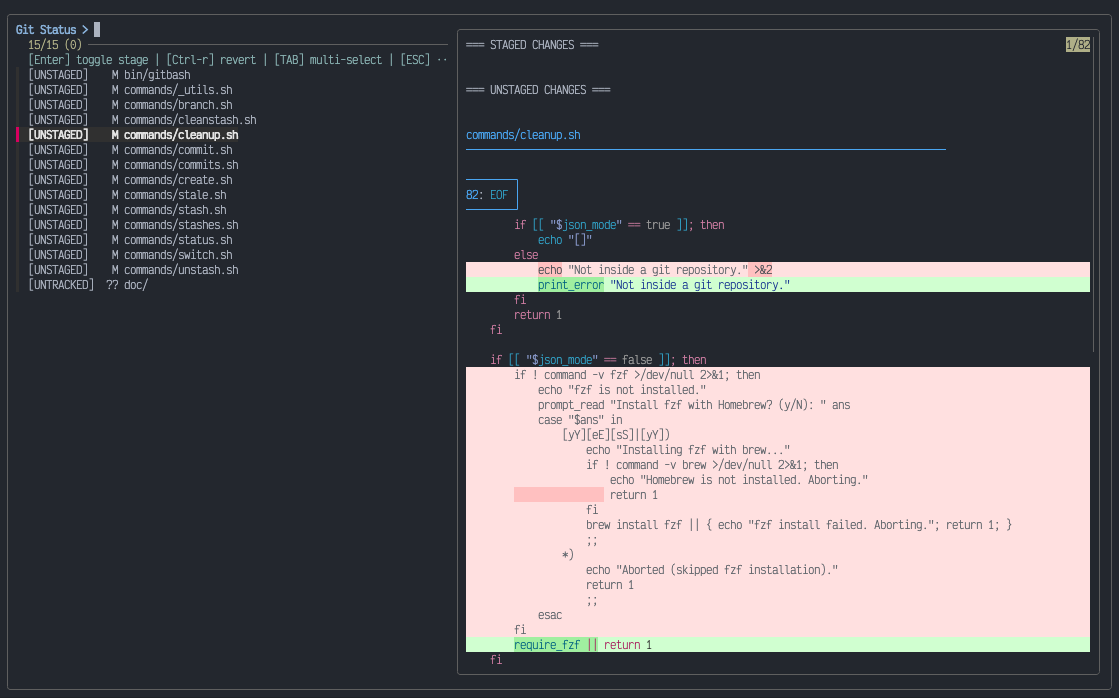
### status
Interactive staging with fzf and diff previews.
- `Enter` stages the selected files (unstages fully staged ones)
- `Ctrl-R` discards changes (asks first)
- `Ctrl-X` adds untracked files to `.gitignore`
- `Ctrl-O` commits the staged changes, then asks whether to push
- `ESC` exits
### pr
```bash
pr [-p|--push] [--print] [-y|--yes]
```
Open the pull request in the browser: the existing PR via the GitHub CLI when available, otherwise the create page (GitHub, GitHub Enterprise, GitLab, Bitbucket, Azure DevOps). Offers to commit local changes and to push a branch that is not on the remote yet. `-p` pushes first, `--print` prints the URL.
### repo
```bash
repo [--print]
```
Open the repository's web page in the browser: via the GitHub CLI (`gh repo view --web`) when available, otherwise the URL derived from the remote (GitHub, GitHub Enterprise, GitLab, Bitbucket, Azure DevOps). `--print` prints the URL.
### reset-repo
```bash
reset-repo [-n|--dry-run] [-y|--yes]
```
Reset the current branch like a fresh clone: fetch, `git reset --hard <remote>/<branch>` and delete all untracked and ignored files (`git clean -dx`). Lists the unpushed commits, local changes and files it removes and asks first. Aborts an unfinished merge or rebase. Files matching `GITBASH_RESET_KEEP` (e.g. `.env`), `.gitbashrc-user` and nested repositories are kept; stashes and other branches are not touched. Submodules you initialized are reset to the recorded commit; others are left alone (run `git submodule update --init` to clone them).
### update
```bash
update [-p|--push] [-y|--yes]
```
Merge the latest `origin/<base>` into the current branch. With local changes, asks to commit, stash (restored afterwards) or abort. Lists conflicts and opens the merge tool (`GITBASH_MERGE_COMMAND`). On the base branch itself, fast-forwards it.
### stale
```bash
stale [-a|--all] [-m|--my] [--age=N] [--json] [FILTER...]
```
List remote branches older than 3 months (oldest first). Multi-select with TAB, Enter deletes them from the remote after confirmation. Protected branches are never listed.
- `-a|--all` starts with all branches (not only stale ones); `Ctrl-T` toggles
- `-m|--my` pre-fills the filter with your git username
- `--age=N` sets the threshold in months (default: 3, or `GITBASH_STALE_MONTHS`)
- `--json` outputs JSON for scripting
### stashes
Interactive stash menu: create, apply, or delete stashes.
### stash
```bash
stash [--] [NAME...]
```
Create named stash (includes untracked files). Use `--` for a name starting with `-`.
### unstash
Apply stash with fzf picker. Drops it afterwards unless you say no. `-y` drops it without asking.
### cleanstash
Delete stashes (multi-select with TAB). `-y` skips the confirmation.
### cleanup
```bash
cleanup [-n|--dry-run] [--days=N] [-y|--yes] [--json]
```
Find and delete leftover local branches:
- **[MERGED]** - Changes are in the base branch (also squash merges). Pre-selected if the remote branch is gone or it is older than N days.
- **[STALE]** - No commits in 7+ days. Pre-selected only if everything is pushed.
- **[GONE]** - Remote branch deleted but changes not merged (not selected)
- **[RECENT]** - Recent activity (not selected)
Unpushed commits are shown per branch. Deletes with `git branch -d`; force-deleting unmerged work needs a second confirmation. Switches to the base branch first if the current branch is deleted. `--dry-run` lists and `--yes` deletes the pre-selected branches without the picker.
`--json` outputs non-interactive JSON for scripting:
```json
[
{
"last_change_timestamp": 1733123456,
"author_email": "dev@example.com",
"author_name": "Dev",
"name": "feature/old",
"last_change_relative": "2 weeks ago",
"category": "merged",
"preselected": true,
"unpushed_commits": 0
}
]
```
### commits
```bash
commits [-a|--all] [-y|--yes] [COUNT]
```
List the current branch's own commits with option to revert. On a feature branch only commits not in the base branch are shown; on the base branch its first-parent history (merged branches as their merge commit). If the upstream has new commits, offers to fast-forward first. Multi-select with TAB; selected commits are reverted newest first.
```bash
commits # Show the branch's last 20 commits
commits 50 # Show up to 50
commits --all # All recent commits, like git log
```
## Configuration
gitbash reads `~/.gitbashrc`. Run `gitbash --config` to set it up interactively, or write it by hand:
```bash
# Branch prefix inserted between type and issue number (default: "")
GITBASH_CREATE_BRANCH_PREFIX=""
# Disable Jira issue number parsing in branch names: yes or no (default: "no")
GITBASH_CREATE_NO_ISSUE_PARSING="no"
# Fallback prefix when no issue number is provided (default: "NOISSUE")
GITBASH_CREATE_ISSUE_PARSING_FALLBACK="NOISSUE"
# Push new branches right after 'create': yes or no (default: "yes")
GITBASH_CREATE_AUTO_PUSH="yes"
# Merge tool invoked by 'update' on conflicts (default: "fork")
GITBASH_MERGE_COMMAND="fork"
# Theme for delta/bat: auto, dark or light (default: "auto")
GITBASH_THEME="auto"
# Stale thresholds: 'stale' in months, 'cleanup' in days (defaults: 3, 7)
GITBASH_STALE_MONTHS="3"
GITBASH_CLEANUP_DAYS="7"
# Branches never offered for deletion, space-separated globs
GITBASH_PROTECTED_BRANCHES="main master develop release/*"
# Files 'reset-repo' keeps, space-separated .gitignore patterns, e.g. ".env .idea/" (default: "")
GITBASH_RESET_KEEP=""
# Base branch (default: detected from origin/HEAD, then main, then master)
GITBASH_BASE_BRANCH=""
# Remote name (default: "origin")
GITBASH_REMOTE="origin"
# Turn off the automatic update checks: yes or no (default: "no")
GITBASH_NO_UPDATE_CHECKS="no"
```
Config files are **read, never executed**. Only `GITBASH_*="value"` lines are used (double, single or no quotes, optional `export`, `# comments`). Values cannot contain `$`, backticks, backslashes or quotes; anything else is ignored with a warning.
#### Local Configuration
Run `gitbash --config-local` inside a repository to create a committed `.gitbashrc` with overrides for everyone working on it (e.g. a team branch prefix or different thresholds). For security, a committed `.gitbashrc` cannot set `GITBASH_MERGE_COMMAND` or `GITBASH_NO_UPDATE_CHECKS`, and its `GITBASH_PROTECTED_BRANCHES` only adds to the branches your own settings protect.
#### User Configuration
Run `gitbash --config-user` to create `.gitbashrc-user` for personal overrides in one repository. It is excluded from git via `.git/info/exclude`. If a repository commits a `.gitbashrc-user` anyway, gitbash treats it like the committed `.gitbashrc` (it cannot set `GITBASH_MERGE_COMMAND`).
**Configuration priority (highest to lowest):**
1. `.gitbashrc-user` - Personal settings for this repository (not committed)
2. `.gitbashrc` - Repository settings (committed)
3. `~/.gitbashrc` - Global settings
#### Updates
`gitbash --update` installs the latest version on npm the same way gitbash was installed: with `npm install -g` (or `pnpm add -g`) for a global package, or with the install script kept in the installation, for the same locations.
gitbash also checks for new releases on its own, at most once a day, in the background while a command runs, so commands never wait for the network. When a new version is known, the next command at a terminal asks (at most every other day) whether to update now, not now, or skip that version for good. It never asks in scripts or pipes.
To turn the checks off, answer "no" in `gitbash --config` or `--config-user`, set `GITBASH_NO_UPDATE_CHECKS="yes"` in any config file, or export `GITBASH_NO_UPDATE_CHECKS=1`. They are also off in CI (`CI` and similar variables) and when running from a git checkout. The check state is kept in `~/.local/state/gitbash/update-check` (`$XDG_STATE_HOME` if set).
#### Colors
gitbash supports [`NO_COLOR`](https://no-color.org): set it to any non-empty value (e.g. `export NO_COLOR=1`) to turn off all colors, including the help, messages, the git output in previews and `bat`. `delta` is not used then, and fzf uses its black-and-white theme. Colors are also left out when the output is not a terminal.
## License
See [LICENSE](LICENSE) file for details.