**Your coding agent cannot see the page it just built. pixelpact measures it against the
reference and hands back numbers.**
[](https://github.com/jamalkamaladdin/pixelpact/actions/workflows/ci.yml)
[](https://www.npmjs.com/package/pixelpact)
[](https://nodejs.org)
[](./LICENSE)
A coding agent writes the CSS and says it is done. It never sees the result. Nothing hands it a
number, so the loop cannot close: the agent guesses, you open the page, you send it back, it
guesses again. Every round costs you the one thing the agent was supposed to save.
The same gap exists without an agent, when a teammate says a section is finished and nobody in
the room has a measurement. The difference is that a person can at least look.
pixelpact reads the reference page and writes down what it actually renders: sizes, colors,
spacing, typography, hover and focus states, animation keyframes, design tokens. That file is
the **contract**. Point pixelpact at the implementation and it answers with one line per
property that drifted, which is precisely what an agent can act on.
```bash
npx pixelpact extract https://reference.example.com -o contract.json
npx pixelpact check contract.json http://localhost:3000
```
## Works with
| **MCP clients** | **Playwright** | **GitHub Actions** | **Any framework** | **Figma** |
| :-------------: | :------------: | :----------------: | :---------------: | :-------: |
| Claude Code, Cursor, anything that speaks stdio MCP | the engine it drives | one comment on the pull request | it reads the DOM, not your stack | a frame as the reference, when you want one |
*If a browser can render it, pixelpact can measure it.*
## For coding agents
An agent that writes UI code cannot tell whether it succeeded. `pixelpact-mcp` gives it the
measurement, so the loop closes without a person in the middle: extract the contract once,
then let the agent check its own work, read the deviation list, fix, and check again.
```jsonc
// .mcp.json
{
"mcpServers": {
"pixelpact": { "command": "npx", "args": ["-y", "pixelpact-mcp"] }
}
}
```
Tools exposed: `extract_contract`, `check_implementation`, `diff_pixels`,
`read_contract_summary`.
## Why this is not visual regression testing
Percy, Chromatic, Applitools, BackstopJS and Pixeleye all compare your page against a baseline
that you approved earlier. That model works once the page already looks right and you want to
keep it that way. While you are still building toward a design, there is no baseline to
compare with, and the first run of a regression tool simply records whatever you produced.
| | Visual regression tools | pixelpact |
| ---------------------------- | ---------------------------------- | ---------------------------------- |
| Compares against | a snapshot you approved earlier | the reference design itself |
| Useful when | the UI is already correct | the UI is being built |
| First run on a new page | records, cannot judge | measures against the reference |
| Answer you get | an image diff to inspect by eye | a value per property, with a delta |
| Fits an autonomous agent | needs a human to approve the diff | the numbers close the loop |
The two models are complementary. Use a regression tool to keep a finished page finished, and
pixelpact to get it finished in the first place.
## Problems pixelpact solves
| Without pixelpact | With pixelpact |
| ----------------- | -------------- |
| ❌ A coding agent writes CSS, declares it done, and a person has to open the page to find out that it is not. | ✅ The agent calls the MCP server, reads the deviations, fixes them and checks again. No person in the middle. |
| ❌ Someone says the section is finished, you disagree, and neither of you has a number. The louder opinion wins. | ✅ Every value in the reference is asserted against your page. What failed is listed with expected, actual and the difference. |
| ❌ A regression tool has nothing to compare a brand new page against, so its first run records whatever you happened to build. | ✅ The reference is the baseline from the first minute. Nothing has to be approved before the tool is useful. |
| ❌ Hover, focus and animation values are almost never reviewed, because checking them by hand is slow and boring. | ✅ They are part of the contract, so they are measured on every run like any other value. |
| ❌ An image diff tells you that something changed and leaves you to hunt for what. | ✅ Deviations name the element, the property, the expected value and the measured one. |
| ❌ The design lives in a file nobody opens during code review. | ✅ The contract is committed JSON, so a pull request shows exactly which values moved. |
## Install
```bash
pnpm add -D pixelpact playwright
pnpm exec playwright install chromium
```
`playwright` is a peer dependency, so the browser download stays under your control and a
project that already has Playwright installs nothing extra. Node 22.12 or newer is required.
## Quickstart
**1. Extract the contract from the reference.**
```bash
npx pixelpact extract https://reference.example.com \
--selector "main" \
--viewport desktop,mobile \
--screenshots .pixelpact/shots \
-o contract.json
```
**2. Measure your implementation.**
```bash
npx pixelpact check contract.json http://localhost:3000 --viewport desktop
```
**3. Fix what it reports, then run it again.** The command exits `0` when everything is inside
tolerance and `1` when it is not, so it drops straight into a script or a CI job.
## What a contract looks like
A contract is plain JSON, readable and diffable, with no proprietary format and no service
behind it.
```jsonc
{
"version": 1,
"source": { "type": "url", "value": "https://reference.example.com" },
"root": "main",
"extractedAt": "2026-09-06T01:20:44.812Z",
"viewports": [{ "name": "desktop", "width": 1440, "height": 900 }],
"tokens": { "--brand-600": "rgb(11, 114, 133)" },
"keyframes": { "fade-up": [{ "offset": "0%", "css": "opacity: 0" }] },
"byViewport": {
"desktop": {
"documentHeight": 4218,
"elements": [
{
"selector": "main > header > a.cta",
"tag": "a",
"text": "Get started",
"box": { "x": 120, "y": 32, "w": 148, "h": 44 },
"styles": {
"background-color": "rgb(11, 114, 133)",
"font-size": "16px",
"border-radius": "8px"
},
"hover": { "background-color": "rgb(8, 90, 105)" },
"focus": { "outline": "2px solid rgb(11, 114, 133)" }
}
]
}
}
}
```
Because it is a file, you can commit it, review it in a pull request, hand it to another
developer, or hand it to an agent.
## What a check prints
```text
pixelpact check FAILED
target http://localhost:4173/impl.html
reference http://localhost:4173/ref.html
viewport desktop 1440x900
elements 14 matched, 0 missing of 14
checks 1056 passed, 10 failed (99.1% of 1066)
deviations (10)
SELECTOR PROPERTY EXPECTED ACTUAL DIFF
body > main > h1 font-size 48px 44px 4px
body > main > a box.width 117.75px 109.75px 8px
body > main > a padding-right 24px 20px 4px
body > main > a padding-left 24px 20px 4px
body > main > a background-color rgb(11, 114, 133) rgb(37, 99, 235) 60.1 (color)
body > main > a border-top-left-radius 8px 4px 4px
body > main > a border-top-right-radius 8px 4px 4px
body > main > a border-bottom-left-ra... 8px 4px 4px
body > main > a border-bottom-right-r... 8px 4px 4px
body > main > a focus.outline rgb(11, 114, 133) s... rgb(37, 99, 235) so... differs
```
That is a real run against two copies of one page with four declarations changed. Four edits
produce ten measured deviations, because padding moves the box width and one `border-radius`
shorthand sets four corners. Run the same check against the reference itself and all 1066
assertions pass, which is the property that matters: a passing check has to mean something.
Add `--json` to get the same report as a data structure, which is what CI jobs and agents read.
## What a side by side run shows
`check` says which values moved. `diff` says how many pixels moved. Neither tells a person
where to look. `side` splits both pages into sections, puts them next to each other, and boxes
what differs.
```bash
npx pixelpact side https://reference.example.com http://localhost:3000 --widths 1440,390
```
```text
# SECTION WIDTH VERDICT DIFF
01 hero 1440px PASS 0.000%
02 features 1440px FAIL 0.675%
.pixelpact/side/1440/02-features.png
03 pricing 1440px PASS 0.000%
04 foot 1440px FAIL 1.265%
.pixelpact/side/1440/04-foot.png
```
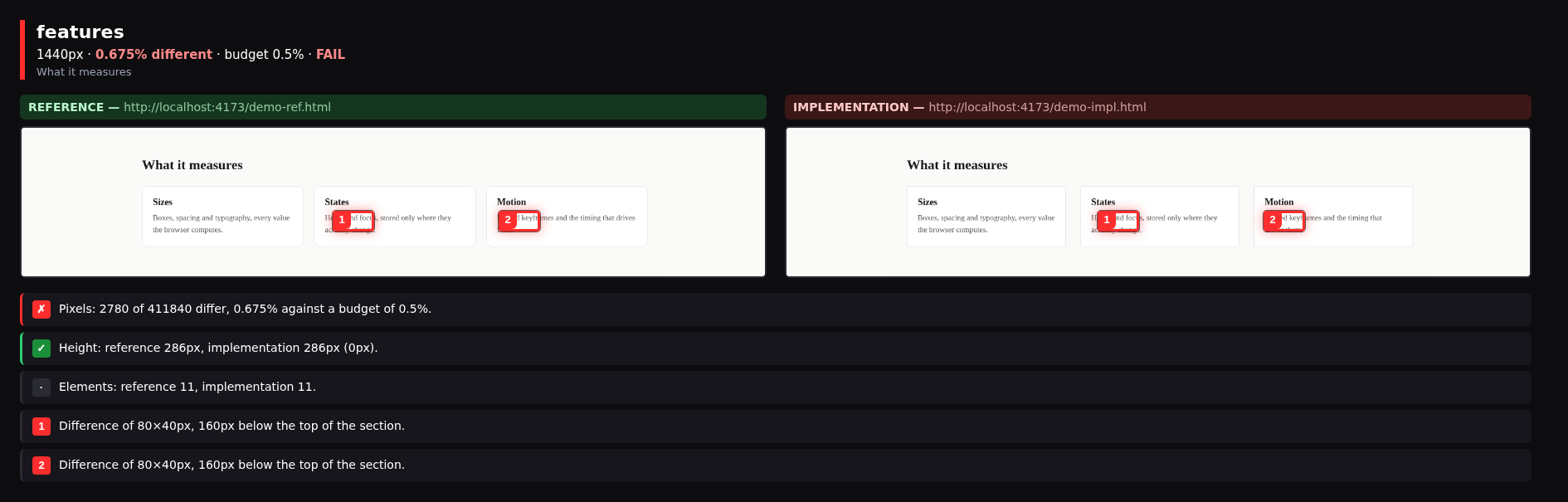
That is a real run against the two files in [`examples/side`](./examples/side), which are
copies of one page where the card gap and the corner radius were changed. Reproduce it with:
```bash
npx pixelpact side "file://$PWD/examples/side/reference.html" \
"file://$PWD/examples/side/implementation.html" --widths 1440
```
This is the command to run before telling anyone that a page is finished.
## Features
Contract from the reference
Reads the page you are building toward and writes down every value it renders. Nothing to approve first.
Numbers, not opinions
Each deviation carries the expected value, the measured value and the difference between them.
States, not just layout
Interactive elements are hovered and focused, and only the properties that actually change are stored.
Tokens and keyframes
Custom properties on the root element and named animation keyframes travel inside the contract.
Pixel comparison
When every value passes and it still looks wrong, compare the screenshots and get a percentage.
Agent ready
An MCP server exposes the same measurements, so a coding agent can close its own loop.
Pull request checks
A composite Action runs the check and keeps one comment on the pull request up to date.
Plain JSON
The contract is a file you can read, diff and review. No service, no account, nothing to log into.
Framework agnostic
It measures the rendered DOM, so React, Vue, Svelte and hand written HTML are all the same to it.
