
React Arborist
[See the Demos](https://react-arborist.netlify.app/)
The tree view is ubiquitous in software applications. This library provides the React ecosystem with a complete solution to build the equivalent of a VSCode sidebar, Mac Finder, Windows Explorer, or Sketch/Figma layers panel.
Here is a Gmail sidebar clone built with react-arborist.
 ## Features
- Drag and drop sorting
- Open/close folders
- Inline renaming
- Virtualized rendering
- Custom styling
- Keyboard navigation
- Aria attributes
- Tree filtering
- Selection synchronization
- Callbacks (onScroll, onActivate, onSelect)
- Controlled or uncontrolled trees
## Installation
react-arborist requires `react-dnd` and `react-dnd-html5-backend` as peer
dependencies. Install them together:
```bash
npm install react-arborist react-dnd react-dnd-html5-backend
```
```bash
yarn add react-arborist react-dnd react-dnd-html5-backend
```
## Examples
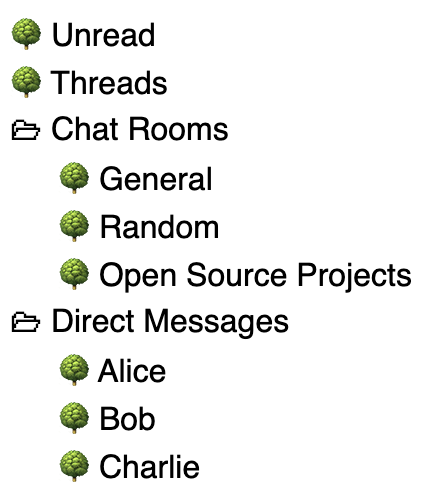
Assume our data is this:
```js
const data = [
{ id: "1", name: "Unread" },
{ id: "2", name: "Threads" },
{
id: "3",
name: "Chat Rooms",
children: [
{ id: "c1", name: "General" },
{ id: "c2", name: "Random" },
{ id: "c3", name: "Open Source Projects" },
],
},
{
id: "4",
name: "Direct Messages",
children: [
{ id: "d1", name: "Alice" },
{ id: "d2", name: "Bob" },
{ id: "d3", name: "Charlie" },
],
},
];
```
### The Simplest Tree
Use all the defaults. The _initialData_ prop makes the tree an uncontrolled component. Create, move, rename, and delete will be handled internally.
```jsx
import { Tree } from 'react-arborist';
function App() {
return ;
}
```
## Features
- Drag and drop sorting
- Open/close folders
- Inline renaming
- Virtualized rendering
- Custom styling
- Keyboard navigation
- Aria attributes
- Tree filtering
- Selection synchronization
- Callbacks (onScroll, onActivate, onSelect)
- Controlled or uncontrolled trees
## Installation
react-arborist requires `react-dnd` and `react-dnd-html5-backend` as peer
dependencies. Install them together:
```bash
npm install react-arborist react-dnd react-dnd-html5-backend
```
```bash
yarn add react-arborist react-dnd react-dnd-html5-backend
```
## Examples
Assume our data is this:
```js
const data = [
{ id: "1", name: "Unread" },
{ id: "2", name: "Threads" },
{
id: "3",
name: "Chat Rooms",
children: [
{ id: "c1", name: "General" },
{ id: "c2", name: "Random" },
{ id: "c3", name: "Open Source Projects" },
],
},
{
id: "4",
name: "Direct Messages",
children: [
{ id: "d1", name: "Alice" },
{ id: "d2", name: "Bob" },
{ id: "d3", name: "Charlie" },
],
},
];
```
### The Simplest Tree
Use all the defaults. The _initialData_ prop makes the tree an uncontrolled component. Create, move, rename, and delete will be handled internally.
```jsx
import { Tree } from 'react-arborist';
function App() {
return ;
}
```
 [Demo](https://codesandbox.io/s/the-simplest-tree-7tbedw)
### Customize the Appearance
We provide our own dimensions and our own `Node` component.
```jsx
function App() {
return (
{Node}
);
}
function Node({ node, style, dragHandle }) {
/* This node instance can do many things. See the API reference. */
return (
[Demo](https://codesandbox.io/s/the-simplest-tree-7tbedw)
### Customize the Appearance
We provide our own dimensions and our own `Node` component.
```jsx
function App() {
return (
{Node}
);
}
function Node({ node, style, dragHandle }) {
/* This node instance can do many things. See the API reference. */
return (
{node.isLeaf ? "🍁" : "🗀"}
{node.data.name}
);
}
```
 [Demo](https://codesandbox.io/s/customize-appearance-f4g15v?file=/src/App.tsx)
### Control the Tree data
Here we use the _data_ prop to make the tree a controlled component. We must handle all the data modifications ourselves using the props below.
```jsx
function App() {
/* Handle the data modifications outside the tree component */
const onCreate = ({ parentId, index, type }) => {};
const onRename = ({ id, name }) => {};
const onMove = ({ dragIds, parentId, index }) => {};
const onDelete = ({ ids }) => {};
return (
);
}
```
#### The `onMove` index
`onMove`'s `index` is a **pre-removal slot**: it counts positions in the destination parent's child list _as shown on screen_, with the dragged rows still in place. If your handler removes the dragged rows before inserting them — the natural way to reorder an array — every dragged row that started before the drop slot shifts your target one place to the left, so dragging a row to just below itself would jump it past its neighbor (issue [#247](https://github.com/jameskerr/react-arborist/issues/247)).
`SimpleTree` / `useSimpleTree` insert before removing, so they need no adjustment. If you manage the data yourself, use the exported `adjustMoveIndex` helper:
```jsx
import { adjustMoveIndex } from "react-arborist";
const onMove = ({ dragIds, index }) => {
const to = adjustMoveIndex({ index, dragIds, siblingIds: data.map((d) => d.id) });
const dragged = data.filter((d) => dragIds.includes(d.id));
const rest = data.filter((d) => !dragIds.includes(d.id));
rest.splice(to, 0, ...dragged);
setData(rest);
};
```
Pass the destination parent's current child ids in display order (for a root-level move, that's your top-level data's ids). Ids that aren't among them — rows moving in from another parent — don't shift anything.
### Tree Filtering
Providing a non-empty _searchTerm_ will only show nodes that match. If a child matches, all its parents are shown too, so the tree keeps its structure. Internal nodes are opened when filtering. You can provide your own _searchMatch_ function, or use the default, which searches a node's own data, excluding its children. The default is deliberately loose: it JSON-stringifies the data's values and looks for the term anywhere in the result, so a term can also hit the keys of a nested object. Pass _searchMatch_ when you want to match specific fields.
```jsx
function App() {
const term = useSearchTermString()
node.data.name.toLowerCase().includes(term.toLowerCase())
}
/>
}
```
### Sync the Selection
It's common to open something elsewhere in the app, but have the tree reflect the new selection.
Passing an id to the _selection_ prop will select and scroll to that node whenever that id changes.
```jsx
function App() {
const chatId = useCurrentChatId();
/*
Whenever the currentChatRoomId changes,
the tree will automatically select it and scroll to it.
*/
return ;
}
```
### Use the Tree Api Instance
You can access the Tree Api in the parent component by giving a ref to the tree.
```jsx
function App() {
const treeRef = useRef();
useEffect(() => {
const tree = treeRef.current;
tree.selectAll();
/* See the Tree API reference for all you can do with it. */
}, []);
return ;
}
```
### Data with Different Property Names
The _idAccessor_ and _childrenAccessor_ props allow you to specify the children and id fields in your data.
```jsx
function App() {
const data = [
{
category: "Food",
subCategories: [{ category: "Restaurants" }, { category: "Groceries" }],
},
];
return (
d.subCategories}
/>
);
}
```
### Custom Rendering
Render every single piece of the tree yourself. See the API reference for the props passed to each renderer.
```jsx
function App() {
return (
{/* The inner element that shows the indentation and data */}
{MyNode}
);
}
```
### Dynamic sizing
You can add a ref to it with this package [Pmndrs/react-use-measure](https://github.com/pmndrs/react-use-measure)
That hook will measure the boundaries (for instance width, height, top, left) of a view you reference. Then you pass the width and the height to the Tree.
```js
import useMeasure from "react-use-measure";
const [ref, bounds] = useMeasure();
[Demo](https://codesandbox.io/s/customize-appearance-f4g15v?file=/src/App.tsx)
### Control the Tree data
Here we use the _data_ prop to make the tree a controlled component. We must handle all the data modifications ourselves using the props below.
```jsx
function App() {
/* Handle the data modifications outside the tree component */
const onCreate = ({ parentId, index, type }) => {};
const onRename = ({ id, name }) => {};
const onMove = ({ dragIds, parentId, index }) => {};
const onDelete = ({ ids }) => {};
return (
);
}
```
#### The `onMove` index
`onMove`'s `index` is a **pre-removal slot**: it counts positions in the destination parent's child list _as shown on screen_, with the dragged rows still in place. If your handler removes the dragged rows before inserting them — the natural way to reorder an array — every dragged row that started before the drop slot shifts your target one place to the left, so dragging a row to just below itself would jump it past its neighbor (issue [#247](https://github.com/jameskerr/react-arborist/issues/247)).
`SimpleTree` / `useSimpleTree` insert before removing, so they need no adjustment. If you manage the data yourself, use the exported `adjustMoveIndex` helper:
```jsx
import { adjustMoveIndex } from "react-arborist";
const onMove = ({ dragIds, index }) => {
const to = adjustMoveIndex({ index, dragIds, siblingIds: data.map((d) => d.id) });
const dragged = data.filter((d) => dragIds.includes(d.id));
const rest = data.filter((d) => !dragIds.includes(d.id));
rest.splice(to, 0, ...dragged);
setData(rest);
};
```
Pass the destination parent's current child ids in display order (for a root-level move, that's your top-level data's ids). Ids that aren't among them — rows moving in from another parent — don't shift anything.
### Tree Filtering
Providing a non-empty _searchTerm_ will only show nodes that match. If a child matches, all its parents are shown too, so the tree keeps its structure. Internal nodes are opened when filtering. You can provide your own _searchMatch_ function, or use the default, which searches a node's own data, excluding its children. The default is deliberately loose: it JSON-stringifies the data's values and looks for the term anywhere in the result, so a term can also hit the keys of a nested object. Pass _searchMatch_ when you want to match specific fields.
```jsx
function App() {
const term = useSearchTermString()
node.data.name.toLowerCase().includes(term.toLowerCase())
}
/>
}
```
### Sync the Selection
It's common to open something elsewhere in the app, but have the tree reflect the new selection.
Passing an id to the _selection_ prop will select and scroll to that node whenever that id changes.
```jsx
function App() {
const chatId = useCurrentChatId();
/*
Whenever the currentChatRoomId changes,
the tree will automatically select it and scroll to it.
*/
return ;
}
```
### Use the Tree Api Instance
You can access the Tree Api in the parent component by giving a ref to the tree.
```jsx
function App() {
const treeRef = useRef();
useEffect(() => {
const tree = treeRef.current;
tree.selectAll();
/* See the Tree API reference for all you can do with it. */
}, []);
return ;
}
```
### Data with Different Property Names
The _idAccessor_ and _childrenAccessor_ props allow you to specify the children and id fields in your data.
```jsx
function App() {
const data = [
{
category: "Food",
subCategories: [{ category: "Restaurants" }, { category: "Groceries" }],
},
];
return (
d.subCategories}
/>
);
}
```
### Custom Rendering
Render every single piece of the tree yourself. See the API reference for the props passed to each renderer.
```jsx
function App() {
return (
{/* The inner element that shows the indentation and data */}
{MyNode}
);
}
```
### Dynamic sizing
You can add a ref to it with this package [Pmndrs/react-use-measure](https://github.com/pmndrs/react-use-measure)
That hook will measure the boundaries (for instance width, height, top, left) of a view you reference. Then you pass the width and the height to the Tree.
```js
import useMeasure from "react-use-measure";
const [ref, bounds] = useMeasure();
```
## API Reference
- Components
- [Tree Component Props](#tree-component-props)
- [Row Component Props](#row-component-props)
- [Node Component Props](#node-component-props)
- [DragPreview Component Props](#dragpreview-component-props)
- [Cursor Component Props](#cursor-component-props)
- Interfaces
- [Node API](#node-api-reference)
- [Tree API](#tree-api-reference)
- Utilities
- [getTreeLinePrefix](#gettreelineprefix)
## Tree Component Props
These are all the props you can pass to the Tree component.
```ts
interface TreeProps {
/* Data Options */
data?: readonly T[];
initialData?: readonly T[];
/* Data Handlers */
onCreate?: handlers.CreateHandler;
onMove?: handlers.MoveHandler;
onRename?: handlers.RenameHandler;
onDelete?: handlers.DeleteHandler;
/* Renderers*/
children?: ElementType>;
renderRow?: ElementType>;
renderDragPreview?: ElementType;
renderCursor?: ElementType;
renderContainer?: ElementType<{}>;
/* Sizes */
rowHeight?: number;
overscanCount?: number;
width?: number | string;
height?: number;
indent?: number;
paddingTop?: number;
paddingBottom?: number;
padding?: number;
/* Config */
childrenAccessor?: string | ((d: T) => readonly T[] | null);
idAccessor?: string | ((d: T) => string);
openByDefault?: boolean;
selectionFollowsFocus?: boolean;
disableMultiSelection?: boolean;
disableDeselectOnClick?: boolean;
disableSelect?: string | boolean | BoolFunc;
disableEdit?: string | boolean | BoolFunc;
disableDrag?: string | boolean | BoolFunc;
disableDrop?:
| string
| boolean
| ((args: {
parentNode: NodeApi;
dragNodes: NodeApi[];
index: number;
}) => boolean);
/* Event Handlers */
onActivate?: (node: NodeApi) => void;
onSelect?: (nodes: NodeApi[]) => void;
onScroll?: (props: ListOnScrollProps) => void;
onToggle?: (id: string) => void;
onFocus?: (node: NodeApi) => void;
/* Selection */
selection?: string;
/* Open State */
initialOpenState?: OpenMap;
/* Search */
searchTerm?: string;
searchMatch?: (node: NodeApi, searchTerm: string) => boolean;
/* Extra */
className?: string | undefined;
rowClassName?: string | undefined;
/* Tree container mouse events — fire for clicks / right-clicks anywhere in
the tree (see "Handling Clicks on the Tree Container" below). */
onClick?: MouseEventHandler;
onContextMenu?: MouseEventHandler;
dndRootElement?: globalThis.Node | null;
dndBackend?: Extract<
DndProviderProps,
{ backend: unknown }
>["backend"];
dndManager?: ReturnType;
dragType?: string | ((node: NodeApi) => string);
}
```
### Handling Clicks on the Tree Container
`onClick` and `onContextMenu` are attached to the tree's outer container, so they fire for mouse events anywhere in the tree — clicks that bubble up from a row, as well as clicks on the empty space below the last row. Use them for interactions that aren't tied to a single node, such as clearing the selection or opening your own context menu for the tree as a whole.
To act only when the empty area was clicked (and not a row), check whether the event started inside a row — rows carry `role="treeitem"`:
```tsx
{
const onRow = (e.target as Element).closest('[role="treeitem"]');
if (!onRow) {
// clicked the empty area, not a row
}
}}
onContextMenu={(e) => {
e.preventDefault(); // suppress the native menu
// open a custom context menu for the tree
}}
/>
```
Clicking empty space already clears the selection by default; pass the [`disableDeselectOnClick`](#tree-component-props) prop to keep the selection instead.
### Dragging Nodes to External Drop Targets
The react-dnd drag item created for each row carries the dragged node's `data`, so a drop target rendered outside the tree can read it:
```tsx
const [, drop] = useDrop(() => ({
accept: "NODE",
drop: (item) => console.log(item.data), // the dragged node's data
}));
```
The tree and your external target must share one react-dnd backend. Wrap both in a single `DndProvider` and pass its manager to the tree via the `dndManager` prop. By default rows advertise the `"NODE"` item type; set the `dragType` prop (a fixed string, or a function of the node) to advertise a custom type instead. Note that the tree's own drop targets only accept `"NODE"`, so a row given a custom `dragType` is no longer reorderable within the tree.
## react-dnd Compatibility
react-arborist requires **React 18+** and **react-dnd v16**.
react-arborist ships a single ESM build, as does react-dnd v16. `import` and
`require` both resolve to it, so an app never loads two copies of react-arborist with
separate React contexts. `require("react-arborist")` from CommonJS relies on
`require(esm)`, unflagged from **Node.js 22.12**, which is what `engines.node`
declares. Only the `require` path actually needs that Node version, but `engines` is
checked at install time: package managers that enforce it (Yarn Classic by default,
pnpm with `engine-strict`) will refuse to install on older Node even for bundler and
browser consumers.
CommonJS TypeScript projects that use Node module resolution need a `module` setting
that understands `require(esm)`: `"nodenext"` (**TypeScript ≥ 5.8**) or `"node20"`
(**TypeScript ≥ 5.9**). `"node16"` and `"node18"` report error TS1479 on
`import ... from "react-arborist"`. Projects using `moduleResolution: "bundler"` or
`"node10"` are unaffected.
### Why react-dnd is a peer dependency
From react-arborist v4, `react-dnd` and `react-dnd-html5-backend` are **peer
dependencies** rather than bundled dependencies. This matters because react-dnd
registers a global singleton (`globalThis[Symbol.for('__REACT_DND_CONTEXT_INSTANCE__')]`).
If your application and react-arborist each bundled their own copy, you would end up
with two independent singletons, causing drag-and-drop to silently break or throw
`"Cannot have two HTML5 backends at the same time"`.
Making react-dnd a peer dependency means npm/yarn/pnpm will always resolve a single
shared copy for your entire application.
### Multiple trees on the same page
Rendering several `` components side by side needs no special setup. react-dnd
v16 memoizes one drag-drop manager per context object, and the default context is the
global one, so every tree on the page already resolves to the same manager and the
same backend.
Reach for the shared-provider pattern when you need the tree bound to a *specific*
manager rather than to whatever the global slot holds: your `` passes a
custom `context`, or renders into another window or iframe. It is also the way to make
the binding explicit — because the global manager is memoized on first use, whichever
provider mounts first fixes the backend for everything after it, and a `dndBackend`
passed to a later `` is silently ignored. Wrap everything in one ``
and pass its manager to each tree:
```tsx
import { DndProvider, useDragDropManager } from "react-dnd";
import { HTML5Backend } from "react-dnd-html5-backend";
function App() {
return (
);
}
function ForestView() {
const manager = useDragDropManager();
return (
<>
{Node}
{Node}
);
}
```
Without the shared manager each `` resolves through the global context instead.
If your provider is on a custom `context`, that is a different manager, and drags
started in the tree are invisible to your drop targets.
### Custom backends
Pass any react-dnd-compatible backend via `dndBackend`:
```tsx
import { TouchBackend } from "react-dnd-touch-backend";
{Node}
```
Passing `dndBackend` or `dndManager` opts out of the default `HTML5Backend`.
Custom-backend / `dndManager` users still need `react-dnd-html5-backend`
installed as a peer: the drag preview calls into it (`getEmptyImage()`) on every
drag regardless of which backend is active, so it's a hard requirement rather
than an optional default.
`dndBackend` is only dependable when this `` is the only react-dnd
consumer in the page: as the previous section explains, react-dnd v16
memoizes one manager per context, so if another `` or any other
react-dnd consumer initialised the global manager first, this backend is
silently dropped with no warning. Reach for the shared `` +
`dndManager` pattern above whenever the page has more than one.
### react-dnd v16 and Jest
react-arborist, react-dnd v16, and react-dnd's transitive dependencies (`dnd-core`,
`@react-dnd/*`) ship **ESM-only** builds. Jest's default CJS runtime can't load them
directly. Add a `transformIgnorePatterns` entry so ts-jest (or babel-jest) transpiles
them to CJS.
Transpile-only mode is required — ts-jest's type-checking path won't emit for files
outside your TS program. Set `isolatedModules: true` in the transformer's `tsconfig`
block. Jest stopped bundling `jest-environment-jsdom` in v28, so install it too:
```
yarn add -D jest-environment-jsdom
```
```js
// jest.config.js
module.exports = {
transform: {
"^.+\\.[jt]sx?$": ["ts-jest", { tsconfig: { allowJs: true, isolatedModules: true } }],
},
transformIgnorePatterns: [
"/node_modules/(?!.*(react-arborist|react-dnd|react-dnd-html5-backend|dnd-core|@react-dnd)/)",
],
testEnvironment: "jsdom",
testEnvironmentOptions: {
customExportConditions: ["browser", "require", "default"],
},
};
```
Three details in that config are easy to get wrong:
- `testEnvironment: "jsdom"` is required, not optional, once you restate
`customExportConditions`. Jest's default environment is `jest-environment-node`,
whose own conditions are `["node"]` — and `customExportConditions` *replaces*
rather than extends them. Drop `jsdom` while keeping `["browser", "require",
"default"]` and dependencies still resolve their **browser** builds, but now run
them in plain Node without the DOM globals those builds expect. A browser build
that touches `window` or `document` then fails with errors like
`ReferenceError: window is not defined`.
- The lookahead scans the rest of the path (`.*`) instead of just the next segment.
Under pnpm these packages live at
`node_modules/.pnpm/react-dnd@16.0.1_.../node_modules/react-dnd/...`; a
next-segment-only pattern sees `.pnpm`, excludes them from transformation, and you
get back the exact `SyntaxError` this is meant to prevent.
- `customExportConditions` **replaces** the test environment's conditions rather than
adding to them, so `"browser"` has to be restated — without it, a dependency whose
exports map lists `"browser"` before `"node"` resolves its Node build under jsdom,
and your tests pass while exercising code that never ships. Do not add `"node"`:
`exports` maps match in the package's own key order, so including `"node"` makes a
package that lists `"node"` first resolve its Node build.
> **Why not `--experimental-vm-modules`?** Node 22.12+ supports `require()` of ESM
> modules natively at the runtime level, but Jest intercepts `require` with its own
> CJS module system regardless of Node version. The `transformIgnorePatterns` approach
> works on all Jest versions without experimental flags.
### Migrating from v3
v3 bundled react-dnd v14 as a regular dependency. v4 promotes it to a peer dependency.
```bash
# Before (v3) — react-dnd was pulled in automatically
npm install react-arborist
# After (v4) — install react-dnd alongside react-arborist
npm install react-arborist react-dnd react-dnd-html5-backend
```
If your app puts its `` on a custom `context`, or renders one into
another window, adopt the shared `DndProvider` + `dndManager` pattern shown above.
## Row Component Props
The _\_ is responsible for attaching the drop ref, the row style (top, height) and the aria-attributes. The default should work fine for most use cases, but it can be replaced by your own component if you need. See the _renderRow_ prop in the _\_ component.
```ts
type RowRendererProps = {
node: NodeApi;
innerRef: (el: HTMLDivElement | null) => void;
attrs: HTMLAttributes;
children: ReactElement;
};
```
## Node Component Props
The _\_ is responsible for attaching the drag ref, the node style (padding for indentation), the visual look of the node, the edit input of the node, and anything else you can dream up.
There is a default renderer, but it's only there as a placeholder to get started. You'll want to create your own component for this. It is passed as the _\_ components only child.
```ts
export type NodeRendererProps = {
style: CSSProperties;
node: NodeApi;
tree: TreeApi;
dragHandle?: (el: HTMLDivElement | null) => void;
preview?: boolean;
};
```
## DragPreview Component Props
The _\_ is responsible for showing a "ghost" version of the node being dragged. The default is a semi-transparent version of the NodeRenderer and should work fine for most people. To customize it, pass your new component to the _renderDragPreview_ prop.
```ts
type DragPreviewProps = {
offset: XYCoord | null;
mouse: XYCoord | null;
id: string | null;
dragIds: string[];
isDragging: boolean;
};
```
## Cursor Component Props
The _\_ is responsible for showing a line that indicates where the node will move to when it's dropped. The default is a blue line with circle on the left side. You may want to customize this. Pass your own component to the _renderCursor_ prop.
```ts
export type CursorProps = {
top: number;
left: number;
indent: number;
};
```
## Node API Reference
### State Properties
All these properties on the node instance return booleans related to the state of the node.
_node_.**isRoot**
Returns true if this is the root node. The root node is added internally by react-arborist and not shown in the UI.
_node_.**isLeaf**
Returns true if the children property is not an array.
_node_.**isInternal**
Returns true if the children property is an array.
_node_.**isOpen**
Returns true if node is internal and in an open state.
_node_.**isEditing**
Returns true if this node is currently being edited. Use this property in the NodeRenderer to render the rename form.
_node_.**isSelected**
Returns true if node is selected.
_node_.**isSelectedStart**
Returns true if node is the first of a contiguous group of selected nodes. Useful for styling.
_node_.**isSelectedEnd**
Returns true if node is the last of a contiguous group of selected nodes. Useful for styling.
_node_.**isOnlySelection**
Returns true if node is the only node selected in the tree.
_node_.**isFocused**
Returns true if node is focused.
_node_.**isDragging**
Returns true if node is being dragged.
_node_.**willReceiveDrop**
Returns true if node is internal and the user is hovering a dragged node over it.
_node_.**state**
Returns an object with all the above properties as keys and boolean values. Useful for adding class names to an element with a library like [clsx](https://github.com/lukeed/clsx) or [classnames](https://github.com/JedWatson/classnames).
```ts
type NodeState = {
isEditing: boolean;
isDragging: boolean;
isSelected: boolean;
isSelectedStart: boolean;
isSelectedEnd: boolean;
isFocused: boolean;
isOpen: boolean;
isClosed: boolean;
isLeaf: boolean;
isInternal: boolean;
willReceiveDrop: boolean;
};
```
### Accessors
_node_.**childIndex**
Returns the node's index in relation to its siblings.
_node_.**next**
Returns the next visible node. The node directly under this node in the tree component. Returns null if none exist.
_node_.**prev**
Returns the previous visible node. The node directly above this node in the tree component. Returns null if none exist.
_node_.**nextSibling**
Returns the next sibling in the data of this node. Returns null if none exist.
### Selection Methods
_node_.**select**()
Select only this node.
_node_.**deselect**()
Deselect this node. Other nodes may still be selected.
_node_.**selectMulti**()
Select this node while maintaining all other selections.
_node_.**selectContiguous**()
Deselect all nodes from the anchor node to the last selected node, the select all nodes from the anchor node to this node. The anchor changes to the focused node after calling _select()_ or _selectMulti()_.
### Activation Methods
_node_.**activate**()
Runs the Tree props' onActivate callback passing in this node.
_node_.**focus**()
Focus this node.
### Open/Close Methods
_node_.**open**()
Opens the node if it is an internal node.
_node_.**close**()
Closes the node if it is an internal node.
_node_.**toggle**()
Toggles the open/closed state of the node if it is an internal node.
_node_.**openParents**()
Opens all the parents of this node.
_node_.**edit**()
Moves this node into the editing state. Calling node._isEditing_ will return true.
_node_.**submit**(_newName_)
Submits _newName_ string to the _onRename_ handler. Moves this node out of the editing state.
_node_.**reset**()
Moves this node out of the editing state without submitting a new name.
### Event Handlers
_node_.**handleClick**(_event_)
Useful for using the standard selection methods when a node is clicked. If the meta key is down, call _multiSelect()_. If the shift key is down, call _selectContiguous()_. Otherwise, call _select()_ and _activate()_.
## Tree API Reference
The tree api reference is stable across re-renders. It always has the most recent state and props.
### Node Accessors
_tree_.**get**(_id_) : _NodeApi | null_
Get node by id from the _visibleNodes_ array.
_tree_.**at**(_index_) : _NodeApi | null_
Get node by index from the _visibleNodes_ array.
_tree_.**visibleNodes** : _NodeApi[]_
Returns an array of the visible nodes.
_tree_.**firstNode** : _NodeApi | null_
The first node in the _visibleNodes_ array.
_tree_.**lastNode** : _NodeApi | null_
The last node in the _visibleNodes_ array.
_tree_.**focusedNode** : _NodeApi | null_
The currently focused node.
_tree_.**mostRecentNode** : _NodeApi | null_
The most recently selected node.
_tree_.**nextNode** : _NodeApi | null_
The node directly after the _focusedNode_ in the _visibleNodes_ array.
_tree_.**prevNode** : _NodeApi | null_
The node directly before the _focusedNode_ in the _visibleNodes_ array.
### Focus Methods
_tree_.**hasFocus** : _boolean_
Returns true if the the tree has focus somewhere within it.
_tree_.**focus**(_id_)
Focus on the node with _id_.
_tree_.**isFocused**(_id_) : _boolean_
Check if the node with _id_ is focused.
_tree_.**pageUp**()
Move focus up one page.
_tree_.**pageDown**()
Move focus down one page.
### Selection Methods
_tree_.**selectedIds** : _Set\_
Returns a set of ids that are selected.
_tree_.**selectedNodes** : _NodeApi[]_
Returns an array of nodes that are selected.
_tree_.**hasNoSelection** : boolean
Returns true if nothing is selected in the tree.
_tree_.**hasSingleSelection** : boolean
Returns true if there is only one selection.
_tree_.**hasMultipleSelections** : boolean
Returns true if there is more than one selection.
_tree_.**isSelected**(_id_) : _boolean_
Returns true if the node with _id_ is selected.
_tree_.**select**(_id_, _[opts]_)
Select only the node with _id_. Accepts an optional options object: `{ align?: "auto" | "smart" | "center" | "end" | "start"; focus?: boolean }`. `align` is forwarded to the scroll behavior; passing `focus: false` suppresses the focus change and the `onFocus` callback.
_tree_.**deselect**(_id_)
Deselect the node with _id_.
_tree_.**selectMulti**(_id_, _[opts]_)
Add to the selection the node with _id_. Accepts the same options object as `select`.
_tree_.**selectContiguous**(_id_)
Deselected nodes between the anchor and the last selected node, then select the nodes between the anchor and the node with _id_.
_tree_.**deselectAll**()
Deselect all nodes.
_tree_.**selectAll**()
Select all nodes.
### Visibility
_tree_.**open**(_id_)
Open the node with _id_.
_tree_.**close**(_id_)
Close the node with _id_.
_tree_.**toggle**(_id_)
Toggle the open state of the node with _id_.
_tree_.**openParents**(_id_)
Open all parents of the node with _id_.
_tree_.**openSiblings**(_id_)
Open all siblings of the node with _id_.
_tree_.**openAll**()
Open all internal nodes.
_tree_.**closeAll**()
Close all internal nodes.
_tree_.**isOpen**(_id_) : _boolean_
Returns true if the node with _id_ is open.
### Drag and Drop
_tree_.**isDragging**(_id_) : _boolean_
Returns true if the node with _id_ is being dragged.
_tree_.**willReceiveDrop**(_id_) : _boolean_
Returns true if the node with _id_ is internal and is under the dragged node.
### Scrolling
_tree_.**scrollTo**(_id_, _[align]_)
Scroll to the node with _id_. If this node is not visible, this method will open all its parents. The align argument can be _"auto" | "smart" | "center" | "end" | "start"_.
_tree_.**scrollToOffset**(_offset_)
Scroll the list vertically to an exact pixel _offset_ from the top — the offset-based counterpart to _scrollTo_, useful for saving and restoring a scroll position. Negative or non-finite values are clamped to the top, and react-window clamps the upper bound to the scrollable range.
_tree_.**scrollOffset** : _number_
Returns the list's current vertical scroll offset, in pixels from the top. Pairs with _scrollToOffset_ to persist and restore the scroll position.
### Properties
_tree_.**isEditing** : _boolean_
Returns true if the tree is editing a node.
_tree_.**isFiltered** : _boolean_
Returns true if the _searchTerm_ prop is not an empty string when trimmed.
_tree_.**filteredCount** : _number_
Returns how many nodes match the current _searchTerm_, counted across the whole tree regardless of which folders are open. Returns 0 when there is no active search. Useful for rendering a match count or a "no results" message (`isFiltered && filteredCount === 0`). Ancestors that appear in the filtered list only to keep the tree's structure intact are not counted. Matches are determined by the same predicate as filtering, so a _searchMatch_ prop changes what counts.
_tree_.**props** : _TreeProps_
Returns all the props that were passed to the _\_ component.
_tree_.**root** : _NodeApi_
Returns the root _NodeApi_ instance. Its children are the Node representations of the _data_ prop array.
## Utilities
### getTreeLinePrefix
Generates a tree-line prefix string (using Unix `tree`-style box-drawing characters like `├`, `└`, `│`) for a given node. Useful when you want ASCII/Unicode connector lines in a custom node renderer.
```ts
function getTreeLinePrefix(
node: NodeApi,
chars?: Partial
): string;
type TreeLineChars = {
last: string; // default: "└ "
middle: string; // default: "├ "
pipe: string; // default: "│ "
blank: string; // default: "\u3000 "
};
```
Wrap the prefix in a monospace span so the connectors line up:
```tsx
import { Tree, getTreeLinePrefix } from "react-arborist";
function Node({ node, style }) {
return (
{getTreeLinePrefix(node)}
{node.data.name}
);
}
```
Pass a partial `chars` object to override any of the default characters (e.g. for an ASCII-only style).
## Contributing
The package ships with Jest tests under `modules/react-arborist/src/**/*.test.ts?(x)`.
From the package directory you can run:
```bash
cd modules/react-arborist
yarn test
```
Good starting points:
- `src/interfaces/tree-api.test.ts` for pure API behavior
- `src/components/provider.test.tsx` for rendered tree behavior
- `src/dnd/drag-hook.test.ts` for drag-and-drop behavior
## Author
[James Kerr](https://twitter.com/specialCaseDev) at [Brim Data](https://brimdata.io) for the [Zui desktop app](https://www.youtube.com/watch?v=I2y663n8d2A).