


📄 Paper: Read our research paper on arXiv 🌐 Project Page: Explore detailed documentation and examples 🚀 Try Now: Use our cloud application directly in your browser

|
OpenLens AI is a fully autonomous multimodal agent designed for medical/ML/stats research, or any data-driven project, and is optimized for medical + AI research. Provide it with your dataset and a single-line research idea, and it will independently conduct literature review, design experiments, analyze data, and generate comprehensive research reports—no manual intervention required. |
No installation required! Visit our project page to learn more about OpenLens AI or try our cloud application to experience the fully autonomous research agent without any setup.
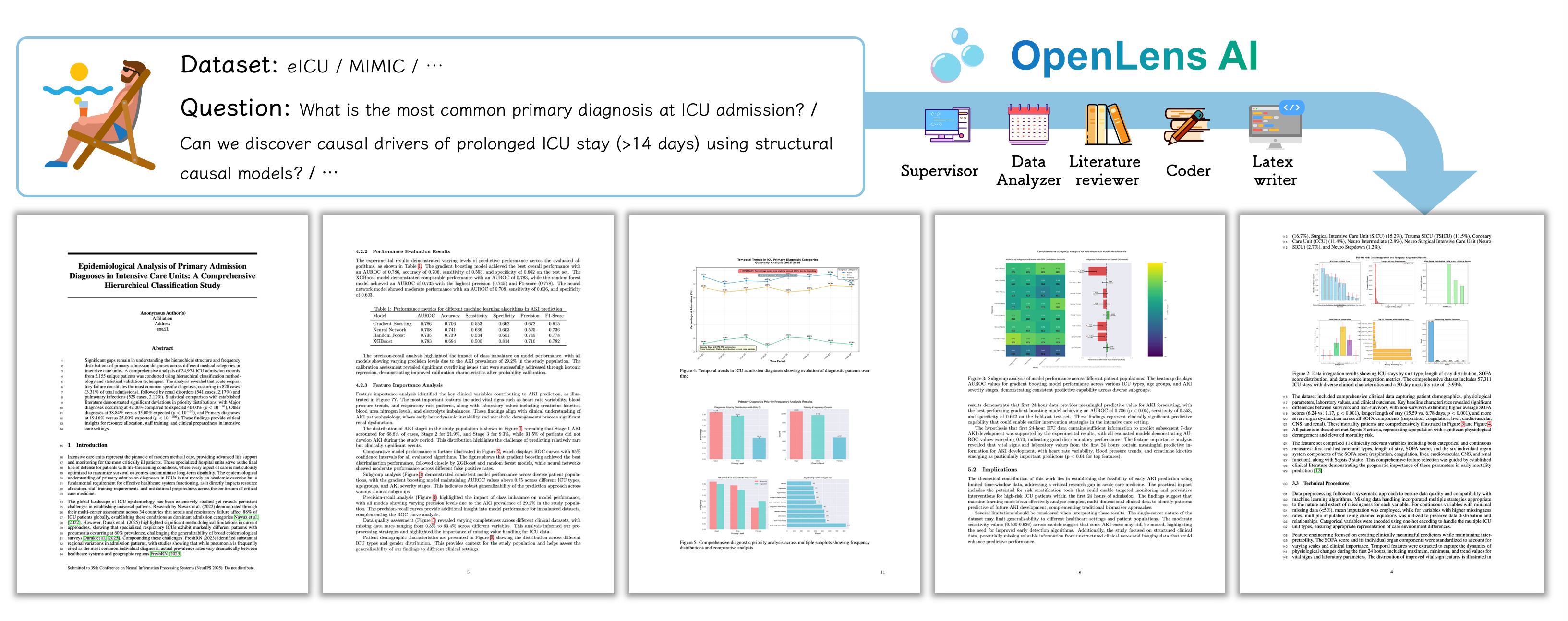 - ✅ **Automated Literature Review**: Search and summarize papers based on your research question
- ✅ **Data Analysis**: Analyze datasets and generate comprehensive reports
- ✅ **Experiment Design**: Suggest and validate experimental approaches
- ✅ **Code Generation and Execution**: Generate and execute code for data analysis and experiments with [OpenHands](https://github.com/All-Hands-AI/OpenHands)
- ✅ **LaTeX Paper Generation**: Automated creation and management of research papers and reports in LaTeX format
- ✅ **Interactive UI**: Streamlit-based interface for monitoring and interacting with the research process
- ✅ **Context Management**: Automated management of contextual information for agents via vector search
- ✅ **Agent File Management**: Identify and remove duplicate files and mock data with [👕 file1.agent](https://github.com/jarrycyx/file1agent)
- ✅ **Vision-Language Feedback**: Integrate with VLM for visualization and feedback
- ✅ **Chinese Language Support**: Full support for Chinese paper writing
- ⬜ **Powerpoint-Based Figures**: Automated generation of Powerpoint-based figures for demonstrations for better visual quality (to replace the current graphviz-based figures)
- ⬜ **Context Manager via Long Context Model**: Integrate with long context model for context management (in addition to the current vector search-based approach)
## Star History
[](https://www.star-history.com/#jarrycyx/openlens-ai&type=date&legend=top-left)
## 🚀 Quick Start
### Prerequisites
- Python 3.9 or higher
- Docker (for OpenHands runtime environment)
- API keys for:
- LLM service (e.g., DeepSeek, OpenAI, Qwen, etc.)
- Tavily search API (for literature search)
### Installation
0. Clone the repository:
```bash
git clone https://github.com/jarrycyx/openlens-ai.git --recurse-submodules
cd openlens-ai
```
1. Ensure Docker Installation:
Pull the runtime directly (**recommended**):
```bash
docker --version
# Pull docker
ALIYUN_REMOTE_DOCKER_NAME=crpi-hbt8nkulkjqjqkie.cn-hangzhou.personal.cr.aliyuncs.com/cyx-docker/openlens-ai:runtime-latest
docker pull $ALIYUN_REMOTE_DOCKER_NAME
docker tag $ALIYUN_REMOTE_DOCKER_NAME openlens-ai:runtime-latest
```
or build from scratch (if needing to support Chinese paper writing, download [windows-fonts.tar.gz](https://github.com/jarrycyx/openlens-ai/releases/download/v0.1.0/windows-fonts.tar.gz) or collect fonts in ```C://windows/Fonts/```):
```bash
# Optional: Collect Chinese fonts
cd openlens_ai/tools/openhands_configs/ && tar -xzvf windows-fonts.tar.gz
# Build base docker for tex-live, etc
bash openlens_ai/tools/openhands_configs/build_docker_base.sh
# Build runtime docker to meet the requirements of OpenHands
bash openlens_ai/tools/openhands_configs/build_docker_runtime.sh
# Check the ID of the built image
docker images
# Tag the image name with openlens-ai:runtime-latest
docker tag
- ✅ **Automated Literature Review**: Search and summarize papers based on your research question
- ✅ **Data Analysis**: Analyze datasets and generate comprehensive reports
- ✅ **Experiment Design**: Suggest and validate experimental approaches
- ✅ **Code Generation and Execution**: Generate and execute code for data analysis and experiments with [OpenHands](https://github.com/All-Hands-AI/OpenHands)
- ✅ **LaTeX Paper Generation**: Automated creation and management of research papers and reports in LaTeX format
- ✅ **Interactive UI**: Streamlit-based interface for monitoring and interacting with the research process
- ✅ **Context Management**: Automated management of contextual information for agents via vector search
- ✅ **Agent File Management**: Identify and remove duplicate files and mock data with [👕 file1.agent](https://github.com/jarrycyx/file1agent)
- ✅ **Vision-Language Feedback**: Integrate with VLM for visualization and feedback
- ✅ **Chinese Language Support**: Full support for Chinese paper writing
- ⬜ **Powerpoint-Based Figures**: Automated generation of Powerpoint-based figures for demonstrations for better visual quality (to replace the current graphviz-based figures)
- ⬜ **Context Manager via Long Context Model**: Integrate with long context model for context management (in addition to the current vector search-based approach)
## Star History
[](https://www.star-history.com/#jarrycyx/openlens-ai&type=date&legend=top-left)
## 🚀 Quick Start
### Prerequisites
- Python 3.9 or higher
- Docker (for OpenHands runtime environment)
- API keys for:
- LLM service (e.g., DeepSeek, OpenAI, Qwen, etc.)
- Tavily search API (for literature search)
### Installation
0. Clone the repository:
```bash
git clone https://github.com/jarrycyx/openlens-ai.git --recurse-submodules
cd openlens-ai
```
1. Ensure Docker Installation:
Pull the runtime directly (**recommended**):
```bash
docker --version
# Pull docker
ALIYUN_REMOTE_DOCKER_NAME=crpi-hbt8nkulkjqjqkie.cn-hangzhou.personal.cr.aliyuncs.com/cyx-docker/openlens-ai:runtime-latest
docker pull $ALIYUN_REMOTE_DOCKER_NAME
docker tag $ALIYUN_REMOTE_DOCKER_NAME openlens-ai:runtime-latest
```
or build from scratch (if needing to support Chinese paper writing, download [windows-fonts.tar.gz](https://github.com/jarrycyx/openlens-ai/releases/download/v0.1.0/windows-fonts.tar.gz) or collect fonts in ```C://windows/Fonts/```):
```bash
# Optional: Collect Chinese fonts
cd openlens_ai/tools/openhands_configs/ && tar -xzvf windows-fonts.tar.gz
# Build base docker for tex-live, etc
bash openlens_ai/tools/openhands_configs/build_docker_base.sh
# Build runtime docker to meet the requirements of OpenHands
bash openlens_ai/tools/openhands_configs/build_docker_runtime.sh
# Check the ID of the built image
docker images
# Tag the image name with openlens-ai:runtime-latest
docker tag