# Vim-EasyComplete
> [中文](README-cn.md) | [English](README.md) | [Wiki](https://github.com/jayli/vim-easycomplete/wiki)
It's a Fast and Minimalism Style Completion Plugin for vim/nvim.
[](https://www.rust-lang.org) 
## What
Vim-easycomplete is a fast and minimalism style completion plugin for vim/nvim. It aims to be available out of the box on linux and mac.
It's extremely simple to configure without installing Node and a bunch of Node modules. For vim, it runs on vimscript for greater compatibility. For nvim, it runs on lua for better performance. On macOS, it includes a version written in Rust to improve performance. Thank [nvim-cmp](https://github.com/hrsh7th/nvim-cmp) and coc.nvim. They inspired me a lot.
 It contains these features:
- Compatible with vim and nvim.
- Full [lsp]([language-server-protocol](https://github.com/microsoft/language-server-protocol)) support. Easy to install LSP Server with one command
- Keywords/path support. Snippet support. cmdline completion support.
- Fast performance based on rust.
- AI coding assistant via [tabnine](#TabNine-Support).
## Installation
Requires Vim 8.2 or higher version on MacOS/Linux/FreeBSD. Neovim 0.7.0 or higher.
Lua config with Packer.nvim via `require("easycomplete").config(opt)`:
```lua
use { 'jayli/vim-easycomplete', requires = {'L3MON4D3/LuaSnip'}}
-- For snippet support, 'SirVer/ultisnips' is an alternative option
-- `tabnine_enable = 0` alias `vim.g.easycomplete_tabnine_enable = 0`
require("easycomplete").config({
cmdline = 1,
pum_noselect = 0,
tabnine_enable = 0,
nerd_font = 1,
enable = 1,
winborder = 1,
ghost_text = 1,
menu_abbr = 0,
pum_format = {"abbr", "kind", "menu"},
setup = function()
vim.keymap.set('n', 'gr', ':EasyCompleteReference')
vim.keymap.set('n', 'gd', ':EasyCompleteGotoDefinition')
vim.keymap.set('n', 'rn', ':EasyCompleteRename')
-- Plugin has already bind shift-k to `:EasyCompleteHover`
-- vim.keymap.set('n', 'gh', ':EasyCompleteHover')
vim.keymap.set('n', 'gb', ':BackToOriginalBuffer')
end
})
```
Run `:PackerInstall`
[Full configuration](https://github.com/jayli/vim-easycomplete/wiki/2.-%E5%AE%89%E8%A3%85%E5%92%8C%E9%85%8D%E7%BD%AE#%E5%9F%BA%E4%BA%8E-lua-%E7%9A%84%E5%AE%8C%E6%95%B4%E9%85%8D%E7%BD%AE)
You can configure it through global variables like this which is exactly the same as the above configuration:
```lua
-- lua
use { 'jayli/vim-easycomplete', requires = {'L3MON4D3/LuaSnip'}}
-- For snippet support, 'SirVer/ultisnips' is an alternative option
-- Tabnine aicoding support, default is 1
-- You should install tabnine first by ":InstallLspServer tabnine"
vim.g.easycomplete_tabnine_enable = 1
-- Tabnine coding suggestion, default is 0
vim.g.easycomplete_tabnine_suggestion = 0
-- Using nerdfont for lsp icons, default is 0
vim.g.easycomplete_nerd_font = 1
-- Add window border for pum, default is 1 (for nvim 0.11 or higher)
vim.g.easycomplete_winborder = 1
-- Pmenu format, default is {"abbr", "kind", "menu"}
vim.g.easycomplete_pum_format = {"kind", "abbr", "menu"}
-- Useful keymap
vim.keymap.set('n', 'gr', ':EasyCompleteReference')
vim.keymap.set('n', 'gd', ':EasyCompleteGotoDefinition')
vim.keymap.set('n', 'rn', ':EasyCompleteRename')
-- Plugin has already bind shift-k to `:EasyCompleteHover`
-- vim.keymap.set('n', 'gh', ':EasyCompleteHover')
vim.keymap.set('n', 'gb', ':BackToOriginalBuffer')
-- cmdline completion
vim.g.easycomplete_cmdline = 1
-- close pum keymap
-- vim.keymap.set('i', '', 'EasycompleteClosePum')
-- Select next/previous pum items Keymap
-- vim.g.easycomplete_tab_trigger = ""
-- vim.g.easycomplete_shift_tab_trigger = ""
-- Redefine CR action
-- vim.g.easycomplete_use_default_cr = 0
-- vim.keymap.set('i', '', 'EasycompleteCR')
```
Run `:PackerInstall`
Vimscript config with vim-plug:
```vim
" vim
Plug 'jayli/vim-easycomplete'
Plug 'L3MON4D3/LuaSnip' " 'SirVer/ultisnips' is a backup option
" Tabnine aicoding support, default is 1
" You should install tabnine first by ":InstallLspServer tabnine"
let g:easycomplete_tabnine_enable = 1
" Tabnine coding suggestion, default is 0
let g:easycomplete_tabnine_suggestion = 0
" Using nerdfont for lsp icons, default is 0
let g:easycomplete_nerd_font = 1
" Add window border for pum, default is 1 (for nvim 0.11 or higher)
let g:easycomplete_winborder = 1
" Pmenu format, default is ["abbr", "kind", "menu"]
let g:easycomplete_pum_format = ["kind", "abbr", "menu"]
" Useful keymap
noremap gr :EasyCompleteReference
noremap gd :EasyCompleteGotoDefinition
noremap rn :EasyCompleteRename
" Plugin has already bind shift-k to `:EasyCompleteHover`
" noremap gh :EasyCompleteHover
noremap gb :BackToOriginalBuffer
" cmdline completion
let g:easycomplete_cmdline = 1
" Close pum keymap
" inoremap EasycompleteClosePum
" Select Matched items Keymap
" let g:easycomplete_tab_trigger = ""
" let g:easycomplete_shift_tab_trigger = ""
" Redefine CR action
" let g:easycomplete_use_default_cr = 0
" inoremap EasycompleteCR
```
Run `:PlugInstall`.
[Full configuration example](custom-config.md).
## Useage
- `Tab`/`S-Tab`: select next/previous matched items.
- `Ctrl-]`: definition jumping
- `Ctrl-t`: jumping back (Same as tags jumping).
- `Ctrl-N`/`Shift-Ctrl-N`: jump to the next/previous diagnostic position.
- `Ctrl-E`: close complete menu.
Other optional configurations:
- `set updatetime=150` (lua: `vim.opt.updatetime = 150`) is highly recommended.
- Menu noselected by default: `setlocal completeopt+=noselect`, (lua: `vim.cmd('setlocal completeopt+=noselect')`)
## Commands
All commands:
| Command | Description |
|-----------------------------------|-----------------------------------------------------|
| `:EasyCompleteInstallServer` | Install LSP server for current fileytpe |
| `:InstallLspServer` | Same as `EasyCompleteInstallServer` |
| `:EasyCompleteDisable` | Disable EasyComplete |
| `:EasyCompleteEnable` | Enable EasyComplete |
| `:EasyCompleteGotoDefinition` | Goto definition position |
| `:EasyCompleteReference` | Find references |
| `:EasyCompleteRename` | Rename |
| `:EasyCompleteHover` | Hover to get more information |
| `:EasyCompleteCheck` | Checking LSP server |
| `:EasyCompletePreviousDiagnostic` | Goto Previous diagnostic |
| `:EasyCompleteNextDiagnostic` | Goto Next diagnostic |
| `:EasyCompleteProfileStart` | Start record diagnostics message |
| `:EasyCompleteProfileStop` | Stop record diagnostics message |
| `:EasyCompleteLint` | Do diagnostic |
| `:LintEasyComplete` | Do diagnostic |
| `:BackToOriginalBuffer` | Return to the position before the reference jump |
| `:DenoCache` | Do Deno Cache for downloading modules |
| `:CleanLog` | close quickfix window |
Global configurations:
| Global Configure | Default | Description |
|--------------------------------------|---------------|---------------------------------------------------------------|
| `g:easycomplete_rust_enable` | 1 | enable the rust high-performance mode on `MacOS_x86` |
| `g:easycomplete_nerd_font` | 0 | Using nerdfont for lsp icons |
| `g:easycomplete_menu_skin` | `{}` | Menu skin. |
| `g:easycomplete_kind_icons` | `{}` | Kind icons. |
| `g:easycomplete_sign_text` | `{}` | Sign icons. |
| `g:easycomplete_lsp_type_font` | ... | lsp icons configuration |
| `g:easycomplete_tabnine_suggestion` | 0 | Tabnine inline suggestion(for nvim only) |
| `g:easycomplete_lsp_checking` | 1 | Check whether the lsp is installed while opening a file |
| `g:easycomplete_lsp_server` | `{}` | Set your custom lsp server for specific source |
| `g:easycomplete_tabnine_enable` | 1 | Enable Tabnine |
| `g:easycomplete_path_enable` | 1 | Path complete |
| `g:easycomplete_snips_enable` | 1 | snippets complete |
| `g:easycomplete_tabnine_config` | `{}` | [TabNine Configuration](#ai-coding-via-tabnine-support) |
| `g:easycomplete_filetypes` | `{}` | [Custom filetyps configuration](#language-support) |
| `g:easycomplete_enable` | 1 | Enable this plugin |
| `g:easycomplete_tab_trigger` | `` | Use tab to trigger completion and select next item |
| `g:easycomplete_shift_tab_trigger` | `` | Use s-tab to select previous item |
| `g:easycomplete_cursor_word_hl` | 0 | Highlight the symbol when holding the cursor |
| `g:easycomplete_signature_offset` | 0 | Signature offset |
| `g:easycomplete_diagnostics_next` | `` | Goto next diagnostic position |
| `g:easycomplete_diagnostics_prev` | `` | Goto previous diagnostic position |
| `g:easycomplete_diagnostics_enable` | 1 | Enable diagnostics |
| `g:easycomplete_signature_enable` | 1 | Enable signature |
| `g:easycomplete_diagnostics_hover` | 1 | Gives a diagnostic prompt when the cursor holds |
| `g:easycomplete_winborder` | 1 | Add window border for pum (for nvim 0.11 or higher) |
| `g:easycomplete_pum_border_style` | `"rounded"` | Pum window border style |
| `g:easycomplete_info_border_style` | `"single"` | More info window border style |
| `g:easycomplete_ghost_text` | 1 | Ghost text |
| `g:easycomplete_pum_maxheight` | 20 | Pum window max height |
| `g:easycomplete_pum_fix_width` | 1 | Pum fix width or not |
| `g:easycomplete_pum_format` | `["abbr", "kind", "menu"]`| Pmenu format |
| `g:easycomplete_menu_abbr` | 0 | Show abbr(shortname) at pum `menu` position, or show fullname |
| `g:easycomplete_custom_snippet` | `""` | Custom snippets path |
| `g:easycomplete_use_default_cr` | 1 | enable or disable default cr action |
| `g:easycomplete_pum_pretty_style` | 1 | Adjust the pum style with border automatically |
| `g:easycomplete_cmdline` | 1 | Commandline complete |
| `g:easycomplete_pum_maxlength` | 31 | Max length of mathing word in pum list |
| `g:easycomplete_pum_noselect` | 0 | Autoselect first matched item or not. Same as `set &completeopt+=noselect` |
Typing `:h easycomplete` for help.
## Language Support
There are tow ways to install lsp server.
1. vim/nvim: Via command`:InstallLspServer`.
2. nvim: Via [mason.nvim](https://github.com/mason-org/mason.nvim), Do `:MasonInstall {lsp-server-name}` (Highly recommended)
LSP Server will all be installed in local path: `~/.config/vim-easycomplete/servers`.
`InstallLspServer` command: Both of the following useage are ok:
- `:InstallLspServer`
- `:InstallLspServer lua`
All supported languages:
| Plugin Name | Languages | Language Server | Installer | Requirements | URL |
|-------------|-----------|:------------------------:|:------------------:|:------------:|:---:|
| path | path | No Need | Integrated | None | |
| buf | buf & dict| No Need | Integrated | None | |
| snips | Snippets | ultisnips/LuaSnip | Integrated | python3/lua | |
| ts | js/ts | tsserver | Yes | node/npm | |
| deno | js/ts | denols | Yes | deno | |
| tn | TabNine | TabNine | Yes | None | |
| vim | Vim | vimls | Yes | node/npm | |
| cpp | C/C++/OC | clangd | Yes | None | |
| css | CSS | cssls | Yes | node/npm | |
| html | HTML | html | Yes | node/npm | |
| yml | YAML | yamlls | Yes | node/npm | |
| xml | Xml | lemminx | Yes | java/jdk | |
| sh | Bash | bashls | Yes | node/npm | |
| json | JSON | json-languageserver | Yes | node/npm | |
| php | php | intelephense | Yes | node/npm | |
| dart | dart | dartls | Yes | None | |
| py | Python | pylsp | Yes | python3/pip3 | |
| java | Java | jdtls | Yes | java11/jdk | |
| go | Go | gopls | Yes | go | |
| r | R | r-languageserver | Yes | R | |
| rb | Ruby | solargraph | Yes | ruby/bundle | |
| lua | Lua | `sumneko_lua` | Yes | Lua | |
| nim | Nim | nimlsp | Yes | nim/nimble | |
| rust | Rust | `rust_analyzer` | Yes | None | |
| kt | Kotlin | `kotlin_language_server` | Yes | java/jdk | |
| grvy | Groovy | groovyls | Yes | java/jdk | |
| cmake | cmake | cmake | Yes | python3/pip3 | |
| c# | C# | omnisharp-lsp | Yes | None | |
| zig | zig | zls | Yes | zig | |
| docker | docker |dockerfile-language-server| Mason | node/npm |[easycomplete-docker](https://github.com/jayli/easycomplete-docker) |
More info about supported language:
- JavaScript & TypeScript: [tsserver](https://github.com/microsoft/TypeScript) required.
- Python: There are 2 avilable python-language-server branches:
- [pyls](https://github.com/palantir/python-language-server) support python 3.5 ~ 3.10 ([pyls breaks autocomplete on Python 3.11](https://github.com/palantir/python-language-server/issues/959)), `pip3 install python-language-server`
- [pylsp](https://github.com/python-lsp/python-lsp-server) work well with python 3.11, `pip3 install python-lsp-server`, (Recommend)
- Go: [gopls](https://github.com/golang/tools/tree/master/gopls) required. (`go get golang.org/x/tools/gopls`)
- Vim Script: [vimls](https://github.com/iamcco/vim-language-server) required.
- C++/C/OC:[Clangd](https://github.com/clangd/clangd) required.
- CSS: [cssls](https://github.com/vscode-langservers/vscode-css-languageserver-bin) required. (css-languageserver),Css-languageserver dose not support CompletionProvider by default as it requires [Snippets](https://github.com/neovim/nvim-lspconfig/wiki/Snippets),You must install it manually.
- JSON: [json-languageserver](https://github.com/vscode-langservers/vscode-json-languageserver-bin) required.
- PHP: [intelephense](https://www.npmjs.com/package/intelephense)
- Dart: [dartls](https://storage.googleapis.com/dart-archive/)
- HTML: [html](https://github.com/vscode-langservers/vscode-html-languageserver-bin) required. html-languageserver dose not support CompletionProvider by default. You must install [Snippets](https://github.com/neovim/nvim-lspconfig/wiki/Snippets) manually.
- Shell: [bashls](https://github.com/bash-lsp/bash-language-server) required.
- Java: [jdtls](https://github.com/eclipse/eclipse.jdt.ls/), java 11 and upper version required.
- Cmake: [cmake](https://github.com/regen100/cmake-language-server) required.
- Kotlin: [kotlin language server](https://github.com/fwcd/kotlin-language-server) required.
- Rust: [rust-analyzer](https://github.com/rust-analyzer/rust-analyzer) required. Please use mason to install `rust-analyzer`.
- Lua: [sumneko lua](https://github.com/sumneko/lua-language-server) required. Local configuration file path is `~/.config/vim-easycomplete/servers/lua/config.json`. Get more information [here](https://github.com/xiyaowong/coc-sumneko-lua/blob/main/settings.md).
- Xml: [lemminx](https://github.com/eclipse/lemminx) required.
- Groovy: [groovyls](https://github.com/prominic/groovy-language-server) required.
- Yaml: [yamlls](https://github.com/redhat-developer/yaml-language-server) required.
- Ruby: [solargraph](https://github.com/castwide/solargraph) required.
- Nim: [nimlsp](https://github.com/PMunch/nimlsp) required. [packages.json](https://github.com/nim-lang/packages/blob/master/packages.json) downloading is very slow, You'd better intall minlsp manually via `choosenim` follow [this guide](https://github.com/jayli/vim-easycomplete/issues/155#issuecomment-1041581629).
- Deno: [denols](https://morioh.com/p/84a54d70a7fa) required. Use `:DenoCache` command for `deno cache` current ts/js file.
- C# : [omnisharp](http://www.omnisharp.net/) required.
- R: [r-languageserver](https://github.com/REditorSupport/languageserver) required.
- zig: [zls](https://zigtools.org/zls/install/) required.
- docker: install plugin [easycomplete-docker](https://github.com/jayli/easycomplete-docker), [dockerfile-language-server](https://github.com/rcjsuen/dockerfile-language-server) required.
- TabNine: [TabNine](https://www.tabnine.com/)
You can add filetypes whitelist for specified language plugin. In most cases, it is not necessary to do so:
vimscript
```vim
" vim
let g:easycomplete_filetypes = {
\ "sh": {
\ "whitelist": ["shell"]
\ },
\ "r": {
\ "whitelist": ["rmd", "rmarkdown"]
\ },
\ }
```
luascript
```lua
-- lua
vim.g.easycomplete_filetypes = {
sh = {
whitelist = {"shell"}
},
r = {
whitelist = {"rmd", "rmarkdown"}
}
}
```
### Snippet Support
The snippet completion of Vim-EasyComplete relies on ultisnip or luasnip. They are both compatible with Vim-EasyComplete by simply place it in the dependent field. UltiSnips required python3 installed. You can use your own snippets path to replace the default snippets.
vimscript
```vim
" vim
let g:easycomplete_custom_snippet = "./path/to/your/snippets"
```
luascript
```lua
-- lua
vim.g.easycomplete_custom_snippet = "./path/to/your/snippets"
```
You can alse add your own snippet directory to `&runtimepath`.
[LuaSnip](https://github.com/L3MON4D3/LuaSnip) is better choice for nvim.
## AI Coding Inline Suggestion
In addition to AI completion with pum, there are more inline AI coding completion tools.
### 1)Tabnine inline suggestion
Vim-easycomplete integrates Tabnine already. Install TabNine: `:InstallLspServer tabnine`.
It contains these features:
- Compatible with vim and nvim.
- Full [lsp]([language-server-protocol](https://github.com/microsoft/language-server-protocol)) support. Easy to install LSP Server with one command
- Keywords/path support. Snippet support. cmdline completion support.
- Fast performance based on rust.
- AI coding assistant via [tabnine](#TabNine-Support).
## Installation
Requires Vim 8.2 or higher version on MacOS/Linux/FreeBSD. Neovim 0.7.0 or higher.
Lua config with Packer.nvim via `require("easycomplete").config(opt)`:
```lua
use { 'jayli/vim-easycomplete', requires = {'L3MON4D3/LuaSnip'}}
-- For snippet support, 'SirVer/ultisnips' is an alternative option
-- `tabnine_enable = 0` alias `vim.g.easycomplete_tabnine_enable = 0`
require("easycomplete").config({
cmdline = 1,
pum_noselect = 0,
tabnine_enable = 0,
nerd_font = 1,
enable = 1,
winborder = 1,
ghost_text = 1,
menu_abbr = 0,
pum_format = {"abbr", "kind", "menu"},
setup = function()
vim.keymap.set('n', 'gr', ':EasyCompleteReference')
vim.keymap.set('n', 'gd', ':EasyCompleteGotoDefinition')
vim.keymap.set('n', 'rn', ':EasyCompleteRename')
-- Plugin has already bind shift-k to `:EasyCompleteHover`
-- vim.keymap.set('n', 'gh', ':EasyCompleteHover')
vim.keymap.set('n', 'gb', ':BackToOriginalBuffer')
end
})
```
Run `:PackerInstall`
[Full configuration](https://github.com/jayli/vim-easycomplete/wiki/2.-%E5%AE%89%E8%A3%85%E5%92%8C%E9%85%8D%E7%BD%AE#%E5%9F%BA%E4%BA%8E-lua-%E7%9A%84%E5%AE%8C%E6%95%B4%E9%85%8D%E7%BD%AE)
You can configure it through global variables like this which is exactly the same as the above configuration:
```lua
-- lua
use { 'jayli/vim-easycomplete', requires = {'L3MON4D3/LuaSnip'}}
-- For snippet support, 'SirVer/ultisnips' is an alternative option
-- Tabnine aicoding support, default is 1
-- You should install tabnine first by ":InstallLspServer tabnine"
vim.g.easycomplete_tabnine_enable = 1
-- Tabnine coding suggestion, default is 0
vim.g.easycomplete_tabnine_suggestion = 0
-- Using nerdfont for lsp icons, default is 0
vim.g.easycomplete_nerd_font = 1
-- Add window border for pum, default is 1 (for nvim 0.11 or higher)
vim.g.easycomplete_winborder = 1
-- Pmenu format, default is {"abbr", "kind", "menu"}
vim.g.easycomplete_pum_format = {"kind", "abbr", "menu"}
-- Useful keymap
vim.keymap.set('n', 'gr', ':EasyCompleteReference')
vim.keymap.set('n', 'gd', ':EasyCompleteGotoDefinition')
vim.keymap.set('n', 'rn', ':EasyCompleteRename')
-- Plugin has already bind shift-k to `:EasyCompleteHover`
-- vim.keymap.set('n', 'gh', ':EasyCompleteHover')
vim.keymap.set('n', 'gb', ':BackToOriginalBuffer')
-- cmdline completion
vim.g.easycomplete_cmdline = 1
-- close pum keymap
-- vim.keymap.set('i', '', 'EasycompleteClosePum')
-- Select next/previous pum items Keymap
-- vim.g.easycomplete_tab_trigger = ""
-- vim.g.easycomplete_shift_tab_trigger = ""
-- Redefine CR action
-- vim.g.easycomplete_use_default_cr = 0
-- vim.keymap.set('i', '', 'EasycompleteCR')
```
Run `:PackerInstall`
Vimscript config with vim-plug:
```vim
" vim
Plug 'jayli/vim-easycomplete'
Plug 'L3MON4D3/LuaSnip' " 'SirVer/ultisnips' is a backup option
" Tabnine aicoding support, default is 1
" You should install tabnine first by ":InstallLspServer tabnine"
let g:easycomplete_tabnine_enable = 1
" Tabnine coding suggestion, default is 0
let g:easycomplete_tabnine_suggestion = 0
" Using nerdfont for lsp icons, default is 0
let g:easycomplete_nerd_font = 1
" Add window border for pum, default is 1 (for nvim 0.11 or higher)
let g:easycomplete_winborder = 1
" Pmenu format, default is ["abbr", "kind", "menu"]
let g:easycomplete_pum_format = ["kind", "abbr", "menu"]
" Useful keymap
noremap gr :EasyCompleteReference
noremap gd :EasyCompleteGotoDefinition
noremap rn :EasyCompleteRename
" Plugin has already bind shift-k to `:EasyCompleteHover`
" noremap gh :EasyCompleteHover
noremap gb :BackToOriginalBuffer
" cmdline completion
let g:easycomplete_cmdline = 1
" Close pum keymap
" inoremap EasycompleteClosePum
" Select Matched items Keymap
" let g:easycomplete_tab_trigger = ""
" let g:easycomplete_shift_tab_trigger = ""
" Redefine CR action
" let g:easycomplete_use_default_cr = 0
" inoremap EasycompleteCR
```
Run `:PlugInstall`.
[Full configuration example](custom-config.md).
## Useage
- `Tab`/`S-Tab`: select next/previous matched items.
- `Ctrl-]`: definition jumping
- `Ctrl-t`: jumping back (Same as tags jumping).
- `Ctrl-N`/`Shift-Ctrl-N`: jump to the next/previous diagnostic position.
- `Ctrl-E`: close complete menu.
Other optional configurations:
- `set updatetime=150` (lua: `vim.opt.updatetime = 150`) is highly recommended.
- Menu noselected by default: `setlocal completeopt+=noselect`, (lua: `vim.cmd('setlocal completeopt+=noselect')`)
## Commands
All commands:
| Command | Description |
|-----------------------------------|-----------------------------------------------------|
| `:EasyCompleteInstallServer` | Install LSP server for current fileytpe |
| `:InstallLspServer` | Same as `EasyCompleteInstallServer` |
| `:EasyCompleteDisable` | Disable EasyComplete |
| `:EasyCompleteEnable` | Enable EasyComplete |
| `:EasyCompleteGotoDefinition` | Goto definition position |
| `:EasyCompleteReference` | Find references |
| `:EasyCompleteRename` | Rename |
| `:EasyCompleteHover` | Hover to get more information |
| `:EasyCompleteCheck` | Checking LSP server |
| `:EasyCompletePreviousDiagnostic` | Goto Previous diagnostic |
| `:EasyCompleteNextDiagnostic` | Goto Next diagnostic |
| `:EasyCompleteProfileStart` | Start record diagnostics message |
| `:EasyCompleteProfileStop` | Stop record diagnostics message |
| `:EasyCompleteLint` | Do diagnostic |
| `:LintEasyComplete` | Do diagnostic |
| `:BackToOriginalBuffer` | Return to the position before the reference jump |
| `:DenoCache` | Do Deno Cache for downloading modules |
| `:CleanLog` | close quickfix window |
Global configurations:
| Global Configure | Default | Description |
|--------------------------------------|---------------|---------------------------------------------------------------|
| `g:easycomplete_rust_enable` | 1 | enable the rust high-performance mode on `MacOS_x86` |
| `g:easycomplete_nerd_font` | 0 | Using nerdfont for lsp icons |
| `g:easycomplete_menu_skin` | `{}` | Menu skin. |
| `g:easycomplete_kind_icons` | `{}` | Kind icons. |
| `g:easycomplete_sign_text` | `{}` | Sign icons. |
| `g:easycomplete_lsp_type_font` | ... | lsp icons configuration |
| `g:easycomplete_tabnine_suggestion` | 0 | Tabnine inline suggestion(for nvim only) |
| `g:easycomplete_lsp_checking` | 1 | Check whether the lsp is installed while opening a file |
| `g:easycomplete_lsp_server` | `{}` | Set your custom lsp server for specific source |
| `g:easycomplete_tabnine_enable` | 1 | Enable Tabnine |
| `g:easycomplete_path_enable` | 1 | Path complete |
| `g:easycomplete_snips_enable` | 1 | snippets complete |
| `g:easycomplete_tabnine_config` | `{}` | [TabNine Configuration](#ai-coding-via-tabnine-support) |
| `g:easycomplete_filetypes` | `{}` | [Custom filetyps configuration](#language-support) |
| `g:easycomplete_enable` | 1 | Enable this plugin |
| `g:easycomplete_tab_trigger` | `` | Use tab to trigger completion and select next item |
| `g:easycomplete_shift_tab_trigger` | `` | Use s-tab to select previous item |
| `g:easycomplete_cursor_word_hl` | 0 | Highlight the symbol when holding the cursor |
| `g:easycomplete_signature_offset` | 0 | Signature offset |
| `g:easycomplete_diagnostics_next` | `` | Goto next diagnostic position |
| `g:easycomplete_diagnostics_prev` | `` | Goto previous diagnostic position |
| `g:easycomplete_diagnostics_enable` | 1 | Enable diagnostics |
| `g:easycomplete_signature_enable` | 1 | Enable signature |
| `g:easycomplete_diagnostics_hover` | 1 | Gives a diagnostic prompt when the cursor holds |
| `g:easycomplete_winborder` | 1 | Add window border for pum (for nvim 0.11 or higher) |
| `g:easycomplete_pum_border_style` | `"rounded"` | Pum window border style |
| `g:easycomplete_info_border_style` | `"single"` | More info window border style |
| `g:easycomplete_ghost_text` | 1 | Ghost text |
| `g:easycomplete_pum_maxheight` | 20 | Pum window max height |
| `g:easycomplete_pum_fix_width` | 1 | Pum fix width or not |
| `g:easycomplete_pum_format` | `["abbr", "kind", "menu"]`| Pmenu format |
| `g:easycomplete_menu_abbr` | 0 | Show abbr(shortname) at pum `menu` position, or show fullname |
| `g:easycomplete_custom_snippet` | `""` | Custom snippets path |
| `g:easycomplete_use_default_cr` | 1 | enable or disable default cr action |
| `g:easycomplete_pum_pretty_style` | 1 | Adjust the pum style with border automatically |
| `g:easycomplete_cmdline` | 1 | Commandline complete |
| `g:easycomplete_pum_maxlength` | 31 | Max length of mathing word in pum list |
| `g:easycomplete_pum_noselect` | 0 | Autoselect first matched item or not. Same as `set &completeopt+=noselect` |
Typing `:h easycomplete` for help.
## Language Support
There are tow ways to install lsp server.
1. vim/nvim: Via command`:InstallLspServer`.
2. nvim: Via [mason.nvim](https://github.com/mason-org/mason.nvim), Do `:MasonInstall {lsp-server-name}` (Highly recommended)
LSP Server will all be installed in local path: `~/.config/vim-easycomplete/servers`.
`InstallLspServer` command: Both of the following useage are ok:
- `:InstallLspServer`
- `:InstallLspServer lua`
All supported languages:
| Plugin Name | Languages | Language Server | Installer | Requirements | URL |
|-------------|-----------|:------------------------:|:------------------:|:------------:|:---:|
| path | path | No Need | Integrated | None | |
| buf | buf & dict| No Need | Integrated | None | |
| snips | Snippets | ultisnips/LuaSnip | Integrated | python3/lua | |
| ts | js/ts | tsserver | Yes | node/npm | |
| deno | js/ts | denols | Yes | deno | |
| tn | TabNine | TabNine | Yes | None | |
| vim | Vim | vimls | Yes | node/npm | |
| cpp | C/C++/OC | clangd | Yes | None | |
| css | CSS | cssls | Yes | node/npm | |
| html | HTML | html | Yes | node/npm | |
| yml | YAML | yamlls | Yes | node/npm | |
| xml | Xml | lemminx | Yes | java/jdk | |
| sh | Bash | bashls | Yes | node/npm | |
| json | JSON | json-languageserver | Yes | node/npm | |
| php | php | intelephense | Yes | node/npm | |
| dart | dart | dartls | Yes | None | |
| py | Python | pylsp | Yes | python3/pip3 | |
| java | Java | jdtls | Yes | java11/jdk | |
| go | Go | gopls | Yes | go | |
| r | R | r-languageserver | Yes | R | |
| rb | Ruby | solargraph | Yes | ruby/bundle | |
| lua | Lua | `sumneko_lua` | Yes | Lua | |
| nim | Nim | nimlsp | Yes | nim/nimble | |
| rust | Rust | `rust_analyzer` | Yes | None | |
| kt | Kotlin | `kotlin_language_server` | Yes | java/jdk | |
| grvy | Groovy | groovyls | Yes | java/jdk | |
| cmake | cmake | cmake | Yes | python3/pip3 | |
| c# | C# | omnisharp-lsp | Yes | None | |
| zig | zig | zls | Yes | zig | |
| docker | docker |dockerfile-language-server| Mason | node/npm |[easycomplete-docker](https://github.com/jayli/easycomplete-docker) |
More info about supported language:
- JavaScript & TypeScript: [tsserver](https://github.com/microsoft/TypeScript) required.
- Python: There are 2 avilable python-language-server branches:
- [pyls](https://github.com/palantir/python-language-server) support python 3.5 ~ 3.10 ([pyls breaks autocomplete on Python 3.11](https://github.com/palantir/python-language-server/issues/959)), `pip3 install python-language-server`
- [pylsp](https://github.com/python-lsp/python-lsp-server) work well with python 3.11, `pip3 install python-lsp-server`, (Recommend)
- Go: [gopls](https://github.com/golang/tools/tree/master/gopls) required. (`go get golang.org/x/tools/gopls`)
- Vim Script: [vimls](https://github.com/iamcco/vim-language-server) required.
- C++/C/OC:[Clangd](https://github.com/clangd/clangd) required.
- CSS: [cssls](https://github.com/vscode-langservers/vscode-css-languageserver-bin) required. (css-languageserver),Css-languageserver dose not support CompletionProvider by default as it requires [Snippets](https://github.com/neovim/nvim-lspconfig/wiki/Snippets),You must install it manually.
- JSON: [json-languageserver](https://github.com/vscode-langservers/vscode-json-languageserver-bin) required.
- PHP: [intelephense](https://www.npmjs.com/package/intelephense)
- Dart: [dartls](https://storage.googleapis.com/dart-archive/)
- HTML: [html](https://github.com/vscode-langservers/vscode-html-languageserver-bin) required. html-languageserver dose not support CompletionProvider by default. You must install [Snippets](https://github.com/neovim/nvim-lspconfig/wiki/Snippets) manually.
- Shell: [bashls](https://github.com/bash-lsp/bash-language-server) required.
- Java: [jdtls](https://github.com/eclipse/eclipse.jdt.ls/), java 11 and upper version required.
- Cmake: [cmake](https://github.com/regen100/cmake-language-server) required.
- Kotlin: [kotlin language server](https://github.com/fwcd/kotlin-language-server) required.
- Rust: [rust-analyzer](https://github.com/rust-analyzer/rust-analyzer) required. Please use mason to install `rust-analyzer`.
- Lua: [sumneko lua](https://github.com/sumneko/lua-language-server) required. Local configuration file path is `~/.config/vim-easycomplete/servers/lua/config.json`. Get more information [here](https://github.com/xiyaowong/coc-sumneko-lua/blob/main/settings.md).
- Xml: [lemminx](https://github.com/eclipse/lemminx) required.
- Groovy: [groovyls](https://github.com/prominic/groovy-language-server) required.
- Yaml: [yamlls](https://github.com/redhat-developer/yaml-language-server) required.
- Ruby: [solargraph](https://github.com/castwide/solargraph) required.
- Nim: [nimlsp](https://github.com/PMunch/nimlsp) required. [packages.json](https://github.com/nim-lang/packages/blob/master/packages.json) downloading is very slow, You'd better intall minlsp manually via `choosenim` follow [this guide](https://github.com/jayli/vim-easycomplete/issues/155#issuecomment-1041581629).
- Deno: [denols](https://morioh.com/p/84a54d70a7fa) required. Use `:DenoCache` command for `deno cache` current ts/js file.
- C# : [omnisharp](http://www.omnisharp.net/) required.
- R: [r-languageserver](https://github.com/REditorSupport/languageserver) required.
- zig: [zls](https://zigtools.org/zls/install/) required.
- docker: install plugin [easycomplete-docker](https://github.com/jayli/easycomplete-docker), [dockerfile-language-server](https://github.com/rcjsuen/dockerfile-language-server) required.
- TabNine: [TabNine](https://www.tabnine.com/)
You can add filetypes whitelist for specified language plugin. In most cases, it is not necessary to do so:
vimscript
```vim
" vim
let g:easycomplete_filetypes = {
\ "sh": {
\ "whitelist": ["shell"]
\ },
\ "r": {
\ "whitelist": ["rmd", "rmarkdown"]
\ },
\ }
```
luascript
```lua
-- lua
vim.g.easycomplete_filetypes = {
sh = {
whitelist = {"shell"}
},
r = {
whitelist = {"rmd", "rmarkdown"}
}
}
```
### Snippet Support
The snippet completion of Vim-EasyComplete relies on ultisnip or luasnip. They are both compatible with Vim-EasyComplete by simply place it in the dependent field. UltiSnips required python3 installed. You can use your own snippets path to replace the default snippets.
vimscript
```vim
" vim
let g:easycomplete_custom_snippet = "./path/to/your/snippets"
```
luascript
```lua
-- lua
vim.g.easycomplete_custom_snippet = "./path/to/your/snippets"
```
You can alse add your own snippet directory to `&runtimepath`.
[LuaSnip](https://github.com/L3MON4D3/LuaSnip) is better choice for nvim.
## AI Coding Inline Suggestion
In addition to AI completion with pum, there are more inline AI coding completion tools.
### 1)Tabnine inline suggestion
Vim-easycomplete integrates Tabnine already. Install TabNine: `:InstallLspServer tabnine`.
 Config TabNine via `g:easycomplete_tabnine_config` witch contains two properties:
- *line_limit*: The number of lines before and after the cursor to send to TabNine. If the option is smaller, the performance may be improved. (default: 1000)
- *max_num_result*: Max results from TabNine showing in the complete menu. (default: 3)
vimscript
```vim
" vim
let g:easycomplete_tabnine_config = {
\ 'line_limit': 1000,
\ 'max_num_result' : 3,
\ }
```
luascript
```lua
-- lua
vim.g.easycomplete_tabnine_config = {
line_limit = 1000,
max_num_result = 3
}
```
TabNine works well without APIKey. If you have a Tabnine's Pro API key or purchased a subscription license. To configure, you'll need to use the [TabNine' magic string](https://www.tabnine.com/faq#special_commands) (Type `Tabnine::config` in insert mode) to open the configuration panel.
Enable TabNine inline suggestion: `let g:easycomplete_tabnine_suggestion = 1`.
### 2) [copilot.nvim](https://github.com/jayli/copilot.nvim/)
[Copilot.nvim](https://github.com/jayli/copilot.nvim/) plugin is a better choice. Vim-easycomplete is working well with copilot.nvim.
### 3) Aone Copilot
If you are an Alibaba engineer, then aone copilot is the best choice. You can find configuration guideline based on copilot.nvim on ATA.
---------------------
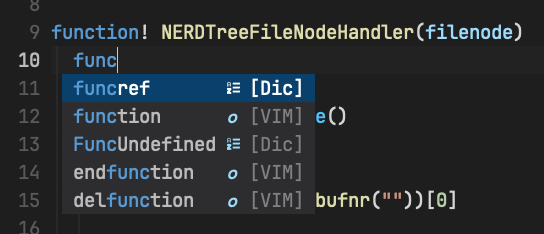
## Beautify completion menu
Set `g:easycomplete_nerd_font = 1` to enable default nerdfonts configuration.
If you want to customize the kind icon, you can modify the configuration with installed. [Examples](custom-config.md).
You can add custom Pmenu styles by defining these highlight groups:
> In most cases, you don't need to do so.
- `EasyFuzzyMatch`: highlight fuzzy matching character. It links to "PmenuMatch" by default.
- `EasyPmenu`: Pmenu style. It links to "Pmenu" by default.
- `EasyPmenuKind`: PmenuKind style. It links to "PmenuKind" by default.
- `EasyPmenuExtra`: PmenuExtra style. It links to "PmenuExtra" by default.
- `EasyFunction`: Function kind icon style. links to "Conditional" by default.
- `EasySnippet`: Snippet kind icon style. links to "Keyword" by default.
- `EasyTabNine`: TabNine kind icon style. links to "Character" by default.
- `EasySnippets`: TabNine snippets suggestion style. links to "LineNr" by default
- `EasyNormal`: Pmenu default style. links to "Normal" by default.
- `EasyKeyword`: Pmenu keyword kind icon style. links to "Define" by default.
- `EasyModule`: Module kind icon style. links to "Function" by default.
When `g:easycomplete_winborder` is set to `1`. The guibg of Pmenu will be set to be the same as the Normal guibg automatically. If you want to redefine pum style, disable the auto setting by `let g:easycomplete_pum_pretty_style = 0`. Then define these highlight group: "FloatBorder, Pmenu, PmenuExtra, PmenuKind" etc.
More examples here: [full config example](https://github.com/jayli/vim-easycomplete/wiki)
[More documentation](https://github.com/jayli/vim-easycomplete/wiki)
### License
MIT
----------------
[](https://www.star-history.com/#jayli/vim-easycomplete&type=date&legend=top-left)
Config TabNine via `g:easycomplete_tabnine_config` witch contains two properties:
- *line_limit*: The number of lines before and after the cursor to send to TabNine. If the option is smaller, the performance may be improved. (default: 1000)
- *max_num_result*: Max results from TabNine showing in the complete menu. (default: 3)
vimscript
```vim
" vim
let g:easycomplete_tabnine_config = {
\ 'line_limit': 1000,
\ 'max_num_result' : 3,
\ }
```
luascript
```lua
-- lua
vim.g.easycomplete_tabnine_config = {
line_limit = 1000,
max_num_result = 3
}
```
TabNine works well without APIKey. If you have a Tabnine's Pro API key or purchased a subscription license. To configure, you'll need to use the [TabNine' magic string](https://www.tabnine.com/faq#special_commands) (Type `Tabnine::config` in insert mode) to open the configuration panel.
Enable TabNine inline suggestion: `let g:easycomplete_tabnine_suggestion = 1`.
### 2) [copilot.nvim](https://github.com/jayli/copilot.nvim/)
[Copilot.nvim](https://github.com/jayli/copilot.nvim/) plugin is a better choice. Vim-easycomplete is working well with copilot.nvim.
### 3) Aone Copilot
If you are an Alibaba engineer, then aone copilot is the best choice. You can find configuration guideline based on copilot.nvim on ATA.
---------------------
## Beautify completion menu
Set `g:easycomplete_nerd_font = 1` to enable default nerdfonts configuration.
If you want to customize the kind icon, you can modify the configuration with installed. [Examples](custom-config.md).
You can add custom Pmenu styles by defining these highlight groups:
> In most cases, you don't need to do so.
- `EasyFuzzyMatch`: highlight fuzzy matching character. It links to "PmenuMatch" by default.
- `EasyPmenu`: Pmenu style. It links to "Pmenu" by default.
- `EasyPmenuKind`: PmenuKind style. It links to "PmenuKind" by default.
- `EasyPmenuExtra`: PmenuExtra style. It links to "PmenuExtra" by default.
- `EasyFunction`: Function kind icon style. links to "Conditional" by default.
- `EasySnippet`: Snippet kind icon style. links to "Keyword" by default.
- `EasyTabNine`: TabNine kind icon style. links to "Character" by default.
- `EasySnippets`: TabNine snippets suggestion style. links to "LineNr" by default
- `EasyNormal`: Pmenu default style. links to "Normal" by default.
- `EasyKeyword`: Pmenu keyword kind icon style. links to "Define" by default.
- `EasyModule`: Module kind icon style. links to "Function" by default.
When `g:easycomplete_winborder` is set to `1`. The guibg of Pmenu will be set to be the same as the Normal guibg automatically. If you want to redefine pum style, disable the auto setting by `let g:easycomplete_pum_pretty_style = 0`. Then define these highlight group: "FloatBorder, Pmenu, PmenuExtra, PmenuKind" etc.
More examples here: [full config example](https://github.com/jayli/vim-easycomplete/wiki)

[More documentation](https://github.com/jayli/vim-easycomplete/wiki)
### License
MIT
----------------
[](https://www.star-history.com/#jayli/vim-easycomplete&type=date&legend=top-left)