JoySafeter
JoySafeter

The AI-native platform for building, orchestrating, and running security agents at scale.
From idea to production-grade security automation — in minutes, not months.


License: Apache 2.0 Python 3.12+ Node.js 20+ LangGraph FastAPI MCP Protocol DeepAgents v0.4

English | 简体中文

--- ## Why JoySafeter Traditional security tooling hits a ceiling: scripts are brittle, single agents lack context, and complex scenarios require 2–3 engineers working in parallel. JoySafeter breaks that ceiling. | Challenge | Traditional Approach | JoySafeter | |-----------|---------------------|------------| | APK vulnerability analysis | Manual MobSF + engineer review | Autonomous agent: upload → analyze → report | | Penetration testing | Fixed scripts, static playbooks | Dynamic DeepAgents that adapt to findings in real time | | Tool integration | Custom glue code per tool | 200+ tools via MCP Protocol, zero glue | | Scale | Linear headcount growth | Agent teams that multiply capacity | > JoySafeter defines a new paradigm: **AI-driven Security Operations (AISecOps)** — where multi-agent collaboration, cognitive memory, and scenario-matched skills replace manual coordination. --- ## Real-World Cases ### Case 1 — APK Vulnerability Detection Agent > Upload an APK. Get an OWASP Mobile Top 10 report. No engineer required.
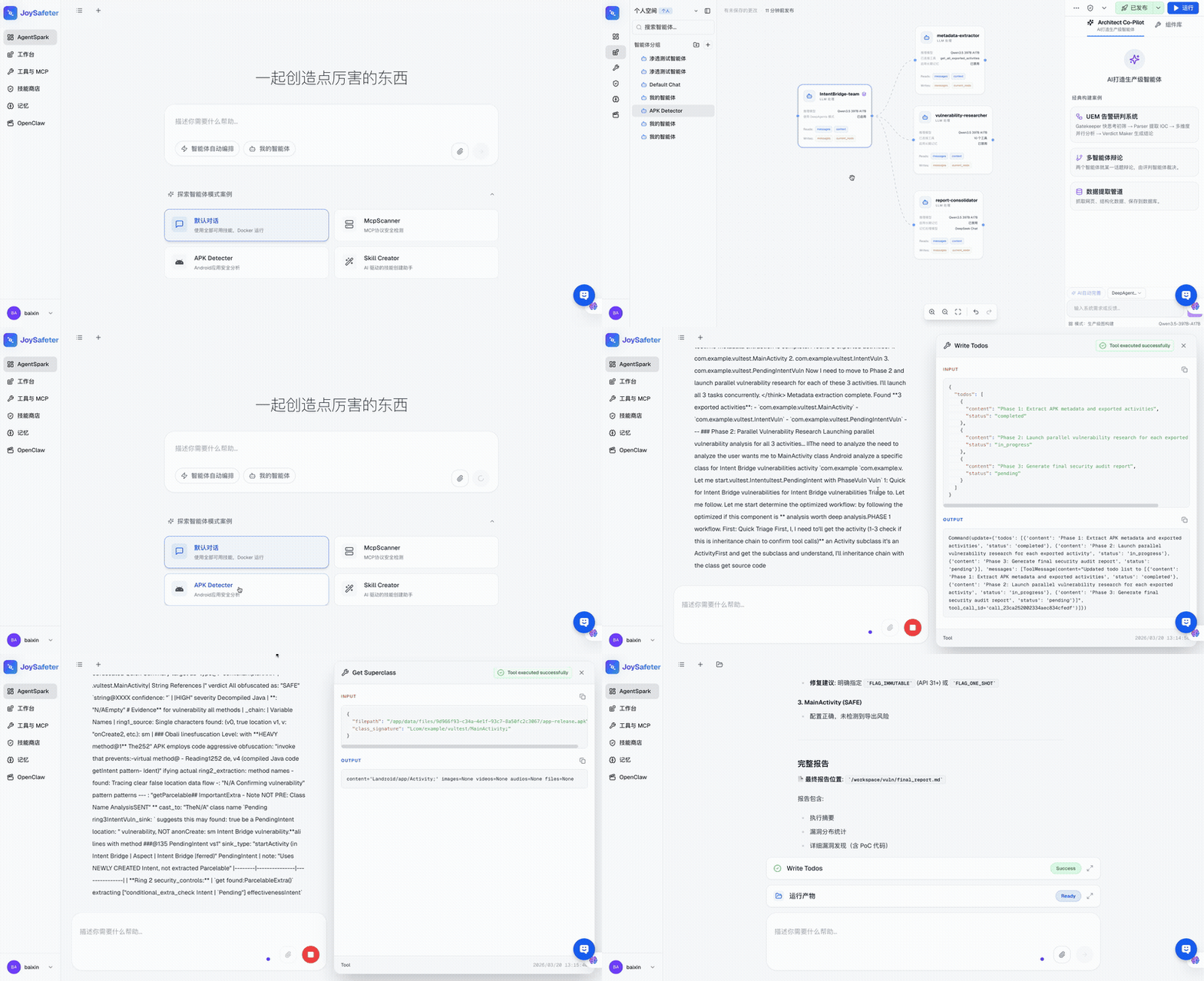
APK Vulnerability Detection Demo

**How it works:** 1. User uploads the APK file 2. Agent invokes MobSF for static analysis 3. Extracts critical risk signals — permission abuse, hardcoded secrets, insecure network config 4. Deep-validates high-severity findings via Frida dynamic instrumentation 5. Auto-generates a structured report aligned to OWASP Mobile Top 10 The entire flow — from upload to report — requires zero manual intervention, covering work that traditionally takes 2–3 security engineers. --- ### Case 2 — Penetration Testing Agent > Describe the target and scope. The agent plans, executes, and adapts — then delivers a report.

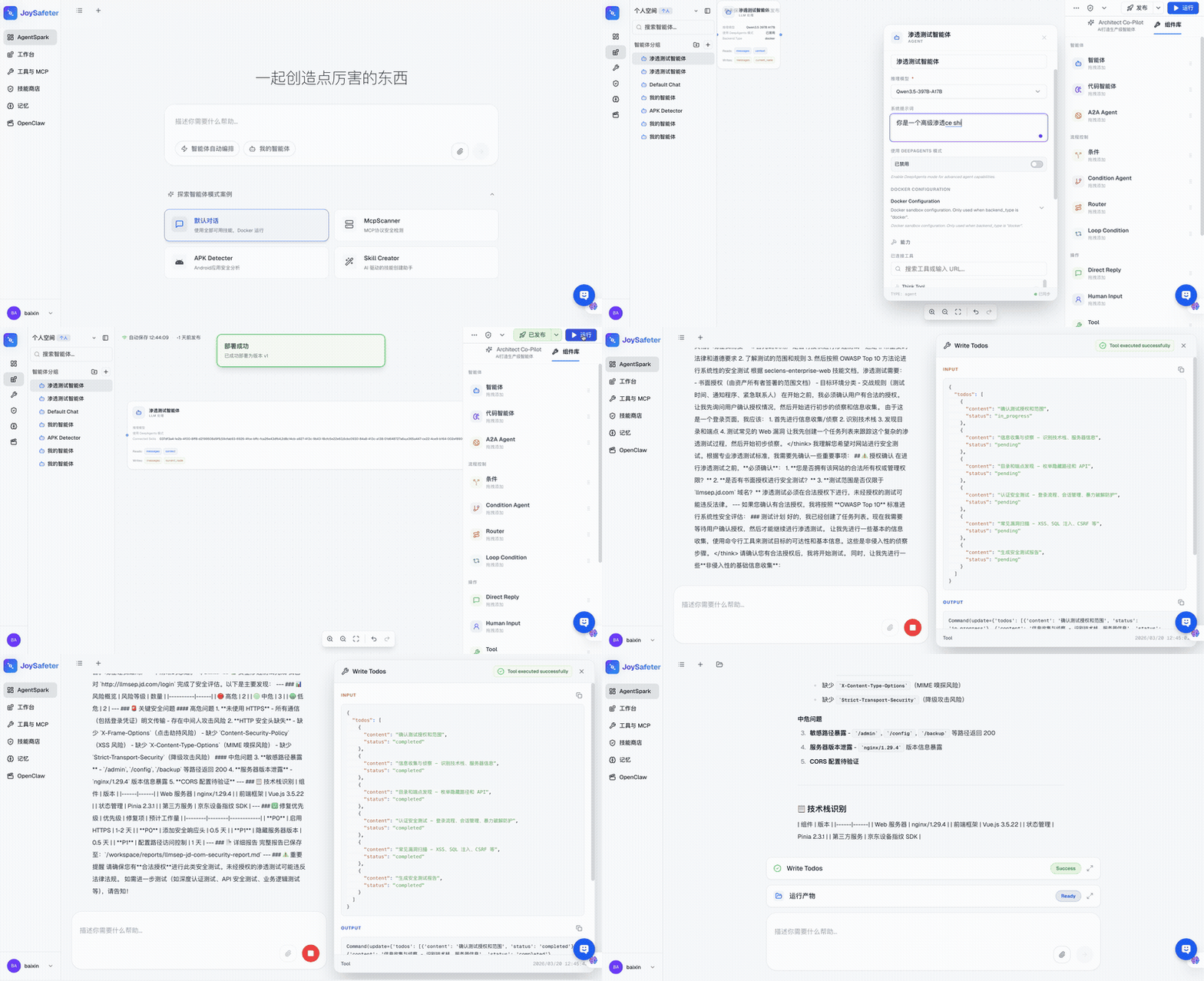
Penetration Testing Agent Demo

**How it works:** 1. Open the Workbench and create a new agent 2. Enable **DeepAgents mode** → select penetration testing skills 3. Provide an authorized target URL and test requirements 4. Agent runs autonomously — if it discovers a login page, it automatically triggers auth bypass testing 5. Download the final report when the run completes > **Note:** Requires sandbox image `swr.cn-north-4.myhuaweicloud.com/ddn-k8s/ghcr.io/jd-opensource/joysafeter-sandbox:latest` configured in Sandbox Settings. This dynamic decision-making — where the agent adapts its next step based on what it finds — is what fixed scripts cannot replicate. --- ## Core Capabilities
### Visual Agent Builder - **No-code workflow editor** — drag-and-drop nodes with loops, conditionals, and parallel execution - **Rapid Mode** — describe in natural language, get a running agent team in minutes - **Deep Mode** — visual debugging and step-by-step observability for complex security research ### 200+ Security Tools, Ready to Use - Pre-integrated **Nmap, Nuclei, Trivy**, and more - **MCP Protocol** — extend with any tool via Model Context Protocol - **30+ pre-built skills** — penetration testing, document analysis, cloud security, and more
### DeepAgents Orchestration - **Manager-Worker multi-level** agent collaboration - **Memory evolution** — long/short-term memory for continuous learning across sessions - **Skill system** — versioned, reusable capability units with progressive disclosure - **LangGraph engine** — graph-based workflows with full state management ### Enterprise Ready - **Multi-tenancy** — isolated workspaces with role-based access control - **Full audit trail** — execution tracing and compliance governance - **SSO integration** — GitHub, Google, Microsoft, OIDC (Keycloak, Authentik, GitLab), JD SSO - **Multi-tenant sandbox** — per-user isolated code execution, zero state leakage
--- ## Quick Start ### One-Click Launch (Recommended) ```bash ./deploy/quick-start.sh ``` The script provides an interactive menu to choose your startup mode and customize ports (with conflict detection): | Mode | Description | Ports Configured | |------|-------------|-----------------| | **(1) Docker Compose Full Stack** | All services in containers, supports localhost or remote server IP/domain | Frontend, Backend, PostgreSQL, Redis | | **(2) Local Frontend Only** | `bun run dev`, supports connecting to remote backend | Frontend (can specify remote backend address) | | **(3) Local Backend Only** | `uvicorn --reload`, supports remote DB/Redis | Backend (can specify remote DB/Redis/frontend address) | | **(4) Local Frontend + Backend** | Auto-starts middleware, supports exposing via non-localhost address | Frontend, Backend | All modes support remote deployment scenarios: - **Docker Compose Full Stack** — choose deployment address (localhost or IP/domain) + http/https - **Local Frontend Only** — optionally connect to a remote backend API (enter backend IP + port + protocol) - **Local Backend Only** — optionally connect to remote PostgreSQL, Redis, and frontend (enter each address and port) - **Local Frontend + Backend** — optionally expose services via a non-localhost address - Non-localhost deployments automatically update `frontend/.env` CSP whitelist (`NEXT_PUBLIC_CSP_CONNECT_SRC_EXTRA`) ```bash ./deploy/quick-start.sh --skip-env # Skip .env file initialization ./deploy/quick-start.sh --skip-db-init # Skip database initialization ``` ### Launch by Scenario ```bash # ─── Development ──────────────────────────────────────── ./deploy/scripts/dev.sh # Docker full-stack dev (containerized frontend + backend) ./deploy/scripts/dev-local.sh # Local dev prep (start middleware, run backend/frontend on host) ./deploy/scripts/dev-backend.sh # Local backend only (requires middleware running) ./deploy/scripts/dev-frontend.sh # Local frontend only (requires backend running) # ─── Production ───────────────────────────────────────── ./deploy/scripts/prod.sh # Production deploy (pre-built images + docker-compose.prod.yml) ./deploy/scripts/prod.sh --skip-mcp # Production without MCP service ./deploy/scripts/prod.sh --skip-pull # Skip image pull, use local images # ─── Middleware / Infrastructure ──────────────────────── ./deploy/scripts/start-middleware.sh # Start middleware (PostgreSQL + Redis + MCP) ./deploy/scripts/minimal.sh # Minimal startup (PostgreSQL + Redis only) ./deploy/scripts/minimal.sh --with-mcp # Minimal + MCP service ./deploy/scripts/stop-middleware.sh # Stop middleware # ─── Test / CI ────────────────────────────────────────── ./deploy/scripts/test.sh # Test environment (minimal deps, automation-friendly) # ─── Install / Check ─────────────────────────────────── ./deploy/install.sh # Interactive installation wizard (generates config files) ./deploy/install.sh --mode dev --non-interactive # Non-interactive install ./deploy/scripts/check-env.sh # Environment preflight (Docker, ports, config files) # ─── Image Management ────────────────────────────────── ./deploy/deploy.sh build # Build frontend + backend images ./deploy/deploy.sh build --all # Build all images (including OpenClaw) ./deploy/deploy.sh push # Build and push to registry ./deploy/deploy.sh pull # Pull latest pre-built images ``` ### Default Ports | Service | Port | URL | |---------|------|-----| | Frontend | `3000` | http://localhost:3000 | | Backend API | `8000` | http://localhost:8000 | | API Docs | `8000/docs` | Swagger UI | | PostgreSQL | `5432` | Database | | Redis | `6379` | Cache | > **Prerequisites:** Docker + Docker Compose. See [INSTALL.md](INSTALL.md) for detailed installation guide, [deploy/PRODUCTION_IP_GUIDE.md](deploy/PRODUCTION_IP_GUIDE.md) for production deployment. --- ## Architecture

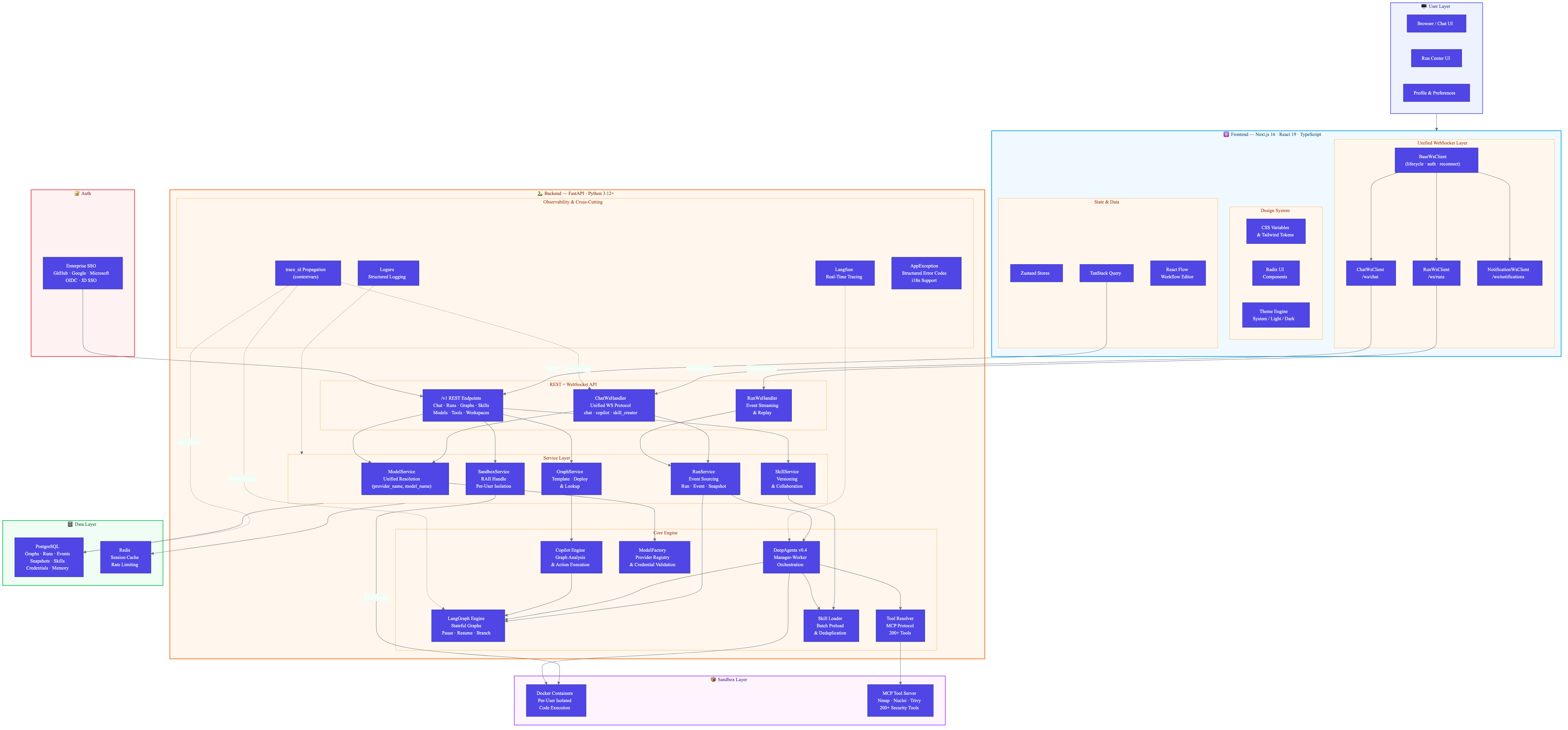
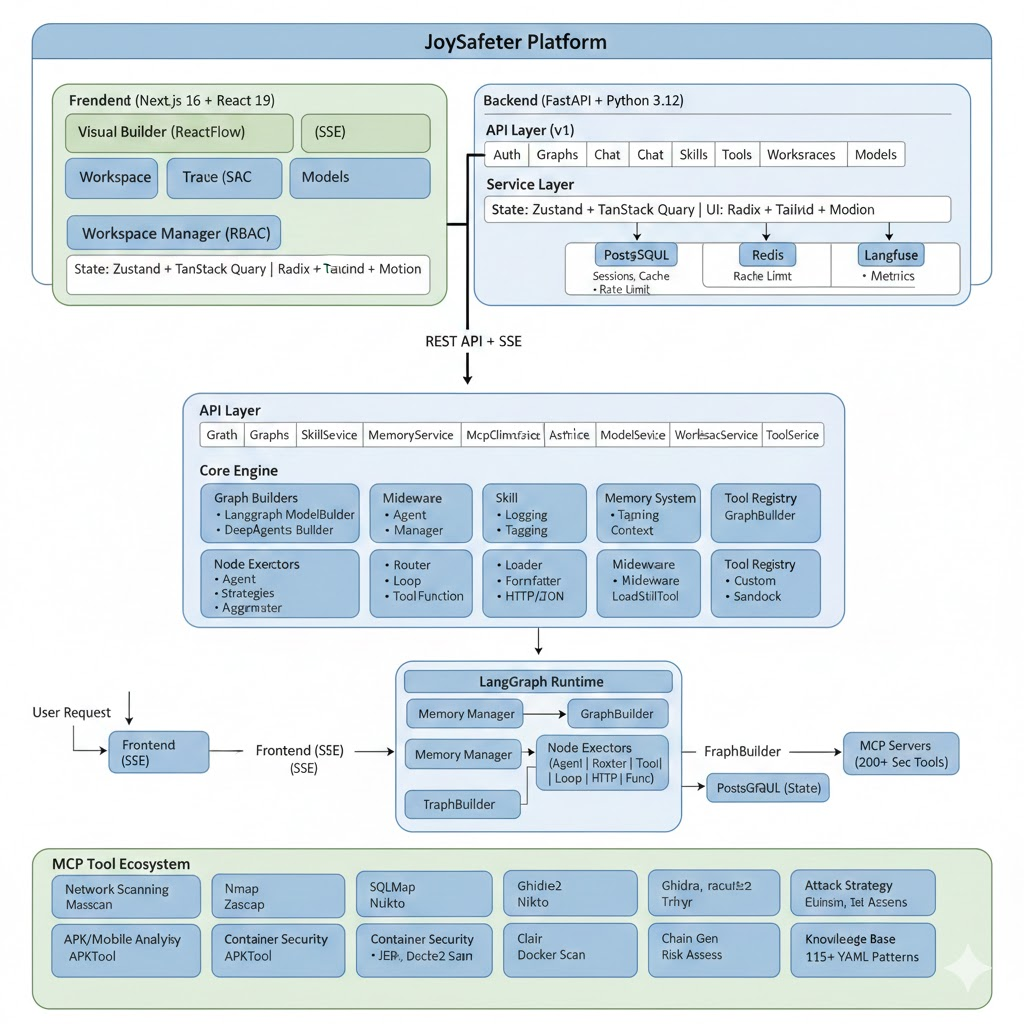
JoySafeter System Architecture

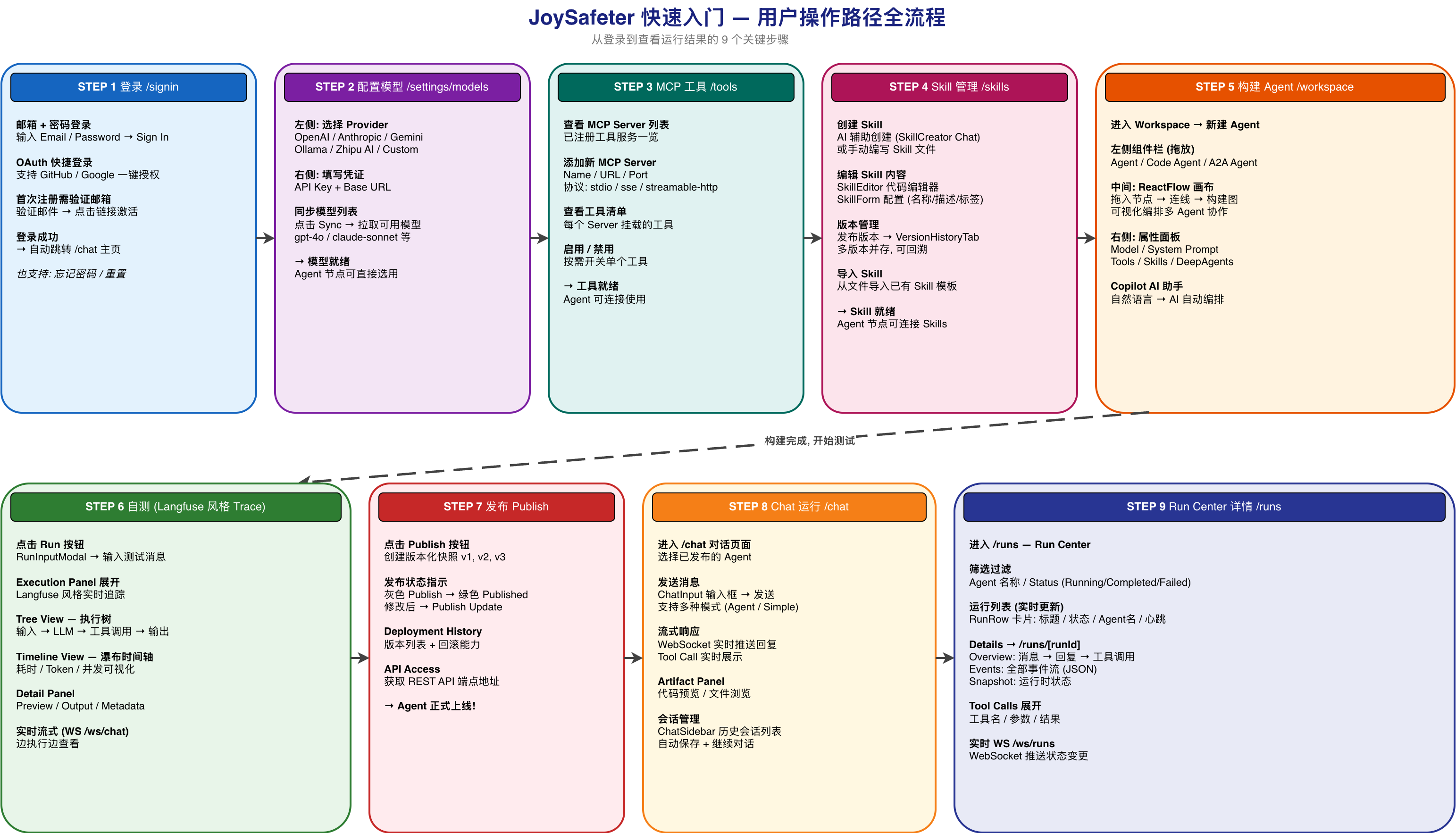
> Full architecture details: [docs/ARCHITECTURE.md](docs/ARCHITECTURE.md) **Key design principles:** - **Graph-based execution** — every agent workflow is a stateful LangGraph, enabling pause, resume, and branch - **Unified Run Center** — Chat, Copilot, and Skill Creator share a single event-sourced run lifecycle (Run → Event → Snapshot) - **Unified WebSocket layer** — BaseWsClient abstract class; Chat / Run / Notification clients share lifecycle, auth (ws-token), and reconnect logic - **Full-chain trace_id propagation** — contextvars-based request tracing from HTTP/WS entry through LangGraph to persistence - **Glass-box observability** — real-time Langfuse tracing of every agent decision and state transition - **RAII sandbox isolation** — per-user Docker containers with automatic handle release, zero state leakage - **Canonical model identifiers** — full-stack (provider_name, model_name) resolution via ModelService → ModelFactory - **Layered skill system** — skills are versioned units that compose into workflows without coupling ### User Journey — Quick Start in 9 Steps

JoySafeter Quick Start User Journey

> **Login** → **Configure Models** → **MCP Tools** → **Skill Management** → **Build Agent** → **Self-Test (Langfuse Trace)** → **Publish** → **Chat UI** → **Run Center** --- ## Tech Stack | Layer | Technology | Purpose | |-------|------------|---------| | **Frontend** | Next.js 16, React 19, TypeScript | Server-side rendering, App Router | | **UI** | Radix UI, Tailwind CSS, Framer Motion | Accessible, animated components | | **State** | Zustand, TanStack Query | Client & server state | | **Workflow Editor** | React Flow | Interactive node-based builder | | **Backend** | FastAPI, Python 3.12+ | Async API with OpenAPI docs | | **AI Framework** | LangChain, LangGraph, DeepAgents | Agent orchestration & workflows | | **MCP** | mcp 1.20+, fastmcp 2.14+ | Tool protocol support | | **Database** | PostgreSQL, SQLAlchemy 2.0 | Async ORM with migrations | | **Cache** | Redis | Session cache & rate limiting | | **Observability** | Langfuse, Loguru | Tracing & structured logging | --- ## What's New > Full history: [CHANGELOG.md](CHANGELOG.md) | Tag | Feature | What it means | |-----|---------|---------------| | **NEW** | **Run Center Architecture** | Chat & Copilot fully integrated into Run Center — run details, session recovery, and live event replay on page refresh | | **NEW** | **Dark Mode & Preferences** | System / Light / Dark theme switching; redesigned profile page with language & theme preferences | | **NEW** | **Unified WebSocket Layer** | BaseWsClient abstract class — Chat, Run, and Notification clients share lifecycle, auth (ws-token), and reconnect logic | | **NEW** | **Full-Chain trace_id Propagation** | End-to-end request tracing via contextvars for complete observability | | **NEW** | **Ollama One-Click Integration** | Local Ollama model provider added out of the box | | **NEW** | **Version Display** | In-app version info tied to bump-version.sh release pipeline | | **NEW** | **Unified Model Identifiers** | Full-stack (provider_name, model_name) canonical form with data migration — no more legacy field ambiguity | | **UPGRADE** | **Design Token Overhaul** | Hardcoded colors, font sizes, and border radii replaced with CSS variables and Tailwind tokens; z-index and typography scales unified | | **UPGRADE** | **Sandbox Overhaul** | RAII handle management, adapter API uploads, security hardening | | **UPGRADE** | **Frontend Component Extraction** | ConfirmDialog, UnifiedDialog, InlineRenameInput, SidebarContextMenu, AgentListContext — less prop drilling, more reuse | | **UPGRADE** | **i18n & Code Quality** | Backend error messages internationalized; email templates moved to Jinja2; LLM prompts externalized to Markdown; 129 unused SVG icons removed | --- ## Documentation ### Getting Started - [INSTALL.md](INSTALL.md) — Installation guide (Docker / manual / pre-built images) - [DEVELOPMENT.md](DEVELOPMENT.md) — Local development setup - [deploy/README.md](deploy/README.md) — Docker deployment - [deploy/PRODUCTION_IP_GUIDE.md](deploy/PRODUCTION_IP_GUIDE.md) — Production deployment ### Deep Dive - [docs/ARCHITECTURE.md](docs/ARCHITECTURE.md) — Architecture overview - [backend/README.md](backend/README.md) — Backend guide - [frontend/README.md](frontend/README.md) — Frontend guide ### Tutorials See [docs/tutorials/](docs/tutorials/) for step-by-step guides on model setup, MCP integration, skill development, and more. ### Governance - [CONTRIBUTING.md](CONTRIBUTING.md) — Contributing guide - [SECURITY.md](SECURITY.md) — Security policy - [CODE_OF_CONDUCT.md](CODE_OF_CONDUCT.md) — Code of conduct --- ## Community Join the WeChat user group for questions and discussion:

JoySafeter User Group 3      JoySafeter User Group 4

--- ## Contributing ```bash git clone https://github.com/jd-opensource/JoySafeter.git git checkout -b feature/amazing-feature git commit -m 'feat: add amazing feature' git push origin feature/amazing-feature ``` See [CONTRIBUTING.md](CONTRIBUTING.md) for full guidelines. --- ## License Apache License 2.0 — see [LICENSE](LICENSE) for details. Third-party component licenses: [THIRD_PARTY_LICENSES.md](THIRD_PARTY_LICENSES.md) --- ## Acknowledgments

LangChain

LangGraph

FastAPI

Next.js

Radix UI
---

Made with ❤️ by the JoySafeter Team
For commercial solutions, contact JD Technology Solutions Team at org.ospo1@jd.com