
Two shots in. One transition out.
Drop two images, two clips or two 3D models. Pick an effect. An open-weights video model renders the in-between
on your own GPU, through ComfyUI. Every take is a ComfyUI workflow you can open.



▶ Watch the 2-minute demo · Project site · Install
---
Seam is an open-source take on the "transitions" apps (Higgsfield, Kling, Pika), built for Comfy's
[Open Source Higgsfield](https://comfy.org/open-source-higgsfield) challenge. No accounts, no credits: the
model runs on your machine and every take can be reopened, inspected and re-run in ComfyUI.
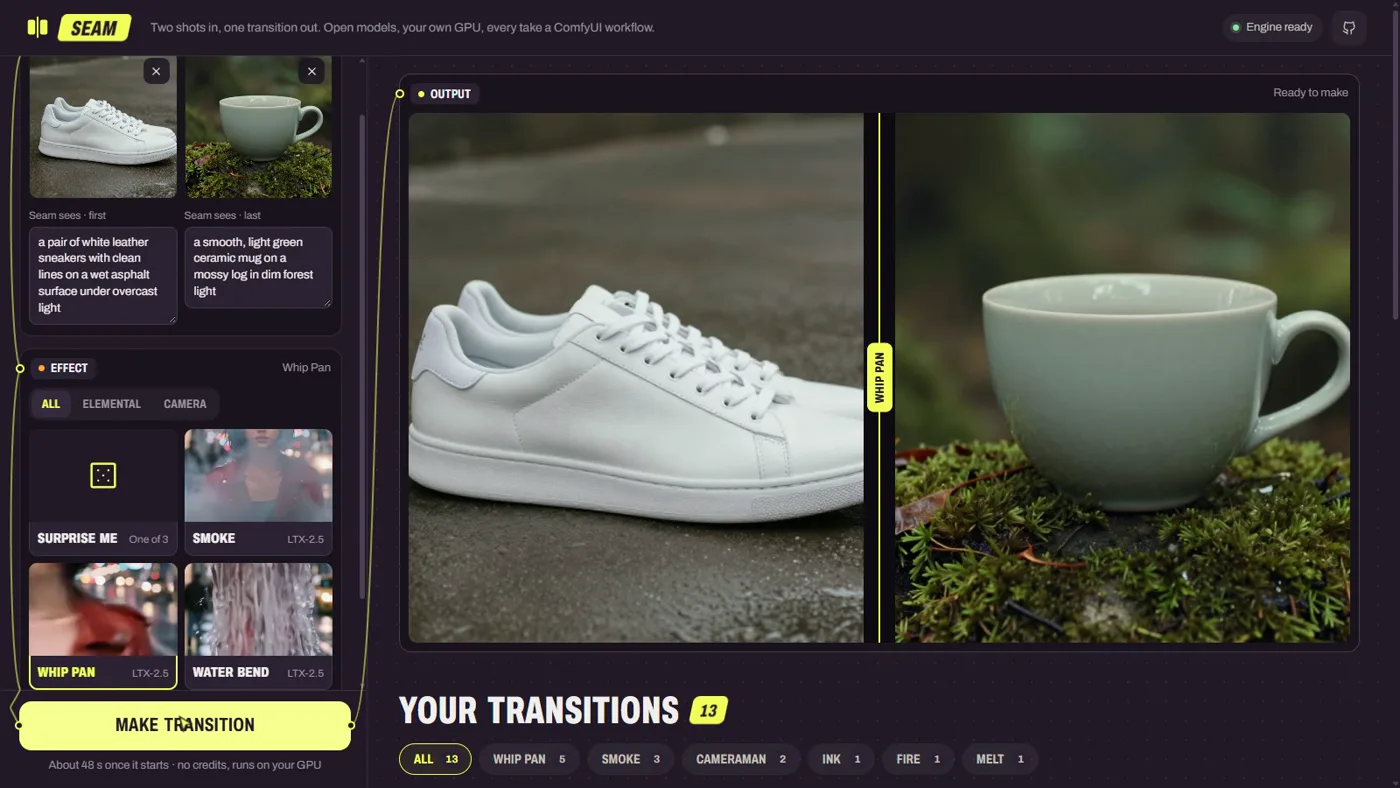
- **Web studio**: shots on the left, the take on the right, your gallery below. Images, 1–6 s clips or **3D models**
as input, ten qualified effects (5 s takes, 10 s for Smoke, Water bend and Whip pan) or **Surprise me**, and three examples so you can try it in one click.
- **No effect**: pick "No effect" and describe the camera and scene motion yourself; your prompt is the whole
direction between the two shots.
- **Models**: one panel lists every model per feature (transitions, Generate shot, 360° orbit) and whether it is
ready on your GPU and on Comfy Cloud. A missing local model is one click away: its files, size and licenses,
then a download into your ComfyUI models folder once you accept them.
- **360° orbit** (optional, your GPU only): turn a generated shot into a full orbit around its subject, drag to the
angle you want and use that frame as a first or last shot or in a sequence. It appears once its models are installed.
- **Sequences**: more than two shots? Put them in order, pick an effect per hand-off, and Seam renders each
transition and joins them into one video (clips play in full at their place). A hand-off can also be a **Cut**:
nothing renders and the shots meet with a hard cut, so your own clips (up to 60 s between cuts) and images (2 s
each) can sit in any order; a sequence of only cuts joins at once, free. A bad hand-off gets a new take on
its own; the others are reused. Or grow a story shot by shot: **Continue** a finished two-shot take with a new
shot, then keep adding; only the new transition renders, and every transition starts from your own shot, so the
story stays as consistent as the shots you bring. The next shot can be a new file, an image from **Generate
Shot**, or a **transition you already made**, which comes in as a clip without rendering again.
- **Links that keep your place**: the open sequence or take is in the address (`/sequences/`, `/takes/`),
so a reload, Back/Forward and a pasted link land where you were.
- **Ask the helper**: a chat on the local Gemma-4 E2B explains the app, knows what you have open, and prepares a new take you start with a click. It never renders or deletes by itself. It reads concrete requests best, like *transition 2 to Smoke at 10 seconds*; free phrasing often gets a question or a description instead. It runs on your GPU only.
- **Generate shots**: a prompt, an aspect, a quality, a model, up to 4 images, on your GPU or Comfy Cloud. They stay in a collection like Midjourney's: every image shows its prompt and settings, and any of them can be reused, varied, or dropped into a transition or a sequence.
- **Rough cut**: see a sequence's order and pacing in seconds, before spending any GPU time or credits. Shots, clips and a card naming each transition; nothing renders.
- **Keep what works**: star a take, open it to use its settings again, and move what missed to a trash that keeps it for 7 days.
- **CLI**: `seam make first.png last.png --preset smoke`, `seam sequence make 1.png 2.png 3.png --preset smoke,whip_pan`, then `seam sequence extend 4.png --preset ink`, and `seam sequence edit --order 1,3,2,4 --transition 1=ink --transition 2=melt --transition 3=smoke` to reorder (only the new hand-offs render).
- **Agent plugin**: a skill + MCP server so Claude Code (or any MCP agent) can plan, render, review and refine
transitions for you. Packaged as a Claude Code plugin and as an [Agent Plugins](https://agent-plugins.org/) 1.0 plugin.
## Why it's different
| | |
|---|---|
| **Generative, not a 2D blend** | Code tools (ffmpeg `xfade`, Remotion) cross-fade two flat frames. Seam asks a video model for what is *between* the shots: smoke that really hides the subject, water that reshapes into the next scene, a pan with real parallax and motion blur. |
| **Any shot in, even 3D** | Images, clips, or a `.glb` you frame in the browser and record as a camera orbit. Everything becomes the frame the transition leaves from or lands on, so clips and orbits stay continuous. |
| **Open by default** | Open weights (LTX-2.5, Gemma-4 E2B), core ComfyUI nodes, the official Comfy SDK. Each take archives the exact graph it submitted; **Open in ComfyUI** downloads it with both shots, and a receipt says how it was made. |
| **Only qualified effects ship** | An effect is exposed only after it plays well on two image pairs × two seeds, then on unseen pairs. Ten passed; more ship only if they pass too. Longer takes are qualified the same way, per effect. |
| **Seam reads your shots** | A small local model describes each shot ("a cracked eggshell with jagged openings…") and that line goes into the prompt. You can correct it before you render. |
| **Agents included** | The same server backs the web app, the CLI and an MCP server, so an agent can run the whole loop: plan, render, look at the take, refine. |
## Tour
 |
 |
| Try an example or drop your own shots. The Effect node plays each effect's preview on hover. |
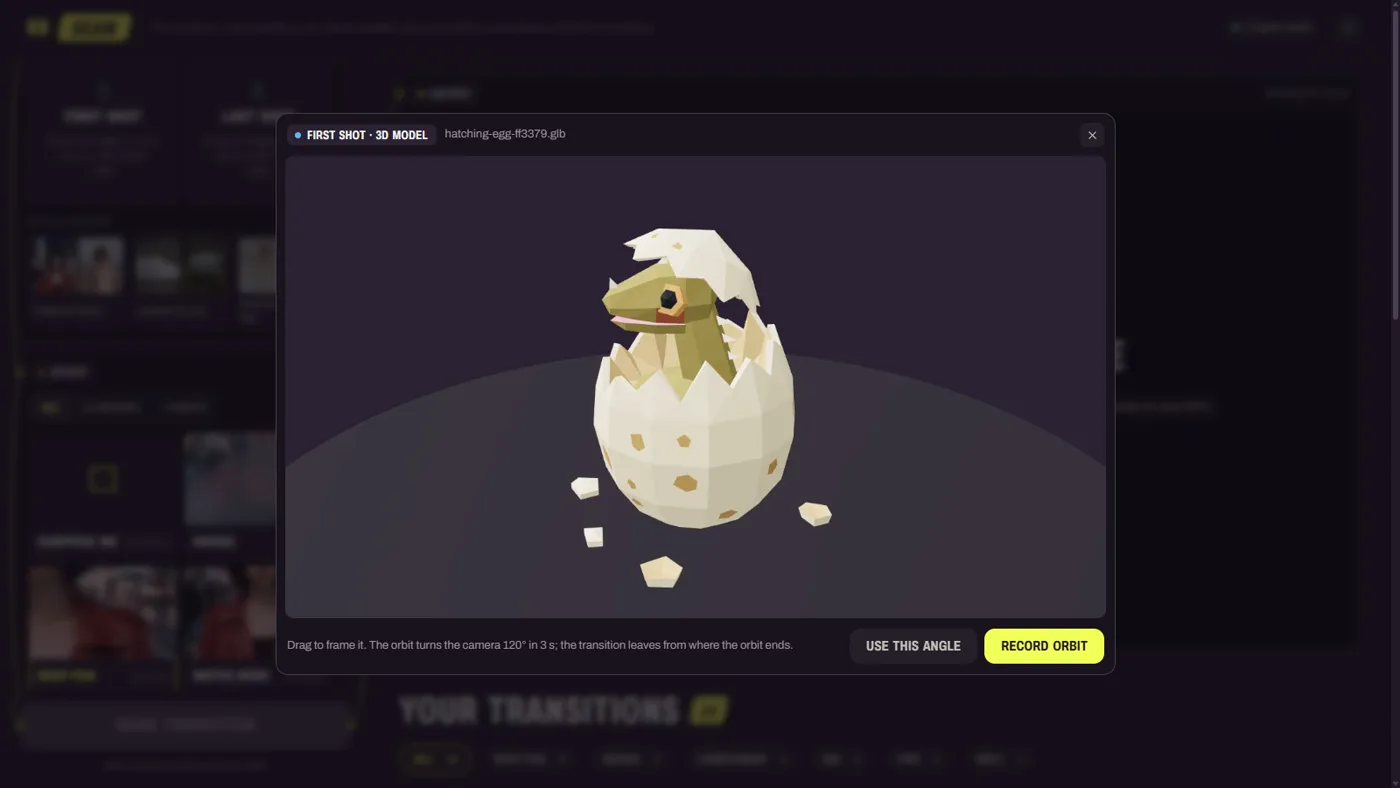
3D model in. Frame the .glb, then Record orbit (3 s, 120°) or keep one angle as a still. |
 |
 |
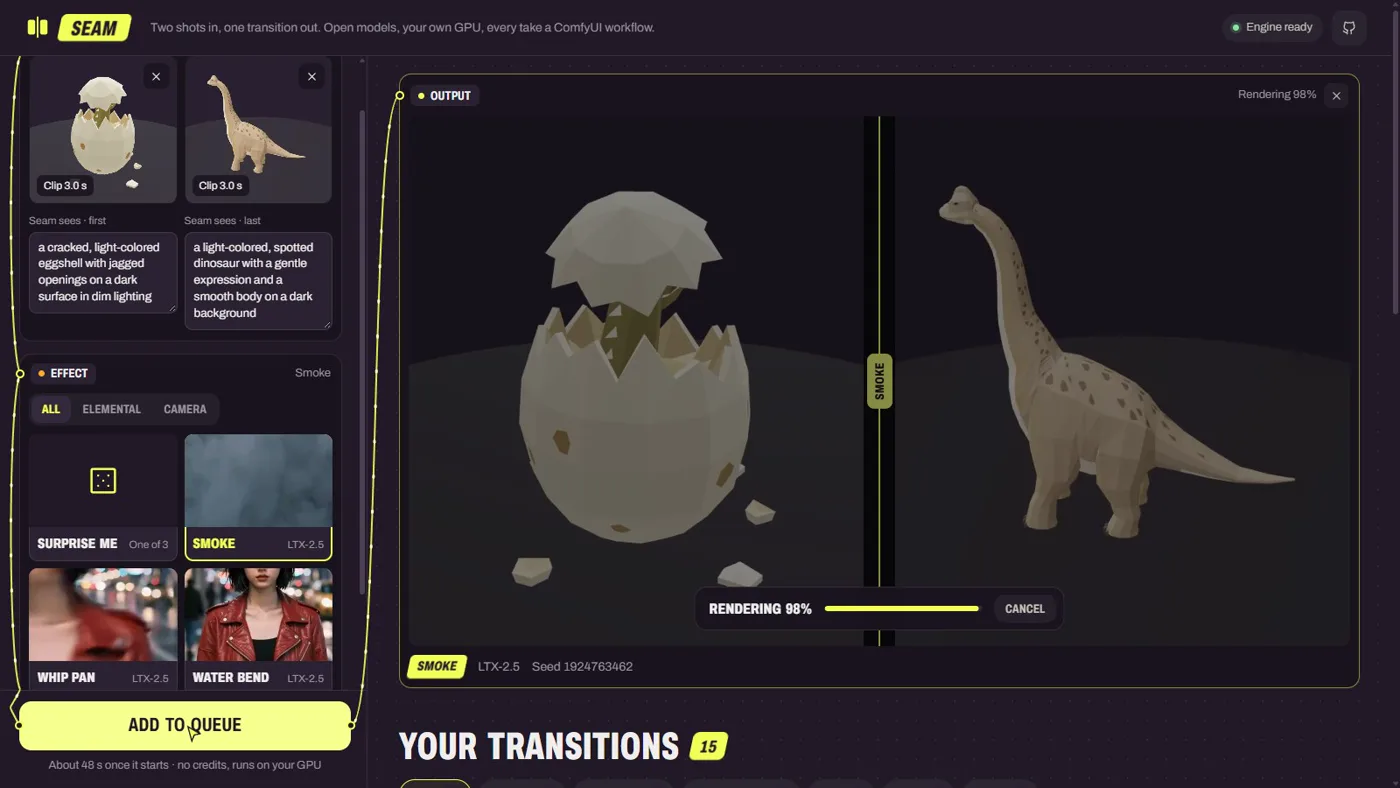
| Make transition. The graph's wires carry the take into Output while LTX-2.5 renders (~45 s on an RTX 5090). |
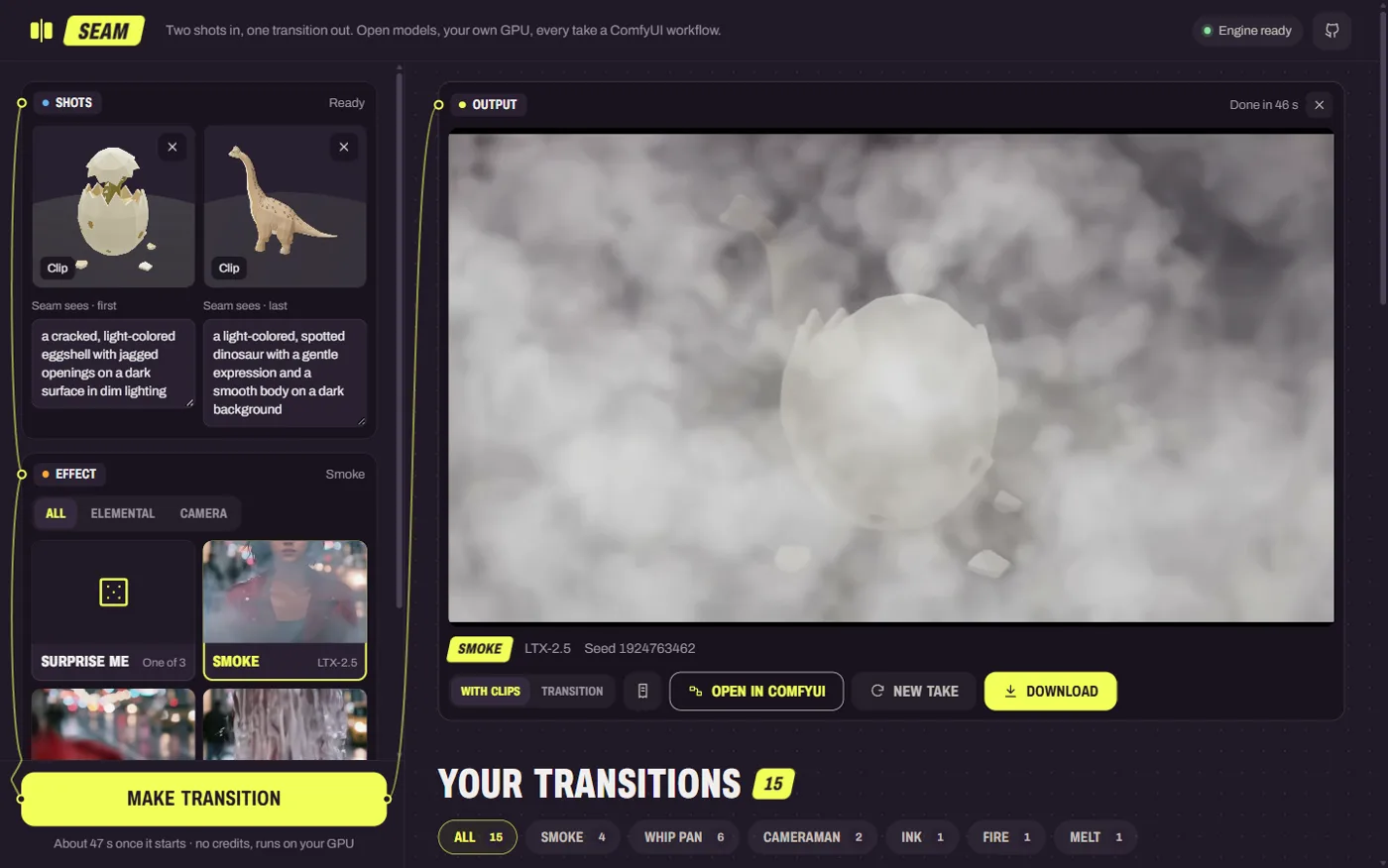
The take. With clips or transition only, open the exact workflow in ComfyUI, make a new take, download. |
The studio is styled after comfy.org: Comfy ink and yellow, condensed type, and ComfyUI's own node-and-wire
language (socket colours by type). Design notes: [DESIGN.md](DESIGN.md).
## Takes
All real renders, seed 1, no retouching. The input stills are fictional and were generated for testing.
**A person** (first shot → Seam → last shot)
| First shot | Smoke | Water bend | Whip pan | Last shot |
|---|---|---|---|---|
|  |
 |
 |
 |
 |
**A product** (sneaker on wet concrete → cup on a mossy rock)
| Smoke | Water bend | Whip pan |
|---|---|---|
|
 |
 |
 |
**3D models** — the egg and the brachiosaurus at the top of this page: two `.glb` files, two recorded orbits, one take.
**Measured** (RTX 5090 32 GB, Windows 11, ComfyUI Desktop 0.41.3; 5 s clips at 1280×704 or 704×1280):
| Effect | Takes | Render time, median (min–max) |
|---|---|---|
| Smoke | 10 | 41 s (30–46 s) |
| Water bend | 9 | 40 s (30–41 s) |
| Whip pan | 9 | 41 s (30–56 s) |
| Lava, Beast, Ink, Light burst, Zoom through, Melt, Wind vortex | 4 each | 38–43 s (35–47 s) |
| Smoke, Water bend, Whip pan at **10 s** | 18 | 76 s (71–86 s) |
Render time runs from submit to finished video, including LTX-2.5's prompt enhancer and any model loading (the
slowest takes were the first after a load). Reading the two shots (~1 s each, cached) comes on top. Peak VRAM was
~31 GB on a 32 GB card; 24 GB cards should work through ComfyUI's offloading (64 GB RAM) but are untested.
The qualification record is [dev/PRESET_REVIEW.md](dev/PRESET_REVIEW.md).
**Will it run on a DGX Spark?** The weights should fit in its 128 GB of unified memory, but nobody has tried it here,
so its speed is unknown. Every number above comes from one RTX 5090.
## 3D models in
Drop a `.glb` on either shot. Seam opens it in a small 3D studio in the browser (three.js): neutral set, studio
light, the model framed for you; drag to change the angle.
- **Record orbit** renders a 3 s, 120° camera orbit and uploads it as a clip. The transition **leaves from where the
first orbit ends** and **lands where the second orbit begins**, and Seam joins orbit + transition + orbit into one
video. The orbit is paced by the clock, so a slow GPU drops frames but the clip still lasts 3 s.
- **Use this angle** keeps one view as a still.
The model never leaves your machine; only the recorded orbit or still goes to the Seam server, like any upload.
## Hackathon submission
| | |
|---|---|
| Category fit | **Open Weights Only** by default: every render is LTX-2.5 (+ Gemma-4 E2B to read the shots) on your own GPU through core ComfyUI nodes; partner models exist only as an explicit pick on Comfy Cloud. **VFX Workflow built with LTX**: LTX-2.5 first/last-frame is the core model of every effect. |
| Comfy Developer Platform | Every render goes through the official **Comfy SDK** to the **Comfy API v2** (`comfy-api-proxy` locally). |
| Workflow files | [`src/seam/workflows/`](src/seam/workflows) (API format, slot-mapped), and any take exports its exact graph via **Open in ComfyUI**. |
| Run it locally | [install.md](install.md), checked end to end by `uv run seam doctor`. |
| Try it | The app ships three example pairs: open the studio and pick one. There is no hosted endpoint: Seam runs on your GPU. |
| Demo | [docs/media/seam-demo.mp4](docs/media/seam-demo.mp4) (1:56, real renders, waits sped up and labelled). |
## Quick start
You need an NVIDIA GPU with 32 GB (24 GB untested), 64 GB RAM, ComfyUI ≥ 0.41.3, Python 3.12 with `uv`, Node 20+
and ffmpeg. The full guide, written so an agent can follow it too, is **[install.md](install.md)**.
```bash
git clone https://github.com/jdnichollsc/seam && cd seam
uv run python scripts/download_models.py --models-dir "/models" --only l25 # ~44 GB, open weights
uv tool install comfy-api-proxy==0.1.6
comfy-api-proxy start --comfyui http://127.0.0.1:8188 # Comfy API v2 on :8189
uv run seam doctor # checks ffmpeg, the Comfy API, nodes, models and the web build
uv run seam serve # http://127.0.0.1:7860
```
**Agents.** In Claude Code:
```bash
claude plugin marketplace add jdnichollsc/seam
claude plugin install seam
```
Then ask for a transition ("make a smoke transition from a.png to b.png and show me a preview"). The MCP server
exposes `seam_status`, `list_presets`, `create_transition`, `wait_job`, `preview_job`, `refine_job`, `get_job`,
`list_jobs` and `cancel_job`, plus `create_sequence`, `wait_sequence`, `get_sequence`, `preview_sequence`,
`refine_segment`, `cancel_sequence`, `continue_take`, `extend_sequence` and `edit_sequence` (remove / reorder
shots, a story line for the whole film) for multi-shot videos; the skill tells the agent how to plan shots, judge a take and refine it.
## How it works
```
browser / CLI / agent (MCP)
│ REST + live events
Seam server (FastAPI) ── presets → model-specific prompt + slot-mapped workflow
│ Comfy SDK (comfy-sdk, Comfy API v2)
comfy-api-proxy → ComfyUI (core nodes only) → LTX-2.5 on your GPU
```
- Every generation goes through the official **Comfy SDK** against the **Comfy API v2**, served locally by
`comfy-api-proxy`. No GPU? `seam backend cloud` renders the same graphs on your Comfy Cloud account (see install.md). A deployed endpoint works through `COMFY_BASE_URL`
(neither has rendered a real take through Seam yet).
- Each effect is a preset (our own prompt text) routed to the model that renders it best: **LTX-2.5** first/last-frame
with its in-graph prompt enhancer (every launch effect), or **LTX-2.3** with an open transition LoRA.
- Any transition, or any part of a sequence, can pick another model. Open: LTX-2.5, LTX-2.3, Wan 2.2. Partner, on Comfy
Cloud only, using credits: MiniMax H3, Kling 3.0, Seedance 2.5. The list shows what the current backend can really
render and downloads nothing. It is a curated catalog because a model file with no wired graph cannot render; adding one
means a graph plus an entry in `workflows/slots.json`. Effects were reviewed on their default model only, and the app
says so when you pick another. A sequence joins at the first shot's canvas, so mixed aspect ratios can lose their edges.
Shot reading on Comfy Cloud is a separate small charge, and a cancelled or timed-out partner job may still be billed.
- Seam reads both shots first with the same small local model as the enhancer (Gemma-4 E2B), so the prompt says
what is in them. You can correct that line before rendering.
- Workflows are the official ComfyUI templates exported to API format; Seam only touches them through a named
slot map, with a test that fails if the template drifts.
- Jobs persist in SQLite and survive a server restart (they re-attach to the running ComfyUI job, and a job that was
mid-submit is reported, never silently resubmitted).
- **Clips in, clips out:** either side can be a 1–6 s clip (normalized to one clock on upload). The transition starts
from clip A's last frame and lands on clip B's first, and Seam joins clip A + transition + clip B with ffmpeg.
- **Every take is reproducible:** a receipt (input hashes, effect, model, seed, final prompt, graph hash) and a
one-click **Open in ComfyUI** bundle: the exact API workflow plus both stills, runnable in plain ComfyUI.
- The server only answers on loopback and refuses cross-site writes.
## Built with
| Tool | What it does in Seam |
|---|---|
| [ComfyUI](https://github.com/comfyanonymous/ComfyUI) | runs the graphs (core nodes only, the official LTX-2.5 first/last-frame template) |
| [Comfy SDK](https://github.com/Comfy-Org/comfy-python-sdk) + [comfy-api-proxy](https://github.com/Comfy-Org/comfy-api-proxy) | every submit, upload and download, over the Comfy API v2 |
| [LTX-2.5](https://github.com/Lightricks/LTX-2) | the video model, with its in-graph prompt enhancer |
| Gemma-4 E2B | reads each shot so the prompt describes it |
| FastAPI · SQLite · ffmpeg | the Seam server, job store, clip normalization and joins |
| React · GSAP · three.js | the web studio, its motion, and the 3D-model studio |
| MCP · Agent skills | the agent plugin (Claude Code, Agent Plugins) |
## Models and licenses
| Model | Role | License |
|---|---|---|
| [LTX-2.5](https://huggingface.co/Lightricks/LTX-2.5) 22B distilled (int8) + VAEs | default video model | LTX-2.x Community License (gated) |
| Gemma-4 12B (LTX-2.5 text encoder) · Gemma-4 E2B (prompt enhancer) | text encoding / prompt enhancement | Gemma terms |
| [LTX-2.3](https://huggingface.co/Lightricks/LTX-2.3-fp8) 22B distilled fp8 + Gemma-3 12B | optional video model | LTX-2 Community License |
| [LTX-2.3 Transition LoRA](https://huggingface.co/valiantcat/LTX-2.3-Transition-LORA) | optional transition style | see model card |
| [Z-Image-Turbo](https://huggingface.co/Tongyi-MAI/Z-Image-Turbo) + Qwen 3 4B | optional: the images of Generate shots, and the fictional test images in `dev/` | Apache 2.0 |
| [FLUX.2 Klein 4B](https://huggingface.co/black-forest-labs/FLUX.2-klein-base-4B) | optional: a model of Generate shots, when your ComfyUI or Comfy Cloud has it; Seam does not download it | Apache 2.0 |
| MiniMax-H3 Ref2VA + ORB360 LoRA | optional: the 360° orbit of Generate shots, when your ComfyUI has them; Seam does not download them | MiniMax H3 Community License; ORB360: see its model card |
| [Juggernaut XL v9](https://huggingface.co/RunDiffusion/Juggernaut-XL-v9) | optional: a model of Generate shots, when your ComfyUI or Comfy Cloud has it; Seam does not download it | CreativeML OpenRAIL-M (use restrictions apply) |
| [MiniMax H3 Image](https://huggingface.co/MiniMaxAI/MiniMax-H3-Image) + Qwen3-VL | optional: a model of Generate shots, one image at a time; needs ComfyUI 0.45.3 or newer | MiniMax H3 Image Community License |
Seam's code is MIT ([LICENSE](LICENSE)). The models keep their own licenses; read them before commercial use.
The effect presets are our own text, inspired by common transition concepts — no third-party prompts or media.
The 3D models (`.glb`) in the demo are the author's own assets, released under MIT.
**Status:** tested on Windows 11 with one RTX 5090. Linux, macOS and smaller GPUs are untested.
## Responsible use
Use images you own or made. Don't put a real, identifiable person into a transition without their permission.
Keep it SFW.
## Credits
Built on [ComfyUI](https://github.com/comfyanonymous/ComfyUI), the [Comfy SDK](https://github.com/Comfy-Org/comfy-python-sdk)
and [comfy-api-proxy](https://github.com/Comfy-Org/comfy-api-proxy), [LTX](https://github.com/Lightricks/LTX-2) by
Lightricks, and the open transition LoRA by valiantcat. Made for [#OpenSourceHiggsfield](https://comfy.org/open-source-higgsfield)
by [@jdnichollsc](https://github.com/jdnichollsc).