# WebBridge (Agent WebBridge)
[](https://jeet-dhandha.github.io/agent-webbridge/)
[](https://www.npmjs.com/package/agent-webbridge)
[](https://chromewebstore.google.com/detail/agent-webbridge/kgnhhbkooeplfdkfnicgekdmegckcnpl)
[](https://glama.ai/mcp/servers/jeet-dhandha/agent-webbridge)
[](LICENSE)
[](https://nodejs.org)
> **WebBridge** (`agent-webbridge`): Drive **your real, logged-in Chrome** with Claude Code, Cursor and any MCP client — across **multiple Chrome profiles** with **true per-tab DevTools parallelism**. 100% open-source (MIT), zero cloud, no telemetry, all on `127.0.0.1`.
>
> 🌐 **Interactive site & demo recordings**: [jeet-dhandha.github.io/agent-webbridge](https://jeet-dhandha.github.io/agent-webbridge/)
## Add it to your agent (30 seconds)
```bash
npm i -g agent-webbridge && awb setup "Work" # once: installs the daemon + the Chrome extension
```
Then add the MCP server to Claude Desktop, Claude Code, Cursor or Windsurf:
```json
{
"mcpServers": {
"chrome": { "command": "npx", "args": ["-y", "agent-webbridge", "mcp"] }
}
}
```
Claude Code: `claude mcp add chrome -- npx -y agent-webbridge mcp`
Or install it as an agent skill (Claude Code, Cursor, Codex and others): `npx skills add jeet-dhandha/agent-webbridge`
Your agent now has `browser_navigate`, `browser_snapshot`, `browser_click`, `browser_fill`, `browser_evaluate`, `browser_screenshot` and more — all running in *your* Chrome, with *your* sessions. Pass `profile` to choose an account and `tabId` to run tabs in parallel. If a call fails, `browser_status` tells the agent which profile isn't connected.
### Why not Playwright or a cloud browser?
| | Cloud browsers (Browserbase, Steel…) | Headless Playwright / Puppeteer | **agent-webbridge** |
|---|---|---|---|
| Cost | usage-based | free | **free, MIT** |
| Your logins, passkeys, 2FA | re-auth or upload cookies | re-login; 2FA breaks | **already signed in** |
| Browser identity | cloud and datacenter IPs are often challenged | headless browsers are often challenged | **your own Chrome profile (sites can still limit automation)** |
| Where your data goes | a third-party server | local | **local only, `127.0.0.1`** |
| Several accounts at once | separate sessions to manage | manual orchestration | **one profile per account, parallel tabs** |
It automates a browser you are already signed in to — use it only on accounts and sites you are entitled to automate, and respect each site's terms.
`agent-webbridge` is a tiny Node daemon (one runtime dependency: [`ws`](https://www.npmjs.com/package/ws)) plus a clean-room MV3 Chrome extension. An agent POSTs a command to a local router → the router fans it out to the right profile's daemon → the extension attaches the Chrome DevTools Protocol **per tab**.
## See it work
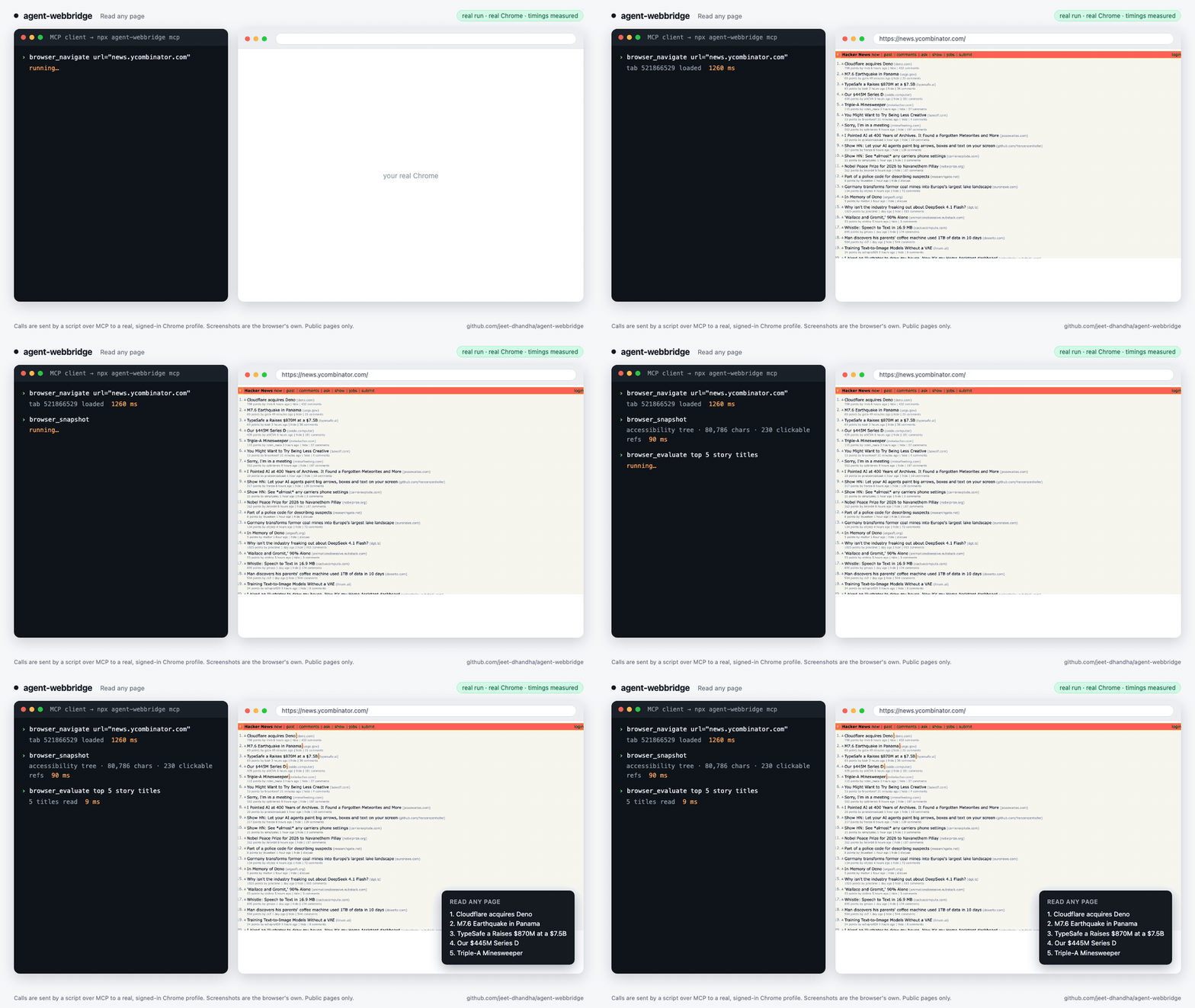
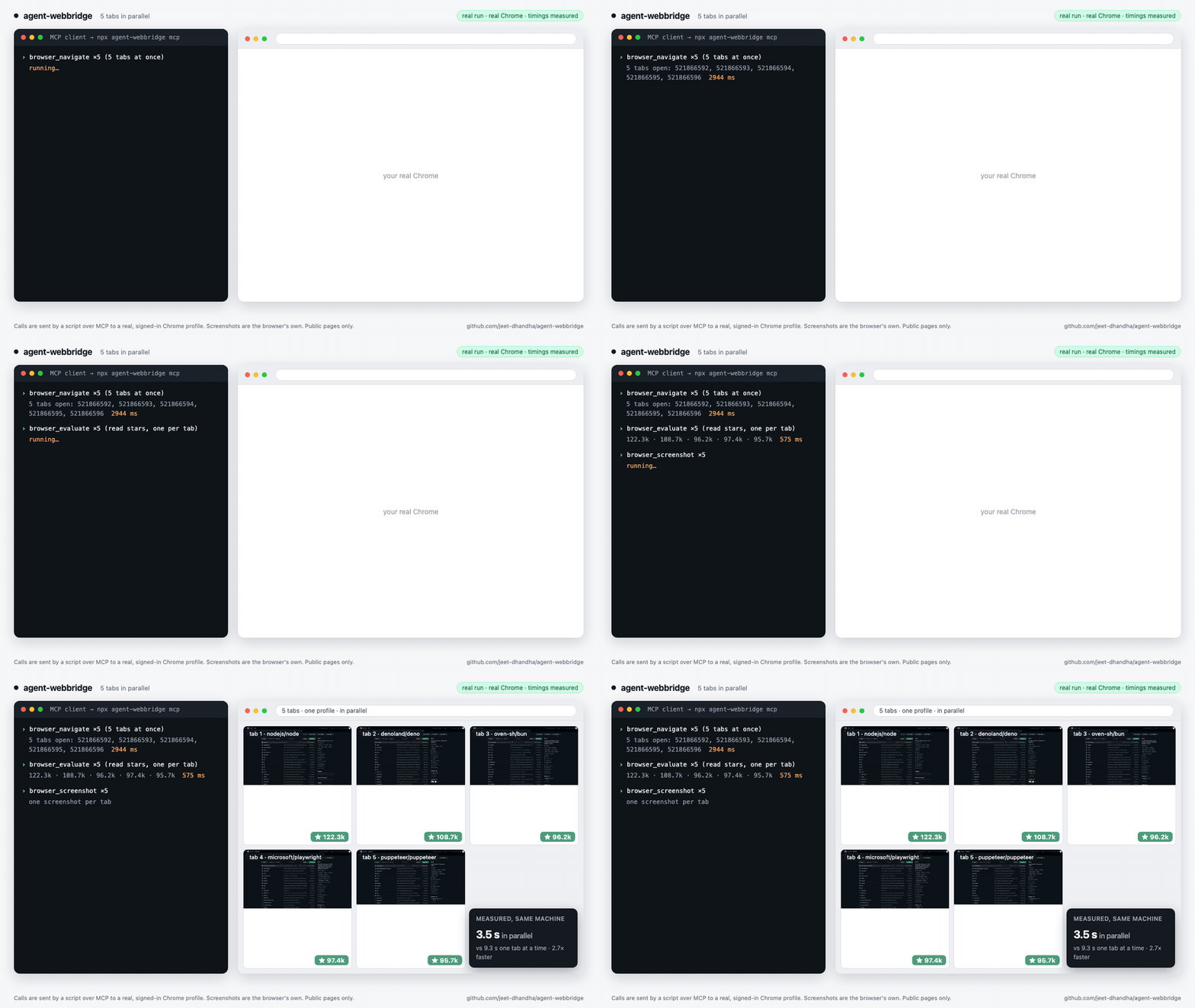
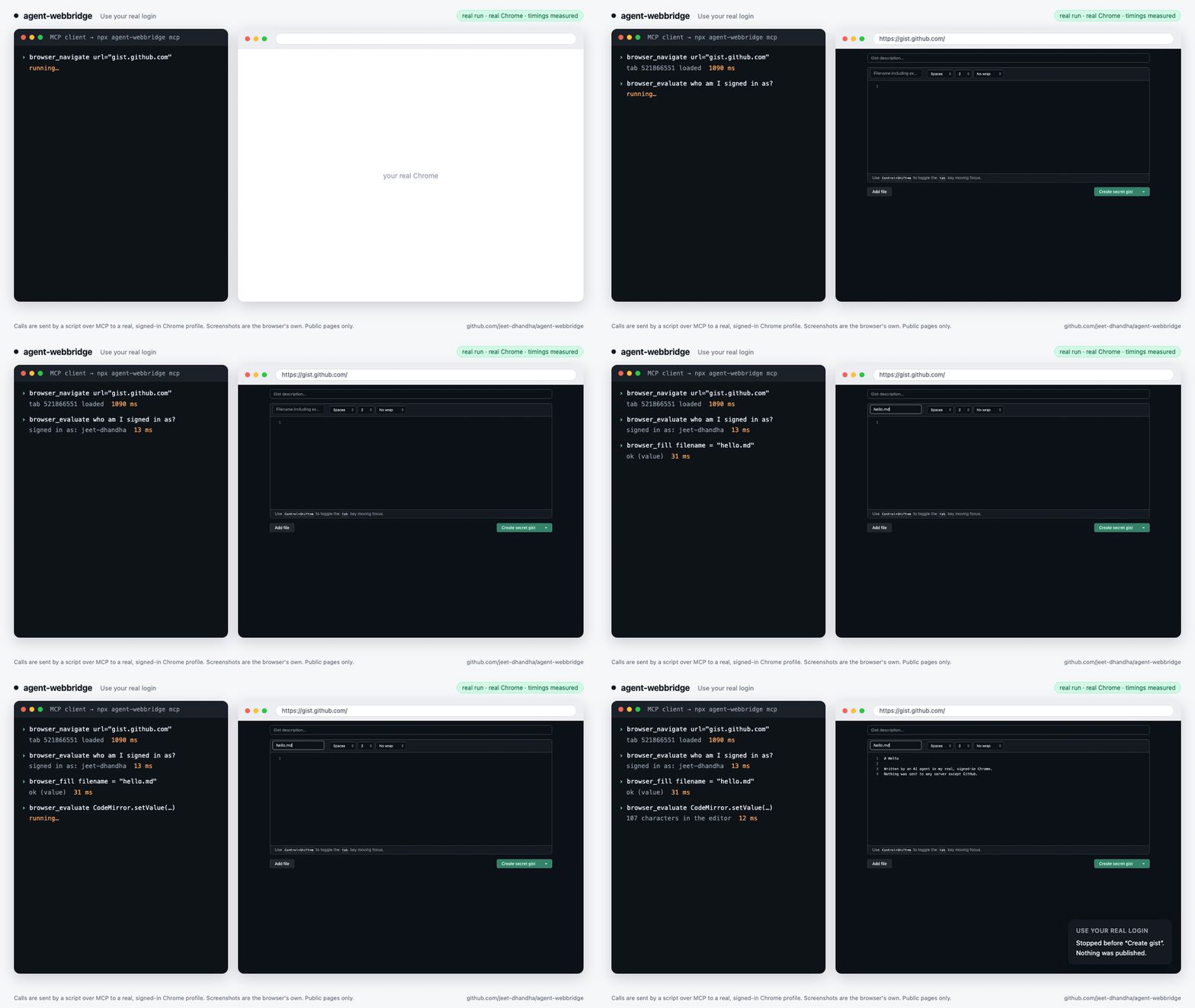
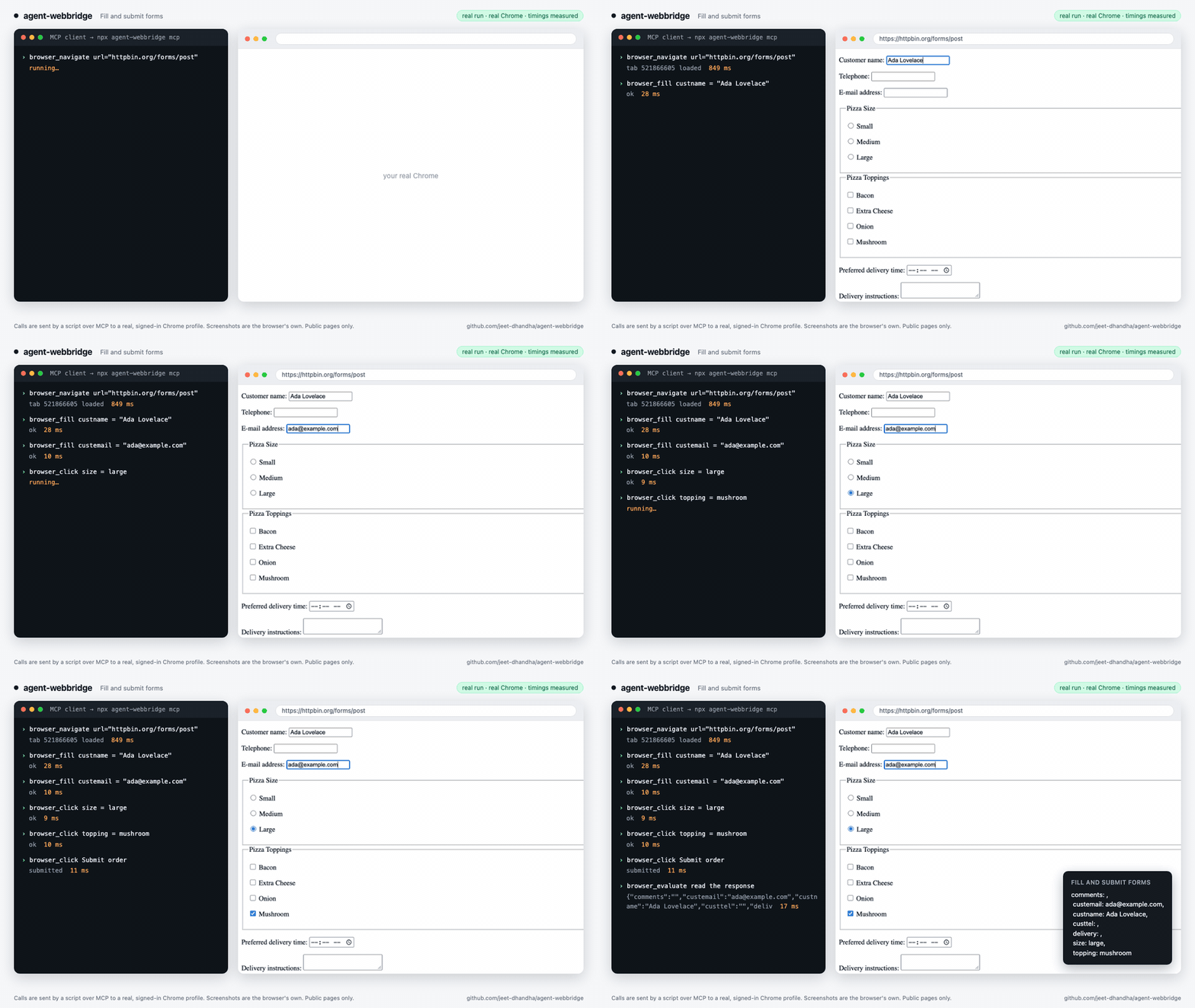
Real runs, not mock-ups: a script sends MCP calls to `npx agent-webbridge mcp`, which drives a real, signed-in Chrome profile. The screenshots are the browser's own and the timings are measured. Public pages only; nothing is submitted to any account.
| | |
|---|---|
| **Read any page**: snapshot + evaluate on Hacker News
 | **Five tabs at once**: 3.5 s in parallel vs 9.3 s one at a time
 |
| **Use your real login**: a signed-in editor, filled in, stopped before publishing
 | **Fill and submit forms** (fields, radios, checkboxes)
 |
Timings come from one MacBook on home broadband; yours will differ.
## Overview
- **Drive your real browser** — your actual Chrome, your actual login sessions. No headless re-login, no scraping around auth.
- **Run tabs in parallel** — the extension attaches `chrome.debugger` per tab, so N tabs in one profile run concurrently. In our benchmark, 5 tabs took 3.5 s in parallel vs 9.3 s one at a time (one MacBook; yours will differ).
- **Span multiple profiles** — one daemon per profile. Total concurrency = **profiles × tabs**, all from one endpoint.
- **Stay private** — own daemon, own MV3 extension, no closed-source dependency, no account. Everything is local.
## Install
```bash
npm i -g agent-webbridge # 1. the daemon + the `awb` CLI
awb setup "Work" # 2. opens the Chrome Web Store; click "Add to Chrome"
```
`awb setup` opens the [**Agent WebBridge** listing](https://chromewebstore.google.com/detail/agent-webbridge/kgnhhbkooeplfdkfnicgekdmegckcnpl) in your chosen profile and **polls** while you click **Add to Chrome**. As soon as it detects the install, it wires the profile to its daemon and brings the fleet up.
**Requirements:** macOS or Windows · Google Chrome · Node.js ≥ 18.
## Quickstart
```bash
awb up "Work" "Personal" # bring profiles up (setup did this on first run)
# Drive any profile by name — using the handy cmd helper function:
cmd(){ curl -s -m 60 -X POST http://127.0.0.1:10086/command -H 'Content-Type: application/json' -d "$1"; echo; }
cmd '{"action":"navigate","args":{"url":"https://news.ycombinator.com"},"session":"scan","profile":"Work"}'
awb down # stop the fleet when done
```
Every call is a `POST /command` on `127.0.0.1:10086`. Wrap payloads in single quotes (`'...'`) to prevent shell quote-escaping issues. `"session"` groups a task's tabs into one Chrome tab group; `"profile"` picks which Chrome profile to drive. Pass `{"action":"screenshot","args":{"path":"/path/to/img.png"}}` to save screenshots directly to disk.
## Tools (15 Native Tools + Status)
| Tool | Does |
|---|---|
| `navigate` | Open a URL in a new or existing tab |
| `find_tab` | Locate a tab by URL / title |
| `evaluate` | Run JavaScript in the page, return the result |
| `snapshot` | Accessibility tree with stable `@e` element refs |
| `click` | Click an element by `@e` ref (synthetic DOM click) |
| `trusted_click` | Real mouse click (CDP, `isTrusted`) for pages that ignore `click` |
| `fill` | Set native inputs **and** `contenteditable` rich text fields |
| `upload` | Programmatically assign files to `` |
| `file_chooser_intercept` | Suppress native OS file picker dialogs (Finder/Explorer) during programmatic upload |
| `screenshot` | Capture full-page or element screenshot directly to disk |
| `save_as_pdf` | Save the page as a PDF |
| `network` | Capture network requests (`start`, `stop`, `list`, `detail`) |
| `list_tabs` | List open tabs with IDs and tab group info |
| `close_tab` | Close a tab |
| `close_session` | Close a session and its entire tab group |
## Programmatic SDKs (Node.js & Python)
### Node.js ESM SDK
```javascript
import { WebBridgeClient } from "agent-webbridge";
const client = new WebBridgeClient({ profile: "Work", session: "my-task" });
await client.navigate("https://example.com");
const title = await client.evaluate("document.title");
console.log("Title:", title);
```
### Python 3 SDK (Zero Dependencies)
```python
from scripts.awb_client import WebBridgeClient
client = WebBridgeClient(profile="Work", session="my-task")
client.navigate("https://example.com")
title = client.evaluate("document.title")
print("Title:", title)
```
## How it works
```
AI agent ──HTTP POST /command──▶ router (127.0.0.1:10086) routes by "profile"
│
┌──────────────────┼──────────────────┐
▼ ▼ ▼
daemon "Work" daemon "Personal" daemon … one per profile
│ WebSocket
▼
MV3 extension ──chrome.debugger (a Map: one attach PER TAB)──▶
│
▼
Chrome DevTools Protocol tab 1 ║ tab 2 ║ tab 3 (concurrent)
```
The router proxies each command to the per-profile daemon on its deterministic hashed port; the daemon relays over WebSocket to that profile's extension; the extension keeps a `Map` of `chrome.debugger` attachments — one per tab — and issues CDP calls. That per-tab map is the whole trick: bridges that funnel everything through a single "current tab" can only drive one tab per profile; this drives N.
## CLI
| Command | Does |
|---|---|
| `awb setup ` | One-time install: walk through "Load unpacked", connect, bring the fleet up |
| `awb up ` | Start the named profiles' daemons + router, open windows, connect |
| `awb down` | Stop the router + fleet |
| `awb connect [--no-restart]` | Point each profile's extension at its daemon. Chrome stays open when the extension is current; `--no-restart` never closes Chrome (fails instead) |
| `awb check [profile…] [--json]` | Read-only readiness probe (folder? dev-mode? loaded? connected?) — what an agent polls during install |
| `awb status` | Per-profile daemon + extension-connection status |
| `awb doctor` | Diagnose the environment (Chrome, profiles, daemon, extension) |
| `awb mcp` | Run the stdio MCP server (what the config above launches) |
| `awb profiles` | List Chrome profiles, their hashed ports, and extension presence |
`` is anything that resolves uniquely — the profile **name** (`"Work"`), an **email**, or the Chrome **directory** (`"Profile 2"`).
## Use it from an AI agent
Ship it as a [Claude Code skill / plugin](.claude-plugin/) — the bundled `agent-webbridge` skill teaches an agent the full flow (install via `awb check --json`, then drive over `POST /command`). To hack on the extension itself, `awb install-dev` Load-unpacks the in-repo build (`chrome://extensions` → Developer mode → Load unpacked → [`agent-webbridge-extension/`](agent-webbridge-extension/)); it ships its own key, so the dev id is stable across reloads.
## Community recipes (awb-recipes)
Websites update their markup and deploy anti-bot traps all the time. Rather than forcing your agent to guess selectors or fail on edge cases, browse community-maintained, verified playbooks in [**awb-recipes**](https://github.com/jeet-dhandha/awb-recipes).
- `github-gist-create`: Create secret or public GitHub Gists via browser UI with active session.
- `google-search-results`: Organic SERP extraction from your own signed-in browser.
- `hn-reply-box`: Interact with Hacker News threads using authentic user cookies.
- `linkedin-feed-posts`: Extract authentic feed updates without session hijacking.
- `npm-most-depended`: Extract package download metrics and dependency hierarchies.
Hand a recipe to your agent: *"Do the `github-gist-create` recipe from awb-recipes with my Work profile."*
To contribute, claim an open issue labelled [`good first recipe`](https://github.com/jeet-dhandha/awb-recipes/issues?q=label%3A%22good+first+recipe%22) and open a PR!
## Ecosystem & listings
- **Official MCP Registry**: Registered as `io.github.jeet-dhandha/agent-webbridge` (the registry currently shows 1.3.1)
- **Awesome MCP Servers**: pull request open on [punkpeye/awesome-mcp-servers](https://github.com/punkpeye/awesome-mcp-servers) (waiting on a Glama listing)
- **Awesome Claude Skills**: pull requests open on [BehiSecc/awesome-claude-skills](https://github.com/BehiSecc/awesome-claude-skills), [karanb192/awesome-claude-skills](https://github.com/karanb192/awesome-claude-skills) and [travisvn/awesome-claude-skills](https://github.com/travisvn/awesome-claude-skills)
- **Skills CLI**: Installable via `npx skills add jeet-dhandha/agent-webbridge`
- **Chrome Web Store**: Published extension [Agent WebBridge](https://chromewebstore.google.com/detail/agent-webbridge/kgnhhbkooeplfdkfnicgekdmegckcnpl)
- **Website & Interactive Demos**: [jeet-dhandha.github.io/agent-webbridge](https://jeet-dhandha.github.io/agent-webbridge/)
## Platform
| | macOS | Windows |
|---|---|---|
| Profile discovery | `~/Library/Application Support/Google/Chrome` | `%LOCALAPPDATA%\Google\Chrome\User Data` |
| Chrome binary | `/Applications/Google Chrome.app` | `Program Files\Google\Chrome\Application\chrome.exe` (auto-detected) |
| Daemon, router, MCP, all tools | ✅ | ✅ |
| Install flow (`awb setup`) | opens the profile window via AppleScript | opens it by launching Chrome with the profile |
| Tab/window housekeeping (focus, tidy blank windows) | ✅ | skipped — cosmetic only |
Set `AWB_CHROME_BIN` / `AWB_CHROME_DIR` if Chrome or its data directory is somewhere non-standard (Chrome Beta, portable installs). Linux paths are wired up but untested.
On Windows, run commands from PowerShell or `cmd` (the `curl` examples below use bash quoting; in PowerShell use `curl.exe` and a here-string, or just use the MCP server). The daemon and the Windows code paths are covered by CI on `windows-latest`; the Chrome-launching steps (`awb setup` / `awb up`) are the least-tested part — please [open an issue](https://github.com/jeet-dhandha/agent-webbridge/issues) if one misbehaves.
## Security
- Everything listens on `127.0.0.1` only. As of 1.3.1 the router and daemons also refuse requests that carry a web `Origin` or a non-loopback `Host`, so a website you visit cannot drive the bridge (see the [changelog](CHANGELOG.md)). Upgrade from earlier versions and restart the fleet with `awb down && awb up`.
- It acts as *you*, in your signed-in browser. Any local program that can reach `127.0.0.1:10086` can do the same, so only run it on a machine and account you trust, and keep irreversible actions (posting, paying, deleting) behind a human confirmation in your agent.
- Report vulnerabilities privately through GitHub's "Report a vulnerability" on the Security tab.
## License
MIT © jeet-dhandha