# Usage Monitor for Claude
[](https://github.com/jens-duttke/usage-monitor-for-claude/discussions/categories/ideas)
[](https://github.com/sponsors/jens-duttke)
**Monitor your Claude rate limits in real time - right from your Windows system tray.**
A native Windows tray app that shows your Claude usage at a glance - lightweight, portable, and fully auditable. Rate limits are shared across claude.ai, Claude Code, Claude Code Cowork, and IDE extensions for VS Code and JetBrains - always know how much of your session and weekly limits (Sonnet, Opus, Fable, Cowork, and any future quota types) you have left.
## Features
- **Portable** - single EXE (~12.5 MB), no installation, no Electron, no runtime required. Download, place anywhere, run. To uninstall, delete the file
- **Zero configuration** - authenticates through your existing Claude Code login, no API key or manual token entry needed
- **Live tray icon** with two [configurable](docs/configuration.md#tray-icon-bars) progress bars (session + weekly by default), [configurable tooltip](docs/configuration.md#tooltip-fields), percentage display, and theme-aware colors for light and dark taskbars
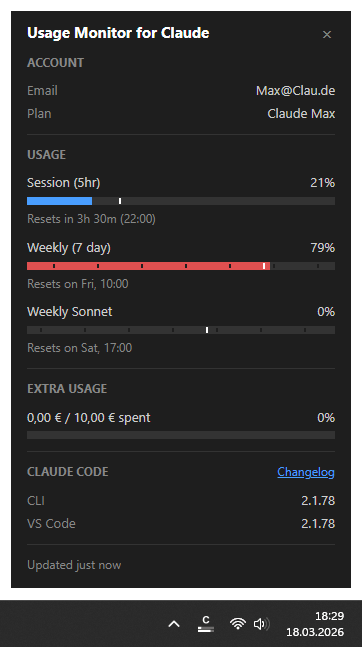
- **Detail popup** (left-click) showing account info, dynamically detected usage bars for all active quota types (Session, Weekly, Sonnet, Opus, Fable, Cowork, and any new quotas Anthropic adds) with [configurable field selection](docs/configuration.md#popup-fields), extra usage, reset countdowns, and a stale-data indicator when values may be outdated; pin it open and move it while pinned to keep usage details visible during long sessions, and [configure a compact pinned view](docs/configuration.md#compact-pinned-view) that hides the sections and bars you do not need. Reset times follow your Windows 24-hour or 12-hour clock format automatically
- **Claude Code versions** - the popup shows which version is installed in each environment (native CLI, VS Code, Cursor, Windsurf), making it easy to spot when your IDE extension is ahead of or behind the CLI
- **Smart alerts** - configurable threshold notifications per quota type, with time-aware mode that only alerts when usage outpaces elapsed time. Reset notifications when a nearly exhausted quota refills
- **[Event commands](docs/event-commands.md)** - run a custom shell command when a quota resets, a usage threshold is crossed, or the app starts up. Send push notifications to your phone, resume an AI agent, start a fresh 5-hour session automatically, play an alert sound, or trigger any custom workflow
- **Time marker** on each bar showing elapsed time in the current period - in the detail popup and on the tray icon bars - so you can instantly see whether your usage is ahead of or behind the clock; bars that outpace the clock turn red, in the popup and tray alike
- **Automatic token refresh** - when the OAuth session expires, runs `claude update` in the background to renew the token without user intervention. If a CLI update is installed, shows a notification
- **Adaptive polling** - speeds up during active usage, pauses when the computer is idle or locked, aligns to imminent quota resets, and backs off on rate-limit errors
- **13 languages** (English, German, French, Spanish, Portuguese, Italian, Japanese, Korean, Hindi, Indonesian, Chinese Simplified, Chinese Traditional, Ukrainian) - auto-detected from your Windows display language, with optional manual override via the `language` setting
- **[Customizable](docs/configuration.md)** - optionally override polling intervals, colors, alert thresholds, and more via a JSON settings file
---
## Security & Transparency
This tool handles your Claude Code OAuth token, so you should be able to verify it is safe. The codebase is deliberately structured for easy auditing:
- **Single network destination** - communicates exclusively with `api.anthropic.com`, no other hosts
- **Credentials stay local** - the OAuth token is used only in HTTP Authorization headers, never logged, stored elsewhere, or transmitted to third parties
- **Read-only** - the app never writes files to disk
- **No dynamic code execution** - no `eval()`, `exec()`, `compile()`, or dynamic imports
- **No obfuscation** - no encoded strings, no hidden URLs, no minified logic
- **Modular architecture** - small, focused modules with security-critical code (credentials, API calls) isolated in a single file ([`api.py`](usage_monitor_for_claude/api.py))
- **Minimal runtime dependencies** - only four well-known packages: [requests](https://pypi.org/project/requests/), [Pillow](https://pypi.org/project/pillow/), [pystray](https://pypi.org/project/pystray/), [pywebview](https://pypi.org/project/pywebview/)
---
## Requirements
- **Windows 10 or Windows 11** (64-bit)
- **[Claude Code](https://docs.anthropic.com/en/docs/claude-code)** installed and logged in (CLI, VS Code extension, or JetBrains plugin - any variant works). The app reads the OAuth token that Claude Code stores locally (`~/.claude/.credentials.json`). If you have `CLAUDE_CONFIG_DIR` set, the app uses that directory instead.
> [!TIP]
> If the token expires, the app automatically runs `claude update` to refresh it. If the token is missing entirely, the app shows a notification and a "!" icon - log in to Claude Code and the monitor picks it up automatically.
---
## Quick Start
**No Python required.** Download the latest [**UsageMonitorForClaude.exe**](https://github.com/jens-duttke/usage-monitor-for-claude/releases/latest), place it wherever you like, and run it. To remove, disable "Start with Windows" in the context menu first (if enabled), then delete the file.
---
## How to Use
| Action | What happens |
|---|---|
| **Hover** over the tray icon | Tooltip shows 5h and 7d usage percentages with reset times |
| **Left-click** the tray icon | Opens the detail popup with account info and all usage bars |
| **Right-click** the tray icon | Context menu: open popup, autostart toggle, test event commands, restart, GitHub link, or quit |
| **Escape** or click outside | Closes the detail popup |
### Tray icon not visible?
Windows may hide new tray icons by default. To keep the icon always visible:
1. Right-click the **taskbar** → **Taskbar settings**
2. Expand **Other system tray icons** (Win 11) or **Select which icons appear on the taskbar** (Win 10)
3. Toggle **UsageMonitorForClaude** to **On**
### Reading the progress bars
Each bar in the detail popup has up to four visual elements:
1. **Blue fill** - how much of the limit you have used
2. **Time dividers** - subtle gaps splitting the session bar into equal hour sections and marking local midnights on the weekly bars, visually grouping usage into hour and day segments
3. **White vertical line** - how much *time* has passed in the current period. The fill turns **red** when it passes this marker, warning that you may hit the limit before the period resets.
4. **Reset text** - when the limit resets, shown as a countdown with clock time
---
## Configuration
All settings work out of the box - no configuration file is needed. To customize behavior, create a file called `usage-monitor-settings.json` with only the keys you want to change:
```json
{
"poll_interval": 180,
"bar_fg": "#00cc66",
"bar_fg_warn": "#ff6600"
}
```
The app searches for this file in two locations (first match wins):
1. **Next to the EXE** (or project root when running from source)
2. **`~/.claude/usage-monitor-settings.json`** (or `$CLAUDE_CONFIG_DIR/usage-monitor-settings.json` if set)
The app never creates or modifies this file. See [Configuration](docs/configuration.md) for all available settings (alert thresholds, polling intervals, colors, language, and more).
---
## Building from Source
For developers who want to build the EXE themselves
### Prerequisites
- Python 3.10+
- pip
### Setup
```bash
git clone https://github.com/jens-duttke/usage-monitor-for-claude.git
cd usage-monitor-for-claude
python -m venv .venv
.venv\Scripts\activate
pip install -r requirements.txt
```
### Run
```bash
python -m usage_monitor_for_claude
```
### Build EXE
```bash
python build.py
```
Produces `dist/UsageMonitorForClaude.exe` (~12.5 MB), a single-file executable that bundles Python and all dependencies.
### Popup UI Development
The popup UI lives in [`usage_monitor_for_claude/popup/`](usage_monitor_for_claude/popup/) as separate HTML, CSS, and JS files. To preview and iterate on the UI without running the full app:
```bash
start http://localhost:8080/usage_monitor_for_claude/popup/dev.html && python -m http.server 8080
```
This starts a local server and opens the dev preview in your default browser. Use the buttons to switch between data presets (full, minimal, error, loading) and the language dropdown to preview every locale (so you can spot strings that overflow the popup width). Test CSS/JS changes with instant feedback.
### Create a Release
1. Update dependencies: `pip install --upgrade -r requirements.txt`
2. Update `__version__` in [`usage_monitor_for_claude/__init__.py`](usage_monitor_for_claude/__init__.py) and the version in [`version_info.py`](version_info.py) (`filevers`, `prodvers`, `FileVersion`, `ProductVersion`)
3. Update `_FALLBACK_USER_AGENT` in [`usage_monitor_for_claude/api.py`](usage_monitor_for_claude/api.py) to the current Claude Code version
4. In [`CHANGELOG.md`](CHANGELOG.md), rename `## [Unreleased]` to `## [1.x.x] - YYYY-MM-DD` and add a fresh empty `## [Unreleased]` section above it
5. Run the test suite: `python -m unittest discover -s tests`
6. Smoke test: `python -m usage_monitor_for_claude` - verify tray icon, popup, and settings
7. Build the EXE with `python build.py`
8. Smoke test: `dist\UsageMonitorForClaude.exe` - verify tray icon, popup, and settings
9. Stage the changes from steps 2 to 4
10. Commit, tag, push, and publish:
```bash
git commit -m "Release v1.x.x"
git tag v1.x.x
git push origin main v1.x.x
gh release create v1.x.x dist/UsageMonitorForClaude.exe --title "v1.x.x" --notes ""
```
---
## Contributing
Contributions are welcome - whether it's bug reports, feature ideas, or pull requests. [Open an issue](https://github.com/jens-duttke/usage-monitor-for-claude/issues) to report bugs or ask questions. For feature ideas, browse and vote on existing proposals or submit your own in [Ideas](https://github.com/jens-duttke/usage-monitor-for-claude/discussions/categories/ideas).
For developers who want to contribute to the project
This project is developed with [Claude Code](https://docs.anthropic.com/en/docs/claude-code). The [`.claude/CLAUDE.md`](.claude/CLAUDE.md) file contains all project conventions, coding standards, and architectural guidelines - Claude Code applies these automatically during development.
### Workflow
1. Read `.claude/CLAUDE.md` to understand the project conventions
2. Implement your changes with Claude Code - it will follow the guidelines automatically
3. Before committing, run the `/review` slash command to perform a systematic quality review of all staged changes (code, tests, documentation)
4. Stage remaining fixes if any, then run `/commit-message` to generate a properly formatted commit message
### Adding features
New features should follow the existing architecture. Key points from the guidelines:
- Security-critical code (credentials, API calls) stays isolated in [`api.py`](usage_monitor_for_claude/api.py)
- All user-facing changes need updates in [`CHANGELOG.md`](CHANGELOG.md), [`README.md`](README.md), and [`docs/configuration.md`](docs/configuration.md) where applicable
- Tests are required - run `python -m unittest discover -s tests` before committing
- The app is read-only and must never write files to disk
---
## License
MIT
---
## Disclaimer
This is an independent, community-built project. It is **not** created, endorsed, or officially supported by [Anthropic](https://www.anthropic.com/). "Claude" and "Anthropic" are trademarks of Anthropic, PBC. Use of these names is solely for descriptive purposes to indicate compatibility.