



bezierCurve in SVG
#### bezierCurveToPolyline ```typescript /** * @description Transform bezierCurve to polyline * @param {BezierCurve} bezierCurve bezier curve * @param {number} precision Wanted precision * @param {number} recursiveCount Recursive count * @return {Point[]} Polyline */ type bezierCurveToPolyline = ( bezierCurve: BezierCurve, precision = 5, resursiveCount = 0 ) => Point[] const polyline = bezierCurveToPolyline(bezierCurve) // polyline = [ // [[20,20], // [25.998752507628243,20.11632023466343],[31.698106846035834,20.457189096242345], // [37.11424670004552,21.010468821119716],[42.263355754480024,21.764021645678454], // ...] ```

polyline in SVG
#### Notice - The calculation result of _bezierCurveToPolyline_ consists of N points, and N depends on the precision you set. - Ideally, the distance between two adjacent points in the calculation result is equal to the set accuracy (unit px). - Recommended precision is 5-10. - The precision of the setting is usually not achieved, unless the higher the number of recursiveCount, the higher the calculation cost. #### getBezierCurveLength ```typescript /** * @description Get the length of the bezier curve * @param {BezierCurve} bezierCurve bezier curve * @param {number} precision Wanted precision * @param {number} recursiveCount Recursive count * @return {number} The length */ type getBezierCurveLength = (bezierCurve: BezierCurve, precision = 5, resursiveCount = 0) => number // Normally the default precision can achieve better visual effects. const length = getBezierCurveLength(bezierCurve) ``` #### polyline ```typescript const polyline: Point[] = [ [20, 70], [50, 30], [100, 70], [150, 30], [180, 70], ] ```
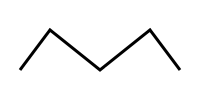
polyline in SVG
#### polylineToBezierCurve ```typescript /** * @description Convert polyline to bezierCurve * @param {Point[]} polyline A set of points that make up a polyline * @param {boolean} close Closed curve * @param {number} offsetA Smoothness * @param {number} offsetB Smoothness * @return {BezierCurve} A set of bezier curve (Invalid input will return false) */ type polylineToBezierCurve = ( polyline: Point[], close = false, offsetA = 0.25, offsetB = 0.25 ) => BezierCurve const bezierCurve = polylineToBezierCurve(polyline) // bezierCurve = [ // [ // [20,70], // [[27.5,60],[30,30],[50,30]], // [[70,30],[75,70],[100,70]], // [[125,70],[130,30],[150,30]], // [[170,30],[172.5,60],[180,70]]] //] const closedBezierCurve = polylineToBezierCurve(polyline, true) // closedBezerCurve = [ // [20,70], // [[-12.5,60],[30,30],[50,30]], // [[70,30],[75,70],[100,70]], // [[125,70],[130,30],[150,30]], // [[170,30],[212.5,60],[180,70]], // [[147.5,80],[52.5,80],[20,70]] // ] ```
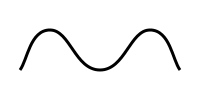
bezierCurve in SVG
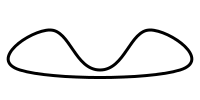
closedBezierCurve in SVG