# TransBind
## Table of Contents
- [Overview](#overview)
- [Model Architecture](#model-architecture)
- [Installation](#installation)
- [Requirements](#requirements)
- [Data Preprocessing Pipeline](#data-preprocessing-pipeline)
- [Protein Features](#protein-features)
- [Training and Testing](#training-and-testing)
- [Training Data Preparation](#training-data-preparation)
- [Training Dataset](#training-dataset)
- [Training](#training)
- [Testing](#testing)
- [Prediction](#prediction)
- [Citation](#citation)
## Overview
TransBind is a deep learning framework for transcription factor (TF) binding prediction that combines DNA sequence information with protein structural features to capture the true diversity of TF–DNA interactions. Unlike prior models that treat all TFs identically, TransBind uses embeddings from ESM-DBP (a protein language model trained on DNA-binding proteins) and a cross-attention mechanism to align each TF’s unique structural properties with genomic sequence features. Trained on 690 ChIP-seq experiments covering 161 TFs across 91 human cell types, TransBind achieves state-of-the-art accuracy (AUROC 0.9504, AUPR 0.3710), recovers known binding motifs for interpretability, and uniquely supports zero-shot prediction for unseen TFs using their amino acid and DNA sequence. This integration of protein-aware modeling with genomic deep learning provides a powerful tool for studying gene regulation, understanding disease-associated variants, and guiding synthetic biology applications.
## Model Architecture
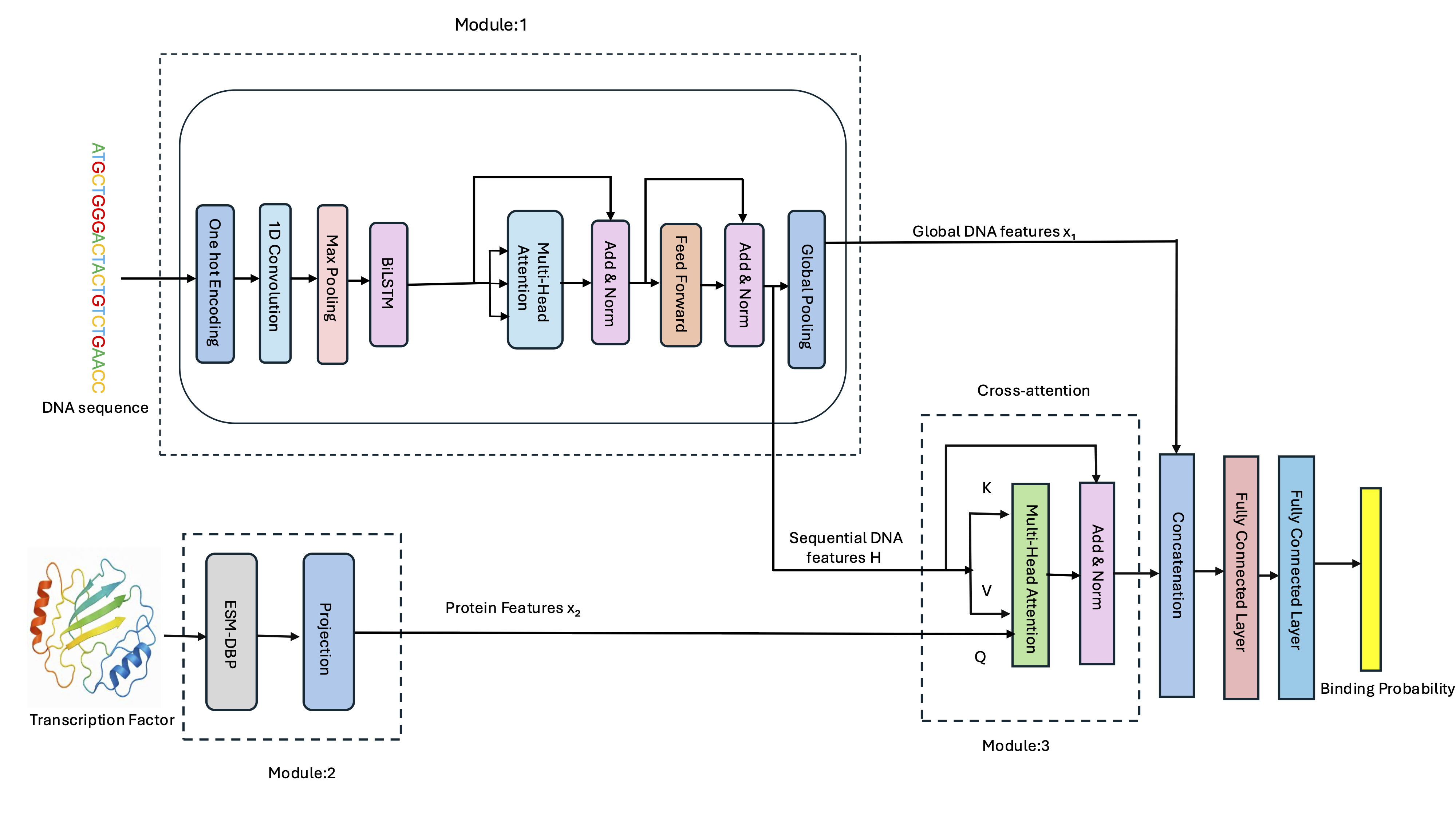
*Figure 1: TransBind model architecture for transcription factor binding site prediction*
## Installation
### Requirements
- PyTorch + PyTorch Lightning
- NumPy, scikit-learn, h5py
- CUDA recommended
### Quick Install
```bash
git clone https://github.com/jianlin-cheng/TransBind.git
cd TransBind
conda env create -f environment.yml
conda activate transBind
```
## Data Preprocessing Pipeline
This pipeline prepares training data for transcription factor binding site prediction by downloading, preprocessing, labeling, and organizing genomic sequences into a final dataset.
| Step | Script | Description |
|------|--------|-------------|
| 1 | `0_download_data.py` | Download human genome assembly and Transcription Factor Binding Sites |
| 2 | `1_preprocess_narrowPeaks_and_humanGenome.sh` | Preprocess human genome assembly and TF binding sites |
| 3 | `2_compute_overlapping_using_batch.sh`
`3_postprocess.sh`
`4_merge_peaks_with_same_labels.ipynb` | Find overlapping regions and assign labels |
| 4 | `5_build_bedFile.py`
`5.1_convert_metadata.py` | Convert processed data to individual BED files |
| 5 | `6_build_dataset.py`
`6.1_extract_labelname.py` | Build final dataset → saves to `data/` directory and extract label names |
| 6 | `7_prediction.sh` | Download model files from [Hugging Face](https://huggingface.co/zengwenwu/ESM-DBP/tree/main) and the necessary scripts from https://github.com/pengsl-lab/ESM-DBP -> Place the `ESM-DBP.model` files in the `ESM-DBP/` directory and the required scripts accordingly -> Run `./7_prediction.sh "/ESM-DBP/model" "/path/to/the/fasta/files/of/TF" "/path/to/output/directory" "cuda:0"` |
| 7 | `8_mapping_between_filename_TF.ipynb` | Create mapping between features and transcription factors |
| 8 | `9_label_mapping_between_label_and_TF.py` | Create comprehensive mapping between labels and TFs |
## Training and Testing
### Training Data Preparation
Before training the model, complete the following steps:
| Step | Process | Description |
|------|----------------------|-----------------------------------------------------------------------------|
| 1️ | Data preprocessing | Complete steps 1–8 from the preprocessing pipeline described above | |
| 2 | Dataset organization | Ensure `train.mat` and `valid.mat` are stored in the `data/` directory |
| 3 | Feature mapping | Verify `tf_to_feature_mapping_exact.json` exists (links TF labels to features) |
---
### Training Dataset
The training dataset is available on Zenodo:
[](https://doi.org/10.5281/zenodo.19338588)
### Training
Update the following paths in your configuration:
```python
DATA_FOLDER = "data/"
MAPPING_FILE = "data/tf_features/tf_to_feature_mapping_exact.json"
FEATURES_DIR = "data/tf_features/"
```
Run the main training script to train TransBind
```bash
cd scripts
python train.py
```
Run the train_general.py to train TransBind_general
```bash
cd scripts
python train_general.py
```
### Testing
For testing use `test.ipynb` in the scripts directory
## Prediction
To run prediction for the new transcription factors(TFs):
### 1. DNA One-Hot Encoder
Converts DNA sequences into one-hot encoded format and saves them as `.mat` files.
#### Usage
```bash
cd Predict_new_TF/
python dna_onehot_encoder.py [arguments]
Arguments:
--sequence Single DNA sequence to convert
(e.g. --sequence "ATGCGATCG")
--fasta FASTA file containing sequences
(e.g. --fasta sequences.fasta)
--sequences Multiple sequences provided directly
(e.g. --sequences "ATGC" "CGTA")
--output Output filename (required)
(e.g. --output results.mat)
--window_size Sequence length (default: 1000)
--no_complement Don't add reverse complement
```
```bash
python dna_onehot_encoder.py --sequence "ATGCGATCGTAGC" --output my_sequence.mat
```
### 2.TF Embedder
1. Download model files from [Hugging Face](https://huggingface.co/zengwenwu/ESM-DBP/tree/main)
2. Place the `ESM-DBP.model` files in the `ESM-DBP/` directory
```bash
python ESM_DBP.py /path/to/ESM-DBP.model/ input.fasta /output/dir/ device
Arguments:
/path/to/ESM-DBP.model/ Full path to directory with model files
(e.g. /home/user/ESM-DBP/)
input.fasta Protein sequence file in FASTA format
(e.g. TF.fasta)
/output/dir/ Output directory for TF features
(e.g. /home/user/results/)
```
### 3. To predict Transcription Factor binding prediction
``` bash
cd scripts
python predict.py [arguments]
Arguments:
--tf_fea_file PATH Path to TF features file (.fea) obtained from step 2
--sequences_file PATH Path to DNA sequences file (.mat) obtained from step 1
--model_path PATH Model checkpoint path
(default: model/model_general.ckpt)
--mapping_file PATH TF mapping file
(default: data/tf_features/tf_to_feature_mapping_exact.json)
--features_dir PATH Features directory
(default: data/tf_features)
--output_prefix NAME Output filename prefix
```
### Example Workflow
This section outlines the steps to perform transcription factor (TF) binding prediction, from processing DNA sequences to generating results.
```bash
# Step 1: Process DNA sequences into one-hot encoded format
cd Predict_new_TF
python dna_onehot_encoder.py --sequence 'ATGCGATCG' --output DNA_sequences.mat
# This command will generate the one-hot encoded matrix and save it as DNA_sequences.mat.
# Step 2: Generate protein features using ESM-DBP model
python ESM-DBP/ESM_DBP.py /ESM-DBP/model/ AP-2gamma_Q92754.fasta /example
# This will produce protein features and save them in the /example directory.
# Step 3: Move to scripts directory
cd ..
cd scripts
# Step 4: Run TF binding prediction
python predict_newTF.py \
--tf_fea_file ../example/protein_features.fea \
--sequences_file DNA_sequences.mat \
--model_path model/model_general.ckpt \
--mapping_file data/tf_features/tf_to_feature_mapping_exact.json \
--features_dir data/tf_features \
--output_prefix Tf_prediction
# This will generate the TF binding predictions and save them with the prefix Tf_prediction.
# Final results will be saved in results.csv with a column representing the binding probability for each prediction. For example:
binding_probability
0.57
```
## Citing this work
If you use this code, please cite our paper:
```bibtex
@article {Basnet2026,
author = {Basnet, Shreya and Cheng, Jianlin},
title = {Integrating Protein and DNA Embeddings for Improving Genome-Wide Transcription Factor Binding Site Prediction},
year = {2026},
doi = {10.1101/2025.09.15.676319},
journal = {NAR Genomics and Bioinformatics}
}