# File Actions · 文件与链接操作
**Right-click a file from your agent's conversation to open, preview or use it.**
[中文](README.md) · [npm](https://www.npmjs.com/package/@jidekaixin2dian/dsh-file-actions/v/0.1.19) · [Marketplace](https://awesome-dsh-plugin.com/p/jidekaixin2dian/dsh-file-actions/) · [Download](https://github.com/jidekaixin2dian/dsh-file-actions/releases/latest) · [Changelog](CHANGELOG.md)
File Actions is a file and link context-menu plugin for DeepSeek Harness (DSH). Right-click a file reference or delivery card in an agent conversation to open, reveal, preview, copy or save it. The menu also supports tool results and sidebars that expose file paths.
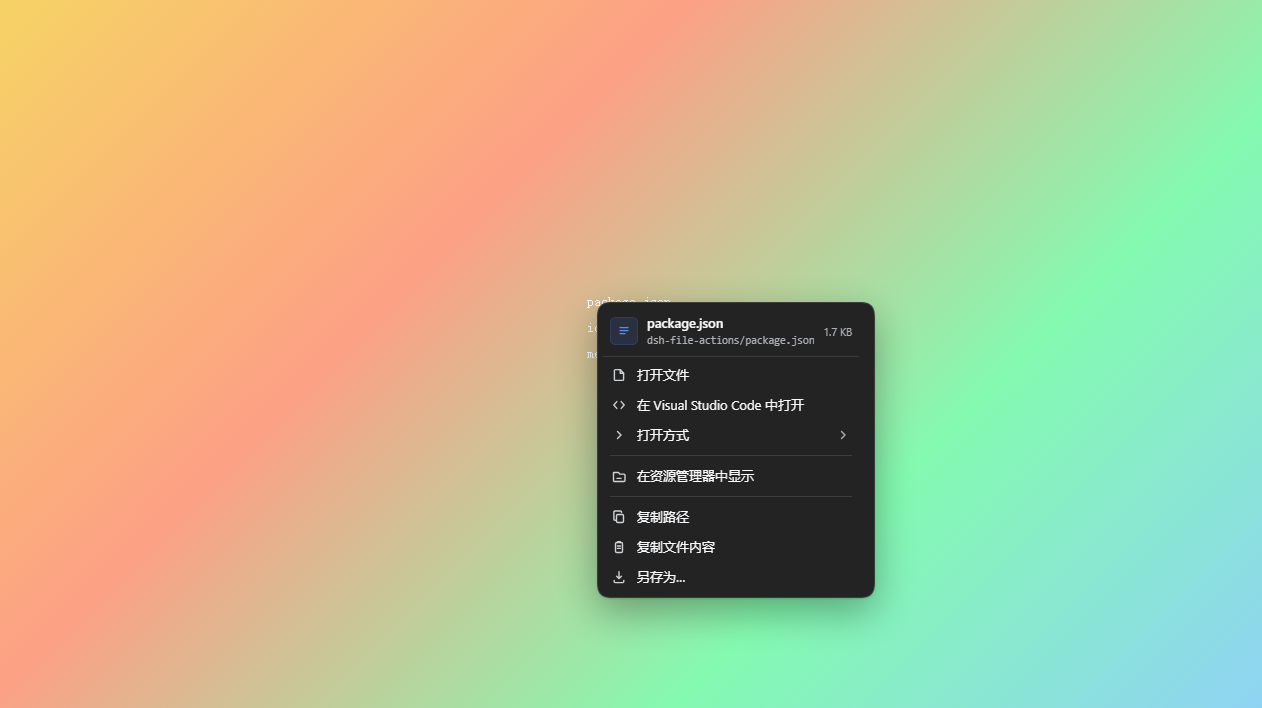
## Continue from a file reference
| Your next step | Available actions |
|---|---|
| Keep editing | Open with the default app, search applications, save a preference per file type |
| Locate and reference | Reveal in the file manager; copy paths, names or references with line numbers |
| View and export | Preview supported documents and media, copy text, save a local file |
| Share a link | Open, copy the URL or text, copy as Markdown |
## Image, video and file-reference previews
- **Image preview:** right-click an image reference to see an available thumbnail in the menu; click the thumbnail to enlarge it. Thumbnail reads are limited to 8 MiB.
- **Video preview:** the menu can show a thumbnail extracted from a video. Open supported formats in the browser to play the full video. Thumbnails depend on browser decoding and are unavailable for files over 8 MiB or when decoding fails; browser previews and saved copies are limited to 64 MiB.
- **Continue editing a delivered file:** use **Open with** from its conversation reference to search associated applications and save a preference by file type without changing OS defaults.
- **Code reference context:** when a reference retains line numbers, preview the referenced lines and surrounding context or copy the excerpt with its source path. These actions cannot recover line numbers hidden by the host.
- **Paths, text and links:** copy absolute or relative paths, filenames, valid UTF-8 text and referenced lines; copy a web link's URL, text or Markdown. File-content and referenced-line reads are limited to 2 MiB.
- **Keyboard and menu settings:** open the menu with `Shift+F10` and navigate with arrows and Enter. Choose a full or compact menu and adjust the number of context lines in reference previews.
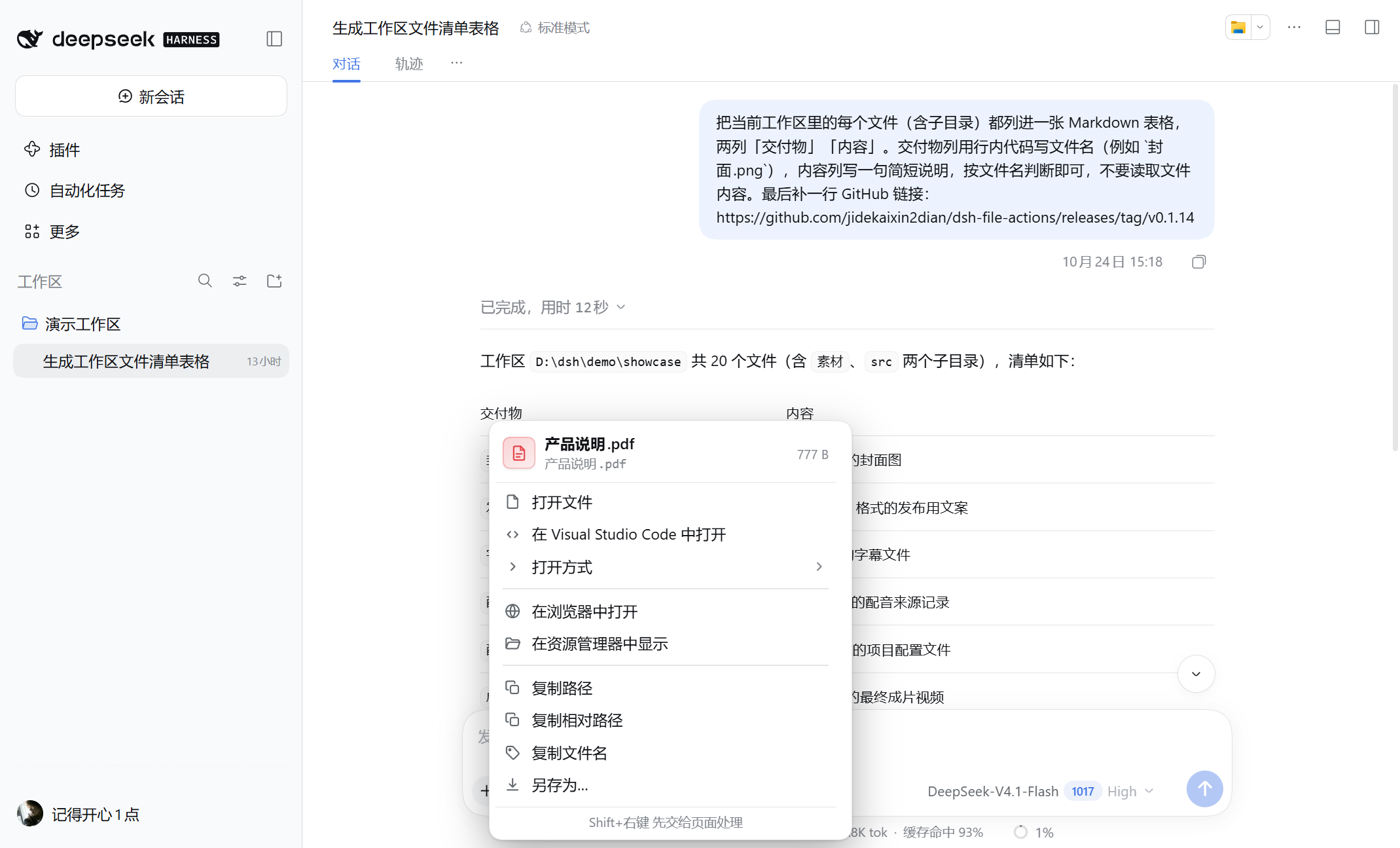
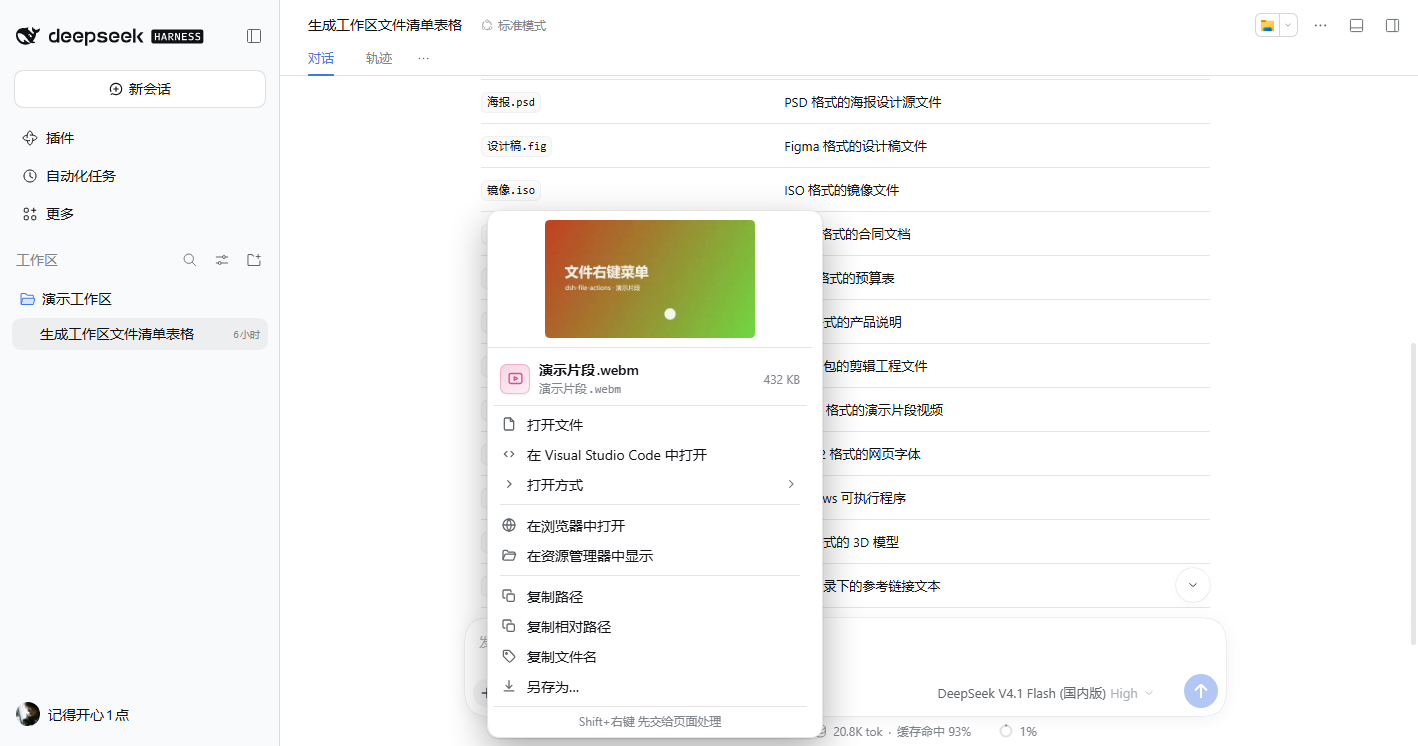
Screenshots are from an earlier isolated demonstration environment; the interface may change between versions.
## Downloads
As of **2026-10-31**, the File Actions npm package and GitHub Release archives have received **2,000+ download requests** combined:
| Source | Scope | Requests |
|---|---|---:|
| [npm package](https://api.npmjs.org/downloads/point/2026-10-23:2026-10-31/@jidekaixin2dian%2Fdsh-file-actions) | All versions, 2026-10-23 through 2026-10-31 | 1,799 |
| [GitHub Releases](https://api.github.com/repos/jidekaixin2dian/dsh-file-actions/releases?per_page=100) | `dsh-file-actions.tgz` across all releases, excluding checksums | 440 |
This is a sum of requests across two channels. It may include repeat installs and automation and **does not represent unique users or deduplicated installs**. Counts are a snapshot; the links provide the npm date-range total and individual GitHub asset counts.
## Install and update
Requires **DSH >=0.2.1-rc.2 and Node >=24**. CI verifies DSH rc.2 / rc.3 / rc.4 / rc.5.
Search for **dsh-file-actions** in the marketplace and verify author **jidekaixin2dian**. Existing users can check updates under installed plugins. Catalog and registry mirrors may take time to refresh.
Alternatively, quit DSH completely and use the same command for installation or updates:
```powershell
dsh plugin --profile desktop add @jidekaixin2dian/dsh-file-actions --registry=https://registry.npmjs.org
```
Reopen DSH. Downloadable archives are available in [Releases](https://github.com/jidekaixin2dian/dsh-file-actions/releases/latest). A plain `npm install` does not register the plugin with DSH.
Alternative installation and removal
```powershell
dsh plugin --profile desktop add https://github.com/jidekaixin2dian/dsh-file-actions/releases/latest/download/dsh-file-actions.tgz
```
Remove, then reopen DSH:
```powershell
dsh plugin --profile desktop remove @jidekaixin2dian/dsh-file-actions
```
## Use
1. Right-click a file reference, delivery card or file tree. Explicit references open directly; guessed text paths are verified first.
2. Search **Open with** and star an application to remember it for that file type. OS defaults stay unchanged.
3. Enlarge image thumbnails or view supported documents, audio and video in the browser.
4. For text references such as `src/app.ts:42:7` or `notes.md#L42-L48`, choose **Copy referenced lines** to copy that line or range. Locations beyond the current file show an error instead of copying the whole file.
5. Choose **View reference context** for a read-only view with line numbers, highlighted referenced lines and nearby context. **Copy excerpt with source** includes the relative path, line range and referenced text, without the surrounding context. Preview display is bounded for long lines and large selections; copying retains the complete referenced lines. Reading outside the workspace requires confirmation before any content is read.
Referenced-line copying and context preview appear only when the reference retains its line numbers. If the host renders a link as a button exposing only its path, hidden line information cannot be recovered.
Keyboard: `Shift+F10` opens the menu, `↑ ↓` move, `→` enters a submenu, `Enter` runs and `Esc` closes. `Shift+right-click` gives the page's own handler priority.
The marketplace checks versions and installs after your click; it does not silently upgrade in the background. Restart DSH when requested.
## Settings
Open **File Actions** in the DSH settings sidebar (**文件操作** in Chinese); the page retains the full bilingual name:
- **Menu display**: full by default; compact mode keeps common open, reveal, reference preview, copy and save actions.
- **Reference context**: 4, 8 or 16 lines before and after, with 8 as the default. This does not change which referenced lines are copied.
- **Preferred applications**: view and remove individual preferences or clear them all. Set new preferences from a file's **Open with** menu.
- **Application cache**: clear after installing or removing applications. The next file menu queries again; preferences are retained.
Changes take effect immediately and persist in this browser or Desktop client. Resetting menu and preview defaults retains preferred applications. Preferences do not change system defaults or sync automatically to other clients.
Use **Project and feedback** at the bottom of settings to visit this plugin's GitHub repository or report an issue. Ideas and suggestions are welcome.
## Boundaries
- File operations use official DSH APIs and path authorization. Application lists depend on system associations; the plugin does not repair registry entries.
- Copying contents or referenced lines requires **valid UTF-8 and a file no larger than 2 MiB**. Referenced lines are copied in full, retaining internal line endings; column numbers do not trim the text. Copies outside the workspace require explicit confirmation; unavailable confirmation cancels the read.
- Save and browser previews read up to **64 MiB** and stop on inconsistent chunks. This is not an atomic filesystem snapshot.
- HTML / SVG previews block scripts and external resources by default. Enable scripts and networking only for a trusted file; the preview remains isolated from DSH. Relative assets may not work. Clicking a document link is an explicit navigation.
- Editor actions do not jump to line/column positions. Save uses browser download behavior. The plugin needs the graphical / Web UI.
FAQ
**Why the native menu?** Plain text, editable fields and unverified guessed paths retain it. Failed explicit references show a reason and retry action.
**Where is Open with?** Empty or failed queries hide those rows; right-click again to retry. Broken associations need a system or host fix.
**No preview window?** Check whether the browser blocked a popup.
[Development and verification](https://github.com/jidekaixin2dian/dsh-file-actions/blob/main/docs/development.md) · [Security](SECURITY.md) · [Issues](https://github.com/jidekaixin2dian/dsh-file-actions/issues)
MIT · Independent community plugin, not affiliated with DeepSeek.