# ChainPageCollectionView
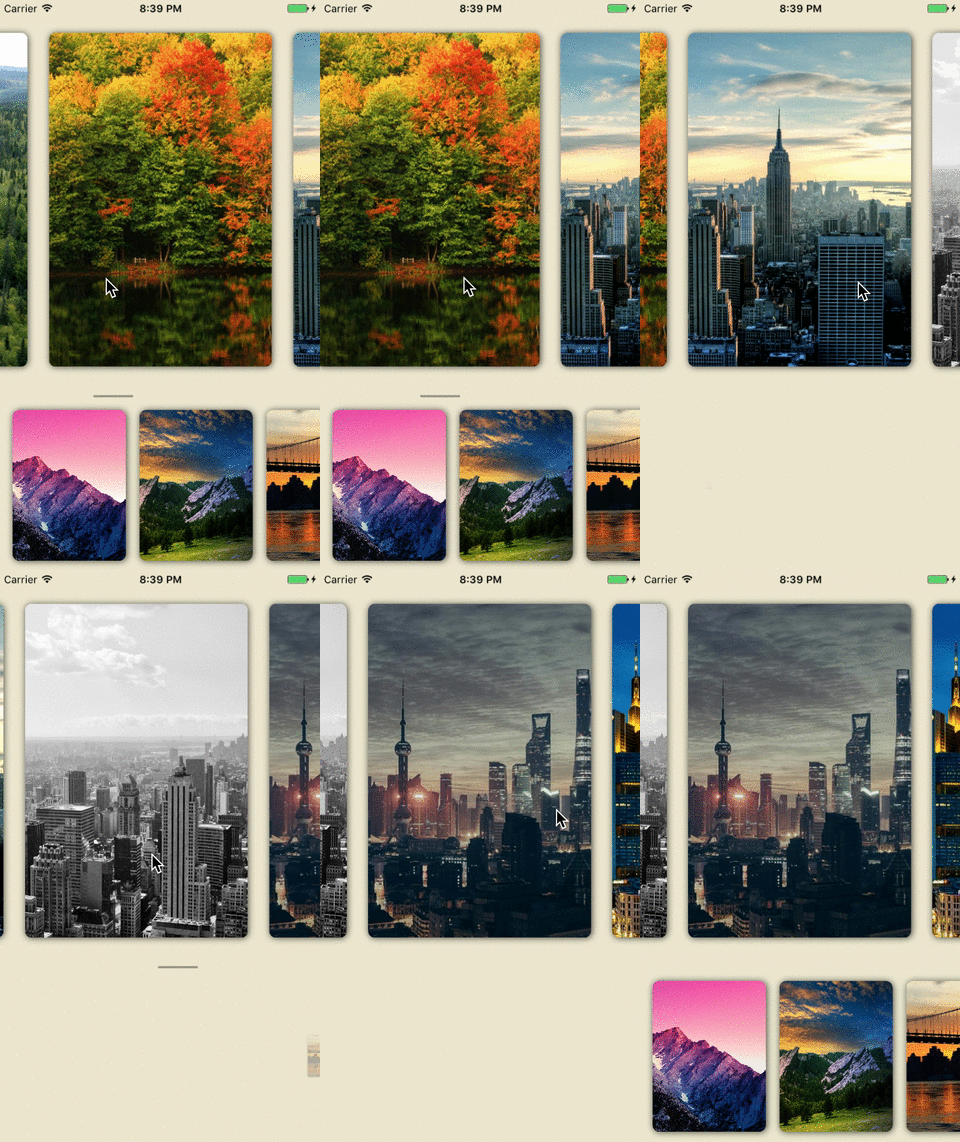
A custom View with two level chained collection views and fancy transition animation.
## Demo

 ## Requirements
- iOS 9.0+
- Xcode 8
## Installation
### CocoaPods
Update your Podfile to include the following:
```ruby
pod 'ChainPageCollectionView', '~> 1.0'
```
Run `pod install`.
NOTE: If you can not find the pod target. Please follow: https://stackoverflow.com/questions/31065447/no-such-module-when-i-use-cocoapods to build your pod target.
### Carthage
To integrate `ChainPageCollectionView` with `Carthage`, specify it in your `Cartfile`
```
github "jindulys/ChainPageCollectionView" ~> 1.0
```
Then, run the following command to build `ChainPageCollectionView` framework
```
$ carthage update
```
At last, you need to set up your Xcode project manually to add `ChainPageCollectionView` framework.
On your application targets’ `General` settings tab, in the `Linked Frameworks and Libraries` section, drag and drop each framework you want to use from the `Carthage/Build` folder on disk.
On your application targets’ `Build Phases` settings tab, click the `+` icon and choose `New Run Script Phase`. Create a Run Script with the following content:
```
/usr/local/bin/carthage copy-frameworks
```
and add the paths to the frameworks you want to use under `Input Files`:
```
$(SRCROOT)/Carthage/Build/iOS/ChainPageCollectionView.framework
```
Check [Carthage](https://github.com/Carthage/Carthage) if you need more help.
## Usage
### Basic Usage
```swift
import ChainPageCollectionView
```
1. Create ChainPageCollectionView
```swift
// chainView is this view controller's property.
chainView = ChainPageCollectionView(viewType: .normal)
chainView.delegate = self
```
2. Register cell for `parentCollectionView` and `childCollectionView`
```swift
chainView.parentCollectionView.register(#cellType, forCellWithReuseIdentifier:#cellIdentifier)
chainView.childCollectionView.register(#cellType, forCellWithReuseIdentifier:#cellIdentifier)
```
3. Implement `ChainPageCollectionViewProtocol`
```swift
func parentCollectionView(_ collectionView: UICollectionView, numberOfItemsInSection section: Int) -> Int {
// return your parent data source count.
}
func parenCollectionView(_ collectionView: UICollectionView, cellForItemAt indexPath: IndexPath) -> UICollectionViewCell {
// Dequeue and configure your parent collectionview cell
}
func childCollectionView(_ collectionView: UICollectionView, numberOfItemsInSection section: Int) -> Int {
// return your child data source count.
}
func childCollectionView(_ collectionView: UICollectionView, cellForItemAt indexPath: IndexPath) -> UICollectionViewCell {
// Dequeue and configure your child collectionview cell
}
```
4. Update child collection view data source when parent index has changed.
```swift
// You will get notified by following protocol method.
func childCollectionView(_ collectionView: UICollectionView, parentCollectionViewIndex: Int) {
// When parent collection view's scroll stops, this will get called with new parent collectionview's index.
// You can use this message to fetch related child collection view's new data.
// Once you have the latest child collection view's data, set `childCollectionViewDataReady` to `true`.
// NOTE: This is important to be set, otherwise your child collection view propably will not show up again.
chainView.childCollectionViewDataReady = true
}
```
### Customization
#### Child Collection View Animation Type
For now `ChainPageCollectionView` support two types of child collection view transition animation.
```swift
public enum ChainPageChildAnimationType {
case slideOutSlideIn
case shrinkOutExpandIn
}
```
Default is `slideOutSlideIn`, you can set it via initialization stage.
```swift
let chainView = ChainPageCollectionView(viewType: .normal,
childAnimationType: #yourchoice)
```
#### Layout
You can customize the layout objects by passing them via `ChainPageCollectionView`'s designated initializer.
```swift
let chainView = ChainPageCollectionView(viewType: .normal,
parentColectionViewLayout: #yourlayout,
childCollectionViewLayout: #yourlayout)
```
#### ItemSize
You can use `parentCollectionViewItemSize` and `childCollectionViewItemSize` to set related layouts' itemSize.
#### Screen Ratio
The default behaviour of this view is that parent collection view takes `3/4` height of this view and child collection view takes the rest. You can set `viewType` to a customized ratio with type `customParentHeight(#SomeInt, #SomeInt)`
```swift
let chainView = ChainPageCollectionView(viewType: .customParentHeight(28, 12))
```
## Author
Yansong Li ( liyansong.edw@gmail.com ), wechat: `jindulys_uw`
## License
Expanding collection is released under the MIT license.
See [LICENSE](./LICENSE) for details.
## Requirements
- iOS 9.0+
- Xcode 8
## Installation
### CocoaPods
Update your Podfile to include the following:
```ruby
pod 'ChainPageCollectionView', '~> 1.0'
```
Run `pod install`.
NOTE: If you can not find the pod target. Please follow: https://stackoverflow.com/questions/31065447/no-such-module-when-i-use-cocoapods to build your pod target.
### Carthage
To integrate `ChainPageCollectionView` with `Carthage`, specify it in your `Cartfile`
```
github "jindulys/ChainPageCollectionView" ~> 1.0
```
Then, run the following command to build `ChainPageCollectionView` framework
```
$ carthage update
```
At last, you need to set up your Xcode project manually to add `ChainPageCollectionView` framework.
On your application targets’ `General` settings tab, in the `Linked Frameworks and Libraries` section, drag and drop each framework you want to use from the `Carthage/Build` folder on disk.
On your application targets’ `Build Phases` settings tab, click the `+` icon and choose `New Run Script Phase`. Create a Run Script with the following content:
```
/usr/local/bin/carthage copy-frameworks
```
and add the paths to the frameworks you want to use under `Input Files`:
```
$(SRCROOT)/Carthage/Build/iOS/ChainPageCollectionView.framework
```
Check [Carthage](https://github.com/Carthage/Carthage) if you need more help.
## Usage
### Basic Usage
```swift
import ChainPageCollectionView
```
1. Create ChainPageCollectionView
```swift
// chainView is this view controller's property.
chainView = ChainPageCollectionView(viewType: .normal)
chainView.delegate = self
```
2. Register cell for `parentCollectionView` and `childCollectionView`
```swift
chainView.parentCollectionView.register(#cellType, forCellWithReuseIdentifier:#cellIdentifier)
chainView.childCollectionView.register(#cellType, forCellWithReuseIdentifier:#cellIdentifier)
```
3. Implement `ChainPageCollectionViewProtocol`
```swift
func parentCollectionView(_ collectionView: UICollectionView, numberOfItemsInSection section: Int) -> Int {
// return your parent data source count.
}
func parenCollectionView(_ collectionView: UICollectionView, cellForItemAt indexPath: IndexPath) -> UICollectionViewCell {
// Dequeue and configure your parent collectionview cell
}
func childCollectionView(_ collectionView: UICollectionView, numberOfItemsInSection section: Int) -> Int {
// return your child data source count.
}
func childCollectionView(_ collectionView: UICollectionView, cellForItemAt indexPath: IndexPath) -> UICollectionViewCell {
// Dequeue and configure your child collectionview cell
}
```
4. Update child collection view data source when parent index has changed.
```swift
// You will get notified by following protocol method.
func childCollectionView(_ collectionView: UICollectionView, parentCollectionViewIndex: Int) {
// When parent collection view's scroll stops, this will get called with new parent collectionview's index.
// You can use this message to fetch related child collection view's new data.
// Once you have the latest child collection view's data, set `childCollectionViewDataReady` to `true`.
// NOTE: This is important to be set, otherwise your child collection view propably will not show up again.
chainView.childCollectionViewDataReady = true
}
```
### Customization
#### Child Collection View Animation Type
For now `ChainPageCollectionView` support two types of child collection view transition animation.
```swift
public enum ChainPageChildAnimationType {
case slideOutSlideIn
case shrinkOutExpandIn
}
```
Default is `slideOutSlideIn`, you can set it via initialization stage.
```swift
let chainView = ChainPageCollectionView(viewType: .normal,
childAnimationType: #yourchoice)
```
#### Layout
You can customize the layout objects by passing them via `ChainPageCollectionView`'s designated initializer.
```swift
let chainView = ChainPageCollectionView(viewType: .normal,
parentColectionViewLayout: #yourlayout,
childCollectionViewLayout: #yourlayout)
```
#### ItemSize
You can use `parentCollectionViewItemSize` and `childCollectionViewItemSize` to set related layouts' itemSize.
#### Screen Ratio
The default behaviour of this view is that parent collection view takes `3/4` height of this view and child collection view takes the rest. You can set `viewType` to a customized ratio with type `customParentHeight(#SomeInt, #SomeInt)`
```swift
let chainView = ChainPageCollectionView(viewType: .customParentHeight(28, 12))
```
## Author
Yansong Li ( liyansong.edw@gmail.com ), wechat: `jindulys_uw`
## License
Expanding collection is released under the MIT license.
See [LICENSE](./LICENSE) for details.