# Codingns4DSH **External Agent CLIs, persistent terminals, workspace debug and remote access — inside DSH's own UI.** [![npm version](https://img.shields.io/npm/v/%40jingyi0605%2Fcodingns4dsh?logo=npm)](https://www.npmjs.com/package/@jingyi0605/codingns4dsh) [![DSH compatibility](https://img.shields.io/badge/DSH-0.2.0--rc.2-4D6BFE)](https://github.com/deepseek-ai/deepseek-harness) [![Node.js](https://img.shields.io/badge/Node.js-%3E%3D22.19-3C873A?logo=node.js&logoColor=white)](https://nodejs.org) [![License: GPL-3.0-or-later](https://img.shields.io/badge/License-GPL--3.0--or--later-blue.svg)](https://www.gnu.org/licenses/gpl-3.0.html) [简体中文](README.md) · **English** **Current release `@jingyi0605/codingns4dsh@0.2.0-rc.3`** · DSH **`0.2.0-rc.2`** (the only formally supported and validated version) · Node **`>= 22.19`** · macOS / Linux / Windows **[GitHub](https://github.com/jingyi0605/Codingns4DSH)** · **[npm](https://www.npmjs.com/package/@jingyi0605/codingns4dsh)** · **QQ group 1092985965**



Preview · What it is · Agents · Features · Install · First run · Troubleshooting · Development · Acknowledgements · License
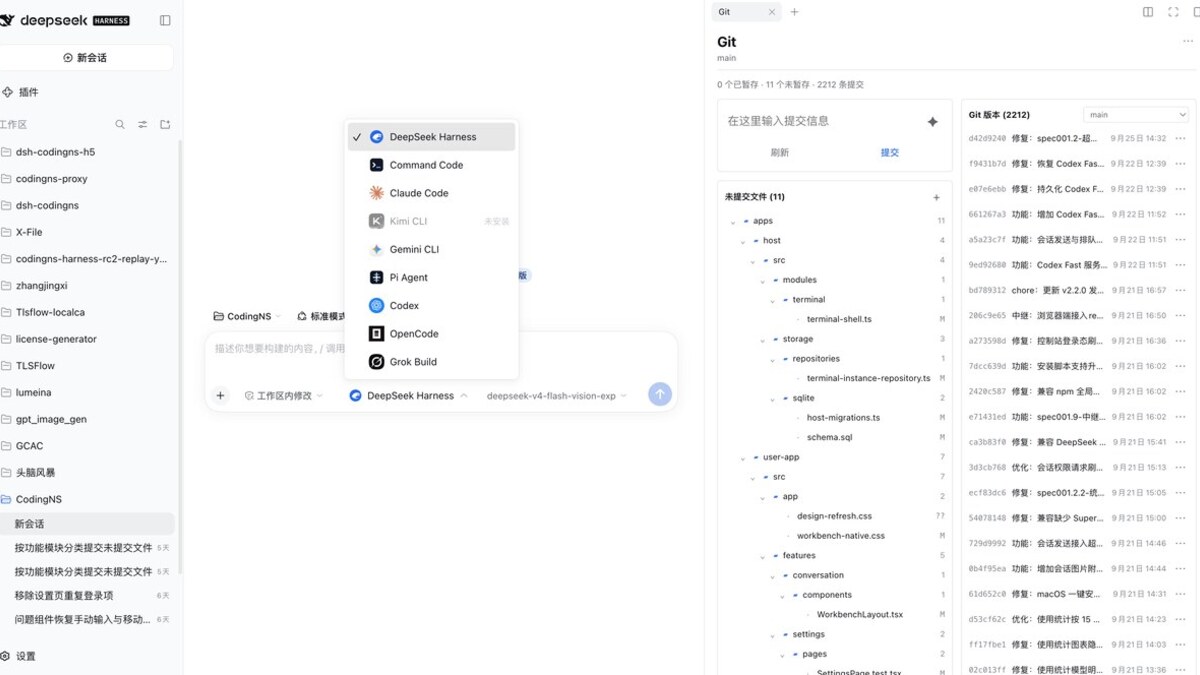
## Interface Preview
The CodingNS workbench and the Git sidebar
The CodingNS workbench brings the conversation, Agent picker and Git sidebar together in one view. --- ## What is Codingns4DSH **DSH (DeepSeek Harness)** is a coding-agent harness — a CLI plus Web UI that runs an agent loop inside your workspace. **Codingns4DSH is a DSH plugin bundle** (Host + browser layers) adding eleven modules, all configured under **Settings → Codingns4DSH**. > Naming: this plugin is **Codingns4DSH** (npm package `@jingyi0605/codingns4dsh`; its settings entry is labelled Codingns4DSH). **Codingns4DSH** on its own refers to the platform service that provides the Control API, accounts and the relay tunnel. | Module | What it does | Default | | --- | --- | :---: | | **External Agent integration** | Run installed Agent CLIs as native DSH sessions: streaming, tools, approvals, questions, usage, thinking levels | On | | **Workspace session enhancement** | Agent logos on session rows, archived-session entry, subscription/usage readout | Off | | **Mobile access enhancements** | On phones or narrow viewports, collapse the main sidebar, turn the settings navigation into an icon rail, support horizontal swipes, Android vibration and LAN PWA notifications | On | | **Terminal enhancement** | Persistent terminals plus shell, theme, font, cursor and scrollback settings | Off · restart | | **LAN access to DSH** | Listener forwarding a LAN address to the local DSH Web port, with a status indicator and one-click copy of a usable access URL | Always on | | **Login protection** | One optional local account guarding LAN **and** relay access; loopback always allowed | Always on (card) | | **Relay access service** | **Your DSH Web from anywhere on the internet**, end-to-end encrypted | Off | | **Workspace debug** | Per-workspace launch profiles, port checks, HTTP service proxy | On | | **Git repository management** | View changes, stage files, commit and browse Git history in the right sidebar | On | | **File management enhancement** | Create, rename, move, copy and delete files/directories, with code and script detection | Off | | **PeerHost workbench** | Proxy other handshaken DSH Hosts and aggregate workspaces, sessions and scoped tools | Off | Nothing native is replaced — conversations, sessions, sidebar, settings and approvals stay DSH's own. Everything runs on the **Host** (your machine): Agents, terminals, files, LAN/relay listeners; the browser is only a view. Agent CLIs run as DSH child processes with their own credentials and providers — model traffic never goes through Codingns4DSH. Remote access is available through optional modules. Notes: the sidebar terminal exists as soon as the plugin is installed — **Terminal enhancement** only switches it to the persistent backend (tmux on macOS/Linux, ConPTY on Windows) and applies on restart; the 调试 card is currently Chinese-only. --- ## Supported Agents Detected on the Host by command name; version and models come from the CLI itself. Detected Agents are enabled by default and can be toggled individually. The built-in **DeepSeek Harness** Agent is always available. | Agent | id | Command | Protocol | Capabilities | | --- | --- | --- | --- | --- | | Command Code | `command-code` | `command-code`, `commandcode`, `cmdc` | single-shot CLI | models, streaming, resume, interrupt, tools, thinking, usage | | Claude Code | `claude-code` | `claude` | stream-json | models, streaming, resume, interrupt, tools, thinking, usage | | Kimi CLI | `kimi` | `kimi`, `kimi-cli` | stream-json | all of the above + approvals, questions, steering | | Gemini CLI | `gemini` | `gemini` | ACP | models, streaming, resume, interrupt, tools, thinking, usage, approvals | | Pi Agent | `pi` | `pi`, `pi-agent` | JSON-RPC | models, streaming, resume, interrupt, tools, thinking, usage, steering | | Codex | `codex` | `codex` | JSON-RPC (app-server) | all + approvals, questions, steering | | OpenCode | `opencode` | `opencode`, or `OPENCODE_SERVER_URL` (default `http://127.0.0.1:4096`) | HTTP + SSE | all + approvals, questions | | Grok Build | `grok` | `grok`, `grok-build` | ACP | models, streaming, tools, thinking, usage, approvals | **models** model list · **streaming** live output · **resume** continue after restart · **interrupt** cancel a turn · **tools** tool calls in the conversation · **thinking** reasoning/effort · **usage** token or subscription limits · **approvals / questions** native DSH interactions · **steering** inject a message mid-turn. Unlisted capabilities are unsupported by that CLI or version. Install and log in to each Agent outside DSH; Codingns4DSH never stores Agent credentials. --- ## Feature Details ### External Agent Integration After you pick an Agent and a model, Codingns4DSH starts (or resumes) that CLI as a DSH child process and projects its event stream into a native session; the model and thinking effort are remembered per Agent.
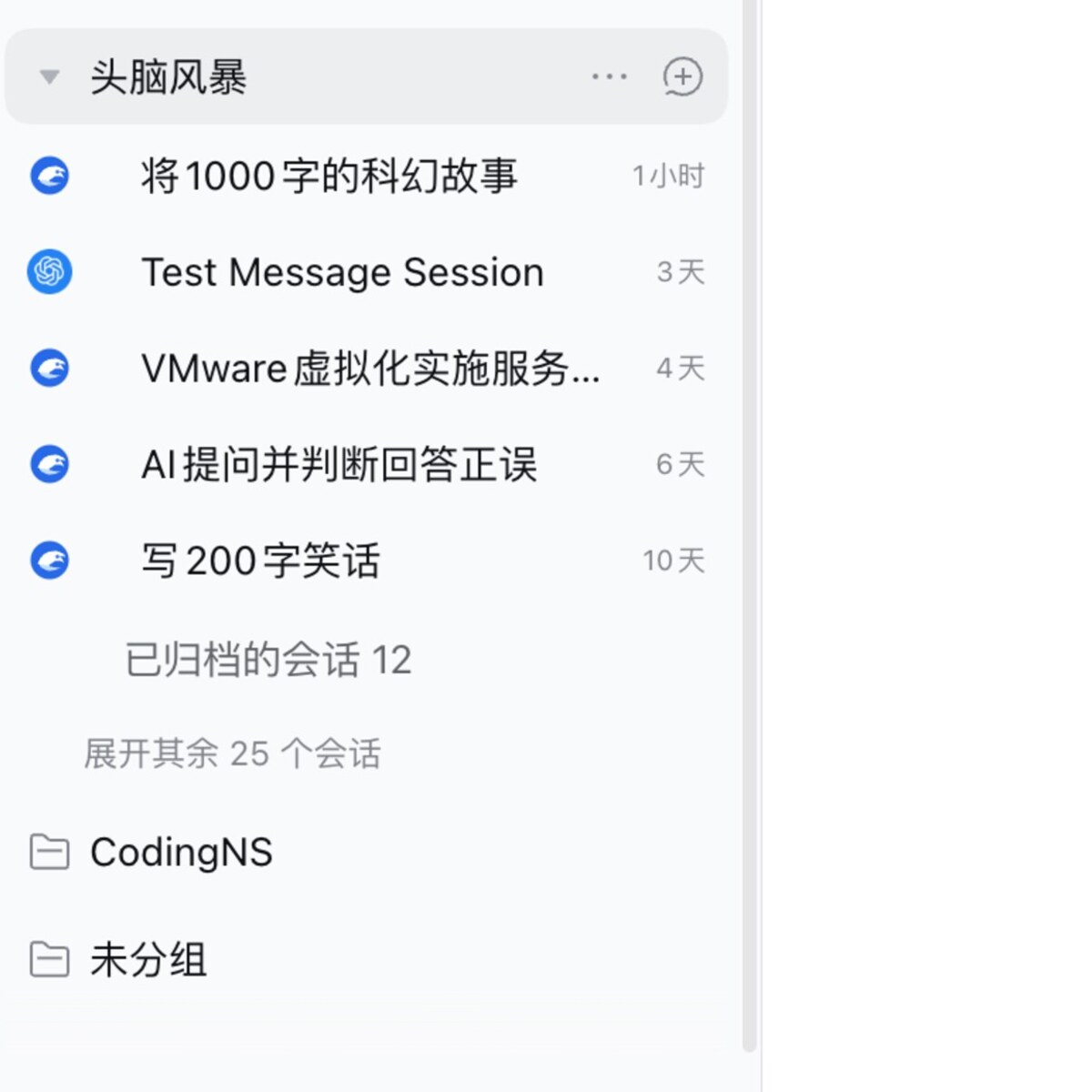
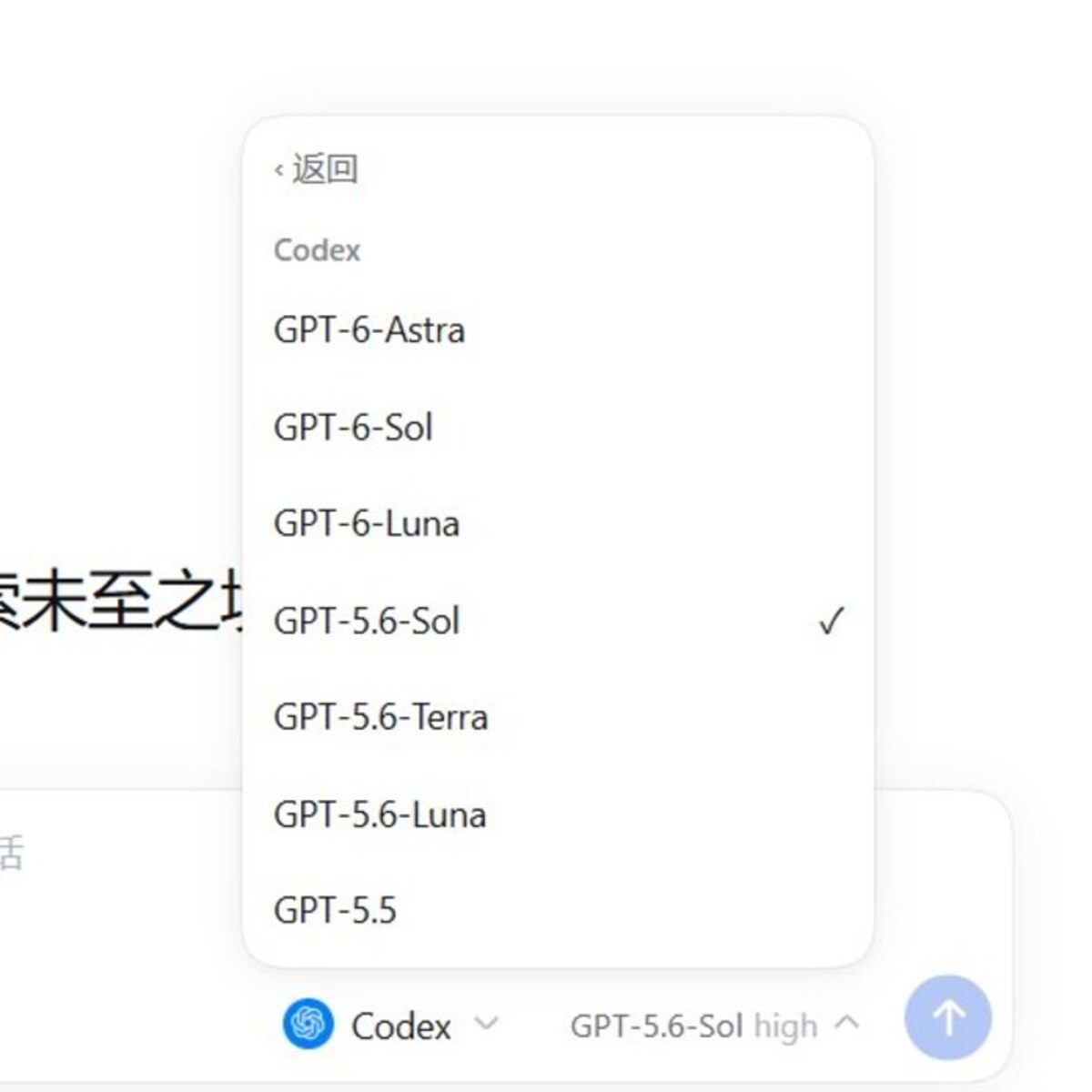
Workspace session enhancement with Agent logos and archived sessions The Codex model list
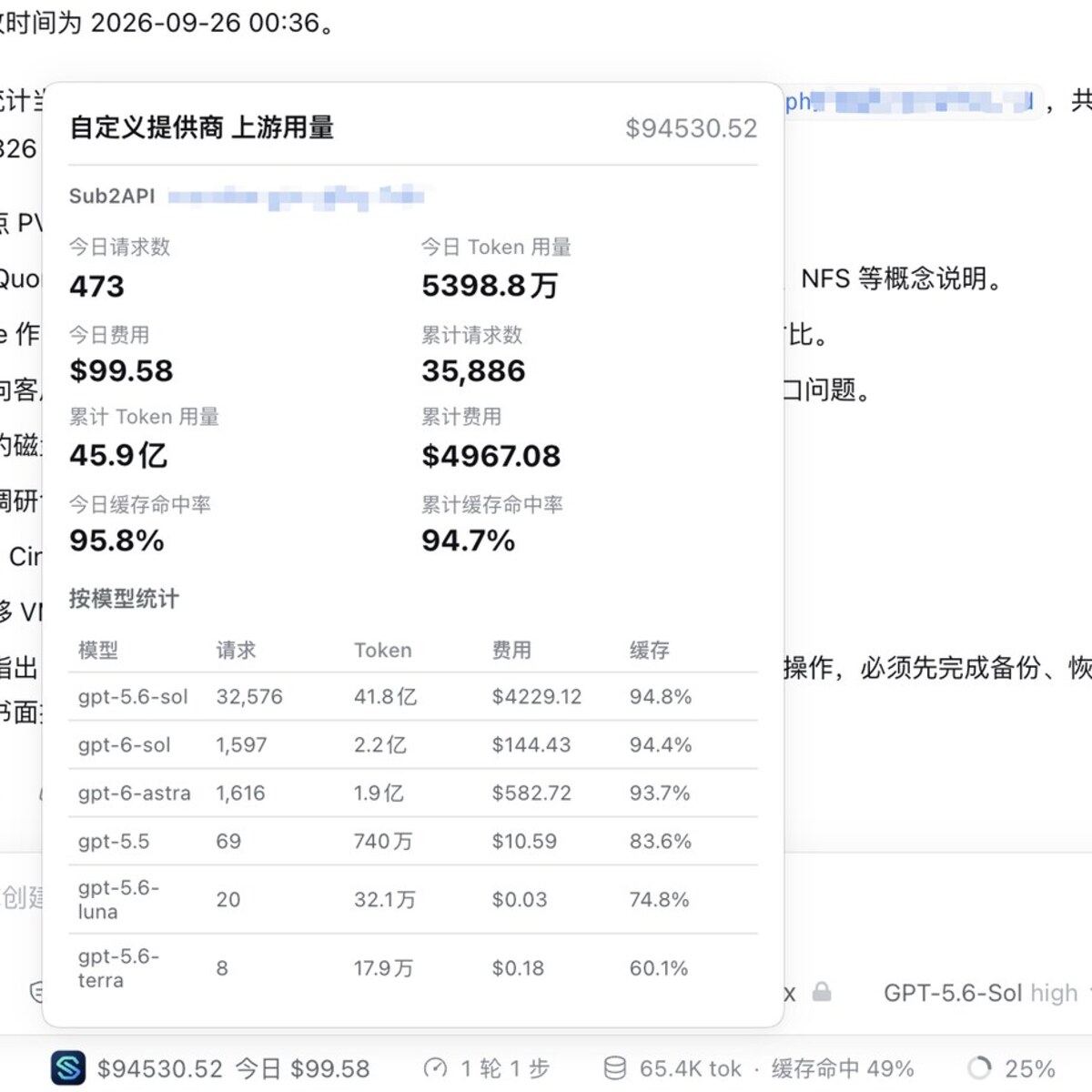
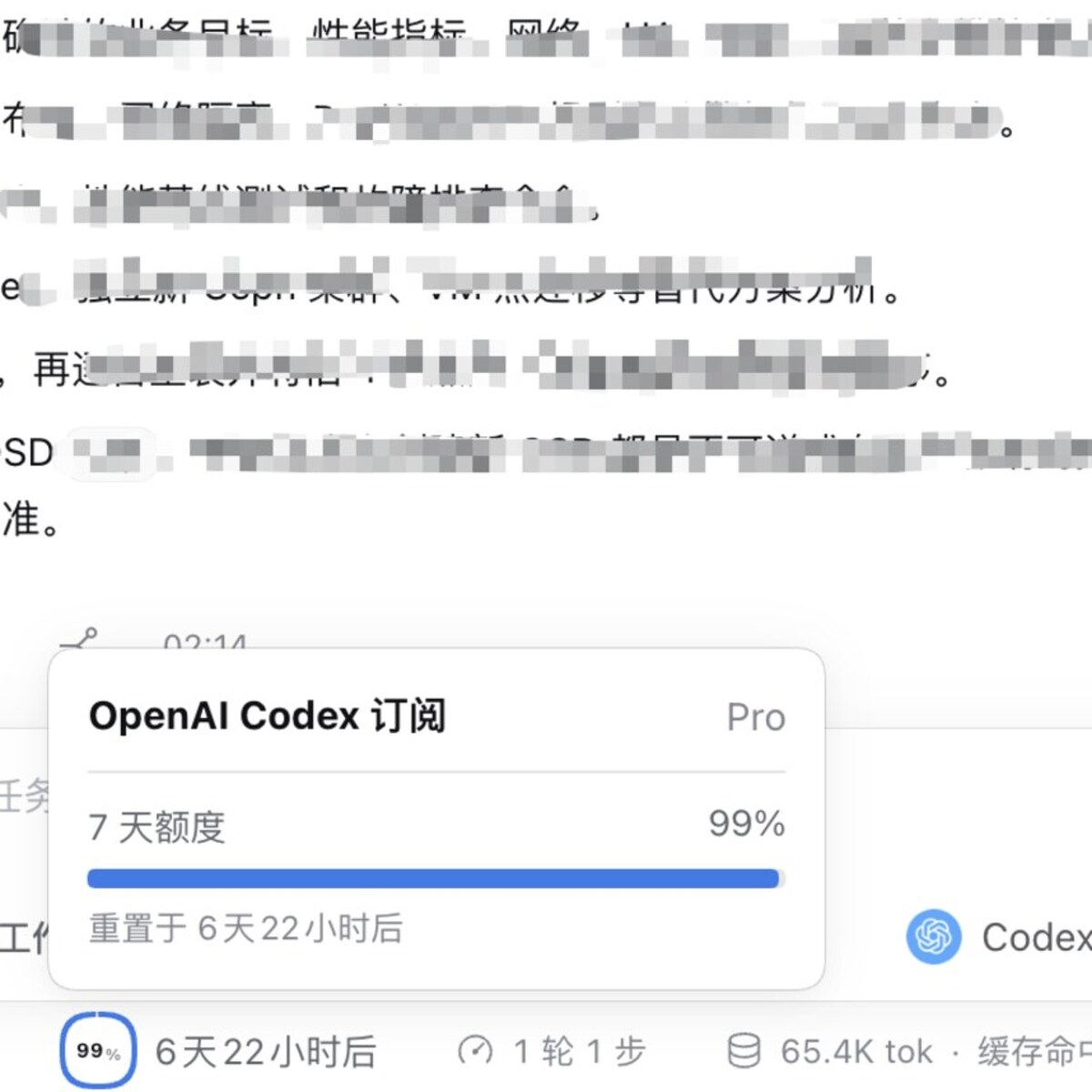
The model list is read from each CLI and can be switched at any time; the composer button also shows the current model and thinking effort. External Agents assemble their own requests, so the context panel's heuristic composition never matches the provider-reported usage; those sessions keep only the occupancy percentage and totals, without the System / Tools / Messages breakdown. ### Session Enhancement and Usage Session rows show the Agent logo and archive entry, and the composer dock shows subscription or upstream usage for Agents whose limits can be read (cache hit rate, per-model stats and cost included). The "Settings" button next to "Show subscription and usage" adjusts the query timeout (10 seconds by default, applied to every Agent) and the auto refresh interval (5 minutes by default, 0 disables automatic refresh); switching back to the same Agent within the interval reuses the previous result instead of querying upstream again.
Codex upstream usage and cost statistics Codex subscription allowance and reset time
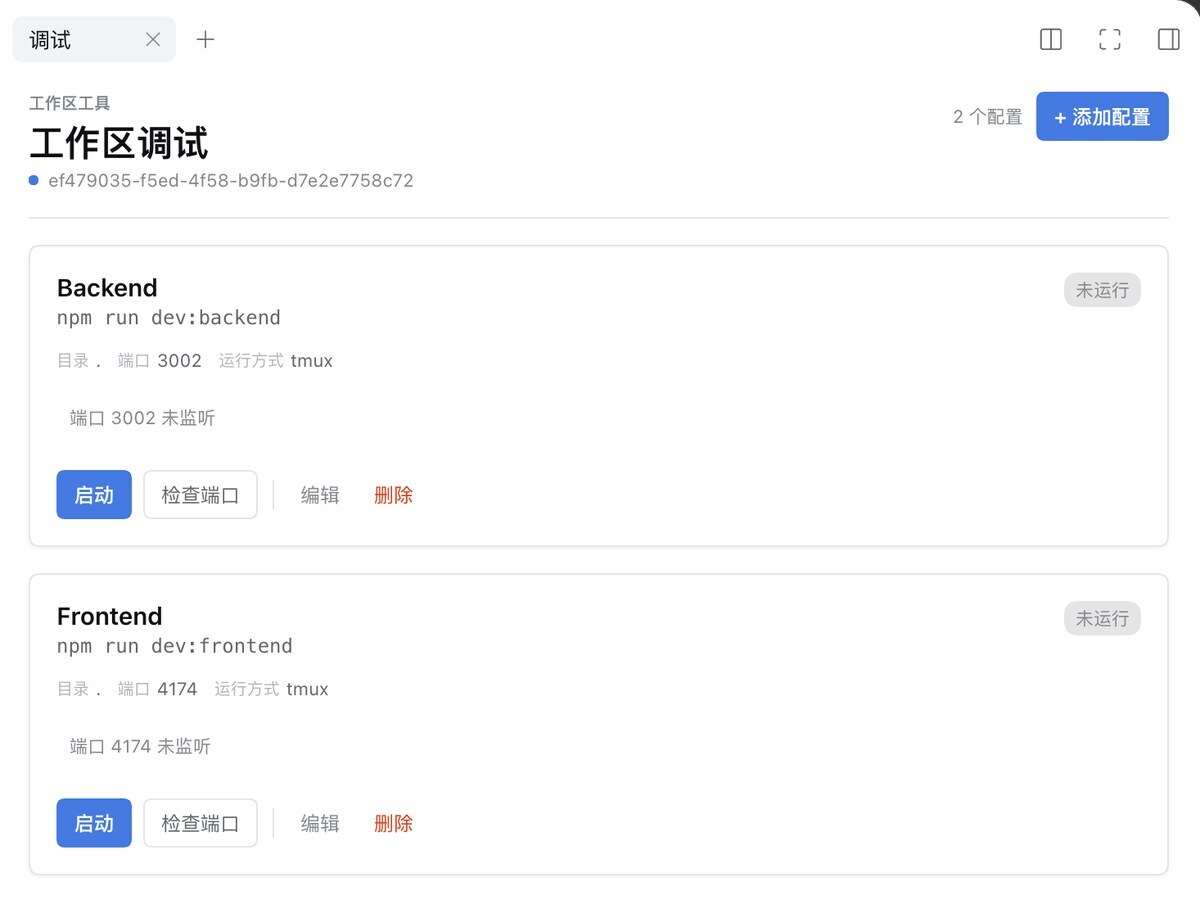
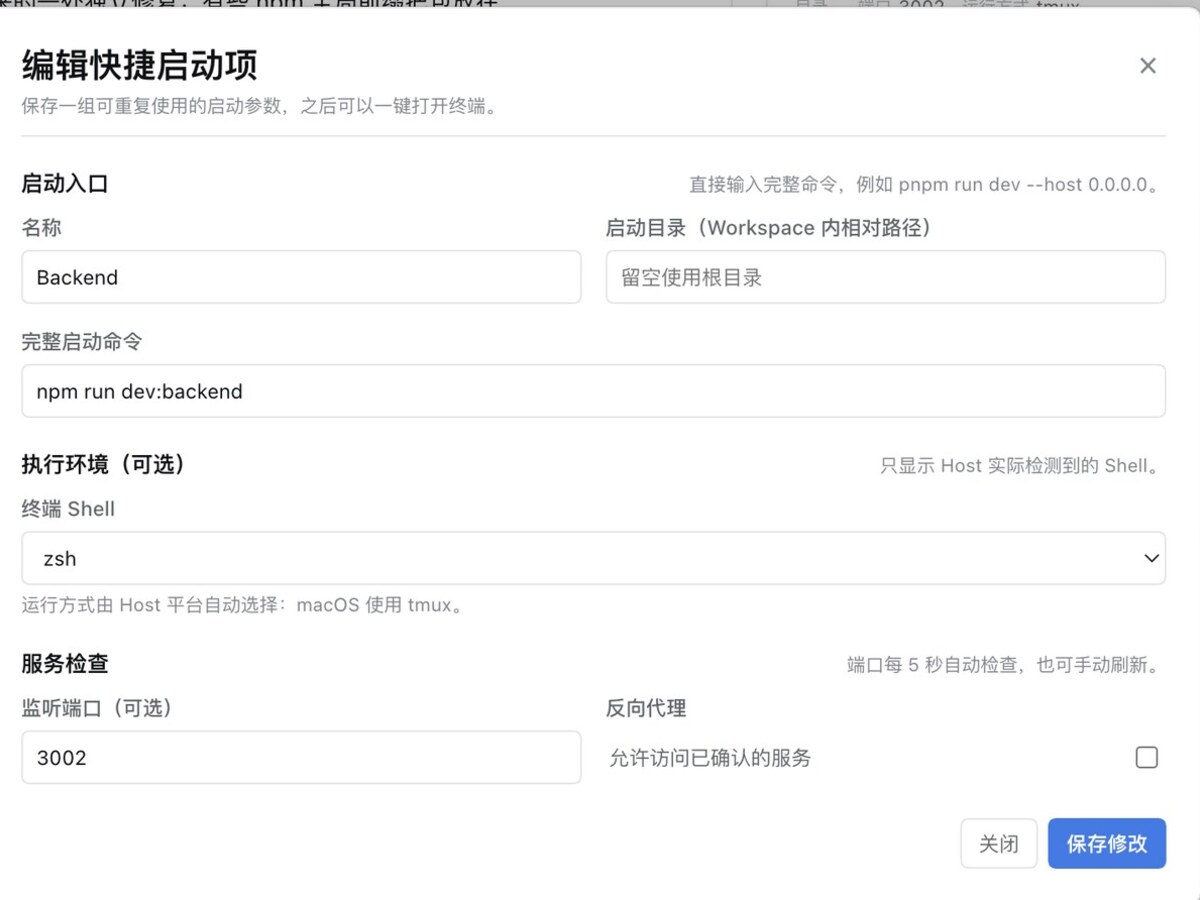
Usage comes from the Agent's own quota API or a configured upstream source; it is read on the Host and never stored in the browser. ### Workspace Debug Each workspace keeps its own launch profiles (`/.codingns/debug.json`): command, working directory, environment, shell and an optional port — start, check the port, kill the process or stop it. An optional reverse proxy exposes the port through DSH (HTTP only for now).
Workspace debug panel: launch profiles, port state and proxy Workspace debug panel: edit a launch profile
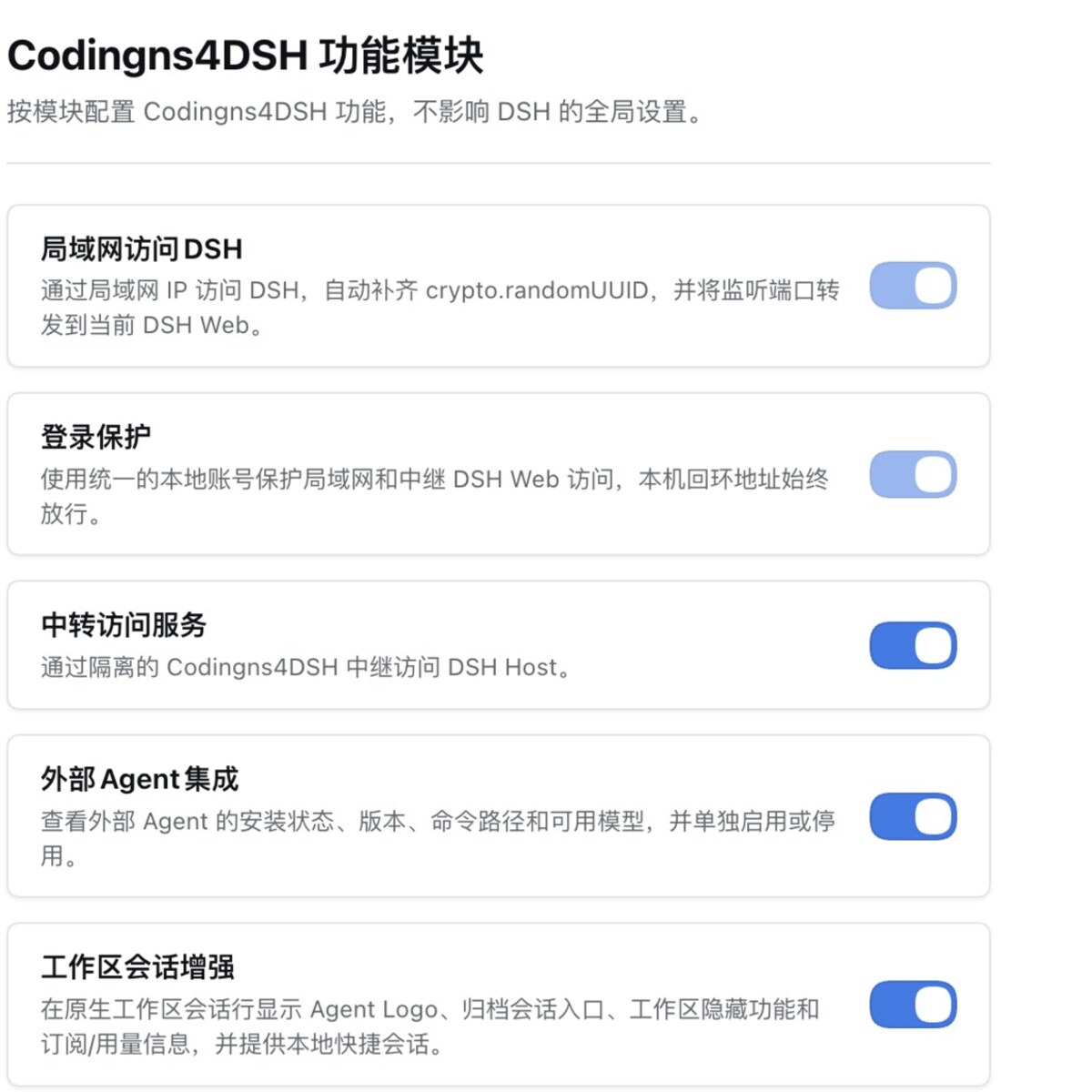
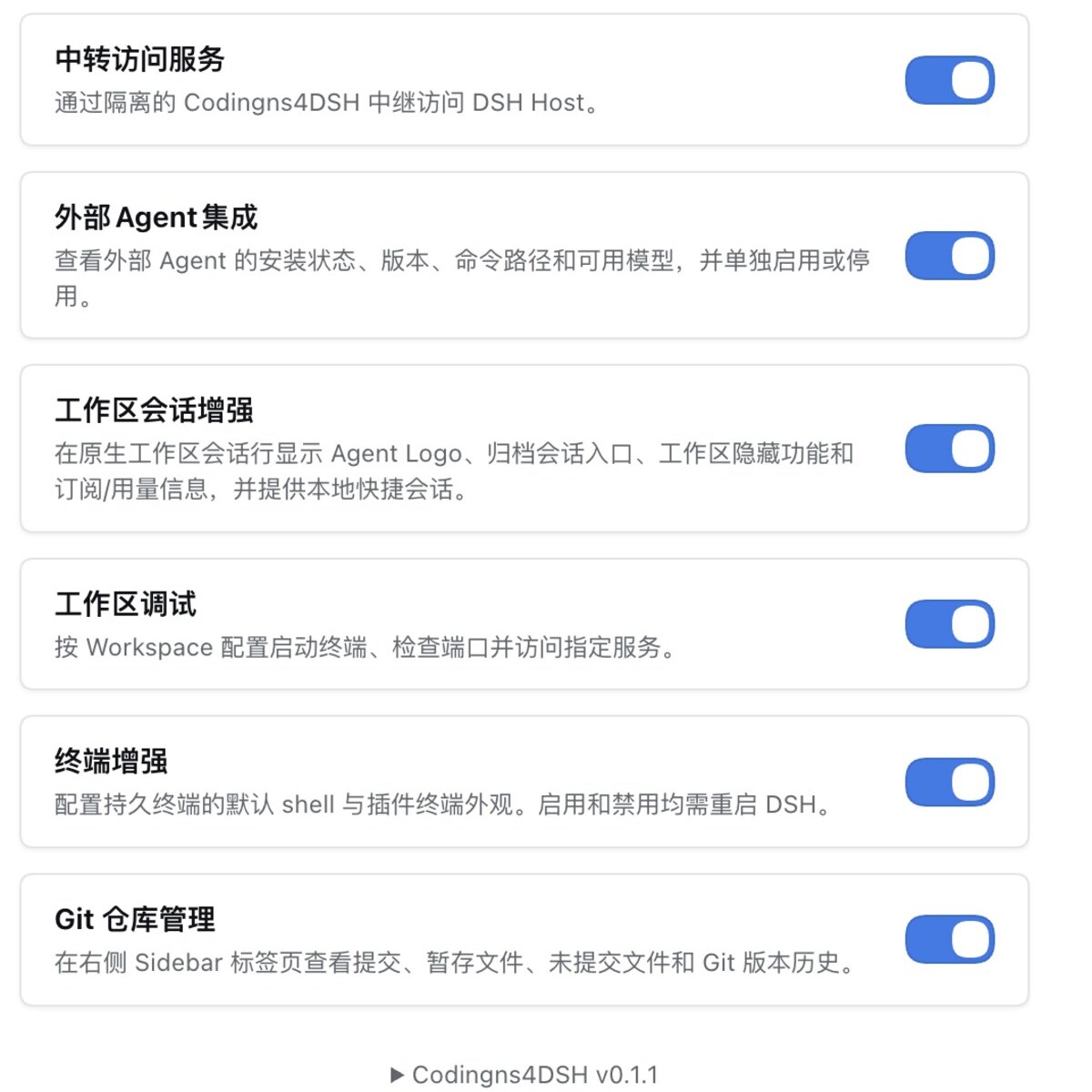
The panel shows live port state and PID, and issues an unguessable proxy URL per running instance. ### Git Repository Management The Git panel is opened from DSH's native right sidebar and persists per workspace across sessions. It can initialize a repository, show staged and unstaged files, stage or unstage paths, discard changes, create commits, switch branches and browse commit history. Disabling the module removes its sidebar tab and Host Git RPC without affecting other modules. ### File Management Enhancement File management enhancement adds common file operations to DSH's native file sidebar: create files and directories, rename, move, copy and delete entries, with code and script type detection for the editor entry point. Workspace path validation rejects paths outside the active workspace; disabling the module removes its sidebar entry and Host RPC. ### PeerHost Workbench PeerHost proxies other DSH Hosts without replacing the current logged-in Host. It can add LAN peers, persist target configuration and login state, and route workspaces, sessions, chat input, live events, files, Git, terminals and right-sidebar tools through an explicit HostScope. A failing peer does not block the local Host or other peers. Unsupported native navigation surfaces report `degraded` or `unsupported` instead of creating an iframe or pretending to be a native three-column view. ### Modules and Settings The settings page renders one card per module — switch, description and restart notice all come from the module itself; terminal appearance, LAN mapping, login protection and relay account are configured inside their own cards.
Settings → Codingns4DSH module cards All module switches
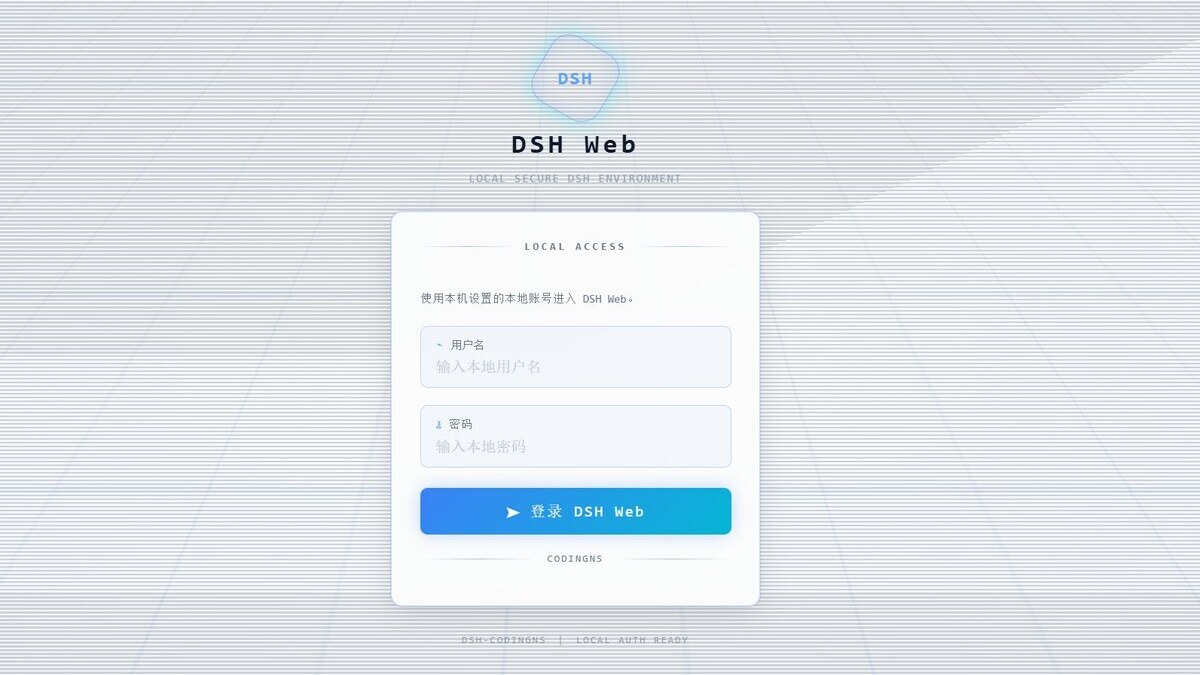
### Login Protection Off by default; once enabled on its card, one local account guards LAN **and** relay access (default session timeout 30 minutes). Authentication happens at the Host's forwarding boundary, so unauthenticated traffic never reaches DSH Web; `127.0.0.1` and `::1` are always allowed to prevent lockout.
Local account login page
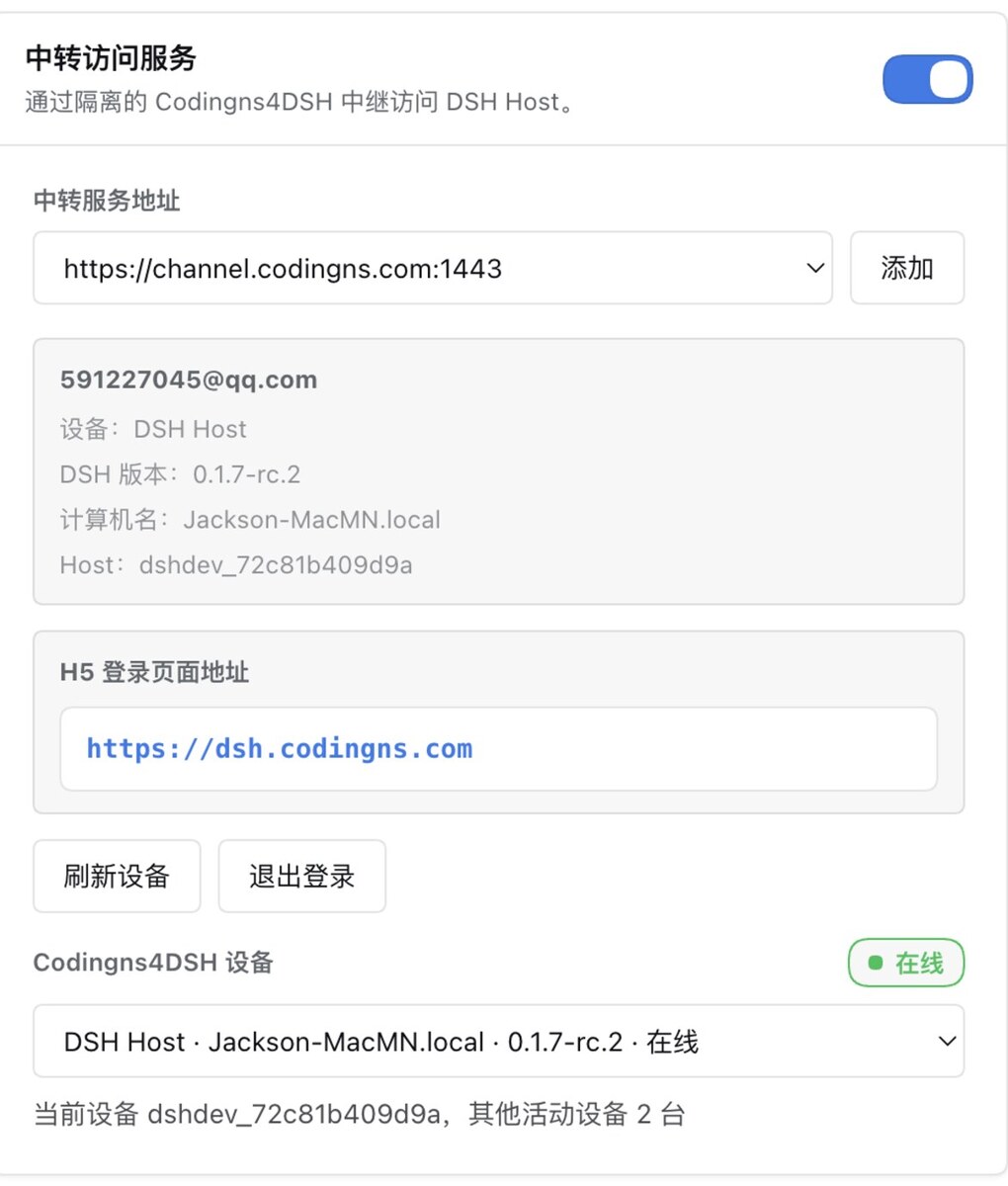
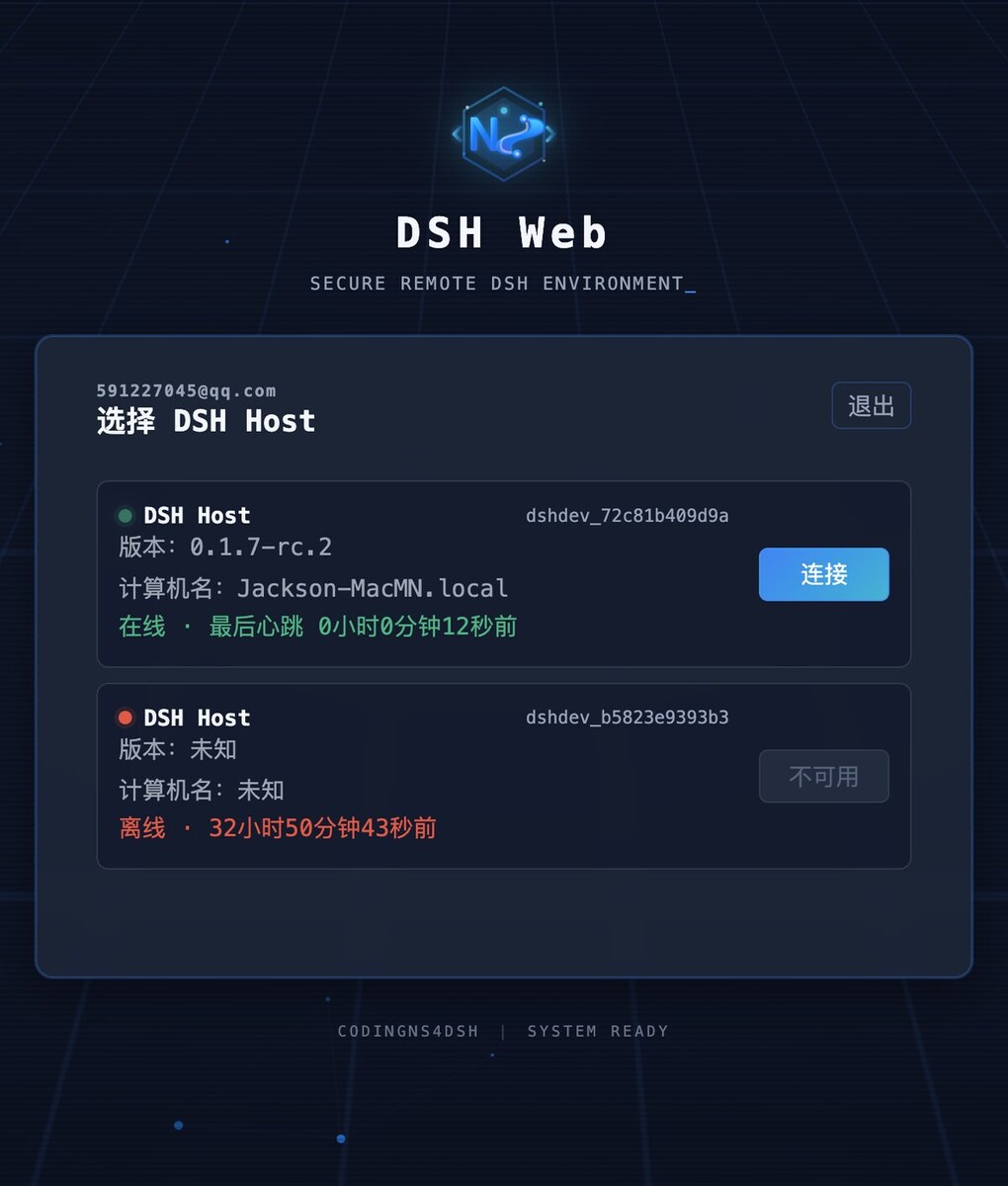
The password is `scrypt`-hashed in a `0600` file, and the browser only holds an `HttpOnly`, `SameSite=Strict` session cookie. ### Remote Access | | LAN access | Relay access | | --- | --- | --- | | Connect from | Same local network | **Any device, anywhere on the internet** | | Needs | Shared network + open listen port | Host can reach the Control API over HTTPS; your device can reach the Codingns4DSH entry | | Local port exposed | Yes — chosen interface/port (default `13080`) | No — isolated device tunnel | | Account | Optional login protection | Codingns4DSH account + bound Host | **LAN**: pick a listen interface and port, auto-detect (or type) the local DSH Web port, start, then open `http://:` from another device; auto-start restores the mapping, and the module patches the `crypto.randomUUID` that plain-HTTP origins need. **Relay**: set the Control API (default `https://channel.codingns.com:1443`, where you can register), log in, refresh devices, bind the current Host (label, public key, fingerprint), then open the bound Host from any device through **`https://dsh.codingns.com`** — no public IP, port forwarding or VPN.
Relay access card H5 login page: choose a DSH Host
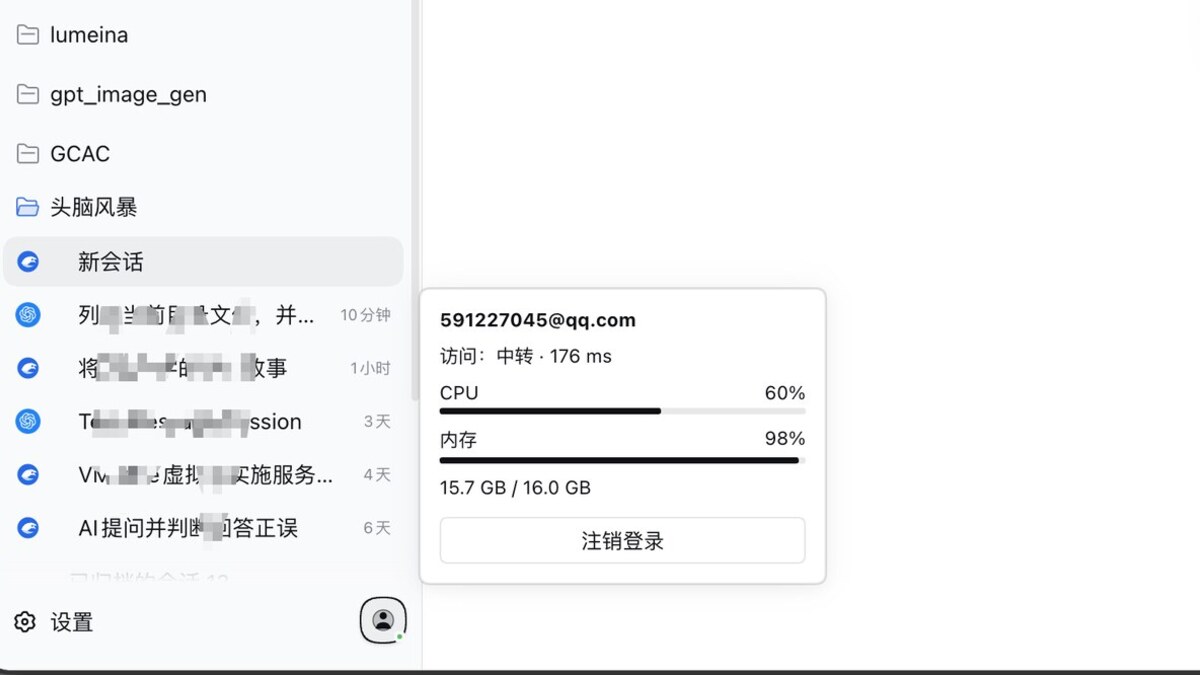
The account entry next to DSH's Settings button shows login state, access path and latency, host CPU/memory, and offers one-click logout.
Account status popover: access path, latency, CPU and memory
The “access” line tells you whether you entered DSH Web locally, over the LAN or through the relay. **Why the relay cannot read your DSH traffic** — the tunnel is end-to-end encrypted, so using it never hands your conversations to a server: - Payload travels in a **WebRTC DataChannel protected by DTLS between the DSH Client and the DSH Host**; direct or via TURN, only ciphertext crosses the relay. - The relay and control service handle **control-plane metadata only**: account/device records, Host binding, tickets, SDP/ICE signaling, online state, traffic accounting. - Each Host keeps its own DTLS certificate (`~/.config/codingns4dsh/dtls-identity.json`) and publishes a SHA-256 fingerprint the remote side verifies during the handshake — a mismatch aborts the connection (`Host DTLS fingerprint 校验失败`) instead of accepting a substituted certificate; the same fingerprint shows in the relay card for manual comparison. - Passwords are used only for login requests; refresh token and device credential stay on the Host. Diagnostics log protocol metadata only (direction, type, stream id, status, bytes) — never bodies, tickets, cookies or DSH Web content. --- ## Installation **Requirements**: DSH `0.2.0-rc.2` · Node.js `>= 22.19` · `pnpm` on `PATH` (`dsh plugin` forwards to pnpm) · optional: Agent CLIs, and `tmux` on macOS/Linux for persistent terminals (`brew install tmux` / `sudo apt install tmux`). ### Simplest install: use the built-in `web` profile DSH automatically initializes the `web` profile on first use. You do not need to create a config file or run `--dump-config`: ```bash dsh plugin --profile web add @jingyi0605/codingns4dsh@0.2.0-rc.3 dsh web ``` ### Optional: use a separate profile If you do not want to modify the built-in `web` profile, create a separate profile. Here `--dump-config` only initializes and inspects the profile; it is not required for installing the plugin: ```bash dsh codingns --from-default-profile web --dump-config dsh plugin --profile codingns add @jingyi0605/codingns4dsh@0.2.0-rc.3 dsh codingns ``` - **Do not** use `dsh plugin --profile add ...` to create a separate profile that needs the Web UI: it initializes from `@deepseek-ai/dsh-base` only, then fails with `entry "terminal-controller" not found`. Use `--from-default-profile web` for a separate profile. - A registry 404 means that version is not published yet — use the source install below. ```bash # optional: verify the installation dsh plugin --profile web list --depth 0 # -> codingns4dsh # upgrade, pin, uninstall (restart DSH afterwards) dsh plugin --profile web add @jingyi0605/codingns4dsh@ dsh plugin --profile web remove @jingyi0605/codingns4dsh ``` **From source** (npm unavailable, or running a checkout): ```bash git clone https://github.com/jingyi0605/Codingns4DSH.git && cd Codingns4DSH pnpm install && pnpm build dsh plugin --profile web add "$PWD" # or: npm pack, then add ./jingyi0605-codingns4dsh-0.2.0-rc.3.tgz dsh web ``` A directory install links the checkout — rebuild (`pnpm build` / `pnpm dev:watch`) and restart DSH after changes. **State on disk**: settings live in `$DSH_HOME/settings.yaml` (default `~/.dsh/settings.yaml`) under the `codingns:` namespace. | Path | Contents | | --- | --- | | `$DSH_HOME/profiles/` | Installed plugin packages and `dsh.profile.bundles` | | `$DSH_HOME/codingns4dsh/` | Terminal `host-id` and `terminals.json` (restore mapping) | | `~/.config/codingns4dsh/` | Relay credentials, DTLS identity, login-protection hash | | `/.codingns/debug.json` | Debug launch profiles (mode `0600`, secrets rejected) | --- ## First Run 1. `dsh codingns` opens the DSH Web UI. 2. Open **Settings → Codingns4DSH** to review the module cards (restart-required ones show both the effective and next-start state). 3. Install and log in to your Agent CLIs **outside** DSH, keep them on the Host `PATH`, then enable them in **外部Agent集成**. 4. Pick an Agent, model and thinking level in the composer and send a prompt — output streams into a native session with the Agent's logo. 5. Right sidebar: Terminal for a workspace shell (enable **终端强化** + restart for persistence); 调试 to add a launch profile and watch its port. 6. For remote use, turn on **登录保护**, configure **局域网访问DSH**, or log in to **中转访问服务** to connect from any network; the account entry shows the current path and host load. --- ## Troubleshooting - **Versions** — `dsh --version`, `dsh plugin --profile web list --depth 0` (replace `web` for a separate profile), `npm view @jingyi0605/codingns4dsh version`; startup rejects DSH outside the supported range, and installation does too whenever it can identify the runtime actually in use. - **Install-time rejection from a stale `dsh` on `PATH`** — installation only blocks on the host-injected version, the Desktop Runtime root, and a `@deepseek-ai/dsh` resolvable from the profile; `dsh --version` from `PATH` is advisory and never blocks. Runtime still validates the DSH that actually loaded. - **`patch: entry "terminal-controller" not found`** — the profile lacks the Web app layer; recreate it from the `web` template as shown above. - **Agent not detected** — run ` --version` on the Host; ensure its directory is on the `PATH` of the process that started DSH (GUI launchers often differ); log in with the vendor tool, then restart DSH. - **Terminal** — persistent mode needs `tmux` on macOS/Linux; enabling/disabling the module and changing the binding scope need a restart; terminals are addressed per workspace. - **LAN** — check the card's status indicator and access URL, allow the port through the firewall, keep both devices on one network; with several DSH instances pick the detected port manually; sign in first when login protection is on. - **Relay** — verify Control API reachability, log in again if the session expired, refresh devices, then bind the Host. - **Logs** — `CODINGNS4DSH_TUNNEL_DEBUG=1 dsh codingns --no-open` (metadata only); pnpm install logs live in `$DSH_HOME/profiles//.plugin-manager/logs/`. - **Reporting** — include DSH and Codingns4DSH versions, OS, module and exact error: [GitHub Issues](https://github.com/jingyi0605/Codingns4DSH/issues) or QQ **1092985965**. --- ## Development Requires Node `>= 22.19` and pnpm: ```bash pnpm install pnpm build # version check -> tsc -> client + H5 bundles pnpm test # build, then the full test suite (currently 901 cases) pnpm typecheck pnpm run capability:check # capability retirement check ``` Dev loop: `pnpm dev:watch` with `pnpm dev:link `, then restart DSH. Versions come from `version.json` (`version:set-plugin` / `version:set-dsh`, guarded by `version:check`). Layout: `src/host` (Host layer), `src/client` (browser layer), `src/dsh-capabilities` (capability registry and version routing), `src/shared/contracts`, `src/transport` (tunnel + WebRTC), `src/features` (module registry), `tests/`, `specs/`, `docs/`, `data/build` (git-ignored). A `v*` tag runs GitHub Actions (tag/version check, frozen install, typecheck, tests, `npm pack`) and publishes with provenance; prereleases get the `next` dist-tag. Releases also run DSH installation replay, runtime module resolution and per-file npm artifact checks. Screenshot assets and shot list: [assets/screenshots](assets/screenshots/README.md) (Chinese). **Chinese version: [README.md](README.md)** --- ## Acknowledgements The inspiration for Codingns4DSH — and part of its implementation approach — comes from **[CodexHost](https://github.com/BytePioneer-AI/codex-host)**, which runs Pi, Claude Code, Grok Build and other Harnesses natively inside Codex Desktop. It showed the direction Codingns4DSH follows from the other side: host *other* Harnesses as first-class Agents instead of replacing them. The multi-Harness adapter model, projecting a CLI event stream into native sessions, and keeping each Agent's sessions in the host sidebar and composer trace back to that design. Thanks to its authors and community. Codingns4DSH is an independent project and is not affiliated with CodexHost. --- ## License Codingns4DSH is released under the **GNU General Public License version 3 or later** (SPDX: `GPL-3.0-or-later`); the full terms are in [LICENSE](LICENSE), and the `license` field in `package.json` matches. Copyright (C) 2026 jingyi0605 You may use, modify and distribute the project freely under the terms of the license; derivative works must stay under the same license, ship the complete source and keep the copyright notice, and the project comes with no warranty.