# Brethap
Brethap is yet another meditation app (yama). Including a timer for meditation, it also allows you to configure a breathing pattern for you to follow. Your sessions will be saved, allowing you to monitor and view stats about your progress in either a list or calendar view. Duration, breath and other options are configurable through saved preferences. Breathing technique presets include 4-7-8, physiological sigh, among others.
For Wear OS users, there is a slimmed down [version](https://github.com/jithware/brethap_wear#brethap-wear) available as well.
[ ](https://f-droid.org/packages/com.jithware.brethap/)
[
](https://f-droid.org/packages/com.jithware.brethap/)
[ ](https://play.google.com/store/apps/details?id=com.jithware.brethap)
[
](https://play.google.com/store/apps/details?id=com.jithware.brethap)
[ ](https://jithware.github.io/brethap)
*The web version has a reduced amount of features. iOS/macOS users can only use the [unsupported](https://github.com/jithware/brethap/discussions/95) web version at this time.*
## Screenshots
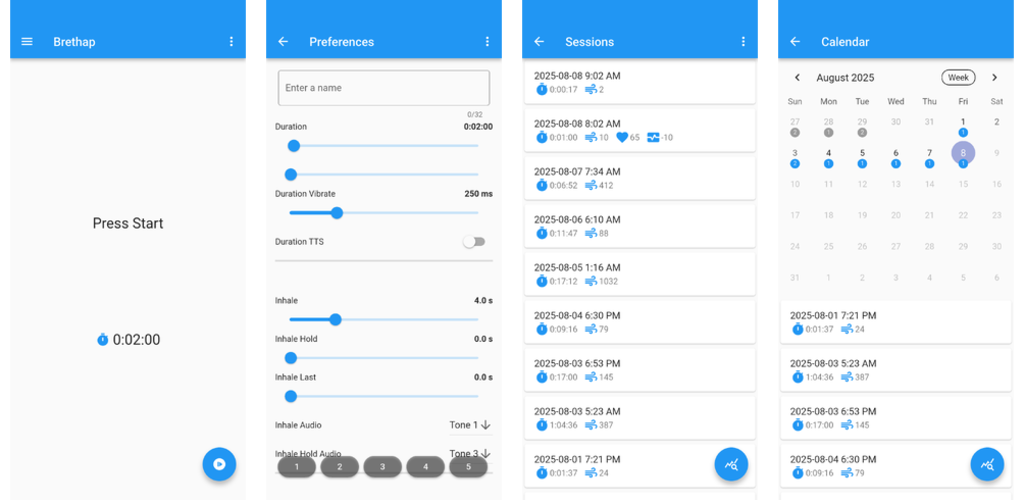
## Usage
### Running


* To start a session, press the Start button
* To end a session, let the timer expire or press the Stop button
* To switch a preference, tap the preferences menu
[
](https://jithware.github.io/brethap)
*The web version has a reduced amount of features. iOS/macOS users can only use the [unsupported](https://github.com/jithware/brethap/discussions/95) web version at this time.*
## Screenshots

## Usage
### Running
* To start a session, press the Start button
* To end a session, let the timer expire or press the Stop button
* To switch a preference, tap the preferences menu
[ ](./screenshots/android/running.webp)
### Sessions

* To view sessions, press the drawer menu in the top left and press Sessions
* To view session stats, press the Stats button
* To remove a session, swipe a session either left or right
[
](./screenshots/android/running.webp)
### Sessions
* To view sessions, press the drawer menu in the top left and press Sessions
* To view session stats, press the Stats button
* To remove a session, swipe a session either left or right
[ ](./screenshots/android/sessions.webp)
### Calendar

* To view a calendar display of sessions, press the drawer menu in the top left and press Calendar
* To view session stats for the month, press the Stats button
* To view sessions for the week only, press the Week button
[
](./screenshots/android/sessions.webp)
### Calendar
* To view a calendar display of sessions, press the drawer menu in the top left and press Calendar
* To view session stats for the month, press the Stats button
* To view sessions for the week only, press the Week button
[ ](./screenshots/android/calendar.webp)
### Preferences
* To view preferences, press the drawer menu in the top left and press Preferences
* To change a preference, enter a name, move the preference slider either left or right, or choose an option from the drop down
* To save a preference, hold down a Preference button
* To select a preset preference, press the Preference menu in the top right and select Presets
* To select a saved preference, press a Preference button
[
](./screenshots/android/calendar.webp)
### Preferences
* To view preferences, press the drawer menu in the top left and press Preferences
* To change a preference, enter a name, move the preference slider either left or right, or choose an option from the drop down
* To save a preference, hold down a Preference button
* To select a preset preference, press the Preference menu in the top right and select Presets
* To select a saved preference, press a Preference button
[ ](./screenshots/android/preferences.webp)
*For a finer adjustment to a preference, rotate your phone to landscape mode. See [#118](https://github.com/jithware/brethap/discussions/118#discussioncomment-13848851) for more detail.*
## Versioning
Brethap [releases](https://github.com/jithware/brethap/releases) use the following [software versioning](https://en.wikipedia.org/wiki/Software_versioning):
_major.minor.maintenance+build_ (example: 1.2.3+4)
Examples updates:
* major = application rewrite
* minor = preferences addition or change
* maintenance = enhancements and bug fixes
* build = incremented number from previous build
[
](./screenshots/android/preferences.webp)
*For a finer adjustment to a preference, rotate your phone to landscape mode. See [#118](https://github.com/jithware/brethap/discussions/118#discussioncomment-13848851) for more detail.*
## Versioning
Brethap [releases](https://github.com/jithware/brethap/releases) use the following [software versioning](https://en.wikipedia.org/wiki/Software_versioning):
_major.minor.maintenance+build_ (example: 1.2.3+4)
Examples updates:
* major = application rewrite
* minor = preferences addition or change
* maintenance = enhancements and bug fixes
* build = incremented number from previous build
[ ](https://github.com/jithware/brethap/releases/latest)
## Donate
Donate to the project's maintainer [@jithware](https://github.com/jithware)
[](https://liberapay.com/jithware/donate) | [](https://www.paypal.com/donate/?hosted_button_id=2ZFSMQ8DGQVFS)
](https://github.com/jithware/brethap/releases/latest)
## Donate
Donate to the project's maintainer [@jithware](https://github.com/jithware)
[](https://liberapay.com/jithware/donate) | [](https://www.paypal.com/donate/?hosted_button_id=2ZFSMQ8DGQVFS)