# PicMo
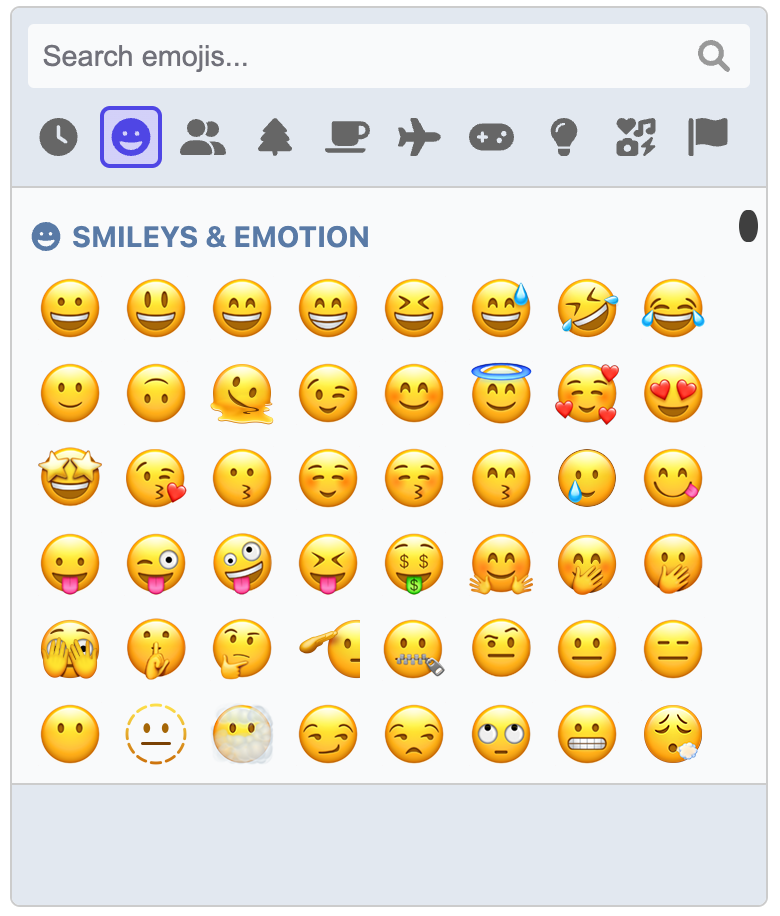
Add a fully featured emoji picker to your app with a few lines of code!
Formerly known as [Emoji Button](https://emoji-button.js.org).
 ## Features at a glance
- It's just JavaScript, no frameworks or libraries required. This means you can use it in any app under any framework.
- Emoji data is loaded once from a CDN and cached in the browser for subsequent sessions.
- Use the default operating system emoji images or use an alternative renderer to use, for example, images from [Twemoji](https://twemoji.twitter.com).
- Emojis are searchable by name or tags
- Full support for skin tone variations where applicable
- Remembers recently used emojis
- Fully keyboard accessible
- Includes light and dark themes, with the ability to extend them to create your own
- Add custom images and GIFs!
- Render inline on the page or as a popup
## Demos and documentation
Demos and full documentation, including the API and usage guide, is available at [https://picmojs.com](https://picmojs.com).
## Installation
At a minimum, you need the core picker package. This gives you a picker that you can insert inline into an element on the page.
```
npm install picmo
```
## Basic usage
```javascript
import { createPicker } from 'picmo';
// The picker must have a root element to insert itself into
const rootElement = document.querySelector('#pickerContainer');
// Create the picker
const picker = createPicker({ rootElement });
// The picker emits an event when an emoji is selected. Do with it as you will!
picker.addEventListener('emoji:select', event => {
console.log('Emoji selected:', event.emoji);
});
```
## Packages
PicMo is made up of three packages:
- [picmo](./packages/picmo): The core package that you use to create the picker.
- [@picmo/popup-picker](./packages/popup-picker): Adds the ability to create a popup picker.
- [@picmo/renderer-twemoji](./packages/renderer-twemoji): Adds support for rendering Twemoji images.
## Contributors
Thank you so much to everyone who has contributed code to PicMo!
## Features at a glance
- It's just JavaScript, no frameworks or libraries required. This means you can use it in any app under any framework.
- Emoji data is loaded once from a CDN and cached in the browser for subsequent sessions.
- Use the default operating system emoji images or use an alternative renderer to use, for example, images from [Twemoji](https://twemoji.twitter.com).
- Emojis are searchable by name or tags
- Full support for skin tone variations where applicable
- Remembers recently used emojis
- Fully keyboard accessible
- Includes light and dark themes, with the ability to extend them to create your own
- Add custom images and GIFs!
- Render inline on the page or as a popup
## Demos and documentation
Demos and full documentation, including the API and usage guide, is available at [https://picmojs.com](https://picmojs.com).
## Installation
At a minimum, you need the core picker package. This gives you a picker that you can insert inline into an element on the page.
```
npm install picmo
```
## Basic usage
```javascript
import { createPicker } from 'picmo';
// The picker must have a root element to insert itself into
const rootElement = document.querySelector('#pickerContainer');
// Create the picker
const picker = createPicker({ rootElement });
// The picker emits an event when an emoji is selected. Do with it as you will!
picker.addEventListener('emoji:select', event => {
console.log('Emoji selected:', event.emoji);
});
```
## Packages
PicMo is made up of three packages:
- [picmo](./packages/picmo): The core package that you use to create the picker.
- [@picmo/popup-picker](./packages/popup-picker): Adds the ability to create a popup picker.
- [@picmo/renderer-twemoji](./packages/renderer-twemoji): Adds support for rendering Twemoji images.
## Contributors
Thank you so much to everyone who has contributed code to PicMo!
