# xc - Simple, Convenient, Docs-based task runner.

[Docs](https://xcfile.dev/) | [Getting Started](https://xcfile.dev/getting-started/) | [GitHub](https://github.com/joerdav/xc)
[](https://xcfile.dev)
[](https://github.com/joerdav/xc/actions/workflows/test.yaml)
[](https://github.com/joerdav/xc/actions/workflows/docs.yml)
[](https://pkg.go.dev/github.com/joerdav/xc)
[](https://github.com/avelino/awesome-go)
[](https://goreportcard.com/report/github.com/joerdav/xc)
[](https://coveralls.io/github/joerdav/xc?branch=main)
`xc` is a task runner similar to `Make` or `npm run`, that aims to be more discoverable and approachable.
The problem `xc` is intended to solve is scripts maintained separately from their documentation.
Often a `Makefile` or a `package.json` will contain some useful scripts for developing on a project,
then the `README.md` will surface and describe these scripts.
In such a case, since the documentation is separate, it may not be updated when scripts are changed or added.
`xc` aims to solve this by defining the scripts [inline with the documentation](https://en.wikipedia.org/wiki/Literate_programming).
`xc` is designed to maximise convenience, and minimise complexity. Each `xc`
task is defined in simple, human-readable
[Markdown](https://en.wikipedia.org/wiki/Markdown) or
[org-mode](https://orgmode.org/). This means that even people without the `xc`
tool installed can use the README (or whatever documentation file contains the
tasks) as a source of useful commands for the project.
# Installation
Installation instructions are described at .
# Contributing
Find our guidelines & HOWTOs at [CONTRIBUTING.md](https://github.com/joerdav/xc/blob/main/CONTRIBUTING.md).
# Features
- Tasks defined in Markdown or org-mode files as code blocks.
- Editor integration:
- [VSCode](https://marketplace.visualstudio.com/items?itemName=xc-vscode.xc-vscode) (list and run `xc` tasks)
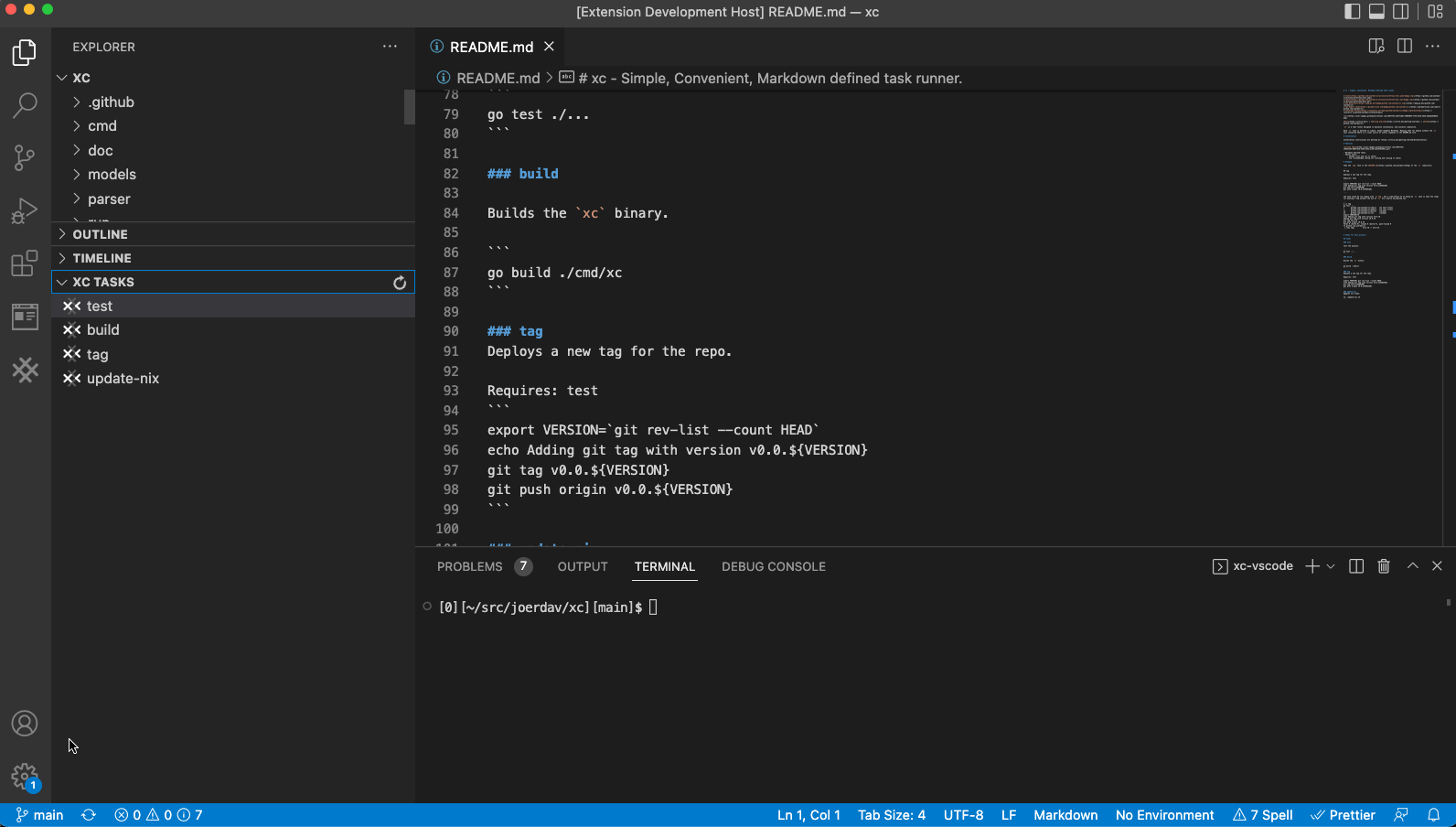
- [Vim](https://xcfile.dev/ide-support/#vim) (recommended config for listing and running `xc` tasks)
- [Emacs](https://codeberg.org/ryanprior/xc.el)

- See also: [`org-mode` specific features](https://xcfile.dev/org-mode-features).
# Example
Take the `tag` task in the [README.md](https://github.com/joerdav/xc#tag) of the `xc` repository:
````
## tag
Deploys a new tag for the repo.
Requires: test
```
export VERSION=`git rev-list --count HEAD`
echo Adding git tag with version v0.0.${VERSION}
git tag v0.0.${VERSION}
git push origin v0.0.${VERSION}
```
````
The task could be run simply with `xc tag`, but a side-effect of it being an `xc` task is that the steps for pushing a tag without the use of `xc` are clearly documented too.
```
$ xc tag
+ go test ./...
? github.com/joerdav/xc/cmd/xc [no test files]
? github.com/joerdav/xc/models [no test files]
ok github.com/joerdav/xc/parser (cached)
ok github.com/joerdav/xc/run (cached)
+ export VERSION=78
+ echo Adding git tag with version v0.0.78
Adding git tag with version v0.0.78
+ git tag v0.0.78
+ git push origin v0.0.78 Total 0 (delta 0), reused 0 (delta 0), pack-reused 0
To github.com:joerdav/xc
* [new tag] v0.0.78 -> v0.0.78
```
# Tasks
## test
Test the project.
```
go test ./...
```
## lint
Run linters.
```
golangci-lint run
```
## build
Builds the `xc` binary.
```
go build ./cmd/xc
```
## tag
Deploys a new tag for the repo.
Specify major/minor/patch with VERSION
Inputs: VERSION
Requires: test
```
# https://github.com/unegma/bash-functions/blob/main/update.sh
CURRENT_VERSION=`git describe --abbrev=0 --tags 2>/dev/null`
CURRENT_VERSION_PARTS=(${CURRENT_VERSION//./ })
VNUM1=${CURRENT_VERSION_PARTS[0]}
VNUM2=${CURRENT_VERSION_PARTS[1]}
VNUM3=${CURRENT_VERSION_PARTS[2]}
if [[ $VERSION == 'major' ]]
then
VNUM1=$((VNUM1+1))
VNUM2=0
VNUM3=0
elif [[ $VERSION == 'minor' ]]
then
VNUM2=$((VNUM2+1))
VNUM3=0
elif [[ $VERSION == 'patch' ]]
then
VNUM3=$((VNUM3+1))
else
echo "Invalid version"
exit 1
fi
NEW_TAG="$VNUM1.$VNUM2.$VNUM3"
echo Adding git tag with version ${NEW_TAG}
git tag ${NEW_TAG}
git push origin ${NEW_TAG}
```
## update-nix
Updates nix flake.
```
sh ./update-nix.sh
```
## install-hugo
Install hugo via `go install`.
```sh
go install github.com/gohugoio/hugo@latest
```
## run-docs
Run the hugo development server.
Directory: doc
```sh
hugo serve
```
## build-docs
Build production docs site.
Directory: doc
```sh
./build.sh
```