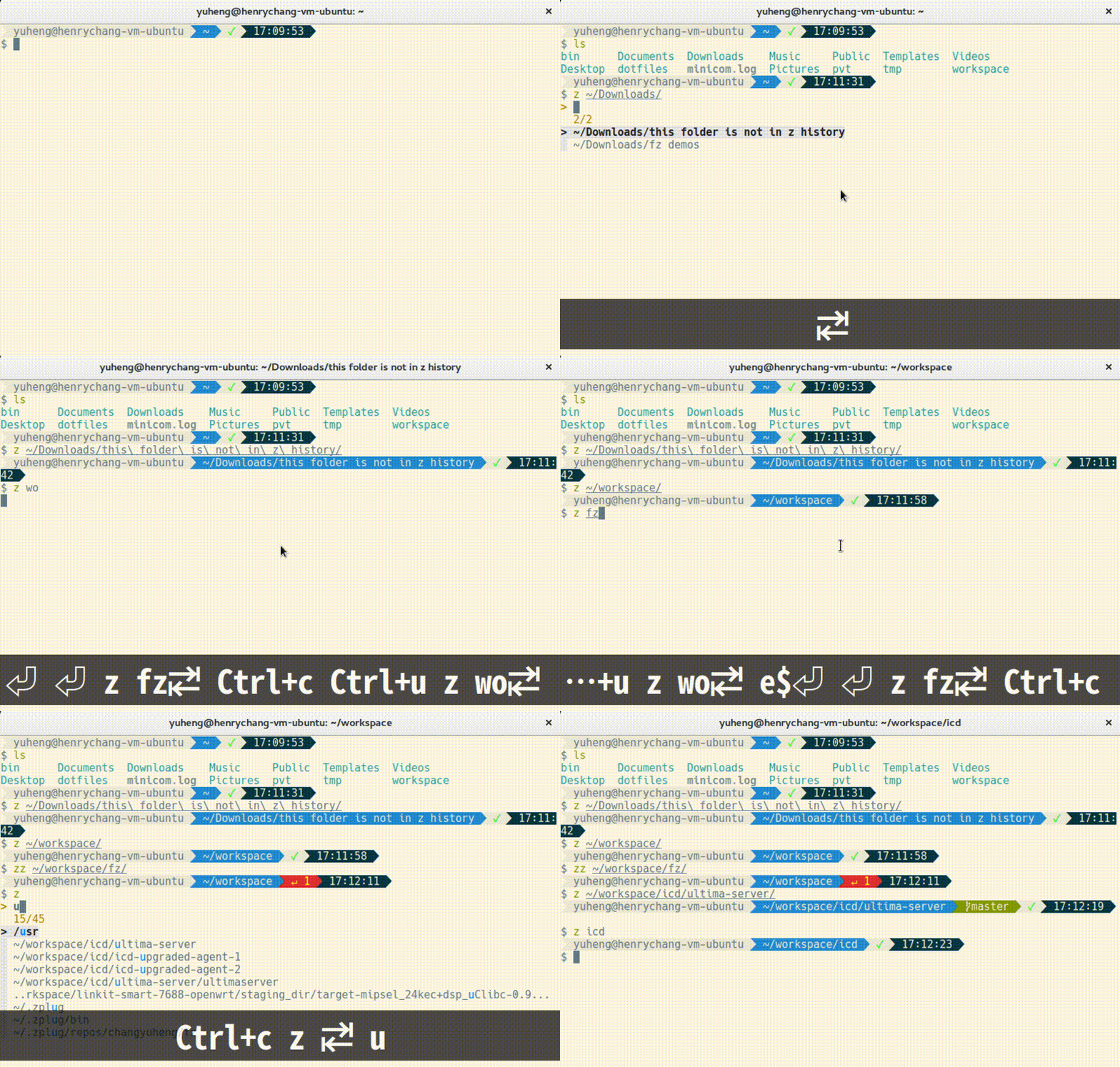
# fz
A shell plugin that seamlessly adds fuzzy search to tab completion of
[z](https://github.com/rupa/z),
lets you easy to jump around among your historical directories.
Not any additional key binding is needed. Currently supports Bash and zsh.
* [Demo](#demo)
* [Installation](#installation)
* [macOS](#macos)
* [Fig](#fig)
* [Bash](#bash)
* [zsh](#zsh)
* [Ubuntu](#ubuntu)
* [Bash](#bash-1)
* [zsh](#zsh-1)
* [Usage](#usage)
* [See Also](#see-also)
* [License](#license)
## Demo
## Installation
By simply sourcing corresponding script file for your shell, you're all set.
However, this plugin is sitting on top of [z](https://github.com/rupa/z) and
[fzf](https://github.com/junegunn/fzf), so you must have them installed as well.
N.B. `fz` needs to be sourced after `z`.
### macOS
#### Fig
[Fig](https://fig.io) adds apps, shortcuts, and autocomplete to your existing terminal.
Install `fz` in zsh or bash with one click.
 #### Bash
1. Install fzf via [Homebrew](https://brew.sh/).
```sh
brew install fzf
```
2. Download z and fz.
```sh
mkdir ~/.bash_completion.d
curl "https://raw.githubusercontent.com/rupa/z/master/{z.sh}" \
-o ~/.bash_completion.d/"#1"
curl "https://raw.githubusercontent.com/changyuheng/fz/master/{fz.sh}" \
-o ~/.bash_completion.d/z"#1"
```
3. Add the following content to `~/.bashrc`:
```sh
if [ -d ~/.bash_completion.d ]; then
for file in ~/.bash_completion.d/*; do
. $file
done
fi
```
#### zsh
1. Install fzf via [Homebrew](https://brew.sh/).
```sh
brew install fzf
```
2. Install z and fz via [zplug](https://github.com/zplug/zplug).
Add the following content to `~/.zshrc`:
```sh
zplug "changyuheng/fz", defer:1
zplug "rupa/z", use:z.sh
```
### Ubuntu
#### Bash
1. Install fzf.
```sh
git clone --depth 1 https://github.com/junegunn/fzf.git ~/.fzf
~/.fzf/install
```
2. Download z and fz.
```sh
mkdir ~/.bash_completion.d
curl "https://raw.githubusercontent.com/rupa/z/master/{z.sh}" \
-o ~/.bash_completion.d/"#1"
curl "https://raw.githubusercontent.com/changyuheng/fz/master/{fz.sh}" \
-o ~/.bash_completion.d/z"#1"
```
3. Add the following content to `~/.bashrc`:
```sh
if [ -d ~/.bash_completion.d ]; then
for file in ~/.bash_completion.d/*; do
. $file
done
fi
```
#### zsh
1. Install fzf.
```sh
git clone --depth 1 https://github.com/junegunn/fzf.git ~/.fzf
~/.fzf/install
```
2. Install z and fz via [zplug](https://github.com/zplug/zplug).
Add the following content to `~/.zshrc`:
```sh
zplug "changyuheng/fz", defer:1
zplug "rupa/z", use:z.sh
```
## Usage
```
z [dir name slug]
zz [dir name slug]
```
- The function of fz is pretty much like what it is of
[z](https://github.com/rupa/z).
`zz` limits the search base starting from current working directory.
Check z’s doc for more information.
- `tab`/`shift-tab`, `ctrl-n`/`ctrl-p`, `ctrl-j`/`ctrl-k`,
for next and previous item. `Enter` for selection.
Check fzf’s [doc](https://github.com/junegunn/fzf#search-syntax)
for the search syntaxes.
- `FZ_CMD=z` specifies command name of `fz`. Default is `z`.
- `FZ_SUBDIR_CMD=zz` specifies command name for subdirectory only `z`.
Default is `zz`.
- `FZ_SUBDIR_TRAVERSAL=0` disables subdirectory completion.
Default is enabled.
- `FZ_CASE_INSENSITIVE=0` disables case-insensitive subdirectory completion.
Default is enabled.
- `FZ_ABBREVIATE_HOME=0` disables abbreviating `~`. Default is enabled.
- `FZ_HISTORY_CD_CMD=_zlua` works with [z.lua](https://github.com/skywind3000/z.lua).
## See Also
- [cdr](https://github.com/willghatch/zsh-cdr) + [zaw](https://github.com/zsh-users/zaw)
- fzf’s [readme of completion](https://github.com/junegunn/fzf#fuzzy-completion-for-bash-and-zsh)
and its [wiki](https://github.com/junegunn/fzf/wiki)
- [fasd](https://github.com/clvv/fasd)
- [autojump](https://github.com/wting/autojump)
- [z.lua](https://github.com/skywind3000/z.lua)
- [命令行上的narrowing(随着输入逐步减少备选项)工具](http://www.cnblogs.com/bamanzi/p/cli-narrowing-tools.html)
#### Bash
1. Install fzf via [Homebrew](https://brew.sh/).
```sh
brew install fzf
```
2. Download z and fz.
```sh
mkdir ~/.bash_completion.d
curl "https://raw.githubusercontent.com/rupa/z/master/{z.sh}" \
-o ~/.bash_completion.d/"#1"
curl "https://raw.githubusercontent.com/changyuheng/fz/master/{fz.sh}" \
-o ~/.bash_completion.d/z"#1"
```
3. Add the following content to `~/.bashrc`:
```sh
if [ -d ~/.bash_completion.d ]; then
for file in ~/.bash_completion.d/*; do
. $file
done
fi
```
#### zsh
1. Install fzf via [Homebrew](https://brew.sh/).
```sh
brew install fzf
```
2. Install z and fz via [zplug](https://github.com/zplug/zplug).
Add the following content to `~/.zshrc`:
```sh
zplug "changyuheng/fz", defer:1
zplug "rupa/z", use:z.sh
```
### Ubuntu
#### Bash
1. Install fzf.
```sh
git clone --depth 1 https://github.com/junegunn/fzf.git ~/.fzf
~/.fzf/install
```
2. Download z and fz.
```sh
mkdir ~/.bash_completion.d
curl "https://raw.githubusercontent.com/rupa/z/master/{z.sh}" \
-o ~/.bash_completion.d/"#1"
curl "https://raw.githubusercontent.com/changyuheng/fz/master/{fz.sh}" \
-o ~/.bash_completion.d/z"#1"
```
3. Add the following content to `~/.bashrc`:
```sh
if [ -d ~/.bash_completion.d ]; then
for file in ~/.bash_completion.d/*; do
. $file
done
fi
```
#### zsh
1. Install fzf.
```sh
git clone --depth 1 https://github.com/junegunn/fzf.git ~/.fzf
~/.fzf/install
```
2. Install z and fz via [zplug](https://github.com/zplug/zplug).
Add the following content to `~/.zshrc`:
```sh
zplug "changyuheng/fz", defer:1
zplug "rupa/z", use:z.sh
```
## Usage
```
z [dir name slug]
zz [dir name slug]
```
- The function of fz is pretty much like what it is of
[z](https://github.com/rupa/z).
`zz` limits the search base starting from current working directory.
Check z’s doc for more information.
- `tab`/`shift-tab`, `ctrl-n`/`ctrl-p`, `ctrl-j`/`ctrl-k`,
for next and previous item. `Enter` for selection.
Check fzf’s [doc](https://github.com/junegunn/fzf#search-syntax)
for the search syntaxes.
- `FZ_CMD=z` specifies command name of `fz`. Default is `z`.
- `FZ_SUBDIR_CMD=zz` specifies command name for subdirectory only `z`.
Default is `zz`.
- `FZ_SUBDIR_TRAVERSAL=0` disables subdirectory completion.
Default is enabled.
- `FZ_CASE_INSENSITIVE=0` disables case-insensitive subdirectory completion.
Default is enabled.
- `FZ_ABBREVIATE_HOME=0` disables abbreviating `~`. Default is enabled.
- `FZ_HISTORY_CD_CMD=_zlua` works with [z.lua](https://github.com/skywind3000/z.lua).
## See Also
- [cdr](https://github.com/willghatch/zsh-cdr) + [zaw](https://github.com/zsh-users/zaw)
- fzf’s [readme of completion](https://github.com/junegunn/fzf#fuzzy-completion-for-bash-and-zsh)
and its [wiki](https://github.com/junegunn/fzf/wiki)
- [fasd](https://github.com/clvv/fasd)
- [autojump](https://github.com/wting/autojump)
- [z.lua](https://github.com/skywind3000/z.lua)
- [命令行上的narrowing(随着输入逐步减少备选项)工具](http://www.cnblogs.com/bamanzi/p/cli-narrowing-tools.html)