Blade


Automatically build and rebuild Xcode image catalogs for app icons, universal images, and more.
* Use in existing projects to generate image catalogs with no extra work. Blade will automagically refresh your image catalogs based on given master images.
* Use templates of image catalogs to generate new catalogs (see [templates](templates/)).
See [blade-sample](https://github.com/jondot/blade-sample) for a preconfigured project.
## Why?
Because most of the time your image catalogs are the same image, resized to various sizes.
Here is how people solve this usually:
* Have the designer slice the images manually / automatically using a [PSD template](http://appicontemplate.com/)
* Use some sort of [online image slicing service](http://makeappicon.com/) which emails you a zip of the various sizes
The problem with these solutions is:
* Some times the various slices are not up to date with Xcode (new devices, new sizes)
* It Almost always require extra work from you (placing each image manually in the catalog, fixing mismatches etc.)
* You can't control the quality of the resize
* You can't integrate the tooling into your build workflow or CI
Blade is an open source tool which will replace the PSD template and/or online services for you, and has a goal to satisfy the above requirements in the best way possible.
## Quick start
You have 2 ways to install:
#### Homebrew
Using Homebrew:
```
$ brew tap jondot/tap
$ brew install blade
```
#### Release
Download one of the binaries in [releases](https://github.com/jondot/blade/releases), and put in your `PATH` or just include in each Xcode project's root.
This should be a typical run of blade:
#### Use a Bladefile
Here's how a project setup with a Bladefile feels like (more in the [Blade Sample](https://github.com/jondot/blade-sample) repo):
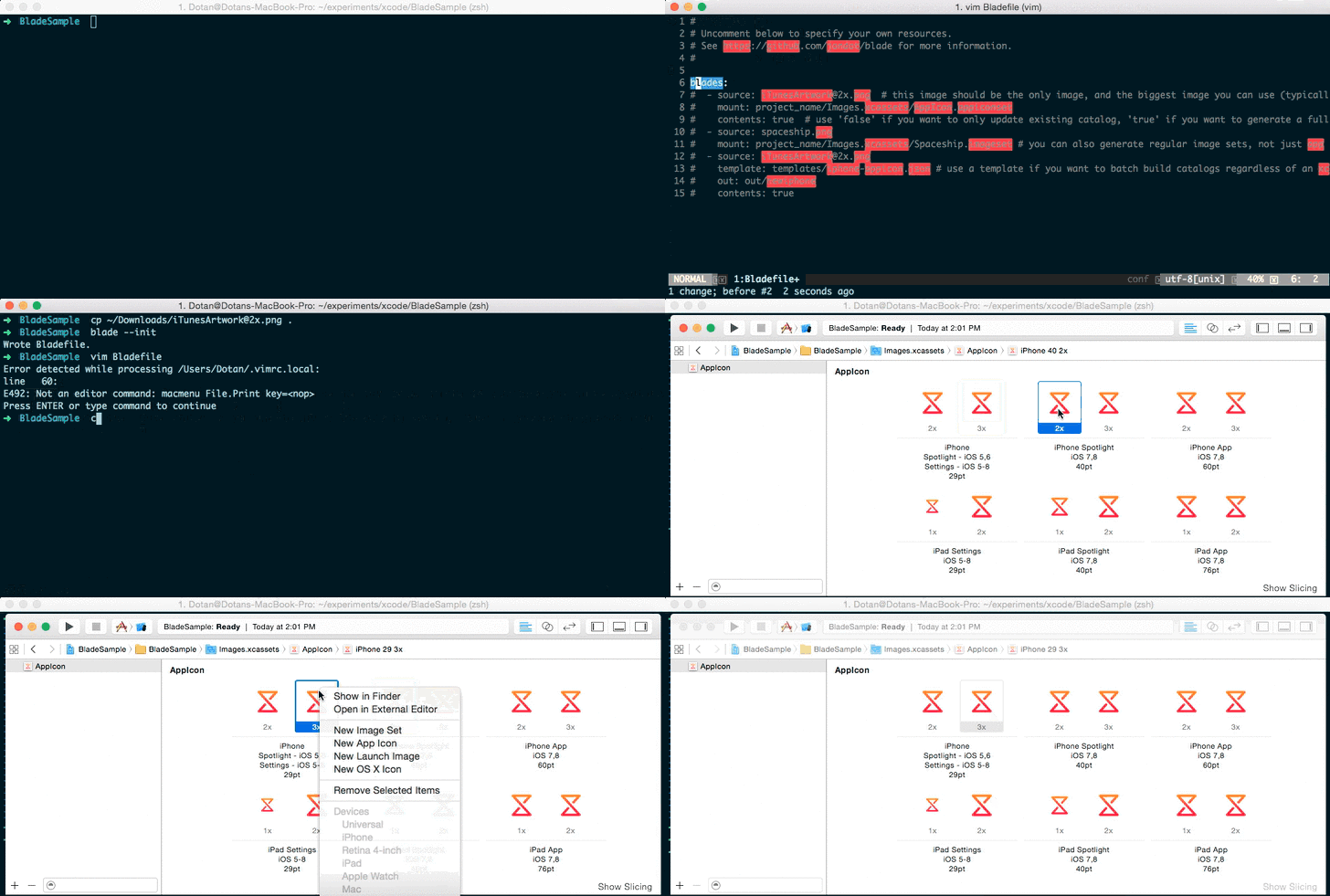
The best way to use Blade, is to set up a local `Bladefile` for your entire project. Within it, specify all of your resources. Blade will pick it up automatically.
_See [blade-sample](https://github.com/jondot/blade-sample) for a preconfigured project._
```
$ blade --init
Wrote Bladefile.
```
Here is how your `Bladefile` would look like:
```yaml
blades:
- source: iTunesArtwork@2x.png
mount: foobar/Assets.xcassets/AppIcon.appiconset
- source: Spaceship_1024.png
mount: foobar/Assets.xcassets/Spaceship.imageset
```
It was made for this project structure:
```
foobar
├── Bladefile
├── images
│ ├── iTunesArtwork@2x.png
│ └── Spaceship_1024.png
├── foobar
│ ├── AppDelegate.swift
│ ├── Assets.xcassets
│ │ ├── AppIcon.appiconset
│ │ │ └── Contents.json
│ │ └── Spaceship.imageset
│ │ ├── Contents.json
```
Then use Blade (use --verbose if you want logs) within the same folder where your `Bladefile` lives:
```
$ blade --verbose
INFO[0000] Found a local Bladefile.
INFO[0000] Bladefile contains 2 blade defs.
...
```
And it will generate all of the images needed within each image catalog.
To make this happen before each build see [how to run a script while building a product](https://developer.apple.com/library/ios/recipes/xcode_help-project_editor/Articles/AddingaRunScriptBuildPhase.html)
#### Use directly

```
$ blade --source=iTunesArtwork@2x.png --template=templates/watch.json --out=out/watch --catalog
```
Here's what we did:
* Use a source image (`--source`)
* Make a brand new image catalog (`--catalog`), from a template (`templates/watch.json`)
* Put everything in `out/watch`
```
$ blade -s iTunesArtwork@2x.png -t existing.imageset -o existing.imageset
```
Here's what we did:
* Use a source image (`-s`)
* Point to an existing image catalog (`-t`)
* Output to that same existing image catalog (`-o`)
* In other words, Blade will refresh the images in this catalog
## How does it work?
Blade parses __the same Xcode image catalog__ configuration file as its own configuration source - no new concept introduced. This allows it to be future-proof with Xcode updates for new image sizes and catalog types.
Supported workflows:
* __Prototyping__ ad-hoc, while prototyping projects
* __Development__ build with Build Steps, transforming all of your source image assets to image catalogs
* __CI__ in your CI servers, either on OSX or Linux (though Linux can't compile code in this case, you can still use it to do image processing)
Supported resize algorithms (`-i` or `--interpolation` flag):
* `l3`: [Lanczos3](https://en.wikipedia.org/wiki/Lanczos_resampling) - _Default_
* `l2`: [Lanczos2](https://en.wikipedia.org/wiki/Lanczos_resampling)
* `n`: [Nearest Neighbor](https://en.wikipedia.org/wiki/Nearest-neighbor_interpolation)
* `bc`: [Bicubic](https://en.wikipedia.org/wiki/Bicubic_interpolation)
* `bl`: [Bilinear](https://en.wikipedia.org/wiki/Bilinear_interpolation)
* `mn`: [Mitchell-Netravali](https://de.wikipedia.org/wiki/Mitchell-Netravali-Filter)
See [here](https://github.com/nfnt/resize) for live samples.
## Hacking on Blade
Pull requests are happily accepted.
Here's what you should know if you want to improve Blade:
* Your workflow starting point is the `Makefile`. There you should see how to setup the development tooling, run builds, tests and coverage.
* The architecture splits out the runner from the converter, so that we could swap to other, faster, converters (vips) if needed.
* The other concerns are the `Contents.json` ([contents.go](contents.go)) parsing and dimension ([dimensions.go](dimensions.go)) computation logic.
* Finally, you're left with the Bladefile ([bladefile.go](bladefile.go)) and CLI ([main.go](main.go)) logic to handle.
Also, check out [fixtures](fixtures) for quick image catalog configuration to work with.
Here is a typical flow:
1. Clone project
2. Branch off for your changes
3. Edit code
4. Test your changes, submit PR
5. (release) `make bump`
6. (release) `make release`
7. (release) use hub to upload release binaries
8. (release) `make brew_sha ver=`
8. (release) update jondot/homebrew-tap version and sha to point to new binary
(* 'release' flows are done by core committers)
# Contributing
Fork, implement, add tests, pull request, get my everlasting thanks and a respectable place here :).
# Copyright
Copyright (c) 2015 [Dotan Nahum](http://gplus.to/dotan) [@jondot](http://twitter.com/jondot). See MIT-LICENSE for further details.