Optio

Optio

All your agent work. One place to run it.

Self-hosted orchestration for coding agents, automated workflows, and interactive sessions.
On your Kubernetes cluster. On your own machines. In your pocket.

Product tour · Get started · Documentation · Releases

[![CI](https://github.com/jonwiggins/optio/actions/workflows/ci.yml/badge.svg)](https://github.com/jonwiggins/optio/actions/workflows/ci.yml) [![License: MIT](https://img.shields.io/badge/License-MIT-blue.svg)](./LICENSE)
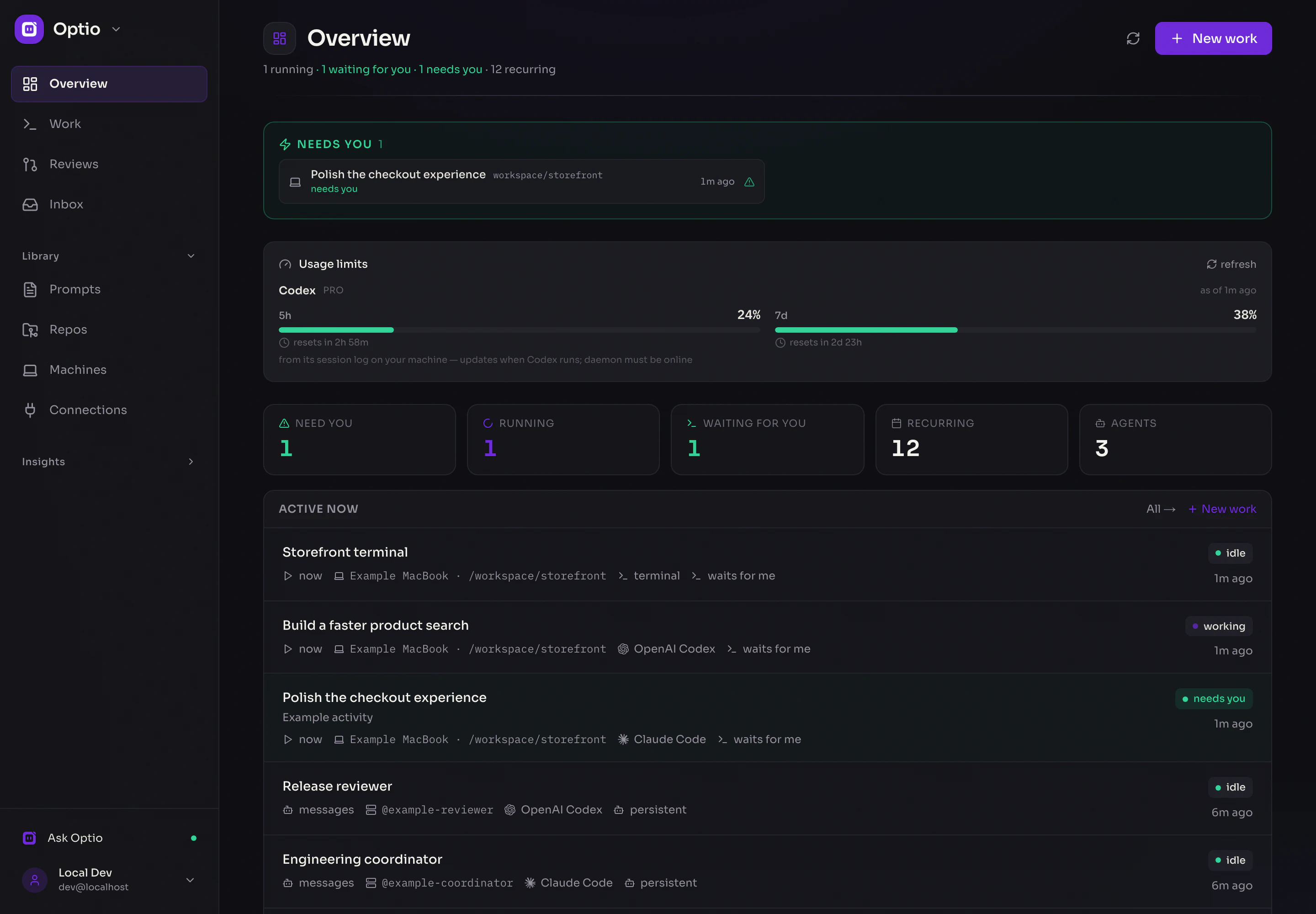
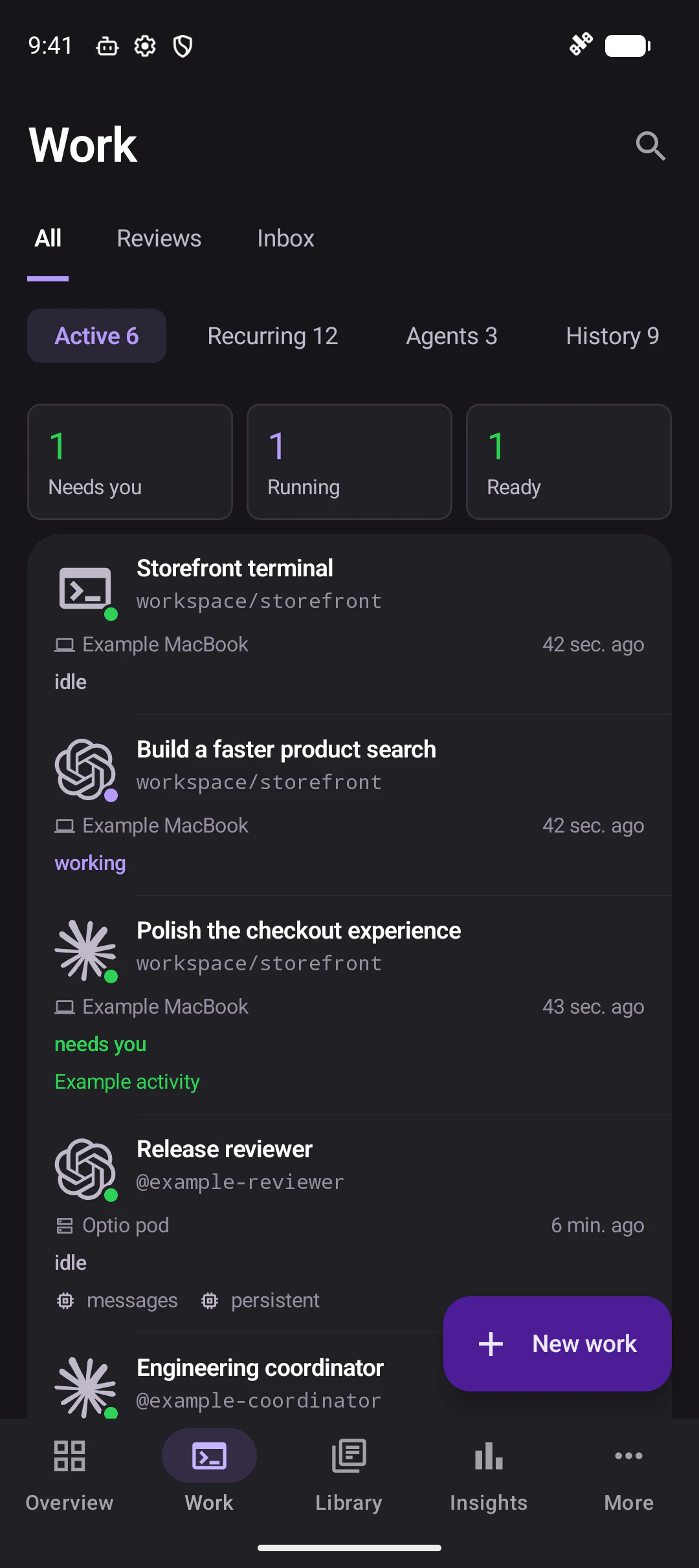
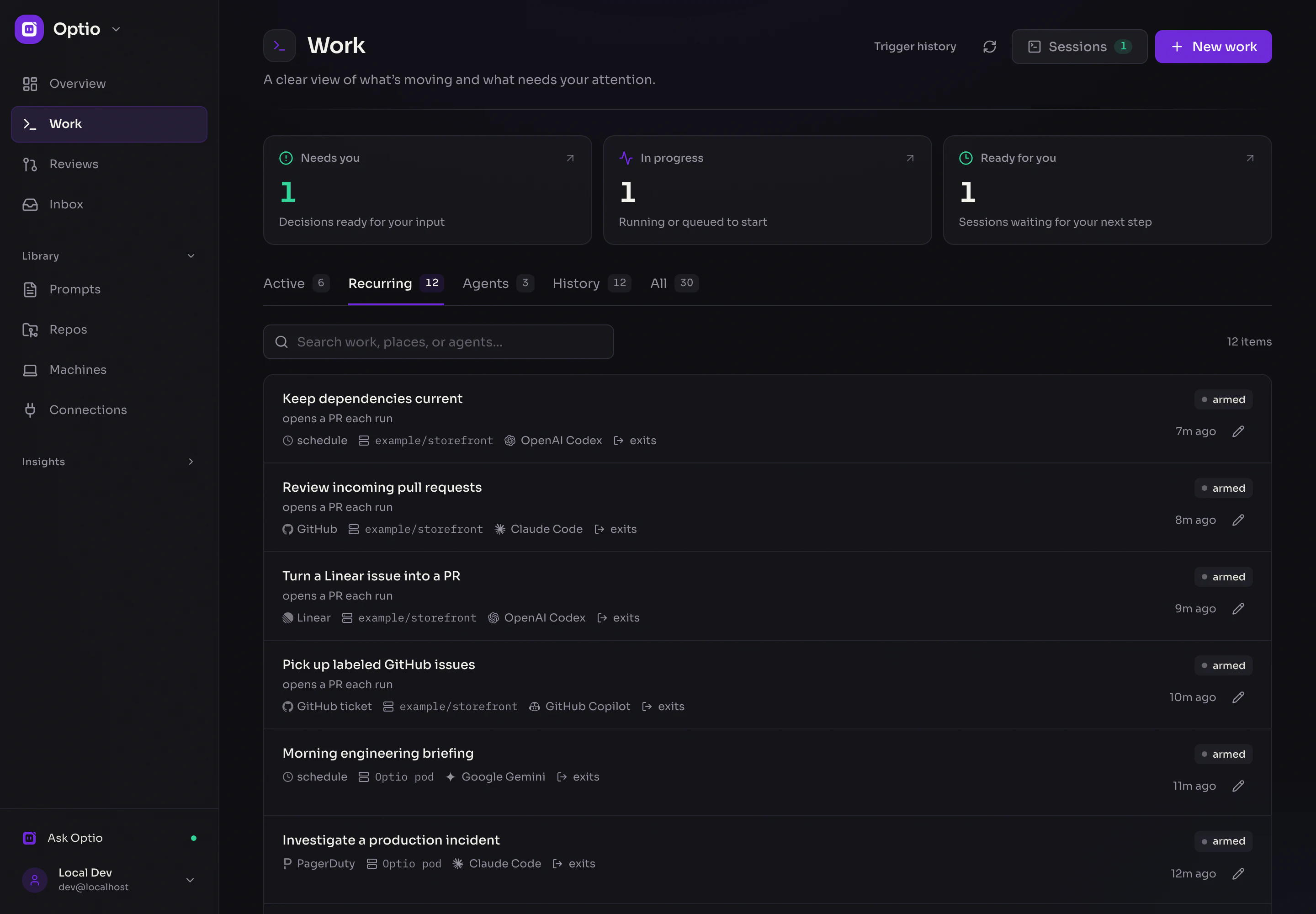
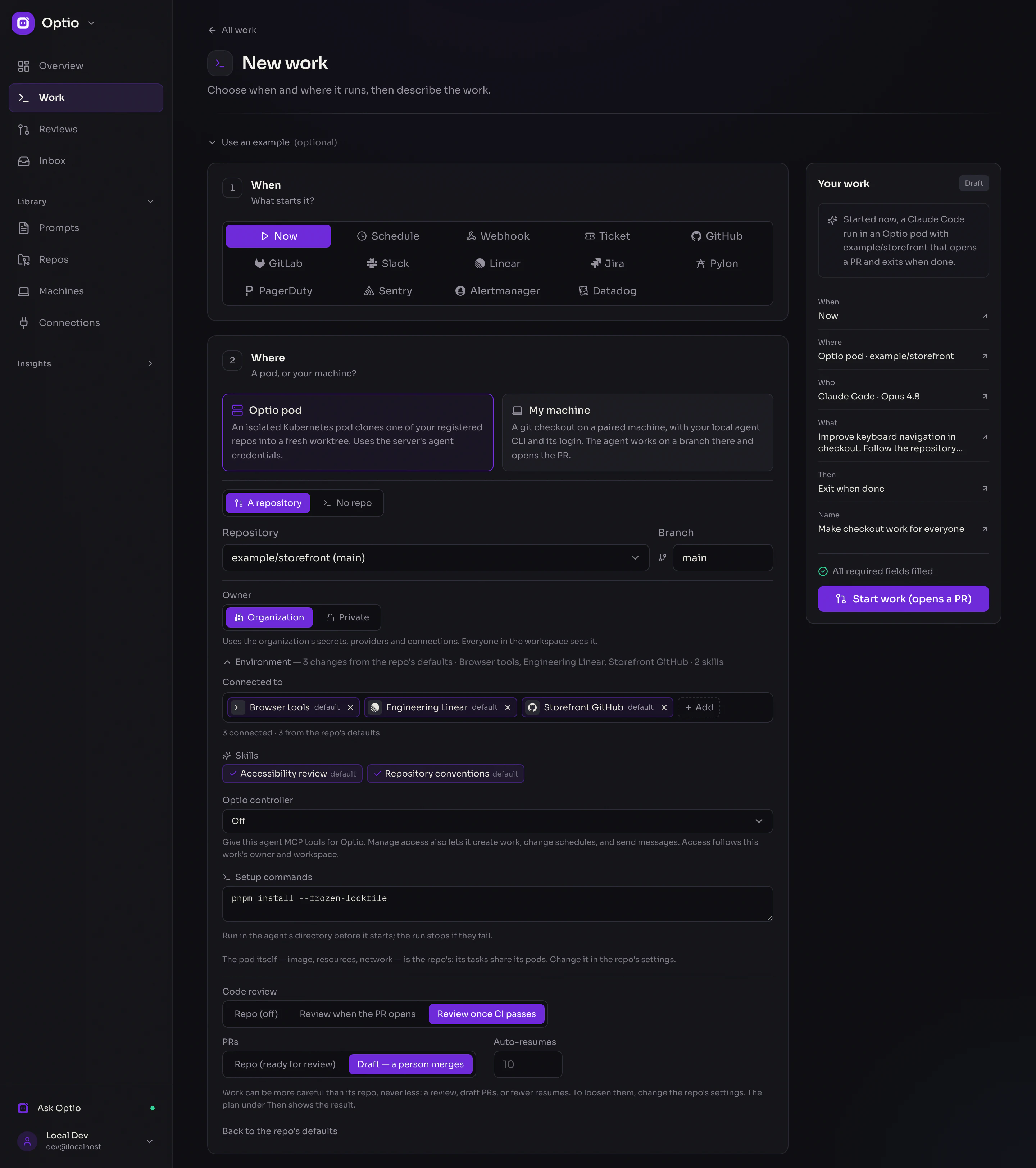
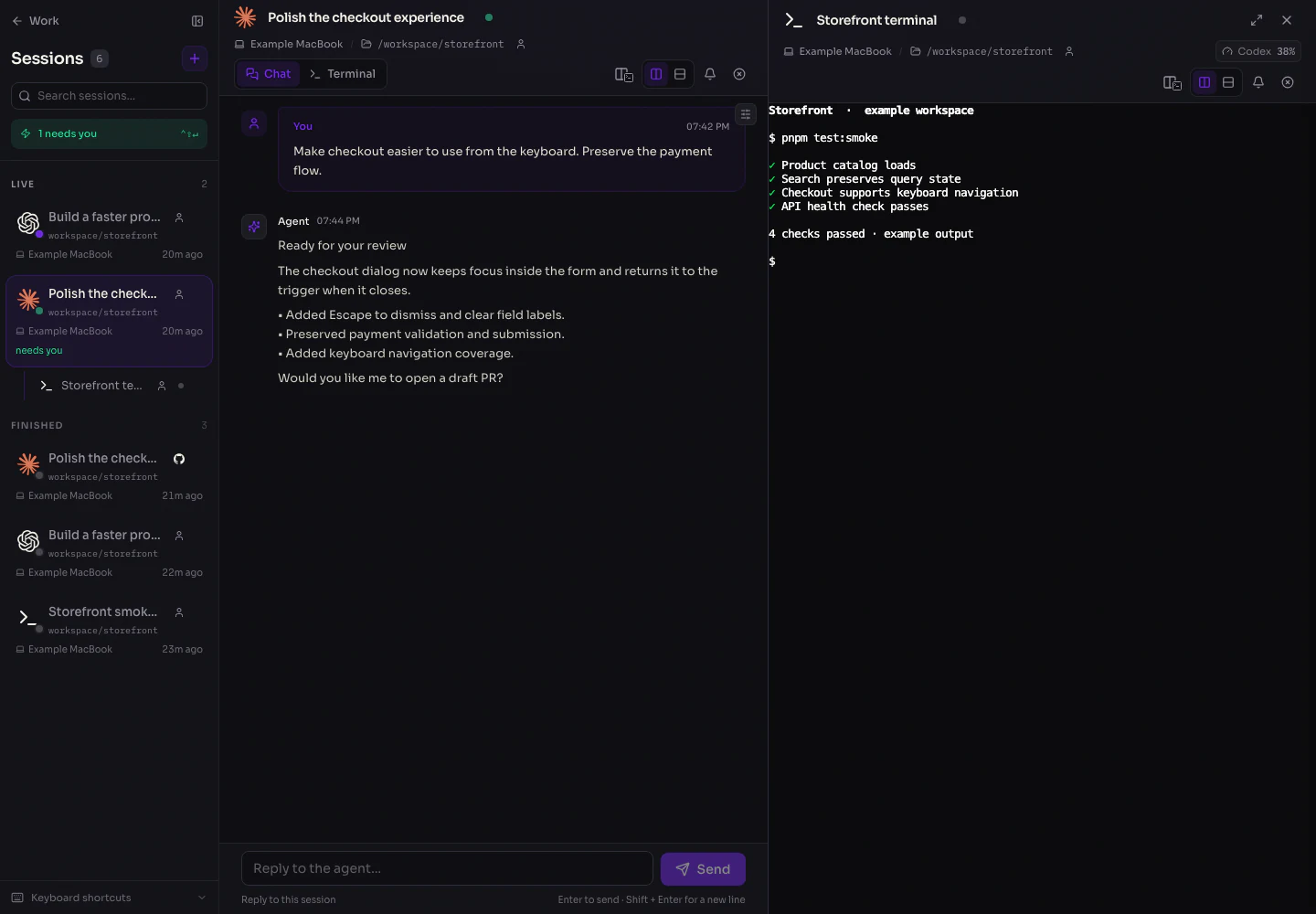
![Optio Overview: needs-you queue, provider usage limits, local sessions, and persistent agents](apps/site/public/screenshots/showcase/web-overview.webp) _Know what is running, what is ready, and what needs you. All screenshots use fictional demonstration data; activity and usage are simulated._ Optio gives your agents a shared workspace. Hand off a code change, schedule a report, respond to an event, or keep a terminal open while you move between your desk and your phone. Start and follow all of it from one **Work** feed. Choose **Claude Code, OpenAI Codex, GitHub Copilot, Google Gemini, Cursor, OpenCode, Pi, or OpenClaw**—or run a plain shell command. Pick the runtime for each piece of work, with the models and providers it supports. ## What can you do with Optio? | Put an agent to work on… | Start it with… | What happens | | ------------------------------------------------- | ----------------------------------------------------------------------- | ------------------------------------------------------------------------------------------------------------------------ | | **An issue → a pull request** | A prompt, ticket, GitHub event, or Linear event | Work in a repo worktree, open a PR, follow CI and review, and resume with feedback. Merge automatically when configured. | | **Dependency updates and daily briefings** | A cron schedule | Run saved instructions on a schedule, with a separate history for each run. | | **Incidents and failed deployments** | PagerDuty, Datadog, Alertmanager, Sentry, a failed CI run, or a webhook | Turn event payloads into prompt parameters; investigate with the tools and credentials you assign. | | **Engineering questions and support escalations** | Slack or Pylon | Research the request, prepare an answer, and leave the next decision to a person when your instructions call for it. | | **Work in your own checkout** | A manual session or an event | Run an agent or terminal on a paired machine with its existing CLI login. | | **A team of specialists** | Messages, schedules, or events | Give persistent agents their own instructions and inboxes. Coordinate them through the inter-agent API. | | **Routine shell checks** | Manual, schedule, or another trigger | Run a command without an LLM; track its output and exit status. | | **A session with a teammate** | An expiring share link | Let an authenticated organization member view and control the session; revoke access when finished. | The fifteen trigger types are **manual, schedule, webhook, ticket, GitHub, GitLab, Slack, Linear, Jira, Pylon, PagerDuty, Sentry, Alertmanager (Prometheus / Grafana), Datadog, and Jenkins**. Persistent agents can also wake on messages. GitHub, GitLab, and AWS CodeCommit are supported repository platforms; available CI and issue features depend on the platform. ![Recurring work with several agent runtimes and schedule, ticket, and event triggers](apps/site/public/screenshots/showcase/web-work.webp) _Repo work, jobs, local automations, and persistent agents share the same feed._ ## Five answers describe the work | | Your choice | | --------- | ------------------------------------------------------------------------------ | | **When** | Start now, on a schedule, from a ticket or event, or when a message arrives. | | **Where** | A pod in your cluster, with or without a repo, or a directory on your machine. | | **Who** | An agent runtime with its parameters, or a terminal. | | **What** | A prompt, a reusable template with `{{params}}`, or a shell command. | | **Then** | Exit when done, wait for you, or stay available as a persistent agent. | The form derives the right kind of work from these choices and reads it back as a sentence. Edit recurring work in the same form. ![Create work: the trigger choices, pod or machine execution, repository and ownership, connections, skills, setup commands, and PR review settings](apps/site/public/screenshots/showcase/web-create-work.webp) _Choose a trigger, then shape the environment: pod or machine, repository and branch, ownership, connections and MCP tools, skills, setup commands, and PR review settings. Follow the repo's defaults or customize this piece of work._ ## Stay close to your sessions Read the agent’s conversation or use its terminal. Open a shell in the same directory with **Terminal here**, split sessions side by side, and drag the session sidebar to the width you want. Pane arrangements stay on the current device. ![An agent conversation and terminal side by side, with grouped sessions in the sidebar](apps/site/public/screenshots/showcase/web-sessions.webp) Session sharing requires organization sign-in and grants **view and control**. Links expire and can be revoked. Collaborators gain access to the session’s environment and capabilities, including credentials available there. [Sharing and recovery details →](docs/production-eks.md) ## Native apps, wherever you are Optio has a **SwiftUI iOS app** and a **Jetpack Compose Android app**. Check the queue, create work, read conversations, control terminals, and manage your workspace from your phone.
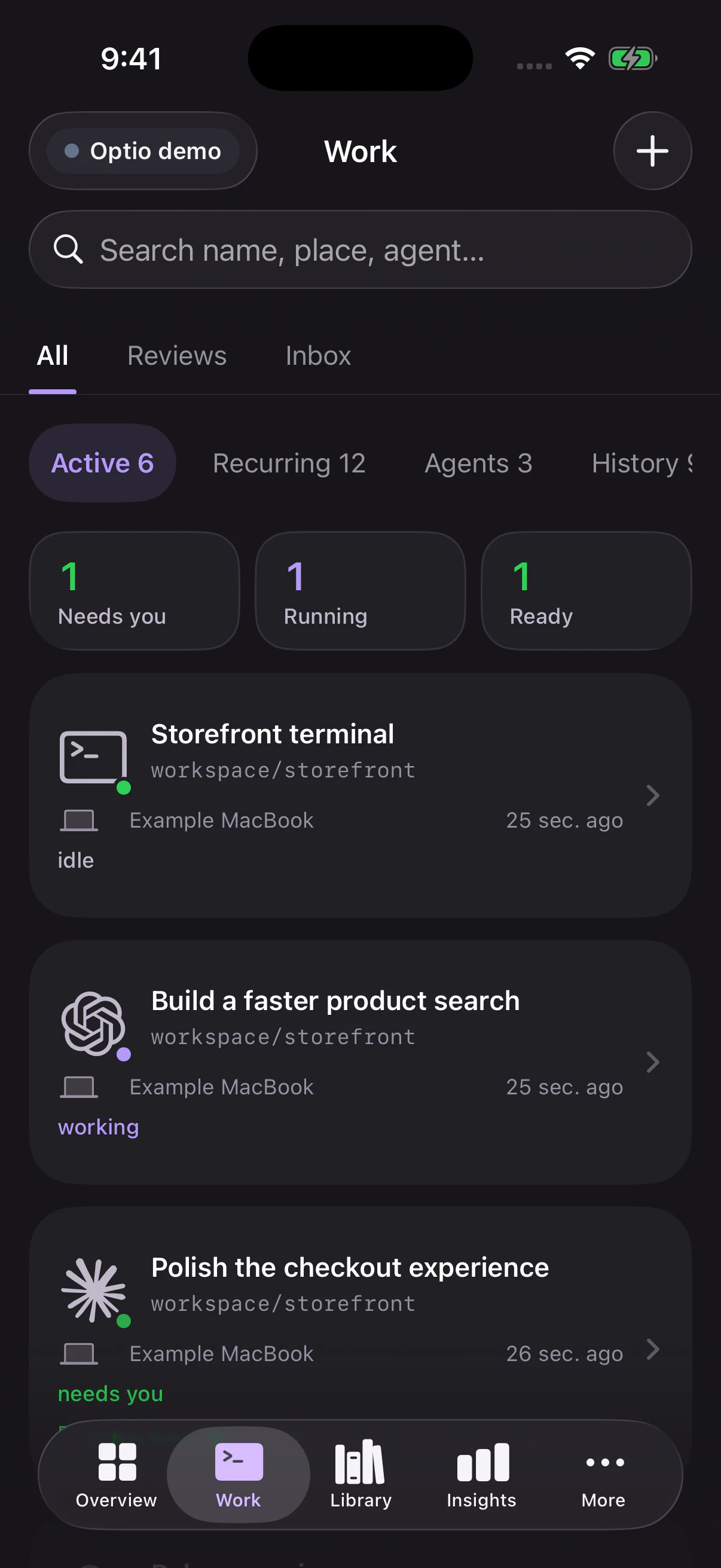
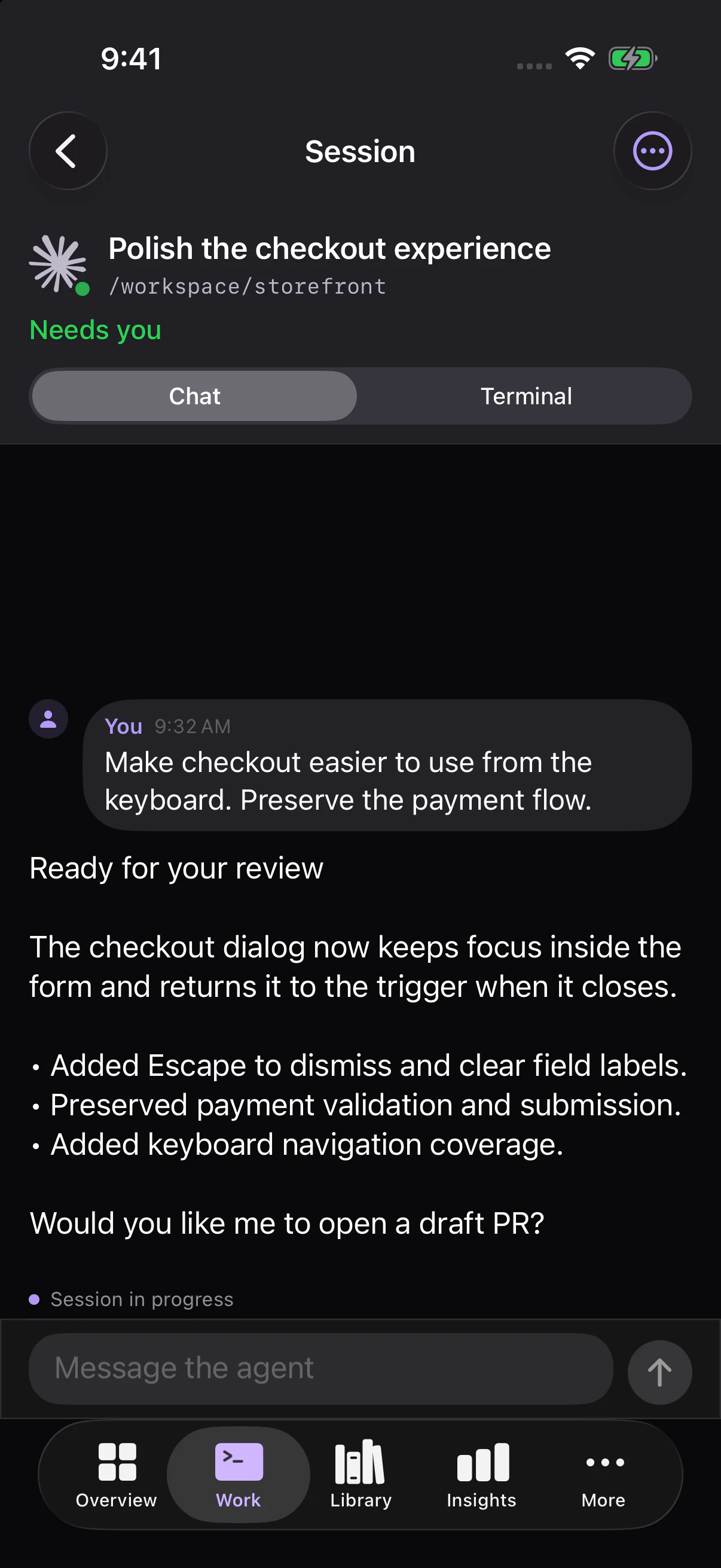
iOS Work feed   iOS agent session with a reply composer   Android Work feed

**iOS:** home-screen and Lock Screen widgets, Live Activities, Dynamic Island, and a mirrored Live Activity in the **Apple Watch Smart Stack**. **Android:** home-screen widgets, notifications, and an ongoing watch notification. Contextual actions take you back to the work that needs you. ![Native Apple widget, Live Activity, and Watch Smart Stack component captures with example states](apps/site/public/screenshots/showcase/ios-glances.webp) _Native Apple component captures with sample states. Watch support is provided by the iPhone Live Activity; there is no separate Watch app._ [Build iOS](apps/ios/README.md) · [Build Android](apps/android/README.md) · [More screenshots](https://optio.host/#gallery) ## Your infrastructure, your choices - **Cluster and laptop execution.** Repository work uses worktrees in Kubernetes; Optio Local pairs your machines through an outbound connection and uses their CLI configuration. - **Connections and tools.** Combine encrypted credentials, MCP servers, shell environment, and usage notes. Assign access by repo and runtime, with per-work settings. [Connections →](docs/connections.md) - **Explicit ownership and isolation.** Execution pools include workspace, owner, purpose, and access settings. Work inside the same pool remains mutually trusted; ordinary pods are not a boundary for hostile tenants. [Security review →](docs/security-review-2026-10.md) - **Recovery with visible status.** Sessions report reconnecting, resumable, or lost states. Preserve recoverable work and require an explicit decision before retrying an uncertain outcome. [Recovery →](docs/production-eks.md) - **Managed Kubernetes deployment.** Helm supports managed PostgreSQL and Redis, existing Kubernetes Secrets for database, Redis, encryption, and OAuth settings, and separate worker identities. The combined API/web deployment runs any number of replicas (`api.replicas` or `api.autoscaling`) on one Postgres and one Redis; worker pods scale independently. [EKS and production guide →](docs/production-eks.md) - **Identity and access.** Workspaces, admin/member/viewer roles, OAuth/OIDC sign-in, personal access tokens, and encrypted secrets at rest. [Sign-in →](docs/sign-in.md) Optio is the orchestration layer you host. Agents still communicate with the model providers and external tools you configure; self-hosting Optio does not make those services local. ## Get started For a local deployment, install Docker Desktop and enable Kubernetes, then: ```bash git clone https://github.com/jonwiggins/optio.git cd optio ./scripts/setup-local.sh ``` Open **http://localhost:30310** and complete setup. The API listens at **http://localhost:30400**. The setup script builds the project and deploys it to local Kubernetes; see the [installation guide](https://optio.host/docs/installation/) for prerequisites and other deployment options. For production, use the [Helm chart](helm/optio/) and [managed deployment guide](docs/production-eks.md). Agent providers and infrastructure may have their own costs. The optional [backup guide](docs/backup.md) covers scheduled database dumps, restores and restore drills. Want a workspace to explore? [Seed the example catalog](scripts/showcase/README.md). It adds clearly labeled, paused examples without running agents, contacting integrations, or replacing existing work. ## Explore further | Guide | What it covers | | ----------------------------------------------------- | ------------------------------------------------------- | | [Work and tasks](docs/tasks.md) | Repo tasks, jobs, recurring definitions, and lifecycle | | [Optio Local](docs/optio-local.md) | Pair machines, terminals, automations, and transcripts | | [Persistent agents](docs/persistent-agents.md) | Inboxes, turn loops, agent messaging, and pod lifecycle | | [Example agent teams](examples/persistent-agents/) | Forge and Mars Mission Control | | [Connections](docs/connections.md) | Credentials, MCP tools, environment, and skills | | [LiteLLM proxy](docs/litellm-proxy.md) | One endpoint and key for every coding agent | | [Configuration as code](docs/config-as-code.md) | Keep workspace configuration in a repository | | [Reconciliation](docs/reconciliation.md) | How the control plane follows work and recovers | | [Redis](docs/redis.md) | Standalone or cluster mode, ElastiCache Serverless | | [Contributing](https://optio.host/docs/contributing/) | Architecture, development setup, and tests | Built with TypeScript, Next.js, Fastify, PostgreSQL, Redis/BullMQ, and Kubernetes, with native Swift and Kotlin clients. See [AGENTS.md](AGENTS.md) for repository conventions and the test matrix. [MIT licensed](LICENSE).