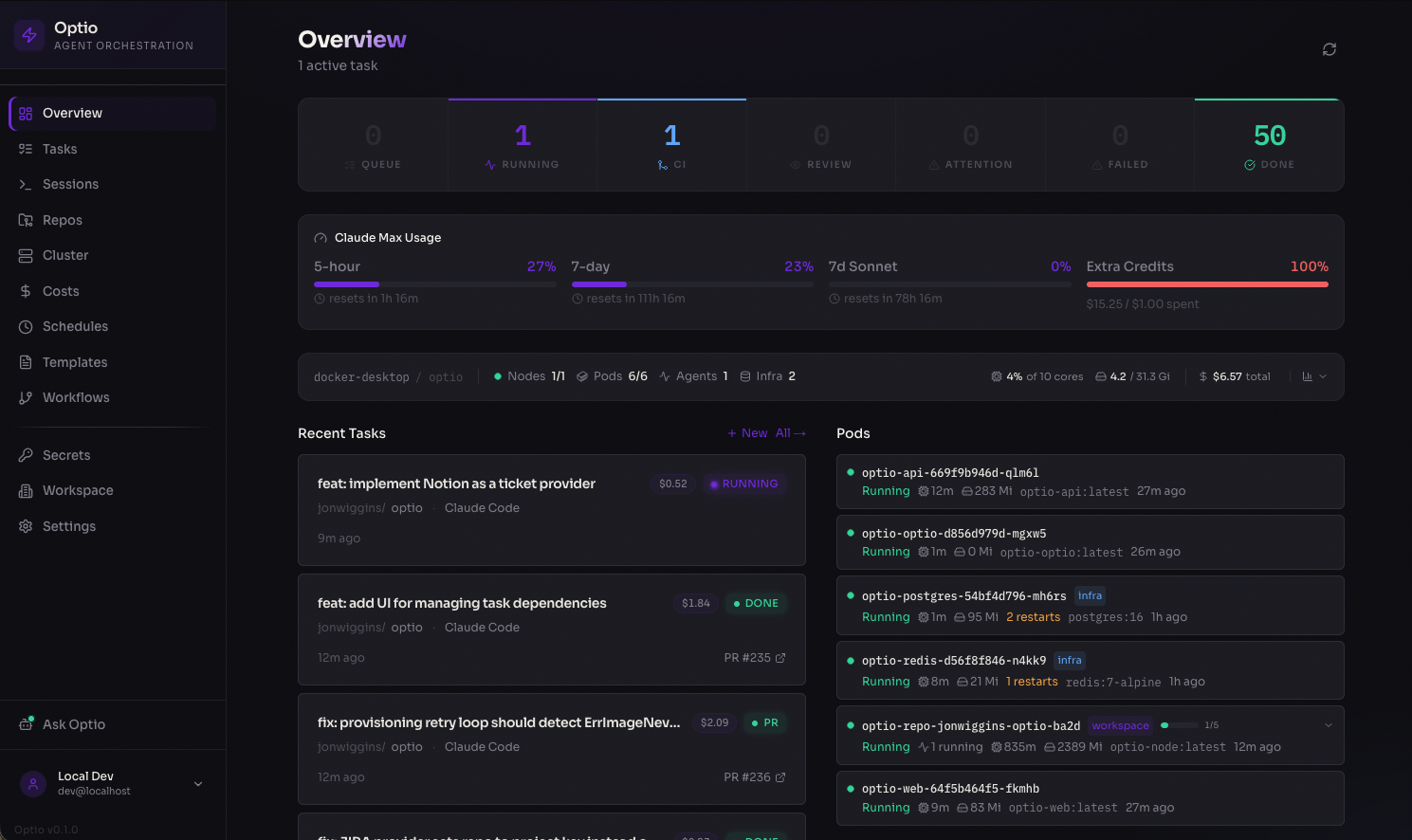
Dashboard — real-time overview of running agents, pod status, costs, and recent activity
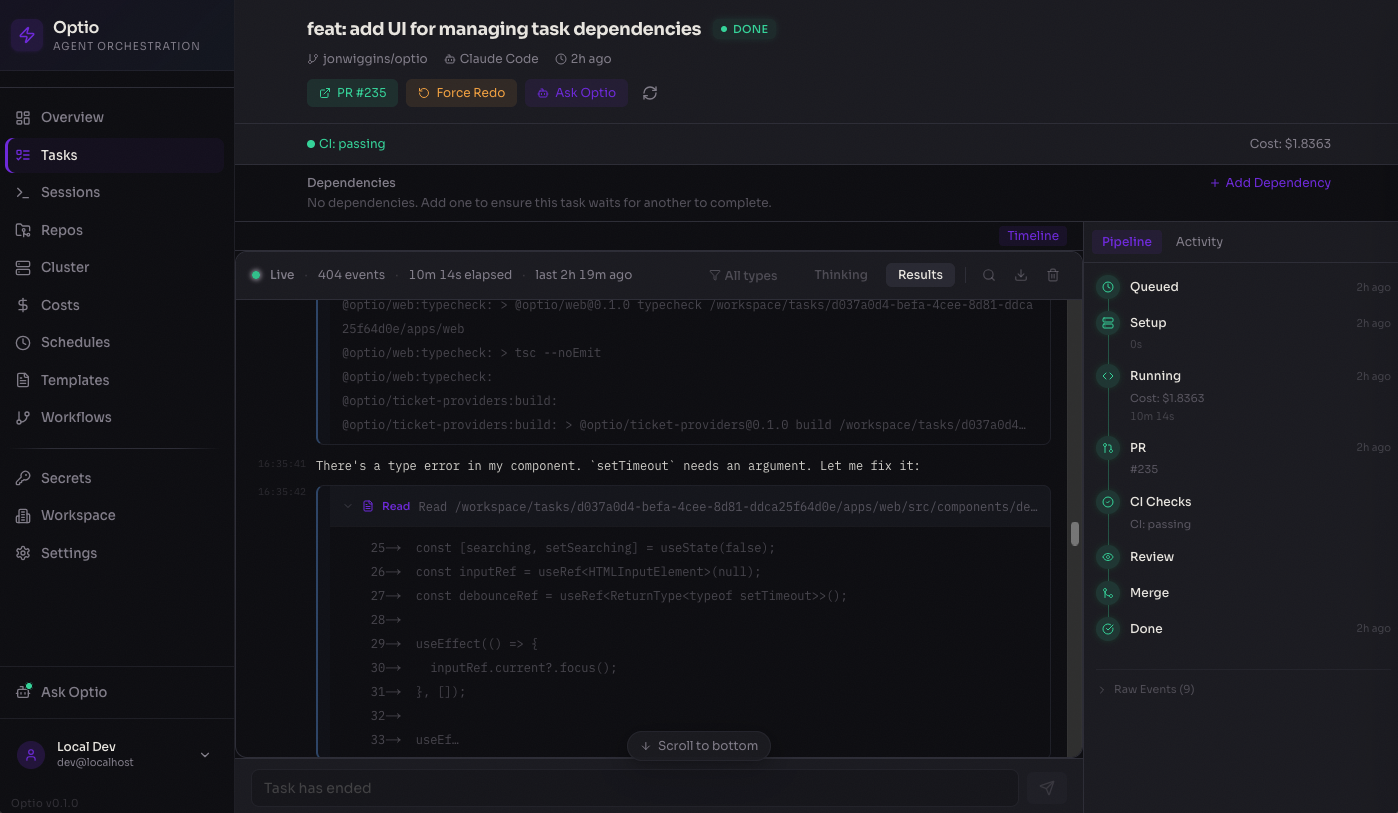
Task detail — live-streamed agent output with pipeline progress, PR tracking, and cost breakdown
## Why Optio? The AI coding agent space is crowded — Devin, Charlie Labs, Cursor background agents, Sweep, and others all promise ticket-to-PR automation. Optio's wedge is different: it runs **in your infrastructure**, behind **whichever agent vendor you trust**, against **whichever Kubernetes cluster you already operate**. | Optio | Hosted alternatives | | --------------------------------------------------------------------------------------------------------------------------------------------------------------------------------------------------------------------------------------------------------------------------------- | ------------------------------------------------------ | | **Self-hosted** — runs entirely in your Kubernetes cluster (GKE, EKS, AKS, or any conformant K8s). Code, secrets, and agent logs never leave your network. | Hosted SaaS — your code goes to their cloud. | | **Multi-vendor agents** — Claude Code, OpenAI Codex, GitHub Copilot, Google Gemini, and OpenCode behind one interface. Switch per repo, or A/B agents on the same task. | Locked to a single model family or in-house agent. | | **Open source (MIT)** — read the code, fork it, audit it. No black box, no vendor lock-in. | Closed source. | | **Enterprise-ready primitives out of the box** — workspaces, encrypted secrets at rest (AES-256-GCM), OIDC/OAuth, Kubernetes RBAC, audit-friendly task history, and a [reconciliation control plane](./docs/reconciliation.md) that keeps runs from getting stuck on lost events. | Vary by vendor; often gated to enterprise tiers. | | **Standalone Tasks** — not just ticket-to-PR. Reusable, parameterized agent work for ops, on-call triage, scheduled reports, and webhook-driven automation, with no repo checkout. | PR-centric; ops/automation use cases are out of scope. | If you'd ship to a hosted agent without thinking twice, the hosted options are simpler. If shipping your repo to someone else's cloud is a non-starter — or if you want to keep your model choice open — Optio is built for you. ## Who is this for? - **Security-conscious organizations** — teams that can't (or won't) ship source code, secrets, or production data to a third-party AI service. - **Regulated industries** — finance, healthcare, government, defense, and others where data residency, auditability, and tenancy isolation are non-negotiable. - **Teams already running Kubernetes** — drop-in Helm install, BYO Postgres/Redis, integrates with your existing observability, ingress, and identity stack. - **Multi-agent shops** — engineering teams evaluating multiple agent vendors and unwilling to commit to a single platform's roadmap. - **Platform teams building internal AI tooling** — Optio is the orchestration layer. You bring the prompts, policies, connections, and review standards. If none of the above describes you, a hosted product like Devin or Cursor background agents will get you to value faster. We're not trying to be everything to everyone. ## How It Works ### Tasks — ticket to merged PR ``` You create a task Optio runs the agent Optio closes the loop ───────────────── ────────────────────── ────────────────────── GitHub Issue Provision repo pod CI fails? Manual task ──→ Create git worktree ──→ → Resume agent with failure context Linear / Jira / Notion Run Claude / Codex / Copilot Review requests changes? Open a PR → Resume agent with feedback CI passes + approved? → Squash-merge + close issue ``` 1. **Intake** — tasks come from the web UI, GitHub Issues (one-click assign), Linear, Jira, or Notion 2. **Provisioning** — Optio finds or creates a Kubernetes pod for the repo, creates a git worktree for isolation 3. **Execution** — the AI agent (Claude Code, OpenAI Codex, or GitHub Copilot) runs with your configured prompt, model, and settings 4. **PR lifecycle** — Optio polls the PR every 30s for CI status, review state, and merge readiness 5. **Feedback loop** — CI failures, merge conflicts, and review feedback automatically resume the agent with context 6. **Completion** — PR is squash-merged, linked issues are closed, costs are recorded ### Jobs — reusable agent work without a repo ``` You define a job Optio triggers it Optio runs & tracks ──────────────────── ───────────────── ─────────────────── Prompt template Manual (UI / API) Provision isolated pod {{PARAM}} variables ──→ Cron schedule ──→ Execute agent with params Agent + model config Webhook from external Stream logs in real time Budget & retry limits Ticket events Track cost & token usage Auto-retry on failure ``` Jobs (Standalone Tasks) run an agent in an isolated pod with no git checkout. Define a prompt template with `{{PARAM}}` placeholders, configure triggers (manual, cron schedule, webhook, or ticket), and let Optio handle execution, retries, and cost tracking. Tasks can also be saved as **blueprints** with the same trigger types — see [docs/tasks.md](./docs/tasks.md). ### Agents — long-lived, message-driven ``` You create an agent Wake sources Per turn ────────────────────── ───────────────── ────────────────────── System prompt User chat message Drain pending messages agents.md operator ──→ Inter-agent message ──→ Render into prompt manual Cron tick / webhook Run one turn → halt Pod lifecycle mode Ticket event Repeat on next wake ``` Persistent Agents (PAs) are long-lived processes addressable by other agents in the same workspace. Each PA executes one **turn** of work, halts, and waits to be re-woken by a message or trigger event. Pod lifecycle is configurable per agent: `always-on` (lowest latency, highest cost), `sticky` (warm for an idle window after each turn — the default), or `on-demand` (cold-start every turn). PAs reuse the existing trigger system, the reconciler, and the pod-pool primitives. See [docs/persistent-agents.md](./docs/persistent-agents.md) and the [examples/persistent-agents](./examples/persistent-agents/) directory. ### Connections — extend agent capabilities Connections give your agents access to external tools and data at runtime. Configure a provider once, assign it to repos or agents, and Optio injects MCP servers into agent pods automatically. **Built-in providers:** Notion, GitHub, Slack, Linear, PostgreSQL, Sentry, Filesystem, plus custom MCP servers and HTTP APIs. ## Key Features - **Autonomous feedback loop** — auto-resumes the agent on CI failures, merge conflicts, and review feedback; auto-merges when everything passes - **Three Task tiers** — **Tasks** land code via PRs; **Jobs** run agents in empty pods for reports, triage, and ops; **Agents** are long-lived, message-driven services. All three share triggers (manual / schedule / webhook / ticket), prompt templates, the reconciler, and the unified `/api/tasks` HTTP layer - **Inter-agent messaging** — Persistent Agents address each other via `/api/internal/persistent-agents/*` for direct messages and broadcasts, enabling multi-agent teams (see the Forge demo) - **Connections** — plug external services (Notion, Slack, Linear, GitHub, PostgreSQL, Sentry, custom MCP servers) into agent pods with fine-grained access control per repo and agent type - **Pod-per-repo architecture** — one long-lived Kubernetes pod per repo with git worktree isolation, multi-pod scaling, and idle cleanup - **Code review agent** — automatically launches a review agent as a subtask, with a separate prompt and model - **Multi-agent support** — run Claude Code, OpenAI Codex, GitHub Copilot, Google Gemini, or OpenCode with per-repo model and prompt configuration - **GitHub Issues, Linear, Jira, and Notion intake** — assign issues to Optio from the UI or via ticket sync - **Reconciliation control plane** — K8s-style pure-decision-plus-CAS-executor loop with periodic resync over four `RunKind`s (`repo`, `standalone`, `pr-review`, `persistent-agent`); keeps state from getting stuck on lost events - **Real-time dashboard** — live log streaming, pipeline progress, cost analytics, and cluster health ## Architecture ``` ┌──────────────┐ ┌────────────────────┐ ┌────────────────────────────┐ │ Web UI │────→│ API Server │────→│ Kubernetes │ │ Next.js │ │ Fastify │ │ │ │ :3100 │ │ │ │ ┌── Repo Pod A ────────┐ │ │ │←ws──│ Workers: │ │ │ clone + sleep │ │ │ Run │ │ ├─ Task Queue │ │ │ ├─ worktree 1 ⚡ │ │ │ Tasks │ │ ├─ PR Watcher │ │ │ ├─ worktree 2 ⚡ │ │ │ Jobs │ │ ├─ Workflow Queue │ │ │ └─ worktree N ⚡ │ │ │ Reviews │ │ ├─ PA Worker │ │ └──────────────────────┘ │ │ Issues │ │ ├─ Reconciler │ │ ┌── Job Pod ───────────┐ │ │ Scheduled │ │ ├─ Health Mon │ │ │ isolated agent ⚡ │ │ │ Live │ │ └─ Ticket Sync │ │ └──────────────────────┘ │ │ Agents │ │ │ │ ┌── Persistent Agent ──┐ │ │ Sessions │ │ Services: │ │ │ long-lived; turns ⚡│ │ │ Library │ │ ├─ Repo Pool │ │ │ wake on messages │ │ │ Prompts │ │ ├─ Workflow Pool │ │ └──────────────────────┘ │ │ Repos │ │ ├─ PA Pool │ │ │ │ Connections│ │ ├─ Connections │ │ MCP servers injected via │ │ │ │ ├─ Review Agent │ │ Connections at runtime │ │ │ │ └─ Auth/Secrets │ │ │ └──────────────┘ └─────────┬──────────┘ └────────────────────────────┘ │ ⚡ = Claude / Codex / Copilot / Gemini / OpenCode ┌──────┴──────┐ │ Postgres │ Tasks, workflows, persistent agents, │ │ inboxes, connections, logs, secrets │ Redis │ Job queue, pub/sub, live streaming └─────────────┘ ``` ### Task lifecycle ``` ┌──────────────────────────────────────────────────┐ │ INTAKE │ │ │ │ GitHub Issue ───→ ┌──────────┐ │ │ Manual Task ───→ │ QUEUED │ │ │ Ticket Sync ───→ └────┬─────┘ │ └───────────────────────────┼──────────────────────┘ │ ┌───────────────────────────┼──────────────────────┐ │ EXECUTION ▼ │ │ │ │ ┌──────────────┐ ┌─────────────────┐ │ │ │ PROVISIONING │───→│ RUNNING │ │ │ │ get/create │ │ agent writes │ │ │ │ repo pod │ │ code in │ │ │ └──────────────┘ │ worktree │ │ │ └───────┬─────────┘ │ └───────────────────────────────┼──────────────────┘ │ ┌─────────────┐ │ ┌──────────────────┐ │ FAILED │←──┴──→│ PR OPENED │ │ │ │ │ │ (auto-retry │ │ PR watcher │ │ if stale) │ │ polls every 30s │ └─────────────┘ └─────────┬────────┘ │ ┌─────────────────────────────────────────────┼─────────┐ │ FEEDBACK LOOP │ │ │ │ │ │ CI fails? ────────→ Resume agent ←─────┤ │ │ to fix build │ │ │ │ │ │ Merge conflicts? ──→ Resume agent ←─────┤ │ │ to rebase │ │ │ │ │ │ Review requests ───→ Resume agent ←─────┤ │ │ changes? with feedback │ │ │ │ │ │ CI passes + ───────→ Auto-merge ──────┤ │ │ review done? & close issue │ │ │ ▼ │ │ ┌──────────────┐ │ │ │ COMPLETED │ │ │ │ PR merged │ │ │ │ Issue closed │ │ │ └──────────────┘ │ └───────────────────────────────────────────────────────┘ ``` ## Quick Start ### Prerequisites - **Kubernetes v1.33+** — required for post-quantum TLS on the control plane. v1.33 is the first release built on Go 1.24, which enables hybrid X25519MLKEM768 key exchange automatically. Earlier versions run but do not negotiate post-quantum TLS between Optio and the Kubernetes API server. - **Docker Desktop** with Kubernetes enabled (Settings → Kubernetes → Enable) - **Node.js 22+** and **pnpm 10+** - **Helm** (`brew install helm`) ### Setup ```bash git clone https://github.com/jonwiggins/optio.git && cd optio ./scripts/setup-local.sh ``` That's it. The setup script installs dependencies, builds all Docker images (API, web, and agent presets), deploys the full stack to your local Kubernetes cluster via Helm, and installs metrics-server. ``` Web UI ...... http://localhost:30310 API ......... http://localhost:30400 ``` Open the web UI and the setup wizard will walk you through configuring GitHub access, agent credentials (API key or Max/Pro subscription), and adding your first repository. ### Updating ```bash ./scripts/update-local.sh ``` Pulls latest code, rebuilds images, applies Helm changes, and rolling-restarts the deployments. ### Teardown ```bash helm uninstall optio -n optio ``` ## Project Structure ``` apps/ api/ Fastify API server, BullMQ workers (incl. reconciler, persistent-agent worker), WebSocket endpoints, standalone-task engine, connection service, review service, OAuth web/ Next.js dashboard with real-time streaming, cost analytics, Tasks / Jobs / Reviews / Issues / Agents / Sessions surfaces, connection catalog site/ Documentation site (GitHub Pages) cli/ Terminal client for Optio packages/ shared/ Types, task state machine, prompt templates, error classifier container-runtime/ Kubernetes pod lifecycle, exec, log streaming agent-adapters/ Claude Code + Codex + Copilot + Gemini + OpenCode adapters ticket-providers/ GitHub Issues, Linear, Jira, Notion images/ Container Dockerfiles: base, node, python, go, rust, full helm/optio/ Helm chart for production Kubernetes deployment scripts/ Setup, init, and entrypoint scripts ``` ## GitHub App Setup Optio can use a [GitHub App](https://docs.github.com/en/apps/creating-github-apps) instead of a Personal Access Token for GitHub operations. This provides user-scoped access (respecting CODEOWNERS, branch protection, and repository permissions), automatic token refresh, and clear attribution on PRs and commits. ### Creating the GitHub App Register a new GitHub App at `https://github.com/organizations/{org}/settings/apps/new` with these settings: **Repository permissions:** | Permission | Access | Used for | | ------------- | ------------ | ---------------------------------- | | Contents | Read & Write | git clone, push, branch management | | Pull requests | Read & Write | create PRs, post comments, merge | | Issues | Read & Write | issue sync, label management | | Checks | Read | CI status polling in PR watcher | | Metadata | Read | repo listing, auto-detection | **Account permissions:** | Permission | Access | Used for | | --------------- | ------ | ---------------------------------- | | Email addresses | Read | user email for login (recommended) | **Organisation permissions:** | Permission | Access | Used for | | ---------- | ------ | ----------------------- | | Members | Read | repo listing (optional) | **Other settings:** - **Callback URL:** `{PUBLIC_URL}/api/auth/github/callback` - **Request user authorization (OAuth) during installation:** Yes - **Expire user authorization tokens:** Yes (recommended, 8-hour lifetime with refresh) - **Webhook:** Can be left disabled (Optio uses polling) ### Configuration After creating the app and installing it on your organisation, configure Optio via Helm values: ```yaml github: app: id: "123456" # App ID (from app settings page) clientId: "Iv1.abc123" # Client ID (for user OAuth login) clientSecret: "..." # Client secret installationId: "789" # Installation ID (from org install URL) privateKey: | # PEM private key (for server-side tokens) -----BEGIN RSA PRIVATE KEY----- ... -----END RSA PRIVATE KEY----- ``` When configured, users who log in via GitHub get a user access token that is used for all their git and API operations. Background workers (PR watcher, ticket sync) use the app's installation token. If the GitHub App is not configured, Optio falls back to the `GITHUB_TOKEN` PAT. ### Using an existing secret If you manage secrets externally (e.g., with [external-secrets-operator](https://external-secrets.io/), sealed-secrets, or vault-injector), you can reference an existing Kubernetes Secret instead of providing the values inline: ```yaml github: app: existingSecret: "my-github-app-secret" ``` The secret must contain these keys: `GITHUB_APP_ID`, `GITHUB_APP_CLIENT_ID`, `GITHUB_APP_CLIENT_SECRET`, `GITHUB_APP_INSTALLATION_ID`, `GITHUB_APP_PRIVATE_KEY`. ## Production Deployment Optio ships with a Helm chart for production Kubernetes clusters. Three installation methods are available: ### Install from Helm repository (recommended) ```bash helm repo add optio https://jonwiggins.github.io/optio helm repo update helm install optio optio/optio -n optio --create-namespace \ --set encryption.key=$(openssl rand -hex 32) \ --set postgresql.enabled=false \ --set externalDatabase.url="postgres://..." \ --set redis.enabled=false \ --set externalRedis.url="redis://..." \ --set ingress.enabled=true \ --set ingress.hosts[0].host=optio.example.com ``` ### Install from OCI registry ```bash helm install optio oci://ghcr.io/jonwiggins/optio -n optio --create-namespace \ --set encryption.key=$(openssl rand -hex 32) \ --set postgresql.enabled=false \ --set externalDatabase.url="postgres://..." \ --set redis.enabled=false \ --set externalRedis.url="redis://..." \ --set ingress.enabled=true \ --set ingress.hosts[0].host=optio.example.com ``` ### Install from source ```bash git clone https://github.com/jonwiggins/optio.git && cd optio helm install optio helm/optio -n optio --create-namespace \ --set encryption.key=$(openssl rand -hex 32) \ --set postgresql.enabled=false \ --set externalDatabase.url="postgres://..." \ --set redis.enabled=false \ --set externalRedis.url="redis://..." \ --set ingress.enabled=true \ --set ingress.hosts[0].host=optio.example.com ``` See the [Helm chart values](helm/optio/values.yaml) for full configuration options including OAuth providers, resource limits, and agent image settings. ## Tech Stack | Layer | Technology | | -------- | ------------------------------------------------------------------ | | Monorepo | Turborepo + pnpm | | API | Fastify 5, Drizzle ORM, BullMQ | | Web | Next.js 15, Tailwind CSS 4, Zustand | | Database | PostgreSQL 16 | | Queue | Redis 7 + BullMQ | | Runtime | Kubernetes (Docker Desktop for local dev) | | Deploy | Helm chart | | Auth | Multi-provider OAuth (GitHub, Google, GitLab) | | CI | GitHub Actions (format, typecheck, test, build-web, build-image) | | Agents | Claude Code, OpenAI Codex, GitHub Copilot, Google Gemini, OpenCode | ## Contributing See [CONTRIBUTING.md](./CONTRIBUTING.md) for development setup, workflow, and conventions. ## License [MIT](./LICENSE)