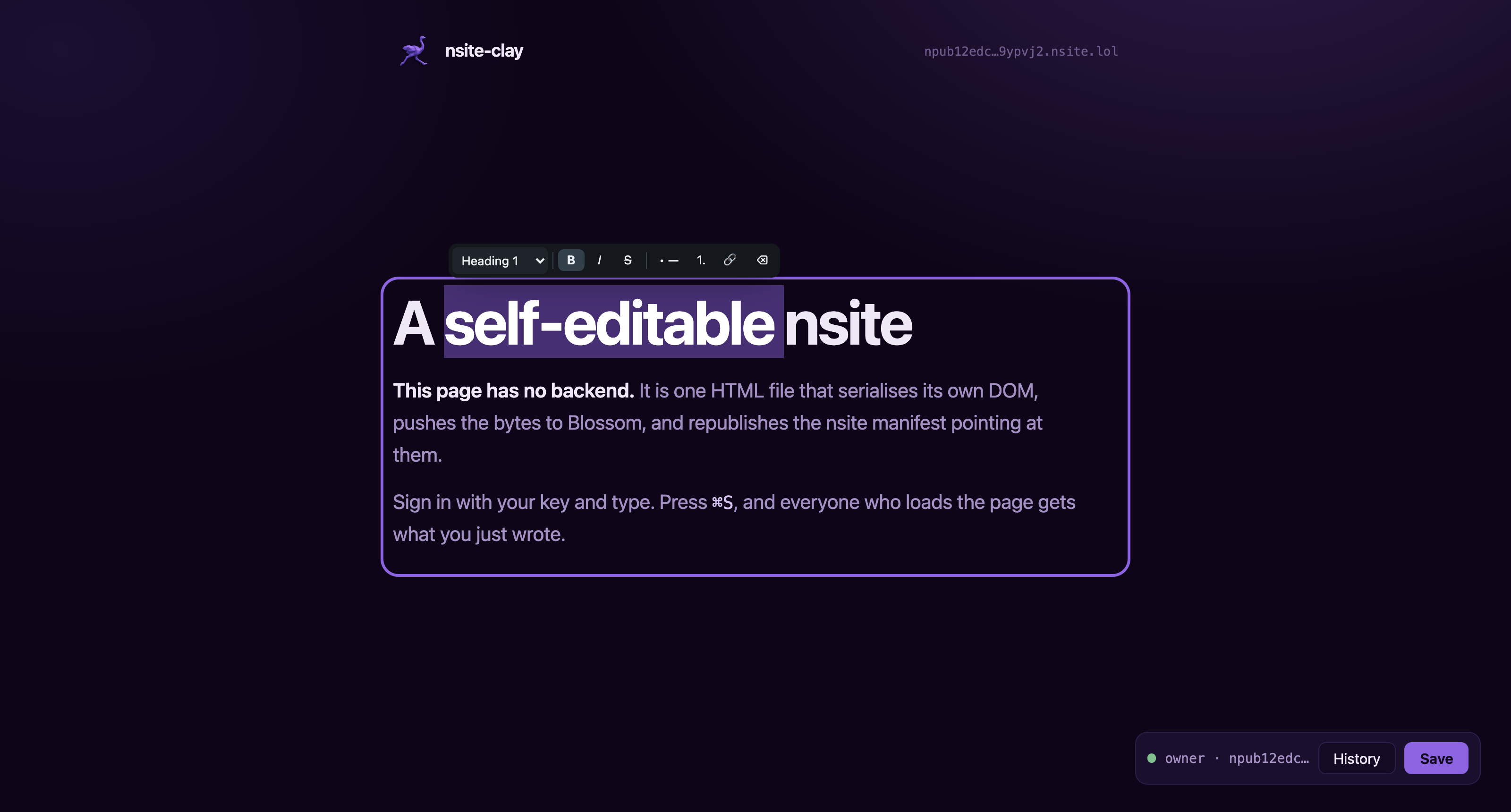
The homepage is itself an nsite-clay document, and it edits itself.
It is served at nsite-clay.cypherpunk.today for readability, which redirects to the
address that actually owns it: npub12edc7326qsryw5rw5yw0yh57fmj9r8jf4c8xazz6333w305qgnms9ypvj2.nsite.lol. That one
needs no domain, no server and no renewal.
---
### More from me
**Related projects**
- [nostr-emanator](https://github.com/jooray/nostr-emanator): schedule Nostr posts, paired over NIP-46 and Amber
- [nostrautica](https://github.com/jooray/nostrautica): Nostr-native event organizer with end-to-end encrypted data
- [oracolo](https://github.com/jooray/oracolo): a Nostr blog in a single HTML file
- [anonmicroblog](https://github.com/jooray/anonmicroblog): anonymous microblogs on Nostr
- [lievik](https://github.com/jooray/lievik): Nostr-first content curation for creators with several audiences
**Full project showcase:** [nsite-clay in my project showcase](https://juraj.bednar.io/showcase/#PUB-01), or [all my projects](https://juraj.bednar.io/showcase/).
I write about building things on [my blog](https://juraj.bednar.io/en/blog-en/). I also wrote a cypherpunk novel, [Tamers of Entropy](https://tamersofentropy.net/), and there is a [trailer](https://tamersofentropy.net/#trailer).
Open the page, sign in with your key, and type into it. The document serialises its own DOM,
pushes those bytes to a [Blossom](https://github.com/hzrd149/blossom) server as one
content-addressed blob, and republishes the [NIP-5A](https://github.com/nostr-protocol/nips/blob/master/5A.md)
nsite manifest that points at it. Anyone else loading the page gets a plain static document with
your changes already in it.
Nothing in that loop is a server you have to run. Relays hold the manifest, Blossom servers hold
the bytes, and the browser does the rest. Ownership is a keypair rather than an account, so
"who may edit this page" is not a row in somebody else's database.
The idea is [HyperClay](https://hyperclay.com)'s and the editing model follows
[ClayJS](https://clayjs.com); this is that model with Nostr underneath instead of a hosting
platform.
## Description for Nostr geeks
An nsite is web hosting. Not long-form notes, whole HTML files. That is all an
nsite is.
nsite-clay adds one thing to it: the page edits and updates itself, so the CMS
sits inside the static HTML rather than behind it.
You change the DOM. Click around the page and edit things, or open your
browser's DOM inspector and change it there; the page does not care which. The
new version is uploaded to your Blossom servers, and one replaceable event is
republished saying which Blossom hash `/` or `/about-us` now points to. Any
nsite gateway renders it.
Saving keeps the original HTML's formatting wherever it can. A small text edit
does not have to rewrite every quote and space around it. The runtime checks
that the saved markup still represents the page and falls back to a full
serialization if it cannot preserve the source safely.
## Write and edit with AI
Describe the page you want in
[the publisher](https://nsite-clay.cypherpunk.today/deploy.html) and AI writes
it: the layout, the stylesheet, text you can edit and empty frames for your own
photos. Look at the preview, ask for changes, and publish it with your own key.
On a page that is already published, press **Edit with AI** and say what should
change, either the whole page or only the part you clicked. Nothing reaches the
page until you keep the result. **Undo** takes it back, and **Save** publishes it.
You pay for AI in one of three ways:
1. **Support the project.** The default. Pay one 2000 sat Lightning invoice and
everything works: 1000 sats fund nsite-clay, and 1000 become your AI credit
on our Routstr node, `routstr.cypherpunk.today`. The credit pays for the
page and for the pictures AI makes for it, about 24 sats each. The key is kept encrypted on
your own Nostr relays, so it follows you to every device you sign in on, and
credit you do not spend can be withdrawn.
2. **Your own Routstr node.** Point **AI settings** at any other Routstr node and
add credit there with Lightning or Cashu. The fees go to whoever runs that node.
3. **Bring your own key.** Use any OpenAI-compatible API that accepts requests
from a browser, with your own key and the model you choose. What you pay
stays between you and that provider.
**AI is an extra, and everything else stays free.** The editor, the twelve
templates, the block composer and publishing never ask for payment. Pick a
template, click into the page and type, exactly as before.
The details of each mode are under [AI provider settings](#ai-provider-settings).
## Try it
A live document is published under a throwaway key, and the key is public on purpose:
****
```
nsec1064etpv2gs3ttywm7w5enrqdssdg6dawz9fxz0vs34ac545l6jfqk3987y
```
Open it, press **Sign in**, paste that nsec, and edit the page. Your save rewrites the real
document for everyone. It is a sandbox with no owner, so treat whatever is there as other
people's leftovers.
## Quick start, without a terminal
Open **[the publisher](https://nsite-clay.cypherpunk.today/deploy.html)**,
pick a template, sign in with your key or make one on the spot, and it is online.
You can also describe a page for AI to build in the second step. Describe what
you want, generate a preview, and review it before choosing an address and
publishing. The generated page has editable text, a content form
and blocks you can add later. The publisher supplies its owner and runtime files.
It runs entirely in the browser: it fetches the template and the runtime from the
site it is published on, uploads them to your Blossom servers, and signs the
manifest with your key. There is no server in the loop and nothing to install.
The [guide](https://nsite-clay.cypherpunk.today/guide.html)
walks the whole path with screenshots, from having no key at all to a published
page with a picture and a Nostr feed in it.
## Quick start, with one
```bash
npx nsite-clay init mysite # scaffolds index.html + nsite-clay.js, generates a key
npx nsite-clay deploy mysite --sec=nsec1…
```
`deploy` prints the URL. Open it, sign in as the owner, and from then on the page saves itself;
you only come back to the CLI for changes you make outside the browser.
To use a key you already have, hand `init` the npub so the document knows its owner:
```bash
npx nsite-clay init mysite --npub=npub1…
npx nsite-clay deploy mysite --bunker="bunker://…"
```
## What a document looks like
```html
Notes
My notes
Type anything here.
```
That is the whole integration. `nc:owner` says whose signature may save it, `editable` marks
what a person can type into, and the script does the rest. Save it, then open the file in a text
editor: your words are in the HTML.
## Editing
Mark a container `editable` and it becomes rich text for the owner and ordinary markup for
everybody else.
**Enter starts a new paragraph.** Selecting text raises a floating toolbar whose first control
is a block menu: Paragraph, Heading 1 to 3, Quote, Code block. Alongside it are bold, italic,
strikethrough, bulleted and numbered lists, link, and clear formatting.
Keyboard: `⌘B` `⌘I` `⌘U` `⌘K`, `⌘⇧8` for a bulleted list, `⌥1` to `⌥3` for headings. Typing `# `,
`- ` or `> ` at the start of a line works too.
Use `editable="single-line"` for a title or a list row, where Enter should do nothing and the
block menu makes no sense.
What reaches the file is markup a person could have written by hand. The `editable` attribute
stays behind as an inert marker; the `contenteditable` it implies, the toolbar, and the debris
browsers emit from editing commands are all stripped. Pasted markup goes through a sanitiser, so
copying out of a word processor does not smuggle a stylesheet into your document.
Undo and Redo on the page toolbar cover text edits, CMS fields and changes to
blocks. `⌘Z` / `Ctrl+Z` undoes a page edit; add Shift to redo it. Deleted blocks
return with their event handlers intact. This history lasts for the current
editing session; History still opens your published versions.
The content form can use dropdowns, numbers, dates and rich text. Pages declare
the field type next to the content, so a price can reject a negative number and
a status can offer the choices the page actually uses. Scripts can read and
update the same fields through `nc.cms.getData()` and `nc.cms.setData()`.
## AI provider settings
Choose **Edit with AI** to change the whole static page. To change one part,
click its text or block first, then choose **Only what I clicked** in the dialog.
A whole-page rewrite keeps the page's live feeds exactly as they were and may
move them; a result that leaves one out is refused. Pages with forms or custom
scripts support selected-text AI edits only, because the static page builder
cannot preserve those behaviours in a whole-page rewrite.
Describe the change and review the preview. **Keep this change** applies it as
one undo step; **Save** publishes it. **Back to my instruction** keeps your prompt
so you can revise it. **Ask for another change** refines the proposed version;
the version selector lets you return to an earlier proposal, and **Show current
page** compares it with the unchanged page. Up to five proposed versions stay
in this browser, under your key and this page's path. Reopen **Edit with AI**
after reloading to resume. Download a draft or restore its JSON file to move it
between browsers. Cancelling leaves the page alone; keeping or discarding the
draft clears its saved copy.
Open **Settings → AI settings** to choose a provider and model. The default is
DeepSeek V4.1 Flash through `routstr.cypherpunk.today`, our Routstr node. Its
fees help fund nsite-clay. Requests stay on that node unless you choose another.
**Add AI credit** opens a separate amount-and-payment dialog for Lightning or
Cashu, then returns you to your page. Before generation, the editor checks
available Routstr credit and shows a rough price range from current model rates.
Unknown balances are labelled unknown, and BYOK balances stay with that provider.
AI settings keeps provider details under **Advanced provider settings**, backup
controls under **Backup and recovery**, and withdrawal in its own dialog. Saving
settings or receiving credit backs up the endpoint, provider type, model and key
to your encrypted Nostr vault. A failed backup is shown with recovery instructions.
The setup is separate from your published page.
For model comparisons, see [the AI evaluation prompts and runner](docs/ai-evaluation.md).
You can also enter another Routstr node or bring a key for an OpenAI-compatible
API. That endpoint must allow browser requests. Changing nodes keeps their keys
separate; it does not send the old node's key to the new one.
## Pictures, video and Nostr posts
Three more buttons on the same toolbar.
**Pictures.** Drag a file in, pick one you have uploaded before from a grid, or paste a URL.
Uploads go to the same Blossom servers the document is stored on, so an image is
content-addressed and its URL never has to change.
Choose a crop before uploading a new file: free, square, wide or 4:3. The crop
happens in your browser; only the accepted image is uploaded. Keep the original
for SVGs or animated pictures you want to preserve.
**Video.** A YouTube or Vimeo link becomes a click-to-play thumbnail rather than an iframe, so
nothing third-party loads until a reader presses play and the thumbnail still works as a link
with JavaScript off. A video file is uploaded and played from Blossom.
**Nostr feeds.** A widget showing short notes, long-form articles or picture posts from any
npubs you name. The dialog lists their actual posts so you can click the ones to pin rather than
hunting for event ids. Pinning an article uses its slug, not its event id, because kind 30023 is
replaceable and an id-pin breaks the moment the author fixes a typo. Every event is
signature-checked and sanitised in the browser, and the posts are fetched at view time rather
than stored in the file.
```html
```
## Writing Nostr posts
The composer lists what you have published and opens an editor for more: short notes (kind 1)
and long-form articles (kind 30023). Publishing an article again under a slug you have used
before is the edit, so every long-form client shows the new text at the same address and the
original date stays put.
Posts and pages are separate. Writing a note does not change your page, and saving your page
does not touch your posts.
## Blocks
A page marked `nc:blocks` is assembled rather than typed over. In edit mode the
runtime draws a rail on every block (move it, duplicate it, delete it, list what
it is made of, and for a picture or a feed a gear that reopens the picker) and an
insert point between them that opens a palette.
The list is the way inside a block. A block is markup, and markup accumulates: a
duplicated card, an element some editing command split in two, an empty box left
behind by something that went wrong. Without a way in, the only cure for one
stray element is to delete the block around it and build the whole thing again.
The palette is built from the document's own library, which is a set of inert
`` elements:
```html
A heading
Caption
```
A `` renders nothing and is saved with the page, so the library
travels with the document. Whoever opens the file next can keep adding blocks
with nothing to fetch and nothing to install. `nc:on-add` names a picker to run
once the block lands (`image`, `video`, `feed`, `post`) and `nc:slot` marks what
that picker acts on.
Nothing the rail draws is written to disk. A reader gets the blocks as ordinary
markup with no trace that a composer was ever involved. The full rules are in
[`templates/_shared/CONTRACT.md`](templates/_shared/CONTRACT.md).
## Editing without a visible editor
Templates ship with `nc:edit-gate="hash"`, so a reader gets the page and nothing
to click. Add `#edit` to the URL and the toolbar appears:
```
https://.nsite.lol/#edit
```
Worth remembering, because a page with no visible way in looks broken to someone
who has forgotten. `nc.settings.open()` turns the gate off if you would rather
have the toolbar always there.
Once you have signed in on your site in a browser, that browser remembers it and
opens the toolbar on later visits without `#edit`. The sign-in itself lasts an
hour after you last used it, so moving between the pages of your site does not ask
again; after that, you sign in again. Signing out forgets both. Visitors who never
signed in see nothing different.
Autosave is off by default. Every save stores the whole page again and files a
version, so saving on a timer publishes a dozen versions of one paragraph.
Turn it on in the same settings panel. Both settings are attributes on ``,
so they are saved with the page and travel with the file rather than living in
one browser.
## Pages with a form
A save writes the live page, form state included, which is what lets a checklist
remember its ticks. On a page where visitors type something and get an answer
back, that would publish one visitor's input and result to the next. Put
`nc:no-persist` on every control a visitor fills in, and `nc:transient` on the
nodes your script adds to show a result, not on the container they go into.
[docs/forms.md](docs/forms.md) has the whole pattern in one example.
## Signing in
Ranked by how much you have to trust the page in front of you:
- **NIP-07 browser extension.** The key never enters the page.
- **Amber or another NIP-46 remote signer.** The key never enters the browser at all. The page
shows a `nostrconnect://` QR and deep link, and every signature is approved on your phone.
This is the right default for a document served from a gateway you do not control.
- **Typing a key.** `nsec1…`, 64 hex characters, or a NIP-49 `ncryptsec1…` with its password.
The key stays in that tab: in memory, and for an hour in the tab's `sessionStorage` so the
other pages of the site open signed in. It never reaches `localStorage` and goes when the
tab closes. It sits in a
password field deliberately: the snapshot algorithm never writes those values into markup, so
a save cannot bake your key into the document it publishes.
## Built by agents
Most pages made with this will be built by an agent rather than by hand, so the
project ships instructions for one:
****
Point your coding agent at that file and ask it for the page you want. It covers
what to ask you for, how to pick and rework a template, how to get the page
online with a remote signer rather than a raw key, and the handful of things
that go wrong. It deliberately does not restate the documentation; it links it.
Hand it to Claude Code, Codex, Cursor, or anything else that reads a URL. The
same file works as `AGENTS.md` in a project built on top of nsite-clay.
A site that is already published has a second brief, for an agent that should
change it rather than build it:
****
The owner gets a filled-in copy from their own page: open it with `#edit`, sign
in, and press **Settings → Copy instructions for your own agent**. The text names
the site's public key, relays, Blossom servers and pages, and walks the agent
through `pull`, the edit, and a `deploy` that keeps the page editable in the
browser. It asks the owner for a `bunker://` link from Amber, Clave or another
NIP-46 signer, never for the key, and keeps that one connection for later runs.
The text is generated from a template in the page, with no AI involved.
## Templates
Twelve starting points, all sharing one stylesheet and one runtime so an engine
change does not mean editing twelve files:
`cms` `event` `blog` `project` `personal` `links` `gallery` `terminal` `phrack`
`brutal` `eco` `irc`
`cms` is the one to start from. It is a page built out of blocks rather than a
finished design to type over: press the `+` between two blocks and add a
heading, a picture, a video, a row of cards or a Nostr feed. See
[Blocks](#blocks) below.
Ten of the twelve take blocks, each in its own shapes, so one added to `phrack`
comes out in monospace and one added to `terminal` comes out as another command.
`gallery` and `irc` do not: the gallery's wall is redrawn from a live feed on
every load and has nothing persisted to make a block of, and the chat log is
append-only by design and already has its own way of growing.
`node tools/template-blocks.mjs` checks every one of them in a browser.
The last of those is worth opening: its content is the transcript of the
conversation that produced it, held with an agent that was handed nothing but
[llms.txt](https://nsite-clay.cypherpunk.today/llms.txt).
```bash
npx nsite-clay init mysite --template=blog --npub=npub1…
```
Browse them at [/templates.html](https://nsite-clay.cypherpunk.today/templates.html),
or read the source in [`templates/`](templates/). The rules a template follows
are in [`templates/_shared/CONTRACT.md`](templates/_shared/CONTRACT.md).
## Deploying
### What a deploy does
A deploy is three steps, and they are the same three the browser performs when you press save:
1. **Every file becomes a Blossom blob**, addressed by its own sha256. Uploads are authorised
with a signed kind-24242 token ([BUD-11](https://github.com/hzrd149/blossom/blob/master/buds/11.md)).
2. **A manifest event maps paths to hashes**, signed by the site owner and published to your
relays. Kind 15128 for a root site, kind 35128 for a named one. The event is replaceable, so
publishing a new one is the deploy.
3. **A kind-5128 snapshot pins that set of hashes** as a permanent version.
A gateway resolves your manifest, fetches the blobs, and serves them over HTTP.
### The commands
```bash
nsite-clay init [dir] [--npub=npub1…]
nsite-clay pull [dir] [--site=name]
nsite-clay deploy [--sec=… | --bunker=…] [--site=name] [--title=…] [--description=…]
nsite-clay whoami [dir]
nsite-clay unpublish [--site=name] [--path=/page.html] [--version=] [--yes]
nsite-clay keygen
```
Signing takes either a raw key (`--sec`, or `NOSTR_SECRET_KEY`) or a remote signer
(`--bunker="bunker://…"`, or `NOSTR_BUNKER_URI`). A bunker keeps the key off the machine running
the deploy, so a CI runner never holds it.
A `bunker://` link's secret works once, so the CLI saves what lasts, the client
key the signer approved, the bunker's pubkey and its relays, in
`~/.config/nsite-clay/bunkers.json`. Later runs find that connection by the
site's owner key and need no link at all. `whoami` connects and prints the key
the signer holds without signing anything, which is the place to spend a new link.
### What gets published
**Everything in the directory is published**, except dotfiles, and a published blob cannot be
taken back: it is content-addressed, and the manifest naming it is signed and public. Keep the
directory to what the page needs, and leave the rest out explicitly:
```gitignore
# .nsiteignore, next to index.html, in gitignore syntax
README.md
*.sh
drafts/
notes/*
!notes/public.md
```
`--exclude=` does the same from the command line; repeat it or separate patterns with
commas. A pattern with a slash is anchored to the directory being published, one without matches
a name at any depth, and a trailing slash matches directories only. `--dry-run` lists what would
be published and what was left out, publishes nothing, and needs no key.
Files that look like keys are refused even without an ignore file: `*.pem`, `*.key`, `*.p12`,
`*.pfx`, `*.ppk`, `*.macaroon`, `id_rsa` and its siblings, `npmrc`, and names like `env.backup`
or `nsec.txt`. A web asset is never refused by its name alone, so `what-is-nsec.html` publishes.
`--publish-secrets` overrides the rule.
### Taking it down
```bash
nsite-clay unpublish # the root site: current version and history
nsite-clay unpublish --site=blog # a named site
nsite-clay unpublish --path=/old-offer.html # one page, as a new version without it
nsite-clay unpublish --version=v… # one version out of the history
```
Each prints what it would do and sends nothing until it is run again with `--yes`. `--npub=npub1…`
shows the plan without connecting a signer.
Nothing published to Nostr can be deleted outright, only asked to be. Unpublishing a site
therefore does three things, each as widely as it can:
1. **An empty manifest replaces the current one.** A manifest is a replaceable event, so every
relay keeps only the newest, whether or not it knows anything about deletions. A gateway
reading it finds no pages.
2. **A [NIP-09](https://github.com/nostr-protocol/nips/blob/master/09.md) deletion request**
names the manifest, every version in the history, and the site's address. Relays that
implement it drop all of it, including the empty manifest, and refuse the events if anyone
sends them back.
3. **Each file is deleted from the Blossom servers** that still hold it
([BUD-02](https://github.com/hzrd149/blossom/blob/master/buds/02.md)). A file that another of
your sites or another version still uses is kept. `--keep-blobs` leaves all of them.
Both events go to the deploy relays, the two lookup relays gateways use, every relay on your own
relay list, and a set of large public relays a gateway may have copied the site from. `--relays`
replaces all of that with a list of your own, which is how to point it at the devnet. Your relay
list and your other sites are not touched.
What it cannot reach: a relay that ignores deletions and was never sent the empty manifest, a
gateway's cache until it expires, a Blossom mirror nobody told about, and anyone who saved a copy.
`--path` and `--version` say what they leave behind: a page taken out of the current version is
still in the older versions until those are deleted too.
The signer needs `sign_event:5` for the deletion, `15128`/`35128` and `5128` for the empty manifest
and a new version, and `24242` for the Blossom deletes.
### Where your site ends up
A key has one **root site** and any number of **named sites**:
| | URL |
|---|---|
| root site (default) | `https://.nsite.lol/` |
| named site (`--site=blog`) | `https://<50-char-base36-pubkey>blog.nsite.lol/` |
| a specific version | `https://v<50-char-base36-snapshot-id>.nsite.lol/` |
Any NIP-5A gateway serves the same site: [nsite.lol](https://nsite.lol),
[nsite.run](https://nsite.run), or one you run yourself. For a domain of your own, see
[Custom domains](#custom-domains).
Named sites need a `d` tag of 1 to 13 characters from `[a-z0-9-]`, because a DNS label is 63
characters and the base36 pubkey uses 50 of them.
### Where it gets served
An nsite gateway resolves your manifest and serves the files. They read the same
events, so a site is not tied to any of them, but each one has to find those
events first, and they do not all look in the same places:
| Gateway | |
|---|---|
| [nsite.lol](https://nsite.lol) | public gateway; reads `wss://relay.nsite.lol`, which is in the default relay set |
| [nsite.run](https://nsite.run) | reference implementation, and the clearest explanation of what an nsite is |
| [nosto.re](https://nosto.re) | public gateway |
| [nwb.tf](https://nwb.tf) | public gateway |
| [nsite.cloud](https://nsite.cloud) | reference implementation |
| [shakespeare.to](https://shakespeare.to) | reference implementation |
**How a gateway finds your site.** The reference gateway
([nsite-gateway](https://github.com/hzrd149/nsite-gateway)) asks two lookup relays,
`wss://purplepag.es` and `wss://user.kindpag.es`, for your relay list (a kind-10002
event), then reads your manifest from the relays on that list plus any its operator
added. A gateway running it finds a site through your relay list. A key
that has never published one is findable only on relays the operator happens to read,
which is why a first deploy from a fresh key can show on nsite.lol and answer
`404 nsite not found` elsewhere.
**A key with no relay list gets one when it publishes.** The web publisher and
`nsite-clay deploy` both check, after the manifest is out, whether your key has a relay list,
and publish one naming the relays the site went to when it provably has none: both lookup
relays have to answer, and no relay asked may hold one. A key made in the publisher skips
the check: it was generated moments ago and cannot have one yet. A key you already use in a
Nostr client usually has a list, and it is never replaced. `wss://relay.nsite.lol` is left out of
the list itself, since it accepts only relay lists and manifests. `--no-relay-list` turns
this off for the CLI.
So, for a site every gateway can find:
- **Deploy to relays on your relay list.** `--relays=` takes the same URLs. If your key
already had a list, make sure at least one relay you deploy to is on it.
- **Keep `wss://relay.nsite.lol` in the set** for nsite.lol, which subscribes to it live
and shows a change in about a second instead of up to ten minutes.
Gateways also go down. On 25 September 2026 nosto.re answered `502` and
shakespeare.to did not resolve this project's own site, while nsite.cloud served a
copy some minutes old. If one fails, swap the hostname and your site is still there,
and `npm run devnet` runs a gateway on your laptop.
### Custom domains
A gateway reads the npub out of the hostname. When the name it was asked for is
not an nsite label it resolves the CNAME and reads the npub from where that
points, so the record goes to your npub subdomain rather than to the gateway:
```
blog.example.com. CNAME npub1….nsite.lol.
```
A CNAME at `nsite.lol` itself cannot work: it carries no npub.
That is the routing. HTTPS is separate and, on the public gateways today, not
solved. nsite.lol holds one certificate covering `*.nsite.lol`, and answers any
other name with a TLS `unrecognized name` alert and no certificate, so a browser
asking for `https://blog.example.com` never reaches the page. Run the gateway
yourself if you want a name of your own over HTTPS: the reference deployment
puts Caddy in front, which issues certificates on demand.
### Relays and Blossom servers
The defaults work for a first deploy.
**Publish to the gateway's own relay.** A gateway keeps a live subscription to its relays and
re-syncs everything else on a timer. With `wss://relay.nsite.lol` in the list a change appears in
about a second; without it, up to ten minutes. It is in the default set for that reason.
**Blossom servers are not interchangeable.** Several public ones refuse `text/html` outright,
sensibly enough, since they would be hosting arbitrary pages on their own domain. Several accept
only padded base64 in the auth header where BUD-11 asks for base64url. The CLI and the runtime
both try each encoding, and a deploy succeeds if any one server takes the blob, since blobs are
content-addressed and more copies is strictly better. `cdn.hzrd149.com` and `nostr.download`
are known to work, and are the defaults.
**A Blossom server has to keep the type you upload with.** Gateways pass on the Content-Type the
server reports, and a browser will not apply a stylesheet labelled as anything but `text/css`.
`blossom.primal.net` guesses the type from the bytes instead and serves CSS as `text/plain`, so a
page fetched from it can arrive without its design. It is fine for pictures, but keep it out of
the list a site is published to. Check a server by uploading a small `.css` file and asking for it
back.
**A blob is only as durable as the servers holding it.** The manifest names hashes, not bytes.
List several servers; every save pushes to all of them.
### Assets and caching
Assets are published at paths carrying their content hash (`/nsite-clay-1054f97d.js`), so a new
build is a new URL that no cache can serve stale. Documents keep stable paths, since those are
what people link to. The unfingerprinted path stays in the manifest as an alias to the same blob,
so a reader still holding a cached copy of the previous document does not break. Pass
`--no-fingerprint` to turn this off.
On top of that, a published document watches its own manifest. The manifest is a replaceable
event, so a new version arrives as a push rather than a poll: when the hash for the document's
path stops matching the bytes the tab was served, the page says so and reloads itself through a
cache-proof URL. A page with unsaved work is never reloaded out from under you. Nobody should
need to know what a hard refresh is.
### Deploying twice
Blobs are addressed by their own hash, so a file whose bytes have not changed is
already on the server under the same name. `deploy` asks each server before it
uploads, and stops before publishing when the path table still hashes to what the
live manifest says:
```
$ npx nsite-clay deploy mysite
/index.html 1aa4b3323850… 18818 B 2/2 already there
/nsite-clay-328e2b9d.js 328e2b9d37e2… 303407 B 2/2 already there
unchanged: the published manifest already points at these 7 paths
nothing published. --force republishes anyway.
```
So a scheduled job that redeploys an unchanged site costs a few HEAD requests and
writes nothing to any relay. A server that has dropped a blob gets it back, which
makes a repeat deploy a repair rather than a no-op, and `--force` publishes
regardless if a manifest needs rewriting for its own sake.
### Changing a site that was edited in the browser
A page saved in the browser exists only on Blossom, so the directory you
deployed from goes out of date the moment its owner edits the page. `pull`
brings the published site back down, every file checked against its hash:
```bash
npx nsite-clay pull npub1… mysite
npx nsite-clay deploy mysite
```
It writes `mysite/.nsite-clay.json`, a dotfile that is never published, saying
which site, relays and servers the directory came from and which version. A
deploy of that directory goes back to the same place with no flags, and compares
each file as pulled, as it is now, and as published: what only you changed is
published, what was changed only in the browser since the pull is kept and
written into the directory, a page added in the browser is kept, and a file
changed in both places stops the deploy before anything is sent. `--overwrite`
publishes your copy anyway.
A deploy of a directory that did not come from `pull` refuses to take down
published pages it does not have, and names them. `--keep-missing` keeps them,
`--prune` takes them down. Every deploy also refuses a page whose `nc:path` or
`nc:site` does not fit where it is going, and a page that would lose
`/nsite-clay.js`; `--no-check` publishes regardless. A page whose `nc:owner` is
another key is published with a note, since only that key can save it.
## Version history
Every save files a permanent kind-5128 snapshot naming an immutable set of hashes, and blobs
deduplicate, so history costs almost nothing. `nc.versions()` lists them, `nc.readVersion()`
fetches one and refuses bytes that do not hash to what the snapshot claims, and `nc.restore()`
republishes an old path table as the current one. Restoring is itself a new version, so nothing
is destroyed. Each version also has its own permanent URL, which does mean your history is
public.
## Upgrading a published page
A published document hardcodes the URLs of the files it runs on, and a gateway
serves those with a cache lifetime, so the deployed copy stays on the engine it
was deployed with. That is the right default — a site that changed under its
owner would not be theirs — but a fix has to be able to reach it somehow.
It reaches it the same way everything else here moves. The project publishes its
own nsite; that manifest is a signed event naming content-addressed blobs; the
page re-hashes whatever a Blossom server hands back before believing a byte of
it. A server cannot lie, and the only thing being trusted is the key the page
names in `nc:runtime-owner` — the same key its owner published from. The new
bytes go onto **your** Blossom servers and into **your** manifest, so afterwards
nothing of ours is in the path and nothing can be withdrawn from under you.
Nothing upgrades itself. Open your page for editing and you are told a newer
runtime exists, with what changed; Settings has the same offer behind a button.
A reader triggers neither, and `nc:runtime-owner="off"` never looks at all.
An upgrade replaces the engine, the toolbar script and the stylesheet. It does
not rewrite your page: your blocks, your words and your design are yours, and
version history keeps the old manifest either way.
## Configuration
Full attribute and API reference: **[docs/RUNTIME-API.md](docs/RUNTIME-API.md)**.
## What this does not do
- **One key writes the document.** The manifest carries one signature. There is no shared
editing and no per-visitor content.
- **No conflict detection.** A replaceable event has no compare-and-swap. Two devices editing
the same document will silently lose one side's work. Re-read before you publish, and do not
treat it as a collaboration tool.
- **The gateway is trusted for the first byte.** Sub-resources are hash-checked against the
manifest and every event is signature-checked, but the entry document cannot verify itself:
the code doing the verifying would be the code under suspicion. This is the nsite trust model,
not something specific to this project. What differs from a hosting platform is that the
manifest, the blobs and the history all live outside the gateway, so you can check the same
document through another one and compare aggregate hashes. Running a local gateway removes the
trust entirely.
- **No server code.** If your project needs a backend, this is the wrong tool. Though your
project probably does not need one beyond Nostr. You would be surprised how far you get
without it.
## Developing locally
```bash
npm run devnet
```
A relay, a Blossom server and a NIP-5A gateway on localhost, all in memory, so experiments do
not land on other people's disks or a public gateway. Deploy into it and open the site at its
canonical hostname, since browsers resolve anything under `.localhost` to the loopback address:
```bash
npx nsite-clay deploy mysite --sec=nsec1… \
--relays=ws://127.0.0.1:4869 --servers=http://127.0.0.1:4870
open http://npub1….localhost:4871/
```
Stop the process and everything it held is gone. It trusts its caller and should never be
reachable from anywhere else.
To click through the web publisher against that stack rather than against public infrastructure:
```bash
npm run publish:local # devnet, plus site/ served with its relay and Blossom lists rewritten
```
It prints the publisher's address. Publish as often as you like; nothing reaches a public relay.
The whole path is also a test. It drives the real publisher from a key that did not exist a
second ago, through the wizard, onto the devnet, back out of the gateway, edits the published
page and saves it, and screenshots every step into `media/guide-publish/`:
```bash
curl -sLo /tmp/lunarpunk.jpg https://image.nostr.build/b9bf63cdfad604ce65598797a5564c9f1e9d7b45ccfef07df3016442addfd9eb.jpg
npm run walkthrough
```
The pictures in the [guide](https://nsite-clay.cypherpunk.today/guide.html)
come from that run, so they show working software rather than a mock-up.
## Building from source
```bash
npm install
npm run build # dist/nsite-clay.js and dist/nsite-clay.esm.js
npm test # behaviour checks, most in a real browser
```
The tests run in Chrome on purpose. Several of them are about what the HTML parser and the
browser's own editing commands do to markup, which is not something a DOM shim will tell you.
## Credits
The malleable-HTML idea, the `editable` model and the save lifecycle come from
[HyperClay](https://hyperclay.com) and [ClayJS](https://clayjs.com) by
[panphora](https://github.com/panphora); the format is specified at
[malleablehtmlfile.com](https://malleablehtmlfile.com). Hosting rests on
[NIP-5A](https://github.com/nostr-protocol/nips/blob/master/5A.md) nsites and
[Blossom](https://github.com/hzrd149/blossom) by [hzrd149](https://github.com/hzrd149), and on
[nostr-tools](https://github.com/nbd-wtf/nostr-tools). Contributed markup is sanitised with
[DOMPurify](https://github.com/cure53/DOMPurify).
## Licence
MIT-0. Use it, change it, ship it, no attribution needed.