# ItsPaint
### MS Paint for the Mac, in a 3.75 MB download
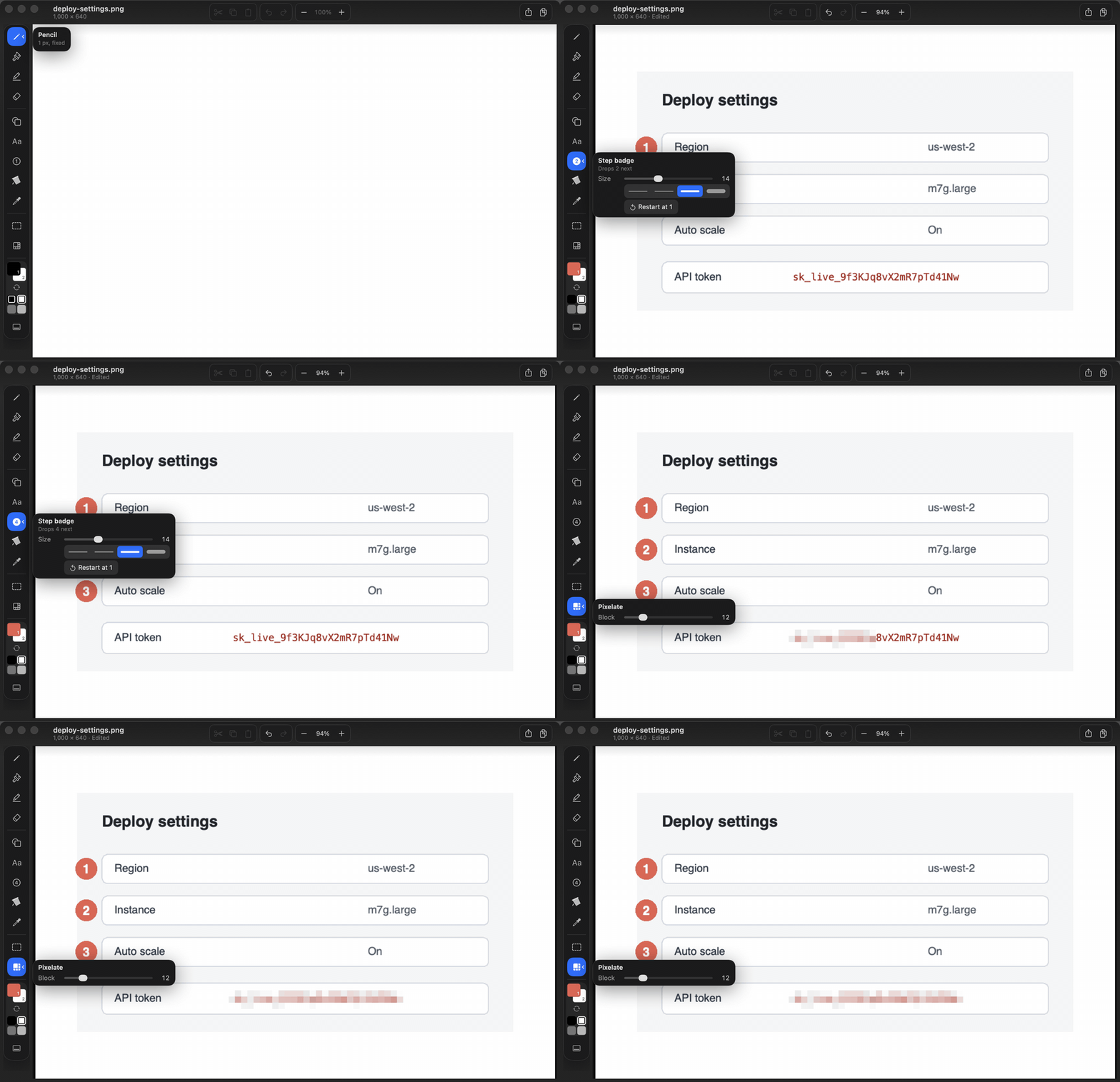
Take or paste a screenshot, number the steps and drag the finished image into a bug report or a doc.
[](https://github.com/joshlin2201/itspaint/releases)
[](https://apps.apple.com/us/app/itspaint/id6796493980?mt=12)
[](LICENSE)
[](https://github.com/joshlin2201/itspaint/actions/workflows/ci.yml)
```sh
brew install --cask joshlin2201/itspaint/itspaint
```
Or get the **[disk image](https://github.com/joshlin2201/itspaint/releases/latest)**, or install it free from the **[Mac App Store](https://apps.apple.com/us/app/itspaint/id6796493980?mt=12)**. Needs macOS 14 or later.
## Why ItsPaint
Preview can't number a step or pixelate anything, CleanShot X charges $29 plus a cloud
subscription to do it, and Krita is a gigabyte built for painters. ItsPaint does the
markup for free and paints too.
It has no network access. The app doesn't request the network entitlement, so the
sandbox won't let it open a socket, and [three commands](#no-network-and-how-to-check)
will show you that on your own copy.
The drawing engine, PaintKit, has no UI. It imports Foundation, CoreGraphics, ImageIO,
CoreText and UniformTypeIdentifiers and nothing else, so `swift test` covers most changes
without Xcode, and you can [use it in your own code](#paintkit-as-a-swift-package).
## PaintKit as a Swift package
The engine is its own SwiftPM product. It has no AppKit and no third-party dependencies,
and it supports macOS 12 and iOS 15 and later. CI runs the engine's tests on an iPhone
simulator as well as the Mac.
```swift
.package(url: "https://github.com/joshlin2201/itspaint", from: "0.24.0")
```
[](https://swiftpackageindex.com/joshlin2201/itspaint)
[](https://swiftpackageindex.com/joshlin2201/itspaint)
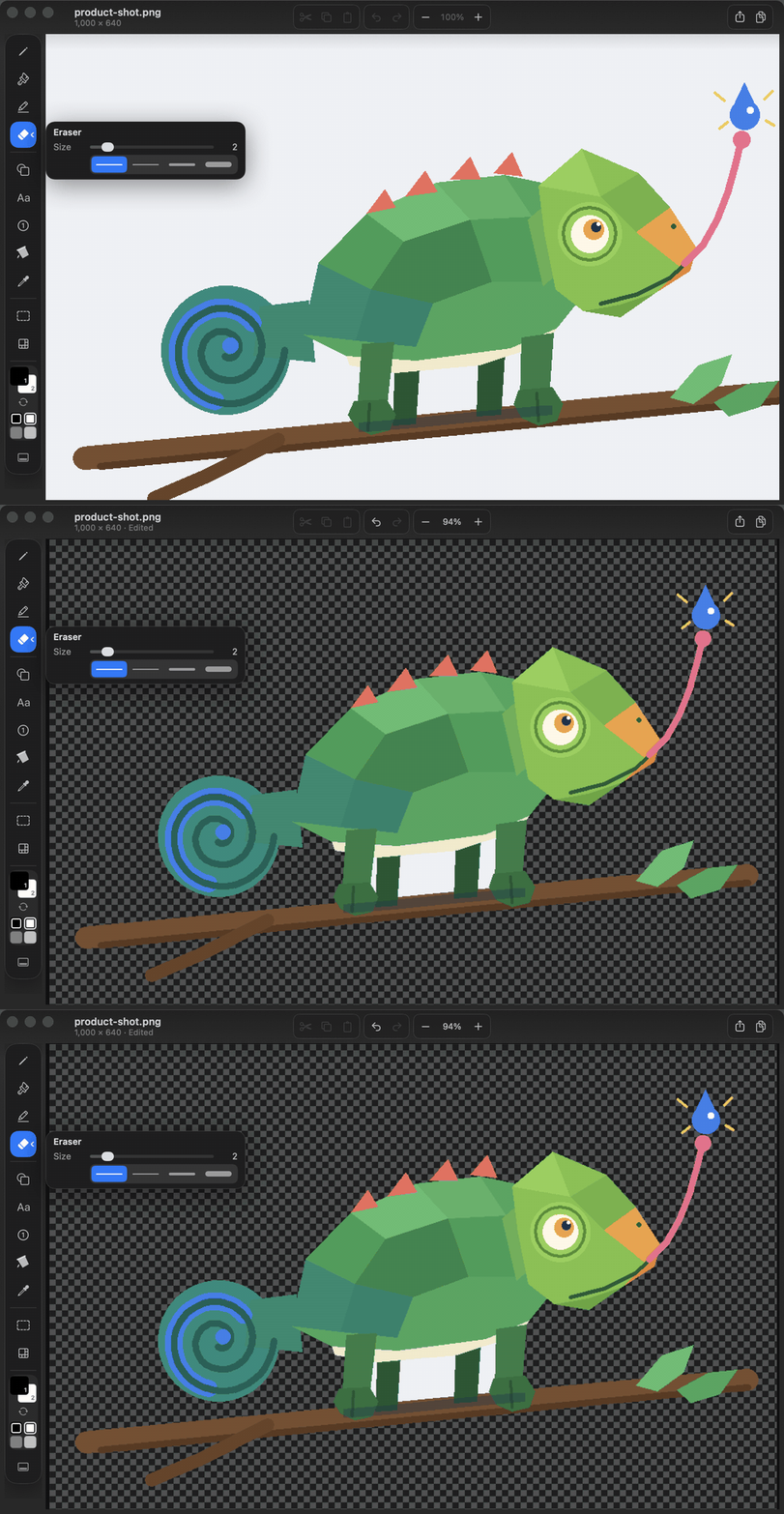
Removing the background from a product shot takes four lines, on device:
```swift
import PaintKit
let engine = PaintEngine(canvas: try ImageCodec.decode(contentsOf: input))
guard engine.removeBackground() else { fatalError("no background to remove") }
try ImageCodec.encode(engine.canvas, as: .png).write(to: output)
```
CI compiles that snippet on every push from a separate package that declares macOS 12,
so the floor can't creep up unnoticed. The engine's own tests count the transparent pixels
`removeBackground()` leaves, so a call that cleared one corner would fail. Every target
builds in Swift 6 language mode with strict concurrency on.
Until 1.0 a minor release can still change the document format, and
[CHANGELOG.md](CHANGELOG.md) says so at the top when one does. **Watch > Custom > Releases**
emails you about new versions and nothing else.
## What it does
### Marking up
| | |
|---|---|
| **Step badges** | Numbered automatically, with the numeral contrasted against its fill. A sequence can start at any number, so it can continue from another screenshot. |
| **Arrows and callouts** | Fifteen shapes, solid, dashed or dotted, outlined or filled. `A` picks the arrow. |
| **Highlighter** | Its own ink, separate from your two colours. Overlaps within one stroke don't darken. |
| **Pixelate** | A mosaic with blocks from 4 to 48 px. It hides detail but isn't redaction, so cover secrets with a filled shape. |
| **Spotlight** | Drag a box and everything outside it dims. |
| **Text** | Annotation text gets a contrasting rim, so it stays readable over light and dark areas. |
### Getting images in and out
| | |
|---|---|
| **Take a screenshot** | File > New from Screenshot brings up the macOS crosshair: drag a region or press Space for a window, and the shot opens as a new image. ⌃⌥⌘4 does the same from any app once it's switched on in Settings. |
| **Drag out** | Drag the image straight into any app that accepts one, without saving a file first. |
| **Paste** | Pasted images arrive as a floating selection. If one is bigger than the canvas, the canvas grows to fit. |
| **Nine export formats** | PNG, JPEG, TIFF, BMP, GIF, HEIC, AVIF, PDF and ICO. Formats without alpha flatten onto Colour 2 instead of black. |
| **Sign a PDF** | Open a contract, sign it and save it back as a PDF. The page keeps its printed size and the pages you didn't touch keep their text. |
| **Open With** | Registered for PNG, JPEG, TIFF, BMP, GIF, HEIC and PDF. |
### Background removal
One command floods from all four corners and makes the union transparent. If the
background can't be separated, it says so and leaves the image alone.
It works on logos, product shots and scanned diagrams. It's useless on hair.
[The thirty lines of code behind it](docs/BACKGROUND_REMOVAL.md).
### Painting
| | |
|---|---|
| **Thirteen tools** | Pencil, brush, highlighter, eraser, clone, shape, text, badge, fill, eyedropper, select, pixelate and spotlight, each on a single key. |
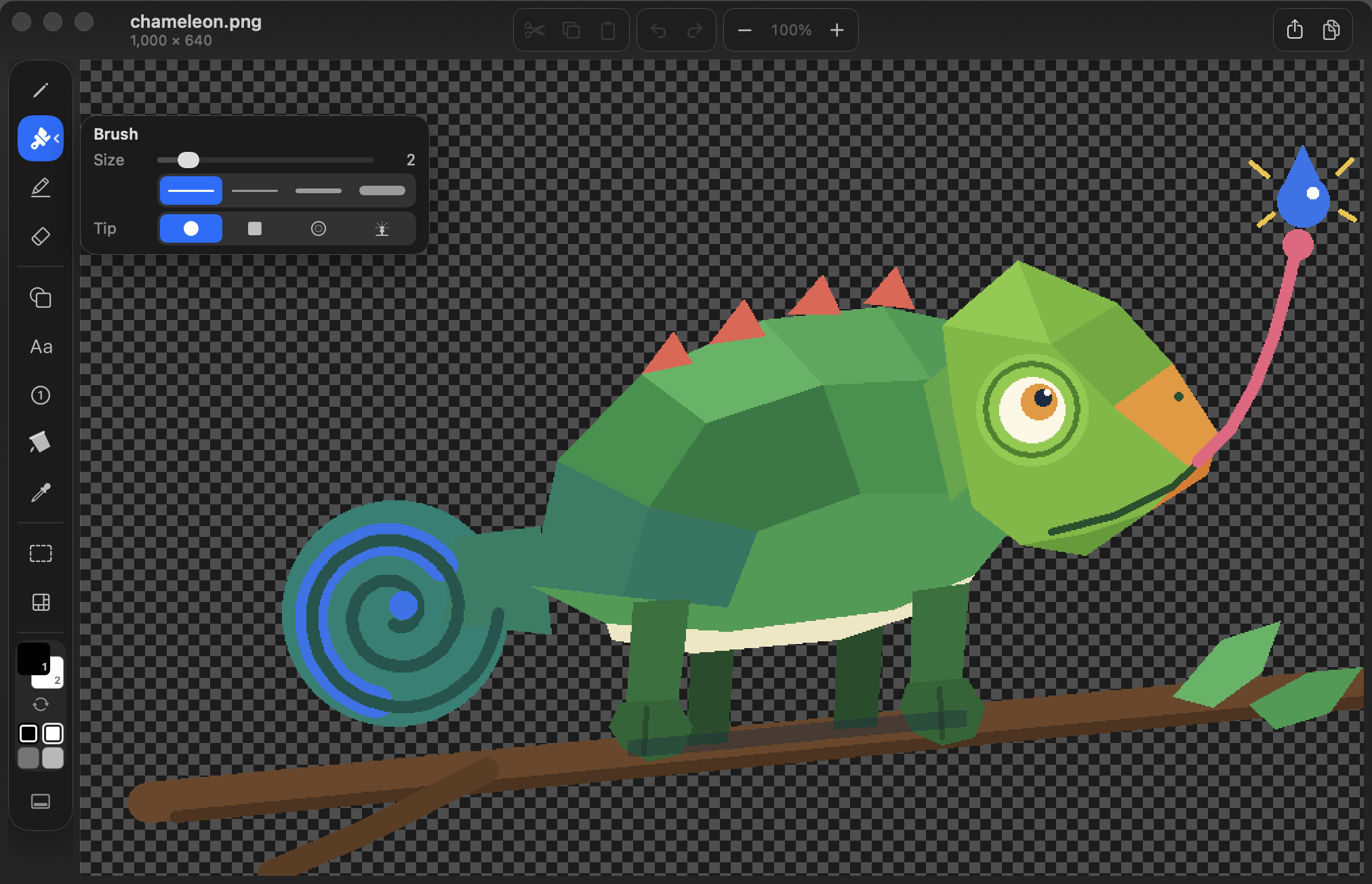
| **Brush nibs** | Round, square, soft and spray. Spray keeps going while you hold still, like an airbrush. |
| **Selections** | Rectangle, ellipse, lasso and Instant Alpha. The marching ants follow the pixel mask. |
| **Pixel control** | Zoom centres on the pointer and switches to nearest-neighbour above 100%. There's a pixel grid, live brush footprints and rotation by any angle. |
| **Snap to grid** | `⇧⌘'` snaps shapes, selections and pasted content to an 8 to 64 px grid. Freehand strokes ignore it. |
## No network, and how to check
ItsPaint doesn't request `com.apple.security.network.client`, so the kernel won't open a
socket for it. The first two commands inspect the copy in `/Applications` and the third
searches this repository:
```bash
codesign -d --entitlements - --xml /Applications/ItsPaint.app | plutil -p -
otool -L /Applications/ItsPaint.app/Contents/MacOS/ItsPaint
grep -rniE 'URLSession|NWConnection|import Network|CFSocket' App Packages
```
| Command | What you should see |
|---|---|
| `codesign` | Three entitlements: the sandbox, files you pick in a panel and app-scoped bookmarks. No `network.client` or `network.server`. |
| `otool` | Apple frameworks and the Swift runtime, for both architectures. No `CFNetwork`, `Network.framework` or bundled dylib. |
| `grep` | Nothing. `Package.swift` declares no dependencies either. |
Start with `codesign`, because it's the one that holds even if the developer is lying to
you. [Making the same claim checkable in your own app](docs/PROVING_NO_NETWORK.md).
## Install
```bash
brew install --cask joshlin2201/itspaint/itspaint
```
Or open the [disk image](https://github.com/joshlin2201/itspaint/releases) and drag
**ItsPaint** to Applications. It's also free on the
[Mac App Store](https://apps.apple.com/us/app/itspaint/id6796493980?mt=12).
| | |
|---|---|
| **Requires** | macOS 14 Sonoma or later |
| **Architecture** | Universal, for Apple silicon and Intel |
| **Signing** | Developer ID and notarised, with the ticket stapled to the disk image and the app, so Gatekeeper can check it offline |
| **Download** | 3.75 MB, with SHA-256 sums in `checksums.txt` |
```bash
shasum -a 256 -c checksums.txt
xcrun stapler validate ItsPaint-*.dmg
```
If macOS asks you to confirm the first launch, go to **System Settings > Privacy &
Security** and click **Open Anyway**. [Why that can happen](#first-launch).
## Contributing
PaintKit has no UI, so most changes to how ItsPaint draws can be made and tested from a
terminal:
```bash
git clone https://github.com/joshlin2201/itspaint.git
cd itspaint
swift test
```
If that stops at `plugin for module 'TestingMacros' not found`, you have the Command Line
Tools without Xcode, and Swift 6.4 is looking for the Swift Testing macro plugin in the
wrong folder. Point it there:
```bash
swift test -Xswiftc -plugin-path -Xswiftc /Library/Developer/CommandLineTools/usr/lib/swift/host/plugins/testing
```
Checked on 2026-09-18 in a fresh clone with Command Line Tools 27.0.
**Seven issues are open and labelled [`good first issue`](https://github.com/joshlin2201/itspaint/issues?q=is%3Aissue+is%3Aopen+label%3A%22good+first+issue%22)**,
and each one names the file and line to start at.
Engine work, no Xcode needed:
- [**#12** Brightness, contrast and saturation](https://github.com/joshlin2201/itspaint/issues/12)
- [**#5** Arrowheads as a line style instead of a separate shape](https://github.com/joshlin2201/itspaint/issues/5)
- [**#3** Grow and shrink a selection by a pixel amount](https://github.com/joshlin2201/itspaint/issues/3)
- [**#4** Make a selection from the alpha channel](https://github.com/joshlin2201/itspaint/issues/4)
- [**#6** Flip and rotate the selection instead of the whole image](https://github.com/joshlin2201/itspaint/issues/6)
- [**#7** Add to and subtract from a selection](https://github.com/joshlin2201/itspaint/issues/7)
AppKit drawing in the view layer:
- [**#11** A loupe that follows the pointer](https://github.com/joshlin2201/itspaint/issues/11)
[CONTRIBUTING.md](CONTRIBUTING.md) covers the structure, the design rules and what a
change has to prove before it lands.
Tools and shortcuts
| Group | Tools |
|---|---|
| **Draw** | Pencil, Brush (round, square, soft, spray), Highlighter (own ink, four colours), Eraser, Clone (clone, soften) |
| **Insert** | Shape, Text, Step Badge, Fill, Eyedropper |
| **Select** | Rectangle, Ellipse, Lasso, Instant Alpha |
| **Effects** | Pixelate, Spotlight |
Thirteen rail buttons. Variants live inside their tool, so the fifteen shapes sit behind
Shape, four nibs behind Brush and four modes behind Select.
Text stays editable. Click a text box with the Text tool, or double-click it with the
Select tool, and it opens again with the caret where you clicked. Highlight a word to
retype it or give it its own font, size, colour, bold, italic or underline. `⌘↩`
finishes, and `Esc` drops whatever you changed since you opened it or last saved.
| Shortcut | Action | Shortcut | Action |
|---|---|---|---|
| `P` | Pencil | `B` | Brush |
| `H` | Highlighter | `E` | Eraser |
| `C` | Clone | `F` | Soften |
| `U` | Shape | `T` | Text |
| `N` | Step Badge | `K` | Fill |
| `I` | Eyedropper | `M` | Select |
| `R` | Pixelate | `S` | Spotlight |
| `A` | Arrow | `X` | Swap colours |
| `[` / `]` | Change tool size | `Space` | Pan |
| `⌥1`–`⌥9` | Choose a shape | `⇧⌘'` | Snap to grid |
| `⌘K` | Crop to selection | `⌘9` | Fit to window |
| `⇧⌘E` | Export | `⌘V` | Paste as a floating image |
| `⌃⌥⌘4` | New from Screenshot | `⌃⌥⌘V` | New from Clipboard |
Pinch or `⌘`-scroll to zoom around the pointer. Hold `⌥` to sample a colour without
switching tools, and right-drag to paint with the second colour. `Esc` cancels the
current shape, text box, selection, floating paste or options panel.
Instant Alpha selects connected pixels by colour. `⇧`-click adds, `⌥`-click subtracts,
then **Make transparent** clears them.
Files and export
An `.itspaint` document is a package holding lossless PNGs and JSON for the canvas,
colours, palette and text boxes, so text is still editable when you open it again.
Painting over a box turns that box into pixels, and Undo brings it back.
Each export format is offered when the installed macOS ships its encoder. There's no
WebP export, because macOS has no WebP encoder. Image formats and exports flatten text into the picture.
A PDF opens one page at a time, rasterised at 144 dpi for drawing. Saving writes a real
PDF, with the edited page at its original size in points and the other pages copied
through untouched. Multi-page documents get a page control at the bottom of the window,
and turning the page keeps what you drew.
ItsPaint asks for `Alternate` rank on PDF so Preview stays the default reader.
How it's built
```text
Packages/PaintKit/ UI-free drawing engine, raster operations, undo and codecs
App/ AppKit document lifecycle, canvas and SwiftUI interface
```
PaintKit stores pixels as premultiplied RGBA8, and every edit returns the rectangle it
changed. The canvas redraws only that area, and undo history is capped by memory rather
than by a step count.
[Background removal without a model](docs/BACKGROUND_REMOVAL.md) walks through both
layers. Its guard was wrong for three releases, which is written up in
[a guard tuned to its test](docs/A_GUARD_TUNED_TO_ITS_TEST.md).
[docs/README.md](docs/README.md) has the design notes, architecture, feature reference,
testing guide and roadmap, and [CHANGELOG.md](CHANGELOG.md) has the version history.
First launch and Gatekeeper
Open **System Settings > Privacy & Security** and click **Open Anyway**.
This happened once, with a freshly downloaded 0.12.0 on macOS 26.6. `spctl --assess`
accepted the disk image and its stapled ticket validated, so it looks like a first-launch
check that never heard back from Apple.
To check the download yourself:
```bash
shasum -a 256 -c checksums.txt
codesign --verify --deep --strict --verbose=2 /Volumes/ItsPaint*/ItsPaint.app
spctl -a -vvv -t exec /Volumes/ItsPaint*/ItsPaint.app # expect: accepted
```
**If you installed it, a star helps the next person find it in search.**
MIT licensed. Built by [Josh Lin](https://github.com/joshlin2201).