# react-markdown-editor
A markdown editor using React/Reflux.
[](https://travis-ci.org/jrm2k6/react-markdown-editor)
[](https://codeclimate.com/github/jrm2k6/react-markdown-editor)
[](http://www.opensource.org/licenses/MIT)
[](https://www.npmjs.com/package/react-markdown-editor)
[](https://www.npmjs.com/package/react-markdown-editor)
##TLDR
Demo here: http://jrm2k6.github.io/react-markdown-editor/
## Installation
``` npm install --save react-markdown-editor ``` or ```yarn add react-markdown-editor```
## Features
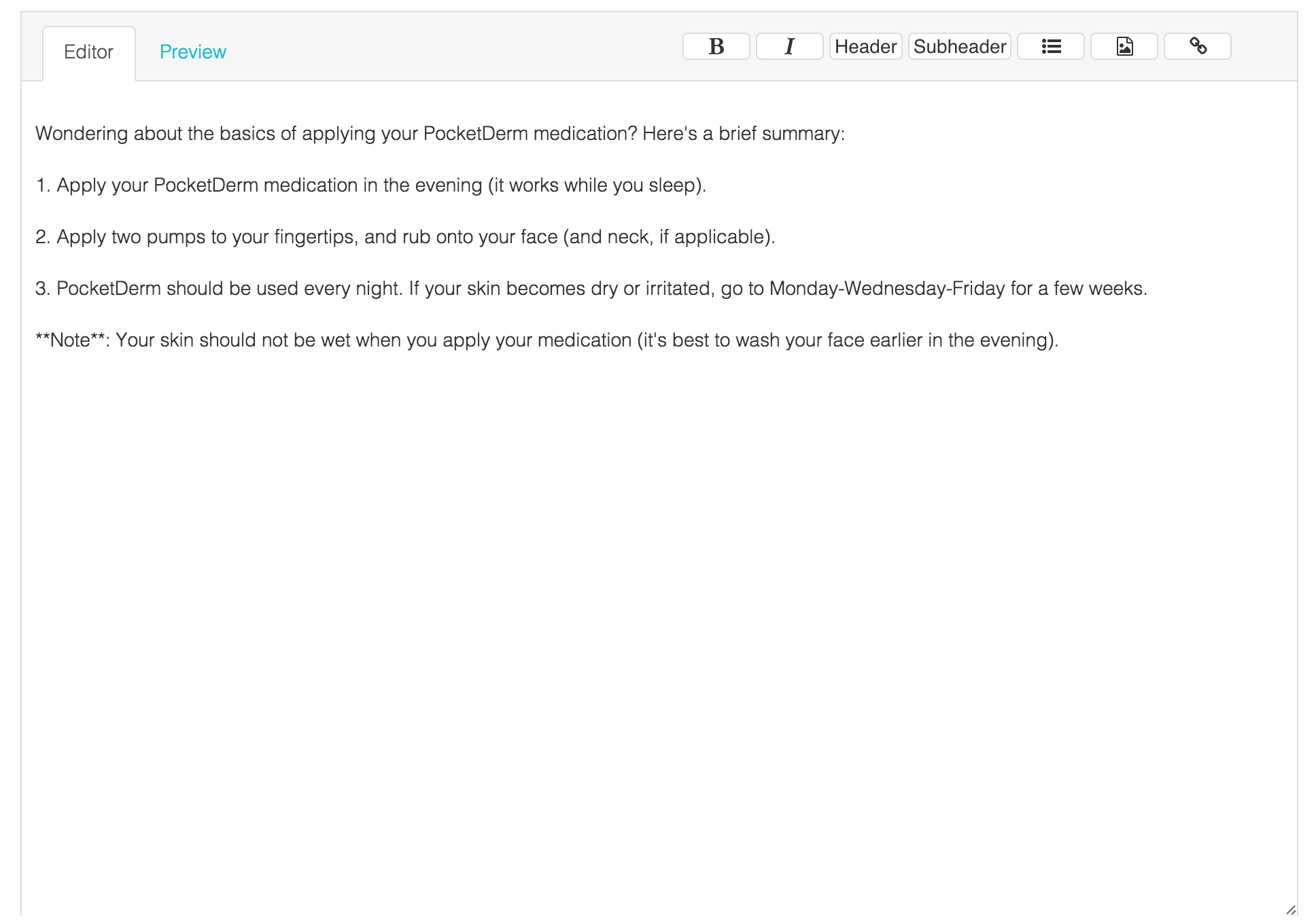
From the UI:
- Bold
- Italic
- Header
- Subheader
- Link
- Unordered List
- Inline Images
Of course it is a regular markdown editor (using the nice [markdown-js](https://github.com/evilstreak/markdown-js) library), so you are not limited to the UI.
## Usage
To render the component:
```
var React = require('react');
var MarkdownEditor = require('react-markdown-editor').MarkdownEditor;
var TestComponent = React.createClass({
render: function() {
return (
);
}
});
React.render(, document.getElementById('content'));
```
``` ``` takes two required props:
- initialContent which is the text you want the textarea to contain on initialization.
- iconsSet which is the icons provider you want to use. It can either be font-awesome or materialize-ui
Optional props:
- ```onContentChange```, function to be called on each content change, getting the new content as an argument (as the property name says!)
- ```styles```, see [Styling](#styling) below
You can also listen to content changes on the editor. If you are using Reflux, by listening to the changes on ```MarkdownEditorContentStore```.
To be able to do so, just ```require('react-markdown-editor').MarkdownEditorContentStore;```
## Dependencies
You can modify the styles directly by modifying the styles declared in ```dist/MarkdownEditor.js```. The pre-existing styles assume that you are using Bootstrap and Font Awesome.
## Styling
`````` is styled using React's inline styling and can be styled by supplying a ```styles``` prop. The following keys are used to style each component, below are their default values:
- styleMarkdownEditorHeader :
- display: 'flex'
- flexDirection: 'column'
- borderBottom: '1px solid #ddd'
- marginLeft: '0px'
- marginRight: '0px'
- minHeight: '50px'
- justifyContent: 'center'
- position: 'relative'
- styleMarkdownEditorContainer :
- display: 'flex'
- flexDirection: 'column'
- marginTop: '2px'
- paddingTop: '10px'
- border: '1px solid #ddd'
- backgroundColor: '#f7f7f7'
- styleMarkdownMenu :
- margin: '5px 0'
- flex: '1'
- display: 'flex'
- position: 'absolute'
- right: '20px'
- top: '10px'
- styleMarkdownTextArea :
- height: '90%'
- width: '100%'
- padding: '30px 10px'
- border: 'none'
- styleMarkdownPreviewArea :
- height: '90%'
- width: '100%'
- padding: '30px 10px'
- backgroundColor: '#fff'
- border: 'none'
- styleMarkdownEditorTabs :
- border: 'none'
- display: 'flex'
- justifyContent: 'flex-start'
- styleTab :
- padding: '0px 20px'
- cursor: 'pointer'
- display: 'flex'
- justifyContent: 'center'
- alignItems: 'center'
- height: '50px'
- styleActiveTab :
- padding: '0px 20px'
- cursor: 'pointer'
- display: 'flex'
- justifyContent: 'center'
- alignItems: 'center'
- height: '50px'
- borderLeft: '1px solid #ddd'
- borderRight: '1px solid #ddd'
- borderTop: '1px solid #ddd'
- backgroundColor: '#fff'
- borderRadius: '3px'
## TODO
- [ ] Cross-browsers testing
- [ ] Move to Redux
## Example
```
cd Example
npm install
webpack
open index.html
```
## Issues/Contribution
You can open an issue on the github repo, or contact me directly by email.
## Help
Please, if you are using this package, let me know. I am interested to know what you think of it, even if it was on a tiny side-project.
## Screenshots