# gob
[](https://github.com/juanibiapina/gob/releases)
[](https://goreportcard.com/report/github.com/juanibiapina/gob)


[](https://github.com/juanibiapina/gob/graphs/contributors)

[](https://deepwiki.com/juanibiapina/gob)
> Process manager for AI agents (and humans).
`gob` (pronounced job, of course) is a CLI for managing background processes with a shared interface for you and your AI coding agent.
Start a dev server with Claude Code, check its logs yourself. Or vice-versa. The agent can monitor what you started. Everyone has the same view.
No more "can you check if that's still running?" No more copy-pasting logs through chat. Just direct access to your processes, for everyone.
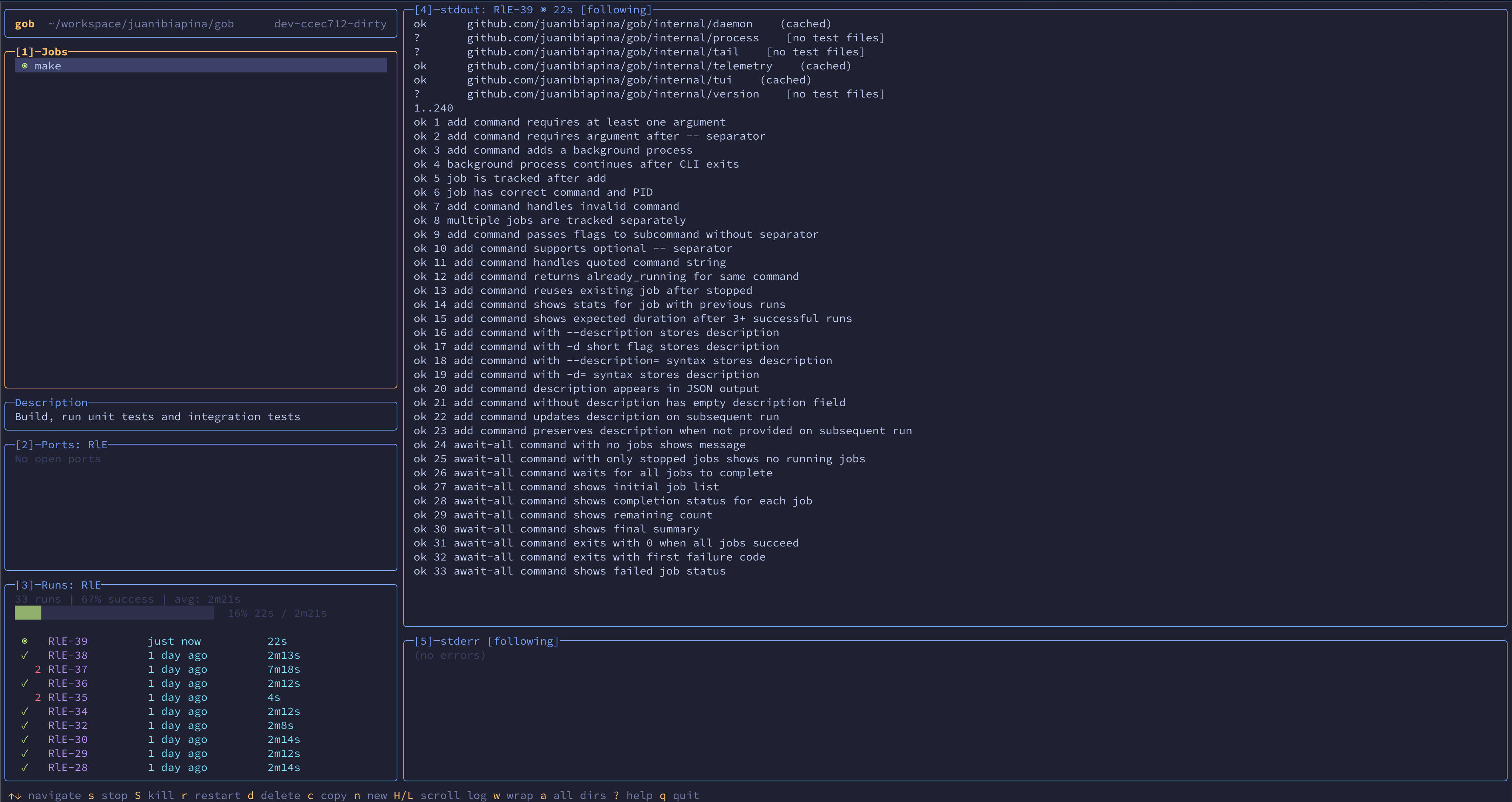
## Features
- **Interactive TUI** - Full-screen terminal interface with real-time job status
- **Real-time log streaming** - Follow stdout/stderr from CLI, TUI, or AI agents without copying output
- **AI agent friendly** - Shared view of all processes for you and your coding agent
- **Real-time sync** - Changes from CLI instantly appear in TUI, and vice-versa
- **Per-directory jobs** - Jobs are scoped to directories, keeping projects organized
- **Process lifecycle control** - Start, stop, restart, send signals to any job
- **Port monitoring** - Inspect listening ports across a job's entire process tree
- **Reliable shutdowns** - Stop, restart, and shutdown verify every child process in the tree is gone
- **Job persistence** - Jobs survive daemon restarts with SQLite-backed state
- **Run history** - Track execution history, statistics, and progress estimates for repeated commands
- **Stuck detection** - Automatically detects jobs that may be stuck and returns early, while the job continues running
- **Blocked jobs** - Prevent AI coding agents from accidentally running dangerous commands
## Installation
Homebrew
```bash
brew tap juanibiapina/taps
brew install gob
```
Go Install
```bash
go install github.com/juanibiapina/gob@latest
```
Requirements:
- Go 1.25.4 or later
The binary will be installed to `$GOPATH/bin` (or `$GOBIN` if set). Make sure this directory is in your `PATH`.
Pre-built Binaries
Download the latest release for your platform from the [Releases page](https://github.com/juanibiapina/gob/releases).
**Available platforms**: Linux, macOS (both amd64 and arm64)
```bash
# Download the appropriate binary for your platform
# For example, macOS Apple Silicon (arm64):
curl -LO https://github.com/juanibiapina/gob/releases/latest/download/gob_VERSION_darwin_arm64.tar.gz
# Extract the archive
tar -xzf gob_VERSION_darwin_arm64.tar.gz
# Move to your PATH
sudo mv gob /usr/local/bin/
# Verify installation
gob --version
```
Build from Source
See [CONTRIBUTING.md](CONTRIBUTING.md) for build instructions.
## Quick Start
```bash
# Usage overview
gob
# Run a command and wait for completion
gob run make test
# Add a background job (returns immediately)
gob add -- make test
gob add -- pnpm --filter web typecheck
# Wait for a job to complete
gob await abc
# List all jobs
gob list
# View stdout and stderr
gob logs abc
# Stop a job
gob stop abc
# Remove a stopped job
gob remove abc
```
## Using with AI Coding Agents
For AI agents, add the following instructions to your agent's configuration file (`CLAUDE.md`, `AGENTS.md`, etc).
````markdown
## Background Jobs with `gob`
Use `gob` for servers, long-running commands, and builds.
### When to Use gob
Use `gob` for:
- **Servers**: `gob add npm run dev`
- **Long-running processes**: `gob add npm run watch`
- **Builds**: `gob run make build`
- **Parallel build steps**: Run multiple builds concurrently
Do NOT use `gob` for:
- Quick commands: `git status`, `ls`, `cat`
- CLI tools: `jira`, `kubectl`, `todoist`
- File operations: `mv`, `cp`, `rm`
### gob Commands
- `gob add ` - Start command in background, returns job ID
- `gob add --description "context" ` - Start with description for context
- `gob run ` - Run and wait for completion (output on failure only)
- `gob run --description "context" ` - Run with description for context
- `gob await ` - Wait for job to finish, stream output in real-time
- `gob list` - List jobs with IDs, status, and descriptions
- `gob logs ` - View stdout and stderr (stdout→stdout, stderr→stderr)
- `gob stdout ` - View current stdout (useful if job may be stuck)
- `gob stop ` - Graceful stop
- `gob restart ` - Stop + start
### Stuck Detection
`gob run` and `gob await` automatically detect potentially stuck jobs:
- Timeout: avg duration + 1 min (or 5 min if no history), triggers if no output for 1 min
- Job continues running in background
- Use `gob logs ` or `gob stdout ` to check output, `gob await ` to continue waiting
### Examples
Servers and long-running:
```
gob add npm run dev # Start dev server
gob add --description "File watcher" npm run watch # With description
```
Builds:
```
gob run make build # Run build, wait for completion
gob run npm run test # Run tests, wait for completion
gob run --description "Type check" npm run typecheck # With description
```
Regular commands (no gob):
```
git status
kubectl get pods
jira issue list
```
````
## Interactive TUI
Launch a full-screen terminal interface for managing jobs:
```bash
gob tui
```
### Layout
The TUI has an info bar and five panels:
- **Info bar**: Shows working directory and version
- **Panel 1 (Jobs)**: List of all jobs with status (◉ running, ✓ success, ✗ failed)
- **Description**: Shows job description (only visible when selected job has one)
- **Panel 2 (Ports)**: Listening ports for the selected job
- **Panel 3 (Runs)**: Run history for the selected job
- **Panel 4 (stdout)**: Standard output of selected run
- **Panel 5 (stderr)**: Standard error of selected run
### Key Bindings
| Key | Action |
|-----|--------|
| `↑/k`, `↓/j` | Navigate / scroll |
| `h/l` | Scroll log horizontally (in log panels) |
| `H/L` | Scroll log horizontally (from jobs/runs panels) |
| `g/G` | Go to first/last |
| `f` | Toggle follow mode |
| `w` | Toggle line wrap |
| `s/S` | Stop / kill job |
| `r` | Restart job |
| `d` | Delete stopped job/run |
| `n` | New job |
| `1/2/3/4/5` | Switch to panel |
| `?` | Show all shortcuts |
| `q` | Quit |
### Auto-Start with Gobfile
Create a `.config/gobfile.toml` in your project directory to automatically start jobs when the TUI launches:
```toml
[[job]]
command = "npm run dev"
description = "Frontend on http://localhost:3000. Check here for UI errors."
[[job]]
command = "npm run api"
description = "API server on http://localhost:4000. Check logs for request debugging."
[[job]]
command = "npm run storybook"
description = "Component library on http://localhost:6006"
autostart = false # Add but don't start automatically
[[job]]
command = "npm run db:reset"
description = "DANGER: Drops and recreates the database"
blocked = true # Prevent accidental execution
```
**Fields:**
- `command` (required): The command to run
- `description` (optional): Context for AI agents (ports, URLs, what to check for)
- `autostart` (optional): Whether to start the job when TUI opens (default: `true`)
- `blocked` (optional): If `true`, the job cannot be started; CLI shows description when attempted (default: `false`)
**Behavior:**
- Jobs are started asynchronously when TUI opens (if `autostart = true`)
- Jobs are stopped when TUI exits (including when terminal is killed)
- Already-running jobs have their descriptions updated if different
- Stopped jobs with matching commands are restarted
- Jobs with `autostart = false` are added but not started
**Tip:** Add `.config/gobfile.toml` to `.gitignore` if you don't want to share it.
## CLI Reference
Run `gob --help` for detailed usage, examples, and flags.
| Command | Description |
|---------|-------------|
| `run ` | Run command and wait for completion (`--description` to add context) |
| `add ` | Start background job (`--description` to add context) |
| `await ` | Wait for job, stream output, show summary |
| `list` | List jobs (`--all` for all directories) |
| `runs ` | Show run history for a job |
| `runs delete ` | Delete a stopped run and its logs |
| `stats ` | Show statistics for a job |
| `stdout ` | View stdout (`--follow` for real-time) |
| `stderr ` | View stderr (`--follow` for real-time) |
| `logs [id]` | View stdout and stderr (`--follow` for real-time) |
| `ports [id]` | List listening ports (`--all` for all jobs) |
| `stop ` | Stop job (`--force` for SIGKILL) |
| `start ` | Start stopped job |
| `restart ` | Stop + start job |
| `signal ` | Send signal (HUP, USR1, etc.) |
| `remove ` | Remove stopped job |
| `shutdown` | Stop all running jobs, shutdown daemon |
| `tui` | Launch interactive TUI |
## Shell Completion
`gob` supports shell completion for Bash, Zsh, and Fish. Completions include dynamic job ID suggestions with command descriptions.
Bash
```bash
# Add to ~/.bashrc
source <(gob completion bash)
```
Zsh
```bash
# Add to ~/.zshrc
source <(gob completion zsh)
```
If you get "command not found: compdef", add this before the source line:
```bash
autoload -Uz compinit && compinit
```
Fish
```bash
# Add to ~/.config/fish/config.fish
gob completion fish | source
```
## Telemetry
`gob` collects anonymous usage telemetry to help inform development priorities. Only usage metadata is collected; command arguments and output are never recorded.
You can opt out by setting `GOB_TELEMETRY_DISABLED=1` or `DO_NOT_TRACK=1` in your environment.
See [docs/telemetry.md](docs/telemetry.md) for details on what's collected.
## Contributing
Interested in contributing? Check out [CONTRIBUTING.md](CONTRIBUTING.md) for development setup, build instructions, testing instructions, and contribution guidelines.
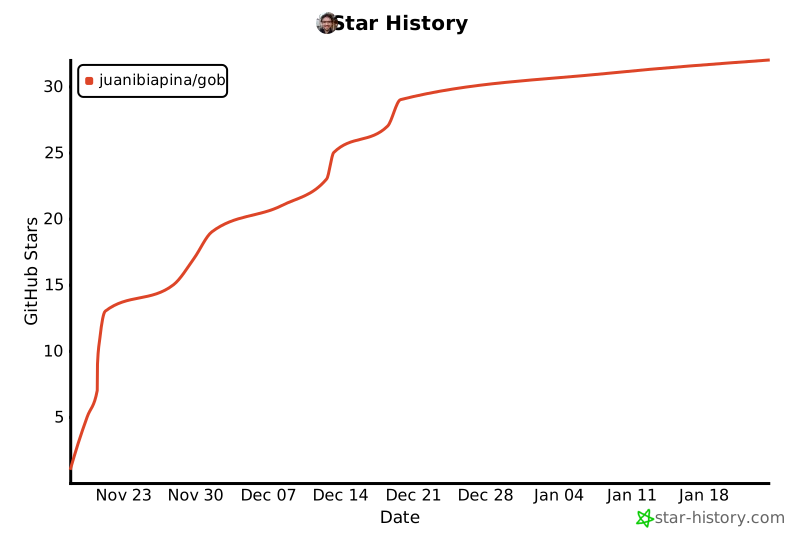
## Star History
[](https://star-history.com/#juanibiapina/gob&Date)