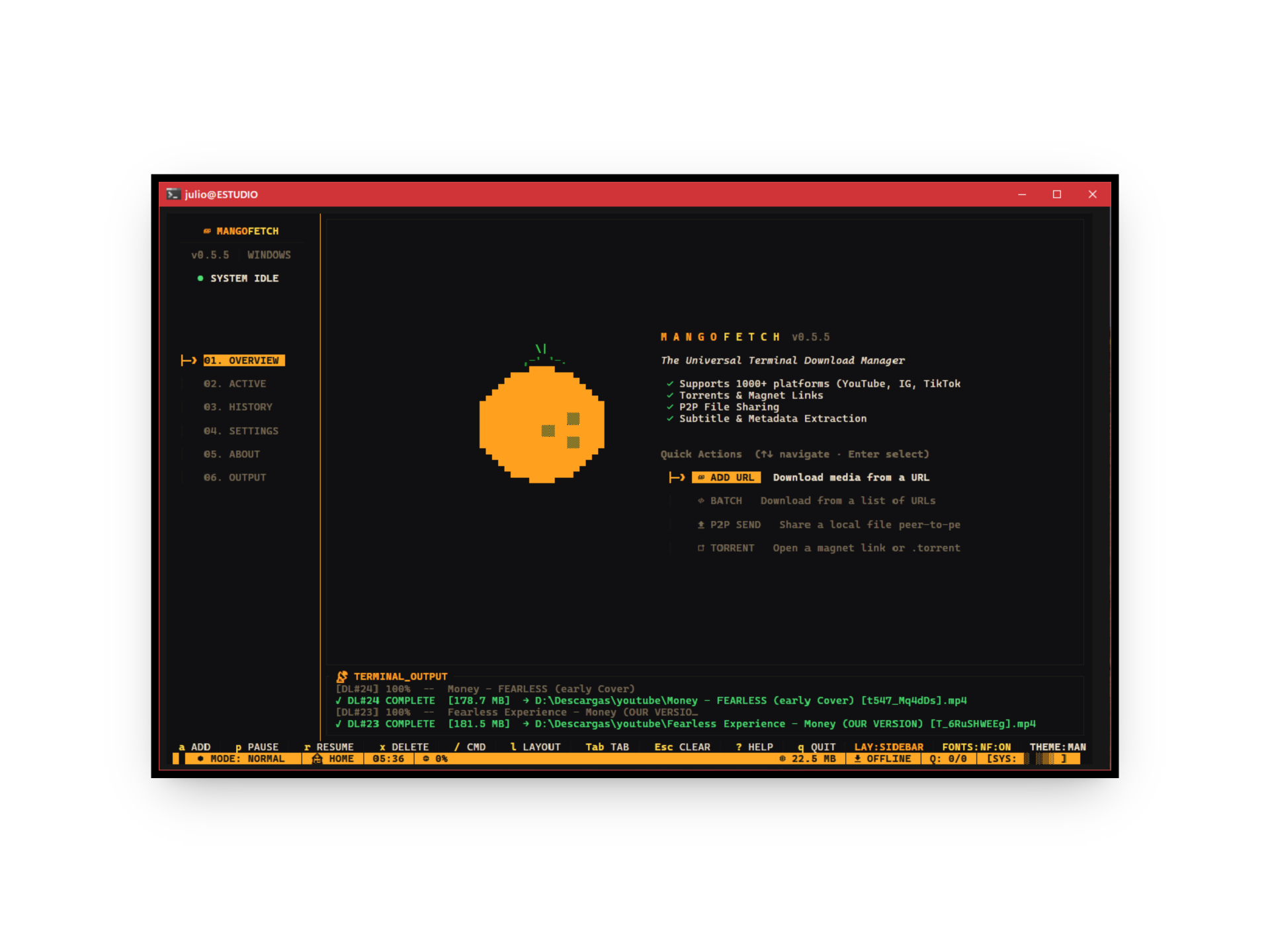
Fast, Tropical, Pure Rust. The core engine SDK and interactive Terminal User Interface (TUI) frontend of the mangoSuite.
---
___
- [Overview](#overview)
- [The mangoSuite](#the-mangosuite)
- [Cross-Platform Compatibility](#cross-platform-compatibility)
- [Using as a Rust Library (mangofetch-core)](#using-as-a-rust-library-mangofetch-core)
- [TUI Installation & Run](#tui-installation--run)
- [Via Cargo (Recommended)](#via-cargo-recommended)
- [From Source](#from-source)
- [Running the TUI](#running-the-tui)
- [Technical Architecture](#technical-architecture)
- [How the Engine Works](#how-the-engine-works)
- [Command Reference](#command-reference)
- [Acknowledgments](#acknowledgments)
- [Contributing](#contributing)
- [License](#license)
## Overview
MangoFetch downloads media quickly across multiple platforms. It provides granular control over video and audio formats without complex configuration.
The **`mangofetch-core`** engine uses Tokio and Reqwest to handle YouTube, Torrents, SoundCloud, and Instagram. It wraps `yt-dlp` and `ffmpeg` to support over 1000 platforms.
This repository contains:
1. **`mangofetch` (TUI)**: The interactive terminal frontend built with `ratatui`. Launches by default and supports mouse interaction, modal dialogs, and multiple color palettes.
2. **`mangofetch-core`**: The headless download engine.
3. **`mangofetch-plugin-sdk`**: The plugin SDK for extending the engine's capabilities.
## The mangoSuite
MangoFetch has been modularized into separate repositories for maximum flexibility:
* **[mangofetch](https://github.com/julesklord/mangofetch)** (This repo): Core engine SDK and interactive Ratatui TUI.
* **[mangofetch-cli](https://github.com/julesklord/mangofetch-cli)**: Scriptable, pure CLI frontend for headless execution and server batch jobs.
* **[mangofetch-gui](https://github.com/julesklord/mangofetch-gui)**: Hardware-accelerated desktop GUI built with `egui` & `eframe`.
## Cross-Platform Compatibility
MangoFetch runs natively on multiple architectures and operating systems.
- **Operating Systems:** Windows (10/11), macOS (Intel and Apple Silicon), GNU/Linux, and BSD.
- **Architectures:** AMD64, ARM64, and ARMv7. It operates on desktops, MacBooks, and Raspberry Pi.
- **Dependency Management:** The engine detects missing binaries like `yt-dlp`, `ffmpeg`, or `aria2c`. It automatically downloads the correct standalone version for your OS.
___
---
## Using as a Rust Library (mangofetch-core)
Integrate `mangofetch-core` directly into Discord bots, web servers, or custom applications.
Add it to `Cargo.toml`:
```toml
[dependencies]
mangofetch-core = ""
```
**Engine Capabilities:**
* **Simple Telemetry:** Track progress via `tokio::sync::mpsc` channels.
* **Unified Traits:** Use the `PlatformDownloader` trait for links, torrents, and videos.
* **Dependency Automation:** The engine manages `yt-dlp` and `ffmpeg` binaries.
* **Recovery:** The download manager handles retries and network interruptions.
---
## TUI Installation & Run
### Via Cargo (Recommended)
Install the TUI to your system path:
```zsh
cargo install mangofetch
```
### From Source
```zsh
git clone https://github.com/julesklord/mangofetch.git
cd mangofetch
cargo build --release
```
### Running the TUI
Simply run the binary without any arguments to launch the interactive TUI directly:
```zsh
mangofetch
```
> [!NOTE]
> You can still pass traditional CLI commands to this binary (e.g., `mangofetch check`, `mangofetch info `), but executing it empty launches the TUI immediately.
Set `MANGOFETCH_OFFLINE=1` to run tests without downloading external tools:
```bash
export MANGOFETCH_OFFLINE=1
cargo test -p mangofetch-core
```
---
## Technical Architecture
The modular design separates the core engine from the user interfaces.
```mermaid
graph TD
User([Terminal / App User]) -->|CLI / Events| Frontend(mangofetch TUI)
subgraph MangoFetch Workspace
Frontend -->|Dispatch & Read MPSC| Core(mangofetch-core)
subgraph Core Engine
Core --> Manager[Manager: Queue & Recovery]
Core --> Registry[Platform Registry]
Manager --> IO[Tokio Async I/O]
Registry --> Ext_Native[Native Extractors]
Registry --> Ext_Generic[Generic Extractor]
end
Frontend -.->|Dynamic Linking| SDK(mangofetch-plugin-sdk)
end
Ext_Generic -->|Wraps| YTDLP[yt-dlp Binary]
Ext_Native -->|Muxes Audio/Video| FFmpeg[FFmpeg Binary]
Ext_Native -->|BitTorrent / P2P| RQBit[librqbit]
YTDLP -.-> Network((Internet))
IO -.-> Network
IO --> Disk[(Local Storage)]
```
### Core Components
- **`mangofetch-core`**: Manages the download queue and platform extractors. It handles binary dependencies automatically.
- **`mangofetch` (TUI)**: The interactive terminal frontend using `ratatui`.
- **`mangofetch-plugin-sdk`**: A toolkit for extending features at runtime.
---
## How the Engine Works
The queue processes multiple items concurrently. It isolates failures and triggers automatic retries.
```mermaid
stateDiagram-v2
[*] --> Queued : Submit URL
Queued --> FetchingMetadata : Worker Thread Picks Item
FetchingMetadata --> Active : Media Info Resolved
FetchingMetadata --> Error : Network/Parse Failure
state Active {
[*] --> Allocating
Allocating --> Downloading : Progress Stream via MPSC
Downloading --> Muxing : Audio+Video Merge (FFmpeg)
Muxing --> [*]
}
Active --> Paused : User Pauses
Paused --> Active : User Resumes
Active --> Seeding : BitTorrent Complete
Seeding --> Complete : Seed Goal Reached
Active --> Complete : Success
Active --> Error : Interruption / Connection Drop
Error --> Queued : Retry Logic Triggered (Auto-Recovery)
Complete --> [*]
```
### Internal Features
- **Progress Reporting:** Background channels provide updates without blocking the UI.
- **Binary Provisioning:** Locates and configures `ffmpeg` and `yt-dlp`.
- **Smart Parsing:** Prioritizes native extraction over external wrappers.
---
## Command Reference
View the **[Official Wiki](docs/wiki/Home.md)** for details.
* **[Installation Guide](docs/wiki/Installation.md)**
* **[CLI Command Reference](docs/wiki/CLI-Guide.md)**
* **[TUI Interactive Guide](docs/wiki/TUI-Experience.md)**
* **[Technical Architecture](docs/wiki/Architecture.md)**
| Command | Alias | Description |
| :------------------------------- | :---- | :------------------------------------------------------ |
| `mangofetch download ` | `mango d` | Download a single link. |
| `mangofetch download-multiple` | `mango dm`| Process links from a file. |
| `mangofetch info ` | `mango i` | View metadata without downloading. |
| `mangofetch list` | `mango ls`| View current queue. |
| `mangofetch clean` | `mango c` | Clear history and cache. |
| `mangofetch config` | `mango cfg`| Modify limits and paths. |
| `mangofetch check` | `mango ch`| Verify external tool status. |
| `mangofetch update` | `mango up`| Update external binaries. |
| `mangofetch logs` | `mango log`| View debug logs. |
| `mangofetch about` | `mango a` | Show version and license. |
---
## Acknowledgments
- **[OmniGet](https://github.com/tonhowtf/omniget)** — Inspired the original engine logic.
- **[yt-dlp](https://github.com/yt-dlp/yt-dlp)** — Handles core extraction.
## Contributing
Submit pull requests for features or fixes. Open an issue first for major changes. See `CONTRIBUTING.md` for details.
## License
Built by Jules and Claude.
Released under the GPL-3.0 License.