
 

[](https://anyquery.dev)
[](https://github.com/julien040/anyquery/issues)
[](https://anyquery.dev/integrations/)
[](https://anyquery.dev/queries)
[](https://pkg.go.dev/github.com/julien040/anyquery/namespace)
[](https://archestra.ai/mcp-catalog/julien040__anyquery)
---
Sponsored by
Sidrune AI provides reliable, cost-efficient access to GPT, Claude, and other leading AI models through one unified API. Save up to 70% compared with official API pricing—and get $3 in API credits when you sign up through this link.
--- Anyquery is a SQL query engine that allows you to run SQL queries on pretty much anything. It supports querying [files](https://anyquery.dev/docs/usage/querying-files/), [databases](https://anyquery.dev/docs/database), and [apps](https://anyquery.dev/integrations) (e.g. Apple Notes, Notion, Chrome, Todoist, etc.). It's built on top of [SQLite](https://www.sqlite.org) and uses [plugins](https://anyquery.dev/integrations) to extend its functionality. It can also connect to [LLMs](https://anyquery.dev/llm) (e.g. ChatGPT, Claude, Cursor, TypingMind, etc.) to allow them to access your data. Finally, it can act as a [MySQL server](https://anyquery.dev/docs/usage/mysql-server/), allowing you to run SQL queries from your favorite MySQL-compatible client (e.g. [TablePlus](https://anyquery.dev/connection-guide/tableplus/), [Metabase](https://anyquery.dev/connection-guide/metabase/), etc.). 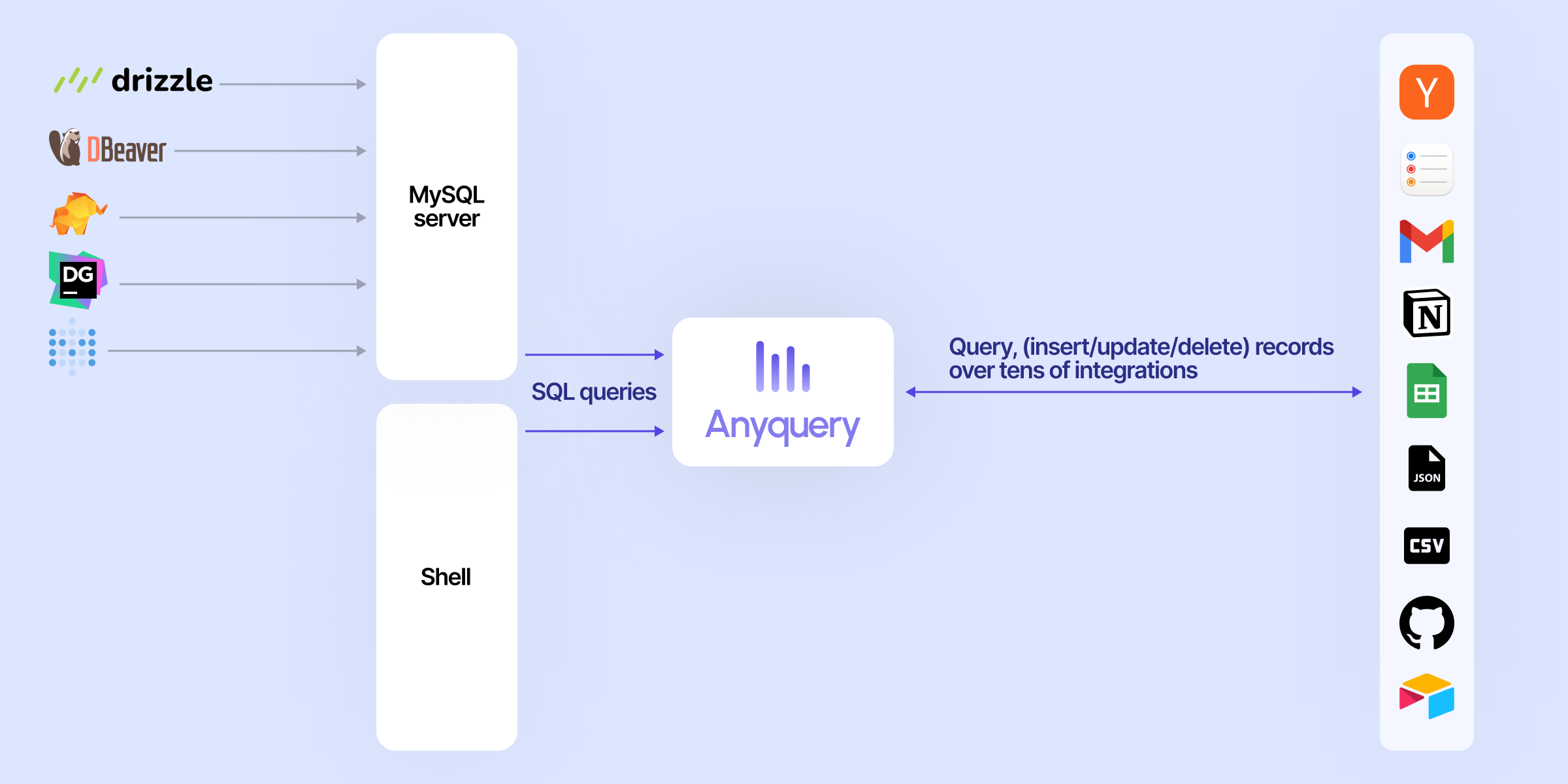 ## Usage ### Connecting LLM LLMs can connect to Anyquery using the [Model Context Protocol (MCP)](https://anyquery.dev/docs/reference/commands/anyquery_mcp). This protocol provides context for LLMs that support it. You can start the MCP server with the following command: ```bash # To be started by the LLM client anyquery mcp --stdio # To connect using an HTTP and SSE tunnel anyquery mcp --host 127.0.0.1 --port 8070 ``` You can also connect to clients that supports function calling (e.g. ChatGPT, TypingMind). Refer to each [connection guide](https://anyquery.dev/integrations#llm) in the documentation for more information. ```bash # Copy the ID returned by the command, and paste it in the LLM client (e.g. ChatGPT, TypingMind) anyquery gpt ```  ### Running SQL queries The [documentation](https://anyquery.dev/docs/usage/running-queries) provides detailed instructions on how to run queries with Anyquery. But let's see a quick example. Type `anyquery` in your terminal to open the shell mode. Then, run the following query: 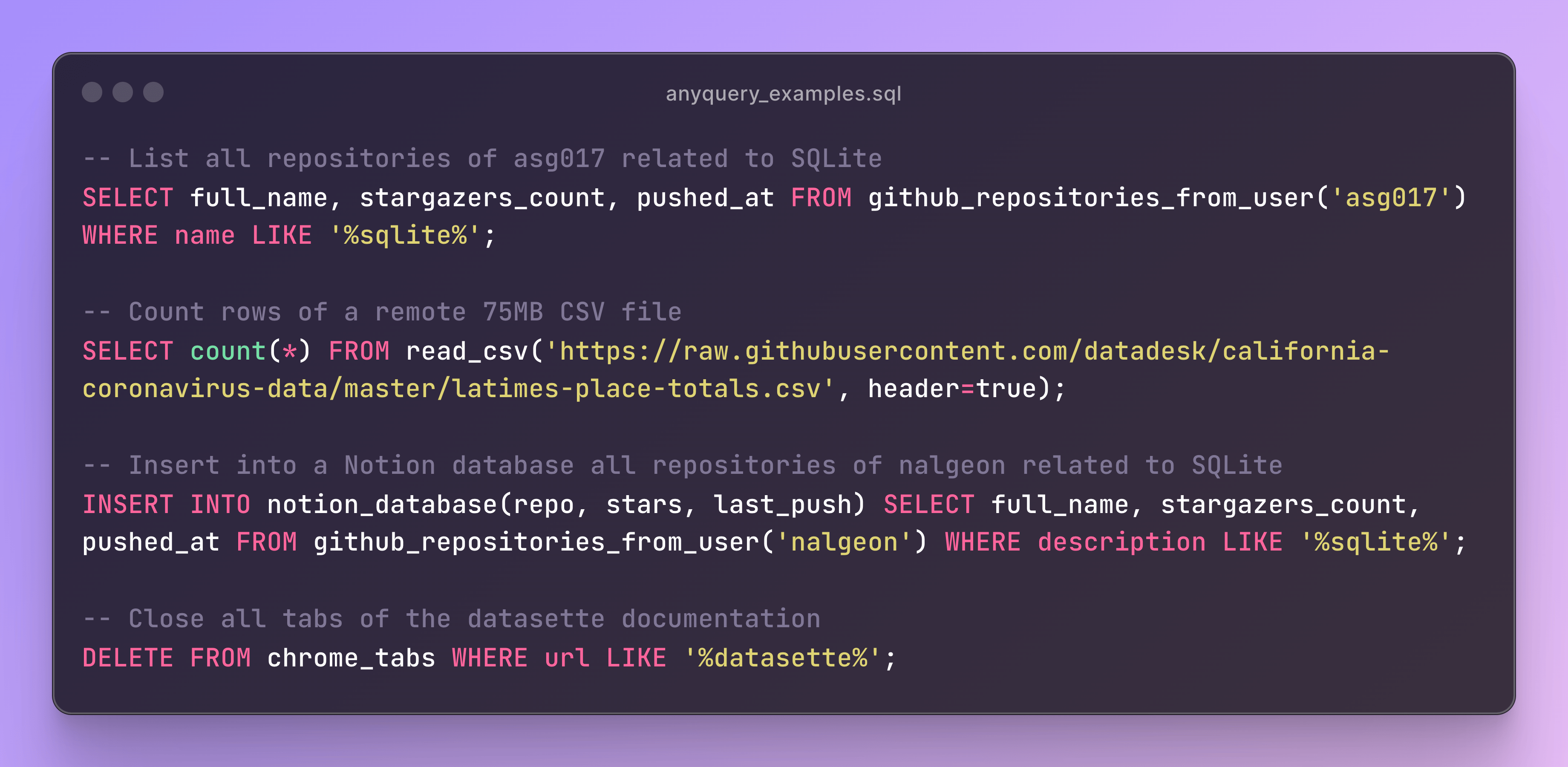 You can also launch the MySQL server with `anyquery server` and connect to it with your favorite MySQL-compatible client. ```bash anyquery server & mysql -u root -h 127.0.0.1 -P 8070 ``` ## Installation The [documentation](https://anyquery.dev/docs/#installation) provides detailed instructions on how to install Anyquery on your system. You can install anyquery from Homebrew, APT, YUM/DNF, Scoop, Winget and Chocolatey. You can also download the binary from the [releases page](https://github.com/julien040/anyquery/releases). ### Quick install (macOS & Linux) The fastest way to get started. This downloads the right binary for your platform, verifies its checksum, and adds it to your `PATH` — no `sudo` required: ```bash curl -fsSL https://anyquery.dev/install.sh | sh ``` To pin a version or install elsewhere, set `ANYQUERY_VERSION` (e.g. `0.4.5`) or `ANYQUERY_INSTALL_DIR`. To update later, re-run the same command. On Windows, use Scoop, Winget, or Chocolatey (below). ### Homebrew ```zsh brew install anyquery ``` ### ARCH LINUX (AUR) ```bash # Install using an AUR helper like yay yay -S anyquery-git # paru paru -S anyquery-git ``` ### APT ```bash echo "deb [trusted=yes] https://apt.julienc.me/ /" | sudo tee /etc/apt/sources.list.d/anyquery.list sudo apt update sudo apt install anyquery ``` ### YUM/DNF ```bash echo "[anyquery] name=Anyquery baseurl=https://yum.julienc.me/ enabled=1 gpgcheck=0" | sudo tee /etc/yum.repos.d/anyquery.repo sudo dnf install anyquery ``` ### Scoop ```powershell scoop bucket add anyquery https://github.com/julien040/anyquery-scoop scoop install anyquery ``` ### Winget ```powershell winget install JulienCagniart.anyquery ``` ### Chocolatey ```powershell choco install anyquery ``` ### Go install Requires Go 1.26+ (some dependencies don't support older versions). ```bash CGO_ENABLED=1 go install -tags "vtable fts5 sqlite_json sqlite_math_functions" github.com/julien040/anyquery@main ``` Anyquery relies on cgo (through go-sqlite3), so you need a C compiler (gcc, clang, or a mingw toolchain on Windows) available in your `PATH`. ## Plugins Anyquery is plugin-based, and you can install plugins to extend its functionality. You can install plugins from the [official registry](https://anyquery.dev/integrations) or create your own. Anyquery can also [load any SQLite extension](https://anyquery.dev/docs/usage/plugins#using-sqlite-extensions).  ## Sponsors Anyquery is an independent open-source project. These companies support its development: