English | [Deutsch](i18n/README.de.md) | [Français](i18n/README.fr.md) | [Español](i18n/README.es.md) | [Português](i18n/README.pt.md) | [Русский](i18n/README.ru.md) | [简体中文](i18n/README.zh-CN.md) | [日本語](i18n/README.ja.md) | [한국어](i18n/README.ko.md)
Lap is an open-source, local-first photo manager for browsing family albums, finding old photos quickly, and managing large personal media libraries offline.
It is a privacy-focused alternative to cloud photo services: no forced upload, local AI search, folder-first workflow, and free to use.
- Website: [https://julyx10.github.io/lap/](https://julyx10.github.io/lap/)
- Demo: [https://youtu.be/RbKqNKhbVUs](https://youtu.be/RbKqNKhbVUs)
- Privacy: [PRIVACY.md](PRIVACY.md)
## Download Lap
Open the [latest release page](https://github.com/julyx10/lap/releases/latest), then download the file that matches your system:
| Platform | Package | Note |
| :-- | :-- | :-- |
| **macOS (Apple Silicon / Intel)** | `_aarch64.dmg` / `_x64.dmg` | Notarized by Apple |
| **Windows 10/11 (x64 / ARM64)** | `_x64_en-US.msi` / `_arm64_en-US.msi` | Unsigned — if SmartScreen blocks the download, click **Keep anyway** |
| **Linux (amd64 / arm64)** | `_amd64.deb` / `_arm64.deb` | For Debian-based distros (Ubuntu, Debian, Linux Mint, etc.) |
### macOS with Homebrew
```bash
brew tap julyx10/lap
brew install --cask lap
```
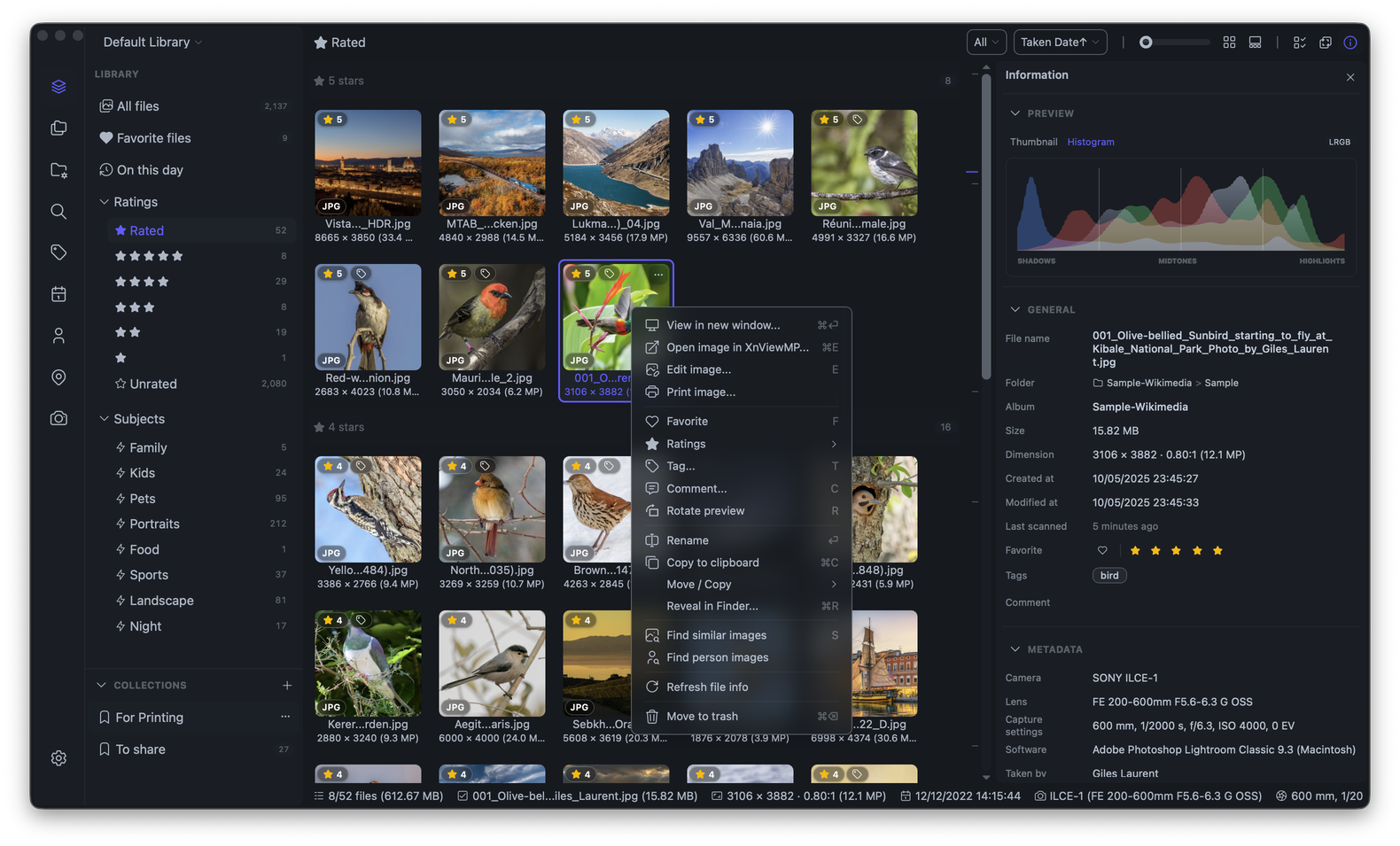
## Screenshots
## Why Lap
- **Local-first by design**: your photos stay on your own disk, with no required cloud account or upload.
- **No library lock-in**: work directly with your existing folders instead of importing everything into a closed database.
- **Private AI tools**: search, similarity, smart tags, and face features run locally on your machine.
- **Built for large collections**: optimized for smooth browsing and organization across libraries with 100k+ files.
- **Open source and free**: no subscription, no forced ecosystem, and code you can inspect.
## Features
- **Flexible library browsing** with timeline, folder, location, camera, lens, tag, favorite, rating, subject, and face filters.
- **Smart Albums** save rule-based views with custom grouping, sorting, ordering.
- **Collection tray** keep ad-hoc collections of files without moving them from their original folders.
- **Local AI search** for text prompts, visual similarity, subjects, face clustering, and optional multilingual search in 50+ languages.
- **Apple Live Photos** recognize paired HEIC/MOV Live Photos, play them in the viewer, and keep linked MOV and AAE sidecars together during rename, move, copy, and delete operations.
- **Folder-first workflow** with multiple libraries, drag-and-drop import, copy-paste import, filesystem sync, and safe move/copy/delete operations.
- **Review and comparison tools** including a four-pane image comparison viewer.
- **Cleanup tools** to find duplicates and batch move unwanted files to trash.
- **Built-in editing** for crop, rotate, flip, resize, and basic image adjustments.
- **Broad format support** for 60+ photo, RAW, and video formats.
## Uninstall Lap
Lap works directly with your existing photo folders. Uninstalling Lap, or deleting its database and cache files, does **not** delete your original photos.
The standard uninstall steps remove the application. To remove Lap completely, quit Lap first, uninstall the application, then delete its local database, thumbnail cache, and configuration files using the cleanup command for your platform.
### macOS
If you installed Lap with Homebrew:
```bash
brew uninstall --cask lap
```
For a manual installation, quit Lap and move `Lap.app` from the `Applications` folder to the Trash.
To remove all Lap database, cache, and configuration files:
```bash
rm -rf "$HOME/Library/Application Support/com.julyx10.lap" \
"$HOME/Library/Caches/com.julyx10.lap" \
"$HOME/Library/WebKit/com.julyx10.lap"
rm -f "$HOME/Library/Preferences/com.julyx10.lap.plist"
```
### Windows
Open **Settings > Apps > Installed apps**, find **Lap**, and select **Uninstall**.
Then open PowerShell and remove all Lap database, cache, and configuration files:
```powershell
Remove-Item -Recurse -Force -ErrorAction SilentlyContinue "$env:LOCALAPPDATA\com.julyx10.lap"
Remove-Item -Recurse -Force -ErrorAction SilentlyContinue "$env:APPDATA\com.julyx10.lap"
```
### Linux
For Debian-based distributions, uninstall the package:
```bash
sudo apt remove lap
```
Then remove all Lap database, cache, and configuration files:
```bash
rm -rf "$HOME/.local/share/com.julyx10.lap" \
"$HOME/.cache/com.julyx10.lap" \
"$HOME/.config/com.julyx10.lap"
```
If you selected a custom database storage directory in Lap settings, delete that directory separately after confirming that it contains only Lap database files.
## Build from Source
Requirements: Node.js 20+, pnpm, Rust stable.
```bash
# macOS system deps
xcode-select --install
brew install nasm pkg-config autoconf automake libtool cmake
# Linux system deps
# sudo apt install libwebkit2gtk-4.1-dev libappindicator3-dev librsvg2-dev \
# patchelf nasm clang pkg-config autoconf automake libtool cmake
# Clone and build
git clone --recursive https://github.com/julyx10/lap.git
cd lap
git submodule update --init --recursive
cargo install tauri-cli --version "^2.0.0" --locked
./scripts/download_models.sh # Windows: .\scripts\download_models.ps1
./scripts/download_ffmpeg_sidecar.sh # Windows: .\scripts\download_ffmpeg_sidecar.ps1
cd src-vite && pnpm install && cd ..
cargo tauri dev
```
## Supported Formats
Lap supports 60+ photo, RAW, and video formats.
| Type | Formats |
| :--- | :--- |
| Images | JPG/JPEG, PNG, GIF, BMP, TIFF, WebP, HEIC/HEIF/HIF, AVIF, JXL, PSD, EXR, HDR/RGBE, TGA, JPEG 2000 (JP2/J2K/J2C/JPC/JPF/JPX), DDS, DPX, QOI |
| RAW photos | CR2, CR3, CRW, NEF, NRW, ARW, SRF, SR2, RAF, RW2, ORF, PEF, DNG, SRW, RWL, MRW, 3FR, MOS, DCR, KDC, ERF, MEF, RAW, MDC |
| Videos | MP4, MOV, M4V, MKV, AVI, FLV, TS/M2TS, WMV, WebM, 3GP/3G2, F4V, VOB, MPG/MPEG, ASF, DIVX and more. H.264 playback is supported on all platforms, with automatic compatibility processing when native playback is unavailable. HEVC/H.265 and VP9 are natively supported on macOS. |
### Linux Video Playback Notes
On Ubuntu/Debian/Linux Mint, install these packages for better video playback support:
```bash
sudo apt install gstreamer1.0-libav gstreamer1.0-plugins-good
```
## Architecture
- Core: Tauri + Rust
- Frontend: Vue + Vite + Tailwind CSS
- Data: SQLite
### Key Libraries
| Library | Purpose |
| :-- | :-- |
| [LibRaw](https://github.com/LibRaw/LibRaw) | RAW image decoding and thumbnail extraction |
| [libheif](https://github.com/strukturag/libheif) | HEIC/HEIF/HIF image decoding and preview generation |
| [libjpeg-turbo](https://libjpeg-turbo.org/) | Fast JPEG decoding and thumbnail generation |
| [FFmpeg](https://ffmpeg.org/) | Video processing and thumbnail generation |
| [Video.js](https://videojs.com/) | Cross-platform video playback UI |
| [ONNX Runtime](https://onnxruntime.ai/) | Local AI model inference engine |
| [CLIP](https://github.com/openai/CLIP) | Image-text similarity search |
| [InsightFace](https://github.com/deepinsight/insightface) | Face detection and recognition |
| [Leaflet](https://leafletjs.com/) | Interactive map for geotagged photos |
| [daisyUI](https://daisyui.com/) | UI component library |
## License
GPL-3.0-or-later. See [LICENSE](LICENSE).