[](https://tokscale.ai)
> A high-performance CLI tool and visualization dashboard for tracking token usage and costs across multiple AI coding agents.
> [!TIP]
>
> I drop new open-source work every week. Don't miss the next one.
>
> | [ ](https://github.com/junhoyeo) | Follow [@junhoyeo](https://github.com/junhoyeo) on GitHub for more projects. Hacking on AI, infra, and everything in between. |
> | :-----| :----- |
> [
](https://github.com/junhoyeo) | Follow [@junhoyeo](https://github.com/junhoyeo) on GitHub for more projects. Hacking on AI, infra, and everything in between. |
> | :-----| :----- |
> [ ](https://discord.gg/h6DUGWdBbm) | Come hang out in our [Discord](https://discord.gg/h6DUGWdBbm) — and surround yourself with the world's top-tier vibers. |
> [
](https://discord.gg/h6DUGWdBbm) | Come hang out in our [Discord](https://discord.gg/h6DUGWdBbm) — and surround yourself with the world's top-tier vibers. |
> [ ](https://github.com/sponsors/junhoyeo) | Support Tokscale's continued development through [GitHub Sponsors](https://github.com/sponsors/junhoyeo). |
[](https://github.com/junhoyeo/tokscale/releases)
[](https://www.npmjs.com/package/tokscale)
[](https://www.npmjs.com/package/tokscale)
[](https://github.com/junhoyeo/tokscale/graphs/contributors)
[](https://github.com/junhoyeo/tokscale/network/members)
[](https://github.com/junhoyeo/tokscale/stargazers)
[](https://github.com/junhoyeo/tokscale/issues)
[](https://github.com/junhoyeo/tokscale/blob/master/LICENSE)
[](https://github.com/junhoyeo/tokscale/issues/403)
[🇺🇸 English](README.md) | [🇰🇷 한국어](README.ko.md) | [🇯🇵 日本語](README.ja.md) | [🇨🇳 简体中文](README.zh-cn.md)
| Overview | Models |
|:---:|:---:|
| 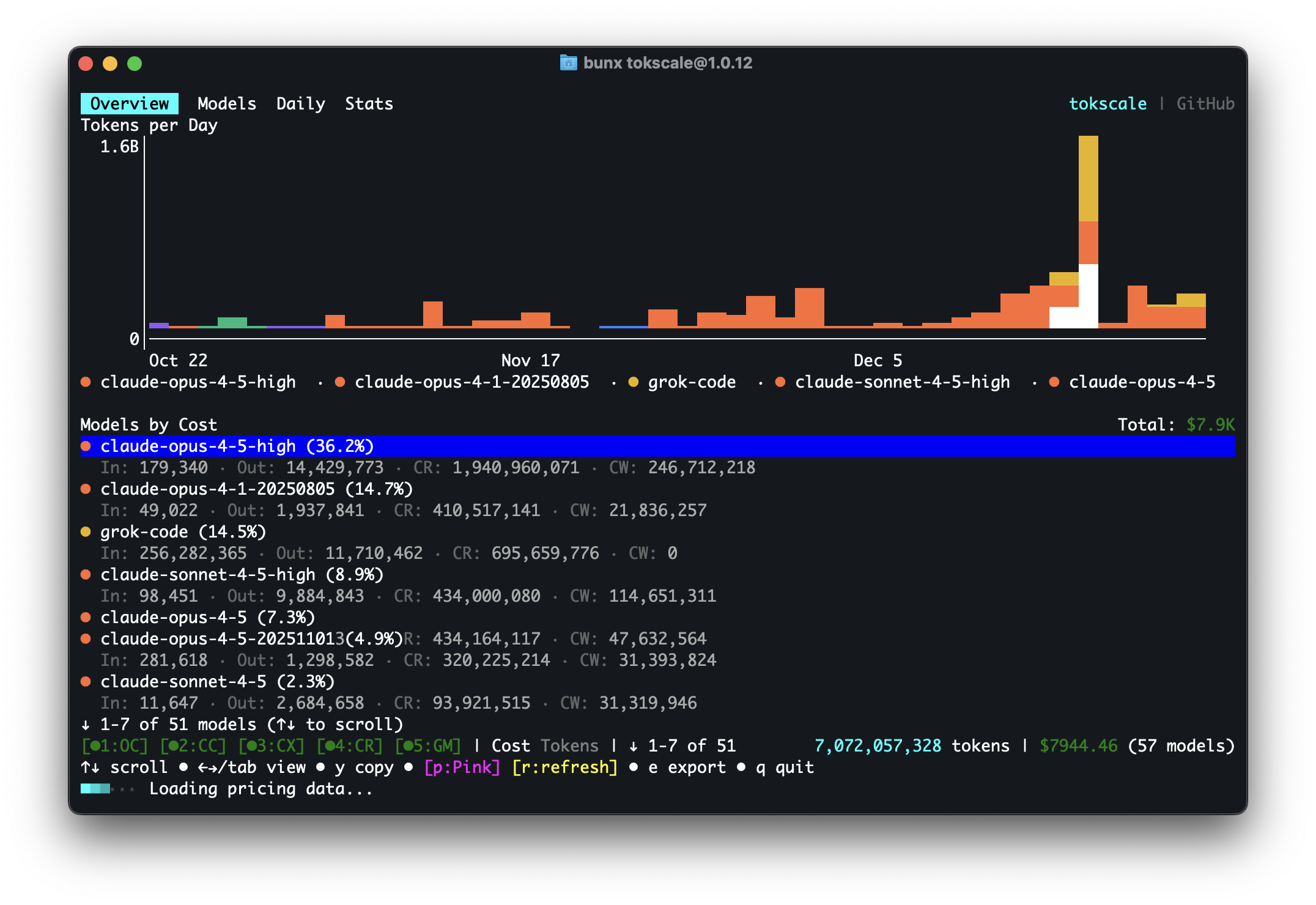 | 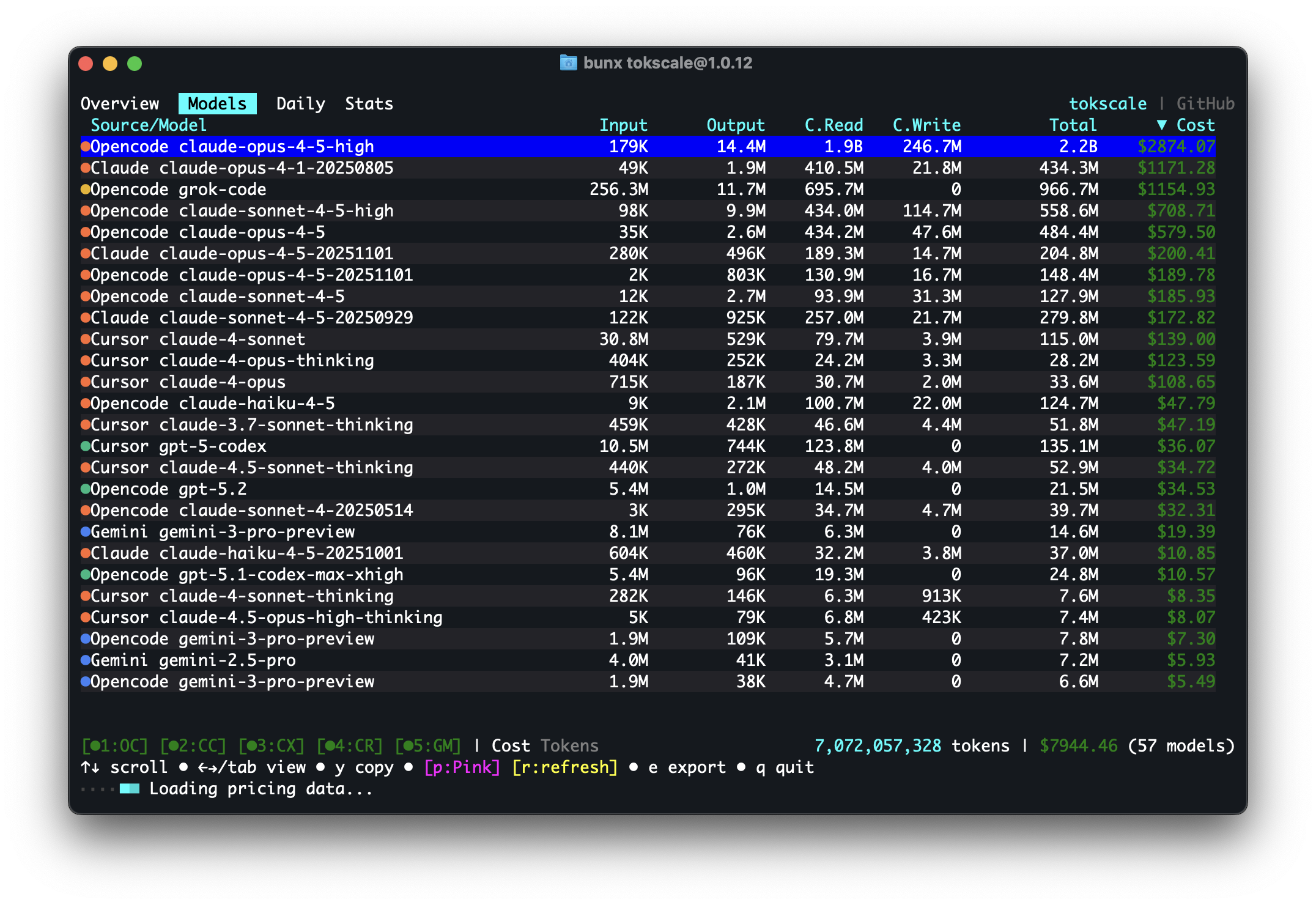 |
| Daily Summary | Stats |
|:---:|:---:|
| 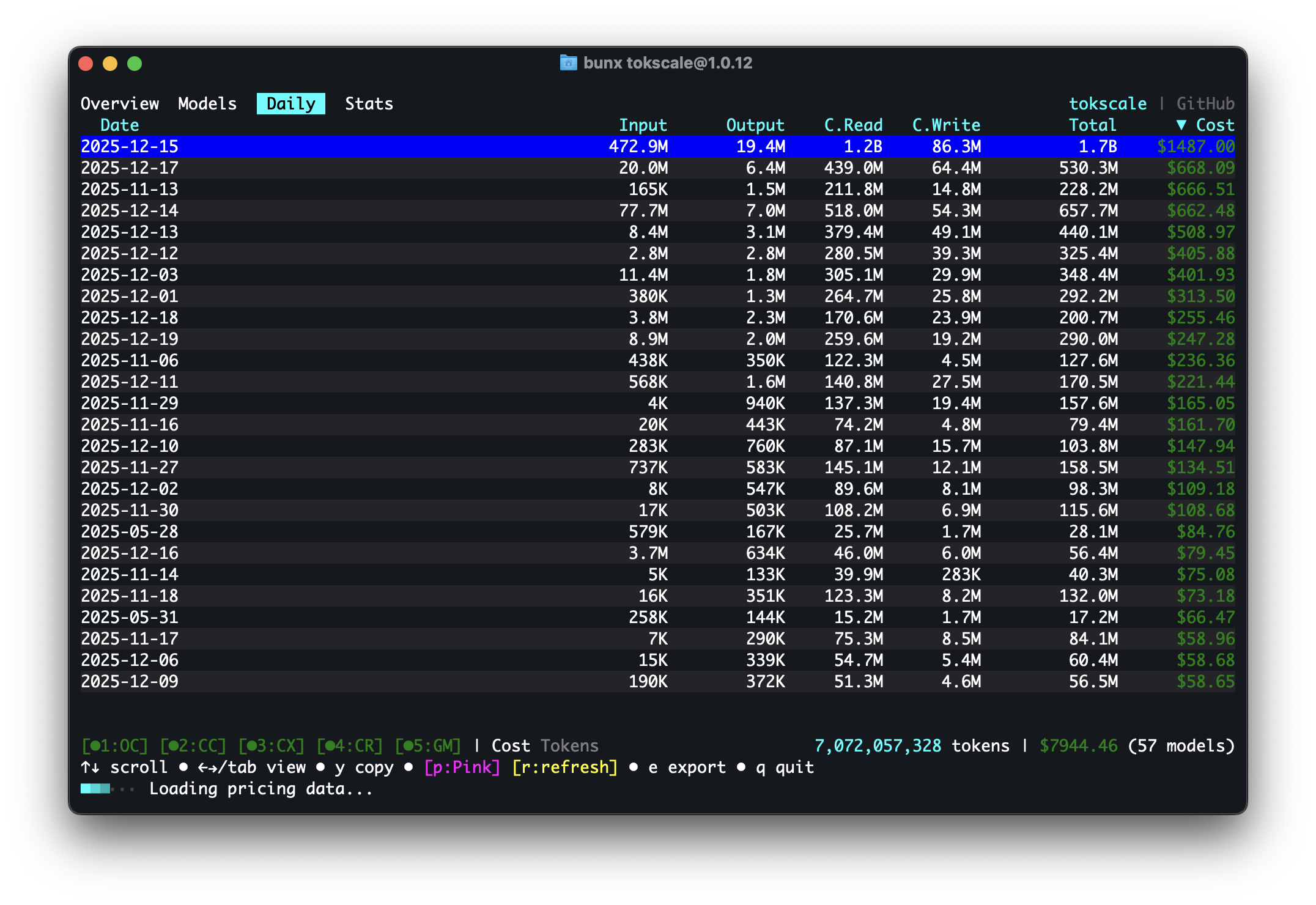 | 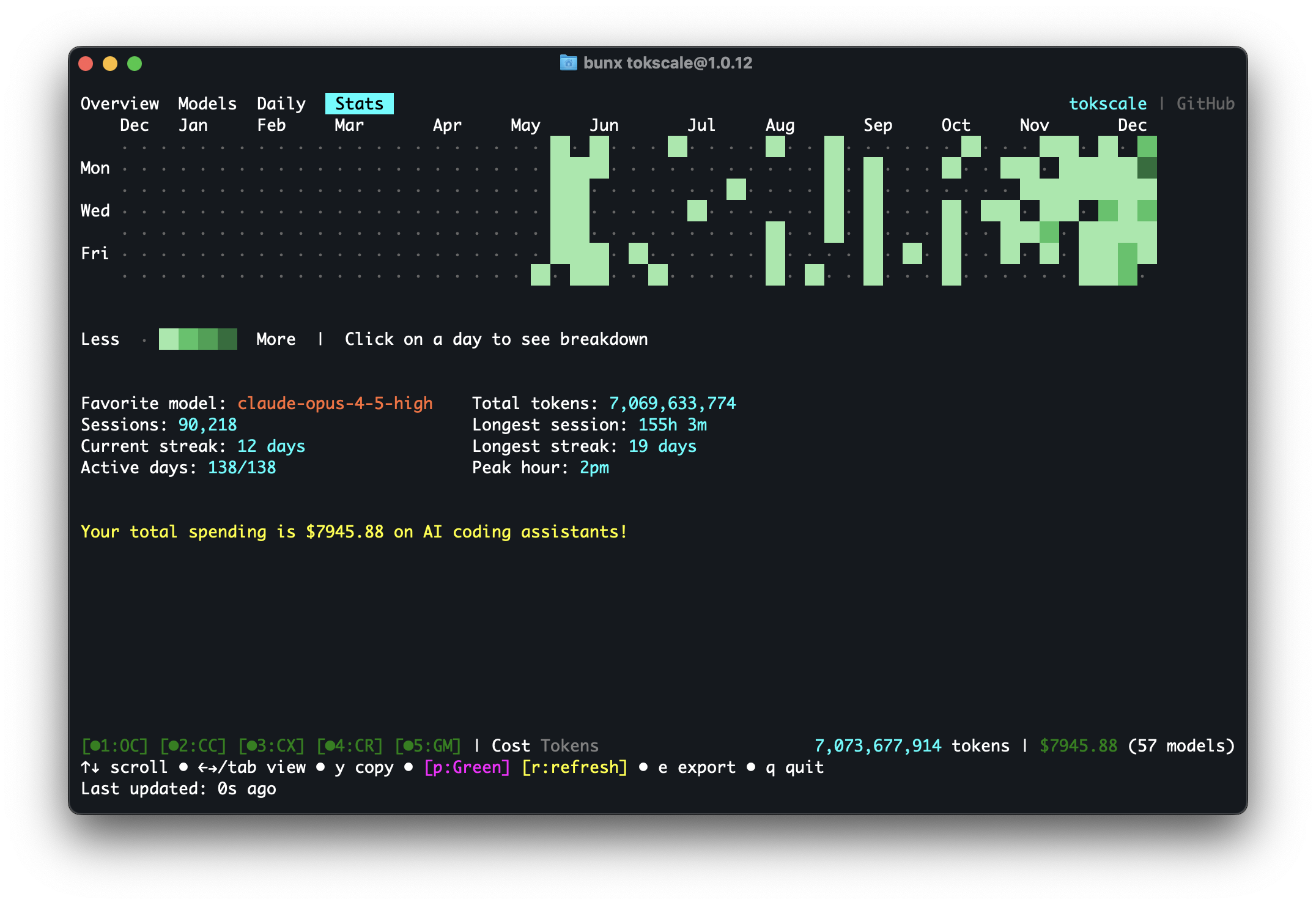 |
| Frontend (3D Contributions Graph) | Wrapped 2025 |
|:---:|:---:|
| 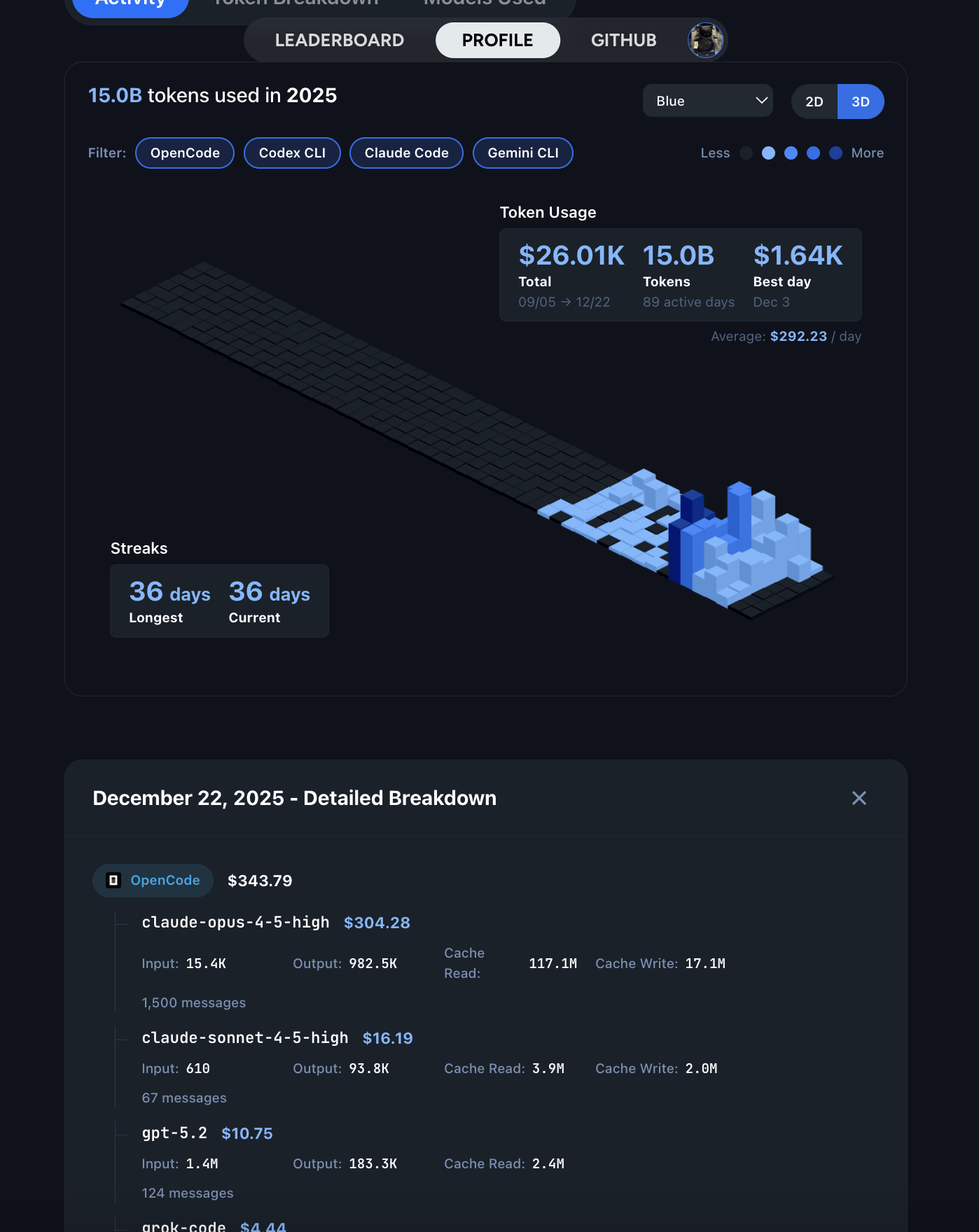 |
| 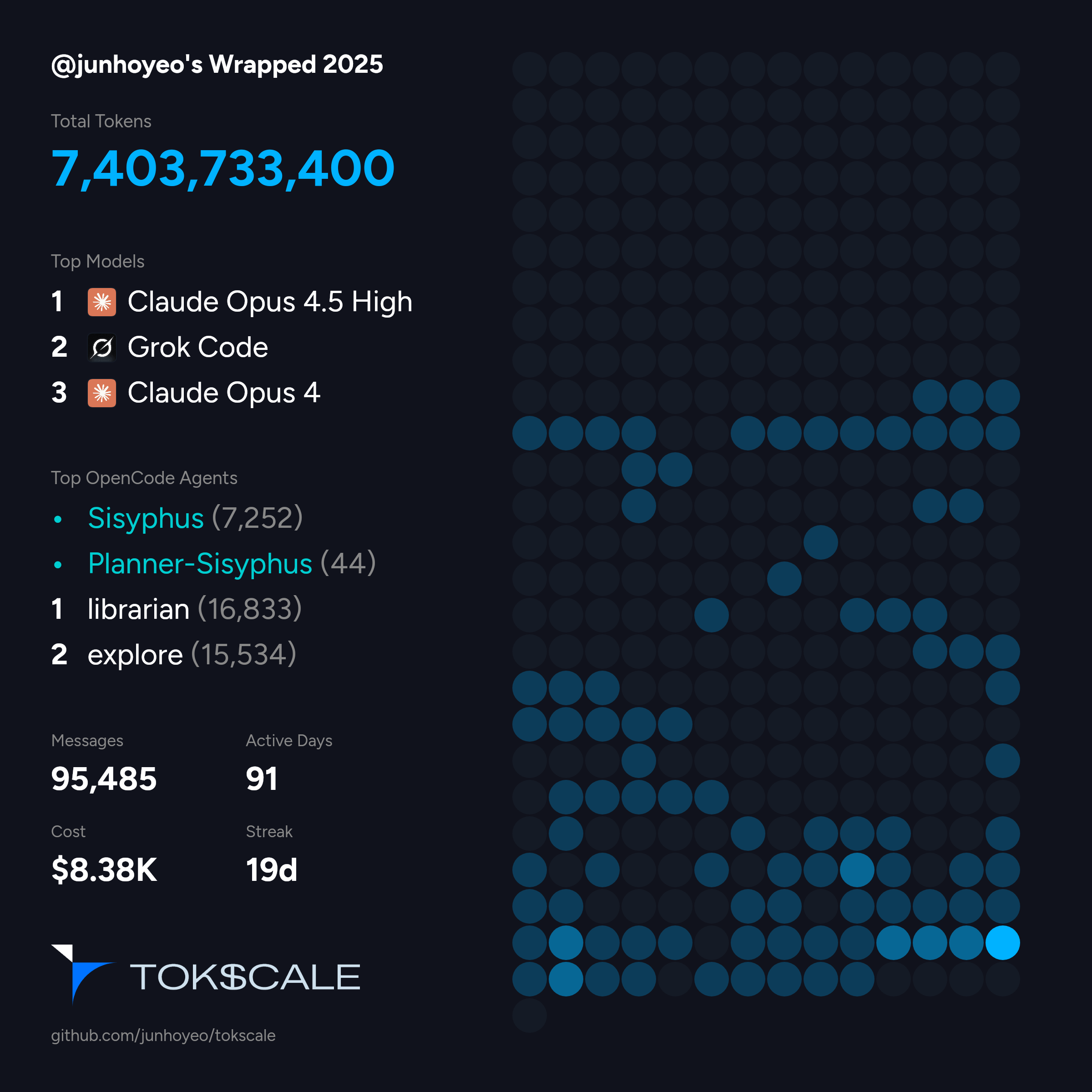 |
> **Run [`bunx tokscale@latest submit`](#social) to submit your usage data to the leaderboard and create your public profile!**
## Overview
**Tokscale** helps you monitor and analyze your token consumption from:
| Logo | Client | Data Location |
|------|----------|---------------|
|
|
> **Run [`bunx tokscale@latest submit`](#social) to submit your usage data to the leaderboard and create your public profile!**
## Overview
**Tokscale** helps you monitor and analyze your token consumption from:
| Logo | Client | Data Location |
|------|----------|---------------|
|  | [OpenCode](https://github.com/sst/opencode) | `~/.local/share/opencode/opencode.db` (1.2+, all channels including `opencode-stable.db`) or/and `~/.local/share/opencode/storage/message/` (legacy/unmigrated) |
|
| [OpenCode](https://github.com/sst/opencode) | `~/.local/share/opencode/opencode.db` (1.2+, all channels including `opencode-stable.db`) or/and `~/.local/share/opencode/storage/message/` (legacy/unmigrated) |
|  | [Claude Code](https://docs.anthropic.com/en/docs/claude-code) | `~/.claude/projects/` and `~/.claude/transcripts/` |
|
| [Claude Code](https://docs.anthropic.com/en/docs/claude-code) | `~/.claude/projects/` and `~/.claude/transcripts/` |
|  | [OpenClaw](https://openclaw.ai/) | `~/.openclaw/agents/` (`*/agent/openclaw-agent.sqlite` + `*/sessions/*.jsonl`; + legacy: `.clawdbot`, `.moltbot`, `.moldbot`) |
|
| [OpenClaw](https://openclaw.ai/) | `~/.openclaw/agents/` (`*/agent/openclaw-agent.sqlite` + `*/sessions/*.jsonl`; + legacy: `.clawdbot`, `.moltbot`, `.moldbot`) |
|  | [Codex CLI](https://github.com/openai/codex) | `~/.codex/sessions/` |
|
| [Codex CLI](https://github.com/openai/codex) | `~/.codex/sessions/` |
|  | [Prime Agent](https://github.com/PrimeIntellect-ai/prime-agent) | `~/.prime/agent/sessions/` and `~/.prime/agent/session-artifacts/` (RLM child sessions) |
|
| [Prime Agent](https://github.com/PrimeIntellect-ai/prime-agent) | `~/.prime/agent/sessions/` and `~/.prime/agent/session-artifacts/` (RLM child sessions) |
|  | [Sakana Fugu](https://sakana.ai/fugu/) | via Codex — `~/.codex/sessions/*.jsonl` (`model_provider: sakana`) |
|
| [Sakana Fugu](https://sakana.ai/fugu/) | via Codex — `~/.codex/sessions/*.jsonl` (`model_provider: sakana`) |
|  | [GitHub Copilot CLI](https://docs.github.com/en/copilot/how-tos/use-copilot-agents/use-the-github-copilot-coding-agent-in-cli) | `~/.copilot/session-store.db` (CLI usage events; no OTEL required), `~/.copilot/otel/*.jsonl` (+ `COPILOT_OTEL_FILE_EXPORTER_PATH`), `~/.copilot/data.db` |
|
| [GitHub Copilot CLI](https://docs.github.com/en/copilot/how-tos/use-copilot-agents/use-the-github-copilot-coding-agent-in-cli) | `~/.copilot/session-store.db` (CLI usage events; no OTEL required), `~/.copilot/otel/*.jsonl` (+ `COPILOT_OTEL_FILE_EXPORTER_PATH`), `~/.copilot/data.db` |
|  | [Hermes Agent](https://github.com/NousResearch/hermes-agent) | `$HERMES_HOME/state.db` and `$HERMES_HOME/profiles/*/state.db` (fallback: `~/.hermes/...`) |
|
| [Hermes Agent](https://github.com/NousResearch/hermes-agent) | `$HERMES_HOME/state.db` and `$HERMES_HOME/profiles/*/state.db` (fallback: `~/.hermes/...`) |
|  | [Gemini CLI](https://github.com/google-gemini/gemini-cli) | `$GEMINI_CLI_HOME/tmp/*/chats/*.json` (fallback: `~/.gemini/tmp/*/chats/*.json`) |
|
| [Gemini CLI](https://github.com/google-gemini/gemini-cli) | `$GEMINI_CLI_HOME/tmp/*/chats/*.json` (fallback: `~/.gemini/tmp/*/chats/*.json`) |
|  | [Cursor IDE](https://cursor.com/) | Cursor API export cached at `~/.config/tokscale/cursor-cache/usage*.csv` (desktop auto-login or cookie paste; not `~/.cursor`) |
|
| [Cursor IDE](https://cursor.com/) | Cursor API export cached at `~/.config/tokscale/cursor-cache/usage*.csv` (desktop auto-login or cookie paste; not `~/.cursor`) |
|  | [Amp (AmpCode)](https://ampcode.com/) | `~/.local/share/amp/threads/` |
|
| [Amp (AmpCode)](https://ampcode.com/) | `~/.local/share/amp/threads/` |
|  | [Codebuff](https://codebuff.com/) | `~/.config/manicode/` (+ `manicode-dev`, `manicode-staging`; override via `CODEBUFF_DATA_DIR`) |
|
| [Codebuff](https://codebuff.com/) | `~/.config/manicode/` (+ `manicode-dev`, `manicode-staging`; override via `CODEBUFF_DATA_DIR`) |
|  | [Freebuff](https://github.com/CodebuffAI/freebuff) | shares `~/.config/manicode/` with Codebuff (same runtime); token usage is estimated from the transcript (no local usage; override via `FREEBUFF_DATA_DIR`) |
|
| [Freebuff](https://github.com/CodebuffAI/freebuff) | shares `~/.config/manicode/` with Codebuff (same runtime); token usage is estimated from the transcript (no local usage; override via `FREEBUFF_DATA_DIR`) |
|  | [Droid (Factory Droid)](https://factory.ai/) | `~/.factory/sessions/` |
|
| [Droid (Factory Droid)](https://factory.ai/) | `~/.factory/sessions/` |
|  | [Pi](https://github.com/badlogic/pi-mono) | `~/.pi/agent/sessions/` |
|
| [Pi](https://github.com/badlogic/pi-mono) | `~/.pi/agent/sessions/` |
|  | [omp (Oh My Pi)](https://github.com/can1357/oh-my-pi) | `~/.omp/agent/sessions/**/*.jsonl` |
|
| [omp (Oh My Pi)](https://github.com/can1357/oh-my-pi) | `~/.omp/agent/sessions/**/*.jsonl` |
|  | [Senpi (OmO Native)](https://github.com/code-yeongyu/senpi) | `~/.senpi/agent/sessions/` (override via `SENPI_CODING_AGENT_DIR`) |
|
| [Senpi (OmO Native)](https://github.com/code-yeongyu/senpi) | `~/.senpi/agent/sessions/` (override via `SENPI_CODING_AGENT_DIR`) |
|  | [Kimchi Coding](https://kimchi.dev/) | `~/.config/kimchi/harness/sessions/` (override via `KIMCHI_CODING_AGENT_DIR`) |
|
| [Kimchi Coding](https://kimchi.dev/) | `~/.config/kimchi/harness/sessions/` (override via `KIMCHI_CODING_AGENT_DIR`) |
|  | [Reasonix](https://github.com/esengine/DeepSeek-Reasonix) | `~/.reasonix/stats/*.jsonl` (override via `REASONIX_STATE_HOME` or `REASONIX_HOME`) |
|
| [Reasonix](https://github.com/esengine/DeepSeek-Reasonix) | `~/.reasonix/stats/*.jsonl` (override via `REASONIX_STATE_HOME` or `REASONIX_HOME`) |
|  | [Kimi CLI](https://github.com/MoonshotAI/kimi-cli) / [Kimi Code](https://github.com/MoonshotAI/kimi-code) | kimi-cli: `~/.kimi/sessions/` kimi-code: `~/.kimi-code/sessions/` (override via `KIMI_CODE_HOME`) kimi-work: desktop app-data root (auto-discovered) |
|
| [Kimi CLI](https://github.com/MoonshotAI/kimi-cli) / [Kimi Code](https://github.com/MoonshotAI/kimi-code) | kimi-cli: `~/.kimi/sessions/` kimi-code: `~/.kimi-code/sessions/` (override via `KIMI_CODE_HOME`) kimi-work: desktop app-data root (auto-discovered) |
|  | [Qwen CLI](https://github.com/QwenLM/qwen-cli) | `~/.qwen/projects/` |
|
| [Qwen CLI](https://github.com/QwenLM/qwen-cli) | `~/.qwen/projects/` |
|  | [Roo Code](https://github.com/RooCodeInc/Roo-Code) | `~/.config/Code/User/globalStorage/rooveterinaryinc.roo-cline/tasks/` (+ server: `~/.vscode-server/data/User/globalStorage/rooveterinaryinc.roo-cline/tasks/`) |
|
| [Roo Code](https://github.com/RooCodeInc/Roo-Code) | `~/.config/Code/User/globalStorage/rooveterinaryinc.roo-cline/tasks/` (+ server: `~/.vscode-server/data/User/globalStorage/rooveterinaryinc.roo-cline/tasks/`) |
|  | [Kilo](https://github.com/Kilo-Org/kilocode) | `~/.config/Code/User/globalStorage/kilocode.kilo-code/tasks/` (+ server: `~/.vscode-server/data/User/globalStorage/kilocode.kilo-code/tasks/`) |
| | [Kilo CLI](https://github.com/nicepkg/kilo) | `~/.local/share/kilo/kilo.db` |
|
| [Kilo](https://github.com/Kilo-Org/kilocode) | `~/.config/Code/User/globalStorage/kilocode.kilo-code/tasks/` (+ server: `~/.vscode-server/data/User/globalStorage/kilocode.kilo-code/tasks/`) |
| | [Kilo CLI](https://github.com/nicepkg/kilo) | `~/.local/share/kilo/kilo.db` |
|  | [Mux](https://github.com/coder/mux) | `~/.mux/sessions/` |
|
| [Mux](https://github.com/coder/mux) | `~/.mux/sessions/` |
|  | [Crush](https://crush.ai/) | `$XDG_DATA_HOME/crush/projects.json` (project registry; fallback: `~/.local/share/crush/projects.json`) |
|
| [Crush](https://crush.ai/) | `$XDG_DATA_HOME/crush/projects.json` (project registry; fallback: `~/.local/share/crush/projects.json`) |
|  | [Goose](https://github.com/aaif-goose/goose) | `~/.local/share/goose/sessions/sessions.db` (+ macOS Application Support, legacy Block/goose paths; override via `GOOSE_PATH_ROOT`) |
|
| [Goose](https://github.com/aaif-goose/goose) | `~/.local/share/goose/sessions/sessions.db` (+ macOS Application Support, legacy Block/goose paths; override via `GOOSE_PATH_ROOT`) |
|  | [Google Antigravity](https://antigravity.google/) | Cached via `tokscale antigravity sync` to `~/.config/tokscale/antigravity-cache/sessions/*.jsonl` (live RPC against the local language server) |
| | [Antigravity CLI](https://antigravity.google/) | `~/.gemini/antigravity-cli/conversations/*.db` (override the Gemini home via `GEMINI_CLI_HOME`; local SQLite, read directly — no `antigravity sync` needed) |
| | [Antigravity IDE Extension](https://www.antigravity.google/docs/ide/extensions/) | `~/.gemini/antigravity/conversations/*.db` (local SQLite, read directly) |
|
| [Google Antigravity](https://antigravity.google/) | Cached via `tokscale antigravity sync` to `~/.config/tokscale/antigravity-cache/sessions/*.jsonl` (live RPC against the local language server) |
| | [Antigravity CLI](https://antigravity.google/) | `~/.gemini/antigravity-cli/conversations/*.db` (override the Gemini home via `GEMINI_CLI_HOME`; local SQLite, read directly — no `antigravity sync` needed) |
| | [Antigravity IDE Extension](https://www.antigravity.google/docs/ide/extensions/) | `~/.gemini/antigravity/conversations/*.db` (local SQLite, read directly) |
|  | [Trae IDE](https://www.trae.ai/) / [Trae Solo](https://www.trae.ai/solo) (international) | Cached via `tokscale trae sync` to `~/.config/tokscale/trae-cache/sessions/*.json` (account-level usage from the official API) |
|
| [Trae IDE](https://www.trae.ai/) / [Trae Solo](https://www.trae.ai/solo) (international) | Cached via `tokscale trae sync` to `~/.config/tokscale/trae-cache/sessions/*.json` (account-level usage from the official API) |
|  | [Warp](https://www.warp.dev/) / Oz | Cached via `tokscale warp sync` to `~/.config/tokscale/warp-cache/usage.json` (aggregate requests and spend only; no token transcripts) |
|
| [Warp](https://www.warp.dev/) / Oz | Cached via `tokscale warp sync` to `~/.config/tokscale/warp-cache/usage.json` (aggregate requests and spend only; no token transcripts) |
|  | Grok Build | `$GROK_HOME/sessions/*/*/updates.jsonl` (fallback: `~/.grok/sessions/*/*/updates.jsonl`) |
|
| Grok Build | `$GROK_HOME/sessions/*/*/updates.jsonl` (fallback: `~/.grok/sessions/*/*/updates.jsonl`) |
|  | [Zed Agent](https://zed.dev/docs/ai/agent-panel) | `~/.local/share/zed/threads/threads.db` (macOS: `~/Library/Application Support/Zed/threads/threads.db`; Windows: `%LOCALAPPDATA%/Zed/threads/threads.db`; hosted Zed models only, not external ACP agents) |
|
| [Zed Agent](https://zed.dev/docs/ai/agent-panel) | `~/.local/share/zed/threads/threads.db` (macOS: `~/Library/Application Support/Zed/threads/threads.db`; Windows: `%LOCALAPPDATA%/Zed/threads/threads.db`; hosted Zed models only, not external ACP agents) |
|  | Kiro | `~/.kiro/sessions/cli/*.json` (+ `*.jsonl`), `~/.local/share/kiro-cli/data.sqlite3` (macOS: `~/Library/Application Support/kiro-cli/data.sqlite3`), and Kiro IDE globalStorage snapshots (`Kiro/User/globalStorage/kiro.kiroagent`; macOS Application Support, Linux `~/.config/Kiro`, Windows `%APPDATA%\Kiro`) |
|
| Kiro | `~/.kiro/sessions/cli/*.json` (+ `*.jsonl`), `~/.local/share/kiro-cli/data.sqlite3` (macOS: `~/Library/Application Support/kiro-cli/data.sqlite3`), and Kiro IDE globalStorage snapshots (`Kiro/User/globalStorage/kiro.kiroagent`; macOS Application Support, Linux `~/.config/Kiro`, Windows `%APPDATA%\Kiro`) |
|  | [Cline](https://github.com/cline/cline) | VS Code globalStorage tasks (Linux: `~/.config/Code/...`; macOS: `~/Library/Application Support/Code/...`; Windows: `%APPDATA%\Code\...`; server: `~/.vscode-server/data/User/globalStorage/saoudrizwan.claude-dev/tasks/`) + Cline CLI sessions (first available root, in order: `$CLINE_SESSION_DATA_DIR`, `$CLINE_DATA_DIR/sessions/`, `$CLINE_DIR/data/sessions/`, fallback `~/.cline/data/sessions/`; blank/whitespace-only environment values are ignored) |
|
| [Cline](https://github.com/cline/cline) | VS Code globalStorage tasks (Linux: `~/.config/Code/...`; macOS: `~/Library/Application Support/Code/...`; Windows: `%APPDATA%\Code\...`; server: `~/.vscode-server/data/User/globalStorage/saoudrizwan.claude-dev/tasks/`) + Cline CLI sessions (first available root, in order: `$CLINE_SESSION_DATA_DIR`, `$CLINE_DATA_DIR/sessions/`, `$CLINE_DIR/data/sessions/`, fallback `~/.cline/data/sessions/`; blank/whitespace-only environment values are ignored) |
|  | [gajae-code (gjc)](https://github.com/Yeachan-Heo/gajae-code) | `~/.gjc/agent/sessions/` (override via `GJC_CODING_AGENT_DIR`, `GJC_CONFIG_DIR`, `PI_CONFIG_DIR`; `$XDG_DATA_HOME/gjc/sessions/` on Linux/macOS) |
|
| [gajae-code (gjc)](https://github.com/Yeachan-Heo/gajae-code) | `~/.gjc/agent/sessions/` (override via `GJC_CODING_AGENT_DIR`, `GJC_CONFIG_DIR`, `PI_CONFIG_DIR`; `$XDG_DATA_HOME/gjc/sessions/` on Linux/macOS) |
|  | [Cherry Studio](https://cherry-ai.com/) | `%APPDATA%\CherryStudio\Data\Agents\.claude\projects\*.jsonl` and legacy `%APPDATA%\CherryStudio\.claude\projects\*.jsonl` (macOS: `~/Library/Application Support/CherryStudio/Data/Agents/.claude/projects/`; Linux: `$XDG_CONFIG_HOME/CherryStudio/Data/Agents/.claude/projects/`; Agent / Claude Code mode transcripts; V2 root preferred, legacy keeps untransferred history) plus the chat ledger at `%APPDATA%\CherryStudio\Data\cherrystudio.sqlite` (macOS: `~/Library/Application Support/CherryStudio/Data/cherrystudio.sqlite`; Linux: `$XDG_CONFIG_HOME/CherryStudio/Data/cherrystudio.sqlite`; `ai_usage_record` rows for the built-in chat and assistant surfaces, which write no transcript; Agent-mode rows in that table are skipped because the transcripts already report them, and both ledgers count toward the same client) |
|
| [Cherry Studio](https://cherry-ai.com/) | `%APPDATA%\CherryStudio\Data\Agents\.claude\projects\*.jsonl` and legacy `%APPDATA%\CherryStudio\.claude\projects\*.jsonl` (macOS: `~/Library/Application Support/CherryStudio/Data/Agents/.claude/projects/`; Linux: `$XDG_CONFIG_HOME/CherryStudio/Data/Agents/.claude/projects/`; Agent / Claude Code mode transcripts; V2 root preferred, legacy keeps untransferred history) plus the chat ledger at `%APPDATA%\CherryStudio\Data\cherrystudio.sqlite` (macOS: `~/Library/Application Support/CherryStudio/Data/cherrystudio.sqlite`; Linux: `$XDG_CONFIG_HOME/CherryStudio/Data/cherrystudio.sqlite`; `ai_usage_record` rows for the built-in chat and assistant surfaces, which write no transcript; Agent-mode rows in that table are skipped because the transcripts already report them, and both ledgers count toward the same client) |
|  | [LM Studio](https://lmstudio.ai/) | `~/.lmstudio/server-logs/**/*.log` (`LM_STUDIO_HOME` supported; Chat Completions and Responses API final-response usage only; prompts and responses are not retained; local inference cost is $0) |
|
| [LM Studio](https://lmstudio.ai/) | `~/.lmstudio/server-logs/**/*.log` (`LM_STUDIO_HOME` supported; Chat Completions and Responses API final-response usage only; prompts and responses are not retained; local inference cost is $0) |
|  | [Unsloth Studio](https://github.com/unslothai/unsloth) | `$UNSLOTH_STUDIO_HOME/studio.db` (fallback: `~/.unsloth/studio/studio.db`; exact internal-chat and authenticated API inference usage; message content is not read; training metrics are excluded; local inference cost is $0) |
|
| [Unsloth Studio](https://github.com/unslothai/unsloth) | `$UNSLOTH_STUDIO_HOME/studio.db` (fallback: `~/.unsloth/studio/studio.db`; exact internal-chat and authenticated API inference usage; message content is not read; training metrics are excluded; local inference cost is $0) |
|  | [Hindsight](https://github.com/vectorize-io/hindsight) | `$HINDSIGHT_HOME/usage/*.jsonl` (fallback: `~/.hindsight/usage/*.jsonl`; populated via `tokscale hindsight sync`) |
|
| [Hindsight](https://github.com/vectorize-io/hindsight) | `$HINDSIGHT_HOME/usage/*.jsonl` (fallback: `~/.hindsight/usage/*.jsonl`; populated via `tokscale hindsight sync`) |
|  | [Jcode](https://github.com/1jehuang/jcode) | `~/.jcode/sessions/session_*.json` + `session_*.journal.jsonl` sidecars (override via `JCODE_HOME`) |
|
| [Jcode](https://github.com/1jehuang/jcode) | `~/.jcode/sessions/session_*.json` + `session_*.journal.jsonl` sidecars (override via `JCODE_HOME`) |
|  | [MiMo Code](https://github.com/XiaomiMiMo/MiMo-Code) | `~/.local/share/mimocode/mimocode.db` (XDG data dir; SQLite) |
|
| [MiMo Code](https://github.com/XiaomiMiMo/MiMo-Code) | `~/.local/share/mimocode/mimocode.db` (XDG data dir; SQLite) |
|  | Xiaomi MiMo AI (desktop) | Same `~/.local/share/mimocode/mimocode.db` store as MiMo Code; sessions are split by `session.version` (`desktop-` prefix → `micode-desktop`) |
|
| Xiaomi MiMo AI (desktop) | Same `~/.local/share/mimocode/mimocode.db` store as MiMo Code; sessions are split by `session.version` (`desktop-` prefix → `micode-desktop`) |
|  | [Junie](https://www.jetbrains.com/junie/) | `~/.junie/sessions/*/events.jsonl` |
|
| [Junie](https://www.jetbrains.com/junie/) | `~/.junie/sessions/*/events.jsonl` |
|  | [Command Code](https://github.com/CommandCodeAI/command-code) | `~/.commandcode/projects/**/*.jsonl` (v3 transcripts persist per-request usage and cost; estimated fallback only for legacy transcripts without a `usage` block) |
|
| [Command Code](https://github.com/CommandCodeAI/command-code) | `~/.commandcode/projects/**/*.jsonl` (v3 transcripts persist per-request usage and cost; estimated fallback only for legacy transcripts without a `usage` block) |
|  | [ZCode](https://zcode.z.ai/) | `~/.zcode/cli/db/db.sqlite` (v2 usage database) and `~/.zcode/projects/**/*.jsonl` (legacy transcripts) |
|
| [ZCode](https://zcode.z.ai/) | `~/.zcode/cli/db/db.sqlite` (v2 usage database) and `~/.zcode/projects/**/*.jsonl` (legacy transcripts) |
|  | [OpenCodeReview](https://github.com/alibaba/open-code-review) | `~/.opencodereview/sessions/**/*.jsonl` |
|
| [OpenCodeReview](https://github.com/alibaba/open-code-review) | `~/.opencodereview/sessions/**/*.jsonl` |
|  | [CodeBuddy](https://www.codebuddy.cn/docs/cli/overview) (CLI, IDE, VS Code plugin) | `~/.codebuddy/projects/**/*.jsonl` + extension logs |
|
| [CodeBuddy](https://www.codebuddy.cn/docs/cli/overview) (CLI, IDE, VS Code plugin) | `~/.codebuddy/projects/**/*.jsonl` + extension logs |
|  | WorkBuddy | `~/.workbuddy/projects/**/*.jsonl` (5.5+ under `~/.workbuddy-ai/`) + SQLite fallback |
|
| WorkBuddy | `~/.workbuddy/projects/**/*.jsonl` (5.5+ under `~/.workbuddy-ai/`) + SQLite fallback |
|  | [Devin CLI](https://devin.ai/) | `~/.local/share/devin/cli/sessions.db` (SQLite) |
| | [Devin Desktop](https://devin.ai/) | ACP events: macOS `~/Library/Application Support/Devin/User/acp-events/`; Linux `~/.config/Devin/User/acp-events/`; Windows `%APPDATA%\Devin\User\acp-events\` |
|
| [Devin CLI](https://devin.ai/) | `~/.local/share/devin/cli/sessions.db` (SQLite) |
| | [Devin Desktop](https://devin.ai/) | ACP events: macOS `~/Library/Application Support/Devin/User/acp-events/`; Linux `~/.config/Devin/User/acp-events/`; Windows `%APPDATA%\Devin\User\acp-events\` |
|  | [Augment Code](https://www.augmentcode.com/) (Auggie CLI) | `~/.augment/sessions/*.json` |
| | [Synthetic](https://synthetic.new/) | Re-attributed from other sources via `hf:` model prefix or `synthetic` provider (+ [Octofriend](https://github.com/synthetic-lab/octofriend): `~/.local/share/octofriend/sqlite.db`) |
|
| [Augment Code](https://www.augmentcode.com/) (Auggie CLI) | `~/.augment/sessions/*.json` |
| | [Synthetic](https://synthetic.new/) | Re-attributed from other sources via `hf:` model prefix or `synthetic` provider (+ [Octofriend](https://github.com/synthetic-lab/octofriend): `~/.local/share/octofriend/sqlite.db`) |
|  | [DeepSeek Harness](https://github.com/deepseek-ai/DeepSeek-Harness) | `~/.dsh/sessions/**/session.jsonl.zstd` (or `session.jsonl` when written uncompressed, plus versioned `session.v.jsonl[.zstd]` spellings; override via `DSH_HOME`) |
|
| [DeepSeek Harness](https://github.com/deepseek-ai/DeepSeek-Harness) | `~/.dsh/sessions/**/session.jsonl.zstd` (or `session.jsonl` when written uncompressed, plus versioned `session.v.jsonl[.zstd]` spellings; override via `DSH_HOME`) |
|  | [MiniMax Code](https://github.com/MiniMax-AI) | `~/.config/tokscale/headless/mcode/*.jsonl` (headless capture of `mcode exec --output-format stream-json`; override via `TOKSCALE_HEADLESS_DIR`) |
|
| [MiniMax Code](https://github.com/MiniMax-AI) | `~/.config/tokscale/headless/mcode/*.jsonl` (headless capture of `mcode exec --output-format stream-json`; override via `TOKSCALE_HEADLESS_DIR`) |
|  | [fx](https://github.com/vercel-labs/fx) | `~/.fx/sessions//usage-v2.json` (per-session aggregates) |
|
| [fx](https://github.com/vercel-labs/fx) | `~/.fx/sessions//usage-v2.json` (per-session aggregates) |
|  | [Muse Code](https://dev.meta.ai/docs/muse-code) | `~/.local/share/muse/sessions/**/session.jsonl` (same XDG-style path on Windows; subagent transcripts under `subagent//` included) |
Get real-time pricing calculations using [🚅 LiteLLM's pricing data](https://github.com/BerriAI/litellm), with support for tiered pricing models and cache token discounts.
### Why "Tokscale"?
[](https://tokscale.ai)
This project is inspired by the **[Kardashev scale](https://en.wikipedia.org/wiki/Kardashev_scale)**, a method proposed by astrophysicist Nikolai Kardashev to measure a civilization's level of technological advancement based on its energy consumption. A Type I civilization harnesses all energy available on its planet, Type II captures the entire output of its star, and Type III commands the energy of an entire galaxy.
In the age of AI-assisted development, **tokens are the new energy**. They power our reasoning, fuel our productivity, and drive our creative output. Just as the Kardashev scale tracks energy consumption at cosmic scales, Tokscale measures your token consumption as you scale the ranks of AI-augmented development. Whether you're a casual user or burning through millions of tokens daily, Tokscale helps you visualize your journey up the scale—from planetary developer to galactic code architect.
## Contents
- [Overview](#overview)
- [Why "Tokscale"?](#why-tokscale)
- [Features](#features)
- [Installation](#installation)
- [Quick Start](#quick-start)
- [Prerequisites](#prerequisites)
- [Development Setup](#development-setup)
- [Building the Native Module](#building-the-native-module)
- [Usage](#usage)
- [Basic Commands](#basic-commands)
- [TUI Features](#tui-features)
- [Filtering by Platform](#filtering-by-platform)
- [Date Filtering](#date-filtering)
- [Pricing Lookup](#pricing-lookup)
- [Social](#social)
- [Autosubmit](#autosubmit)
- [Cursor IDE Commands](#cursor-ide-commands)
- [Antigravity Commands](#antigravity-commands)
- [Trae Commands](#trae-commands)
- [Warp/Oz Commands](#warpoz-commands)
- [Task-Attributed Report](#task-attributed-report)
- [Subscription Usage](#subscription-usage)
- [Example Output](#example-output---light-version)
- [Configuration](#configuration)
- [Environment Variables](#environment-variables)
- [Frontend Visualization](#frontend-visualization)
- [Features](#features-1)
- [Running the Frontend](#running-the-frontend)
- [Social Platform](#social-platform)
- [Features](#features-2)
- [Getting Started](#getting-started)
- [Data Validation](#data-validation)
- [Wrapped 2025](#wrapped-2025)
- [Command](#command)
- [What's Included](#whats-included)
- [Development](#development)
- [Prerequisites](#prerequisites-1)
- [How to Run](#how-to-run)
- [Container Setup](#container-setup)
- [Supported Platforms](#supported-platforms)
- [Native Module Targets](#native-module-targets)
- [Windows Support](#windows-support)
- [Session Data Retention](#session-data-retention)
- [Data Sources](#data-sources)
- [Pricing](#pricing)
- [Local Usage Recovery Ledger](#local-usage-recovery-ledger)
- [Contributing](#contributing)
- [Development Guidelines](#development-guidelines)
- [Acknowledgments](#acknowledgments)
- [License](#license)
## Features
- **Interactive TUI Mode** - Beautiful terminal UI powered by Ratatui (default mode)
- 10 interactive views: Overview, Usage, Models, Daily, Hourly, Monthly, Sessions, Projects, Stats, Agents (plus an optional Minutely view, opt-in via `minutelyTabEnabled`)
- Keyboard & mouse navigation
- GitHub-style contribution graph with configurable color themes
- Real-time filtering and sorting
- Zero flicker rendering
- **Multi-platform support** - Track usage across OpenCode, Claude Code, Codex CLI, Prime Agent, Copilot CLI, Cursor IDE, Gemini CLI, Amp, Codebuff, Droid, OpenClaw, Hermes Agent, Pi, Kimchi Coding, Reasonix, Kimi CLI, Kimi Work, Qwen CLI, Roo Code, Kilo, Mux, Kilo CLI, Crush, Goose, Antigravity, Antigravity CLI, Antigravity IDE Extension, Zed, Kiro, Trae, Warp/Oz, Cline, Gajae-Code, Grok Build, Jcode, MiMo Code, Xiaomi MiMo AI, Command Code, Junie, ZCode, OpenCodeReview, CodeBuddy, WorkBuddy, Devin CLI, Devin Desktop, Augment Code, Synthetic, Cherry Studio, LM Studio, Unsloth Studio, Hindsight, fx, Oh My Pi, and Muse Code
- **Real-time pricing** - Fetches current pricing from LiteLLM with 1-hour disk cache; automatic OpenRouter fallback and Cursor model pricing for newly released models
- **Detailed breakdowns** - Input, output, cache read/write, and reasoning token tracking
- **Native Rust core** - All parsing and aggregation done in Rust for 10x faster processing
- **Web visualization** - Interactive contribution graph with 2D and 3D views
- **Flexible filtering** - Filter by platform, date range, or year
- **Task-attributed reports** - LLM-powered session summarization and task grouping with multi-backend support (Apple FM, Claude, Codex, Gemini, Kiro, MiniMax)
- **Export to JSON** - Generate data for external visualization tools
- **Social Platform** - Share your usage, compete on leaderboards, and view public profiles
## Installation
### Quick Start
```bash
# Run directly with npx
npx tokscale@latest
# Or use bunx
bunx tokscale@latest
# Or use Deno without installing an alias
deno x npm:tokscale@latest
# Light mode (table rendering only)
npx tokscale@latest --light
```
That's it! This gives you the full interactive TUI experience with zero setup.
> **Package Structure**: `tokscale` is an alias package (like [`swc`](https://www.npmjs.com/package/swc)) that installs `@tokscale/cli`. Both install the same CLI with the native Rust core (`@tokscale/core`) included.
### Prerequisites
- [Node.js](https://nodejs.org/) or [Bun](https://bun.sh/)
- (Optional) Rust toolchain for building native module from source
### Development Setup
For local development or building from source:
```bash
# Clone the repository
git clone https://github.com/junhoyeo/tokscale.git
cd tokscale
# Install Bun (if not already installed)
curl -fsSL https://bun.sh/install | bash
# Install dependencies
bun install
# Run the CLI in development mode
bun run cli
```
> **Note**: `bun run cli` is for local development. When installed via `bunx tokscale`, the command runs directly. The Usage section below shows the installed binary commands.
### Building the Native Module
The native Rust module is **required** for CLI operation. It provides ~10x faster processing through parallel file scanning and SIMD JSON parsing:
```bash
# Build the native core (run from repository root)
bun run build:core
```
> **Note**: Native binaries are pre-built and included when you install via `bunx tokscale@latest`. Building from source is only needed for local development.
## Usage
### Basic Commands
```bash
# Launch interactive TUI (default)
tokscale
# Launch TUI with specific tab
tokscale models # Models tab
tokscale monthly # Daily view (shows daily breakdown)
tokscale hourly # Hourly tab
# Use legacy CLI table output
tokscale --light
tokscale models --light
# Launch TUI explicitly
tokscale tui
# Export contribution graph data as JSON
tokscale graph --output data.json
# Output data as JSON (for scripting/automation)
tokscale --json # Default models view as JSON
tokscale models --json # Models breakdown as JSON
tokscale monthly --json # Monthly breakdown as JSON
tokscale models --json > report.json # Save to file
```
### TUI Features
The interactive TUI mode provides:
- **10 Views**: Overview (chart + top models), Usage (subscription quotas), Models, Daily, Hourly, Monthly, Sessions, Projects (per-workspace rollups), Stats (contribution graph), Agents. In Projects, Codex Desktop's ordinary chat directories (`Documents/Codex/YYYY-MM-DD/`) are combined into **Codex Chat**, preserving their session count, tokens, and cost; directories containing a Git repository remain separate. A per-minute view (Minutely) is hidden by default and can be enabled with `minutelyTabEnabled` in `settings.json` — see [Configuration](#configuration)
- **Keyboard Navigation**:
- `←/→/Tab/BackTab`: Switch views
- `↑/↓` or `Home/End`: Navigate lists
- `Enter`: Open daily detail (Daily tab) / per-day trend with ms/1K and Cost/1M (Models tab) / select graph cell (Stats tab)
- `Esc` or `Backspace`: Close dialog or exit detail view
- `c/d/t`: Sort by cost/date/tokens
- `j`: Jump to today
- `s`: Open source picker dialog
- `g`: Open group-by picker dialog (model, client+model, client+provider+model, workspace+model, session+model, client+session+model)
- `h`: Toggle Daily/Hourly chart granularity (Overview tab)
- `v`: Toggle Table/Profile view (Hourly tab)
- `b`: Toggle subagent session roll-up into parent sessions (Sessions tab)
- `y`: Copy selected row to clipboard
- `p`: Cycle through color themes
- `L`: Toggle light mode (white background)
- `r`: Refresh data; `Shift+R` toggles auto-refresh; `+`/`-` adjusts interval
- `e`: Export to JSON
- `q` or `Ctrl+C`: Quit
- **Mouse Support**: Click tabs, buttons, and filters
- **Themes**: Green, Halloween, Teal, Blue, Pink, Purple, Orange, Monochrome, YlGnBu, Graphite, Lagoon, Dusk
- **Settings Persistence**: Preferences saved to `~/.config/tokscale/settings.json` (see [Configuration](#configuration))
### Group-By Strategies
Press `g` in the TUI or use `--group-by` in `--light`/`--json` mode to control how model rows are aggregated:
| Strategy | Flag | TUI Default | Effect |
|----------|------|-------------|--------|
| **Model** | `--group-by model` | ✅ | One row per model — merges all clients and providers |
| **Client + Model** | `--group-by client,model` | | One row per client-model pair |
| **Client + Provider + Model** | `--group-by client,provider,model` | | Most granular — no merging |
| **Workspace + Model** | `--group-by workspace,model` | | Group local usage by workspace key, then model — add [`--merge-worktrees`](#per-workspace-cost) to fold git worktrees into their repo |
| **Session + Model** | `--group-by session,model` | | One row per `session_id` and model — attribute cost to a specific agent-CLI session |
| **Client + Session + Model** | `--group-by client,session,model` | | One row per client, session, and model — useful for multi-agent runners that join on `session_id` |
**`--group-by model`** (most consolidated)
| Clients | Providers | Model | Cost |
|---------|-----------|-------|------|
| OpenCode, Claude, Amp | github-copilot, anthropic | claude-opus-4-5 | $2,424 |
| OpenCode, Claude | anthropic, github-copilot | claude-sonnet-4-5 | $1,332 |
**`--group-by client,model`** (CLI default)
| Client | Provider | Model | Cost |
|--------|----------|-------|------|
| OpenCode | github-copilot, anthropic | claude-opus-4-5 | $1,368 |
| Claude | anthropic | claude-opus-4-5 | $970 |
**`--group-by client,provider,model`** (most granular)
| Client | Provider | Model | Cost |
|--------|----------|-------|------|
| OpenCode | github-copilot | claude-opus-4-5 | $1,200 |
| OpenCode | anthropic | claude-opus-4-5 | $168 |
| Claude | anthropic | claude-opus-4-5 | $970 |
**`--group-by session,model`** (per-session cost attribution)
`tokscale models --json --group-by session,model` emits one entry per `(session_id, model)`. Each entry includes a top-level `sessionId` field so downstream tools (e.g. multi-agent IDEs) can join cost data back to a specific agent-CLI session:
```json
{
"groupBy": "session,model",
"entries": [
{
"sessionId": "019e1e27-af49-7cd1-89b7-7bad1c3f3be2",
"client": "codex",
"provider": "openai",
"model": "gpt-5",
"input": 25251,
"output": 47,
"cacheRead": 1920,
"cacheWrite": 0,
"reasoning": 40,
"messageCount": 12,
"cost": 0.0123
}
]
}
```
Use `--group-by client,session,model` when you also need the client name on every row (one spawn across all 20+ supported CLIs at once).
#### Per-workspace cost
`--group-by workspace,model` attributes usage to the directory an agent ran in, so you can see what a given project cost:
```bash
# One row per (workspace, model)
tokscale models --light --group-by workspace,model --month
# Fold every git worktree into its parent repository — one row per repo
tokscale models --light --group-by workspace,model --merge-worktrees --month
# JSON carries workspaceKey (grouping identity) and workspaceLabel (display name)
tokscale models --json --group-by workspace,model --merge-worktrees
```
In the TUI, press `g` → **Workspace + Model**, then `w` to toggle worktree rollup (the footer shows `[w:worktrees]` or `[w:repos]`).
Workspace rows are labeled `repo` or `repo ⑃ worktree`. Clients disagree about how they record a workspace — Claude Code stores a dash-mangled directory slug (`-Users-me-devpro-app`) while Codex and OpenCode store real paths — so tokscale resolves slugs back to their true path against the filesystem. Four consequences worth knowing:
- **Without `--merge-worktrees`, each git worktree is its own row.** Agent CLIs that isolate every task into a worktree will therefore spread one repository across many rows; `--merge-worktrees` re-unites them (and also merges a repo recorded by different clients under different key formats).
- **`--merge-worktrees` finds worktrees kept inside the repo and beside it.** `/.claude/worktrees/` (what agent CLIs create) and `/.git/worktrees/` are recognized from the path alone; a worktree checked out elsewhere (`git worktree add ../feature-x`) is recognized by reading its `.git` pointer file back to the repository. A repo reached through two different path spellings (a symlink and its target) still stays two rows, because a workspace identity is compared as a string. Totals are unaffected either way — usage is split across rows, never lost or double counted.
- **Rows that would show the same name are qualified with their parent directory.** A label is the directory's own name, so `~/work/api` and `~/oss/api` would both read `api`; colliding labels gain as many leading path segments as it takes to tell them apart (`work/api`, `oss/api`), and when no path segment can — the same directory recorded by two clients under different key formats — the row is qualified with its workspace key instead. Grouping is unaffected — this only changes the displayed text.
- **Clients that never record a workspace roll up into a single `Unknown workspace` row.** Roughly half the supported clients (including gemini, cursor, amp, droid, roocode, kilocode, goose, and Copilot's OTEL path) do not write one, so their usage cannot be attributed to a directory.
### Filtering by Platform
Use `--client` (short `-c`) to scope reports to one or more clients. The flag is repeatable, accepts comma-separated values, and works with every report command:
```bash
# Show only OpenCode usage
tokscale --client opencode
# Comma-separated: combine multiple clients
tokscale --client opencode,claude
# Repeated: same effect, useful with shell aliases
tokscale -c opencode -c claude
# Cursor IDE uses Tokscale's API cache; run login + sync --json first
tokscale --client cursor
# Synthetic (synthetic.new) is detected from other agent sessions
tokscale --client synthetic
# Combine with other filters
tokscale --client opencode,claude --week --json
```
Possible values: `opencode`, `claude`, `codex`, `copilot`, `gemini`, `cursor`, `amp`, `codebuff`, `droid`, `openclaw`, `hermes`, `pi`, `prime-agent`, `kimchi`, `kimi`, `qwen`, `roocode`, `kilocode`, `kilo`, `mux`, `crush`, `goose`, `antigravity`, `antigravity-cli`, `antigravity-extension`, `zed`, `kiro`, `trae`, `warp`, `cline`, `gjc`, `grok`, `jcode`, `micode`, `micode-desktop`, `commandcode`, `junie`, `zcode`, `opencodereview`, `codebuddy`, `augment`, `synthetic`, `cherrystudio`, `lmstudio`, `unsloth`, `hindsight`, `muse`.
> **Breaking change (v4.0.0):** The per-client boolean flags (`--opencode`, `--claude`, `--codex`, etc.) have been removed and now error. Use the canonical `--client`/`-c` flag instead — e.g. `tokscale --client opencode,claude`.
### Date Filtering
Date filters work across all commands that generate reports (`tokscale`, `tokscale models`, `tokscale monthly`, `tokscale graph`):
```bash
# Quick date shortcuts
tokscale --today # Today only
tokscale --yesterday # Yesterday only
tokscale --week # Last 7 days
tokscale --month # Current calendar month
# Custom date range (inclusive, local timezone)
tokscale --since 2024-01-01 --until 2024-12-31
# Filter by year
tokscale --year 2024
# Combine with other options
tokscale models --week --client claude --json
tokscale monthly --month --benchmark
```
> **Note**: Date filters use your local timezone. Both `--since` and `--until` are inclusive.
> **v2.2.0 note**: Session active-time daily buckets also use your local timezone, so users outside UTC may see active-time dates align with local token/cost report days instead of UTC day boundaries.
### Pricing Lookup
Look up real-time pricing for any model:
```bash
# Look up model pricing
tokscale pricing "claude-3-5-sonnet-20241022"
tokscale pricing "gpt-4o"
tokscale pricing "grok-code"
# Force specific provider source
tokscale pricing "grok-code" --provider openrouter
tokscale pricing "claude-3-5-sonnet" --provider litellm
# Inspect custom pricing overrides
tokscale pricing list-overrides
```
**Lookup Strategy:**
The pricing lookup uses a multi-step resolution strategy:
1. **Custom Pricing Overrides** - Exact user-defined entries from `~/.config/tokscale/custom-pricing.json`
2. **Exact Match** - Direct lookup in LiteLLM/OpenRouter databases
3. **Alias Resolution** - Resolves friendly names (e.g., `big-pickle` → `glm-4.7`)
4. **Tier Suffix Stripping** - Removes quality tiers (`gpt-5.2-xhigh` → `gpt-5.2`)
5. **Version Normalization** - Handles version formats (`claude-3-5-sonnet` ↔ `claude-3.5-sonnet`)
6. **Provider Prefix Matching** - Tries common prefixes (`anthropic/`, `openai/`, etc.)
7. **Cursor Model Pricing** - Hardcoded pricing for models not yet in LiteLLM/OpenRouter (e.g., `gpt-5.3-codex`)
8. **Fuzzy Matching** - Word-boundary matching for partial model names
### Custom Pricing Overrides
Create `custom-pricing.json` in Tokscale's config directory (`~/.config/tokscale/custom-pricing.json` on macOS/Linux by default; the same directory resolved by `TOKSCALE_CONFIG_DIR` when set) to override prices for model IDs that upstream pricing databases do not yet cover correctly.
```json
{
"$schema": "https://tokscale.ai/custom-pricing.schema.json",
"models": {
"accounts/fireworks/routers/kimi-k2p6-turbo": {
"input_cost_per_million_tokens": 2.00,
"output_cost_per_million_tokens": 8.00,
"cache_read_input_token_cost_per_million_tokens": 0.30,
"source": "https://docs.fireworks.ai/serverless/pricing",
"notes": "Fireworks Kimi K2.6 Turbo (preview)"
},
"accounts/fireworks/models/kimi-k2p6": {
"input_cost_per_million_tokens": 0.95,
"output_cost_per_million_tokens": 4.00,
"cache_read_input_token_cost_per_million_tokens": 0.16
},
"kimi-k2p6-turbo": {
"input_cost_per_million_tokens": 2.00,
"output_cost_per_million_tokens": 8.00
}
}
}
```
Override prices are entered in dollars per million tokens, matching how most API providers publish pricing; Tokscale converts them to per-token rates internally. At least one of `input_cost_per_million_tokens` or `output_cost_per_million_tokens` must be present, and cache-read/cache-creation fields are optional. An explicit `0` is allowed and is the way to declare a free model — it is a statement ("this costs nothing"), unlike an omitted field, which means the rate is unknown and leaves the usage unpriced. LiteLLM-style per-token field names such as `input_cost_per_token`, `output_cost_per_token`, and `cache_read_input_token_cost` are also accepted for copy/paste compatibility, but the per-million names are the recommended user-facing form. To omit a tier or cache price, leave the field out; negative or non-finite values are treated as invalid and the whole model entry is skipped so typos do not silently alter accounting. Optional `source` and `notes` fields are ignored by Tokscale and can be used for your own bookkeeping.
Overrides are exact-only and case-insensitive. Tokscale checks the raw model ID first, then the existing synthetic `/models/` normalization, then falls through to LiteLLM, OpenRouter, Cursor pricing, and fuzzy matching if no override matches. Raw exact matches beat normalized exact matches, so `accounts/fireworks/routers/kimi-k2p6-turbo` can override one gateway-specific model while `kimi-k2p6-turbo` can cover normalized `/models/` paths. Overrides are loaded once at startup; restart the command after editing the file. This is the recommended local fix for wrong-model pricing bugs while waiting on upstream LiteLLM pricing updates.
**Provider Preference:**
When multiple matches exist, original model creators are preferred over resellers:
| Preferred (Original) | Deprioritized (Reseller) |
|---------------------|-------------------------|
| `xai/` (Grok) | `azure_ai/` |
| `anthropic/` (Claude) | `bedrock/` |
| `openai/` (GPT) | `vertex_ai/` |
| `google/` (Gemini) | `together_ai/` |
| `meta-llama/` | `fireworks_ai/` |
Example: `grok-code` matches `xai/grok-code-fast-1` ($0.20/$1.50) instead of `azure_ai/grok-code-fast-1` ($3.50/$17.50).
### Social
```bash
# Login to Tokscale (opens browser for GitHub auth)
tokscale login
# Save an existing Tokscale API token without browser auth
tokscale login --token tt_xxx
# Check who you're logged in as
tokscale whoami
# Display your saved API token as a QR code (useful for sharing to another device)
# Encodes {"token":"tt_xxx","username":"..."} — scan with any QR reader
tokscale qr
# Submit your usage data to the leaderboard
tokscale submit
# Submit in CI/headless environments without writing credentials
# Precedence: TOKSCALE_API_TOKEN env > saved credentials file (~/.config/tokscale/credentials.json).
# When the env var is set, the saved file is ignored for that invocation.
TOKSCALE_API_TOKEN=tt_xxx tokscale submit
# Revoke a token: visit Settings > API Tokens on the leaderboard site
# (https://tokscale.ai/settings) and click "Revoke" on the token row.
# Revocation takes effect immediately — subsequent requests with that
# token will get HTTP 401 "Invalid API token".
# Submit with filters
tokscale submit --client opencode,claude --since 2024-01-01
# Preview what would be submitted (dry run)
tokscale submit --dry-run
# Logout
tokscale logout
```
| [Muse Code](https://dev.meta.ai/docs/muse-code) | `~/.local/share/muse/sessions/**/session.jsonl` (same XDG-style path on Windows; subagent transcripts under `subagent//` included) |
Get real-time pricing calculations using [🚅 LiteLLM's pricing data](https://github.com/BerriAI/litellm), with support for tiered pricing models and cache token discounts.
### Why "Tokscale"?
[](https://tokscale.ai)
This project is inspired by the **[Kardashev scale](https://en.wikipedia.org/wiki/Kardashev_scale)**, a method proposed by astrophysicist Nikolai Kardashev to measure a civilization's level of technological advancement based on its energy consumption. A Type I civilization harnesses all energy available on its planet, Type II captures the entire output of its star, and Type III commands the energy of an entire galaxy.
In the age of AI-assisted development, **tokens are the new energy**. They power our reasoning, fuel our productivity, and drive our creative output. Just as the Kardashev scale tracks energy consumption at cosmic scales, Tokscale measures your token consumption as you scale the ranks of AI-augmented development. Whether you're a casual user or burning through millions of tokens daily, Tokscale helps you visualize your journey up the scale—from planetary developer to galactic code architect.
## Contents
- [Overview](#overview)
- [Why "Tokscale"?](#why-tokscale)
- [Features](#features)
- [Installation](#installation)
- [Quick Start](#quick-start)
- [Prerequisites](#prerequisites)
- [Development Setup](#development-setup)
- [Building the Native Module](#building-the-native-module)
- [Usage](#usage)
- [Basic Commands](#basic-commands)
- [TUI Features](#tui-features)
- [Filtering by Platform](#filtering-by-platform)
- [Date Filtering](#date-filtering)
- [Pricing Lookup](#pricing-lookup)
- [Social](#social)
- [Autosubmit](#autosubmit)
- [Cursor IDE Commands](#cursor-ide-commands)
- [Antigravity Commands](#antigravity-commands)
- [Trae Commands](#trae-commands)
- [Warp/Oz Commands](#warpoz-commands)
- [Task-Attributed Report](#task-attributed-report)
- [Subscription Usage](#subscription-usage)
- [Example Output](#example-output---light-version)
- [Configuration](#configuration)
- [Environment Variables](#environment-variables)
- [Frontend Visualization](#frontend-visualization)
- [Features](#features-1)
- [Running the Frontend](#running-the-frontend)
- [Social Platform](#social-platform)
- [Features](#features-2)
- [Getting Started](#getting-started)
- [Data Validation](#data-validation)
- [Wrapped 2025](#wrapped-2025)
- [Command](#command)
- [What's Included](#whats-included)
- [Development](#development)
- [Prerequisites](#prerequisites-1)
- [How to Run](#how-to-run)
- [Container Setup](#container-setup)
- [Supported Platforms](#supported-platforms)
- [Native Module Targets](#native-module-targets)
- [Windows Support](#windows-support)
- [Session Data Retention](#session-data-retention)
- [Data Sources](#data-sources)
- [Pricing](#pricing)
- [Local Usage Recovery Ledger](#local-usage-recovery-ledger)
- [Contributing](#contributing)
- [Development Guidelines](#development-guidelines)
- [Acknowledgments](#acknowledgments)
- [License](#license)
## Features
- **Interactive TUI Mode** - Beautiful terminal UI powered by Ratatui (default mode)
- 10 interactive views: Overview, Usage, Models, Daily, Hourly, Monthly, Sessions, Projects, Stats, Agents (plus an optional Minutely view, opt-in via `minutelyTabEnabled`)
- Keyboard & mouse navigation
- GitHub-style contribution graph with configurable color themes
- Real-time filtering and sorting
- Zero flicker rendering
- **Multi-platform support** - Track usage across OpenCode, Claude Code, Codex CLI, Prime Agent, Copilot CLI, Cursor IDE, Gemini CLI, Amp, Codebuff, Droid, OpenClaw, Hermes Agent, Pi, Kimchi Coding, Reasonix, Kimi CLI, Kimi Work, Qwen CLI, Roo Code, Kilo, Mux, Kilo CLI, Crush, Goose, Antigravity, Antigravity CLI, Antigravity IDE Extension, Zed, Kiro, Trae, Warp/Oz, Cline, Gajae-Code, Grok Build, Jcode, MiMo Code, Xiaomi MiMo AI, Command Code, Junie, ZCode, OpenCodeReview, CodeBuddy, WorkBuddy, Devin CLI, Devin Desktop, Augment Code, Synthetic, Cherry Studio, LM Studio, Unsloth Studio, Hindsight, fx, Oh My Pi, and Muse Code
- **Real-time pricing** - Fetches current pricing from LiteLLM with 1-hour disk cache; automatic OpenRouter fallback and Cursor model pricing for newly released models
- **Detailed breakdowns** - Input, output, cache read/write, and reasoning token tracking
- **Native Rust core** - All parsing and aggregation done in Rust for 10x faster processing
- **Web visualization** - Interactive contribution graph with 2D and 3D views
- **Flexible filtering** - Filter by platform, date range, or year
- **Task-attributed reports** - LLM-powered session summarization and task grouping with multi-backend support (Apple FM, Claude, Codex, Gemini, Kiro, MiniMax)
- **Export to JSON** - Generate data for external visualization tools
- **Social Platform** - Share your usage, compete on leaderboards, and view public profiles
## Installation
### Quick Start
```bash
# Run directly with npx
npx tokscale@latest
# Or use bunx
bunx tokscale@latest
# Or use Deno without installing an alias
deno x npm:tokscale@latest
# Light mode (table rendering only)
npx tokscale@latest --light
```
That's it! This gives you the full interactive TUI experience with zero setup.
> **Package Structure**: `tokscale` is an alias package (like [`swc`](https://www.npmjs.com/package/swc)) that installs `@tokscale/cli`. Both install the same CLI with the native Rust core (`@tokscale/core`) included.
### Prerequisites
- [Node.js](https://nodejs.org/) or [Bun](https://bun.sh/)
- (Optional) Rust toolchain for building native module from source
### Development Setup
For local development or building from source:
```bash
# Clone the repository
git clone https://github.com/junhoyeo/tokscale.git
cd tokscale
# Install Bun (if not already installed)
curl -fsSL https://bun.sh/install | bash
# Install dependencies
bun install
# Run the CLI in development mode
bun run cli
```
> **Note**: `bun run cli` is for local development. When installed via `bunx tokscale`, the command runs directly. The Usage section below shows the installed binary commands.
### Building the Native Module
The native Rust module is **required** for CLI operation. It provides ~10x faster processing through parallel file scanning and SIMD JSON parsing:
```bash
# Build the native core (run from repository root)
bun run build:core
```
> **Note**: Native binaries are pre-built and included when you install via `bunx tokscale@latest`. Building from source is only needed for local development.
## Usage
### Basic Commands
```bash
# Launch interactive TUI (default)
tokscale
# Launch TUI with specific tab
tokscale models # Models tab
tokscale monthly # Daily view (shows daily breakdown)
tokscale hourly # Hourly tab
# Use legacy CLI table output
tokscale --light
tokscale models --light
# Launch TUI explicitly
tokscale tui
# Export contribution graph data as JSON
tokscale graph --output data.json
# Output data as JSON (for scripting/automation)
tokscale --json # Default models view as JSON
tokscale models --json # Models breakdown as JSON
tokscale monthly --json # Monthly breakdown as JSON
tokscale models --json > report.json # Save to file
```
### TUI Features
The interactive TUI mode provides:
- **10 Views**: Overview (chart + top models), Usage (subscription quotas), Models, Daily, Hourly, Monthly, Sessions, Projects (per-workspace rollups), Stats (contribution graph), Agents. In Projects, Codex Desktop's ordinary chat directories (`Documents/Codex/YYYY-MM-DD/`) are combined into **Codex Chat**, preserving their session count, tokens, and cost; directories containing a Git repository remain separate. A per-minute view (Minutely) is hidden by default and can be enabled with `minutelyTabEnabled` in `settings.json` — see [Configuration](#configuration)
- **Keyboard Navigation**:
- `←/→/Tab/BackTab`: Switch views
- `↑/↓` or `Home/End`: Navigate lists
- `Enter`: Open daily detail (Daily tab) / per-day trend with ms/1K and Cost/1M (Models tab) / select graph cell (Stats tab)
- `Esc` or `Backspace`: Close dialog or exit detail view
- `c/d/t`: Sort by cost/date/tokens
- `j`: Jump to today
- `s`: Open source picker dialog
- `g`: Open group-by picker dialog (model, client+model, client+provider+model, workspace+model, session+model, client+session+model)
- `h`: Toggle Daily/Hourly chart granularity (Overview tab)
- `v`: Toggle Table/Profile view (Hourly tab)
- `b`: Toggle subagent session roll-up into parent sessions (Sessions tab)
- `y`: Copy selected row to clipboard
- `p`: Cycle through color themes
- `L`: Toggle light mode (white background)
- `r`: Refresh data; `Shift+R` toggles auto-refresh; `+`/`-` adjusts interval
- `e`: Export to JSON
- `q` or `Ctrl+C`: Quit
- **Mouse Support**: Click tabs, buttons, and filters
- **Themes**: Green, Halloween, Teal, Blue, Pink, Purple, Orange, Monochrome, YlGnBu, Graphite, Lagoon, Dusk
- **Settings Persistence**: Preferences saved to `~/.config/tokscale/settings.json` (see [Configuration](#configuration))
### Group-By Strategies
Press `g` in the TUI or use `--group-by` in `--light`/`--json` mode to control how model rows are aggregated:
| Strategy | Flag | TUI Default | Effect |
|----------|------|-------------|--------|
| **Model** | `--group-by model` | ✅ | One row per model — merges all clients and providers |
| **Client + Model** | `--group-by client,model` | | One row per client-model pair |
| **Client + Provider + Model** | `--group-by client,provider,model` | | Most granular — no merging |
| **Workspace + Model** | `--group-by workspace,model` | | Group local usage by workspace key, then model — add [`--merge-worktrees`](#per-workspace-cost) to fold git worktrees into their repo |
| **Session + Model** | `--group-by session,model` | | One row per `session_id` and model — attribute cost to a specific agent-CLI session |
| **Client + Session + Model** | `--group-by client,session,model` | | One row per client, session, and model — useful for multi-agent runners that join on `session_id` |
**`--group-by model`** (most consolidated)
| Clients | Providers | Model | Cost |
|---------|-----------|-------|------|
| OpenCode, Claude, Amp | github-copilot, anthropic | claude-opus-4-5 | $2,424 |
| OpenCode, Claude | anthropic, github-copilot | claude-sonnet-4-5 | $1,332 |
**`--group-by client,model`** (CLI default)
| Client | Provider | Model | Cost |
|--------|----------|-------|------|
| OpenCode | github-copilot, anthropic | claude-opus-4-5 | $1,368 |
| Claude | anthropic | claude-opus-4-5 | $970 |
**`--group-by client,provider,model`** (most granular)
| Client | Provider | Model | Cost |
|--------|----------|-------|------|
| OpenCode | github-copilot | claude-opus-4-5 | $1,200 |
| OpenCode | anthropic | claude-opus-4-5 | $168 |
| Claude | anthropic | claude-opus-4-5 | $970 |
**`--group-by session,model`** (per-session cost attribution)
`tokscale models --json --group-by session,model` emits one entry per `(session_id, model)`. Each entry includes a top-level `sessionId` field so downstream tools (e.g. multi-agent IDEs) can join cost data back to a specific agent-CLI session:
```json
{
"groupBy": "session,model",
"entries": [
{
"sessionId": "019e1e27-af49-7cd1-89b7-7bad1c3f3be2",
"client": "codex",
"provider": "openai",
"model": "gpt-5",
"input": 25251,
"output": 47,
"cacheRead": 1920,
"cacheWrite": 0,
"reasoning": 40,
"messageCount": 12,
"cost": 0.0123
}
]
}
```
Use `--group-by client,session,model` when you also need the client name on every row (one spawn across all 20+ supported CLIs at once).
#### Per-workspace cost
`--group-by workspace,model` attributes usage to the directory an agent ran in, so you can see what a given project cost:
```bash
# One row per (workspace, model)
tokscale models --light --group-by workspace,model --month
# Fold every git worktree into its parent repository — one row per repo
tokscale models --light --group-by workspace,model --merge-worktrees --month
# JSON carries workspaceKey (grouping identity) and workspaceLabel (display name)
tokscale models --json --group-by workspace,model --merge-worktrees
```
In the TUI, press `g` → **Workspace + Model**, then `w` to toggle worktree rollup (the footer shows `[w:worktrees]` or `[w:repos]`).
Workspace rows are labeled `repo` or `repo ⑃ worktree`. Clients disagree about how they record a workspace — Claude Code stores a dash-mangled directory slug (`-Users-me-devpro-app`) while Codex and OpenCode store real paths — so tokscale resolves slugs back to their true path against the filesystem. Four consequences worth knowing:
- **Without `--merge-worktrees`, each git worktree is its own row.** Agent CLIs that isolate every task into a worktree will therefore spread one repository across many rows; `--merge-worktrees` re-unites them (and also merges a repo recorded by different clients under different key formats).
- **`--merge-worktrees` finds worktrees kept inside the repo and beside it.** `/.claude/worktrees/` (what agent CLIs create) and `/.git/worktrees/` are recognized from the path alone; a worktree checked out elsewhere (`git worktree add ../feature-x`) is recognized by reading its `.git` pointer file back to the repository. A repo reached through two different path spellings (a symlink and its target) still stays two rows, because a workspace identity is compared as a string. Totals are unaffected either way — usage is split across rows, never lost or double counted.
- **Rows that would show the same name are qualified with their parent directory.** A label is the directory's own name, so `~/work/api` and `~/oss/api` would both read `api`; colliding labels gain as many leading path segments as it takes to tell them apart (`work/api`, `oss/api`), and when no path segment can — the same directory recorded by two clients under different key formats — the row is qualified with its workspace key instead. Grouping is unaffected — this only changes the displayed text.
- **Clients that never record a workspace roll up into a single `Unknown workspace` row.** Roughly half the supported clients (including gemini, cursor, amp, droid, roocode, kilocode, goose, and Copilot's OTEL path) do not write one, so their usage cannot be attributed to a directory.
### Filtering by Platform
Use `--client` (short `-c`) to scope reports to one or more clients. The flag is repeatable, accepts comma-separated values, and works with every report command:
```bash
# Show only OpenCode usage
tokscale --client opencode
# Comma-separated: combine multiple clients
tokscale --client opencode,claude
# Repeated: same effect, useful with shell aliases
tokscale -c opencode -c claude
# Cursor IDE uses Tokscale's API cache; run login + sync --json first
tokscale --client cursor
# Synthetic (synthetic.new) is detected from other agent sessions
tokscale --client synthetic
# Combine with other filters
tokscale --client opencode,claude --week --json
```
Possible values: `opencode`, `claude`, `codex`, `copilot`, `gemini`, `cursor`, `amp`, `codebuff`, `droid`, `openclaw`, `hermes`, `pi`, `prime-agent`, `kimchi`, `kimi`, `qwen`, `roocode`, `kilocode`, `kilo`, `mux`, `crush`, `goose`, `antigravity`, `antigravity-cli`, `antigravity-extension`, `zed`, `kiro`, `trae`, `warp`, `cline`, `gjc`, `grok`, `jcode`, `micode`, `micode-desktop`, `commandcode`, `junie`, `zcode`, `opencodereview`, `codebuddy`, `augment`, `synthetic`, `cherrystudio`, `lmstudio`, `unsloth`, `hindsight`, `muse`.
> **Breaking change (v4.0.0):** The per-client boolean flags (`--opencode`, `--claude`, `--codex`, etc.) have been removed and now error. Use the canonical `--client`/`-c` flag instead — e.g. `tokscale --client opencode,claude`.
### Date Filtering
Date filters work across all commands that generate reports (`tokscale`, `tokscale models`, `tokscale monthly`, `tokscale graph`):
```bash
# Quick date shortcuts
tokscale --today # Today only
tokscale --yesterday # Yesterday only
tokscale --week # Last 7 days
tokscale --month # Current calendar month
# Custom date range (inclusive, local timezone)
tokscale --since 2024-01-01 --until 2024-12-31
# Filter by year
tokscale --year 2024
# Combine with other options
tokscale models --week --client claude --json
tokscale monthly --month --benchmark
```
> **Note**: Date filters use your local timezone. Both `--since` and `--until` are inclusive.
> **v2.2.0 note**: Session active-time daily buckets also use your local timezone, so users outside UTC may see active-time dates align with local token/cost report days instead of UTC day boundaries.
### Pricing Lookup
Look up real-time pricing for any model:
```bash
# Look up model pricing
tokscale pricing "claude-3-5-sonnet-20241022"
tokscale pricing "gpt-4o"
tokscale pricing "grok-code"
# Force specific provider source
tokscale pricing "grok-code" --provider openrouter
tokscale pricing "claude-3-5-sonnet" --provider litellm
# Inspect custom pricing overrides
tokscale pricing list-overrides
```
**Lookup Strategy:**
The pricing lookup uses a multi-step resolution strategy:
1. **Custom Pricing Overrides** - Exact user-defined entries from `~/.config/tokscale/custom-pricing.json`
2. **Exact Match** - Direct lookup in LiteLLM/OpenRouter databases
3. **Alias Resolution** - Resolves friendly names (e.g., `big-pickle` → `glm-4.7`)
4. **Tier Suffix Stripping** - Removes quality tiers (`gpt-5.2-xhigh` → `gpt-5.2`)
5. **Version Normalization** - Handles version formats (`claude-3-5-sonnet` ↔ `claude-3.5-sonnet`)
6. **Provider Prefix Matching** - Tries common prefixes (`anthropic/`, `openai/`, etc.)
7. **Cursor Model Pricing** - Hardcoded pricing for models not yet in LiteLLM/OpenRouter (e.g., `gpt-5.3-codex`)
8. **Fuzzy Matching** - Word-boundary matching for partial model names
### Custom Pricing Overrides
Create `custom-pricing.json` in Tokscale's config directory (`~/.config/tokscale/custom-pricing.json` on macOS/Linux by default; the same directory resolved by `TOKSCALE_CONFIG_DIR` when set) to override prices for model IDs that upstream pricing databases do not yet cover correctly.
```json
{
"$schema": "https://tokscale.ai/custom-pricing.schema.json",
"models": {
"accounts/fireworks/routers/kimi-k2p6-turbo": {
"input_cost_per_million_tokens": 2.00,
"output_cost_per_million_tokens": 8.00,
"cache_read_input_token_cost_per_million_tokens": 0.30,
"source": "https://docs.fireworks.ai/serverless/pricing",
"notes": "Fireworks Kimi K2.6 Turbo (preview)"
},
"accounts/fireworks/models/kimi-k2p6": {
"input_cost_per_million_tokens": 0.95,
"output_cost_per_million_tokens": 4.00,
"cache_read_input_token_cost_per_million_tokens": 0.16
},
"kimi-k2p6-turbo": {
"input_cost_per_million_tokens": 2.00,
"output_cost_per_million_tokens": 8.00
}
}
}
```
Override prices are entered in dollars per million tokens, matching how most API providers publish pricing; Tokscale converts them to per-token rates internally. At least one of `input_cost_per_million_tokens` or `output_cost_per_million_tokens` must be present, and cache-read/cache-creation fields are optional. An explicit `0` is allowed and is the way to declare a free model — it is a statement ("this costs nothing"), unlike an omitted field, which means the rate is unknown and leaves the usage unpriced. LiteLLM-style per-token field names such as `input_cost_per_token`, `output_cost_per_token`, and `cache_read_input_token_cost` are also accepted for copy/paste compatibility, but the per-million names are the recommended user-facing form. To omit a tier or cache price, leave the field out; negative or non-finite values are treated as invalid and the whole model entry is skipped so typos do not silently alter accounting. Optional `source` and `notes` fields are ignored by Tokscale and can be used for your own bookkeeping.
Overrides are exact-only and case-insensitive. Tokscale checks the raw model ID first, then the existing synthetic `/models/` normalization, then falls through to LiteLLM, OpenRouter, Cursor pricing, and fuzzy matching if no override matches. Raw exact matches beat normalized exact matches, so `accounts/fireworks/routers/kimi-k2p6-turbo` can override one gateway-specific model while `kimi-k2p6-turbo` can cover normalized `/models/` paths. Overrides are loaded once at startup; restart the command after editing the file. This is the recommended local fix for wrong-model pricing bugs while waiting on upstream LiteLLM pricing updates.
**Provider Preference:**
When multiple matches exist, original model creators are preferred over resellers:
| Preferred (Original) | Deprioritized (Reseller) |
|---------------------|-------------------------|
| `xai/` (Grok) | `azure_ai/` |
| `anthropic/` (Claude) | `bedrock/` |
| `openai/` (GPT) | `vertex_ai/` |
| `google/` (Gemini) | `together_ai/` |
| `meta-llama/` | `fireworks_ai/` |
Example: `grok-code` matches `xai/grok-code-fast-1` ($0.20/$1.50) instead of `azure_ai/grok-code-fast-1` ($3.50/$17.50).
### Social
```bash
# Login to Tokscale (opens browser for GitHub auth)
tokscale login
# Save an existing Tokscale API token without browser auth
tokscale login --token tt_xxx
# Check who you're logged in as
tokscale whoami
# Display your saved API token as a QR code (useful for sharing to another device)
# Encodes {"token":"tt_xxx","username":"..."} — scan with any QR reader
tokscale qr
# Submit your usage data to the leaderboard
tokscale submit
# Submit in CI/headless environments without writing credentials
# Precedence: TOKSCALE_API_TOKEN env > saved credentials file (~/.config/tokscale/credentials.json).
# When the env var is set, the saved file is ignored for that invocation.
TOKSCALE_API_TOKEN=tt_xxx tokscale submit
# Revoke a token: visit Settings > API Tokens on the leaderboard site
# (https://tokscale.ai/settings) and click "Revoke" on the token row.
# Revocation takes effect immediately — subsequent requests with that
# token will get HTTP 401 "Invalid API token".
# Submit with filters
tokscale submit --client opencode,claude --since 2024-01-01
# Preview what would be submitted (dry run)
tokscale submit --dry-run
# Logout
tokscale logout
```
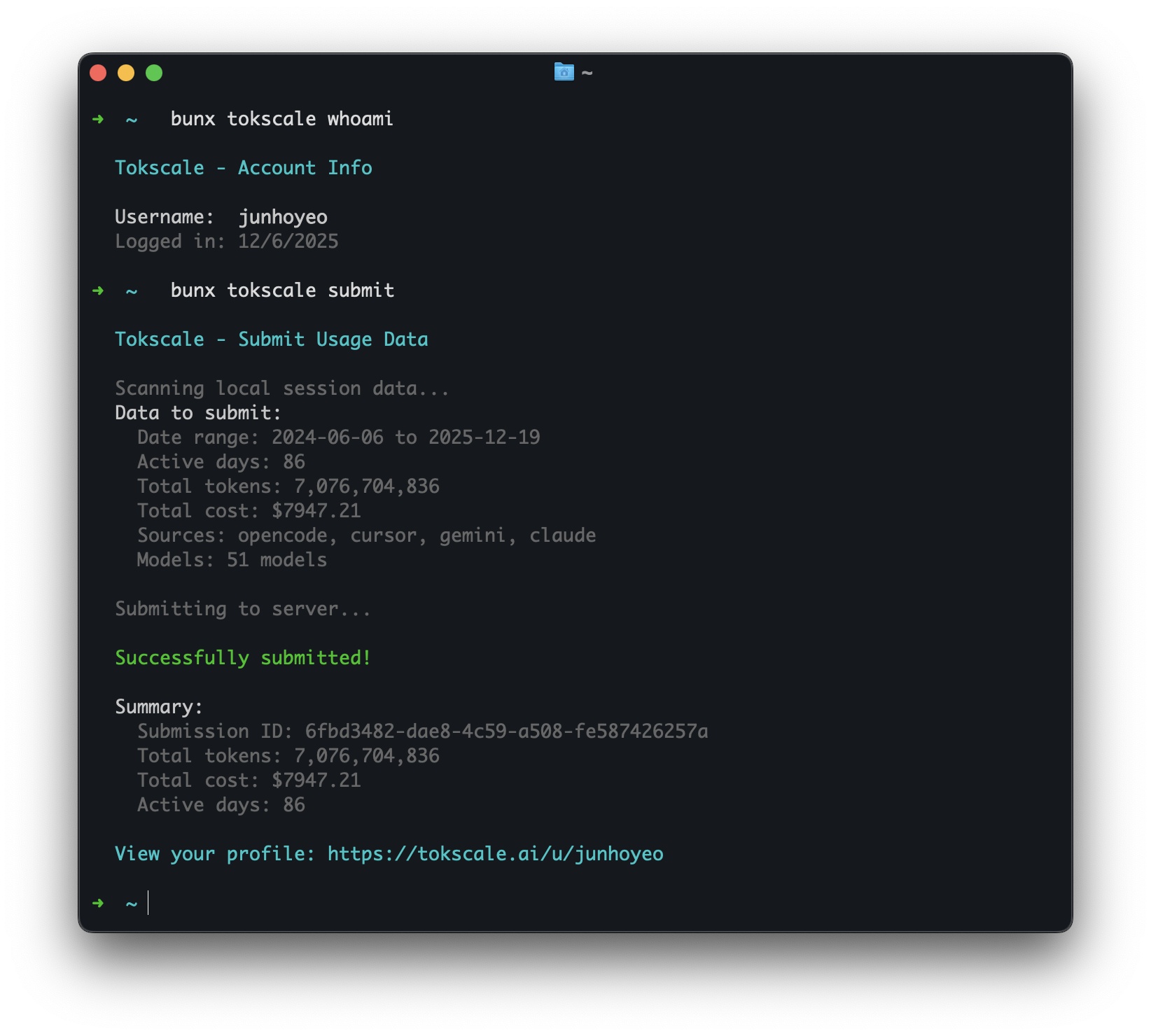 #### Unpriced usage is excluded from submission
Before anything is submitted, every message must resolve to an authoritative price that covers every token bucket the message populated (input, output, cache read, cache write). Messages that cannot be priced are skipped and reported as `Warning: excluded N unpriced provider/model message(s)` — unknown models never submit invented or guessed spend, and all remaining priced usage still submits normally.
The exclusion reasons:
- `no authoritative model-to-price mapping` — the model ID is absent from LiteLLM, OpenRouter, models.dev, and your custom overrides.
- `generic routing label has no authoritative model-to-price mapping` — the ID is a router label (`auto`, `gemini-default`, …) whose underlying model varies per request, so it is refused outright. An explicit entry for the label in `custom-pricing.json` is the supported way to assert a rate you know applies.
- `pricing does not cover every populated token bucket` — a price row was found, but it is missing a rate (most often cache read or cache creation) that this usage actually populates.
- `model price match does not establish the requested provider` — a price row was found only by matching the model part of the ID, or by trying a provider prefix, which does not prove your provider bills at that row's rate.
- `model price match does not exactly name the requested model` — a fuzzy or provider-scoped match was found, but nothing proves the priced key names the model you actually used.
- `model price lookup is ambiguous across non-equivalent candidates` — several candidate rows matched and they quote different prices.
To include previously excluded usage, add an exact-match entry to `custom-pricing.json` (see [Custom Pricing Overrides](#custom-pricing-overrides)) — an explicit `0` declares a genuinely free model — then re-run `tokscale submit --dry-run` until no warnings remain. `tokscale pricing ` shows which entry matched. The file is keyed by the model ID alone — the `model` half of the `provider/model` pair shown in the warning.
### Autosubmit
Autosubmit schedules the normal `tokscale submit` flow with the operating system scheduler. It is useful for keeping your public profile current without a manual terminal run.
```bash
# Enable periodic submission. Uses launchd on macOS, systemd user timers on Linux
# when available, cron as a Linux fallback, and Windows Task Scheduler on Windows.
tokscale autosubmit enable --interval 24h
# Keep the same client and date filters you would pass to submit.
tokscale autosubmit enable --interval 2h --client opencode,claude --week
# Show saved settings and the last run/error.
tokscale autosubmit status
tokscale autosubmit status --json
# Run once now, even if the saved interval has not elapsed.
tokscale autosubmit run --force
# Disable autosubmit and remove the scheduler entry.
tokscale autosubmit disable
```
Scheduled runs are non-interactive: they never prompt for GitHub auth or star confirmation. Run `tokscale login --token tt_xxx` once, or set `TOKSCALE_API_TOKEN` in the scheduler environment. Tokscale records scheduler state in `settings.json`, writes logs under `~/.config/tokscale/autosubmit/`, and uses a lock file so overlapping scheduler ticks do not submit twice.
### Cursor IDE Commands
Cursor IDE support uses Cursor's web API export, cached by Tokscale at `~/.config/tokscale/cursor-cache/usage*.csv`. Tokscale does not parse local Cursor Agent CLI state under `~/.cursor`, and it does not treat the desktop SQLite DB as a usage ledger.
When the Cursor desktop app is installed and signed in, `tokscale cursor login` prefers the local `cursorAuth/accessToken` from Cursor's `state.vscdb` and builds the session cookie automatically. `tokscale cursor sync` also refreshes that token when available. Usage rows still come only from Cursor's usage-export API.
Setup (desktop auto-login):
1. Sign in to the Cursor desktop app.
2. Run `tokscale cursor login --name work` (auto-detects the local desktop session when available).
3. Run `tokscale cursor sync --json` to populate `~/.config/tokscale/cursor-cache/usage.csv`.
4. Run `tokscale --client cursor` or any report command.
Fallback (manual browser cookie), if desktop login is unavailable:
1. Open https://www.cursor.com/settings in your browser and sign in.
2. Copy the `WorkosCursorSessionToken` cookie value:
- Network tab: make any request to `cursor.com/api/*`, then copy the value after `WorkosCursorSessionToken=` from the `Cookie` request header.
- Application tab: open Cookies -> `https://www.cursor.com`, then copy the `WorkosCursorSessionToken` value.
3. Run `tokscale cursor login --name work` and paste the token when prompted.
4. Continue with `tokscale cursor sync --json` as above.
Treat the session token like a password. It is stored locally in `~/.config/tokscale/cursor-credentials.json`.
```bash
# Login to Cursor (auto-detects Cursor desktop login; falls back to browser cookie paste)
# --name is optional; it just helps you identify accounts later
tokscale cursor login --name work
# Check Cursor authentication status and session validity
tokscale cursor status
# List saved Cursor accounts
tokscale cursor accounts
# Manually refresh cached Cursor usage
tokscale cursor sync --json
# Switch active account (controls which account syncs to cursor-cache/usage.csv)
tokscale cursor switch work
# Logout from a specific account (keeps history; excludes it from aggregation)
tokscale cursor logout --name work
# Logout and delete cached usage for that account
tokscale cursor logout --name work --purge-cache
# Logout from all Cursor accounts (keeps history; excludes from aggregation)
tokscale cursor logout --all
# Logout from all accounts and delete cached usage
tokscale cursor logout --all --purge-cache
```
By default, Tokscale aggregates usage across all saved Cursor accounts by reading `cursor-cache/usage*.csv`. The active account syncs to `usage.csv`; additional accounts sync to `usage..csv`.
When you log out, Tokscale moves cached usage to `cursor-cache/archive/` so it is no longer aggregated. Use `--purge-cache` to delete cached usage instead.
### Antigravity Commands
Antigravity sync currently works on macOS and Linux only. The Antigravity-enabled editor must be running and its local language server available; tokscale reads usage from that local language server and caches normalized artifacts locally.
```bash
# Check whether tokscale can see running Antigravity language servers
tokscale antigravity status
# Sync usage from local Antigravity language servers into tokscale's cache
tokscale antigravity sync
# Delete the cached Antigravity artifacts
tokscale antigravity purge-cache
```
**Cache location**: `~/.config/tokscale/antigravity-cache/`
**How it works**: `tokscale antigravity sync` discovers local Antigravity session candidates, fetches confirmed usage data from the local language server RPC, and stores normalized JSONL artifacts for tokscale-core to parse later. Run sync before reports if you want the freshest Antigravity data.
### Trae Commands
Trae ([ByteDance's AI IDE](https://www.trae.ai/)) ships in two international product lines — Trae IDE and Trae Solo. They share the same account-level usage data (same backend, same JWT), so tokscale reports them as a single `trae` client. You can install either or both desktop apps; tokscale auto-discovers credentials from whichever is present.
Credentials are identified per desktop app via `--variant`:
- **`--variant ide`** — credentials from Trae IDE (`~/Library/Application Support/Trae/`)
- **`--variant solo`** — credentials from Trae Solo (`~/Library/Application Support/TRAE SOLO/`)
`tokscale trae sync` calls the official `query_user_usage_group_by_session` API exactly once per run (regardless of how many desktop apps are installed) and persists the raw JSON to a local cache.
```bash
# Log in (auto-detects credentials from any installed Trae desktop client)
tokscale trae login
# Manual JWT entry (for environments where auto-detect can't find storage.json,
# e.g. Linux/Windows or a headless server). Open https://www.trae.ai/account-setting#usage
# in your browser, then F12 → Network → filter `query_user_usage` and copy the
# `Authorization` header value.
tokscale trae login --manual --variant solo
# Show which variants have cached credentials
tokscale trae status
# Sync usage (uses the first available credential source)
tokscale trae sync --since 30
# Forget cached credentials for one variant
tokscale trae logout --variant solo
```
**Cache location**: `~/.config/tokscale/trae-cache/`
**How it works**: tokscale either decrypts the desktop client's `iCubeAuthInfo://*` blob (`globalStorage/storage.json`) to recover a JWT, or accepts one pasted via `--manual`. It then calls `POST /trae/api/v1/pay/query_user_usage_group_by_session` paginated and stores the raw JSON. Run sync before reports if you want the freshest Trae data.
#### Sync-lock recovery during upgrades
Antigravity and Trae syncs use a legacy-compatible `sync.lock` file to avoid overlapping an older tokscale binary during a rolling upgrade. After a crash or forced stop, that file can remain. Tokscale intentionally fails closed instead of replacing it, because an older binary may still be creating or updating the same path. Confirm that no `tokscale antigravity sync` or `tokscale trae sync` process is active, remove the exact quoted `sync.lock` path printed by the command, then retry. Do not remove the lock while a sync may still be running.
> **Note on pricing**: Trae cost figures are **vendor-reported** — tokscale surfaces the `dollar_float` value returned by Trae's own API rather than recomputing cost from token counts through tokscale's pricing engine. Numbers will match what you see on `trae.ai/account-setting#usage`, not what tokscale would otherwise calculate for the same usage.
> **China variants**: The China editions (`trae.com.cn`) are intentionally **not** supported. The CN backend does not expose a session-level usage query API. Trae CN / Trae Solo CN support will be added once an official endpoint becomes available upstream.
### Warp/Oz Commands
Warp/Oz does not expose local token transcripts. Tokscale only syncs the aggregate request and spend counters returned by Warp's GraphQL API, then reports them as `warp` / `aggregate-requests` rows with zero token buckets.
```bash
# Save a bearer token or Cookie header copied from an authenticated Warp request
tokscale warp login
# Inspect credential/cache state and diagnostics
tokscale warp status
# Sync aggregate requests and spend into tokscale's local cache
tokscale warp sync
# Remove saved credentials; add --purge-cache to delete synced usage too
tokscale warp logout --purge-cache
```
**Cache location**: `~/.config/tokscale/warp-cache/usage.json`
**How it works**: `tokscale warp sync` calls Warp's authenticated GraphQL API for account and workspace aggregate counters. Tokscale preserves request counts as message counts and vendor-reported spend as cost, but it never converts requests into synthetic tokens. Warp is excluded from default `submit` data because the public leaderboard accepts token-attributed usage, not aggregate request counters.
### Task-Attributed Report
The `report` command generates a task-attributed usage breakdown. It uses an LLM to summarize each session into a short title and category, then groups related sessions into high-level task clusters for a bird's-eye view of where your tokens went.
```bash
# Basic report (today, default Apple FM summarizer)
tokscale report
# Last 7 days
tokscale report --week
# Use Claude Code as the summarizer backend
tokscale report --week --summarizer claude
# Use Codex, Gemini, Kiro, or MiniMax
tokscale report --summarizer codex
tokscale report --summarizer gemini
tokscale report --summarizer kiro
tokscale report --summarizer minimax
# Skip LLM summarization (show raw data only)
tokscale report --no-summarize
# Re-summarize from scratch (resets cached summaries in range)
tokscale report --week --rebuild
# Output as JSON
tokscale report --week --json
# Filter by workspace or client
tokscale report --workspace my-project --client opencode
```
**Summarizer backends:**
| Backend | Command | Notes |
|---------|---------|-------|
| `apple-fm` | (default) | On-device Apple Foundation Models via native Rust FFI (no Python). Enabled in the prebuilt Apple Silicon (macOS arm64) binary; runs on macOS 26+ with Apple Intelligence on, and transparently falls back to a built-in Rust heuristic everywhere else (Intel Macs, older macOS, Linux, Windows) — so the default works on every platform. |
| `claude` | `claude -p` | Requires Claude Code CLI installed and authenticated. |
| `codex` | `codex --quiet` | Requires Codex CLI installed and authenticated. |
| `gemini` | `gemini -p` | Requires Gemini CLI installed and authenticated. |
| `kiro` | `kiro --non-interactive` | Requires Kiro CLI installed and authenticated. |
| `minimax` | (HTTP API) | OpenAI-compatible chat-completions API, so no CLI is needed. Set `MINIMAX_API_KEY` or `MINIMAX_API_TOKEN`. Defaults to `MiniMax-M3` on the global endpoint (`https://api.minimax.io/v1`); set `MINIMAX_API_REGION=cn` to use `https://api.minimaxi.com/v1`, and `MINIMAX_MODEL` to select another model (for example `MiniMax-M2.7`). |
**How it works:**
1. Sessions are scanned and inserted into a local SQLite wiki database (`wiki.db` in your platform config dir — e.g. `~/.config/tokscale/` on Linux, `~/Library/Application Support/tokscale/` on macOS)
2. Unsummarized sessions are sent to the chosen LLM backend in batches, which returns a title, category, description, and complexity for each
3. A second LLM pass groups all titled sessions into 3–8 high-level task clusters (e.g. "Kiro Auth", "Tokscale Report", "System Config")
4. Results are cached in the wiki DB — subsequent runs skip already-summarized sessions
**Example output:**
```
Task Group Sess Tokens Cost
───────────────────────────────────────────────────────────────────────
Tokscale Development 19 4.2B $22.66
Add task-attributed report command
Implement wiki DB schema
Fix pricing lookup for new models
System Config 28 2.1B $10.06
Configure OpenCode workspace settings
Update shell aliases
Kiro Auth 4 890.5M $3.10
Implement JWT refresh flow
```
### Subscription Usage
Tokscale can fetch and display your real-time subscription quota across AI providers. This shows how much of your plan you've used and when limits reset.
```bash
# Show subscription usage for all detected providers
tokscale usage
# Output as JSON (for scripting)
tokscale usage --json
# Lightweight terminal output (no TUI)
tokscale usage --light
```
In the TUI, navigate to the **Usage** tab to see subscription data. Use `[Refresh]` to refresh subscription quotas. The keyboard refresh shortcut `r` uses the same refresh path.
> **Note**: Subscription quotas and balances are **vendor-reported** — tokscale calls each provider's own quota endpoint and surfaces the response verbatim. Numbers reflect what the provider reports (which is also what shows up in their official dashboards) and are not independently verified against tokscale's own usage tracking.
#### Supported Providers
| Provider | Auth Method | Metrics | Setup |
|----------|-------------|---------|-------|
| **Claude** | OAuth (credentials file or macOS Keychain) | Session (5hr), Weekly, model-scoped quotas | Run `claude` to log in |
| **Codex** (OpenAI) | OAuth (Codex auth, saved Tokscale accounts, or OpenCode's `$XDG_DATA_HOME/opencode/auth.json`) | Session, Weekly quotas | Use `[Add Codex]`, run `codex`, import with `tokscale codex import --name work`, or connect OpenAI with ChatGPT Plus/Pro in OpenCode |
| **Z.ai** | API key (env var) | Token limits, Web Searches | Set `ZAI_API_KEY` or `GLM_API_KEY` |
| **Amp** | API key (`~/.local/share/amp/secrets.json`) | Free tier balance, Credits | Run `amp` to log in |
| **GitHub Copilot** | GitHub token (keychain or `~/.config/gh/hosts.yml`) | Premium interactions, Chat quotas | Run `gh auth login` |
| **Grok Build** | OAuth (`~/.grok/auth.json`) | Credits, subscription plan | Run `grok login` |
| **Kimi** | OAuth (`~/.kimi/credentials/kimi-code.json`) | Session, Weekly quotas | Run `kimi` to log in |
| **MiniMax** | API key (env var) | Prompt quotas per model | Set `MINIMAX_API_KEY` or `MINIMAX_API_TOKEN` |
| **MiniMax Token Plan** | API key (env var) | Interval + weekly remaining-percent quotas (per region: CN minimaxi.com + Global minimax.io) | Set `MINIMAX_TOKEN_PLAN_CN_KEY` and/or `MINIMAX_TOKEN_PLAN_GLOBAL_KEY` |
| **OpenCode Go** | API key (`~/.local/share/opencode/auth.json` or env var) | Rolling, Weekly, Monthly quotas | Run `/connect` in OpenCode, or set `OPENCODE_API_KEY` |
| **Sakana** (Fugu) | Session cookie (env var or file) — billing-console HTML scrape, no public API | 5-hour, Weekly quota windows (plan tier + monthly price as metadata) | Set `SAKANA_SESSION_COOKIE` (see [docs/providers/sakana.md](docs/providers/sakana.md)) |
Providers are auto-detected — only those with valid credentials are shown. If a provider is missing, ensure you've logged in or set the required environment variable.
#### Codex Multi-Account Usage
Tokscale can save multiple Codex OAuth accounts for subscription usage display. The TUI Usage tab groups saved accounts under one **Codex** section. The active account is marked with `*`; inactive accounts can be selected with `[Use]`; account removal uses `[Remove]` followed by `[Confirm]`.
To add an account without leaving the TUI, click `[Add Codex]` in the Usage tab. Tokscale starts `codex login` with a temporary `CODEX_HOME`, displays the login output in the Usage tab, imports the resulting auth into Tokscale's saved account store, and then refreshes usage. This keeps the login isolated and does not switch the current Codex auth; click `[Use]` on a saved account when you want Tokscale to write that account into the real Codex auth file.
The CLI commands are still available for scripted or manual account management, plus a separate opt-in account-activity snapshot:
```bash
# Save the current Codex auth as a named Tokscale account
tokscale codex import --name work
# List saved Codex accounts
tokscale codex accounts
tokscale codex accounts --json
# Switch the active Codex account and write Codex auth.json
tokscale codex switch work
# Stop tracking a saved Codex account (removes it from Tokscale's store
# only — the codex CLI's own auth.json/login is never touched)
tokscale codex remove personal
# Check subscription usage for the active or a named account
tokscale codex status
tokscale codex status --name personal --json
# Fetch the active Codex app-server account activity separately from local totals
tokscale codex activity
tokscale codex activity --json
```
When saved Codex accounts exist, `tokscale usage --json` includes structured account metadata for each Codex entry and the TUI displays those entries under one Codex group. Without saved accounts, Tokscale falls back to the current Codex auth discovery path (`CODEX_HOME/auth.json`, `~/.config/codex/auth.json`, `~/.codex/auth.json`, then macOS Keychain).
If those native Codex sources produce no successful usage result, Tokscale reads the `openai` OAuth entry from OpenCode's `$XDG_DATA_HOME/opencode/auth.json` (normally `~/.local/share/opencode/auth.json`). OpenAI API-key entries are not ChatGPT subscription credentials and are ignored. OpenCode credentials are read-only: Tokscale never imports, refreshes, or rewrites them. If the access token is rejected, use OpenCode so it can refresh the login, or reconnect OpenAI with `/connect`.
`tokscale codex activity` uses only the installed Codex app-server's active authentication to fetch a timestamped, account-level snapshot. It is supplemental data: it is never included in local totals, reports, exports, submissions, or leaderboards.
#### Example Output
```
╭──────────────────────────────────────────────────────────╮
│ Session 85% left [=========---] resets in 2h 15m │
│ Weekly 72% left [========----] resets Fri 3pm │
│ Plan Max 20x │
╰──────────────────────────────────────────────────────────╯
╭──────────────────────────────────────────────────────────╮
│ Session 40% left [=====-------] resets in 4h 30m │
│ Weekly 90% left [==========--] resets Mon 12am │
│ Account user@example.com │
│ Plan Pro │
╰──────────────────────────────────────────────────────────╯
```
### Example Output (`--light` version)
#### Unpriced usage is excluded from submission
Before anything is submitted, every message must resolve to an authoritative price that covers every token bucket the message populated (input, output, cache read, cache write). Messages that cannot be priced are skipped and reported as `Warning: excluded N unpriced provider/model message(s)` — unknown models never submit invented or guessed spend, and all remaining priced usage still submits normally.
The exclusion reasons:
- `no authoritative model-to-price mapping` — the model ID is absent from LiteLLM, OpenRouter, models.dev, and your custom overrides.
- `generic routing label has no authoritative model-to-price mapping` — the ID is a router label (`auto`, `gemini-default`, …) whose underlying model varies per request, so it is refused outright. An explicit entry for the label in `custom-pricing.json` is the supported way to assert a rate you know applies.
- `pricing does not cover every populated token bucket` — a price row was found, but it is missing a rate (most often cache read or cache creation) that this usage actually populates.
- `model price match does not establish the requested provider` — a price row was found only by matching the model part of the ID, or by trying a provider prefix, which does not prove your provider bills at that row's rate.
- `model price match does not exactly name the requested model` — a fuzzy or provider-scoped match was found, but nothing proves the priced key names the model you actually used.
- `model price lookup is ambiguous across non-equivalent candidates` — several candidate rows matched and they quote different prices.
To include previously excluded usage, add an exact-match entry to `custom-pricing.json` (see [Custom Pricing Overrides](#custom-pricing-overrides)) — an explicit `0` declares a genuinely free model — then re-run `tokscale submit --dry-run` until no warnings remain. `tokscale pricing ` shows which entry matched. The file is keyed by the model ID alone — the `model` half of the `provider/model` pair shown in the warning.
### Autosubmit
Autosubmit schedules the normal `tokscale submit` flow with the operating system scheduler. It is useful for keeping your public profile current without a manual terminal run.
```bash
# Enable periodic submission. Uses launchd on macOS, systemd user timers on Linux
# when available, cron as a Linux fallback, and Windows Task Scheduler on Windows.
tokscale autosubmit enable --interval 24h
# Keep the same client and date filters you would pass to submit.
tokscale autosubmit enable --interval 2h --client opencode,claude --week
# Show saved settings and the last run/error.
tokscale autosubmit status
tokscale autosubmit status --json
# Run once now, even if the saved interval has not elapsed.
tokscale autosubmit run --force
# Disable autosubmit and remove the scheduler entry.
tokscale autosubmit disable
```
Scheduled runs are non-interactive: they never prompt for GitHub auth or star confirmation. Run `tokscale login --token tt_xxx` once, or set `TOKSCALE_API_TOKEN` in the scheduler environment. Tokscale records scheduler state in `settings.json`, writes logs under `~/.config/tokscale/autosubmit/`, and uses a lock file so overlapping scheduler ticks do not submit twice.
### Cursor IDE Commands
Cursor IDE support uses Cursor's web API export, cached by Tokscale at `~/.config/tokscale/cursor-cache/usage*.csv`. Tokscale does not parse local Cursor Agent CLI state under `~/.cursor`, and it does not treat the desktop SQLite DB as a usage ledger.
When the Cursor desktop app is installed and signed in, `tokscale cursor login` prefers the local `cursorAuth/accessToken` from Cursor's `state.vscdb` and builds the session cookie automatically. `tokscale cursor sync` also refreshes that token when available. Usage rows still come only from Cursor's usage-export API.
Setup (desktop auto-login):
1. Sign in to the Cursor desktop app.
2. Run `tokscale cursor login --name work` (auto-detects the local desktop session when available).
3. Run `tokscale cursor sync --json` to populate `~/.config/tokscale/cursor-cache/usage.csv`.
4. Run `tokscale --client cursor` or any report command.
Fallback (manual browser cookie), if desktop login is unavailable:
1. Open https://www.cursor.com/settings in your browser and sign in.
2. Copy the `WorkosCursorSessionToken` cookie value:
- Network tab: make any request to `cursor.com/api/*`, then copy the value after `WorkosCursorSessionToken=` from the `Cookie` request header.
- Application tab: open Cookies -> `https://www.cursor.com`, then copy the `WorkosCursorSessionToken` value.
3. Run `tokscale cursor login --name work` and paste the token when prompted.
4. Continue with `tokscale cursor sync --json` as above.
Treat the session token like a password. It is stored locally in `~/.config/tokscale/cursor-credentials.json`.
```bash
# Login to Cursor (auto-detects Cursor desktop login; falls back to browser cookie paste)
# --name is optional; it just helps you identify accounts later
tokscale cursor login --name work
# Check Cursor authentication status and session validity
tokscale cursor status
# List saved Cursor accounts
tokscale cursor accounts
# Manually refresh cached Cursor usage
tokscale cursor sync --json
# Switch active account (controls which account syncs to cursor-cache/usage.csv)
tokscale cursor switch work
# Logout from a specific account (keeps history; excludes it from aggregation)
tokscale cursor logout --name work
# Logout and delete cached usage for that account
tokscale cursor logout --name work --purge-cache
# Logout from all Cursor accounts (keeps history; excludes from aggregation)
tokscale cursor logout --all
# Logout from all accounts and delete cached usage
tokscale cursor logout --all --purge-cache
```
By default, Tokscale aggregates usage across all saved Cursor accounts by reading `cursor-cache/usage*.csv`. The active account syncs to `usage.csv`; additional accounts sync to `usage..csv`.
When you log out, Tokscale moves cached usage to `cursor-cache/archive/` so it is no longer aggregated. Use `--purge-cache` to delete cached usage instead.
### Antigravity Commands
Antigravity sync currently works on macOS and Linux only. The Antigravity-enabled editor must be running and its local language server available; tokscale reads usage from that local language server and caches normalized artifacts locally.
```bash
# Check whether tokscale can see running Antigravity language servers
tokscale antigravity status
# Sync usage from local Antigravity language servers into tokscale's cache
tokscale antigravity sync
# Delete the cached Antigravity artifacts
tokscale antigravity purge-cache
```
**Cache location**: `~/.config/tokscale/antigravity-cache/`
**How it works**: `tokscale antigravity sync` discovers local Antigravity session candidates, fetches confirmed usage data from the local language server RPC, and stores normalized JSONL artifacts for tokscale-core to parse later. Run sync before reports if you want the freshest Antigravity data.
### Trae Commands
Trae ([ByteDance's AI IDE](https://www.trae.ai/)) ships in two international product lines — Trae IDE and Trae Solo. They share the same account-level usage data (same backend, same JWT), so tokscale reports them as a single `trae` client. You can install either or both desktop apps; tokscale auto-discovers credentials from whichever is present.
Credentials are identified per desktop app via `--variant`:
- **`--variant ide`** — credentials from Trae IDE (`~/Library/Application Support/Trae/`)
- **`--variant solo`** — credentials from Trae Solo (`~/Library/Application Support/TRAE SOLO/`)
`tokscale trae sync` calls the official `query_user_usage_group_by_session` API exactly once per run (regardless of how many desktop apps are installed) and persists the raw JSON to a local cache.
```bash
# Log in (auto-detects credentials from any installed Trae desktop client)
tokscale trae login
# Manual JWT entry (for environments where auto-detect can't find storage.json,
# e.g. Linux/Windows or a headless server). Open https://www.trae.ai/account-setting#usage
# in your browser, then F12 → Network → filter `query_user_usage` and copy the
# `Authorization` header value.
tokscale trae login --manual --variant solo
# Show which variants have cached credentials
tokscale trae status
# Sync usage (uses the first available credential source)
tokscale trae sync --since 30
# Forget cached credentials for one variant
tokscale trae logout --variant solo
```
**Cache location**: `~/.config/tokscale/trae-cache/`
**How it works**: tokscale either decrypts the desktop client's `iCubeAuthInfo://*` blob (`globalStorage/storage.json`) to recover a JWT, or accepts one pasted via `--manual`. It then calls `POST /trae/api/v1/pay/query_user_usage_group_by_session` paginated and stores the raw JSON. Run sync before reports if you want the freshest Trae data.
#### Sync-lock recovery during upgrades
Antigravity and Trae syncs use a legacy-compatible `sync.lock` file to avoid overlapping an older tokscale binary during a rolling upgrade. After a crash or forced stop, that file can remain. Tokscale intentionally fails closed instead of replacing it, because an older binary may still be creating or updating the same path. Confirm that no `tokscale antigravity sync` or `tokscale trae sync` process is active, remove the exact quoted `sync.lock` path printed by the command, then retry. Do not remove the lock while a sync may still be running.
> **Note on pricing**: Trae cost figures are **vendor-reported** — tokscale surfaces the `dollar_float` value returned by Trae's own API rather than recomputing cost from token counts through tokscale's pricing engine. Numbers will match what you see on `trae.ai/account-setting#usage`, not what tokscale would otherwise calculate for the same usage.
> **China variants**: The China editions (`trae.com.cn`) are intentionally **not** supported. The CN backend does not expose a session-level usage query API. Trae CN / Trae Solo CN support will be added once an official endpoint becomes available upstream.
### Warp/Oz Commands
Warp/Oz does not expose local token transcripts. Tokscale only syncs the aggregate request and spend counters returned by Warp's GraphQL API, then reports them as `warp` / `aggregate-requests` rows with zero token buckets.
```bash
# Save a bearer token or Cookie header copied from an authenticated Warp request
tokscale warp login
# Inspect credential/cache state and diagnostics
tokscale warp status
# Sync aggregate requests and spend into tokscale's local cache
tokscale warp sync
# Remove saved credentials; add --purge-cache to delete synced usage too
tokscale warp logout --purge-cache
```
**Cache location**: `~/.config/tokscale/warp-cache/usage.json`
**How it works**: `tokscale warp sync` calls Warp's authenticated GraphQL API for account and workspace aggregate counters. Tokscale preserves request counts as message counts and vendor-reported spend as cost, but it never converts requests into synthetic tokens. Warp is excluded from default `submit` data because the public leaderboard accepts token-attributed usage, not aggregate request counters.
### Task-Attributed Report
The `report` command generates a task-attributed usage breakdown. It uses an LLM to summarize each session into a short title and category, then groups related sessions into high-level task clusters for a bird's-eye view of where your tokens went.
```bash
# Basic report (today, default Apple FM summarizer)
tokscale report
# Last 7 days
tokscale report --week
# Use Claude Code as the summarizer backend
tokscale report --week --summarizer claude
# Use Codex, Gemini, Kiro, or MiniMax
tokscale report --summarizer codex
tokscale report --summarizer gemini
tokscale report --summarizer kiro
tokscale report --summarizer minimax
# Skip LLM summarization (show raw data only)
tokscale report --no-summarize
# Re-summarize from scratch (resets cached summaries in range)
tokscale report --week --rebuild
# Output as JSON
tokscale report --week --json
# Filter by workspace or client
tokscale report --workspace my-project --client opencode
```
**Summarizer backends:**
| Backend | Command | Notes |
|---------|---------|-------|
| `apple-fm` | (default) | On-device Apple Foundation Models via native Rust FFI (no Python). Enabled in the prebuilt Apple Silicon (macOS arm64) binary; runs on macOS 26+ with Apple Intelligence on, and transparently falls back to a built-in Rust heuristic everywhere else (Intel Macs, older macOS, Linux, Windows) — so the default works on every platform. |
| `claude` | `claude -p` | Requires Claude Code CLI installed and authenticated. |
| `codex` | `codex --quiet` | Requires Codex CLI installed and authenticated. |
| `gemini` | `gemini -p` | Requires Gemini CLI installed and authenticated. |
| `kiro` | `kiro --non-interactive` | Requires Kiro CLI installed and authenticated. |
| `minimax` | (HTTP API) | OpenAI-compatible chat-completions API, so no CLI is needed. Set `MINIMAX_API_KEY` or `MINIMAX_API_TOKEN`. Defaults to `MiniMax-M3` on the global endpoint (`https://api.minimax.io/v1`); set `MINIMAX_API_REGION=cn` to use `https://api.minimaxi.com/v1`, and `MINIMAX_MODEL` to select another model (for example `MiniMax-M2.7`). |
**How it works:**
1. Sessions are scanned and inserted into a local SQLite wiki database (`wiki.db` in your platform config dir — e.g. `~/.config/tokscale/` on Linux, `~/Library/Application Support/tokscale/` on macOS)
2. Unsummarized sessions are sent to the chosen LLM backend in batches, which returns a title, category, description, and complexity for each
3. A second LLM pass groups all titled sessions into 3–8 high-level task clusters (e.g. "Kiro Auth", "Tokscale Report", "System Config")
4. Results are cached in the wiki DB — subsequent runs skip already-summarized sessions
**Example output:**
```
Task Group Sess Tokens Cost
───────────────────────────────────────────────────────────────────────
Tokscale Development 19 4.2B $22.66
Add task-attributed report command
Implement wiki DB schema
Fix pricing lookup for new models
System Config 28 2.1B $10.06
Configure OpenCode workspace settings
Update shell aliases
Kiro Auth 4 890.5M $3.10
Implement JWT refresh flow
```
### Subscription Usage
Tokscale can fetch and display your real-time subscription quota across AI providers. This shows how much of your plan you've used and when limits reset.
```bash
# Show subscription usage for all detected providers
tokscale usage
# Output as JSON (for scripting)
tokscale usage --json
# Lightweight terminal output (no TUI)
tokscale usage --light
```
In the TUI, navigate to the **Usage** tab to see subscription data. Use `[Refresh]` to refresh subscription quotas. The keyboard refresh shortcut `r` uses the same refresh path.
> **Note**: Subscription quotas and balances are **vendor-reported** — tokscale calls each provider's own quota endpoint and surfaces the response verbatim. Numbers reflect what the provider reports (which is also what shows up in their official dashboards) and are not independently verified against tokscale's own usage tracking.
#### Supported Providers
| Provider | Auth Method | Metrics | Setup |
|----------|-------------|---------|-------|
| **Claude** | OAuth (credentials file or macOS Keychain) | Session (5hr), Weekly, model-scoped quotas | Run `claude` to log in |
| **Codex** (OpenAI) | OAuth (Codex auth, saved Tokscale accounts, or OpenCode's `$XDG_DATA_HOME/opencode/auth.json`) | Session, Weekly quotas | Use `[Add Codex]`, run `codex`, import with `tokscale codex import --name work`, or connect OpenAI with ChatGPT Plus/Pro in OpenCode |
| **Z.ai** | API key (env var) | Token limits, Web Searches | Set `ZAI_API_KEY` or `GLM_API_KEY` |
| **Amp** | API key (`~/.local/share/amp/secrets.json`) | Free tier balance, Credits | Run `amp` to log in |
| **GitHub Copilot** | GitHub token (keychain or `~/.config/gh/hosts.yml`) | Premium interactions, Chat quotas | Run `gh auth login` |
| **Grok Build** | OAuth (`~/.grok/auth.json`) | Credits, subscription plan | Run `grok login` |
| **Kimi** | OAuth (`~/.kimi/credentials/kimi-code.json`) | Session, Weekly quotas | Run `kimi` to log in |
| **MiniMax** | API key (env var) | Prompt quotas per model | Set `MINIMAX_API_KEY` or `MINIMAX_API_TOKEN` |
| **MiniMax Token Plan** | API key (env var) | Interval + weekly remaining-percent quotas (per region: CN minimaxi.com + Global minimax.io) | Set `MINIMAX_TOKEN_PLAN_CN_KEY` and/or `MINIMAX_TOKEN_PLAN_GLOBAL_KEY` |
| **OpenCode Go** | API key (`~/.local/share/opencode/auth.json` or env var) | Rolling, Weekly, Monthly quotas | Run `/connect` in OpenCode, or set `OPENCODE_API_KEY` |
| **Sakana** (Fugu) | Session cookie (env var or file) — billing-console HTML scrape, no public API | 5-hour, Weekly quota windows (plan tier + monthly price as metadata) | Set `SAKANA_SESSION_COOKIE` (see [docs/providers/sakana.md](docs/providers/sakana.md)) |
Providers are auto-detected — only those with valid credentials are shown. If a provider is missing, ensure you've logged in or set the required environment variable.
#### Codex Multi-Account Usage
Tokscale can save multiple Codex OAuth accounts for subscription usage display. The TUI Usage tab groups saved accounts under one **Codex** section. The active account is marked with `*`; inactive accounts can be selected with `[Use]`; account removal uses `[Remove]` followed by `[Confirm]`.
To add an account without leaving the TUI, click `[Add Codex]` in the Usage tab. Tokscale starts `codex login` with a temporary `CODEX_HOME`, displays the login output in the Usage tab, imports the resulting auth into Tokscale's saved account store, and then refreshes usage. This keeps the login isolated and does not switch the current Codex auth; click `[Use]` on a saved account when you want Tokscale to write that account into the real Codex auth file.
The CLI commands are still available for scripted or manual account management, plus a separate opt-in account-activity snapshot:
```bash
# Save the current Codex auth as a named Tokscale account
tokscale codex import --name work
# List saved Codex accounts
tokscale codex accounts
tokscale codex accounts --json
# Switch the active Codex account and write Codex auth.json
tokscale codex switch work
# Stop tracking a saved Codex account (removes it from Tokscale's store
# only — the codex CLI's own auth.json/login is never touched)
tokscale codex remove personal
# Check subscription usage for the active or a named account
tokscale codex status
tokscale codex status --name personal --json
# Fetch the active Codex app-server account activity separately from local totals
tokscale codex activity
tokscale codex activity --json
```
When saved Codex accounts exist, `tokscale usage --json` includes structured account metadata for each Codex entry and the TUI displays those entries under one Codex group. Without saved accounts, Tokscale falls back to the current Codex auth discovery path (`CODEX_HOME/auth.json`, `~/.config/codex/auth.json`, `~/.codex/auth.json`, then macOS Keychain).
If those native Codex sources produce no successful usage result, Tokscale reads the `openai` OAuth entry from OpenCode's `$XDG_DATA_HOME/opencode/auth.json` (normally `~/.local/share/opencode/auth.json`). OpenAI API-key entries are not ChatGPT subscription credentials and are ignored. OpenCode credentials are read-only: Tokscale never imports, refreshes, or rewrites them. If the access token is rejected, use OpenCode so it can refresh the login, or reconnect OpenAI with `/connect`.
`tokscale codex activity` uses only the installed Codex app-server's active authentication to fetch a timestamped, account-level snapshot. It is supplemental data: it is never included in local totals, reports, exports, submissions, or leaderboards.
#### Example Output
```
╭──────────────────────────────────────────────────────────╮
│ Session 85% left [=========---] resets in 2h 15m │
│ Weekly 72% left [========----] resets Fri 3pm │
│ Plan Max 20x │
╰──────────────────────────────────────────────────────────╯
╭──────────────────────────────────────────────────────────╮
│ Session 40% left [=====-------] resets in 4h 30m │
│ Weekly 90% left [==========--] resets Mon 12am │
│ Account user@example.com │
│ Plan Pro │
╰──────────────────────────────────────────────────────────╯
```
### Example Output (`--light` version)
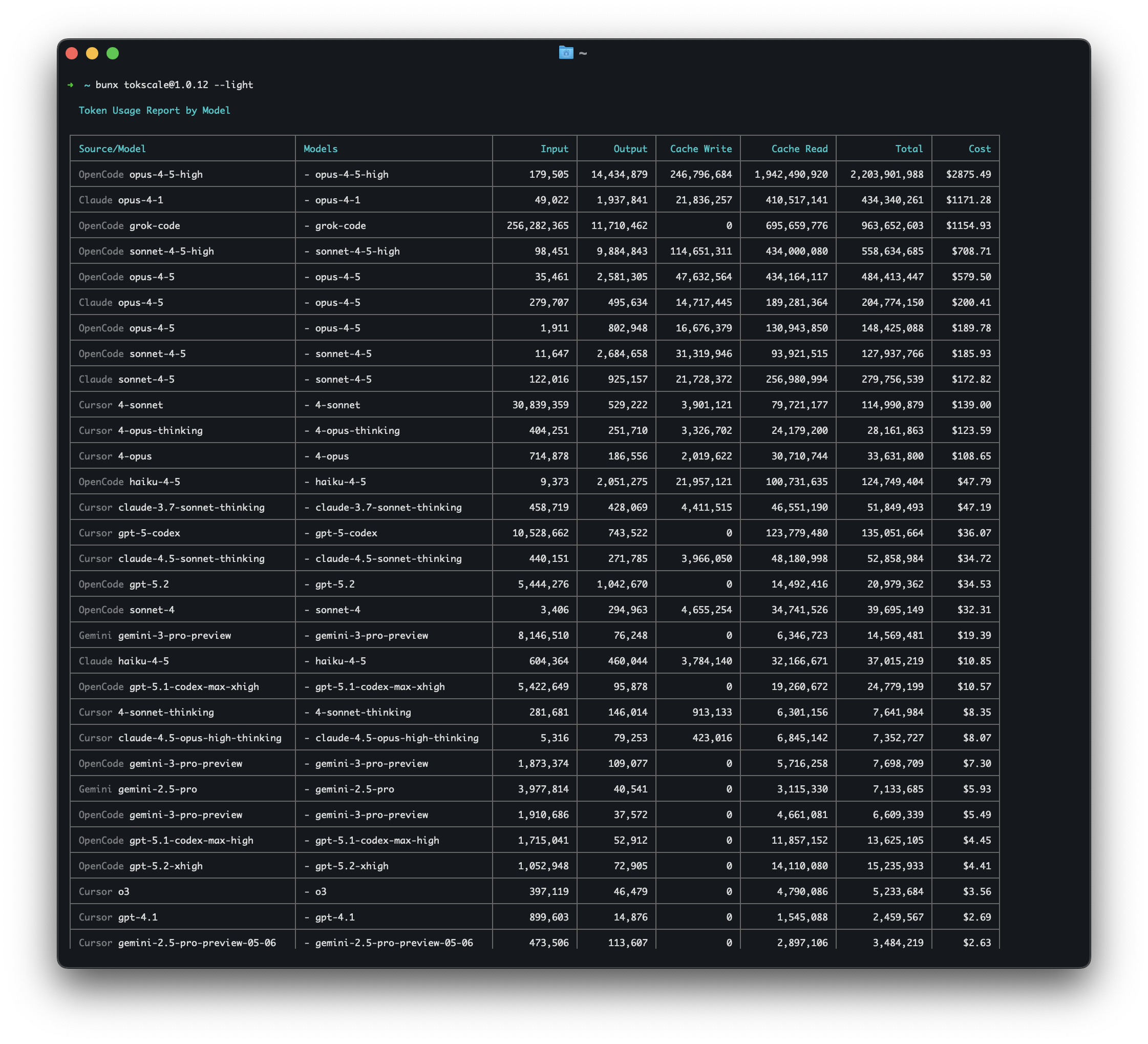 ### Configuration
Tokscale stores settings in `~/.config/tokscale/settings.json`:
```json
{
"colorPalette": "blue",
"includeUnusedModels": false,
"defaultClients": ["opencode", "claude"],
"usage": {
"disabledProviders": ["copilot"]
},
"scanner": {
"extraScanPaths": {
"codex": [
"/Users/me/workspace/project-a/.codex/sessions",
"/Users/me/workspace/project-b/.codex/archived_sessions"
],
"hermes": [
"/Users/me/.hermes/profiles/director_planning",
"/Users/me/.hermes/profiles/research/state.db"
]
}
}
}
```
| Setting | Type | Default | Description |
|---------|------|---------|-------------|
| `colorPalette` | string | `"blue"` | TUI color theme (green, halloween, teal, blue, pink, purple, orange, monochrome, ylgnbu, graphite, lagoon, dusk, tokyo-night, catppuccin, solarized, gruvbox, gruvbox-material, one-dark) |
| `includeUnusedModels` | boolean | `false` | Show models with zero tokens in reports |
| `autoRefreshEnabled` | boolean | `false` | Enable auto-refresh in TUI |
| `autoRefreshMs` | number | `60000` | Auto-refresh interval (30000-3600000ms) |
| `nativeTimeoutMs` | number | `300000` | Maximum time for native subprocess processing (5000-3600000ms) |
| `defaultClients` | string[] | `[]` | Client filter applied when no `--client/-c` flag is passed. Accepts the same ids as `--client` (e.g. `["opencode", "claude", "synthetic"]`). Unknown ids are silently dropped. CLI flags always override this list completely — no merging. |
| `usage.disabledProviders` | string[] | `[]` | Subscription-usage providers to skip before credential discovery or network access. Valid ids (case-insensitive; surrounding whitespace ignored): `claude`, `codex`, `zai`, `amp`, `antigravity`, `copilot`, `grok`, `kimi`, `minimax`, `minimax-token-plan`, `warp`, `sakana`, and `opencode-go`. Unknown ids are ignored. Disabled providers are also hidden from cached TUI cards and diagnostics. Changes apply to the next `tokscale usage` run or TUI launch/refresh. |
| `light.writeCache` | boolean | `false` | When true, `tokscale --light` overwrites the TUI cache atomically after rendering. CLI flags `--write-cache` / `--no-write-cache` override per-invocation. |
| `minutelyTabEnabled` | boolean | `false` | Show the per-minute Minutely tab in the TUI and aggregate per-minute usage during data loading. Default-off because minute-granularity is a niche/diagnostic view for most users and the per-minute bucketing has a non-trivial cost on large datasets. |
| `autosubmit` | object | disabled | Saved `tokscale autosubmit` state: interval, client/date filters, scheduler backend, last run time, and last error. Prefer `tokscale autosubmit enable/status/disable` over editing this object by hand. |
| `scanner.extraScanPaths` | object | `{}` | Additional per-client scan roots for sessions outside Tokscale's default home-root locations |
| `scanner.bucketTimezone` | string | auto-detected | IANA name of the timezone this device buckets usage days into (e.g. `"Asia/Seoul"`). Recorded automatically on first run. Prefer `tokscale config set timezone ` over editing this by hand. |
#### Day boundaries and `scanner.bucketTimezone`
Which calendar day a message counts toward depends on a timezone. Tokscale
records this device's timezone on first run and reuses it, rather than reading
the machine's current timezone on every scan.
This matters because day totals are submitted per day and never allowed to
decrease. If the same history were re-bucketed under a different timezone — you
travel, you change your system clock, you run in CI with a different `TZ` — a
session near midnight would move to the neighbouring day, and both the old and
the new day would keep their value. The total would go up without any new usage.
Pinning the zone makes the day boundary stable, so a rescan of unchanged history
always produces the same buckets.
```console
$ tokscale config list
timezone Asia/Seoul
$ tokscale config get timezone
Asia/Seoul
# `set timezone auto` is allowed only before a valid pin exists (or while
# recovering an invalid hand-edited value). It cannot repin an established
# device.
$ tokscale config set timezone auto
```
Only IANA zone names are accepted. Fixed UTC offsets such as `+09:00` are
rejected: an offset cannot follow daylight saving time, so a pinned offset stops
matching local midnight after a DST transition and re-splits usage near the day
boundary — a smaller version of the problem pinning removes.
An established valid pin cannot be changed or unset, including with `auto`.
Historical submitted day rows are monotonic, so re-keying prior usage would
permanently double count it. Relocating a device requires a server
resync/replacement transition before choosing a different bucket timezone.
Existing installs are unaffected until they pin, and the run that pins reports
exactly what it would have reported anyway: the zone recorded is the one the
machine was already using.
Use `scanner.extraScanPaths` for persistent extra roots such as project-level `.codex` directories or imported Gemini/OpenClaw histories. Tokscale automatically discovers Hermes profile databases under `$HERMES_HOME/profiles/*/state.db` (or `~/.hermes/profiles/*/state.db` when `HERMES_HOME` is unset). Use `scanner.extraScanPaths.hermes` only for non-standard Hermes profile locations; entries may point at a profile directory containing `state.db` or directly at a `state.db` file. Tokscale merges these paths with the default scan roots on every run and deduplicates overlapping roots by canonical path.
Use `defaultClients` to pin a personal default — for example, set it to `["opencode", "claude"]` if those are the only clients you use, and `tokscale` (with no flags) will scope every report to them automatically. Pass `--client` on the command line to override for a single run.
#### Enabling the Minutely tab
The Minutely tab shows a per-minute breakdown of token usage and is most useful for diagnosing burst patterns, debugging a single session, or watching activity in near-real-time alongside `autoRefreshEnabled`. It is hidden by default because the per-minute aggregation runs over every parsed message during data loading, which adds RAM and CPU cost that most users do not need.
To enable it, set `minutelyTabEnabled` to `true` in `~/.config/tokscale/settings.json`:
```json
{
"minutelyTabEnabled": true
}
```
After restart, the Minutely tab appears between Hourly and Stats in the tab strip, and Tab / BackTab / Left / Right navigation cycles through it. Set the flag back to `false` to hide the tab and skip the aggregation again.
#### Cache directory layout
The regenerable CLI/TUI/pricing/Wrapped caches now live under `~/.config/tokscale/cache/` (or `${TOKSCALE_CONFIG_DIR}/cache/` when overridden). Integration sync artifacts remain in client-specific cache roots such as `~/.config/tokscale/antigravity-cache/` and `~/.config/tokscale/trae-cache/`:
- `tui-data-cache.json` — TUI startup cache
- `source-message-cache-v2/` + `source-message-cache.lock` — sharded source-message cache + lock file
- `pricing-litellm.json` / `pricing-openrouter.json` — pricing caches
- `opencode-migration.json` — OpenCode migration record
- `fonts/` and `images/` — Wrapped asset caches
It is safe to delete this directory. Tokscale will recreate and repopulate it on demand.
One caveat, for Claude Code only. Claude Code rewrites a session transcript in place when you resume or compact it: the file keeps its name but loses assistant turns it had already written. `source-message-cache-v2/` remembers those turns for as long as the transcript file exists, so they keep counting toward your totals. That is the only place they still exist — the transcript itself no longer has them. Deleting the cache (or letting a Claude parser upgrade rebuild it) rebuilds from the compacted transcripts, so totals for heavily compacted sessions can come back lower. Deleting a transcript still drops its turns either way, which is what makes local disk the source of truth.
### Environment Variables
Environment variables override config file values. For CI/CD or one-off use:
| Variable | Default | Description |
|----------|---------|-------------|
| `TOKSCALE_NATIVE_TIMEOUT_MS` | `300000` (5 min) | Overrides `nativeTimeoutMs` config |
| `TOKSCALE_API_TOKEN` | unset | Tokscale personal API token for non-interactive `submit` and `delete-submitted-data` runs. Create one from Settings > API Tokens or save it locally with `tokscale login --token tt_xxx`. |
| `TOKSCALE_EXTRA_DIRS` | unset | One-off extra session roots as `client:/abs/path,client:/abs/path` |
| `TOKSCALE_CONFIG_DIR` | unset | Overrides the config directory root (where `settings.json`, `star-cache.json`, `cache/`, `antigravity-cache/`, and `trae-cache/` live). Absolute path recommended; relative paths resolve against the process CWD. Useful for CI sandboxes or pinning a non-default location. When set, tokscale will not fall back to the legacy macOS `~/Library/Application Support/tokscale/` path. |
| `TOKSCALE_FM_DEBUG` | unset | When set, prints Apple Foundation Models diagnostics (macOS version gate, dlopen dylib path, load/symbol errors) to stderr to explain why on-device apple-fm did or didn't engage. |
| `TOKSCALE_RECOVERY_DISABLE` | unset | When set, disables the local usage recovery ledger (`recovered-usage-v1.json`) even if the file exists. |
```bash
# Example: Increase timeout for very large datasets
TOKSCALE_NATIVE_TIMEOUT_MS=600000 tokscale graph --output data.json
# Example: one-off extra scan roots
TOKSCALE_EXTRA_DIRS='codex:/Users/me/workspace/project-a/.codex/sessions,gemini:/Users/me/imports/imac/gemini/tmp' tokscale
# Example: submit from CI without an interactive browser login
TOKSCALE_API_TOKEN=tt_xxx tokscale submit
```
> **Note**: For persistent extra roots, prefer `scanner.extraScanPaths` in `~/.config/tokscale/settings.json`. `TOKSCALE_EXTRA_DIRS` is best for one-off overrides or CI/CD.
### Headless Mode
Tokscale can aggregate token usage from **Codex CLI and MiniMax Code headless outputs** for automation, CI/CD pipelines, and batch processing.
**What is headless mode?**
When you run Codex CLI or MiniMax Code with JSON output flags, the CLI writes usage data to stdout. Headless mode captures that stream and keeps it attributable to the originating CLI. MiniMax Code is intentionally read from Tokscale's capture directory rather than its shared Desktop/Runtime session store, whose records do not identify the originating surface.
**Storage location:** `~/.config/tokscale/headless/`
On macOS, Tokscale also scans `~/Library/Application Support/tokscale/headless/` when `TOKSCALE_HEADLESS_DIR` is not set.
Tokscale automatically scans this directory structure:
```
~/.config/tokscale/headless/
├── codex/ # Codex CLI JSONL outputs
└── mcode/ # MiniMax Code stream-json outputs
```
**Environment variable:** Set `TOKSCALE_HEADLESS_DIR` to customize the headless log directory:
```bash
export TOKSCALE_HEADLESS_DIR="$HOME/my-custom-logs"
```
**Recommended (automatic capture):**
| Tool | Command Example |
|------|-----------------|
| **Codex CLI** | `tokscale headless codex exec -m gpt-5 "implement feature"` |
| **MiniMax Code** | `tokscale headless mcode exec "implement feature"` |
**Manual redirect (optional):**
| Tool | Command Example |
|------|-----------------|
| **Codex CLI** | `codex exec --json "implement feature" > ~/.config/tokscale/headless/codex/ci-run.jsonl` |
| **MiniMax Code** | `mcode exec --output-format stream-json "implement feature" > ~/.config/tokscale/headless/mcode/ci-run.jsonl` |
MiniMax Code usage is counted only when the final `exec.result` includes `model.providerId` and `model.modelId`. Partial captures and older MiniMax Code releases that omit this identity are skipped instead of being priced against a guessed model.
**Diagnostics:**
```bash
# Show scan locations and headless counts
tokscale sources
tokscale sources --json
```
**CI/CD integration example:**
```bash
# In your GitHub Actions workflow
- name: Run AI automation
run: |
mkdir -p ~/.config/tokscale/headless/codex
codex exec --json "review code changes" \
> ~/.config/tokscale/headless/codex/pr-${{ github.event.pull_request.number }}.jsonl
# Later, track usage
- name: Report token usage
run: tokscale --json
```
> **Note**: Headless capture is supported for Codex CLI and MiniMax Code. If you run either CLI directly, redirect stdout to its matching headless directory as shown above.
## Frontend Visualization
The frontend provides a GitHub-style contribution graph visualization:
### Features
- **2D View**: Classic GitHub contribution calendar
- **3D View**: Isometric 3D contribution graph with height based on token usage
- **Multiple color palettes**: GitHub, GitLab, Halloween, Winter, and more
- **3-way theme toggle**: Light / Dark / System (follows OS preference)
- **GitHub Primer design**: Uses GitHub's official color system
- **Interactive tooltips**: Hover for detailed daily breakdowns
- **Day breakdown panel**: Click to see per-source and per-model details
- **Year filtering**: Navigate between years
- **Source filtering**: Filter by platform (OpenCode, Claude, Codex, MiniMax Code, Copilot, Cursor, Gemini, Amp, Codebuff, Droid, OpenClaw, Hermes Agent, Pi, Prime Agent, Kimi, Qwen, Roo Code, Kilo, Mux, Kilo CLI, Crush, Goose, Antigravity, Antigravity CLI, Antigravity IDE Extension, Zed, Kiro, Trae, Warp, Cline, Gajae-Code, Grok Build, Jcode, MiMo Code, Xiaomi MiMo AI, Command Code, Junie, ZCode, OpenCodeReview, CodeBuddy, WorkBuddy, Devin CLI, Devin Desktop, Augment Code, Synthetic, Cherry Studio, LM Studio, Unsloth, Hindsight, Muse Code)
- **Stats panel**: Total cost, tokens, active days, streaks
- **FOUC prevention**: Theme applied before React hydrates (no flash)
### Running the Frontend
```bash
cd packages/frontend
bun install
bun run dev
```
Open [http://localhost:3000](http://localhost:3000) to access the social platform.
## Social Platform
Tokscale includes a social platform where you can share your usage data and compete with other developers.
### Features
- **Leaderboard** - See who's using the most tokens across all platforms
- **User Profiles** - Public profiles with contribution graphs and statistics
- **Period Filtering** - View stats for all time, this month, or this week
- **GitHub Integration** - Login with your GitHub account
- **Local Viewer** - View your data privately without submitting
### GitHub Profile Embed Widget
You can embed your public Tokscale stats directly in your GitHub profile README:
```md
[](https://tokscale.ai/u/)
```
Replace `` with your GitHub username. With no query parameters this
renders the default `classic` card; append any of the parameters below to
customize the design.
| Parameter | Values | Effect |
| --- | --- | --- |
| `template` | `classic` (default) · `minimal` · `terminal` · `graph` · `orbit` · `vitals` · `blueprint` · `receipt` | Card design |
| `color` | `blue` · `green` · `teal` · `purple` · `pink` · `orange` · `monochrome` · `halloween` · `YlGnBu` | Accent color and contribution-graph palette |
| `theme` | `dark` (default) · `light` | Light or dark card |
| `period` | `all` (default) · `month` (trailing 30 days) · `week` (trailing 7 days) | Token, cost, contribution, and rank window; submission count stays lifetime |
| `sort` | `tokens` (default) · `cost` | Which leaderboard the rank is taken from |
| `tokens`, `cost` | `compact` · `full` | Number format, set independently — `20.9B` vs `20,941,000,000` |
| `rank` | `plain` (default, `#134`) · `percent` (`top 12%`) · `total` (`#134 / 1,174`) | How the leaderboard rank is shown |
| `graph` | `1` to append the contribution graph (off by default) | Supported by `classic`, `minimal`, `terminal`, `orbit`, `blueprint`, `receipt` |
| `view` | `2d` (default) · `3d` | Switch between the selected 2D card and the isometric contribution view |
| `compact` | `1` | Uses the compact Classic layout or compact number formatting in the 3D view |
Examples:
```md


```
### GitHub Profile Badge
You can also use a shields.io-style badge for a more compact display:
```md

```
- Replace `` with your GitHub username
- Optional query params:
- `metric=tokens` (default), `metric=cost`, or `metric=rank`
- `style=flat` (default) or `style=flat-square`
- `sort=tokens` (default) or `sort=cost` to control ranking basis
- `compact=1` to use compact number notation (e.g., `1.2M`, `$3.4K`)
- `label=` to override the left-side label
- `color=` to override the right-side color (e.g., `color=ff5733`)
- Examples:
- `https://tokscale.ai/api/badge//svg?metric=cost&compact=1`
- `https://tokscale.ai/api/badge//svg?metric=rank&sort=cost&style=flat-square`
### Getting Started
1. **Login** - Run `tokscale login` to authenticate via GitHub, or create an API token in Settings for CI/headless use
2. **Submit** - Run `tokscale submit` to upload your usage data
3. **View** - Visit the web platform to see your profile and the leaderboard
### Data Validation
Submitted data goes through Level 1 validation:
- Mathematical consistency (totals match, no negatives)
- No future dates
- Required fields present
- Duplicate detection
## Wrapped 2025

Generate a beautiful year-in-review image summarizing your AI coding assistant usage—inspired by Spotify Wrapped.
| `bunx tokscale@latest wrapped` | `bunx tokscale@latest wrapped --clients` | `bunx tokscale@latest wrapped --agents --disable-pinned` |
|:---:|:---:|:---:|
|  | 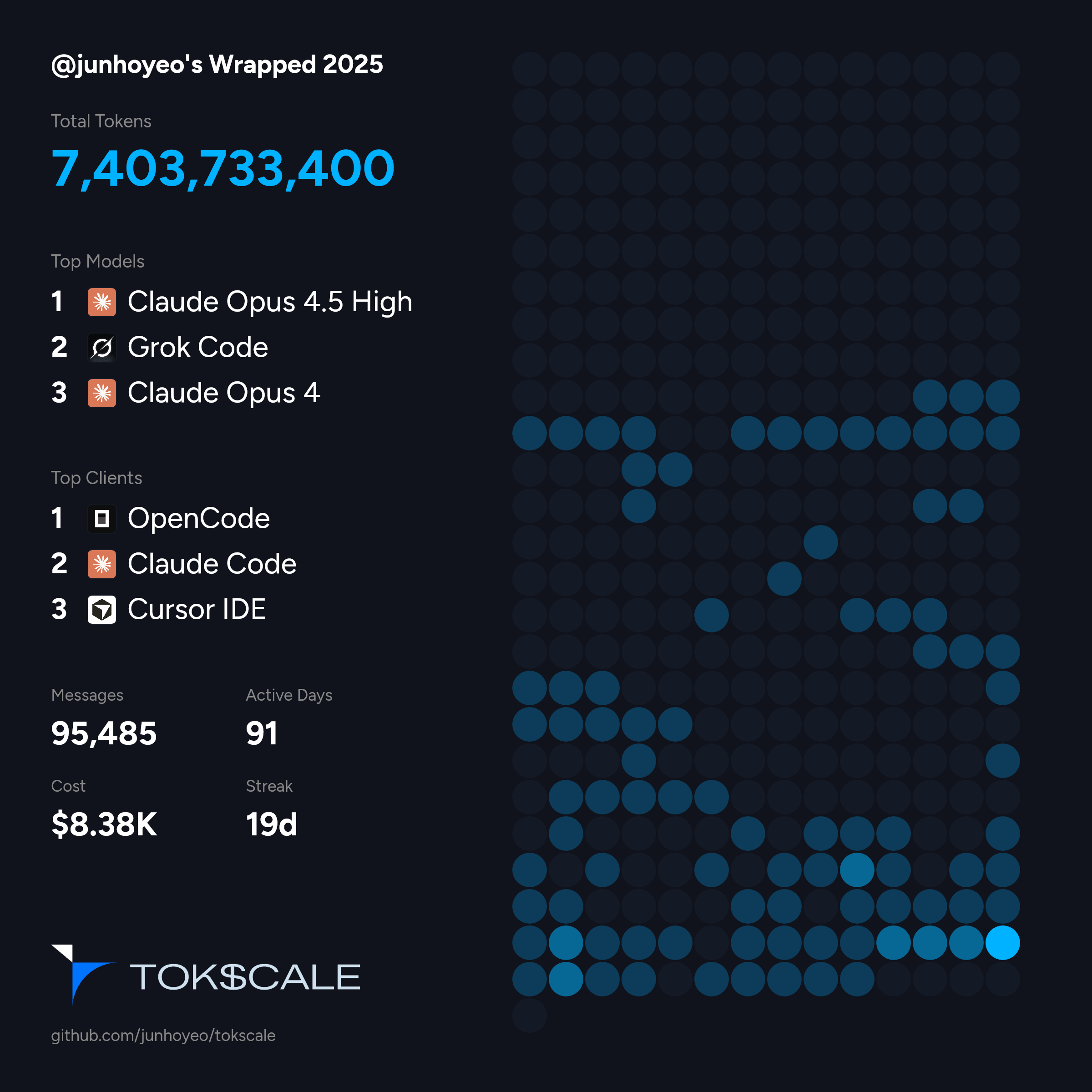 | 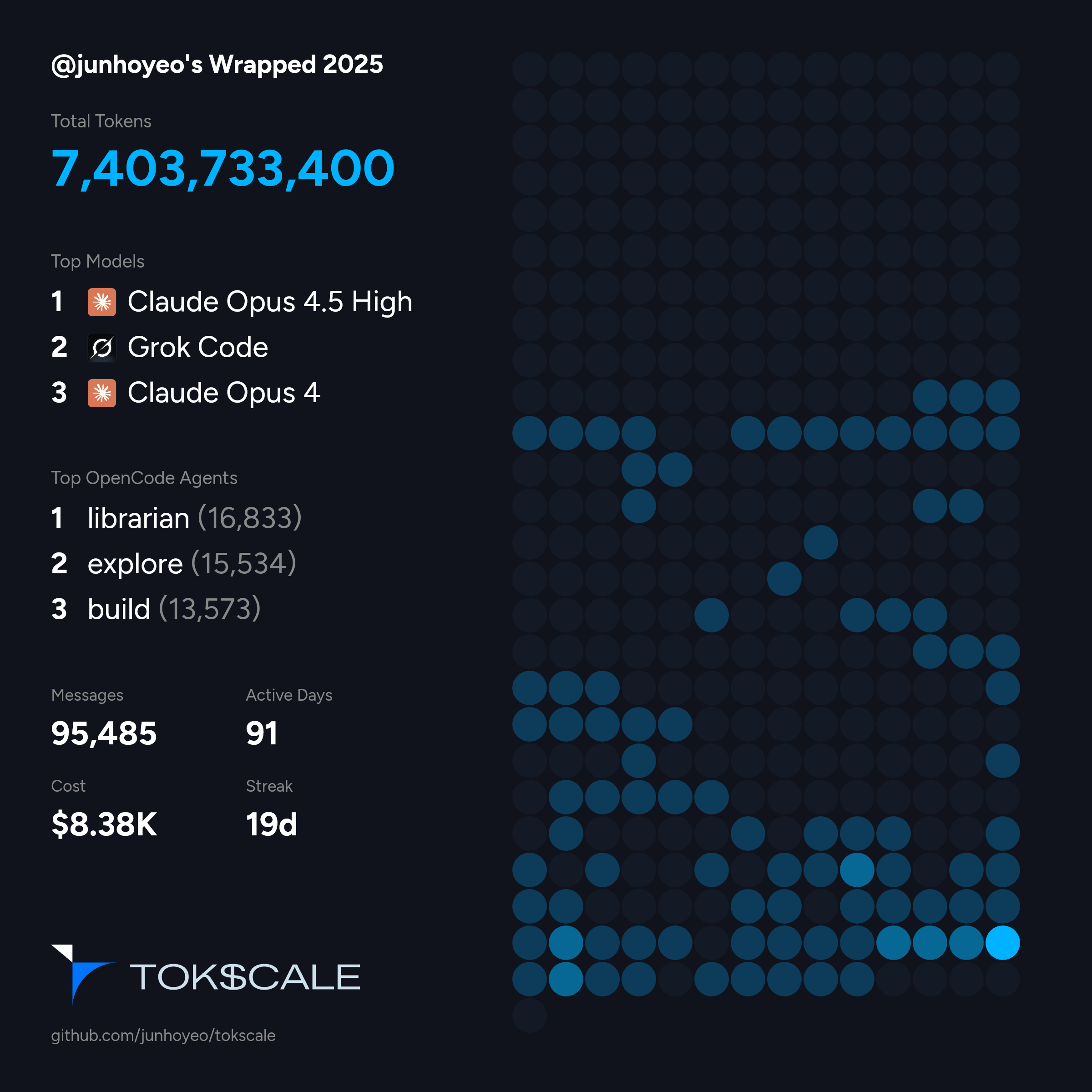 |
### Command
```bash
# Generate wrapped image for current year
tokscale wrapped
# Generate for a specific year
tokscale wrapped --year 2025
```
### What's Included
The generated image includes:
- **Total Tokens** - Your total token consumption for the year
- **Top Models** - Your 3 most-used AI models ranked by cost
- **Top Clients** - Your 3 most-used platforms (OpenCode, Claude Code, Cursor, etc.)
- **Messages** - Total number of AI interactions
- **Active Days** - Days with at least one AI interaction
- **Cost** - Estimated total cost based on LiteLLM pricing
- **Streak** - Your longest consecutive streak of active days
- **Contribution Graph** - A visual heatmap of your yearly activity
The generated PNG is optimized for sharing on social media. Share your coding journey with the community!
## Development
> **Quick setup**: If you just want to get started quickly, see [Development Setup](#development-setup) in the Installation section above.
### Prerequisites
```bash
# Bun (required for JS tooling)
bun --version
# Rust (for native CLI binary)
rustc --version
cargo --version
```
### How to Run
After following the [Development Setup](#development-setup), you can:
```bash
# Build native module (optional but recommended)
bun run build:core
# Run in development mode (launches TUI)
cd packages/cli && bun src/index.ts
# Or use legacy CLI mode
cd packages/cli && bun src/index.ts --light
```
### Configuration
Tokscale stores settings in `~/.config/tokscale/settings.json`:
```json
{
"colorPalette": "blue",
"includeUnusedModels": false,
"defaultClients": ["opencode", "claude"],
"usage": {
"disabledProviders": ["copilot"]
},
"scanner": {
"extraScanPaths": {
"codex": [
"/Users/me/workspace/project-a/.codex/sessions",
"/Users/me/workspace/project-b/.codex/archived_sessions"
],
"hermes": [
"/Users/me/.hermes/profiles/director_planning",
"/Users/me/.hermes/profiles/research/state.db"
]
}
}
}
```
| Setting | Type | Default | Description |
|---------|------|---------|-------------|
| `colorPalette` | string | `"blue"` | TUI color theme (green, halloween, teal, blue, pink, purple, orange, monochrome, ylgnbu, graphite, lagoon, dusk, tokyo-night, catppuccin, solarized, gruvbox, gruvbox-material, one-dark) |
| `includeUnusedModels` | boolean | `false` | Show models with zero tokens in reports |
| `autoRefreshEnabled` | boolean | `false` | Enable auto-refresh in TUI |
| `autoRefreshMs` | number | `60000` | Auto-refresh interval (30000-3600000ms) |
| `nativeTimeoutMs` | number | `300000` | Maximum time for native subprocess processing (5000-3600000ms) |
| `defaultClients` | string[] | `[]` | Client filter applied when no `--client/-c` flag is passed. Accepts the same ids as `--client` (e.g. `["opencode", "claude", "synthetic"]`). Unknown ids are silently dropped. CLI flags always override this list completely — no merging. |
| `usage.disabledProviders` | string[] | `[]` | Subscription-usage providers to skip before credential discovery or network access. Valid ids (case-insensitive; surrounding whitespace ignored): `claude`, `codex`, `zai`, `amp`, `antigravity`, `copilot`, `grok`, `kimi`, `minimax`, `minimax-token-plan`, `warp`, `sakana`, and `opencode-go`. Unknown ids are ignored. Disabled providers are also hidden from cached TUI cards and diagnostics. Changes apply to the next `tokscale usage` run or TUI launch/refresh. |
| `light.writeCache` | boolean | `false` | When true, `tokscale --light` overwrites the TUI cache atomically after rendering. CLI flags `--write-cache` / `--no-write-cache` override per-invocation. |
| `minutelyTabEnabled` | boolean | `false` | Show the per-minute Minutely tab in the TUI and aggregate per-minute usage during data loading. Default-off because minute-granularity is a niche/diagnostic view for most users and the per-minute bucketing has a non-trivial cost on large datasets. |
| `autosubmit` | object | disabled | Saved `tokscale autosubmit` state: interval, client/date filters, scheduler backend, last run time, and last error. Prefer `tokscale autosubmit enable/status/disable` over editing this object by hand. |
| `scanner.extraScanPaths` | object | `{}` | Additional per-client scan roots for sessions outside Tokscale's default home-root locations |
| `scanner.bucketTimezone` | string | auto-detected | IANA name of the timezone this device buckets usage days into (e.g. `"Asia/Seoul"`). Recorded automatically on first run. Prefer `tokscale config set timezone ` over editing this by hand. |
#### Day boundaries and `scanner.bucketTimezone`
Which calendar day a message counts toward depends on a timezone. Tokscale
records this device's timezone on first run and reuses it, rather than reading
the machine's current timezone on every scan.
This matters because day totals are submitted per day and never allowed to
decrease. If the same history were re-bucketed under a different timezone — you
travel, you change your system clock, you run in CI with a different `TZ` — a
session near midnight would move to the neighbouring day, and both the old and
the new day would keep their value. The total would go up without any new usage.
Pinning the zone makes the day boundary stable, so a rescan of unchanged history
always produces the same buckets.
```console
$ tokscale config list
timezone Asia/Seoul
$ tokscale config get timezone
Asia/Seoul
# `set timezone auto` is allowed only before a valid pin exists (or while
# recovering an invalid hand-edited value). It cannot repin an established
# device.
$ tokscale config set timezone auto
```
Only IANA zone names are accepted. Fixed UTC offsets such as `+09:00` are
rejected: an offset cannot follow daylight saving time, so a pinned offset stops
matching local midnight after a DST transition and re-splits usage near the day
boundary — a smaller version of the problem pinning removes.
An established valid pin cannot be changed or unset, including with `auto`.
Historical submitted day rows are monotonic, so re-keying prior usage would
permanently double count it. Relocating a device requires a server
resync/replacement transition before choosing a different bucket timezone.
Existing installs are unaffected until they pin, and the run that pins reports
exactly what it would have reported anyway: the zone recorded is the one the
machine was already using.
Use `scanner.extraScanPaths` for persistent extra roots such as project-level `.codex` directories or imported Gemini/OpenClaw histories. Tokscale automatically discovers Hermes profile databases under `$HERMES_HOME/profiles/*/state.db` (or `~/.hermes/profiles/*/state.db` when `HERMES_HOME` is unset). Use `scanner.extraScanPaths.hermes` only for non-standard Hermes profile locations; entries may point at a profile directory containing `state.db` or directly at a `state.db` file. Tokscale merges these paths with the default scan roots on every run and deduplicates overlapping roots by canonical path.
Use `defaultClients` to pin a personal default — for example, set it to `["opencode", "claude"]` if those are the only clients you use, and `tokscale` (with no flags) will scope every report to them automatically. Pass `--client` on the command line to override for a single run.
#### Enabling the Minutely tab
The Minutely tab shows a per-minute breakdown of token usage and is most useful for diagnosing burst patterns, debugging a single session, or watching activity in near-real-time alongside `autoRefreshEnabled`. It is hidden by default because the per-minute aggregation runs over every parsed message during data loading, which adds RAM and CPU cost that most users do not need.
To enable it, set `minutelyTabEnabled` to `true` in `~/.config/tokscale/settings.json`:
```json
{
"minutelyTabEnabled": true
}
```
After restart, the Minutely tab appears between Hourly and Stats in the tab strip, and Tab / BackTab / Left / Right navigation cycles through it. Set the flag back to `false` to hide the tab and skip the aggregation again.
#### Cache directory layout
The regenerable CLI/TUI/pricing/Wrapped caches now live under `~/.config/tokscale/cache/` (or `${TOKSCALE_CONFIG_DIR}/cache/` when overridden). Integration sync artifacts remain in client-specific cache roots such as `~/.config/tokscale/antigravity-cache/` and `~/.config/tokscale/trae-cache/`:
- `tui-data-cache.json` — TUI startup cache
- `source-message-cache-v2/` + `source-message-cache.lock` — sharded source-message cache + lock file
- `pricing-litellm.json` / `pricing-openrouter.json` — pricing caches
- `opencode-migration.json` — OpenCode migration record
- `fonts/` and `images/` — Wrapped asset caches
It is safe to delete this directory. Tokscale will recreate and repopulate it on demand.
One caveat, for Claude Code only. Claude Code rewrites a session transcript in place when you resume or compact it: the file keeps its name but loses assistant turns it had already written. `source-message-cache-v2/` remembers those turns for as long as the transcript file exists, so they keep counting toward your totals. That is the only place they still exist — the transcript itself no longer has them. Deleting the cache (or letting a Claude parser upgrade rebuild it) rebuilds from the compacted transcripts, so totals for heavily compacted sessions can come back lower. Deleting a transcript still drops its turns either way, which is what makes local disk the source of truth.
### Environment Variables
Environment variables override config file values. For CI/CD or one-off use:
| Variable | Default | Description |
|----------|---------|-------------|
| `TOKSCALE_NATIVE_TIMEOUT_MS` | `300000` (5 min) | Overrides `nativeTimeoutMs` config |
| `TOKSCALE_API_TOKEN` | unset | Tokscale personal API token for non-interactive `submit` and `delete-submitted-data` runs. Create one from Settings > API Tokens or save it locally with `tokscale login --token tt_xxx`. |
| `TOKSCALE_EXTRA_DIRS` | unset | One-off extra session roots as `client:/abs/path,client:/abs/path` |
| `TOKSCALE_CONFIG_DIR` | unset | Overrides the config directory root (where `settings.json`, `star-cache.json`, `cache/`, `antigravity-cache/`, and `trae-cache/` live). Absolute path recommended; relative paths resolve against the process CWD. Useful for CI sandboxes or pinning a non-default location. When set, tokscale will not fall back to the legacy macOS `~/Library/Application Support/tokscale/` path. |
| `TOKSCALE_FM_DEBUG` | unset | When set, prints Apple Foundation Models diagnostics (macOS version gate, dlopen dylib path, load/symbol errors) to stderr to explain why on-device apple-fm did or didn't engage. |
| `TOKSCALE_RECOVERY_DISABLE` | unset | When set, disables the local usage recovery ledger (`recovered-usage-v1.json`) even if the file exists. |
```bash
# Example: Increase timeout for very large datasets
TOKSCALE_NATIVE_TIMEOUT_MS=600000 tokscale graph --output data.json
# Example: one-off extra scan roots
TOKSCALE_EXTRA_DIRS='codex:/Users/me/workspace/project-a/.codex/sessions,gemini:/Users/me/imports/imac/gemini/tmp' tokscale
# Example: submit from CI without an interactive browser login
TOKSCALE_API_TOKEN=tt_xxx tokscale submit
```
> **Note**: For persistent extra roots, prefer `scanner.extraScanPaths` in `~/.config/tokscale/settings.json`. `TOKSCALE_EXTRA_DIRS` is best for one-off overrides or CI/CD.
### Headless Mode
Tokscale can aggregate token usage from **Codex CLI and MiniMax Code headless outputs** for automation, CI/CD pipelines, and batch processing.
**What is headless mode?**
When you run Codex CLI or MiniMax Code with JSON output flags, the CLI writes usage data to stdout. Headless mode captures that stream and keeps it attributable to the originating CLI. MiniMax Code is intentionally read from Tokscale's capture directory rather than its shared Desktop/Runtime session store, whose records do not identify the originating surface.
**Storage location:** `~/.config/tokscale/headless/`
On macOS, Tokscale also scans `~/Library/Application Support/tokscale/headless/` when `TOKSCALE_HEADLESS_DIR` is not set.
Tokscale automatically scans this directory structure:
```
~/.config/tokscale/headless/
├── codex/ # Codex CLI JSONL outputs
└── mcode/ # MiniMax Code stream-json outputs
```
**Environment variable:** Set `TOKSCALE_HEADLESS_DIR` to customize the headless log directory:
```bash
export TOKSCALE_HEADLESS_DIR="$HOME/my-custom-logs"
```
**Recommended (automatic capture):**
| Tool | Command Example |
|------|-----------------|
| **Codex CLI** | `tokscale headless codex exec -m gpt-5 "implement feature"` |
| **MiniMax Code** | `tokscale headless mcode exec "implement feature"` |
**Manual redirect (optional):**
| Tool | Command Example |
|------|-----------------|
| **Codex CLI** | `codex exec --json "implement feature" > ~/.config/tokscale/headless/codex/ci-run.jsonl` |
| **MiniMax Code** | `mcode exec --output-format stream-json "implement feature" > ~/.config/tokscale/headless/mcode/ci-run.jsonl` |
MiniMax Code usage is counted only when the final `exec.result` includes `model.providerId` and `model.modelId`. Partial captures and older MiniMax Code releases that omit this identity are skipped instead of being priced against a guessed model.
**Diagnostics:**
```bash
# Show scan locations and headless counts
tokscale sources
tokscale sources --json
```
**CI/CD integration example:**
```bash
# In your GitHub Actions workflow
- name: Run AI automation
run: |
mkdir -p ~/.config/tokscale/headless/codex
codex exec --json "review code changes" \
> ~/.config/tokscale/headless/codex/pr-${{ github.event.pull_request.number }}.jsonl
# Later, track usage
- name: Report token usage
run: tokscale --json
```
> **Note**: Headless capture is supported for Codex CLI and MiniMax Code. If you run either CLI directly, redirect stdout to its matching headless directory as shown above.
## Frontend Visualization
The frontend provides a GitHub-style contribution graph visualization:
### Features
- **2D View**: Classic GitHub contribution calendar
- **3D View**: Isometric 3D contribution graph with height based on token usage
- **Multiple color palettes**: GitHub, GitLab, Halloween, Winter, and more
- **3-way theme toggle**: Light / Dark / System (follows OS preference)
- **GitHub Primer design**: Uses GitHub's official color system
- **Interactive tooltips**: Hover for detailed daily breakdowns
- **Day breakdown panel**: Click to see per-source and per-model details
- **Year filtering**: Navigate between years
- **Source filtering**: Filter by platform (OpenCode, Claude, Codex, MiniMax Code, Copilot, Cursor, Gemini, Amp, Codebuff, Droid, OpenClaw, Hermes Agent, Pi, Prime Agent, Kimi, Qwen, Roo Code, Kilo, Mux, Kilo CLI, Crush, Goose, Antigravity, Antigravity CLI, Antigravity IDE Extension, Zed, Kiro, Trae, Warp, Cline, Gajae-Code, Grok Build, Jcode, MiMo Code, Xiaomi MiMo AI, Command Code, Junie, ZCode, OpenCodeReview, CodeBuddy, WorkBuddy, Devin CLI, Devin Desktop, Augment Code, Synthetic, Cherry Studio, LM Studio, Unsloth, Hindsight, Muse Code)
- **Stats panel**: Total cost, tokens, active days, streaks
- **FOUC prevention**: Theme applied before React hydrates (no flash)
### Running the Frontend
```bash
cd packages/frontend
bun install
bun run dev
```
Open [http://localhost:3000](http://localhost:3000) to access the social platform.
## Social Platform
Tokscale includes a social platform where you can share your usage data and compete with other developers.
### Features
- **Leaderboard** - See who's using the most tokens across all platforms
- **User Profiles** - Public profiles with contribution graphs and statistics
- **Period Filtering** - View stats for all time, this month, or this week
- **GitHub Integration** - Login with your GitHub account
- **Local Viewer** - View your data privately without submitting
### GitHub Profile Embed Widget
You can embed your public Tokscale stats directly in your GitHub profile README:
```md
[](https://tokscale.ai/u/)
```
Replace `` with your GitHub username. With no query parameters this
renders the default `classic` card; append any of the parameters below to
customize the design.
| Parameter | Values | Effect |
| --- | --- | --- |
| `template` | `classic` (default) · `minimal` · `terminal` · `graph` · `orbit` · `vitals` · `blueprint` · `receipt` | Card design |
| `color` | `blue` · `green` · `teal` · `purple` · `pink` · `orange` · `monochrome` · `halloween` · `YlGnBu` | Accent color and contribution-graph palette |
| `theme` | `dark` (default) · `light` | Light or dark card |
| `period` | `all` (default) · `month` (trailing 30 days) · `week` (trailing 7 days) | Token, cost, contribution, and rank window; submission count stays lifetime |
| `sort` | `tokens` (default) · `cost` | Which leaderboard the rank is taken from |
| `tokens`, `cost` | `compact` · `full` | Number format, set independently — `20.9B` vs `20,941,000,000` |
| `rank` | `plain` (default, `#134`) · `percent` (`top 12%`) · `total` (`#134 / 1,174`) | How the leaderboard rank is shown |
| `graph` | `1` to append the contribution graph (off by default) | Supported by `classic`, `minimal`, `terminal`, `orbit`, `blueprint`, `receipt` |
| `view` | `2d` (default) · `3d` | Switch between the selected 2D card and the isometric contribution view |
| `compact` | `1` | Uses the compact Classic layout or compact number formatting in the 3D view |
Examples:
```md


```
### GitHub Profile Badge
You can also use a shields.io-style badge for a more compact display:
```md

```
- Replace `` with your GitHub username
- Optional query params:
- `metric=tokens` (default), `metric=cost`, or `metric=rank`
- `style=flat` (default) or `style=flat-square`
- `sort=tokens` (default) or `sort=cost` to control ranking basis
- `compact=1` to use compact number notation (e.g., `1.2M`, `$3.4K`)
- `label=` to override the left-side label
- `color=` to override the right-side color (e.g., `color=ff5733`)
- Examples:
- `https://tokscale.ai/api/badge//svg?metric=cost&compact=1`
- `https://tokscale.ai/api/badge//svg?metric=rank&sort=cost&style=flat-square`
### Getting Started
1. **Login** - Run `tokscale login` to authenticate via GitHub, or create an API token in Settings for CI/headless use
2. **Submit** - Run `tokscale submit` to upload your usage data
3. **View** - Visit the web platform to see your profile and the leaderboard
### Data Validation
Submitted data goes through Level 1 validation:
- Mathematical consistency (totals match, no negatives)
- No future dates
- Required fields present
- Duplicate detection
## Wrapped 2025

Generate a beautiful year-in-review image summarizing your AI coding assistant usage—inspired by Spotify Wrapped.
| `bunx tokscale@latest wrapped` | `bunx tokscale@latest wrapped --clients` | `bunx tokscale@latest wrapped --agents --disable-pinned` |
|:---:|:---:|:---:|
|  |  |  |
### Command
```bash
# Generate wrapped image for current year
tokscale wrapped
# Generate for a specific year
tokscale wrapped --year 2025
```
### What's Included
The generated image includes:
- **Total Tokens** - Your total token consumption for the year
- **Top Models** - Your 3 most-used AI models ranked by cost
- **Top Clients** - Your 3 most-used platforms (OpenCode, Claude Code, Cursor, etc.)
- **Messages** - Total number of AI interactions
- **Active Days** - Days with at least one AI interaction
- **Cost** - Estimated total cost based on LiteLLM pricing
- **Streak** - Your longest consecutive streak of active days
- **Contribution Graph** - A visual heatmap of your yearly activity
The generated PNG is optimized for sharing on social media. Share your coding journey with the community!
## Development
> **Quick setup**: If you just want to get started quickly, see [Development Setup](#development-setup) in the Installation section above.
### Prerequisites
```bash
# Bun (required for JS tooling)
bun --version
# Rust (for native CLI binary)
rustc --version
cargo --version
```
### How to Run
After following the [Development Setup](#development-setup), you can:
```bash
# Build native module (optional but recommended)
bun run build:core
# Run in development mode (launches TUI)
cd packages/cli && bun src/index.ts
# Or use legacy CLI mode
cd packages/cli && bun src/index.ts --light
```
Run with self-hosting
### Container Setup
The repo ships a `Makefile` and Docker/Podman Compose stack for a **single-host deployment**. No local Rust or Bun install is required. The stack auto-detects `podman` over `docker`.
**First run** — image builds do not connect to a database. Migrations run when the app container starts, after Compose marks Postgres healthy:
```bash
make docker/build # build and tag the frontend image (tokscale:latest)
make up # start Postgres and the frontend on http://localhost:3333
```
`make up` uses the pre-built `tokscale:latest` image — it does not trigger a compose rebuild.
**Subsequent runs** — the image is already built; just start the services:
```bash
make up
```
**TUI** — runs independently of the web stack, reading session data directly from host filesystem mounts:
```bash
make tui/build # build once
make tui # launch
```
`make tui` runs the container with your current host UID and GID, creates only `~/.config/tokscale` and `~/.cache/tokscale` if needed, and mounts those two directories read-write. Session-data mounts stay read-only, so the container cannot create root-owned files in your client directories. If you call Compose directly instead of `make tui`, set `TOKSCALE_UID=$(id -u)` and `TOKSCALE_GID=$(id -g)` and create those two writable directories yourself.
The default TUI profile deliberately does **not** bind client-data directories: rootful Docker creates a missing bind source as root even for read-only mounts. Opt in only to paths that already exist on your machine, for example:
```bash
TOKSCALE_UID=$(id -u) TOKSCALE_GID=$(id -g) \
docker compose --profile tui run --rm \
-v "$HOME/.claude:/home/tokscale/.claude:ro" tui
```
Add equivalent `-v` flags for the clients you use. This keeps the default command from creating arbitrary host client directories.
**Other common targets:**
```bash
make down # stop all services
make logs/app # tail app logs
make help # full target list
```
**Custom credentials** — set all four variables together before running `make up`. Compose cannot derive `DATABASE_URL` from the `POSTGRES_*` variables automatically. The hostname `db` is valid only for the app container on the Compose network; do not use it from your host shell or as a Docker build argument:
```bash
export POSTGRES_USER=myuser
export POSTGRES_PASSWORD=mypass
export POSTGRES_DB=mydb
export DATABASE_URL=postgresql://myuser:mypass@db:5432/mydb
```
The defaults (`tokscale`/`tokscale`/`tokscale`) are for local dev only.
**Public deployments** — this Compose file binds both ports to loopback and is intended to sit behind a reverse proxy that terminates TLS. Set `APP_URL` to the public HTTPS origin before `make up` (for example, `https://tokscale.example.com`) and configure that URL in the proxy; it drives OAuth redirects, CSRF defaults, canonical metadata, sitemap, and robots at runtime. Keep `DATABASE_SSL=false` only for the bundled local Postgres service. For a managed database, put `DATABASE_URL`, `DATABASE_SSL=require`, `APP_URL`, and optional GitHub OAuth credentials in a protected `.env`/secret store, then run `docker compose -f docker-compose.external-db.yml up -d`. That file has no `db` service or local-database dependency. The sample defaults intentionally do not enable OAuth.
Because one reusable image must emit the runtime `APP_URL` in page metadata and social cards, the root layout is request-dynamic. This intentionally trades full-route static/ISR output for correct per-deployment public origins; data fetches still use their existing cache tags and revalidation policies.
Advanced Development
### Project Scripts
| Script | Description |
|--------|-------------|
| `bun run cli` | Run CLI in development mode (TUI with Bun) |
| `bun run build:core` | Build native Rust module (release) |
| `bun run build:cli` | Build CLI TypeScript to dist/ |
| `bun run build` | Build both core and CLI |
| `bun run dev:frontend` | Run frontend development server |
**Package-specific scripts** (from within package directories):
- `packages/cli`: `bun run dev`, `bun run tui`
- `packages/core`: `bun run build:debug`, `bun run test`, `bun run bench`
**Note**: This project uses **Bun** as the package manager for development.
### Testing
```bash
# Test native module (Rust)
cd packages/core
bun run test:rust # Cargo tests
bun run test # Node.js integration tests
bun run test:all # Both
```
### Native Module Development
```bash
cd packages/core
# Build in debug mode (faster compilation)
bun run build:debug
# Build in release mode (optimized)
bun run build
# Run Rust benchmarks
bun run bench
```
### Graph Command Options
```bash
# Export graph data to file
tokscale graph --output usage-data.json
# Date filtering (all shortcuts work)
tokscale graph --today
tokscale graph --week
tokscale graph --since 2024-01-01 --until 2024-12-31
tokscale graph --year 2024
# Filter by platform
tokscale graph --client opencode,claude
# Show processing time benchmark
tokscale graph --output data.json --benchmark
```
### Benchmark Flag
Show processing time for performance analysis:
```bash
tokscale --benchmark # Show processing time with default view
tokscale models --benchmark # Benchmark models report
tokscale monthly --benchmark # Benchmark monthly report
tokscale graph --benchmark # Benchmark graph generation
```
### Generating Data for Frontend
```bash
# Export data for visualization
tokscale graph --output packages/frontend/public/my-data.json
```
### Performance
The native Rust module provides significant performance improvements:
| Operation | TypeScript | Rust Native | Speedup |
|-----------|------------|-------------|---------|
| File Discovery | ~500ms | ~50ms | **10x** |
| JSON Parsing | ~800ms | ~100ms | **8x** |
| Aggregation | ~200ms | ~25ms | **8x** |
| **Total** | **~1.5s** | **~175ms** | **~8.5x** |
*Benchmarks for ~1000 session files, 100k messages*
#### Memory Optimization
The native module also provides ~45% memory reduction through:
- Streaming JSON parsing (no full file buffering)
- Zero-copy string handling
- Efficient parallel aggregation with map-reduce
#### Running Benchmarks
```bash
# Generate synthetic data
cd packages/benchmarks && bun run generate
# Run Rust benchmarks
cd packages/core && bun run bench
```
## Supported Platforms
### Native Module Targets
| Platform | Architecture |
|----------|--------------|
| macOS | x86_64 |
| macOS | aarch64 (Apple Silicon) |
| Linux | x86_64 (glibc) |
| Linux | aarch64 (glibc) |
| Linux | x86_64 (musl) |
| Linux | aarch64 (musl) |
| Windows | x86_64 |
| Windows | aarch64 |
On Linux, the launcher detects glibc vs musl automatically (via `process.report`, the musl dynamic loader at `/lib/ld-musl-*.so.1`, and `ldd`). If detection ever picks the wrong flavor — e.g. in minimal containers — set `TOKSCALE_LIBC=musl` (or `TOKSCALE_LIBC=gnu`) to force it.
### Windows Support
Tokscale fully supports Windows. The TUI and CLI work the same as on macOS/Linux.
**Installation on Windows:**
```powershell
# Install Bun (PowerShell)
powershell -c "irm bun.sh/install.ps1 | iex"
# Run tokscale
bunx tokscale@latest
```
#### Data Locations on Windows
AI coding tools store their session data in cross-platform locations. Most tools use the same relative paths on all platforms:
| Tool | Unix Path | Windows Path | Source |
|------|-----------|--------------|--------|
| OpenCode | `~/.local/share/opencode/` | `%USERPROFILE%\.local\share\opencode\` | Uses [`xdg-basedir`](https://github.com/sindresorhus/xdg-basedir) for cross-platform consistency ([source](https://github.com/sst/opencode/blob/main/packages/opencode/src/global/index.ts)) |
| Claude Code | `~/.claude/` | `%USERPROFILE%\.claude\` | Same path on all platforms |
| OpenClaw | `~/.openclaw/` (+ legacy: `.clawdbot`, `.moltbot`, `.moldbot`) | `%USERPROFILE%\.openclaw\` (+ legacy paths) | Same path on all platforms |
| Codex CLI | `~/.codex/` | `%USERPROFILE%\.codex\` | Configurable via `CODEX_HOME` env var ([source](https://github.com/openai/codex)) |
| Prime Agent | `~/.prime/agent/` | `%USERPROFILE%\.prime\agent\` | Root sessions plus RLM child sessions; configurable via `sessionDir` in `settings.json`, `PRIME_AGENT_CODING_AGENT_DIR`, `PRIME_AGENT_SESSION_DIR`, or legacy `PRIME_AGENT_CODING_AGENT_SESSION_DIR` |
| Copilot CLI | `~/.copilot/session-store.db`, `~/.copilot/otel/`, `~/.copilot/data.db` | `%USERPROFILE%\.copilot\session-store.db`, `%USERPROFILE%\.copilot\otel\`, `%USERPROFILE%\.copilot\data.db` | CLI usage events from `session-store.db` (no OTEL required); also auto-ingests `COPILOT_OTEL_FILE_EXPORTER_PATH` and Desktop `data.db` |
| Hermes Agent | `~/.hermes/` | `%USERPROFILE%\.hermes\` | Configurable via `HERMES_HOME` env var ([source](https://github.com/NousResearch/hermes-agent/blob/main/website/docs/developer-guide/session-storage.md)) |
| Gemini CLI | `~/.gemini/` | `%USERPROFILE%\.gemini\` | Configurable via `GEMINI_CLI_HOME` env var |
| Amp | `~/.local/share/amp/` | `%USERPROFILE%\.local\share\amp\` | Uses `xdg-basedir` like OpenCode |
| Cursor | API sync | API sync | Data fetched from Cursor API and cached as `usage*.csv`; desktop auto-login reads auth only from `state.vscdb`; local `~/.cursor` session data is not parsed |
| Droid | `~/.factory/` | `%USERPROFILE%\.factory\` | Same path on all platforms |
| Pi | `~/.pi/` | `%USERPROFILE%\.pi\` | Same path on all platforms |
| Oh My Pi | `~/.omp/` | `%USERPROFILE%\.omp\` | Same path on all platforms ([Oh My Pi](https://github.com/can1357/oh-my-pi)) |
| Kimchi Coding | `~/.config/kimchi/harness/sessions/` | `%USERPROFILE%\.config\kimchi\harness\sessions\` | Configurable via `KIMCHI_CODING_AGENT_DIR` env var; Pi-compatible JSONL sessions |
| Kimi CLI | `~/.kimi/` | `%USERPROFILE%\.kimi\` | Same path on all platforms |
| Kimi Code | `~/.kimi-code/` | `%USERPROFILE%\.kimi-code\` | Same path on all platforms |
| Kimi Work (desktop) | `~/Library/Application Support/kimi-desktop/` | `%APPDATA%\kimi-desktop\` | No Linux build |
| Qwen CLI | `~/.qwen/` | `%USERPROFILE%\.qwen\` | Same path on all platforms |
| Roo Code | `~/.config/Code/User/globalStorage/rooveterinaryinc.roo-cline/tasks/` | `%USERPROFILE%\.config\Code\User\globalStorage\rooveterinaryinc.roo-cline\tasks\` | VS Code globalStorage task logs |
| Kilo | `~/.config/Code/User/globalStorage/kilocode.kilo-code/tasks/` | `%USERPROFILE%\.config\Code\User\globalStorage\kilocode.kilo-code\tasks\` | VS Code globalStorage task logs |
| Cline | Linux: `~/.config/Code/User/globalStorage/saoudrizwan.claude-dev/tasks/`; macOS: `~/Library/Application Support/Code/User/globalStorage/saoudrizwan.claude-dev/tasks/`; server: `~/.vscode-server/data/User/globalStorage/saoudrizwan.claude-dev/tasks/`; Cline CLI fallback: `~/.cline/data/sessions/` | `%APPDATA%\Code\User\globalStorage\saoudrizwan.claude-dev\tasks\`; Cline CLI fallback: `%USERPROFILE%\.cline\data\sessions\` | VS Code globalStorage task logs; Cline CLI selects the first available root in order `$CLINE_SESSION_DATA_DIR` → `$CLINE_DATA_DIR/sessions/` → `$CLINE_DIR/data/sessions/` → `~/.cline/data/sessions/`; blank/whitespace-only environment values are ignored |
| Mux | `~/.mux/sessions/` | `%USERPROFILE%\.mux\sessions\` | Same path on all platforms |
| Codebuff | `~/.config/manicode/projects/` (+ `manicode-dev`, `manicode-staging`) | `%USERPROFILE%\.config\manicode\projects\` | Override via `CODEBUFF_DATA_DIR` env var |
| Kilo CLI | `~/.local/share/kilo/` | `%USERPROFILE%\.local\share\kilo\` | Uses `xdg-basedir` like OpenCode |
| Crush | `$XDG_DATA_HOME/crush/` (fallback: `~/.local/share/crush/`) | `%USERPROFILE%\.local\share\crush\` (or `%XDG_DATA_HOME%\crush\` if set) | Uses XDG data directory with fallback |
| Goose | `~/.local/share/goose/sessions/` (+ macOS Application Support, legacy Block paths) | `%USERPROFILE%\.local\share\goose\sessions\` | Configurable via `GOOSE_PATH_ROOT` env var |
| Antigravity | `~/.config/tokscale/antigravity-cache/sessions/` | — | `tokscale antigravity sync` is currently supported on macOS/Linux only |
| Antigravity CLI | `~/.gemini/antigravity-cli/conversations/` | `%USERPROFILE%\.gemini\antigravity-cli\conversations\` | Configurable via `GEMINI_CLI_HOME` env var |
| Antigravity IDE Extension | `~/.gemini/antigravity/conversations/` | `%USERPROFILE%\.gemini\antigravity\conversations\` | Same path on all platforms |
| Zed Agent | `~/.local/share/zed/threads/threads.db` | `%LOCALAPPDATA%\Zed\threads\threads.db` | Hosted Zed model usage only; external ACP agents are not included |
| Kiro | `~/.kiro/sessions/cli/` and `~/.local/share/kiro-cli/data.sqlite3` | `%USERPROFILE%\.kiro\sessions\cli\` and `%USERPROFILE%\.local\share\kiro-cli\data.sqlite3` | Parses Kiro session files plus the Kiro CLI SQLite database when present |
| Trae | `~/.config/tokscale/trae-cache/sessions/` | `%APPDATA%\tokscale\trae-cache\sessions\` | Synced once via `tokscale trae sync`; credentials are auto-discovered from any installed Trae IDE or Trae Solo desktop app |
| Warp/Oz | `~/.config/tokscale/warp-cache/usage.json` | `%APPDATA%\tokscale\warp-cache\usage.json` | Synced via `tokscale warp sync`; aggregate requests and spend only, no token transcripts |
| Grok Build | `~/.grok/sessions/` | `%USERPROFILE%\.grok\sessions\` | Configurable via `GROK_HOME` env var; parses `updates.jsonl` session updates |
| Jcode | `~/.jcode/sessions/` | `%USERPROFILE%\.jcode\sessions\` | Configurable via `JCODE_HOME` env var; parses `session_*.json` snapshots plus `session_*.journal.jsonl` sidecars |
| MiMo Code | `~/.local/share/mimocode/` | `%USERPROFILE%\.local\share\mimocode\` | Uses XDG data directory; SQLite database `mimocode.db` |
| Xiaomi MiMo AI | `~/.local/share/mimocode/` | `%USERPROFILE%\.local\share\mimocode\` | Shared engine store with MiMo Code; desktop sessions stamped `micode-desktop` when `session.version` starts with `desktop-` |
| Gajae-Code | `~/.gjc/agent/sessions/` | `%USERPROFILE%\.gjc\agent\sessions\` | Configurable via `GJC_CODING_AGENT_DIR` (also `GJC_CONFIG_DIR`/`PI_CONFIG_DIR`; `$XDG_DATA_HOME/gjc/sessions/` flattens on Linux/macOS) |
| Junie | `~/.junie/sessions/` | `%USERPROFILE%\.junie\sessions\` | Same home-relative path on all platforms; parses `events.jsonl` usage events |
| ZCode | `~/.zcode/cli/db/db.sqlite` and `~/.zcode/projects/` | `%USERPROFILE%\.zcode\cli\db\db.sqlite` and `%USERPROFILE%\.zcode\projects\` | Parses v2 SQLite model usage plus legacy `*.jsonl` session transcripts; Z.ai's ADE for GLM models |
| OpenCodeReview | `~/.opencodereview/sessions/` | `%USERPROFILE%\.opencodereview\sessions\` | Parses `*.jsonl` session transcripts; Alibaba's AI code review tool |
| CodeBuddy | `~/.codebuddy/projects/` + extension logs | `%USERPROFILE%\.codebuddy\projects\` + CodeBuddy / VS Code extension logs | Parses CodeBuddy CLI, IDE, and VS Code plugin token usage |
| WorkBuddy | `~/.workbuddy/projects/` + `~/.workbuddy/workbuddy.db` (5.5+ under `~/.workbuddy-ai/`) | `%USERPROFILE%\.workbuddy\projects\` + `%USERPROFILE%\.workbuddy\workbuddy.db` (5.5+ under `%USERPROFILE%\.workbuddy-ai\`) | Parses WorkBuddy token usage, with the aggregate SQLite database as a fallback |
| Devin CLI | `~/.local/share/devin/cli/sessions.db` | `%USERPROFILE%\.local\share\devin\cli\sessions.db` | Reads the authoritative local SQLite usage database |
| Devin Desktop | Linux: `~/.config/Devin/User/acp-events/`; macOS: `~/Library/Application Support/Devin/User/acp-events/` | `%APPDATA%\Devin\User\acp-events\` | Parses ACP usage events; the CLI database resolves matching session titles when present |
| Augment Code | `~/.augment/sessions/` | `%USERPROFILE%\.augment\sessions\` | Parses Auggie CLI session JSON snapshots (`*.json`); join key is top-level `sessionId` |
| Synthetic | Re-attributed from other sources | Re-attributed from other sources | Detects `hf:` model prefix + `synthetic` provider |
| Cherry Studio | V2: `$XDG_CONFIG_HOME/CherryStudio/Data/Agents/.claude/projects/` (default `~/.config/CherryStudio/Data/Agents/.claude/projects/`; macOS: `~/Library/Application Support/CherryStudio/Data/Agents/.claude/projects/`); V1: `$XDG_CONFIG_HOME/CherryStudio/.claude/projects/` (default `~/.config/CherryStudio/.claude/projects/`; macOS: `~/Library/Application Support/CherryStudio/.claude/projects/`); chat ledger: `$XDG_CONFIG_HOME/CherryStudio/Data/cherrystudio.sqlite` (default `~/.config/CherryStudio/Data/cherrystudio.sqlite`; macOS: `~/Library/Application Support/CherryStudio/Data/cherrystudio.sqlite`) | V2: `%APPDATA%\CherryStudio\Data\Agents\.claude\projects\`; V1: `%APPDATA%\CherryStudio\.claude\projects\`; chat ledger: `%APPDATA%\CherryStudio\Data\cherrystudio.sqlite` | Agent / Claude Code mode transcripts; V2 wins for same-name sessions and V1 keeps untransferred history. The chat ledger supplies the chat and assistant invocations recorded in `ai_usage_record`; its Agent-mode rows stay with the transcripts so the two ledgers never double count |
| Unsloth Studio | `$UNSLOTH_STUDIO_HOME/studio.db` (fallback: `~/.unsloth/studio/studio.db`) | `%UNSLOTH_STUDIO_HOME%\studio.db` (fallback: `%USERPROFILE%\.unsloth\studio\studio.db`) | Reads exact inference counters from internal assistant metadata and the content-free authenticated API usage table; never selects prompts or responses; excludes training metrics |
| Hindsight | `$HINDSIGHT_HOME/usage/` (fallback: `~/.hindsight/usage/`) | `%HINDSIGHT_HOME%\usage\` (fallback: `%USERPROFILE%\.hindsight\usage\`) | API sync via `tokscale hindsight sync`; Hindsight writes no local session logs of its own, so data is synced from the LLM trace API into an append-only JSONL cache |
| Muse Code | `~/.local/share/muse/sessions/` | `%USERPROFILE%\.local\share\muse\sessions\` | Same XDG-style path on all platforms; parses `session.jsonl` `model_completed` usage events plus `subagent/` transcripts |
| MiniMax Code | `~/.config/tokscale/headless/mcode/` | `%APPDATA%\tokscale\headless\mcode\` | Headless capture only; Tokscale reads its own capture directory rather than MiniMax Code's shared Desktop/Runtime store, which does not identify the originating surface. Override the root with `TOKSCALE_HEADLESS_DIR` |
> **Devin Desktop agent support**: Local usage parsing works for ACP-connected agents (e.g. Cascade/Windsurf, claude-code, opencode) that emit `usage_update` events in the NDJSON stream. The default **devin-cloud** agent does not emit local `usage_update` events — its usage stays server-side and cannot be tracked by tokscale without an account-level API.
> **Note**: On Windows, `~` expands to `%USERPROFILE%` (e.g., `C:\Users\YourName`). These tools intentionally use Unix-style paths (like `.local/share`) even on Windows for cross-platform consistency, rather than Windows-native paths like `%APPDATA%`.
#### Windows-Specific Configuration
Tokscale stores its configuration in:
- **TUI settings**: `%APPDATA%\tokscale\settings.json` (platform default; override with `TOKSCALE_CONFIG_DIR`)
- **Cache**: `%APPDATA%\tokscale\cache\` (consolidated cache root)
- **Legacy cache paths**: `%USERPROFILE%\.cache\tokscale\` and `%LOCALAPPDATA%\tokscale\cache\` equivalents from older releases may still exist until regenerated data is written to the new path
- **Cursor credentials**: `%USERPROFILE%\.config\tokscale\cursor-credentials.json`
- **Trae credentials and synced usage**: `%APPDATA%\tokscale\trae-cache\`
- **Tokscale account credentials**: `%USERPROFILE%\.config\tokscale\credentials.json`
## Session Data Retention
By default, some AI coding assistants automatically delete old session files. To preserve your usage history for accurate tracking, disable or extend the cleanup period.
| Platform | Default | Config File | Setting to Disable | Source |
|----------|---------|-------------|-------------------|--------|
| Claude Code | **⚠️ 30 days** | `~/.claude/settings.json` | `"cleanupPeriodDays": 9999999999` | [Docs](https://docs.anthropic.com/en/docs/claude-code/settings) |
| Gemini CLI | Disabled | `$GEMINI_CLI_HOME/settings.json` (fallback: `~/.gemini/settings.json`) | `"general.sessionRetention.enabled": false` | [Docs](https://github.com/google-gemini/gemini-cli/blob/main/docs/cli/session-management.md) |
| Codex CLI | Disabled | N/A | No cleanup feature | [#6015](https://github.com/openai/codex/issues/6015) |
| OpenCode | Disabled | N/A | No cleanup feature | [#4980](https://github.com/sst/opencode/issues/4980) |
### Claude Code
**Default**: 30 days cleanup period
Add to `~/.claude/settings.json`:
```json
{
"cleanupPeriodDays": 9999999999
}
```
> Setting an extremely large value (e.g., `9999999999` days ≈ 27 million years) effectively disables cleanup.
### Gemini CLI
**Default**: Cleanup disabled (sessions persist forever)
If you've enabled cleanup and want to disable it, remove or set `enabled: false` in `$GEMINI_CLI_HOME/settings.json` (fallback: `~/.gemini/settings.json`):
```json
{
"general": {
"sessionRetention": {
"enabled": false
}
}
}
```
Or set an extremely long retention period:
```json
{
"general": {
"sessionRetention": {
"enabled": true,
"maxAge": "9999999d"
}
}
}
```
### Codex CLI
**Default**: No automatic cleanup (sessions persist forever)
Codex CLI does not have built-in session cleanup. Sessions in `~/.codex/sessions/` persist indefinitely.
> **Note**: There's an open feature request for this: [#6015](https://github.com/openai/codex/issues/6015)
### OpenCode
**Default**: No automatic cleanup (sessions persist forever)
OpenCode does not have built-in session cleanup. Sessions in `~/.local/share/opencode/storage/` persist indefinitely.
> **Note**: See [#4980](https://github.com/sst/opencode/issues/4980)
---
## Data Sources
### OpenCode
Location: `~/.local/share/opencode/opencode.db` (v1.2+) or `storage/message/{sessionId}/*.json` (legacy)
OpenCode 1.2+ stores sessions in SQLite. Tokscale reads from SQLite first and falls back to legacy JSON files for older versions.
OpenCode picks the db filename from the release channel the binary was built against: the `latest` and `beta` channels use `opencode.db`, while other channels use `opencode-.db` (e.g. `opencode-stable.db`, `opencode-nightly.db`). Tokscale scans all of them, so users running multiple channels side by side get a unified view.
If you launched opencode with `OPENCODE_DB` pointing at a file outside `~/.local/share/opencode`, add the absolute path to `~/.config/tokscale/settings.json` so tokscale can find it on every run:
```json
{
"scanner": {
"opencodeDbPaths": [
"/custom/location/opencode.db",
"/another/location/opencode-stable.db"
]
}
}
```
Paths are merged with auto-discovery, deduped by canonical path, and non-existent entries are silently skipped (so stale config never breaks a scan). `opencode.db-wal`, `opencode.db-shm`, and other SQLite sidecars are rejected.
If you keep sessions outside Tokscale's default home-root locations, you can also persist extra scan roots per client:
```json
{
"scanner": {
"extraScanPaths": {
"codex": [
"/Users/me/workspace/project-a/.codex/sessions",
"/Users/me/workspace/project-b/.codex/archived_sessions"
],
"gemini": ["/Users/me/imports/imac/gemini/tmp"],
"hermes": [
"/Users/me/.hermes/profiles/director_planning",
"/Users/me/.hermes/profiles/research/state.db"
],
"openclaw": ["/Users/me/imports/imac/openclaw/agents"]
}
}
}
```
This is useful for project-level `.codex` directories, imported histories, and Hermes profile databases outside the default `$HERMES_HOME/state.db` or `~/.hermes/state.db` location. Tokscale still scans its default roots, then merges `scanner.extraScanPaths` and `TOKSCALE_EXTRA_DIRS` on top with canonical-path deduplication. It does not auto-discover your whole workspace.
Each message contains:
```json
{
"id": "msg_xxx",
"role": "assistant",
"modelID": "claude-sonnet-4-20250514",
"providerID": "anthropic",
"tokens": {
"input": 1234,
"output": 567,
"reasoning": 0,
"cache": { "read": 890, "write": 123 }
},
"time": { "created": 1699999999999 }
}
```
### Claude Code
Location: `~/.claude/projects/{projectPath}/*.jsonl` and `~/.claude/transcripts/*.jsonl`
JSONL format with assistant messages containing usage data:
```json
{"type": "assistant", "message": {"model": "claude-sonnet-4-20250514", "usage": {"input_tokens": 1234, "output_tokens": 567, "cache_read_input_tokens": 890}}, "timestamp": "2024-01-01T00:00:00Z"}
```
Wrapper transcript files under `~/.claude/transcripts/` are counted only when they contain real Claude usage metadata. Files with user/tool events but no `usage` block are skipped rather than estimated.
Tokscale's `claude` client is Claude Code token accounting, not Claude Desktop chat accounting. Claude Desktop stores app data under locations such as `~/Library/Application Support/Claude`, but Anthropic does not document a stable local per-message token ledger for consumer desktop chat or chat-history exports. Run `tokscale clients` to see a diagnostic when Claude Desktop data is present but only Claude Code JSONL roots are scannable. `tokscale usage` can show best-effort Claude subscription quota bars from Claude Code credentials, while organization/API usage belongs to Anthropic's Admin Usage and Cost APIs and is intentionally separate from local transcript scanning.
### Codex CLI
Location: `~/.codex/sessions/*.jsonl`
Event-based format with `token_count` events:
```json
{"type": "event_msg", "payload": {"type": "token_count", "info": {"last_token_usage": {"input_tokens": 1234, "output_tokens": 567}}}}
```
### Copilot CLI
Location: `~/.copilot/session-store.db` (CLI usage events; no OTEL required), `~/.copilot/otel/*.jsonl` or the explicit path in `COPILOT_OTEL_FILE_EXPORTER_PATH`, and Desktop `~/.copilot/data.db`
Copilot CLI usage is read from `session-store.db` by default. File-exported OpenTelemetry JSONL is still supported and wins per session when both exist. Enable OTEL before running Copilot:
```bash
export COPILOT_OTEL_ENABLED=true
export COPILOT_OTEL_EXPORTER_TYPE=file
mkdir -p "$HOME/.copilot/otel"
export COPILOT_OTEL_FILE_EXPORTER_PATH="$HOME/.copilot/otel/copilot-otel-$(date +%Y%m%d-%H%M%S).jsonl"
```
PowerShell:
```powershell
$otelDir = "$HOME/.copilot/otel"
New-Item -ItemType Directory -Force -Path $otelDir | Out-Null
$env:COPILOT_OTEL_ENABLED = "true"
$env:COPILOT_OTEL_EXPORTER_TYPE = "file"
$env:COPILOT_OTEL_FILE_EXPORTER_PATH = Join-Path $otelDir ("copilot-otel-{0}.jsonl" -f (Get-Date -Format "yyyyMMdd-HHmmss"))
```
Using a timestamped filename is recommended so each Copilot session writes to a fresh file instead of accumulating into one huge OTEL log.
Tokscale treats `chat` spans as the source of truth for token accounting and ignores tool spans plus cumulative metrics in phase 1:
```json
{"type":"span","name":"chat gpt-5.4-mini","attributes":{"gen_ai.operation.name":"chat","gen_ai.response.model":"gpt-5.4-mini","gen_ai.conversation.id":"session-id","gen_ai.usage.input_tokens":1234,"gen_ai.usage.output_tokens":567,"gen_ai.usage.cache_read.input_tokens":890,"gen_ai.usage.reasoning.output_tokens":123}}
```
> Copilot's OTEL payloads currently do not expose stable workspace metadata, so Copilot rows may appear without workspace attribution. Tokscale prices these rows from the reported model when possible and does not trust `github.copilot.cost` directly.
### Gemini CLI
Location: `$GEMINI_CLI_HOME/tmp/{projectHash}/chats/*.json` (fallback: `~/.gemini/tmp/{projectHash}/chats/*.json`)
Session files containing message arrays:
```json
{
"sessionId": "xxx",
"messages": [
{"type": "gemini", "model": "gemini-2.5-pro", "tokens": {"input": 1234, "output": 567, "cached": 890, "thoughts": 123}}
]
}
```
### Cursor IDE
Location: `~/.config/tokscale/cursor-cache/usage*.csv` (synced via Cursor API)
Cursor usage is fetched from the Cursor API using a session token and cached locally. Auth can be imported from the Cursor desktop `state.vscdb` (`cursorAuth/accessToken` only) or pasted as a browser cookie. Tokscale reads the API cache files for reports; it does not parse local `~/.cursor` session data or desktop usage tables. See [Cursor IDE Commands](#cursor-ide-commands) for setup.
### Antigravity
Location: `~/.config/tokscale/antigravity-cache/sessions/*.jsonl` (synced via local Antigravity language server RPC)
Antigravity data is not fetched automatically by the root command. Run `tokscale antigravity sync` while the Antigravity-enabled editor is open to refresh the local cache, then use normal tokscale reports and filters against the cached JSONL artifacts.
### Trae
Location: `~/.config/tokscale/trae-cache/sessions/*.json` (synced via official usage API)
Trae data is not fetched automatically by the root command. Run `tokscale trae login` once, then `tokscale trae sync` before reports. Tokscale parses the synced API dumps as session-level records and preserves the cost totals reported by Trae.
### Warp/Oz
Location: `~/.config/tokscale/warp-cache/usage.json` (synced via authenticated GraphQL API)
Warp/Oz data is not fetched automatically by the root command. Run `tokscale warp login`, then `tokscale warp sync` before reports. Tokscale records only aggregate request counts and spend because Warp does not expose token-attributed local transcripts.
### Grok Build
Location: `$GROK_HOME/sessions/*/*/updates.jsonl` (fallback: `~/.grok/sessions/*/*/updates.jsonl`)
Grok Build data is parsed directly from local session updates. Current logs expose cumulative `totalTokens` counters without a stable input/output split, so Tokscale records positive per-turn deltas as input tokens. `grok-composer-2.5-fast` is temporarily mapped to the Composer 2.5 Fast pricing override until a dedicated public price is available.
### Jcode
Location: `$JCODE_HOME/sessions/session_*.json` (fallback: `~/.jcode/sessions/session_*.json`) plus matching `session_*.journal.jsonl` sidecars.
Jcode data is parsed directly from local session snapshots. Tokscale reads assistant `messages[].token_usage` fields (`input_tokens`, `output_tokens`, `cache_read_input_tokens`, `cache_creation_input_tokens`, and `reasoning_output_tokens`) without spoofing another client identity. Matching journal sidecars are merged into the same session stream before deduplication so recent appended messages are included until Jcode checkpoints them into the snapshot. Stable message IDs are used for replay dedupe; malformed/custom records without IDs use a scoped fallback key.
### Augment Code (Auggie CLI)
Location: `~/.augment/sessions/.json`
Augment Code / Auggie CLI writes one JSON snapshot per chat session. Tokscale reads each completed turn under `chatHistory[]`, prefers `exchange.model_id` over the session default `agentState.modelId`, and takes the single `token_usage` observation on `exchange.response_nodes[]` (`input_tokens`, `output_tokens`, `cache_read_input_tokens`, `cache_creation_input_tokens`). The top-level `sessionId` is preserved so external tools can join costs back to the ACP session id.
### OpenClaw
Location: `~/.openclaw/agents//agent/openclaw-agent.sqlite` (current OpenClaw) plus `~/.openclaw/agents//sessions/*.jsonl*` (legacy transcripts, published archives, and doctor backups such as `*.jsonl.pre-doctor-*.bak`; also scans legacy paths: `~/.clawdbot/`, `~/.moltbot/`, `~/.moldbot/`)
Current OpenClaw (2026.x) stores live transcripts in a per-agent SQLite database. Tokscale opens every agent database read-only (safe in WAL mode while the gateway is running), reads the `transcript_events` table, counts assistant events that carry a `usage` block (except OpenClaw's own transcript-bookkeeping rows such as `delivery-mirror`, which are not model output), and falls back to the `session_windows` model/provider when an event does not name its own. For turns OpenClaw ran through the Codex app-server harness, the transcript only mirrors the final assistant message with the last model response's usage, so Tokscale also reads the Codex rollouts OpenClaw keeps under `~/.openclaw/agents//agent/codex-home/sessions/` (its default per-agent `CODEX_HOME`), attributes every response in them to `openclaw` under the OpenClaw session they were mirrored into, and drops the transcript's mirror row for each turn the rollout holds (a mirror row for a turn the rollout lacks, because the rollout was cut short or the turn ran after it was read, is kept). Rollouts OpenClaw creates in a shared user Codex home (`appServer.homeScope: "user"`, or a supervision branch) carry `originator: "openclaw"` and are attributed the same way instead of to the Codex client. A thread the Codex client already counts (one OpenClaw resumed from the user's own Codex home through supervision) keeps its usage under `codex` and the mirror rows of its turns are dropped, so nothing is counted twice; a mirror row whose rollout cannot be found anywhere is kept as is. Copies of a transcript that `/fork` writes under a new session id, and legacy JSONL that `openclaw doctor --fix` imported into SQLite, count once. Legacy JSONL the doctor found unreferenced is never imported; it moves to `session-sqlite-import-archive/archive-tier..jsonl.imported-` and is read from there under its original session id.
Legacy installs wrote one JSONL file per session (indexed by `sessions.json`), and `openclaw doctor --fix` imports them into SQLite while leaving the originals in place. Every assistant event is keyed by its own event id, timestamp and token counts across both stores, so a migrated transcript that still exists as JSONL is counted once.
Legacy index file pointing to JSONL session files:
```json
{
"agent:main:main": {
"sessionId": "uuid",
"sessionFile": "/path/to/session.jsonl"
}
}
```
Session JSONL format with model_change events and assistant messages:
```json
{"type":"model_change","provider":"openai-codex","modelId":"gpt-5.2"}
{"type":"message","message":{"role":"assistant","usage":{"input":1660,"output":55,"cacheRead":108928,"cost":{"total":0.02}},"timestamp":1769753935279}}
```
### Hermes Agent
Location: `$HERMES_HOME/state.db` (fallback: `~/.hermes/state.db`) plus standard profile databases at `$HERMES_HOME/profiles/*/state.db` (or sibling `~/.hermes/profiles/*/state.db` when `HERMES_HOME` points at an active profile)
Hermes stores session-level usage in a SQLite `sessions` table. Tokscale imports rows where `model` is present and token or cost totals are non-zero, uses `started_at` as the timestamp, preserves `message_count`, and prefers `actual_cost_usd` over `estimated_cost_usd`.
### Unsloth Studio
Location: `$UNSLOTH_STUDIO_HOME/studio.db` (fallback: `~/.unsloth/studio/studio.db`)
Tokscale reads exact inference counters from Unsloth Studio's durable SQLite database. Internal Studio responses come from `contextUsage` metadata on completed assistant messages; authenticated external API calls come from the content-free `api_usage_events` table. The queries do not select message bodies, prompts, responses, credentials, or response previews. Stable message and request IDs prevent double-counting across overlapping scan roots, and SQLite WAL changes invalidate the source cache. Local inference is recorded at $0. Training `num_tokens` metrics are intentionally excluded because they measure training progress rather than prompt/completion usage.
### Hindsight
Location: `$HINDSIGHT_HOME/usage/.jsonl` (fallback: `~/.hindsight/usage/.jsonl`, synced via Hindsight LLM trace API)
Hindsight writes no local session logs of its own. Running `tokscale hindsight sync` fetches recent LLM calls from Hindsight's rolling `/v1/{tenant}/banks/{bank_id}/llm-requests` trace endpoint and appends them to monthly JSONL ledgers on disk. Tokscale reads those cached ledgers for reports and deduplicates requests by their stable request ID.
### Pi
Location: `~/.pi/agent/sessions//*.jsonl`. [Oh My Pi](https://github.com/can1357/oh-my-pi) writes the same session format under `~/.omp/agent/sessions/` and is tracked as its own `omp` client.
JSONL format with session header and message entries:
```json
{"type":"session","id":"pi_ses_001","timestamp":"2026-01-01T00:00:00.000Z","cwd":"/tmp"}
{"type":"message","id":"msg_001","timestamp":"2026-01-01T00:00:01.000Z","message":{"role":"assistant","model":"claude-3-5-sonnet","provider":"anthropic","usage":{"input":100,"output":50,"cacheRead":10,"cacheWrite":5,"totalTokens":165}}}
```
### Prime Agent
Location: `~/.prime/agent/sessions/*.jsonl` for root sessions and `~/.prime/agent/session-artifacts/*/sub-*/*.jsonl` for RLM child sessions. The agent root can be moved with `PRIME_AGENT_CODING_AGENT_DIR`; the `sessionDir` setting, `PRIME_AGENT_SESSION_DIR`, or legacy `PRIME_AGENT_CODING_AGENT_SESSION_DIR` can move the session directory independently.
Prime Agent uses the same append-only JSONL message format as Pi. Tokscale scans root and child session files as separate sources and ignores `child_usage_attributed` bookkeeping records, which prevents RLM child tokens from being counted both in the parent aggregate and in the child's own transcript. Named RLM sessions are exposed as agent attribution.
### Kimi CLI
Location: `~/.kimi/sessions/{GROUP_ID}/{SESSION_UUID}/wire.jsonl`
wire.jsonl format with StatusUpdate messages:
```json
{"type": "metadata", "protocol_version": "1.3"}
{"timestamp": 1770983426.420942, "message": {"type": "StatusUpdate", "payload": {"token_usage": {"input_other": 1562, "output": 2463, "input_cache_read": 0, "input_cache_creation": 0}, "message_id": "chatcmpl-xxx"}}}
```
### Kimi Code
Location: `~/.kimi-code/sessions/{WORKDIR}/{SESSION_UUID}/agents/{AGENT}/wire.jsonl`
```json
{"type":"usage.record","model":"kimi-code/kimi-for-coding","usage":{"inputOther":1163,"output":352,"inputCacheRead":22272,"inputCacheCreation":0},"usageScope":"turn","time":1780410897480}
```
### Qwen CLI
Location: `~/.qwen/projects/{PROJECT_PATH}/chats/{CHAT_ID}.jsonl`
Format: JSONL — one JSON object per line, each with `type`, `model`, `timestamp`, `sessionId`, and `usageMetadata` fields.
Token fields (from `usageMetadata`):
- `promptTokenCount` → input tokens
- `candidatesTokenCount` → output tokens
- `thoughtsTokenCount` → reasoning/thinking tokens
- `cachedContentTokenCount` → cached input tokens
### Roo Code
Location:
- Local: `~/.config/Code/User/globalStorage/rooveterinaryinc.roo-cline/tasks/{TASK_ID}/ui_messages.json`
- Server (best-effort): `~/.vscode-server/data/User/globalStorage/rooveterinaryinc.roo-cline/tasks/{TASK_ID}/ui_messages.json`
Each task directory may also include `api_conversation_history.json` with `` blocks used for model/agent metadata.
`ui_messages.json` is an array of UI events. Tokscale counts only:
- `type == "say"`
- `say == "api_req_started"`
The `text` field is JSON containing token/cost metadata:
```json
{
"type": "say",
"say": "api_req_started",
"ts": "2026-02-18T12:00:00Z",
"text": "{\"cost\":0.12,\"tokensIn\":100,\"tokensOut\":50,\"cacheReads\":20,\"cacheWrites\":5,\"apiProtocol\":\"anthropic\"}"
}
```
### Kilo
Location:
- Local: `~/.config/Code/User/globalStorage/kilocode.kilo-code/tasks/{TASK_ID}/ui_messages.json`
- Server (best-effort): `~/.vscode-server/data/User/globalStorage/kilocode.kilo-code/tasks/{TASK_ID}/ui_messages.json`
Kilo uses the same task log shape as Roo Code. Tokscale applies the same rules:
- count only `say/api_req_started` events from `ui_messages.json`
- parse `tokensIn`, `tokensOut`, `cacheReads`, `cacheWrites`, `cost`, and `apiProtocol` from `text` JSON
- enrich model/agent metadata from sibling `api_conversation_history.json` when available
### Cline
Location:
- Linux desktop VS Code: `~/.config/Code/User/globalStorage/saoudrizwan.claude-dev/tasks/{TASK_ID}/ui_messages.json`
- macOS desktop VS Code: `~/Library/Application Support/Code/User/globalStorage/saoudrizwan.claude-dev/tasks/{TASK_ID}/ui_messages.json`
- Windows desktop VS Code: `%APPDATA%\Code\User\globalStorage\saoudrizwan.claude-dev\tasks\{TASK_ID}\ui_messages.json`
- Server (best-effort): `~/.vscode-server/data/User/globalStorage/saoudrizwan.claude-dev/tasks/{TASK_ID}/ui_messages.json`
Cline is the upstream project that Roo Code and Kilo forked from, so it uses the same VS Code globalStorage task log shape. Tokscale applies the same rules:
- count only `say/api_req_started` events from `ui_messages.json`
- parse `tokensIn`, `tokensOut`, `cacheReads`, `cacheWrites`, `cost`, and `apiProtocol` from `text` JSON
- enrich model/agent metadata from sibling `api_conversation_history.json` when available
Cline CLI sessions select the first available root in this order: `$CLINE_SESSION_DATA_DIR` → `$CLINE_DATA_DIR/sessions/` → `$CLINE_DIR/data/sessions/` → fallback `~/.cline/data/sessions/`. Blank or whitespace-only environment values are treated as unset. Within the selected root, sessions are read from `{SESSION_ID}/{SESSION_ID}.messages.json`. Tokscale counts assistant messages with persisted `metrics`, including input/output/cache tokens and provider-reported cost, and uses the sibling session manifest for workspace and fallback model metadata. When environment-root discovery is disabled, only the home fallback is used.
### Kimchi Coding
Location:
- `~/.config/kimchi/harness/sessions/{ENCODED_WORKSPACE}/*.jsonl` (or `$KIMCHI_CODING_AGENT_DIR/sessions/`)
Kimchi uses the Pi-compatible JSONL session format. Tokscale counts assistant messages with persisted input/output/cache usage and keeps Kimchi as a separate client from Pi, even though the session schema is shared.
### Mux
Location:
- `~/.mux/sessions/{WORKSPACE_ID}/session-usage.json`
Mux stores cumulative per-session token usage in `session-usage.json` files. Each file contains a `byModel` map with per-model token breakdowns:
- `input`, `cached` (cache reads), `cacheCreate` (cache writes), `output`, `reasoning`
- Model names use `provider:model` format (e.g., `anthropic:claude-opus-4-6`) — tokscale strips the provider prefix for model identification
- Sub-agent usage is automatically rolled up into parent sessions by Mux, so there is no double-counting
### Kilo CLI
Location: `~/.local/share/kilo/kilo.db`
Kilo CLI stores session data in a SQLite database similar to OpenCode. Each message row contains per-message token breakdowns (input, output, cache read/write, reasoning) with model and provider attribution.
### Crush
Location: Project-level SQLite databases discovered via `$XDG_DATA_HOME/crush/projects.json` (fallback: `~/.local/share/crush/projects.json`)
Crush stores usage in per-project SQLite databases (`crush.db`). Tokscale imports session-level cost totals from root sessions only, because Crush does not expose reliable per-message or per-model token accounting. Records appear as `model=session-total` with zero token breakdown.
### Goose
Location: `~/.local/share/goose/sessions/sessions.db` (also scans `~/Library/Application Support/goose/`, `~/Library/Application Support/Block/goose/`, `~/.local/share/Block/goose/`; override via `GOOSE_PATH_ROOT`)
Goose stores per-session usage in a SQLite `sessions.db`. Tokscale extracts the model from `model_config_json`, the provider from `provider_name`, and accumulated input/output token totals per session. Reasoning tokens are inferred when the column is populated.
### Codebuff
Location: `~/.config/manicode/projects//chats//chat-messages.json` (also scans `manicode-dev` and `manicode-staging` channels; override via `CODEBUFF_DATA_DIR`)
Codebuff (formerly Manicode) writes per-chat JSON files. Tokscale parses token usage from `metadata.usage`, `metadata.codebuff.usage`, and the run-state `messageHistory[*].providerOptions` fallback, walking the history in reverse so partial newer entries don't shadow earlier entries that carry the actual token counts. Per-message timestamps fall back to the chat-id directory name and finally to file mtime when missing.
### Gajae-Code (gjc)
Location: `~/.gjc/agent/sessions//*.jsonl` (override the agent dir via `GJC_CODING_AGENT_DIR`; also resolves `GJC_CONFIG_DIR`/`PI_CONFIG_DIR` joined with `agent/sessions`, and the flattened `$XDG_DATA_HOME/gjc/sessions/` redirect on Linux/macOS). Depth-2 per-pass sub-agent transcripts (`//N-*.jsonl`) are discovered too.
JSONL format with a session header and message entries. Tokscale emits only assistant messages and reuses gjc's authoritative per-message `usage.cost.total` (USD) when present, recomputing from tokens only when it is absent:
```json
{"type":"session","id":"S1","timestamp":"2026-01-01T00:00:00.000Z","cwd":"/work/proj"}
{"type":"message","id":"M1","timestamp":"2026-01-01T00:00:01.000Z","message":{"role":"assistant","model":"claude-sonnet-4","provider":"anthropic","usage":{"input":1000,"output":500,"cacheRead":0,"cacheWrite":0,"totalTokens":1500,"cost":{"input":0.1,"output":0.2,"total":0.3}}}}
```
Messages dedup by `:` (with a deterministic fallback) so replayed depth-1/depth-2 transcripts are counted once. `service_tier_change` and malformed lines are skipped per line.
### Synthetic (synthetic.new)
Synthetic usage is detected via post-processing of existing agent session files. Messages are re-attributed to `synthetic` when they use `hf:` model IDs or synthetic providers (`synthetic`, `glhf`, `octofriend`).
Tokscale also checks Octofriend SQLite at `~/.local/share/octofriend/sqlite.db` and parses token-bearing records when available.
### MiMo Code
Location: `~/.local/share/mimocode/mimocode.db` (XDG data directory)
MiMo Code stores session data in a SQLite database. Tokscale queries the `message` table joined with `session` for workspace context:
```sql
SELECT m.id, m.session_id, m.data, NULLIF(s.directory, '') AS workspace_root
FROM message m
LEFT JOIN session s ON s.id = m.session_id
WHERE json_extract(m.data, '$.role') = 'assistant'
AND json_extract(m.data, '$.tokens') IS NOT NULL
```
The `data` column is a JSON blob with the following token-relevant fields:
```json
{
"role": "assistant",
"modelID": "claude-sonnet-4",
"providerID": "anthropic",
"cost": 0.0032,
"tokens": {
"input": 1200,
"output": 450,
"reasoning": 0,
"cache": { "read": 800, "write": 0 }
},
"time": { "created": 1780410897000, "completed": 1780410912000 },
"agent": "micode",
"path": { "root": "/Users/me/project" }
}
```
Tokscale deduplicates messages across forked sessions using a fingerprint of timestamps, model, provider, token counts, cost, and agent name.
### Muse Code
Location: `~/.local/share/muse/sessions/YYYY/MM/DD//session.jsonl` (same XDG-style path on all platforms, including Windows; subagent transcripts under `subagent//` are scanned too)
Muse Code writes one event-sourced JSONL transcript per session. Tokscale reads `model_completed` events, which carry the model id (`muse-spark-*`), a Responses-shaped `usage` object (`input_tokens`, `output_tokens`, `cached_tokens`/`cache_read_tokens`, `cache_write_tokens`, `reasoning_tokens`) and the call's `duration_ms`; `recorded_at` is in microseconds. `cached_tokens` is a subset of `input_tokens` and reasoning rides inside `output_tokens`, so both are split out before pricing and aggregation. The parent session's `workflow_child_lifecycle` usage aggregates are skipped because the child transcripts they summarize are scanned separately. Workspace labels come from the file's `runtime.session.metadata` record.
Muse Spark models are priced from upstream datasets — LiteLLM and models.dev carry `meta/muse-spark-*` rows at Meta's published rates — so Muse usage is costed out of the box (Standard: $1.25/$4.25 per 1M input/output tokens, $0.15 cached input; Contributor: $0.10/$0.20, $0.002 cached input — see [pricing and rate limits](https://dev.meta.ai/docs/pricing-rate-limits)).
## Pricing
Tokscale fetches real-time pricing from [LiteLLM's pricing database](https://github.com/BerriAI/litellm/blob/main/model_prices_and_context_window.json).
**Dynamic Fallback**: For models not yet available in LiteLLM (e.g., recently released models), Tokscale automatically fetches pricing from [OpenRouter's endpoints API](https://openrouter.ai/docs/api/api-reference/endpoints/list-endpoints). This ensures you get accurate pricing from the model's author provider (e.g., Z.AI for glm-4.7) without waiting for LiteLLM updates.
**Cursor Model Pricing**: For very recently released models not yet in either LiteLLM or OpenRouter (e.g., `gpt-5.3-codex`), Tokscale includes hardcoded pricing sourced from [Cursor's model docs](https://cursor.com/en-US/docs/models). These overrides are checked after all upstream sources but before fuzzy matching, so they automatically yield once real upstream pricing becomes available.
**Sakana Fugu Pricing**: Fugu Ultra cost is estimated from Sakana's published pay-as-you-go rates; the `fugu` router model is intentionally left unpriced because its cost is the variable rate of whichever underlying model it orchestrated.
**Caching**: Pricing data is cached to disk with 1-hour TTL for fast startup:
- LiteLLM cache: `~/.config/tokscale/cache/pricing-litellm.json`
- OpenRouter cache: `~/.config/tokscale/cache/pricing-openrouter.json` (caches author pricing for models from supported providers)
Pricing includes:
- Input tokens
- Output tokens
- Cache read tokens (discounted)
- Cache write tokens
- Reasoning tokens (for models like o1)
- Model-specific tiered pricing (for example, above 200k or 272k tokens)
## Local Usage Recovery Ledger
Tokscale can reconcile an older local export of wiped session transcripts back into local reports via an opt-in ledger at `~/.config/tokscale/recovered-usage-v1.json` (the config directory resolved by `TOKSCALE_CONFIG_DIR`). The file is an `Archive` JSON object: `version` (must be `1`), `home` (must exactly match the scanned home directory), and optional `messages` / `daily_floors` arrays of serialized `UnifiedMessage` records — `messages` restores archived request rows for sessions no longer on disk, while `daily_floors` holds per-(client, date) aggregate snapshots that fill only the positive gap between the snapshot and the counted daily total. Live transcripts always win, recovered rows are marked with `local-recovery:` dedup keys and "Recovered request archive" / "Recovered daily aggregate (component split estimated)" agent labels, and the overlay is strictly local-only: recovered usage is never submitted to the leaderboard, never written into the source-message cache, and daily-floor aggregates are excluded from the Sessions, Agents, Hourly, and Minutely views. Set `TOKSCALE_RECOVERY_DISABLE` to ignore the ledger. The format is internal: `local-recovery:` keys are trusted as produced by Tokscale itself, so do not hand-author them. While a matching ledger is present, local reports collect all messages instead of streaming them, so users with very large corpora may see higher memory usage.
```json
{
"version": 1,
"home": "/Users/you",
"messages": [ /* archived request rows as serialized UnifiedMessages */ ],
"daily_floors": [ /* per-(client, date) aggregate snapshots as serialized UnifiedMessages */ ]
}
```
## Contributing
Contributions are welcome! Please follow these steps:
1. Fork the repository
2. Create a feature branch (`git checkout -b feature/amazing-feature`)
3. Make your changes
4. Run tests (`cd packages/core && bun run test:all`)
5. Commit your changes (`git commit -m 'Add amazing feature'`)
6. Push to the branch (`git push origin feature/amazing-feature`)
7. Open a Pull Request
### Development Guidelines
- Follow existing code style
- Add tests for new functionality
- Update documentation as needed
- Keep commits focused and atomic
## Acknowledgments
- [ccusage](https://github.com/ryoppippi/ccusage), [viberank](https://github.com/sculptdotfun/viberank), and [Isometric Contributions](https://github.com/jasonlong/isometric-contributions) for inspiration
- [Ratatui](https://github.com/ratatui/ratatui) for terminal UI framework
- [Solid.js](https://www.solidjs.com/) for reactive rendering
- [LiteLLM](https://github.com/BerriAI/litellm) for pricing data
- [napi-rs](https://napi.rs/) for Rust/Node.js bindings
- [github-contributions-canvas](https://github.com/sallar/github-contributions-canvas) for 2D graph reference
## License

MIT © Junho Yeo
If you find this project intriguing, **please consider starring it ⭐** or [follow me on GitHub](https://github.com/junhoyeo) and join the ride (1.1k+ already aboard). I code around the clock and ship mind-blowing things on a regular basis—your support won't go to waste.