# pdf-mcp
[](https://pypi.org/project/pdf-mcp/)
[](https://www.python.org/downloads/)
[](https://opensource.org/licenses/MIT)
[](https://github.com/jztan/pdf-mcp/issues)
[](https://github.com/jztan/pdf-mcp/actions/workflows/ci.yml)
[](https://codecov.io/gh/jztan/pdf-mcp)
[](https://pepy.tech/project/pdf-mcp)
**Surgical PDF access for AI agents — search, read, and extract without flooding context.**
An [MCP](https://modelcontextprotocol.io/) server that lets Claude Code and other AI agents search a PDF by meaning or keyword, read only the pages that matter, and cleanly pull out tables, images, and scanned text — even from multi-column and Japanese layouts.
**mcp-name: io.github.jztan/pdf-mcp**
## Try it in your browser
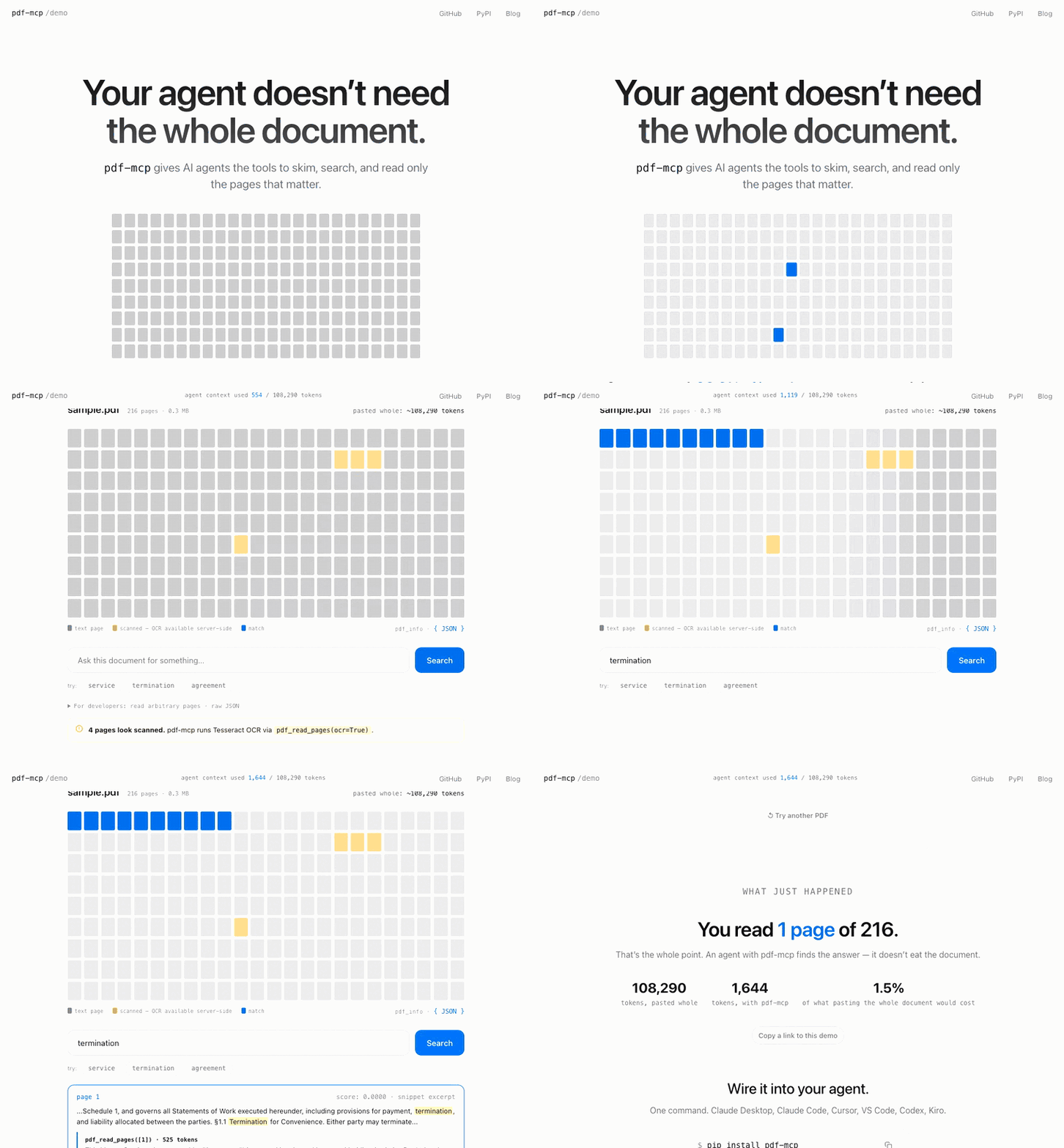
**[See what your AI agent sees →](https://pdf-mcp.jztan.com/)**
Drop in any PDF and watch an agent skim it, search it, and read only the pages that matter — using a fraction of the tokens. 100% client-side, no install required.
[ ](https://pdf-mcp.jztan.com/)
## Why pdf-mcp?
| | Without pdf-mcp | With pdf-mcp |
|---|---|---|
| Large PDFs | Context overflow | Chunked reading |
| Token budgeting | Guess and overflow | Estimated tokens before reading |
| Finding content | Load everything | Hybrid search (BM25 keyword + semantic) |
| Tables | Lost in raw text | Extracted and inlined per page |
| Multi-column PDFs | Columns interleaved in extracted text | Column-aware reading order (`pdf-mcp[multicolumn]`) |
| Vertical scripts (Japanese) | Columns scrambled / glyph soup | Geometric reorder of vertical text (tategaki / 縦書き) — search CJK with mode='semantic' (pip install 'pdf-mcp[cjk]') |
| Images | Ignored | Extracted as PNG files |
| Repeated access | Re-parse every time | SQLite cache |
| Scanned PDFs | No text extracted | OCR via Tesseract, parallelized across pages (`pdf_read_pages(ocr=True)`) |
| Visual content | Must describe in words | Render page as image (`pdf_render_pages`) |
| Tool design | Single monolithic tool | 9 specialized tools |
## Features
- **Hybrid search** — find relevant pages with a question, not a page range. Combines BM25 keyword and semantic search via Reciprocal Rank Fusion
- **Paginated reading** — fetch only the pages your agent needs; large documents don't blow your context window
- **OCR** — scanned and image-based PDFs are fully readable and searchable via Tesseract, parallelized across pages for ~2–3x faster extraction on typical scans
- **Structured extraction** — tables, embedded images, and table of contents returned as structured data, not text soup
- **Vertical-script reading order** — Japanese tategaki (縦書き) reconstructed from glyph geometry into correct top-to-bottom, right-to-left order; article segmentation for dense magazine layouts; mojibake filtered
- **Persistent cache** — SQLite-backed; re-reads are instant and survive server restarts
- **Secure URL fetching** — HTTPS-only with SSRF protection; local network ranges are blocked
## Contents
- [Installation](#installation)
- [Quick Start](#quick-start)
- [Tools](#tools)
- [Example Workflow](#example-workflow)
- [Configuration](#configuration)
- [Roadmap](#roadmap)
- [Contributing](#contributing)
- [Security](#security)
- [License](#license)
## Installation
```bash
pip install pdf-mcp
```
For semantic search (adds `fastembed` and `numpy`, ~67 MB model download on first use):
```bash
pip install 'pdf-mcp[semantic]'
```
For correct reading order on multi-column PDFs (adds `pymupdf4llm`, which pulls `pymupdf_layout`/`onnxruntime`):
```bash
pip install 'pdf-mcp[multicolumn]'
```
Without it, multi-column pages fall back to positional-sort extraction, which can interleave columns.
For Japanese/Chinese/Korean PDFs (recommended — CJK *search* needs semantic;
extraction works without it):
```bash
pip install 'pdf-mcp[cjk]'
```
For OCR on scanned PDFs (requires system Tesseract):
```bash
# macOS
brew install tesseract
# Ubuntu/Debian
apt install tesseract-ocr
# Windows — download the installer from:
# https://github.com/UB-Mannheim/tesseract/wiki
# Then add the install directory to your PATH.
```
## Quick Start
Choose your MCP client below to get started:
](https://pdf-mcp.jztan.com/)
## Why pdf-mcp?
| | Without pdf-mcp | With pdf-mcp |
|---|---|---|
| Large PDFs | Context overflow | Chunked reading |
| Token budgeting | Guess and overflow | Estimated tokens before reading |
| Finding content | Load everything | Hybrid search (BM25 keyword + semantic) |
| Tables | Lost in raw text | Extracted and inlined per page |
| Multi-column PDFs | Columns interleaved in extracted text | Column-aware reading order (`pdf-mcp[multicolumn]`) |
| Vertical scripts (Japanese) | Columns scrambled / glyph soup | Geometric reorder of vertical text (tategaki / 縦書き) — search CJK with mode='semantic' (pip install 'pdf-mcp[cjk]') |
| Images | Ignored | Extracted as PNG files |
| Repeated access | Re-parse every time | SQLite cache |
| Scanned PDFs | No text extracted | OCR via Tesseract, parallelized across pages (`pdf_read_pages(ocr=True)`) |
| Visual content | Must describe in words | Render page as image (`pdf_render_pages`) |
| Tool design | Single monolithic tool | 9 specialized tools |
## Features
- **Hybrid search** — find relevant pages with a question, not a page range. Combines BM25 keyword and semantic search via Reciprocal Rank Fusion
- **Paginated reading** — fetch only the pages your agent needs; large documents don't blow your context window
- **OCR** — scanned and image-based PDFs are fully readable and searchable via Tesseract, parallelized across pages for ~2–3x faster extraction on typical scans
- **Structured extraction** — tables, embedded images, and table of contents returned as structured data, not text soup
- **Vertical-script reading order** — Japanese tategaki (縦書き) reconstructed from glyph geometry into correct top-to-bottom, right-to-left order; article segmentation for dense magazine layouts; mojibake filtered
- **Persistent cache** — SQLite-backed; re-reads are instant and survive server restarts
- **Secure URL fetching** — HTTPS-only with SSRF protection; local network ranges are blocked
## Contents
- [Installation](#installation)
- [Quick Start](#quick-start)
- [Tools](#tools)
- [Example Workflow](#example-workflow)
- [Configuration](#configuration)
- [Roadmap](#roadmap)
- [Contributing](#contributing)
- [Security](#security)
- [License](#license)
## Installation
```bash
pip install pdf-mcp
```
For semantic search (adds `fastembed` and `numpy`, ~67 MB model download on first use):
```bash
pip install 'pdf-mcp[semantic]'
```
For correct reading order on multi-column PDFs (adds `pymupdf4llm`, which pulls `pymupdf_layout`/`onnxruntime`):
```bash
pip install 'pdf-mcp[multicolumn]'
```
Without it, multi-column pages fall back to positional-sort extraction, which can interleave columns.
For Japanese/Chinese/Korean PDFs (recommended — CJK *search* needs semantic;
extraction works without it):
```bash
pip install 'pdf-mcp[cjk]'
```
For OCR on scanned PDFs (requires system Tesseract):
```bash
# macOS
brew install tesseract
# Ubuntu/Debian
apt install tesseract-ocr
# Windows — download the installer from:
# https://github.com/UB-Mannheim/tesseract/wiki
# Then add the install directory to your PATH.
```
## Quick Start
Choose your MCP client below to get started:
Claude Code
```bash
claude mcp add pdf-mcp -- pdf-mcp
```
Or add to `~/.claude.json`:
```json
{
"mcpServers": {
"pdf-mcp": {
"command": "pdf-mcp"
}
}
}
```
Claude Desktop
Add to your `claude_desktop_config.json`:
```json
{
"mcpServers": {
"pdf-mcp": {
"command": "pdf-mcp"
}
}
}
```
Config file location:
- macOS: `~/Library/Application Support/Claude/claude_desktop_config.json`
- Windows: `%APPDATA%\Claude\claude_desktop_config.json`
Restart Claude Desktop after updating the config.
Visual Studio Code
Requires VS Code 1.101+ with GitHub Copilot.
**CLI:**
```bash
code --add-mcp '{"name":"pdf-mcp","command":"pdf-mcp"}'
```
**Command Palette:**
1. Open Command Palette (`Cmd/Ctrl+Shift+P`)
2. Run `MCP: Open User Configuration` (global) or `MCP: Open Workspace Folder Configuration` (project-specific)
3. Add the configuration:
```json
{
"servers": {
"pdf-mcp": {
"command": "pdf-mcp"
}
}
}
```
4. Save. VS Code will automatically load the server.
**Manual:** Create `.vscode/mcp.json` in your workspace:
```json
{
"servers": {
"pdf-mcp": {
"command": "pdf-mcp"
}
}
}
```
Codex CLI
```bash
codex mcp add pdf-mcp -- pdf-mcp
```
Or configure manually in `~/.codex/config.toml`:
```toml
[mcp_servers.pdf-mcp]
command = "pdf-mcp"
```
Kiro
Create or edit `.kiro/settings/mcp.json` in your workspace:
```json
{
"mcpServers": {
"pdf-mcp": {
"command": "pdf-mcp",
"args": [],
"disabled": false
}
}
}
```
Save and restart Kiro.
Other MCP Clients
Most MCP clients use a standard configuration format:
```json
{
"mcpServers": {
"pdf-mcp": {
"command": "pdf-mcp"
}
}
}
```
With `uvx` (for isolated environments):
```json
{
"mcpServers": {
"pdf-mcp": {
"command": "uvx",
"args": ["pdf-mcp"]
}
}
}
```
### Verify Installation
```bash
pdf-mcp --help
```
## Tools
The typical pattern: call `pdf_info` first to plan, then `pdf_search` to locate — its paragraph excerpts are often enough to answer directly. Use `pdf_read_pages` or `pdf_read_all` when you need deeper context.
| Tool | What it does |
|------|--------------|
| `pdf_info` | Page count, metadata, TOC summary, scanned-page detection. **Call first.** |
| `pdf_get_toc` | Full table of contents for documents with >50 bookmarks |
| `pdf_read_pages` | Read specific pages or ranges; OCR-on-demand; embedded images + tables |
| `pdf_read_all` | Read entire document in one call (byte-capped for safety) |
| `pdf_render_pages` | Render pages as PNG for vision models — diagrams, handwriting, scans |
| `pdf_search` | Hybrid RRF search (keyword + semantic), page or section granularity, optional paragraph excerpts |
| `pdf_cache_stats` | Per-document cache breakdown + total size |
| `pdf_cache_clear` | Clear expired or all cache entries |
| `server_info` | Which optional features (column-aware, OCR, semantic) and config are active. **Call before feature-dependent calls.** |
Example prompts:
```
"Read the PDF at /path/to/document.pdf"
"Which pages discuss supply chain risks?"
"Find sections about the training process"
"Show me what page 5 looks like"
"OCR pages 3-5 of the scanned PDF"
```
See **[docs/tool-reference.md](docs/tool-reference.md)** for the complete reference — every parameter, response shape, security contract, and example. For semantic-search model selection, see **[docs/embedding-models.md](docs/embedding-models.md)**.
## Example Workflow
For a large document (e.g., a 200-page annual report):
```
User: "Summarize the risk factors in this annual report"
Agent workflow:
1. pdf_info("report.pdf")
→ 200 pages, TOC shows "Risk Factors" on page 89
2. pdf_search("report.pdf", "risk factors")
→ Matches with structural paragraph excerpts — each excerpt
is the bullet, paragraph, or heading that matched, not a
fixed-width window. Often enough to answer directly.
3. If excerpts are sufficient → synthesize answer
4. If more context needed:
pdf_read_pages("report.pdf", "89-95")
→ Full page text for deeper reading
```
## Configuration
pdf-mcp works out of the box with no configuration. To restrict which paths and URL hosts the server can access, tune cache and worker settings, or understand what's cached, see **[docs/configuration.md](docs/configuration.md)**.
- **Access control** — `~/.config/pdf-mcp/config.toml` allow/deny rules for paths and URLs, plus response byte caps
- **Environment variables** — cache directory, TTL, and parallel OCR/render worker count
- **Caching** — SQLite-backed persistence, what's cached, and invalidation
## Roadmap
See [ROADMAP.md](ROADMAP.md) for planned features and release history.
## Contributing
Contributions are welcome. See **[docs/contributing.md](docs/contributing.md)** for setup, checks, the coherence eval harness, and quality-loop guidelines.
## Security
Found a vulnerability? See [SECURITY.md](SECURITY.md) for the threat model, reporting channel, and expected response timeline. Please do not open a public GitHub issue for unpatched security reports.
## License
MIT — see [LICENSE](LICENSE).
## Links
- [pdf-mcp on PyPI](https://pypi.org/project/pdf-mcp/)
- [pdf-mcp on GitHub](https://github.com/jztan/pdf-mcp)
## Blog posts
Background, benchmarks, and design notes from building pdf-mcp:
**Getting started**
- [How I Built pdf-mcp](https://blog.jztan.com/how-i-built-pdf-mcp-solving-claude-large-pdf-limitations/?utm_source=github&utm_medium=readme&utm_campaign=pdf-mcp) — The problem with large PDFs in AI agents and a working solution
- [How Claude Code Actually Reads PDFs](https://blog.jztan.com/how-claude-code-actually-reads-pdfs-lessons-from-building-an-mcp-server/?utm_source=github&utm_medium=readme&utm_campaign=pdf-mcp) — How AI agents use pdf-mcp tools to read and navigate PDF documents
**Search & retrieval**
- [Semantic vs Keyword Search for AI Agents](https://blog.jztan.com/semantic-vs-keyword-search-ai-agents/?utm_source=github&utm_medium=readme&utm_campaign=pdf-mcp) — Benchmarks and a dual-search routing pattern: FTS5 for exact identifiers, embeddings for natural language
- [Hybrid Search vs Query Routing for AI Agents](https://blog.jztan.com/hybrid-search-vs-query-routing-ai-agents/?utm_source=github&utm_medium=readme&utm_campaign=pdf-mcp) — Why pdf-mcp uses hybrid RRF instead of query routing: benchmarks showing RRF wins across query types
- [Section Chunking vs Page Chunking for AI Agents](https://blog.jztan.com/section-chunking-vs-page-chunking-ai-agents/?utm_source=github&utm_medium=readme&utm_campaign=pdf-mcp) — Why section-aware search delivers full section content in one call while page-mode costs 2–6 extra tool calls per query
- [Section-Level RAG: Why BM25 Beat Hybrid Search in My Benchmark](https://blog.jztan.com/bm25-vs-hybrid-search-section-rag/?utm_source=github&utm_medium=readme&utm_campaign=pdf-mcp) — Why pdf-mcp's section-grain search is BM25-only: hybrid RRF caused a 33% lexical regression at section grain, so granularity decides the search technique
**Engineering & security**
- [MCP Server Security: 8 Vulnerabilities](https://blog.jztan.com/mcp-server-security-8-vulnerabilities/?utm_source=github&utm_medium=readme&utm_campaign=pdf-mcp) — What we found when we audited an MCP server for security holes
- [Your LLM Is Free QA for Your MCP Server](https://blog.jztan.com/llm-free-qa-mcp-server/?utm_source=github&utm_medium=readme&utm_campaign=pdf-mcp) — Four Payload UX bugs in pdf-mcp that schema tests missed but Claude Desktop surfaced during real use