# FlexibleHeader
[](https://travis-ci.org/k-lpmg/FlexibleHeader)

[](https://cocoapods.org/pods/FlexibleHeader)
[](https://github.com/Carthage/Carthage)

[](https://github.com/k-lpmg/FlexibleHeader/blob/master/LICENSE)
A container view that responds to scrolling of UIScrollView.
normal | threshold
--- | :---:
 |
|  - [FlexibleHeaderExecutantType](#FlexibleHeaderExecutantType)
- [Getting Started](#getting-started)
- [Progressive](#Progressive)
- [Installation](#Installation)
## FlexibleHeaderExecutantType
The enum used in the FlexibleHeader class to determine the header type.
``` swift
public enum FlexibleHeaderExecutantType {
case normal
case threshold
case customThreshold(hiddenThreshold: CGFloat, showThreshold: CGFloat)
}
```
### 1. normal
Header appears when offset Y of scroll is 0. In other cases, the Header is disappeared.
### 2. threshold
Unlike the normal type, the header can be appeared or disappeared in the middle of the scroll by the threshold.
### 3. customThreshold
You can set hidden threshold and show threshold to threshold type. The unit of threshold is the offset of UIScrollView.
## Getting Started
### FlexibleHeaderScrollView
The container view that contains the UIScrollView and the FlexibleHeader is the easiest way to implement a FlexibleHeader.
1. Create an instance of FlexibleHeaderScrollView.
``` swift
let flexibleHeaderScrollView = FlexibleHeaderScrollView(headerMaxHeight: 64, headerMinHeight: 0, headerExecutantType: .threshold)
flexibleHeaderScrollView.translatesAutoresizingMaskIntoConstraints = false
```
2. Add subviews to the contentView in FlexibleHeaderScrollView.
``` swift
let topView = UIView()
topView.translatesAutoresizingMaskIntoConstraints = false
let bottomView = UIView()
bottomView.translatesAutoresizingMaskIntoConstraints = false
topView.leadingAnchor.constraint(equalTo: flexibleHeaderScrollView.contentView.leadingAnchor).isActive = true
topView.topAnchor.constraint(equalTo: flexibleHeaderScrollView.contentView.topAnchor).isActive = true
topView.trailingAnchor.constraint(equalTo: flexibleHeaderScrollView.contentView.trailingAnchor).isActive = true
topView.heightAnchor.constraint(equalToConstant: 550).isActive = true
bottomView.leadingAnchor.constraint(equalTo: flexibleHeaderScrollView.contentView.leadingAnchor).isActive = true
bottomView.topAnchor.constraint(equalTo: topView.bottomAnchor).isActive = true
bottomView.trailingAnchor.constraint(equalTo: flexibleHeaderScrollView.contentView.trailingAnchor).isActive = true
bottomView.heightAnchor.constraint(equalToConstant: 550).isActive = true
bottomView.bottomAnchor.constraint(equalTo: flexibleHeaderScrollView.contentView.bottomAnchor).isActive = true
```
### FlexibleHeader
If you want to implement the FlexibleHeader functionality in your UIScrollView, use the FlexibleHeader class.
1. Create an instance of UIScrollView.
``` swift
let scrollView = UIScrollView()
scrollView.translatesAutoresizingMaskIntoConstraints = false
```
2. Create an instance of FlexibleHeader using an instance of UIScrollView.
``` swift
let flexibleHeader = FlexibleHeader(scrollView: scrollView, maxHeight: 64, minHeight: 0, executantType: .threshold)
flexibleHeader.translatesAutoresizingMaskIntoConstraints = false
```
3. Configure a height NSLayoutConstraint of an instance of FlexibleHeader.
``` swift
let flexibleHeaderHeight = flexibleHeader.heightAnchor.constraint(equalToConstant: 50)
flexibleHeaderHeight.isActive = true
flexibleHeader.configure(heightConstraint: flexibleHeaderHeight)
```
## Progressive
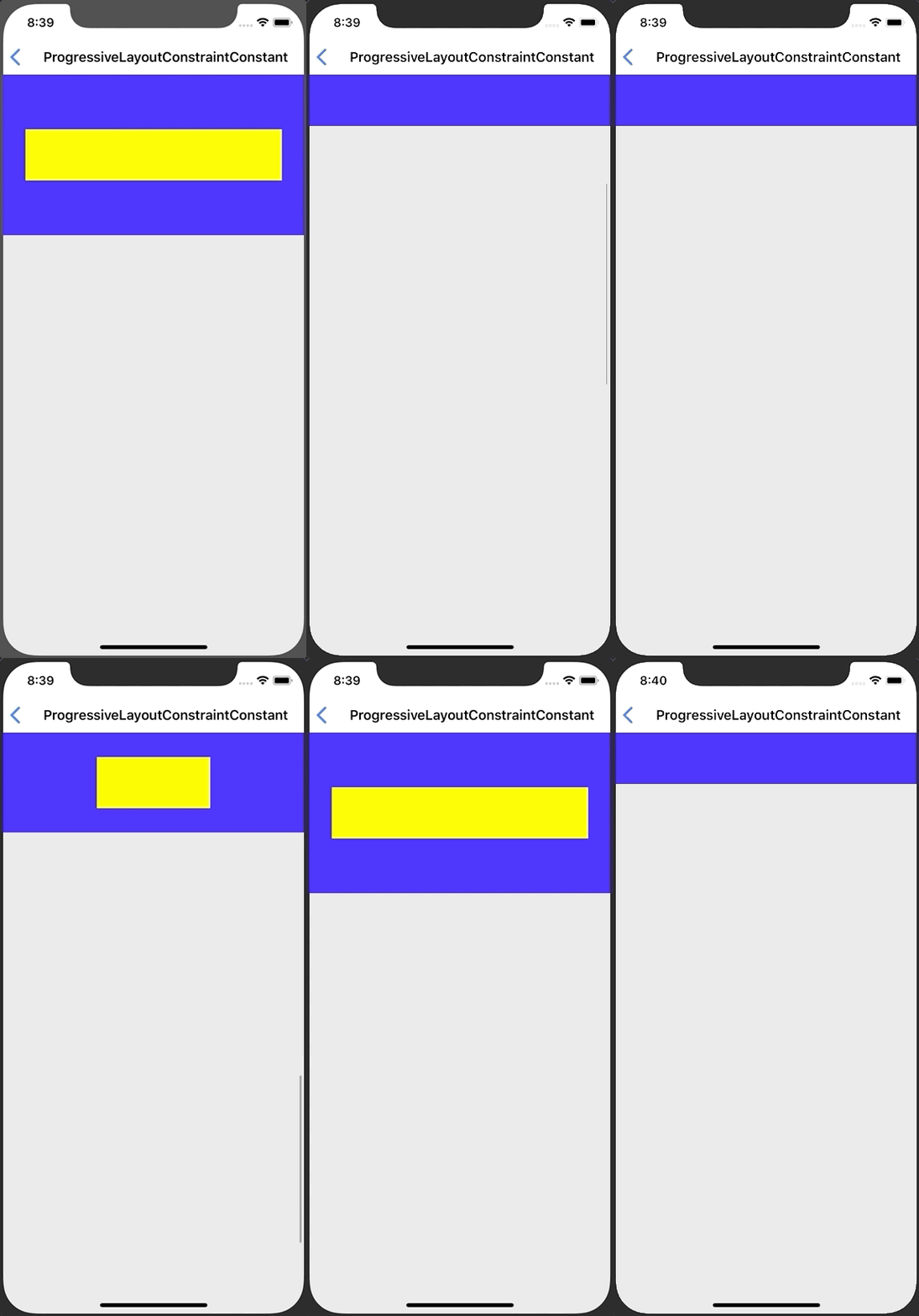
You can change the value(view properties, constant of NSLayoutConstraint) based on the start and end points as the scroll progress.
### ProgressiveViewAttribute
- [FlexibleHeaderExecutantType](#FlexibleHeaderExecutantType)
- [Getting Started](#getting-started)
- [Progressive](#Progressive)
- [Installation](#Installation)
## FlexibleHeaderExecutantType
The enum used in the FlexibleHeader class to determine the header type.
``` swift
public enum FlexibleHeaderExecutantType {
case normal
case threshold
case customThreshold(hiddenThreshold: CGFloat, showThreshold: CGFloat)
}
```
### 1. normal
Header appears when offset Y of scroll is 0. In other cases, the Header is disappeared.
### 2. threshold
Unlike the normal type, the header can be appeared or disappeared in the middle of the scroll by the threshold.
### 3. customThreshold
You can set hidden threshold and show threshold to threshold type. The unit of threshold is the offset of UIScrollView.
## Getting Started
### FlexibleHeaderScrollView
The container view that contains the UIScrollView and the FlexibleHeader is the easiest way to implement a FlexibleHeader.
1. Create an instance of FlexibleHeaderScrollView.
``` swift
let flexibleHeaderScrollView = FlexibleHeaderScrollView(headerMaxHeight: 64, headerMinHeight: 0, headerExecutantType: .threshold)
flexibleHeaderScrollView.translatesAutoresizingMaskIntoConstraints = false
```
2. Add subviews to the contentView in FlexibleHeaderScrollView.
``` swift
let topView = UIView()
topView.translatesAutoresizingMaskIntoConstraints = false
let bottomView = UIView()
bottomView.translatesAutoresizingMaskIntoConstraints = false
topView.leadingAnchor.constraint(equalTo: flexibleHeaderScrollView.contentView.leadingAnchor).isActive = true
topView.topAnchor.constraint(equalTo: flexibleHeaderScrollView.contentView.topAnchor).isActive = true
topView.trailingAnchor.constraint(equalTo: flexibleHeaderScrollView.contentView.trailingAnchor).isActive = true
topView.heightAnchor.constraint(equalToConstant: 550).isActive = true
bottomView.leadingAnchor.constraint(equalTo: flexibleHeaderScrollView.contentView.leadingAnchor).isActive = true
bottomView.topAnchor.constraint(equalTo: topView.bottomAnchor).isActive = true
bottomView.trailingAnchor.constraint(equalTo: flexibleHeaderScrollView.contentView.trailingAnchor).isActive = true
bottomView.heightAnchor.constraint(equalToConstant: 550).isActive = true
bottomView.bottomAnchor.constraint(equalTo: flexibleHeaderScrollView.contentView.bottomAnchor).isActive = true
```
### FlexibleHeader
If you want to implement the FlexibleHeader functionality in your UIScrollView, use the FlexibleHeader class.
1. Create an instance of UIScrollView.
``` swift
let scrollView = UIScrollView()
scrollView.translatesAutoresizingMaskIntoConstraints = false
```
2. Create an instance of FlexibleHeader using an instance of UIScrollView.
``` swift
let flexibleHeader = FlexibleHeader(scrollView: scrollView, maxHeight: 64, minHeight: 0, executantType: .threshold)
flexibleHeader.translatesAutoresizingMaskIntoConstraints = false
```
3. Configure a height NSLayoutConstraint of an instance of FlexibleHeader.
``` swift
let flexibleHeaderHeight = flexibleHeader.heightAnchor.constraint(equalToConstant: 50)
flexibleHeaderHeight.isActive = true
flexibleHeader.configure(heightConstraint: flexibleHeaderHeight)
```
## Progressive
You can change the value(view properties, constant of NSLayoutConstraint) based on the start and end points as the scroll progress.
### ProgressiveViewAttribute
 ``` swift
let flexibleHeader = FlexibleHeader(scrollView: scrollView, maxHeight: 128, minHeight: 0, executantType: .threshold)
let initialAttribute = ProgressiveViewAttribute(view: flexibleHeader, progress: 0.0, alpha: 1.0)
let finalAttribute = ProgressiveViewAttribute(view: flexibleHeader, progress: 1.0, alpha: 0.0)
flexibleHeader.appendProgressiveViewAttribute(with: initialAttribute)
flexibleHeader.appendProgressiveViewAttribute(with: finalAttribute)
```
### ProgressiveLayoutConstraintConstant
``` swift
let flexibleHeader = FlexibleHeader(scrollView: scrollView, maxHeight: 128, minHeight: 0, executantType: .threshold)
let initialAttribute = ProgressiveViewAttribute(view: flexibleHeader, progress: 0.0, alpha: 1.0)
let finalAttribute = ProgressiveViewAttribute(view: flexibleHeader, progress: 1.0, alpha: 0.0)
flexibleHeader.appendProgressiveViewAttribute(with: initialAttribute)
flexibleHeader.appendProgressiveViewAttribute(with: finalAttribute)
```
### ProgressiveLayoutConstraintConstant
 ``` swift
let headerContentView = UIView()
headerContentView.translatesAutoresizingMaskIntoConstraints = false
headerContentView.backgroundColor = .yellow
flexibleHeader.addSubview(headerContentView)
headerContentView.centerXAnchor.constraint(equalTo: flexibleHeader.centerXAnchor).isActive = true
headerContentView.centerYAnchor.constraint(equalTo: flexibleHeader.centerYAnchor).isActive = true
headerContentView.heightAnchor.constraint(equalToConstant: 64).isActive = true
```
``` swift
let headerContentViewWidth = headerContentView.widthAnchor.constraint(equalToConstant: 0)
headerContentViewWidth.isActive = true
let initialConstraintConstant = ProgressiveLayoutConstraintConstant(constraint: headerContentViewWidth, progress: 0.0, constant: 320)
let finalConstraintConstant = ProgressiveLayoutConstraintConstant(constraint: headerContentViewWidth, progress: 1.0, constant: 0)
flexibleHeader.appendProgressiveConstraintConstant(with: initialConstraintConstant)
flexibleHeader.appendProgressiveConstraintConstant(with: finalConstraintConstant)
```
## Installation
#### CocoaPods (iOS 9+)
```ruby
platform :ios, '9.0'
use_frameworks!
target '' do
pod 'FlexibleHeader'
end
```
#### Carthage (iOS 9+)
```ruby
github "k-lpmg/FlexibleHeader"
```
## LICENSE
These works are available under the MIT license. See the [LICENSE][license] file
for more info.
[license]: LICENSE
``` swift
let headerContentView = UIView()
headerContentView.translatesAutoresizingMaskIntoConstraints = false
headerContentView.backgroundColor = .yellow
flexibleHeader.addSubview(headerContentView)
headerContentView.centerXAnchor.constraint(equalTo: flexibleHeader.centerXAnchor).isActive = true
headerContentView.centerYAnchor.constraint(equalTo: flexibleHeader.centerYAnchor).isActive = true
headerContentView.heightAnchor.constraint(equalToConstant: 64).isActive = true
```
``` swift
let headerContentViewWidth = headerContentView.widthAnchor.constraint(equalToConstant: 0)
headerContentViewWidth.isActive = true
let initialConstraintConstant = ProgressiveLayoutConstraintConstant(constraint: headerContentViewWidth, progress: 0.0, constant: 320)
let finalConstraintConstant = ProgressiveLayoutConstraintConstant(constraint: headerContentViewWidth, progress: 1.0, constant: 0)
flexibleHeader.appendProgressiveConstraintConstant(with: initialConstraintConstant)
flexibleHeader.appendProgressiveConstraintConstant(with: finalConstraintConstant)
```
## Installation
#### CocoaPods (iOS 9+)
```ruby
platform :ios, '9.0'
use_frameworks!
target '' do
pod 'FlexibleHeader'
end
```
#### Carthage (iOS 9+)
```ruby
github "k-lpmg/FlexibleHeader"
```
## LICENSE
These works are available under the MIT license. See the [LICENSE][license] file
for more info.
[license]: LICENSE