
[](https://github.com/k1LoW/tbls/actions) [](https://github.com/k1LoW/tbls/releases) [](https://goreportcard.com/report/github.com/k1LoW/tbls)   
`tbls` (pronounced /ˈteɪbl̩z/) is a CI-Friendly tool to document a database, written in Go.
Key features of `tbls` are:
- **Document a database automatically in [GFM](https://github.github.com/gfm/) format. Output database schema [in many formats](#output-formats).**
- **Single binary = CI-Friendly.**
- **[Support many databases](#support-datasource).**
- **Work as linter for database**
### Table of Contents
- [Quick Start](#quick-start)
- [Install](#install)
- [Getting Started](#getting-started)
- [Document a database](#document-a-database)
- [Diff database and (document or database)](#diff-database-and-document-or-database)
- [Lint a database](#lint-a-database)
- [Measure document coverage](#measure-document-coverage)
- [Continuous Integration](#continuous-integration)
- [Configuration](#configuration)
- [Name](#name)
- [Description](#description)
- [Labels](#labels)
- [DSN](#dsn)
- [Support Datasource](#support-datasource)
- [Document path](#document-path)
- [Document format](#document-format)
- [ER diagram](#er-diagram)
- [Filter tables](#filter-tables)
- [Lint](#lint)
- [Comments](#comments)
- [Relations](#relations)
- [Viewpoints](#viewpoints)
- [Dictionary](#dictionary)
- [Personalized Templates](#personalized-templates)
- [Required Version](#required-version)
- [Expand environment variables](#expand-environment-variables)
- [Output formats](#output-formats)
- [Command arguments](#command-arguments)
- [Environment variables](#environment-variables)
## Quick Start
Document a database with one command.
```console
$ tbls doc postgres://dbuser:dbpass@hostname:5432/dbname
```
Using docker image.
```console
$ docker run --rm -v $PWD:/work -w /work ghcr.io/k1low/tbls doc postgres://dbuser:dbpass@hostname:5432/dbname
```
## Install
**deb:**
```console
$ export TBLS_VERSION=X.X.X
$ curl -o tbls.deb -L https://github.com/k1LoW/tbls/releases/download/v$TBLS_VERSION/tbls_$TBLS_VERSION-1_amd64.deb
$ dpkg -i tbls.deb
```
**RPM:**
```console
$ export TBLS_VERSION=X.X.X
$ yum install https://github.com/k1LoW/tbls/releases/download/v$TBLS_VERSION/tbls_$TBLS_VERSION-1_amd64.rpm
```
**Homebrew:**
```console
$ brew install tbls
```
**MacPorts:**
```console
$ sudo port install tbls
```
**[aqua](https://aquaproj.github.io/):**
```console
$ aqua g -i k1LoW/tbls
```
**Manually:**
Download binary from [releases page](https://github.com/k1LoW/tbls/releases)
**go install:**
```console
$ go install github.com/k1LoW/tbls@latest
```
**Docker:**
```console
$ docker pull ghcr.io/k1low/tbls:latest
```
**On GitHub Actions:**
```yml
# .github/workflows/doc.yml
name: Document
on:
push:
branches:
- main
jobs:
doc:
runs-on: ubuntu-latest
steps:
-
name: Checkout .tbls.yml
uses: actions/checkout@v3
-
uses: k1low/setup-tbls@v1
-
name: Run tbls for generate database document
run: tbls doc
```
**:octocat: A GitHub Action for tbls is [here](https://github.com/k1LoW/setup-tbls).**
**Temporary:**
```console
$ source <(curl https://raw.githubusercontent.com/k1LoW/tbls/main/use)
```
```console
$ curl -sL https://raw.githubusercontent.com/k1LoW/tbls/main/use > /tmp/use-tbls.tmp && . /tmp/use-tbls.tmp
```
## Getting Started
### Document a database
Add `.tbls.yml` (or `tbls.yml`) file to your repository.
```yaml
# .tbls.yml
# DSN (Database Source Name) to connect database
dsn: postgres://dbuser:dbpass@localhost:5432/dbname
# Path to generate document
# Default is `dbdoc`
docPath: doc/schema
```
> **Notice:** If you are using a symbol such as `#` `<` in database password, URL-encode the password
Run `tbls doc` to analyzes the database and generate document in GitHub Friendly Markdown format.
```console
$ tbls doc
```
Commit `.tbls.yml` and the document.
```console
$ git add .tbls.yml doc/schema
$ git commit -m 'Add database document'
$ git push origin main
```
View the document on GitHub.
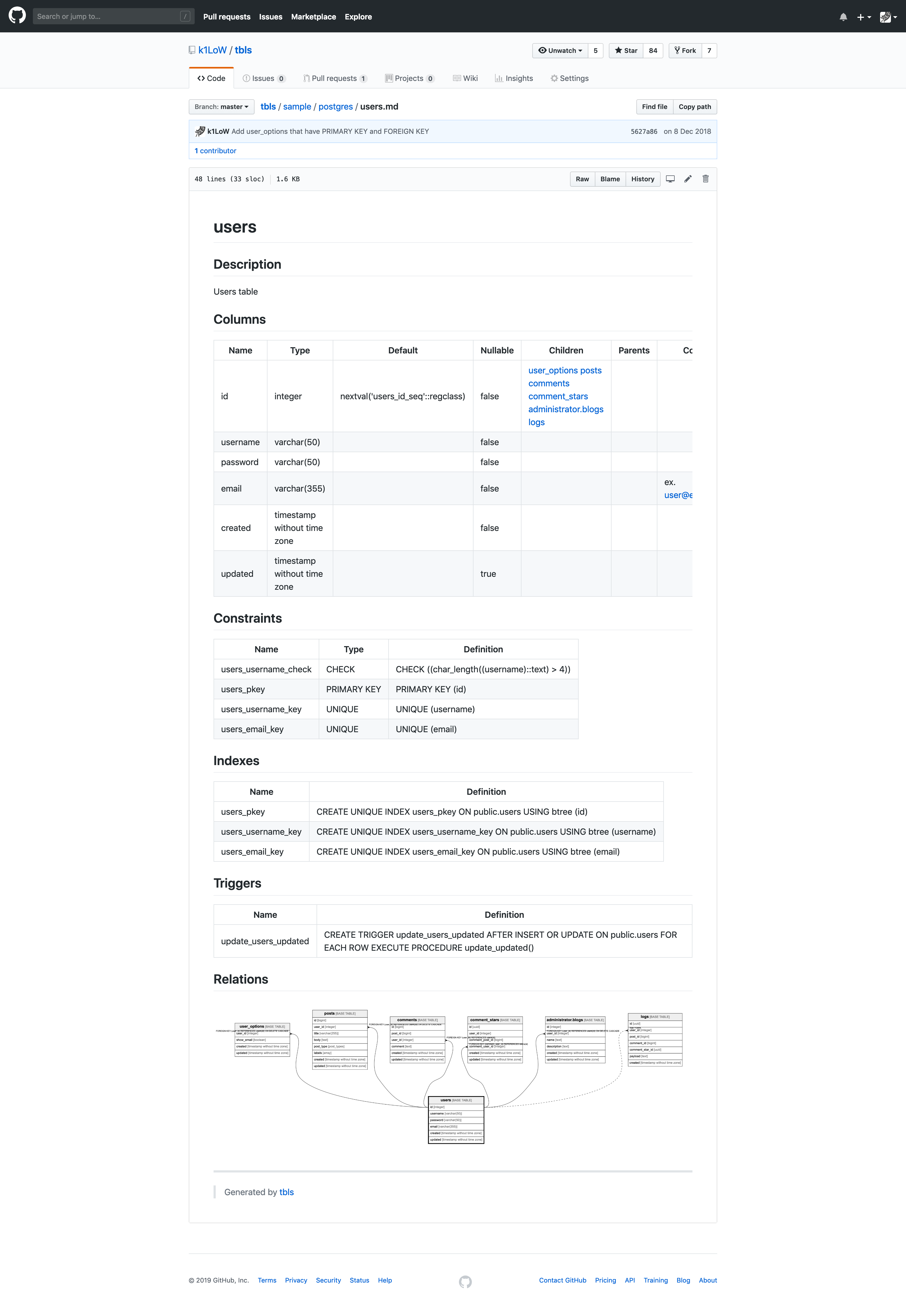
[Sample document](sample/postgres/README.md)
### Diff database and (document or database)
Update database schema.
```console
$ psql -U dbuser -d dbname -h hostname -p 5432 -c 'ALTER TABLE users ADD COLUMN phone_number varchar(15);'
Password for user dbuser:
ALTER TABLE
```
`tbls diff` shows the difference between database schema and generated document.
```diff
$ tbls diff
diff postgres://dbuser:*****@hostname:5432/dbname doc/schema/README.md
--- postgres://dbuser:*****@hostname:5432/dbname
+++ doc/schema/README.md
@@ -4,7 +4,7 @@
| Name | Columns | Comment | Type |
| ---- | ------- | ------- | ---- |
-| [users](users.md) | 7 | Users table | BASE TABLE |
+| [users](users.md) | 6 | Users table | BASE TABLE |
| [user_options](user_options.md) | 4 | User options table | BASE TABLE |
| [posts](posts.md) | 8 | Posts table | BASE TABLE |
| [comments](comments.md) | 6 | Comments
Multi-line
table
comment | BASE TABLE |
diff postgres://dbuser:*****@hostname:5432/dbname doc/schema/users.md
--- postgres://dbuser:*****@hostname:5432/dbname
+++ doc/schema/users.md
@@ -14,7 +14,6 @@
| email | varchar(355) | | false | | | ex. user@example.com |
| created | timestamp without time zone | | false | | | |
| updated | timestamp without time zone | | true | | | |
-| phone_number | varchar(15) | | true | | | |
## Constraints
```
And, `tbls diff` support for diff checking between database and other database
```console
$ tbls diff postgres://dbuser:*****@local:5432/dbname postgres://dbuser:*****@production:5432/dbname
```
> **Notice:** `tbls diff` shows the difference Markdown documents only.
### Re-generating database documentation
Existing documentation can re-generated using either `--force` or `--rm-dist` flag.
`--force` forces overwrite of the existing documents. It does not, however, remove files of removed tables.
```console
$ tbls doc --force
```
`--rm-dist` removes files in docPath before generating the documents.
```console
$ tbls doc --rm-dist
```
### Lint a database
Add linting rule to `.tbls.yml` following
```yaml
# .tbls.yml
lint:
requireColumnComment:
enabled: true
exclude:
- id
- created
- updated
columnCount:
enabled: true
max: 10
```
Run `tbls lint` to check the database according to `lint:` rules
```console
$ tbls lint
users.username: column comment required.
users.password: column comment required.
users.phone_number: column comment required.
posts.user_id: column comment required.
posts.title: column comment required.
posts.labels: column comment required.
comments.post_id: column comment required.
comment_stars.user_id: column comment required.
post_comments.comment: column comment required.
posts: too many columns. [12/10]
comments: too many columns. [11/10]
11 detected
```
### Measure document coverage
`tbls coverage` measure and show document coverage (description, comments).
```console
$ tbls coverage
Table Coverage
All tables 16.1%
public.users 20%
public.user_options 37.5%
public.posts 35.3%
public.comments 14.3%
public.comment_stars 0%
public.logs 12.5%
public.post_comments 87.5%
public.post_comment_stars 0%
public.CamelizeTable 0%
public.hyphen-table 0%
administrator.blogs 0%
backup.blogs 0%
backup.blog_options 0%
time.bar 0%
time.hyphenated-table 0%
time.referencing 0%
```
### Continuous Integration
Continuous integration using tbls.
1. Commit the document using `tbls doc`.
2. Update the database schema in the development cycle.
3. Check for document updates by running `tbls diff` or `tbls lint` in CI.
4. Return to **1**.
**Example: Travis CI**
```yaml
# .travis.yml
language: go
install:
- source <(curl -sL https://raw.githubusercontent.com/k1LoW/tbls/main/use)
script:
- tbls diff
- tbls lint
```
> **Tips:** If your CI based on Debian/Ubuntu (`/bin/sh -> dash`), you can use the following install command `curl -sL https://raw.githubusercontent.com/k1LoW/tbls/main/use > use-tbls.tmp && . ./use-tbls.tmp && rm ./use-tbls.tmp`
> **Tips:** If the order of the columns does not match, you can use the `--sort` option.
## Configuration
### Name
`name:` is used to specify the database name of the document.
```yaml
# .tbls.yml
name: mydatabase
```
### Description
`desc:` is used to specify the database description.
```yaml
# .tbls.yml
desc: This is My Database
```
### Labels
`labels:` is used to label the database or tables.
**label database:**
```yaml
# .tbls.yml
labels:
- cmdb
- analytics
```
**label tables:**
```yaml
# .tbls.yml
comments:
-
table: users
labels:
- user
- privacy data
```
**label columns:**
```yaml
# .tbls.yml
comments:
-
table: users
columnLabels:
email:
- secure
- encrypted
```
### DSN
`dsn:` (Data Source Name) is used to connect to database.
```yaml
# .tbls.yml
dsn: my://dbuser:dbpass@hostname:3306/dbname
```
#### SSL/TLS
For PostgreSQL, MySQL, MariaDB and Microsoft SQL Server, the `tls:` section of `dsn:` configures SSL/TLS using certificate files:
```yaml
# .tbls.yml
dsn:
url: my://dbuser:dbpass@hostname:3306/dbname
tls:
ca: /path/to/ca.pem
cert: /path/to/client-cert.pem
key: /path/to/client-key.pem
verify: identity
```
- `ca` verifies the server certificate chain without hostname verification (like `mysql --ssl-mode=VERIFY_CA`).
- `verify: identity` also verifies the hostname (like `mysql --ssl-mode=VERIFY_IDENTITY`).
- `cert` and `key` present a client certificate, and must be set together. Without `ca` or `verify: identity` the connection is encrypted but the server is not verified.
- Empty values are treated as absent, so settings like `ca: ${MYSQL_SSL_CA}` work unchanged when the environment variables are not set. Paired settings (`cert`/`key`) must be set or unset together.
- Native TLS DSN parameters that contradict these settings (e.g. `sslmode=disable`, `encrypt=disable`, `trustservercertificate=true`, `tls=preferred`) are rejected with an error instead of being silently overridden. `tls=true` keeps full verification, and `tls=skip-verify` is upgraded to the requested verification level.
#### Support Datasource
tbls supports the following databases/datasources.
**PostgreSQL:**
```yaml
# .tbls.yml
dsn: postgres://dbuser:dbpass@hostname:5432/dbname
```
```yaml
# .tbls.yml
dsn: pg://dbuser:dbpass@hostname:5432/dbname
```
When you want to disable SSL mode, add "?sslmode=disable"
For example:
```yaml
dsn: pg://dbuser:dbpass@hostname:5432/dbname?sslmode=disable
```
The `dsn.tls` settings map to `sslrootcert`, `sslcert` and `sslkey`, with `sslmode=verify-ca` (or `sslmode=verify-full` when `verify: identity` is set). An explicit verifying `sslmode` (`require`, `verify-ca`, `verify-full`) is kept. Certificate paths containing spaces are not supported.
**MySQL:**
```yaml
# .tbls.yml
dsn: mysql://dbuser:dbpass@hostname:3306/dbname
```
```yaml
# .tbls.yml
dsn: my://dbuser:dbpass@hostname:3306/dbname
```
When you want to hide AUTO_INCREMENT clause on the table definitions,
add "?hide_auto_increment".
For example:
```yaml
dsn: my://dbuser:dbpass@hostname:3306/dbname?hide_auto_increment
```
Each `--ssl-mode` of the mysql client maps to a DSN parameter or `dsn.tls` settings (see the SSL/TLS section) as follows:
| `--ssl-mode` | tbls configuration |
| --- | --- |
| `DISABLED` | `?tls=false` |
| `PREFERRED` | `?tls=preferred` |
| `REQUIRED` | `?tls=skip-verify` |
| `VERIFY_CA` | `tls:` with `ca: /path/to/ca.pem` |
| `VERIFY_IDENTITY` | `tls:` with `ca: /path/to/ca.pem` and `verify: identity` |
**MariaDB:**
```yaml
# .tbls.yml
dsn: mariadb://dbuser:dbpass@hostname:3306/dbname
```
```yaml
# .tbls.yml
dsn: maria://dbuser:dbpass@hostname:3306/dbname
```
**SQLite:**
```yaml
# .tbls.yml
dsn: sqlite:///path/to/dbname.db
```
```yaml
# .tbls.yml
dsn: sq:///path/to/dbname.db
```
**BigQuery:**
```yaml
# .tbls.yml
dsn: bigquery://project-id/dataset-id?creds=/path/to/google_application_credentials.json
```
```yaml
# .tbls.yml
dsn: bq://project-id/dataset-id?creds=/path/to/google_application_credentials.json
```
To set `GOOGLE_APPLICATION_CREDENTIALS` environment variable, you can use
1. `export GOOGLE_APPLICATION_CREDENTIALS` or `export GOOGLE_APPLICATION_CREDENTIALS_JSON`
2. Add query to DSN
- `?google_application_credentials=/path/to/client_secrets.json`
- `?credentials=/path/to/client_secrets.json`
- `?creds=/path/to/client_secrets.json`
Required permissions: `bigquery.datasets.get` `bigquery.tables.get` `bigquery.tables.list`
Also, you can use impersonate service account using environment variables below.
- `GOOGLE_IMPERSONATE_SERVICE_ACCOUNT`: Email of service account
- `GOOGLE_IMPERSONATE_SERVICE_ACCOUNT_LIFETIME`: You can use impersonate service account within this lifetime. This value must be readable from https://github.com/k1LoW/duration .
**Cloud Spanner:**
```yaml
# .tbls.yml
dsn: spanner://project-id/instance-id/dbname?creds=/path/to/google_application_credentials.json
```
To set `GOOGLE_APPLICATION_CREDENTIALS` environment variable, you can use
1. `export GOOGLE_APPLICATION_CREDENTIALS` or `export GOOGLE_APPLICATION_CREDENTIALS_JSON`
2. Add query to DSN
- `?google_application_credentials=/path/to/client_secrets.json`
- `?credentials=/path/to/client_secrets.json`
- `?creds=/path/to/client_secrets.json`
Also, you can use impersonate service account using environment variables below.
- `GOOGLE_IMPERSONATE_SERVICE_ACCOUNT`: Email of service account
- `GOOGLE_IMPERSONATE_SERVICE_ACCOUNT_LIFETIME`: You can use impersonate service account within this lifetime. This value must be readable from https://github.com/k1LoW/duration .
**Amazon Redshift:**
```yaml
# .tbls.yml
dsn: redshift://dbuser:dbpass@hostname:5432/dbname
```
```yaml
# .tbls.yml
dsn: rs://dbuser:dbpass@hostname:5432/dbname
```
**Microsoft SQL Server:**
```yaml
# .tbls.yml
dsn: mssql://DbUser:SQLServer-DbPassw0rd@hostname:1433/testdb
```
```yaml
# .tbls.yml
dsn: sqlserver://DbUser:SQLServer-DbPassw0rd@hostname:1433/testdb
```
```yaml
# .tbls.yml
dsn: ms://DbUser:SQLServer-DbPassw0rd@localhost:1433/testdb
```
SQL Server **2017 or later** with a **database compatibility level of 110 or higher** is required. Schema introspection uses `STRING_AGG`, which is unavailable on SQL Server 2016 and earlier, and its `WITHIN GROUP (ORDER BY ...)` clause needs compatibility level 110+. A database migrated onto a newer server but left at level 100 fails with `Incorrect syntax near '('`; raise it with `ALTER DATABASE SET COMPATIBILITY_LEVEL = 110` (or higher).
**Azure SQL / Microsoft Fabric Warehouse (Experimental):**
Azure AD Service Principal authentication (credentials in userinfo):
```yaml
# .tbls.yml
dsn: azuresql://@:@myworkspace.datawarehouse.fabric.microsoft.com/mydb
```
Azure AD Default authentication (picks up `AZURE_CLIENT_ID`, `AZURE_TENANT_ID`, `AZURE_CLIENT_SECRET`, Azure CLI, or Managed Identity):
```yaml
# .tbls.yml
dsn: azuresql://myworkspace.datawarehouse.fabric.microsoft.com/mydb
```
Supported DSN formats and parameters:
- Database name can be provided in the URL path (`/mydb`) or via the `database` query parameter (`?database=mydb`).
- `fedauth`: authentication type. If omitted, defaults to `ActiveDirectoryServicePrincipal` when credentials are provided in userinfo, or `ActiveDirectoryDefault` otherwise.
- Tenant ID in userinfo is optional (`azuresql://:@host/mydb`), resolved from the server if omitted.
- Other supported `fedauth` modes include `ActiveDirectoryPassword`, `ActiveDirectoryMSI`, etc.
See also: https://github.com/microsoft/go-mssqldb
The `dsn.tls.ca` setting maps to `certificate` with `encrypt=true` and `trustservercertificate=false` (go-mssqldb always verifies the hostname when encryption is on). The certificate file must have a `.pem` or `.der` extension. An explicit `encrypt=strict` is kept. Client certificates (`cert`/`key`) are not supported by the driver.
**Amazon DynamoDB:**
```yaml
# .tbls.yml
dsn: dynamodb://us-west-2
```
```yaml
# .tbls.yml
dsn: dynamo://ap-northeast-1?aws_access_key_id=XXXXXxxxxxxxXXXXXXX&aws_secret_access_key=XXXXXxxxxxxxXXXXXXX
```
To set AWS credentials, you can use
1. [Use default credential provider chain of AWS SDK for Go](https://docs.aws.amazon.com/sdk-for-go/v1/developer-guide/configuring-sdk.html#specifying-credentials)
2. Add query to DSN
- `?aws_access_key_id=XXXXXxxxxxxxXXXXXXX&aws_secret_access_key=XXXXXxxxxxxxXXXXXXX`
**Snowflake (Experimental):**
```yaml
---
# .tbls.yml
dsn: snowflake://user:password@myaccount/mydb/myschema
```
See also: https://pkg.go.dev/github.com/snowflakedb/gosnowflake
**MongoDB:**
```yaml
# .tbls.yml
dsn: mongodb://mongoadmin:secret@localhost:27017/test
```
```yaml
# .tbls.yml
dsn: mongodb://mongoadmin:secret@localhost:27017/test?sampleSize=20
```
If a field has multiple types, the `multipleFieldType` query can be used to list all the types.
```yaml
# .tbls.yml
dsn: mongodb://mongoadmin:secret@localhost:27017/test?sampleSize=20&multipleFieldType=true
```
**ClickHouse:**
```yaml
# .tbls.yml
dsn: clickhouse://dbuser:dbpass@hostname:9000/dbname
```
See also: https://pkg.go.dev/github.com/ClickHouse/clickhouse-go
**Databricks (Experimental):**
Personal Access Token (PAT) Authentication:
```yaml
# .tbls.yml
dsn: databricks://your_databricks_workspace_id.cloud.databricks.com:443/sql/1.0/warehouses/your_warehouse_id?catalog=your_catalog&schema=your_schema&token=your_token
```
OAuth Client Credentials Authentication:
```yaml
# .tbls.yml
dsn: databricks://your_databricks_workspace_id.cloud.databricks.com:443/sql/1.0/warehouses/your_warehouse_id?catalog=your_catalog&schema=your_schema&client_id=your_client_id&client_secret=your_client_secret
```
Required parameters:
- `your_databricks_workspace_id`: databricks workspace ID
- `your_warehouse_id`: databricks sql warehouse ID
- `your_catalog`: Unity Catalog name
optional parameters:
- `your_schema`: Schema/database name within the catalog. If not specified all tables in the catalogue will be documented and generated table references will include schema name.
Authentication (choose one):
- PAT Authentication: `token` - Personal access token for authentication
- OAuth Authentication: `client_id` and `client_secret` - OAuth M2M client credentials
See also: https://pkg.go.dev/github.com/databricks/databricks-sql-go
**JSON:**
The JSON file output by the `tbls out -t json` command can be read as a datasource (JSON Schema is [here](spec/tbls.schema.json_schema.json)).
```yaml
---
# .tbls.yml
dsn: json://path/to/testdb.json
```
**HTTP:**
```yaml
---
# .tbls.yml
dsn: https://hostname/path/to/testdb.json
```
```yaml
---
# .tbls.yml
dsn:
url: https://hostname/path/to/testdb.json
headers:
Authorization: token GITHUB_OAUTH_TOKEN
```
**GitHub:**
```yaml
---
# .tbls.yml
dsn: github://k1LoW/tbls/sample/mysql/schema.json
```
### External database driver
tbls can integrate with external database drivers. If an executable with the pattern `tbls-driver-*` is on the PATH, tbls will recognize the corresponding scheme.
For example, if you have an executable named `tbls-driver-foodb`, tbls will recognize the `foodb://` scheme.
`tbls-driver-foodb` receives the DSN at runtime via the environment variable `TBLS_DSN`. By outputting [schema.json](spec/tbls.schema.json_schema.json) via STDOUT, tbls will work with it.
### Document path
`tbls doc` generates document in the directory specified by `docPath:`.
```yaml
# .tbls.yml
# Default is `dbdoc`
docPath: doc/schema
```
### Document format
`format:` is used to change the document format.
```yaml
# .tbls.yml
format:
# Adjust the column width of Markdown format table
# Default is false
adjust: true
# Sort the order of table list and columns
# Default is false
sort: false
# Display sequential numbers in table rows
# Default is false
number: false
# The comments for each table in the Tables section of the index page will display the text up to the first double newline (first paragraph).
# Default is false
showOnlyFirstParagraph: true
# Hide table columns without values
# Default is false
hideColumnsWithoutValues: true
# It can be boolean or array
# hideColumnsWithoutValues: ["Parents", "Children"]
```
### ER diagram
`tbls doc` generate ER diagram images at the same time.
```yaml
# .tbls.yml
er:
# Skip generation of ER diagram
# Default is false
skip: false
# ER diagram image format (`png`, `jpg`, `svg`, `mermaid`)
# Default is `svg`
format: svg
# Add table/column comment to ER diagram
# Default is false
comment: true
# Hide relation definition from ER diagram
# Default is false
hideDef: true
# Show column settings in ER diagram. If this section is not set, all columns will be displayed (default).
showColumnTypes:
# Show related columns
related: true
# Show primary key columns
primary: true
# Distance between tables that display relations in the ER
# Default is 1
distance: 2
# ER diagram (png/jpg) font (font name, font file, font path or keyword)
# Default is "" (system default)
font: M+
```
It is also possible to personalize the output by providing your own templates.
See the [Personalized Templates](#personalized-templates) section below.
### Lint
`tbls lint` work as linter for database.
```yaml
# .tbls.yml
lint:
# require table comment
requireTableComment:
enabled: true
# all commented, or all uncommented.
allOrNothing: false
# require column comment
requireColumnComment:
enabled: true
# all commented, or all uncommented.
allOrNothing: true
# exclude columns from warnings
exclude:
- id
- created_at
- updated_at
# exclude tables from warnings
excludeTables:
- logs
- comment_stars
# require index comment
requireIndexComment:
enabled: true
# all commented, or all uncommented.
allOrNothing: false
# exclude indexes from warnings
exclude:
- user_id_idx
# exclude tables from warnings
excludeTables:
- logs
- comment_stars
# require constraint comment
requireConstraintComment:
enabled: true
# all commented, or all uncommented.
allOrNothing: false
# exclude constrains from warnings
exclude:
- unique_user_name
# exclude tables from warnings
excludeTables:
- logs
- comment_stars
# require trigger comment
requireTriggerComment:
enabled: true
# all commented, or all uncommented.
allOrNothing: false
# exclude triggers from warnings
exclude:
- update_count
# exclude tables from warnings
excludeTables:
- logs
- comment_stars
# require table labels
requireTableLabels:
enabled: true
# all commented, or all uncommented.
allOrNothing: false
# exclude tables from warnings
exclude:
- logs
# find a table that has no relation
unrelatedTable:
enabled: true
# all related, or all unrelated.
allOrNothing: true
# exclude tables from warnings
exclude:
- logs
# check max column count
columnCount:
enabled: true
max: 10
# exclude tables from warnings
exclude:
- user_options
# require columns
requireColumns:
enabled: true
columns:
-
name: created
-
name: updated
exclude:
- logs
- CamelizeTable
# check duplicate relations
duplicateRelations:
enabled: true
# check if the foreign key columns have an index
requireForeignKeyIndex:
enabled: true
exclude:
- comments.user_id
# checks if labels are in BigQuery style (https://cloud.google.com/resource-manager/docs/creating-managing-labels#requirements)
labelStyleBigQuery:
enabled: true
exclude:
- schema_migrations
# checks if tables are included in at least one viewpoint
requireViewpoints:
enabled: true
exclude:
- schema_migrations
```
### Filter tables
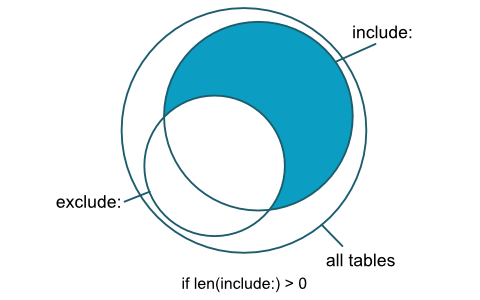
`include:` and `exclude:` are used to filter target tables from `tbls *`.
```yaml
# .tbls.yml
include:
- some_prefix_*
exclude:
- some_prefix_logs
- CamelizeTable
```
`lintExclude:` is used to exclude tables from `tbls lint`.
```yaml
# .tbls.yml
lintExclude:
- CamelizeTable
```
#### Filter logic
1. Add tables/functions from include
2. Remove tables/functions from exclude
- Check for include/exclude overlaps
- If include is more specific than exclude (i.e. `schema.MyTable` > `schema.*` or `schema.MyT*` > `schema.*`), include the table(s)/function(s). If include is equally or less specific than exclude, exclude wins.
3. Result
### Comments
`comments:` is used to add table/column comment to database document without `ALTER TABLE`.
For example, you can add comment about VIEW TABLE or SQLite tables/columns.
> **Notice:** Comments defined in `.tbls.yml` will override existing comments in the schema.
```yaml
# .tbls.yml
comments:
-
table: users
# table comment
tableComment: Users table
# column comments
columnComments:
email: Email address as login id. ex. user@example.com
# labels for tables
labels:
- privary data
- backup:true
-
table: post_comments
tableComment: post and comments View table
columnComments:
id: comments.id
title: posts.title
post_user: posts.users.username
comment_user: comments.users.username
created: comments.created
updated: comments.updated
-
table: posts
# index comments
indexComments:
posts_user_id_idx: user.id index
# constraints comments
constraintComments:
posts_id_pk: PRIMARY KEY
# triggers comments
triggerComments:
update_posts_updated: Update updated when posts update
```
### Relations
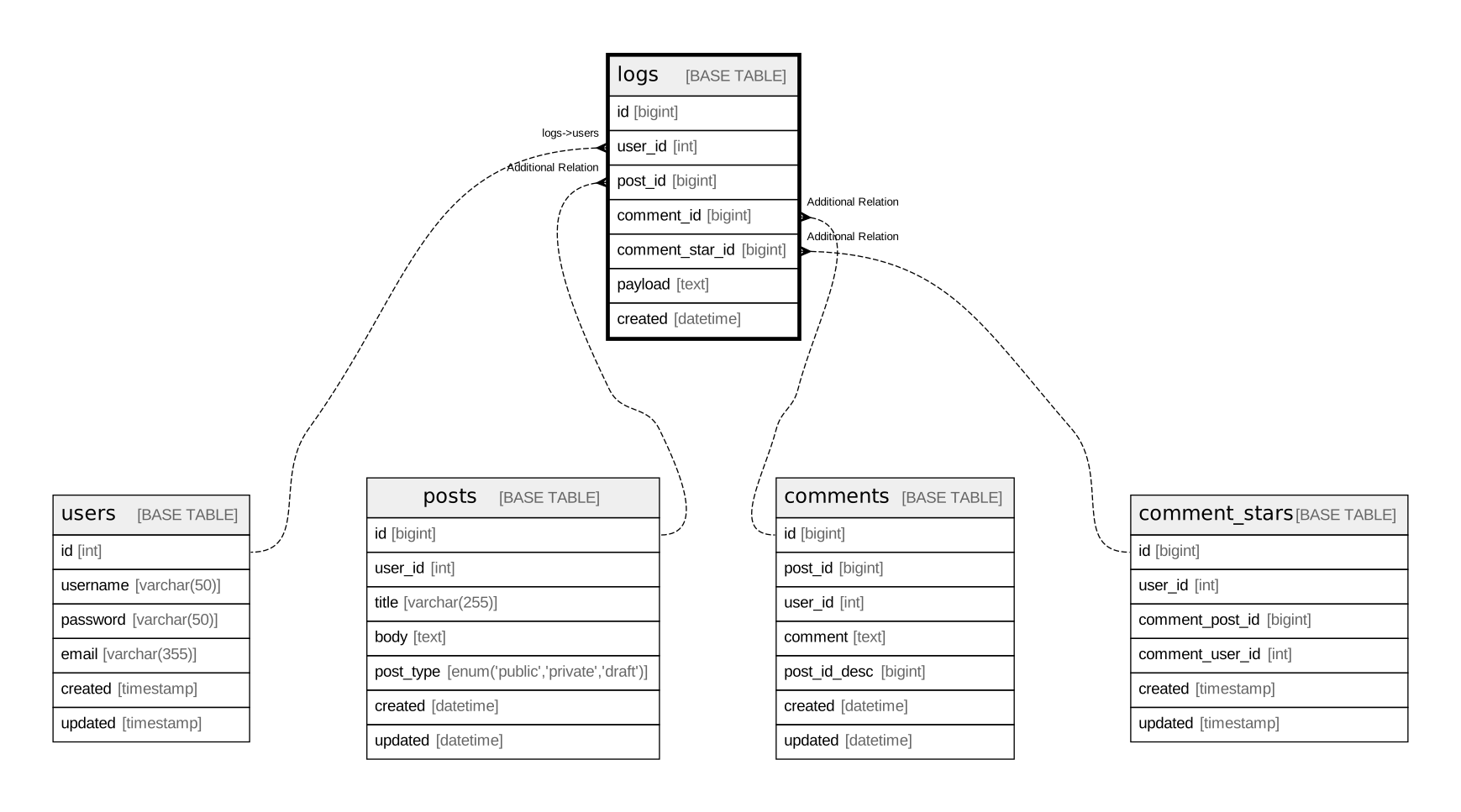
`relations:` is used to add or override table relation to database document without `FOREIGN KEY`.
You can create ER diagrams with relations without having foreign key constraints.
```yaml
relations:
-
table: logs
columns:
- user_id
parentTable: users
parentColumns:
- id
# Relation definition
# Default is `Additional Relation`
def: logs->users
-
table: logs
columns:
- post_id
parentTable: posts
parentColumns:
- id
-
table: logs
columns:
- comment_id
parentTable: comments
parentColumns:
- id
-
table: logs
columns:
- comment_star_id
parentTable: comment_stars
parentColumns:
- id
```
#### Override relations
If you want to override an existing relation, set the `override:` to `true`.
```yaml
relations:
-
table: posts
columns:
- user_id
cardinality: zero or one
parentTable: users
parentColumns:
- id
parentCardinality: one or more
override: true
def: posts->users
```
#### Automatically detect relations
`detectVirtualRelations:` if enabled, automatically detect relations from table and column names.
```yaml
detectVirtualRelations:
enabled: true
strategy: default
```
##### Supported strategies
| strategy name | relation from | relation to |
| :-- | :-- | :-- |
| `default` | `some_table.user_id` | `users.id` |
| `singularTableName` | `some_table.user_id` | `user.id` |
| `identical` | `some_table.user_id` | `users.user_id` |
| `identicalSingularTableName` | `some_table.user_id` | `user.user_id` |
| `invertedSingularTableName` | `some_table.id_user` | `user.id` |
### Dictionary
`dict:` is used to replace title/table header of database document
```yaml
# .tbls.yml
---
dict:
Tables: テーブル一覧
Description: 概要
Columns: カラム一覧
Indexes: INDEX一覧
Constraints: 制約一覧
Triggers: トリガー
Relations: ER図
Name: 名前
Comment: コメント
Type: タイプ
Default: デフォルト値
Children: 子テーブル
Parents: 親テーブル
Definition: 定義
Table Definition: テーブル定義
```
### Personalized Templates
It is possible to provide your own templates to personalize the documentation generated by `tbls` by adding a `templates:` section to your configuration.
For example:
```yaml
templates:
dot:
schema: 'templates/schema.dot.tmpl'
table: 'templates/table.dot.tmpl'
puml:
schema: 'templates/schema.puml.tmpl'
table: 'templates/table.puml.tmpl'
md:
index: 'templates/index.md.tmpl'
table: 'templates/table.md.tmpl'
```
A good starting point to design your own template is to modify a copy the default ones for [Dot](output/dot/templates), [PlantUML](output/plantuml/templates) and [markdown](output/md/templates).
### Required Version
The `requiredVersion` setting defines a version constraint string. This defines which version of tbls can be used in the configuration.
```yaml
requiredVersion: '>= 1.42, < 2'
```
## Expand environment variables
All configuration values can be set by expanding the environment variables.
```yaml
# .tbls.yml
dsn: my://${MYSQL_USER}:${MYSQL_PASSWORD}@hostname:3306/${MYSQL_DATABASE}
```
### Viewpoints
Viewpoints of your database schema based on concerns of your domain and add description to them.
You can also define groups of tables within viewpoints.
```yaml
# .tbls.yml
viewpoints:
-
id: comments-on-post
name: comments on post
desc: Users can comment on each post multiple times and put a star on each comment.
tables:
- users
- posts
- comments
- comment_stars
- post_comments
- post_comment_stars
groups:
-
name: Comments
desc: Tables about comments
tables:
- posts
- comments
- post_comments
-
name: Stars
desc: Tables about stars
tables:
- comment_stars
- post_comment_stars
```
`id` is optional. When set, it is used as the suffix of the viewpoint output file name (e.g. `viewpoint-comments-on-post.md`) instead of the index, so the file name stays stable regardless of the viewpoint order. `id` must be unique and must not contain path separators (`/` or `\`). It is also used to specify the viewpoint in `tbls out --viewpoint`.
## Output formats
`tbls out` output in various formats.
**Markdown:**
```console
$ tbls out -t md -o schema.md
```
**DOT:**
```console
$ tbls out -t dot -o schema.dot
```
**PlantUML:**
```console
$ tbls out -t plantuml -o schema.puml
```
**Mermaid:**
```console
$ tbls out -t mermaid -o schema.mmd
```
**Image (svg, png, jpg):**
```console
$ tbls out -t svg --table users --distance 2 -o users.svg
```
**Viewpoint:**
Output only the schema of a specific viewpoint by specifying its `id` (or index).
```console
$ tbls out -t svg --viewpoint comments-on-post -o comments-on-post.svg
```
With `-t md`, the viewpoint document (including groups and the ER diagram inlined as Mermaid) is generated instead of a plain schema document.
```console
$ tbls out -t md --viewpoint comments-on-post -o comments-on-post.md
```
**JSON:**
```console
$ tbls out -t json -o schema.json
```
> **Tips:** `tbls doc` can load `schema.json` as DSN.
>
> ```console
> $ tbls doc json:///path/to/schema.json
> ```
**YAML:**
```console
$ tbls out -t yaml -o schema.yaml
```
**Excel:**
```console
$ tbls out -t xlsx -o schema.xlsx
```
**.tbls.yml:**
```console
$ tbls out -t config -o .tbls.new.yml
```
## Command arguments
tbls subcommands (`doc`,`diff`, etc) accepts arguments and options
```console
$ tbls doc my://root:mypass@localhost:3306/testdb doc/schema
```
You can check available arguments and options using `tbls help [COMMAND]`.
```console
$ tbls help doc
'tbls doc' analyzes a database and generate document in GitHub Friendly Markdown format.
Usage:
tbls doc [DSN] [DOC_PATH] [flags]
Flags:
-j, --adjust-table adjust column width of table
-b, --base-url string base url for links
-c, --config string config file path
-t, --er-format string ER diagrams output format (png, svg, jpg, mermaid). default: svg
-f, --force force
-h, --help help for doc
--rm-dist remove files in docPath before generating documents
--sort sort
--when string command execute condition
--without-er no generate ER diagrams
```
## Output Schema data
`tbls doc` also output schema data (`schema.json`) to same directory as the generated schema document.
To disable output of schema data, set `disableOutputSchema:` to `true` in `.tbls.yml` file.
## Environment variables
tbls accepts environment variables `TBLS_DSN` and `TBLS_DOC_PATH`
```console
$ env TBLS_DSN=my://root:mypass@localhost:3306/testdb TBLS_DOC_PATH=doc/schema tbls doc
```