[](https://github.com/kaiser-data/kitsune-mcp)
[](https://pypi.org/project/kitsune-mcp/)
[](https://www.npmjs.com/package/kitsune-mcp)
[](https://registry.modelcontextprotocol.io/v0/servers?search=io.github.kaiser-data%2Fkitsune-mcp)
[](https://pypi.org/project/kitsune-mcp/)
[](https://github.com/kaiser-data/kitsune-mcp/actions)
[](https://codecov.io/gh/kaiser-data/kitsune-mcp)
[](LICENSE)
[](https://glama.ai/mcp/servers/kaiser-data/kitsune-mcp)
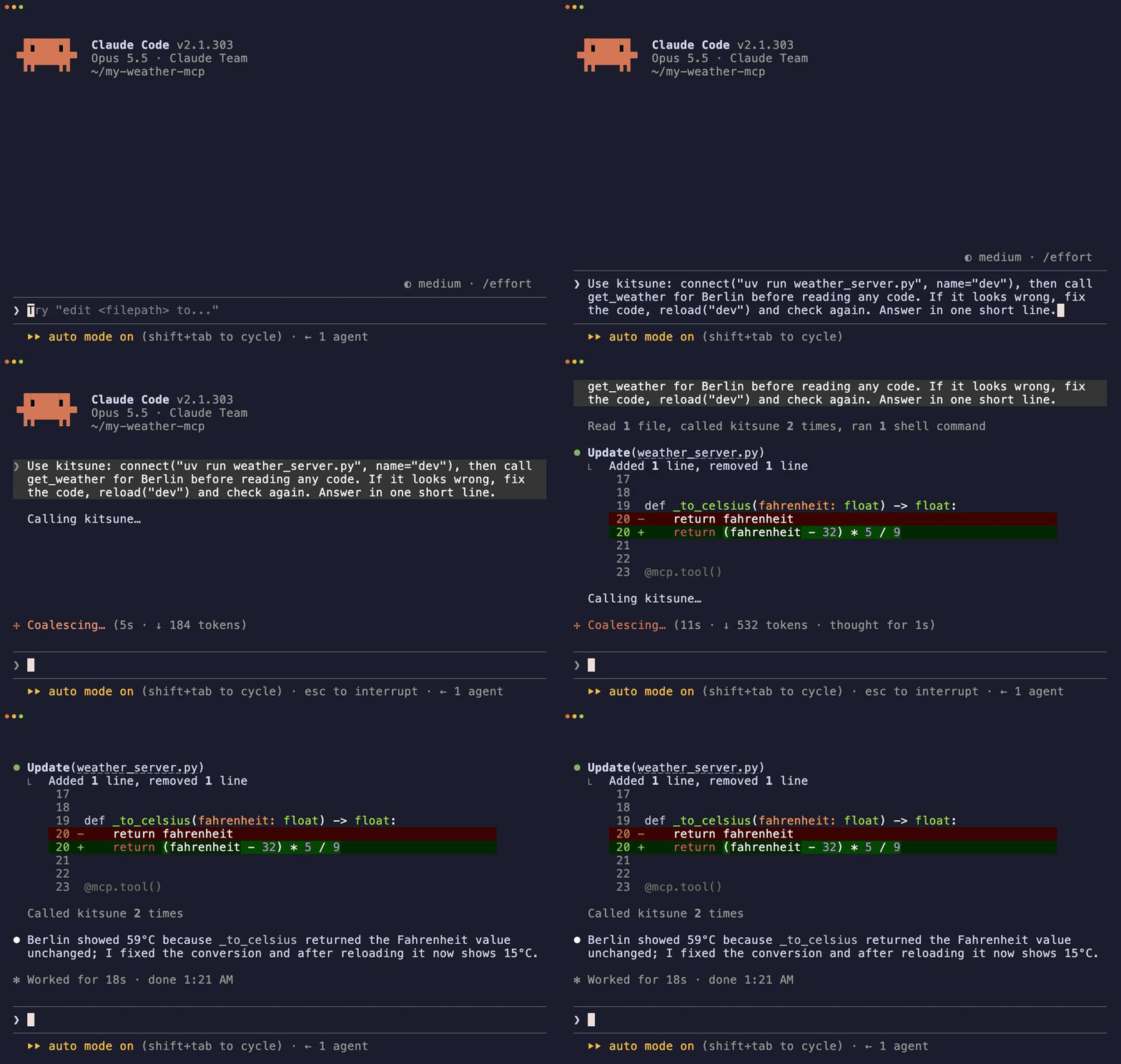
One prompt: Claude finds the bug, fixes it, reloads, checks again. Real recording, 31 s.
---
## Why
Your agent edits an MCP tool, but the client still runs the old process. Someone has to restart it before the agent can test the fix.
With Kitsune, `connect`, `call` and `reload` are tools. The agent runs the whole loop itself:
```python
connect("uvx --from . my-mcp-server", name="dev") # start your server
shapeshift("dev") # its tools appear in the client
call("summarize", arguments={"url": "https://example.com"})
# … the agent (or you) edits the tool …
reload("dev") # restart on fresh code, remount
call("summarize", arguments={"url": "https://example.com"}) # new code, same session
```
It also mounts any of 130,000+ servers from 7 registries mid-session, caged in Docker.
Try it: [hot-reload tutorial](https://kaiser-data.github.io/kitsune-mcp/hot-reload/) · [`examples/demo-hot-reload/`](examples/demo-hot-reload/)
## Install
**Claude Code**
```bash
claude mcp add -s user kitsune -- uvx kitsune-mcp
```
**Any other client** (Claude Desktop, Cursor, Windsurf, Cline, Zed, …):
```json
{
"mcpServers": {
"kitsune": { "command": "uvx", "args": ["kitsune-mcp"] }
}
}
```
Also on PyPI (`pip install kitsune-mcp`, then `"command": "kitsune-mcp"`) and npm (`npx kitsune-mcp`, delegates to `uvx`).
**Requirements:** Python 3.12+ · [uv](https://github.com/astral-sh/uv) · `node`/`npx` for npm-based servers · Docker optional, used to cage community servers.
## Three things it does
| | Loop | What you get |
|---|---|---|
| **MCP REPL** | `connect` → `shapeshift` → edit → `reload` → `call` | Iterate on your own server without restarting the client |
| **Long-tail reach** | `search` → `shapeshift` → `call` → `shapeshift()` | Use a server once without adding it to your config forever |
| **Try before you trust** | `confirm=True` + Docker cage + version pins | Run community npm/PyPI code contained, not as your user |
### Borrow a server you never configured
```python
search("web scraping")
shapeshift("firecrawl", tools=["scrape_url"]) # mount one tool, not the whole server
call("scrape_url", arguments={"url": "https://example.com"})
shapeshift() # drop it, session stays up
```
### Try a community package, caged
```python
search("pdf", registry="glama")
shapeshift("mcp-pdf-tools", confirm=True) # npm/PyPI run in hardened Docker when available
call("extract_text", arguments={"path": "report.pdf"})
shapeshift()
```
### Add credentials mid-session
```python
auth("BRAVE_API_KEY", "sk-...") # saved to ~/.kitsune/.env, no restart
shapeshift("brave", tools=["brave_web_search"])
```
Full live walkthrough: [`docs/demo-realtime.md`](docs/demo-realtime.md).
## When to use it, when not to
| Use Kitsune when… | Skip it when… |
|---|---|
| You're building an MCP server and want an edit/reload loop | You only use 1–3 trusted servers (configure them natively) |
| A task needs a server that isn't in your config | Every turn hits the same server (keep it always-on) |
| You want to evaluate community MCP code without installing it for good | You want lower token use: the base cost is ~1,774 tokens/turn, and modern clients already defer tool schemas |
| Your MCP config is crowded ([GATEWAY](docs/configuration.md#gateway-consolidate-always-on-servers)) | You need a sub-second first call (cold mount takes ~1–15 s) |
## How it works
`shapeshift(server_id)` picks a transport (stdio, HTTP+SSE, WebSocket, Docker), connects, reads `tools/list`, and registers each tool as a native tool with the server's real schema. The client receives `notifications/tools/list_changed` and sees first-class tools, with no wrapper in between. `shapeshift()` with no argument removes them and closes the connection.
`search()` covers the [official servers repo](https://github.com/modelcontextprotocol/servers), the [MCP Registry](https://registry.modelcontextprotocol.io), [Glama](https://glama.ai/mcp/servers), npm, PyPI, GitHub (`github:owner/repo`) and [Smithery](https://smithery.ai) (hosted servers, free API key).
## Tools
Default profile: **9 tools, ~1,774 tokens/turn** (measured with `python examples/benchmark.py`).
| Tool | Role |
|---|---|
| `connect(command, name)` | Start a persistent local server, e.g. the one you're developing |
| `reload(name)` | Release, restart on fresh code, remount, in one call |
| `release(name)` | Stop a persistent server |
| `search(query, registry?)` | Search 7 registries |
| `shapeshift(server_id?, tools=[…])` | Mount a server's tools (all or a subset); no argument drops them |
| `call(tool_name, arguments)` | Call a tool; the server is inferred when mounted |
| `auth(var_or_server, value?)` | Set an env key or run an OAuth 2.1 browser flow |
| `auto(task, server_hint=)` | Search, mount and call in one step |
| `status()` | Current form, connection pool, session stats |
`KITSUNE_TOOLS=all` (or the `kitsune-forge` command) adds developer tools: `inspect` (schemas, credential check, token cost), `test` (quality score 0–100), `bench` (p50/p95 latency), `compare`, `prewarm`, `craft`, `setup`, and more. See [`docs/tools.md`](docs/tools.md). Companion skills for Claude Code: `kitsune-dev`, `kitsune-improve`.
## Safety, in short
- **Community sources need consent.** npm, PyPI and GitHub servers require `confirm=True`. The model can set that flag itself, so real approval belongs in your client's tool-approval UI.
- **`connect()` runs the command it is given, as your user, with no consent gate and no cage.** It is meant for your own code. Approve `connect` calls in your client before the agent runs them.
- **Community packages run in a Docker cage by default** when Docker is installed: no host filesystem, `--cap-drop ALL`, read-only root, memory and PID limits. Credentials are passed by name, never in argv.
- **Version pins (TOFU).** A later malicious publish doesn't silently replace a version you already ran.
- **Opt-in action guard.** A `~/.kitsune/policy.json` checks every downstream call against allow/ask/deny rules, path roots and a host allowlist. `ask` goes to you through MCP elicitation.
- Install commands are validated and launched without a shell. `fetch()` blocks private hosts and re-checks every redirect.
Don't run it unattended with production admin, billing or security credentials. The full model, including what it does **not** protect against: [`docs/safety.md`](docs/safety.md).
## More
- [Configuration](docs/configuration.md): env and `.env` lookup, tool profiles, sandbox and trust settings, Smithery, GATEWAY, mount patterns
- [Performance](docs/performance.md): cold/warm latency and token cost compared with always-on servers
- [Transports](docs/transports.md) · [Compatibility](docs/compatibility.md) · [Agent patterns](docs/agent-patterns.md) · [Worked scenarios](examples/scenarios/)
## Why "Kitsune"?
In Japanese folklore the kitsune (狐) is known for what it can *become*: it borrows a form, uses that power, casts it off and returns to itself. That is the product loop.
> *I am not Japanese, and I use this name with the highest respect for the mythology and culture it comes from. The parallel felt too precise to ignore.*
## Contributing
```bash
make dev # install with dev dependencies
make test # pytest
make lint # ruff
```
Issues and PRs welcome: [github.com/kaiser-data/kitsune-mcp](https://github.com/kaiser-data/kitsune-mcp) · [CHANGELOG.md](CHANGELOG.md)
---
*MIT License · Python 3.12+ · Built on [FastMCP](https://github.com/jlowin/fastmcp)*