## Configuration
Player configuration parameters are provided whenever a player instance is created.
```js
var config = {
// Configuration here
};
var player = KalturaPlayer.setup(config);
```
#### Configuration Structure
The configuration uses the following structure:
```js
{
targetId: string,
log: PKLogConfigObject,
disableUserCache: boolean,
text: PKTextConfigObject,
playback: PKPlaybackConfigObject,
sources: PKSourcesConfigObject,
streaming: PKStreamingConfigObject,
network: PKNetworkConfigObject,
customLabels: PKCustomLabelsConfigObject,
dimensions: PKDimensionsConfig,
abr: PKAbrConfigObject,
drm: PKDrmConfigObject,
playlist: KPPlaylistObject,
plugins: KPPluginsConfigObject,
advertising: KPAdvertisingConfigObject,
session: PKSessionConfigObject,
provider: ProviderOptionsObject,
ui: UIOptionsObject,
cast: CastConfigObject,
viewability: KPViewabilityConfigObject
}
```
##
> ### config.targetId
>
> ##### Type: `string`
>
> ##### Default: `-`
>
> ##### Description: Defines the ID of the DOM element to which the player will be added.
##
> ### config.log
>
> ##### Type: [PKLogConfigObject](https://github.com/kaltura/playkit-js/blob/master/docs/configuration.md#configlog)
>
> ##### Description: Defines the player log level.
##
> ### config.disableUserCache
>
> ##### Type: `boolean`
>
> ##### Default: `false`
>
> ##### Description: Indicates whether to stop using the saved user preferences.
>
>
You can learn more about user preferences in the player [here](./user-preferences.md).
##
> ### config.text
>
> ##### Type: [PKTextConfigObject](https://github.com/kaltura/playkit-js/blob/master/docs/configuration.md#configtext)
>
> ##### Description: Defines the text configuration.
>
> ##
>
> ### config.playback
>
> ##### Type: [PKPlaybackConfigObject](https://github.com/kaltura/playkit-js/blob/master/docs/configuration.md#configplayback)
>
> ##### Description: Defines the playback configuration.
>
> ##
>
> > ### config.playback.loop
> >
> > ##### Type: `boolean`
> >
> > ##### Default: `false`
> >
> > ##### Description: Indicates whether the video should play in loop.
> >
> > This is a Boolean attribute that indicates the default setting of the loop playback option. If set, the player will restart playback upon completion. The attribute's default value is false, which means that the video will pause when the video is finished playing.
##
> ### config.sources
>
> ##### Type: [PKSourcesConfigObject](https://github.com/kaltura/playkit-js/blob/master/docs/configuration.md#configsources)
>
> ##### Description: Defines the sources configuration.
##
> ### config.streaming
>
> ##### Type: [PKStreamingConfigObject](https://github.com/kaltura/playkit-js/blob/master/docs/configuration.md#type-pkstreamingconfigobject)
>
> ##### Description: Defines the sources streaming configuration.
##
> ### config.network
>
> ##### Type: [PKNetworkConfigObject](https://github.com/kaltura/playkit-js/blob/master/docs/configuration.md#confignetwork)
>
> ##### Description: Defines the player network configuration.
##
> ### config.customLabels
>
> ##### Type: [PKCustomLabelsConfigObject](https://github.com/kaltura/playkit-js/blob/master/docs/configuration.md#configcustomlabels)
>
> ##### Description: Defines the tracks custom labels configuration.
##
> ### config.dimensions
>
> ##### Type: [PKDimensionsConfig](https://github.com/kaltura/playkit-js/blob/master/docs/configuration.md#type-pkdimensionsconfig)
>
> ##### Description: Defines the player dimensions configuration.
##
> ### config.abr
>
> ##### Type: [PKAbrConfigObject](https://github.com/kaltura/playkit-js/blob/master/docs/configuration.md#type-pkabrconfigobject)
>
> ##### Description: Defines the playback abr configuration.
##
> ### config.drm
>
> ##### Type: [PKDrmConfigObject](https://github.com/kaltura/playkit-js/blob/master/docs/configuration.md#type-pkdrmconfigobject)
>
> ##### Description: Defines the drm system configuration.
> ### config.playlist
>
> ##### Type: [KPPlaylistObject](./api.md#kpplaylistobject)
>
> ##### Description: Defines the playlist configuration.
##
> ### config.plugins
>
> ##### Type: [KPPluginsConfigObject](./api.md#kppluginsconfigobject)
>
> ##### Default: `{}`
>
> ##### Description: Defines the active plugins.
>
> This should map the plugin to its config object.
>
> #### Example:
>
> ```js
> var config = {
> plugins: {
> myAwesomePlugin1: {},
> myAwesomePlugin2: {}
> }
> };
> ```
>
> ##
>
> > ### config.plugins.PLUGIN_NAME.disable
> >
> > ##### Type: `boolean`
> >
> > ##### Default: `false`
> >
> > ##### Description: Allow to disable a specific plugin.
> >
> > #### Expample:
> >
> > ```js
> > var config = {
> > plugins: {
> > myAwesomePlugin: {
> > disable: true
> > }
> > }
> > };
> > ```
##
> ### config.advertising
>
> ##### Type: [KPAdvertisingConfigObject](./api.md#kpadvertisingconfigobject)
>
> ```js
> {
> playAdsAfterTime?: number,
> showAdBreakCuePoint?: booleab,
> adBreakCuePointStyle?: Object,
> adBreaks: Array
> }
> ```
>
> ##### Default: `-`
>
> ##### Description: Defines an advertising scheme (optional).
>
> ##
>
> > ### config.advertising.playAdsAfterTime
> >
> > ##### Type: `number`
> >
> > ##### Default: `config.playback.startTime`
> >
> > ##### Description: Only play ad breaks scheduled after this time (in seconds). This setting is strictly after - e.g. setting playAdsAfterTime to 15 will cause the player to ignore an ad break scheduled to play at 15s.
> >
> > ##
> >
> > ### config.advertising.showAdBreakCuePoint
> >
> > ##### Type: `boolean`
> >
> > ##### Default: `false`
> >
> > ##### Description: Whether to show the ad breaks cue points.
> >
> > ##
> >
> > ### config.advertising.adBreakCuePointStyle
> >
> > ##### Type: `Object`
> >
> > ##### Default: `null`
> >
> > ##### Description: Style options for the ad breaks cue points.
> >
> > ##
> >
> > ### config.advertising.adBreaks
> >
> > ##### Type: `Array`
> >
> > ##### Description: The ad breaks scheme
> >
> > ##
> >
> > > ##### Type [PKAdBreakObject](./api.md#kpadbreakobject)
> > >
> > > ```js
> > > {
> > > position: number,
> > > percentage?: number, // optional
> > > every?: number, // optional
> > > ads: Array
> > > }
> > > ```
> > >
> > > ##
> > >
> > > > ##### `PKAdBreakObject.position`
> > > >
> > > > ##### Type: `number`
> > > >
> > > > ##### Description: The position, in seconds, to show the ad break.
> > > >
> > > > ##
> > > >
> > > > ##### `PKAdBreakObject.percentage`
> > > >
> > > > ##### Type: `number`
> > > >
> > > > ##### Description: Alternative parameter to `position`. The position, in percentage of the media length, to show the ad break (optional).
> > > >
> > > > ##
> > > >
> > > > ##### `PKAdBreakObject.every`
> > > >
> > > > ##### Type: `number`
> > > >
> > > > ##### Description: Alternative parameter to `position`. Play ad break every X seconds (optional).
> > > >
> > > > ##
> > > >
> > > > **Important**. `position`, `percentage` and `every` are several options to configure the ad break position.
> > > > Only one should be provided. If none will be provided, the ad break will be ignored.
> > > > If more than one will be provided, only one configuration will be considered, by the following priority:
> > > >
> > > > 1. `position` 2. `percentage` 3. `every`.
> > > >
> > > > ##
> > > >
> > > > ##### `PKAdBreakObject.ads`
> > > >
> > > > ##### Type: `Array`
> > > >
> > > > ##### Description: An array of ads to play (Ad pod).
> > > >
> > > > ##
> > > >
> > > > > ##### Type [PKAdObject](./api.md#kpadobject)
> > > > >
> > > > > ```js
> > > > > {
> > > > > url?: Array,
> > > > > response?: Array,
> > > > > bumper?: boolean
> > > > > }
> > > > > ```
> > > > >
> > > > > ##
> > > > >
> > > > > > ##### `PKAdObject.url`
> > > > > >
> > > > > > ##### Type: `Array`
> > > > > >
> > > > > > ##### Description: List of urls, each one specifies the ad tag url that is requested from the ad server. The player will request the first url, if failed, it will request the second url and so on (aka waterfalling).
> > > > > >
> > > > > > ##
> > > > > >
> > > > > > ##### `PKAdObject.response`
> > > > > >
> > > > > > ##### Type: `Array`
> > > > > >
> > > > > > ##### Description: List of XMLs, each one specifies a VAST 2.0 document to be used as the ads response instead of making a request via an ad tag url. The player will use the first XML, if failed, it will use the second and so on (aka waterfalling).
> > > > > >
> > > > > > ##
> > > > > >
> > > > > > ##### `PKAdObject.bumper`
> > > > > >
> > > > > > ##### Type: `boolean`
> > > > > >
> > > > > > ##### Default: `false`
> > > > > >
> > > > > > ##### Description: Specifies whether this is a bumper.
> >
> > ##
> >
> > #### Example:
> >
> > ```js
> > var config = {
> > advertising: {
> > adBreaks: [
> > {
> > position: 0,
> > ads: [
> > {
> > url: [VAST_URL],
> > bumper: true
> > }
> > ]
> > },
> > {
> > percentage: 50,
> > ads: [
> > {
> > url: [VAST_URL, VAST_URL] //waterfalling
> > },
> > {
> > url: [VAST_URL]
> > }
> > ]
> > },
> > {
> > position: -1,
> > ads: [
> > {
> > response: [VAST_XML]
> > }
> > ]
> > }
> > ]
> > }
> > };
> > ```
##
> ### config.session
>
> ##### Type: [PKSessionConfigObject](https://github.com/kaltura/playkit-js/blob/master/docs/configuration.md#configsession)
>
> ##### Description: Defines the session configuration.
##
> ### config.provider
>
> ##### Type: [ProviderOptionsObject](https://github.com/kaltura/playkit-js-providers/blob/master/docs/configuration.md)
>
> ##### Description: Defines the provider configuration.
##
> ### config.ui
>
> ##### Type: [UIOptionsObject](https://github.com/kaltura/playkit-js-ui/blob/master/docs/configuration.md)
>
> ##### Description: Defines the user interface (UI) configuration.
##
> ### config.cast
>
> ##### Type: [CastConfigObject](https://github.com/kaltura/playkit-js-cast-sender/blob/master/docs/api.md#castconfigobject)
>
> ##### Description: Defines the cast configuration.
##
> ### config.viewability
>
> ##### Type: `KPViewabilityConfigObject`
>
> ##### Description: Defines the viewability configuration.
>
> > #### KPViewabilityConfigObject
> >
> > The viewability feature is coupled with the autoplay/autopause configs
> > If the autoplay config is set to `autoplay: inview` the player will only play when it gets into the view
> > If the autopause config is set to `autopause: true` the palyer will pause the playback when it gets out of view
> > If floating player is configured, it will be used to float the player when it gets out of the view and it gets back to the place when you go into original viewport of player.
> > ##### Properties
> >
> > - `observedThresholds` **[Array][1]<[number][2]>** An array of numbers which indicate at what percentage of the target's visibility the observer's callback should be executed. It will fire events when it meets thresholds and the default player threshold is used for defining when to take an action.
> > - `playerThreshold` **[number][2]** The minimal viewable percentage of the player to consider as visible.
## Configuration Priority
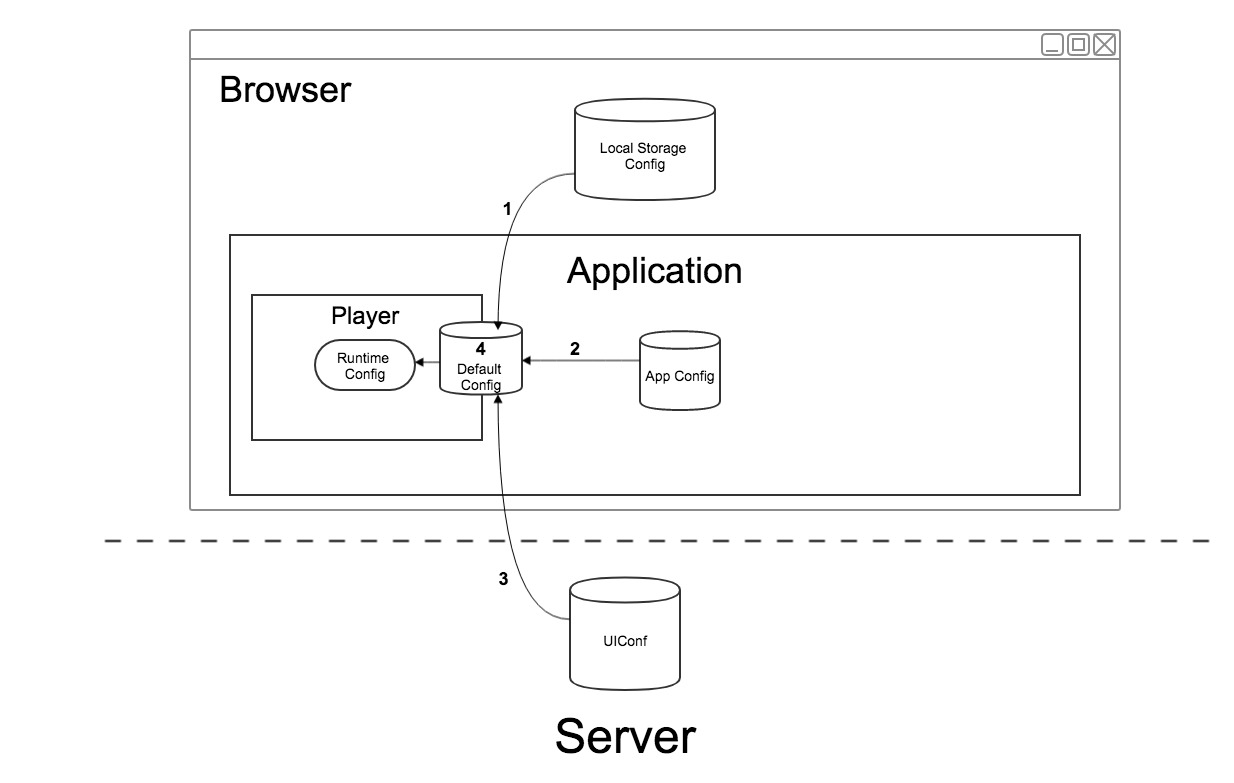
In the player setup flow, the configuration described above (partially or in full) can be provided by a number of different sources. Each source has a priority, which determines whether the source has a greater or lesser impact on how the player is configured.
Available sources include:
- **Application** - This is the application that embeds the player and can be used to configures the player in-line upon instantiation.
- **Server** - This is a partner configuration that is saved on the server. The partner can use this configuration when configuring the player by suppling the `uiConfId` value.
- **Local Storage (Browser)** - This is the user preferences configuration, which is saved in the local storage of the browser.
- **Default Player Configuration** - The default player configuration is defined internally by the player.
When the player builds its runtime configuration, it will need to know how to built the configuration correctly according to the priority of each configuration, which is as follows (#1 is highest; #4 is lowest):
1. **Local Storage**
2. **Application**
3. **Server**
4. **Default Player Configuration**
#### Example
In this example, we'll use the following configuration from each source to see how that source affects the configuration:
Local Storage
```js
{
muted: true,
audioLanguage: 'spa'
}
```
Application
```js
{
muted: false,
volume: 0.7
}
```
Server
```js
{
audioLanguage: 'eng';
autoplay: true;
}
```
Default Player Configuration
```js
{
audioLanguage: '',
textLanguage: '',
muted: false,
volume: 1,
captionsDisplay: false
autoplay: false
}
```
**The resulting runtime configuration will, therefore, be as follows:**
```js
{
audioLanguage: 'spa',
textLanguage: '',
muted: true,
volume: 0.7,
captionsDisplay: false,
autoplay: true
}
```
[1]: https://developer.mozilla.org/docs/Web/JavaScript/Reference/Global_Objects/Array
[2]: https://developer.mozilla.org/docs/Web/JavaScript/Reference/Global_Objects/Number