# Worktree Space
[简体中文](README.md) · **English** · [Changelog](CHANGELOG.en.md)
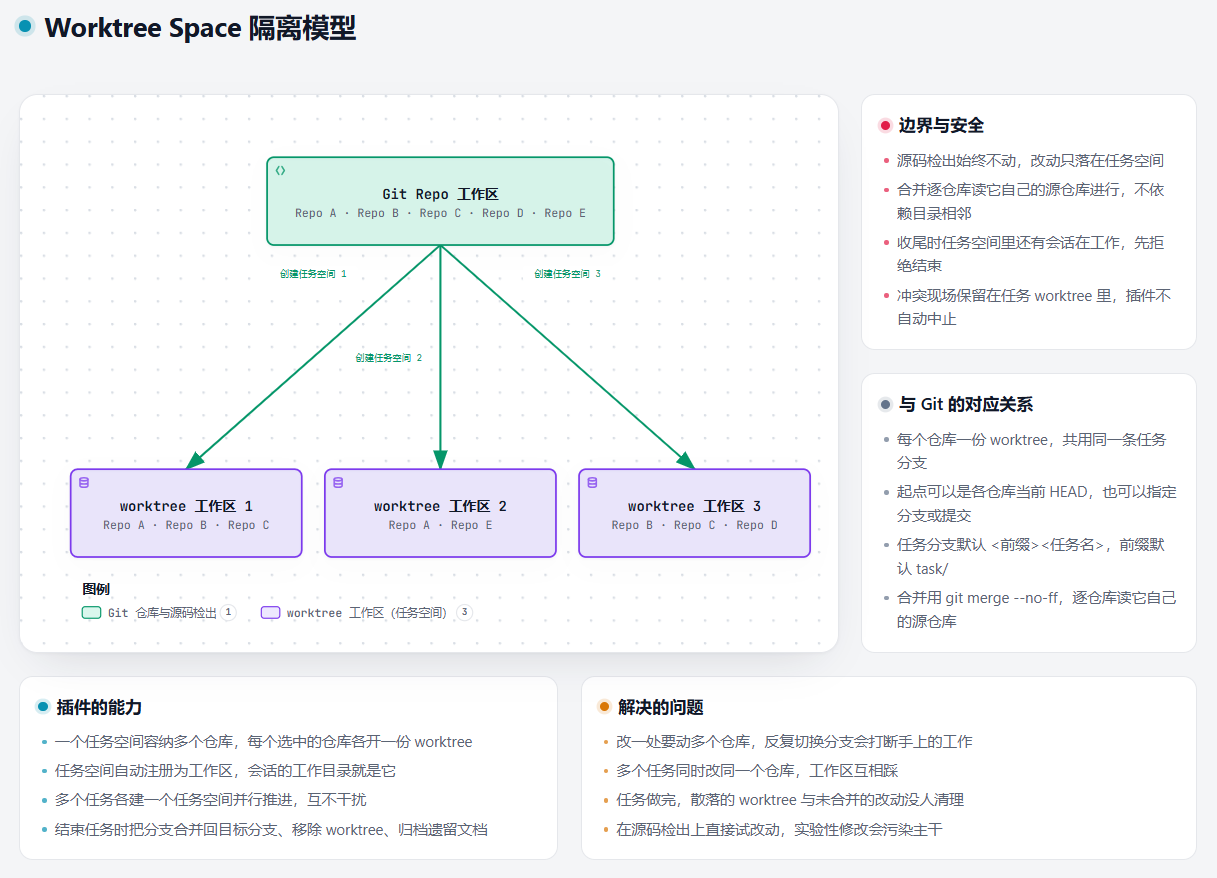
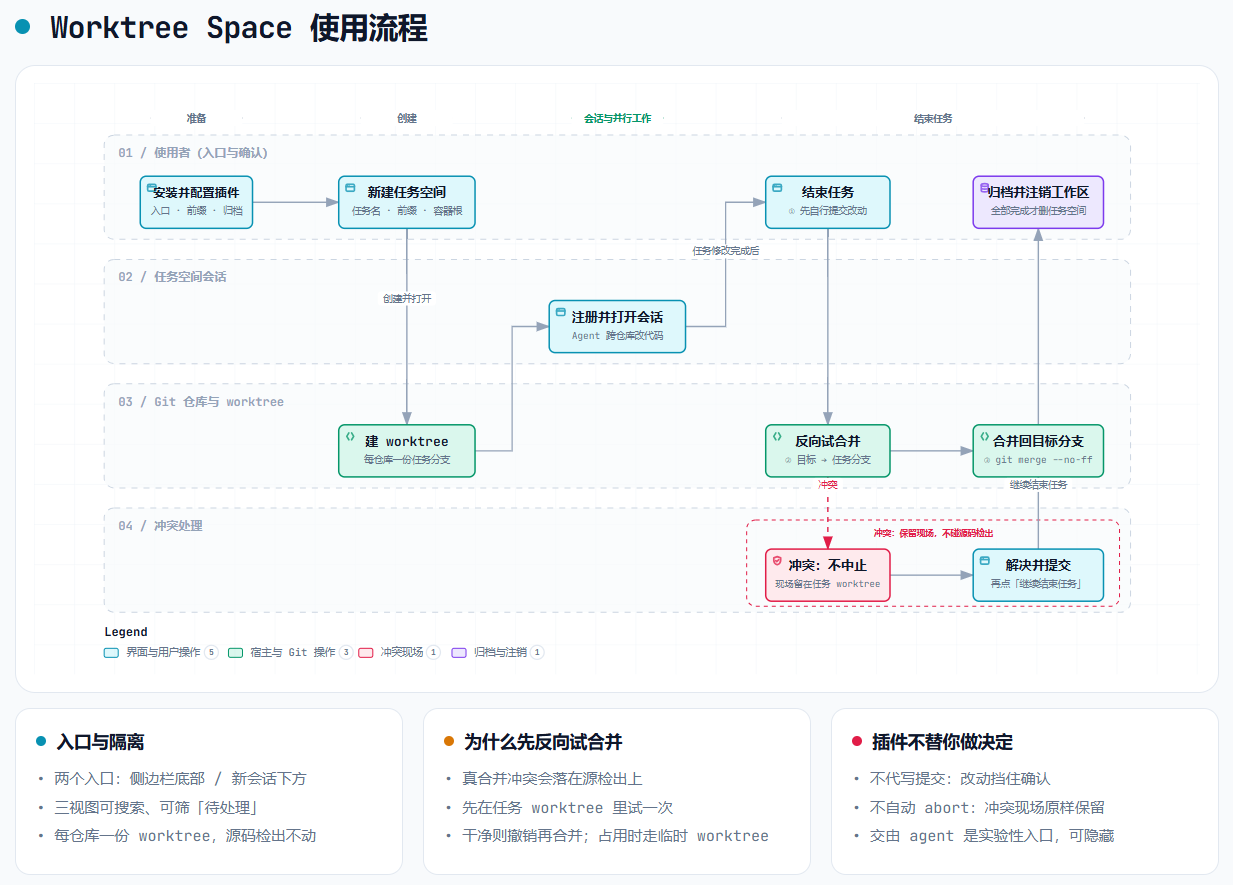
Worktree Space: One task, one space — work on parallel tracks. A task that involves one or more Git repositories goes into its own task space directory, where each participating repository gets a worktree on one shared task branch; the task space registers itself as a DSH workspace and sessions start working inside it, so several tasks can run in parallel without interfering with one another. When the space is created you settle **whether this task deploys for acceptance** — tick it, and a passing smoke record becomes the gate the finishing merge has to clear. When a task is finished its branch is merged back into the target branch, the worktrees are removed, and whatever documents were left in the space are filed into a directory you choose; uncommitted work and merge conflicts can instead be handed to an agent session.
The two routes differ in emphasis and you can read only one of them: **clicking through the whole thing on the panel** ([Usage](#-usage)) or **letting an agent orchestrate it with the tools** ([Advanced](#-advanced-letting-an-agent-orchestrate-end-to-end)). The full step-by-step instructions, the failure paths and the error codes live in the [Worktree Space manual](USAGE.en.md).


 > [!IMPORTANT]
> **Beta (experimental)**: handing the commits and the merge conflicts to an agent is a feature
> in an experimental validation phase and is **shown by default** - set the plugin's agent handoff
> entry to hide to take those two entries off the finish dialog; its behaviour may still change
> (see the [experimental section](#-experimental-handing-the-commits-and-the-conflicts-to-an-agent)).
> The rest of this document describes the flow
> without an agent. Please report problems in
> [GitHub Issues](https://github.com/kangtsang/dsh-worktree-space/issues).
## 📑 Contents
- [🚀 Install](#-install)
- [✨ Features](#-features)
- [📂 Layout of a task](#-layout-of-a-task)
- [🔧 Requirements](#-requirements)
- [🔐 Permissions and failure boundaries](#-permissions-and-failure-boundaries)
- [🛠️ Usage](#-usage) **the manual route**: [⚙️ Configuration](#-configuration) · [➕ Create](#-create-a-worktree-space) · [🗂️ Manage](#-manage-a-worktree-space) · [🚢 Deploy and acceptance](#-deploy-and-acceptance) · [🏁 Finish](#-finish-a-worktree-space) ([combinations](#what-each-combination-does))
- [🤖 Advanced: letting an agent orchestrate end to end](#-advanced-letting-an-agent-orchestrate-end-to-end)
- [🤖 Experimental: handing the commits and the conflicts to an agent](#-experimental-handing-the-commits-and-the-conflicts-to-an-agent)
- [📝 The operation log](#-the-operation-log)
- [📄 Companion documents](#-companion-documents)
## 🚀 Install
**On the web client, from the command line:**
```sh
dsh plugin --profile web add dsh-worktree-space
```
To uninstall: `dsh plugin --profile web remove dsh-worktree-space`. To update, remove and reinstall.
**On the desktop client, from the plugin management page:** sidebar → **Plugins**, put
`dsh-worktree-space` in **Plugin package name**, and press **Install**; to remove it, open
**Worktree Space** from the list, go to its **Plugin details** page, and press **Uninstall** at the
top right.
## ✨ Features
- **Create a task space from a session.** Tick the repositories taking part (all of them are ticked
to start with), name the task, settle the branch prefix, and say where the space goes. Every
participating repository gets a worktree on `` — `task/` by default —
starting from each repository's current HEAD, or from a branch or commit that exists in **every**
selected repository.
- **One delivery choice, and only one: does this task deploy for acceptance?** The bottom of Task
details is a single tick box — **Deploy to Docker** — which, once ticked, adds one **Deploy script**
field (empty means `workspace/.worktree-space/deploy/deploy.sh`). It is asked at creation because
**the delivery choice is made once, when the space is created, and nothing afterwards can add or
change it**: not ticking it settles "this task needs no acceptance", and nothing later will mention
that again. Ticking it while no usable entry script exists **refuses the create outright**, rather
than leaving a task space that can never deploy.
Everything a finish decides — which branch to merge into, whether to delete it, what a conflict
does, what happens to the documents left behind — is deliberately not settled here, and is asked at
the finish, where you can see the work it applies to.
- **Deploy and acceptance** (when it was ticked). The task space carries its own deploy root: the
source root's `.worktree-space/deploy/` is copied into it, and its entry script answers `up` (raise
the environment, write the acceptance URL) and `smoke` (run the smoke test, write the result into
`.state.json`). The environment identity is computed from the container root, the project, the task
name and a local port, so **each task gets its own, and tasks cannot crowd each other out**. There
is **a gate before the merge**: without a `lastSmoke` carrying `result: "pass"` in
`/.state.json`, the merge is refused; the panel then asks whether to finish anyway,
and that exemption is one only a person can give.
- **Registered as a Workspace** named `/`, opened with a session whose working
directory is the task space, so code can be edited inside the task space without touching the
source checkouts.
- **A management page**, with three views (the ways in are listed under Manage a Worktree Space):
- **Workspaces** shows which Workspaces can host a task space, and how many repositories
each one has;
- **Git repositories** lists every Git repository found and the worktrees linked to it;
- **Task spaces** puts each task's repositories together (branch, how many files changed,
whether it is locked or prunable), with that task's deployment card under its row.
All three can be searched, and **Needs attention** narrows them to rows worth a look
(changes, a lock, something prunable, or a status that failed to read). The arrow on a row
folds that row on its own; the button beside the filters folds or opens them all at once.
- **Add a repository to a task** from its row, when the work turns out to need one the task
did not start with. The candidates are the Git repository view's own list, minus the ones the
task already has; a repository directory can also be typed in, and it is registered as a
Workspace so it joins that view too. The new repository gets a worktree on the branch the
task is already on, starting from its own HEAD or from a branch or commit you name.
An added repository may share no common directory with the ones the task began with, and may
not even be on the same volume: merging and finishing are unaffected, because each repository's
source is read from its own worktree. What it does affect is the working directory of a session
handed the commit — it cannot reach those source repositories' `.git`, so the elevation is
approved in that session. This release does **not** offer removing a repository from a task.
- **Finish a task** from its row: each repository's branch is merged back into its target branch,
the worktrees are removed, the task space's documents are filed under a selected directory,
and the Workspace registration is removed — but **not while a session is still working in that
space**. Where the merge runs and what a conflict means: see Finish a Worktree Space.
- **New task space** and **Finish task space** also sit in that workspace list's own `⋯` menu — the
first for Workspaces that hold repositories, the second for directories that really are task
spaces; both open the same dialog the rest of this document describes.
- **The interface is fully bilingual in Chinese and English.** The management page, the create and
finish dialogs, the configuration items and their explanations, the buttons and the error messages
all switch with DSH's language setting; the plugin registers `zh` and `en` with the host (351 strings
each at this release) and carries no language switch of its own. The plugin list's name, description
and icon are English only.
- **No extra service needed.** The entries, the scan depth and the directory limit all
live in the plugin's own configuration (see Configuration). It follows DSH themes.
- **An operation log, on by default and switchable.** `worktree-space-log.jsonl` at the container root
records what this task space did; reading it is how a report gets reproduced. See
[The operation log](#-the-operation-log).
## 📂 Layout of a task
> Terms: the **Worktree Space container** (the **container** below) is the directory the plugin keeps
> task spaces in — that is, the **container root directory** `worktree-space/`. Each paragraph names
> it in full the first time and in short after.
>
> **Container root** is short for **container root directory** and points at that one directory: both
> the area it occupies and the path you fill into the setting.
```text
~/workspace/ the root workspace: projects hang off this level, and the Worktree Space container root lives here too
├── repo-x/ project x's main Workspace (a repository itself)
├── project1/ project 1's main Workspace (several repositories)
│ ├── repo-a/
│ └── repo-b/
├── deep-path/project2/ project 2's main Workspace, filed under a deeper directory
│ ├── repo-c/
│ └── repo-d/
└── worktree-space/ the container root: the plugin's own zone
├── repo-x/ the project layer, named after the source Workspace directory
│ └── task-x/ the task space — also the session's working directory
│ ├── .worktree-space/ the plugin's own directory: everything it writes lives here
│ │ ├── worktree-space.json the task's record: branch, base, project, repositories, delivery choice, created
│ │ ├── worktree-space.md rendered from that record — branch, base and conventions
│ │ └── deploy/ the deploy root: a copy of the source root's .worktree-space/deploy/, state file included
│ └── repo-x/ a worktree on task-x
├── project1/
│ ├── hotfix/
│ │ ├── repo-a/ both on a worktree named hotfix
│ │ └── repo-b/
│ └── task-a/
│ ├── repo-a/
│ └── repo-b/
├── project2/ filed under a deeper directory, and still the same container
│ └── task-b/
│ ├── repo-c/
│ └── repo-d/
├── archived-docs/ the archive root (default): non-Git output lands here
│ └── project1/ filed by project
│ └── hotfix-20260926-020933/ `-`, one folder per task
├── README.md written once, on first use: this is the worktree-only area
└── worktree-space-log.jsonl the operation log: every git call, error and warning
~/my-archive/ an archive root, chosen in the plugin's settings
└── project2/ same shape: a project layer, then a task name with its timestamp
└── task-b-20260926-020933/
```
The **Worktree Space container root** is recommended **one level below the root workspace** (`~/workspace/worktree-space`),
and where that is depends only on the first directory below the volume root: `~/workspace/project1` and
`~/workspace/deep-path/project2` are both offered the **same** container however deep their own project
sits. A different path can be given when a task space is created, but the container root and the source
root must not contain one another.
The project name is the **source Workspace's directory name**; the plugin layers by itself, so there is
nothing to fill in. Two projects in one Worktree Space container can each hold a task called `hotfix` without crowding
each other. When the Workspace directory *is* a repository (`~/workspace/repo-x`), the project and
repository layers end up with the same name — `repo-x/task-x/repo-x`. That repeat is deliberate: the
layout is three levels deep either way, so neither the plugin nor the client needs to be told which
level is which.
The **Worktree Space container root** is the plugin's zone: the first task space created under it writes a `README.md`
saying this is a worktree-only area and that `git init` / `clone` do not belong there (an existing one is
never overwritten). Conversely, if the container root is itself a Git repository — it has a `.git` —
creation is **refused**, and not a single directory is made.
The archive root splits two levels further, `/-/`, so its shape mirrors the
Worktree Space container's and a project's documents stay in that project's own folder. By default it sits in the
container root, adding exactly one directory — `archived-docs` — and the operation log's one file to the
whole volume. Removing a worktree does not delete the Git branch behind it; finishing a task merges the
branch back first and removes the worktree afterwards.
## 🔧 Requirements
- [Node.js](https://nodejs.org) `>=22.19.0`
- [Git](https://git-scm.com): it runs every worktree and branch operation, is not shipped with the
plugin, and has to be on `PATH`
- DSH `>=0.1.7-rc.1 <0.3.0-0`, the 0.1.7 line without its `0.1.7-alpha.x` prereleases, and 0.2.x
- Clients: **both the web client and the desktop client work**; the desktop client was verified by
hand, the command-line matrix does not cover it
**All four official releases were verified one by one** — `0.1.7-rc.1`, `0.1.7-rc.2`, `0.2.0-rc.1`
and `0.2.0-rc.2` — each against **its own** DSH CLI, in a disposable profile, through
install, start, uninstall and rollback. That matrix covers the **command line and the web client**;
the desktop client (Electron) was only confirmed installable by hand and is not part of the scripted
matrix. The per-release record is in
[`docs/store-evidence.md`](docs/store-evidence.md).
DSH **enforces** the DSH range declared in the manifest's `peerDependencies`: a runtime that does not
satisfy it has the install refused before pnpm runs, or the plugin refused at startup, with the
exact-version exemption (`dsh plugin allow-version`) offered instead. Fields such as `engines.dsh` are
declarations and block nothing. Anything outside the tested range is treated as unknown rather than
passed off as evidence; if you hit a version-specific problem, open an
[issue](https://github.com/kangtsang/dsh-worktree-space/issues).
## 🔐 Permissions and failure boundaries
At runtime this plugin reads and writes files and runs `git`. Those two permissions *are* its
function; they cannot be reduced to zero. Every runtime dependency is supplied by the DSH profile and
none of them ship with the plugin — installing it brings in no new runtime third-party dependency,
contacts no external service and reports no telemetry.
**Permissions at a glance:**
| Permission | Scope |
| --- | --- |
| File reads | The selected Workspace directories (breadth-first scan, skipping `node_modules`, `dist`, `build`, `vendor` and hidden directories except `.worktrees`); the record files in the task space and at the Worktree Space container root; each worktree's `.git` marker file; and, at finish, the contents of the files git lists, read only to decide whether a merge still carries conflict markers |
| File writes | Only inside the task space, the Worktree Space container root, and the archive directory the configuration names (see Configuration); finishing a task removes only the worktrees and documents the plugin itself created, and a merge also `git worktree add`s one temporary checkout under the **system temporary directory** and deletes it right after. It does **not** write the files of a source repository's checkout and does **not** write the DSH data directory |
| Command execution | `git` only, always as `git -C ` with fixed argv through a single `runGit` seam — no shell; plus the task's own entry script (`up` / `smoke`), and only for a task created with deployment ticked. **`add` and `commit` are not among them**: the plugin writes no commit, uncommitted work stops that repository (see below), and a commit handed to an agent is run by the host's own session |
| Operation log | `worktree-space-log.jsonl` at the container root, **on by default**: the git commands that change repository state, any git command that fails, the outcome of every operation, and every error and warning with an error code. Switchable in the plugin settings; switching it off leaves any log already there alone. **No file contents**, credentials in a URL masked before the write; nothing sends it anywhere and it leaves this machine |
| Network | None: the plugin itself makes no HTTP requests and runs no `git push`; every `git` subcommand it runs is local |
| Credentials | Reads, stores and forwards none; the plugin never touches keys |
| Global resources | No global installs, no daemon or resident service, no writes to system directories |
The full account — what it reads, what it writes, which subcommands it runs and what happens when
things fail — is in [PERMISSIONS.en.md](PERMISSIONS.en.md); the disposable-Profile install, start,
uninstall and rollback acceptance evidence is in [docs/store-evidence.md](docs/store-evidence.md).
**Failure boundaries (never silent):**
| Situation | Behaviour |
| --- | --- |
| Directory scan hits its limit | It stops where it is and says which deeper repositories were not looked at; raise the limit, or point the Workspace at a narrower root. It no longer throws away every other path's findings |
| Any `git` command fails | Throws `git failed (exit N): `, surfacing Git's own diagnosis verbatim |
| A session is still working in the task space at finish | The whole finish is refused, naming those sessions; let them finish or stop them first |
| A repository still holds uncommitted work at finish | That repository stops (`force` is what discards it): `uncommitted work is waiting in ; commit it before the task can be finished`; the plugin **writes no commit**, the others carry on, and the result names each one |
| A merge is resolved but not committed | `the merge in is resolved but not committed` — the state is kept as it stands |
| The resolved files still carry conflict markers | `the resolved merge still has conflict markers in ` — kept as they stand, no side is taken |
| The rehearsal merge conflicts | Does **not** auto `merge --abort`; the merge site is kept (with `mergeSite` and `conflictedFiles`) until it is resolved and committed, then carry on |
| The real merge meets a fresh commit | The rehearsal passed, then the real merge ran into a commit someone pushed in between: the merge is undone (`merge --abort`, the branch is left as it was) and Git's own words are surfaced; the worktree and the task branch are kept, and pressing **Continue finishing** rehearses again |
| Deploy and acceptance blocks the merge | Refuses the merge and names what is missing — a deployment or a smoke — and takes the merge again once there is a passing smoke |
| Worktree removal fails | Reports `failed to remove the worktree (uncommitted changes? force it deliberately)`; the worktree is kept and reported, and `git worktree prune` is the remedy |
| A task directory is not empty | The directory and the Workspace registration are kept rather than force-deleted |
| A fact cannot be confirmed | It is written as "unknown" — absence of evidence is never inferred as absence of access |
## 🛠️ Usage
This section sketches the **manual route** — configuration, creating, working, deploy and acceptance,
finishing — clicked through on the panel, with no leader or member and no tool calls in sight. The
full instructions for each step, the failures you can meet and what to do after a refusal are in the
[Worktree Space manual](USAGE.en.md). The other route — one agent driving the whole chain with
`wts_worktree_space` — is [Advanced: letting an agent orchestrate end to end](#-advanced-letting-an-agent-orchestrate-end-to-end).
### ⚙️ Configuration
**In the UI** (recommended): sidebar → **Plugins** → **Worktree Space** → the configuration
section of its **Plugin details** page, beside every other plugin's; changes take effect
immediately, no restart. The file can also be
edited directly: the plugin's `config:` block in `profiles//cordis.patch.yml` under the DSH
data directory, which needs a DSH restart.
| Setting | Values | Default | Meaning |
| --- | --- | --- | --- |
| Panel entry (under New session) | show / hide | **hide** | The row in the sidebar's panel list that opens the management page full-width (the page brings its own left-hand navigation and its Back to conversation); hidden by default |
| Shortcut in the sidebar footer | show / hide | show | The shortcut at the sidebar foot, opening that same page as a **dialog** |
| Agent handoff entry (experimental) | show / hide | show | The finish dialog's two experimental entries, **Hand the commits to the agent** and **Hand the conflict to the agent**; hidden, the standard flow applies: commit and resolve the conflict yourself, then continue the finish |
| Full access for the sessions handed to the agent for conflicts and commits | off / on | **off** | On, those two sessions are opened on the **container root** and widened to `danger-full-access` straight away. **The cost is that such a session can afterwards write anywhere the DSH process can**, without asking again, and the grant survives a restart. It governs only the sessions opened after it, and the finish dialog can switch it where it matters |
| Operation log | on / off | **on** | The switch for `worktree-space-log.jsonl` at the container root. Off stops new records only; a log already on disk is left alone |
| Scan depth | 1–5 levels | 3 levels | How many levels below a Workspace directory (level 0) the scan looks for Git repositories |
| Scan directory limit | 500 / 1000 / 2000 / 3000 / 5000 / 10000 | 2000 | How many directories one scan may read; past it, the scan stops and says what it did not reach |
| Directories the scan skips | any list of directory names | the plugin's 25 | A scan never descends into directories with these names. The plugin ships 25: dependency and build-output directories across languages — `node_modules`, `target`, `__pycache__`, `Pods` and the rest — plus this plugin's own task container, under both names it takes, `worktree-space` and `dsh-worktree-space`. You can add your own, and you can put one of those back. **Restoring a built-in one asks first**, because the cost lands on the next scan rather than in the dialog. Names are matched without regard to case; the Edit button on the right opens a dialog to search, add and remove, and nothing is written until it is saved |
| Default branch prefix | any text | `task/` | The prefix a new task space starts from; changing it in the create dialog and ticking Set as the default branch prefix writes it back here when the space is created |
| Worktree Space container root | default / custom directory | **default** | Where new task spaces go. **The default is the recommended choice**: it is derived from the source root by the rule above and lands one level below the root workspace, so every project under that root workspace falls into the same container however deep its own directory sits. A custom directory that shares no common ancestor with the repositories makes the session that hands commits and conflicts to an agent ask for authorisation by hand |
| Custom Worktree Space container root | any path | empty | Used only by the custom strategy; empty keeps the derived recommendation. Changing the Worktree Space container root in the create dialog and ticking Set as the default Worktree Space container root writes both back when the space is created |
| Archive documents location | in the container root / custom directory | **in the container root** | The root the archive is filed under; both strategies add a `/-` folder beneath it, the stamp being the local time of that moment, to the second. The default files them in the Worktree Space container root's own `archived-docs`, wherever the task space was made |
| Custom archive directory | any path | empty | Used only by the custom strategy; empty files them in the Worktree Space container root's `archived-docs` |
A scan covers **every** Workspace. It goes breadth-first, reading up to eight directories at
a time per level. A directory holding a `.git` **directory** counts as a repository — a linked
worktree carries `.git` as a file, and is not counted twice — and `node_modules`, `dist`, `build`,
`vendor` and hidden directories are skipped (except `.worktrees`).
### ➕ Create a Worktree Space
> [!IMPORTANT]
> **Beta (experimental)**: handing the commits and the merge conflicts to an agent is a feature
> in an experimental validation phase and is **shown by default** - set the plugin's agent handoff
> entry to hide to take those two entries off the finish dialog; its behaviour may still change
> (see the [experimental section](#-experimental-handing-the-commits-and-the-conflicts-to-an-agent)).
> The rest of this document describes the flow
> without an agent. Please report problems in
> [GitHub Issues](https://github.com/kangtsang/dsh-worktree-space/issues).
## 📑 Contents
- [🚀 Install](#-install)
- [✨ Features](#-features)
- [📂 Layout of a task](#-layout-of-a-task)
- [🔧 Requirements](#-requirements)
- [🔐 Permissions and failure boundaries](#-permissions-and-failure-boundaries)
- [🛠️ Usage](#-usage) **the manual route**: [⚙️ Configuration](#-configuration) · [➕ Create](#-create-a-worktree-space) · [🗂️ Manage](#-manage-a-worktree-space) · [🚢 Deploy and acceptance](#-deploy-and-acceptance) · [🏁 Finish](#-finish-a-worktree-space) ([combinations](#what-each-combination-does))
- [🤖 Advanced: letting an agent orchestrate end to end](#-advanced-letting-an-agent-orchestrate-end-to-end)
- [🤖 Experimental: handing the commits and the conflicts to an agent](#-experimental-handing-the-commits-and-the-conflicts-to-an-agent)
- [📝 The operation log](#-the-operation-log)
- [📄 Companion documents](#-companion-documents)
## 🚀 Install
**On the web client, from the command line:**
```sh
dsh plugin --profile web add dsh-worktree-space
```
To uninstall: `dsh plugin --profile web remove dsh-worktree-space`. To update, remove and reinstall.
**On the desktop client, from the plugin management page:** sidebar → **Plugins**, put
`dsh-worktree-space` in **Plugin package name**, and press **Install**; to remove it, open
**Worktree Space** from the list, go to its **Plugin details** page, and press **Uninstall** at the
top right.
## ✨ Features
- **Create a task space from a session.** Tick the repositories taking part (all of them are ticked
to start with), name the task, settle the branch prefix, and say where the space goes. Every
participating repository gets a worktree on `` — `task/` by default —
starting from each repository's current HEAD, or from a branch or commit that exists in **every**
selected repository.
- **One delivery choice, and only one: does this task deploy for acceptance?** The bottom of Task
details is a single tick box — **Deploy to Docker** — which, once ticked, adds one **Deploy script**
field (empty means `workspace/.worktree-space/deploy/deploy.sh`). It is asked at creation because
**the delivery choice is made once, when the space is created, and nothing afterwards can add or
change it**: not ticking it settles "this task needs no acceptance", and nothing later will mention
that again. Ticking it while no usable entry script exists **refuses the create outright**, rather
than leaving a task space that can never deploy.
Everything a finish decides — which branch to merge into, whether to delete it, what a conflict
does, what happens to the documents left behind — is deliberately not settled here, and is asked at
the finish, where you can see the work it applies to.
- **Deploy and acceptance** (when it was ticked). The task space carries its own deploy root: the
source root's `.worktree-space/deploy/` is copied into it, and its entry script answers `up` (raise
the environment, write the acceptance URL) and `smoke` (run the smoke test, write the result into
`.state.json`). The environment identity is computed from the container root, the project, the task
name and a local port, so **each task gets its own, and tasks cannot crowd each other out**. There
is **a gate before the merge**: without a `lastSmoke` carrying `result: "pass"` in
`/.state.json`, the merge is refused; the panel then asks whether to finish anyway,
and that exemption is one only a person can give.
- **Registered as a Workspace** named `/`, opened with a session whose working
directory is the task space, so code can be edited inside the task space without touching the
source checkouts.
- **A management page**, with three views (the ways in are listed under Manage a Worktree Space):
- **Workspaces** shows which Workspaces can host a task space, and how many repositories
each one has;
- **Git repositories** lists every Git repository found and the worktrees linked to it;
- **Task spaces** puts each task's repositories together (branch, how many files changed,
whether it is locked or prunable), with that task's deployment card under its row.
All three can be searched, and **Needs attention** narrows them to rows worth a look
(changes, a lock, something prunable, or a status that failed to read). The arrow on a row
folds that row on its own; the button beside the filters folds or opens them all at once.
- **Add a repository to a task** from its row, when the work turns out to need one the task
did not start with. The candidates are the Git repository view's own list, minus the ones the
task already has; a repository directory can also be typed in, and it is registered as a
Workspace so it joins that view too. The new repository gets a worktree on the branch the
task is already on, starting from its own HEAD or from a branch or commit you name.
An added repository may share no common directory with the ones the task began with, and may
not even be on the same volume: merging and finishing are unaffected, because each repository's
source is read from its own worktree. What it does affect is the working directory of a session
handed the commit — it cannot reach those source repositories' `.git`, so the elevation is
approved in that session. This release does **not** offer removing a repository from a task.
- **Finish a task** from its row: each repository's branch is merged back into its target branch,
the worktrees are removed, the task space's documents are filed under a selected directory,
and the Workspace registration is removed — but **not while a session is still working in that
space**. Where the merge runs and what a conflict means: see Finish a Worktree Space.
- **New task space** and **Finish task space** also sit in that workspace list's own `⋯` menu — the
first for Workspaces that hold repositories, the second for directories that really are task
spaces; both open the same dialog the rest of this document describes.
- **The interface is fully bilingual in Chinese and English.** The management page, the create and
finish dialogs, the configuration items and their explanations, the buttons and the error messages
all switch with DSH's language setting; the plugin registers `zh` and `en` with the host (351 strings
each at this release) and carries no language switch of its own. The plugin list's name, description
and icon are English only.
- **No extra service needed.** The entries, the scan depth and the directory limit all
live in the plugin's own configuration (see Configuration). It follows DSH themes.
- **An operation log, on by default and switchable.** `worktree-space-log.jsonl` at the container root
records what this task space did; reading it is how a report gets reproduced. See
[The operation log](#-the-operation-log).
## 📂 Layout of a task
> Terms: the **Worktree Space container** (the **container** below) is the directory the plugin keeps
> task spaces in — that is, the **container root directory** `worktree-space/`. Each paragraph names
> it in full the first time and in short after.
>
> **Container root** is short for **container root directory** and points at that one directory: both
> the area it occupies and the path you fill into the setting.
```text
~/workspace/ the root workspace: projects hang off this level, and the Worktree Space container root lives here too
├── repo-x/ project x's main Workspace (a repository itself)
├── project1/ project 1's main Workspace (several repositories)
│ ├── repo-a/
│ └── repo-b/
├── deep-path/project2/ project 2's main Workspace, filed under a deeper directory
│ ├── repo-c/
│ └── repo-d/
└── worktree-space/ the container root: the plugin's own zone
├── repo-x/ the project layer, named after the source Workspace directory
│ └── task-x/ the task space — also the session's working directory
│ ├── .worktree-space/ the plugin's own directory: everything it writes lives here
│ │ ├── worktree-space.json the task's record: branch, base, project, repositories, delivery choice, created
│ │ ├── worktree-space.md rendered from that record — branch, base and conventions
│ │ └── deploy/ the deploy root: a copy of the source root's .worktree-space/deploy/, state file included
│ └── repo-x/ a worktree on task-x
├── project1/
│ ├── hotfix/
│ │ ├── repo-a/ both on a worktree named hotfix
│ │ └── repo-b/
│ └── task-a/
│ ├── repo-a/
│ └── repo-b/
├── project2/ filed under a deeper directory, and still the same container
│ └── task-b/
│ ├── repo-c/
│ └── repo-d/
├── archived-docs/ the archive root (default): non-Git output lands here
│ └── project1/ filed by project
│ └── hotfix-20260926-020933/ `-`, one folder per task
├── README.md written once, on first use: this is the worktree-only area
└── worktree-space-log.jsonl the operation log: every git call, error and warning
~/my-archive/ an archive root, chosen in the plugin's settings
└── project2/ same shape: a project layer, then a task name with its timestamp
└── task-b-20260926-020933/
```
The **Worktree Space container root** is recommended **one level below the root workspace** (`~/workspace/worktree-space`),
and where that is depends only on the first directory below the volume root: `~/workspace/project1` and
`~/workspace/deep-path/project2` are both offered the **same** container however deep their own project
sits. A different path can be given when a task space is created, but the container root and the source
root must not contain one another.
The project name is the **source Workspace's directory name**; the plugin layers by itself, so there is
nothing to fill in. Two projects in one Worktree Space container can each hold a task called `hotfix` without crowding
each other. When the Workspace directory *is* a repository (`~/workspace/repo-x`), the project and
repository layers end up with the same name — `repo-x/task-x/repo-x`. That repeat is deliberate: the
layout is three levels deep either way, so neither the plugin nor the client needs to be told which
level is which.
The **Worktree Space container root** is the plugin's zone: the first task space created under it writes a `README.md`
saying this is a worktree-only area and that `git init` / `clone` do not belong there (an existing one is
never overwritten). Conversely, if the container root is itself a Git repository — it has a `.git` —
creation is **refused**, and not a single directory is made.
The archive root splits two levels further, `/-/`, so its shape mirrors the
Worktree Space container's and a project's documents stay in that project's own folder. By default it sits in the
container root, adding exactly one directory — `archived-docs` — and the operation log's one file to the
whole volume. Removing a worktree does not delete the Git branch behind it; finishing a task merges the
branch back first and removes the worktree afterwards.
## 🔧 Requirements
- [Node.js](https://nodejs.org) `>=22.19.0`
- [Git](https://git-scm.com): it runs every worktree and branch operation, is not shipped with the
plugin, and has to be on `PATH`
- DSH `>=0.1.7-rc.1 <0.3.0-0`, the 0.1.7 line without its `0.1.7-alpha.x` prereleases, and 0.2.x
- Clients: **both the web client and the desktop client work**; the desktop client was verified by
hand, the command-line matrix does not cover it
**All four official releases were verified one by one** — `0.1.7-rc.1`, `0.1.7-rc.2`, `0.2.0-rc.1`
and `0.2.0-rc.2` — each against **its own** DSH CLI, in a disposable profile, through
install, start, uninstall and rollback. That matrix covers the **command line and the web client**;
the desktop client (Electron) was only confirmed installable by hand and is not part of the scripted
matrix. The per-release record is in
[`docs/store-evidence.md`](docs/store-evidence.md).
DSH **enforces** the DSH range declared in the manifest's `peerDependencies`: a runtime that does not
satisfy it has the install refused before pnpm runs, or the plugin refused at startup, with the
exact-version exemption (`dsh plugin allow-version`) offered instead. Fields such as `engines.dsh` are
declarations and block nothing. Anything outside the tested range is treated as unknown rather than
passed off as evidence; if you hit a version-specific problem, open an
[issue](https://github.com/kangtsang/dsh-worktree-space/issues).
## 🔐 Permissions and failure boundaries
At runtime this plugin reads and writes files and runs `git`. Those two permissions *are* its
function; they cannot be reduced to zero. Every runtime dependency is supplied by the DSH profile and
none of them ship with the plugin — installing it brings in no new runtime third-party dependency,
contacts no external service and reports no telemetry.
**Permissions at a glance:**
| Permission | Scope |
| --- | --- |
| File reads | The selected Workspace directories (breadth-first scan, skipping `node_modules`, `dist`, `build`, `vendor` and hidden directories except `.worktrees`); the record files in the task space and at the Worktree Space container root; each worktree's `.git` marker file; and, at finish, the contents of the files git lists, read only to decide whether a merge still carries conflict markers |
| File writes | Only inside the task space, the Worktree Space container root, and the archive directory the configuration names (see Configuration); finishing a task removes only the worktrees and documents the plugin itself created, and a merge also `git worktree add`s one temporary checkout under the **system temporary directory** and deletes it right after. It does **not** write the files of a source repository's checkout and does **not** write the DSH data directory |
| Command execution | `git` only, always as `git -C ` with fixed argv through a single `runGit` seam — no shell; plus the task's own entry script (`up` / `smoke`), and only for a task created with deployment ticked. **`add` and `commit` are not among them**: the plugin writes no commit, uncommitted work stops that repository (see below), and a commit handed to an agent is run by the host's own session |
| Operation log | `worktree-space-log.jsonl` at the container root, **on by default**: the git commands that change repository state, any git command that fails, the outcome of every operation, and every error and warning with an error code. Switchable in the plugin settings; switching it off leaves any log already there alone. **No file contents**, credentials in a URL masked before the write; nothing sends it anywhere and it leaves this machine |
| Network | None: the plugin itself makes no HTTP requests and runs no `git push`; every `git` subcommand it runs is local |
| Credentials | Reads, stores and forwards none; the plugin never touches keys |
| Global resources | No global installs, no daemon or resident service, no writes to system directories |
The full account — what it reads, what it writes, which subcommands it runs and what happens when
things fail — is in [PERMISSIONS.en.md](PERMISSIONS.en.md); the disposable-Profile install, start,
uninstall and rollback acceptance evidence is in [docs/store-evidence.md](docs/store-evidence.md).
**Failure boundaries (never silent):**
| Situation | Behaviour |
| --- | --- |
| Directory scan hits its limit | It stops where it is and says which deeper repositories were not looked at; raise the limit, or point the Workspace at a narrower root. It no longer throws away every other path's findings |
| Any `git` command fails | Throws `git failed (exit N): `, surfacing Git's own diagnosis verbatim |
| A session is still working in the task space at finish | The whole finish is refused, naming those sessions; let them finish or stop them first |
| A repository still holds uncommitted work at finish | That repository stops (`force` is what discards it): `uncommitted work is waiting in ; commit it before the task can be finished`; the plugin **writes no commit**, the others carry on, and the result names each one |
| A merge is resolved but not committed | `the merge in is resolved but not committed` — the state is kept as it stands |
| The resolved files still carry conflict markers | `the resolved merge still has conflict markers in ` — kept as they stand, no side is taken |
| The rehearsal merge conflicts | Does **not** auto `merge --abort`; the merge site is kept (with `mergeSite` and `conflictedFiles`) until it is resolved and committed, then carry on |
| The real merge meets a fresh commit | The rehearsal passed, then the real merge ran into a commit someone pushed in between: the merge is undone (`merge --abort`, the branch is left as it was) and Git's own words are surfaced; the worktree and the task branch are kept, and pressing **Continue finishing** rehearses again |
| Deploy and acceptance blocks the merge | Refuses the merge and names what is missing — a deployment or a smoke — and takes the merge again once there is a passing smoke |
| Worktree removal fails | Reports `failed to remove the worktree (uncommitted changes? force it deliberately)`; the worktree is kept and reported, and `git worktree prune` is the remedy |
| A task directory is not empty | The directory and the Workspace registration are kept rather than force-deleted |
| A fact cannot be confirmed | It is written as "unknown" — absence of evidence is never inferred as absence of access |
## 🛠️ Usage
This section sketches the **manual route** — configuration, creating, working, deploy and acceptance,
finishing — clicked through on the panel, with no leader or member and no tool calls in sight. The
full instructions for each step, the failures you can meet and what to do after a refusal are in the
[Worktree Space manual](USAGE.en.md). The other route — one agent driving the whole chain with
`wts_worktree_space` — is [Advanced: letting an agent orchestrate end to end](#-advanced-letting-an-agent-orchestrate-end-to-end).
### ⚙️ Configuration
**In the UI** (recommended): sidebar → **Plugins** → **Worktree Space** → the configuration
section of its **Plugin details** page, beside every other plugin's; changes take effect
immediately, no restart. The file can also be
edited directly: the plugin's `config:` block in `profiles//cordis.patch.yml` under the DSH
data directory, which needs a DSH restart.
| Setting | Values | Default | Meaning |
| --- | --- | --- | --- |
| Panel entry (under New session) | show / hide | **hide** | The row in the sidebar's panel list that opens the management page full-width (the page brings its own left-hand navigation and its Back to conversation); hidden by default |
| Shortcut in the sidebar footer | show / hide | show | The shortcut at the sidebar foot, opening that same page as a **dialog** |
| Agent handoff entry (experimental) | show / hide | show | The finish dialog's two experimental entries, **Hand the commits to the agent** and **Hand the conflict to the agent**; hidden, the standard flow applies: commit and resolve the conflict yourself, then continue the finish |
| Full access for the sessions handed to the agent for conflicts and commits | off / on | **off** | On, those two sessions are opened on the **container root** and widened to `danger-full-access` straight away. **The cost is that such a session can afterwards write anywhere the DSH process can**, without asking again, and the grant survives a restart. It governs only the sessions opened after it, and the finish dialog can switch it where it matters |
| Operation log | on / off | **on** | The switch for `worktree-space-log.jsonl` at the container root. Off stops new records only; a log already on disk is left alone |
| Scan depth | 1–5 levels | 3 levels | How many levels below a Workspace directory (level 0) the scan looks for Git repositories |
| Scan directory limit | 500 / 1000 / 2000 / 3000 / 5000 / 10000 | 2000 | How many directories one scan may read; past it, the scan stops and says what it did not reach |
| Directories the scan skips | any list of directory names | the plugin's 25 | A scan never descends into directories with these names. The plugin ships 25: dependency and build-output directories across languages — `node_modules`, `target`, `__pycache__`, `Pods` and the rest — plus this plugin's own task container, under both names it takes, `worktree-space` and `dsh-worktree-space`. You can add your own, and you can put one of those back. **Restoring a built-in one asks first**, because the cost lands on the next scan rather than in the dialog. Names are matched without regard to case; the Edit button on the right opens a dialog to search, add and remove, and nothing is written until it is saved |
| Default branch prefix | any text | `task/` | The prefix a new task space starts from; changing it in the create dialog and ticking Set as the default branch prefix writes it back here when the space is created |
| Worktree Space container root | default / custom directory | **default** | Where new task spaces go. **The default is the recommended choice**: it is derived from the source root by the rule above and lands one level below the root workspace, so every project under that root workspace falls into the same container however deep its own directory sits. A custom directory that shares no common ancestor with the repositories makes the session that hands commits and conflicts to an agent ask for authorisation by hand |
| Custom Worktree Space container root | any path | empty | Used only by the custom strategy; empty keeps the derived recommendation. Changing the Worktree Space container root in the create dialog and ticking Set as the default Worktree Space container root writes both back when the space is created |
| Archive documents location | in the container root / custom directory | **in the container root** | The root the archive is filed under; both strategies add a `/-` folder beneath it, the stamp being the local time of that moment, to the second. The default files them in the Worktree Space container root's own `archived-docs`, wherever the task space was made |
| Custom archive directory | any path | empty | Used only by the custom strategy; empty files them in the Worktree Space container root's `archived-docs` |
A scan covers **every** Workspace. It goes breadth-first, reading up to eight directories at
a time per level. A directory holding a `.git` **directory** counts as a repository — a linked
worktree carries `.git` as a file, and is not counted twice — and `node_modules`, `dist`, `build`,
`vendor` and hidden directories are skipped (except `.worktrees`).
### ➕ Create a Worktree Space
 > Terms: the **source root** is the Workspace directory whose Git repositories the plugin recognises:
> the source root is itself a Git repository, or it is the top-level directory holding several Git
> repositories.
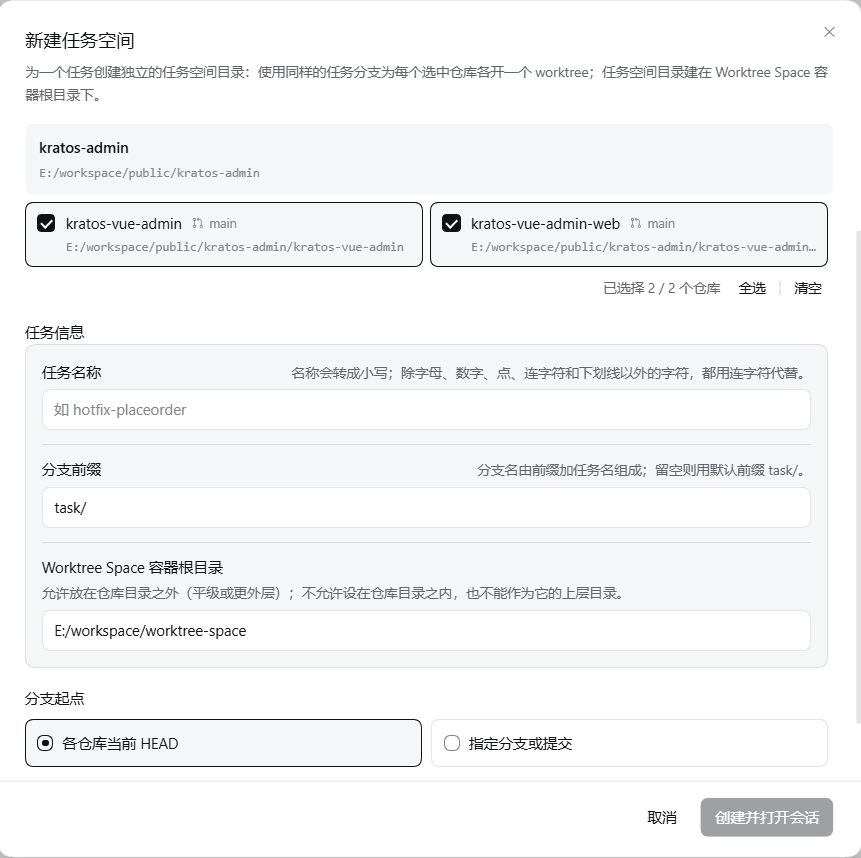
Four entries reach this dialog: the plugin icon beside a blank conversation's composer, **New
Worktree Space** on a row in the management page, and the `⋯` menu in the workspace list. From the
top down:
1. **Repositories**: tick the ones taking part. Each card names the branch its HEAD is on and its
path, and the footer carries **Select all / Select none** with "N / M selected". **One is the
minimum.**
2. **Task name**: lower-cased, with everything except letters, digits, dots, dashes and underscores
(spaces, Chinese characters and so on) turned into dashes. It is both the task space's directory
name and the branch suffix, and an invalid name is reported with the rule it breaks.
3. **Branch prefix**: the branch is this prefix plus the task name, `task/` by default. Change it to
something other than the stored default and **Set as the default branch prefix** appears — ticking
it writes this value back into the settings when the space is created.
4. **Worktree Space container root**: pre-filled with the recommendation, one level below the root
workspace, and rarely changed; moving it offers the same **Set as the default…** box, which writes
the path back the same way. A container root that is itself a Git repository is refused.
5. **Deploy to Docker** (unticked to start with): ticked, it adds one **Deploy script** field, empty
meaning `workspace/.worktree-space/deploy/deploy.sh`. This box settles whether a passing smoke
gates the merge, and it is **recorded once, at creation** — nothing afterwards can add it.
6. **Branch base**: each repository's **current HEAD** (the default), or a **named branch or commit**,
which has to exist in **every** selected repository — one missing refuses the create.
7. **Preview**: the branch name and the space's directory this task will use, live as you type.
8. Press **Create and open session**: the space is built and a session is opened in it.
If the space is built but registering the Workspace fails, the dialog says why and offers to retry the
registration; once registered it is an ordinary task space and can be finished normally. When any
other step fails, what was built is **rolled back** — directory, worktrees and branch together — so no
half task is left behind.
### 🗂️ Manage a Worktree Space
> Terms: the **source root** is the Workspace directory whose Git repositories the plugin recognises:
> the source root is itself a Git repository, or it is the top-level directory holding several Git
> repositories.
Four entries reach this dialog: the plugin icon beside a blank conversation's composer, **New
Worktree Space** on a row in the management page, and the `⋯` menu in the workspace list. From the
top down:
1. **Repositories**: tick the ones taking part. Each card names the branch its HEAD is on and its
path, and the footer carries **Select all / Select none** with "N / M selected". **One is the
minimum.**
2. **Task name**: lower-cased, with everything except letters, digits, dots, dashes and underscores
(spaces, Chinese characters and so on) turned into dashes. It is both the task space's directory
name and the branch suffix, and an invalid name is reported with the rule it breaks.
3. **Branch prefix**: the branch is this prefix plus the task name, `task/` by default. Change it to
something other than the stored default and **Set as the default branch prefix** appears — ticking
it writes this value back into the settings when the space is created.
4. **Worktree Space container root**: pre-filled with the recommendation, one level below the root
workspace, and rarely changed; moving it offers the same **Set as the default…** box, which writes
the path back the same way. A container root that is itself a Git repository is refused.
5. **Deploy to Docker** (unticked to start with): ticked, it adds one **Deploy script** field, empty
meaning `workspace/.worktree-space/deploy/deploy.sh`. This box settles whether a passing smoke
gates the merge, and it is **recorded once, at creation** — nothing afterwards can add it.
6. **Branch base**: each repository's **current HEAD** (the default), or a **named branch or commit**,
which has to exist in **every** selected repository — one missing refuses the create.
7. **Preview**: the branch name and the space's directory this task will use, live as you type.
8. Press **Create and open session**: the space is built and a session is opened in it.
If the space is built but registering the Workspace fails, the dialog says why and offers to retry the
registration; once registered it is an ordinary task space and can be finished normally. When any
other step fails, what was built is **rolled back** — directory, worktrees and branch together — so no
half task is left behind.
### 🗂️ Manage a Worktree Space
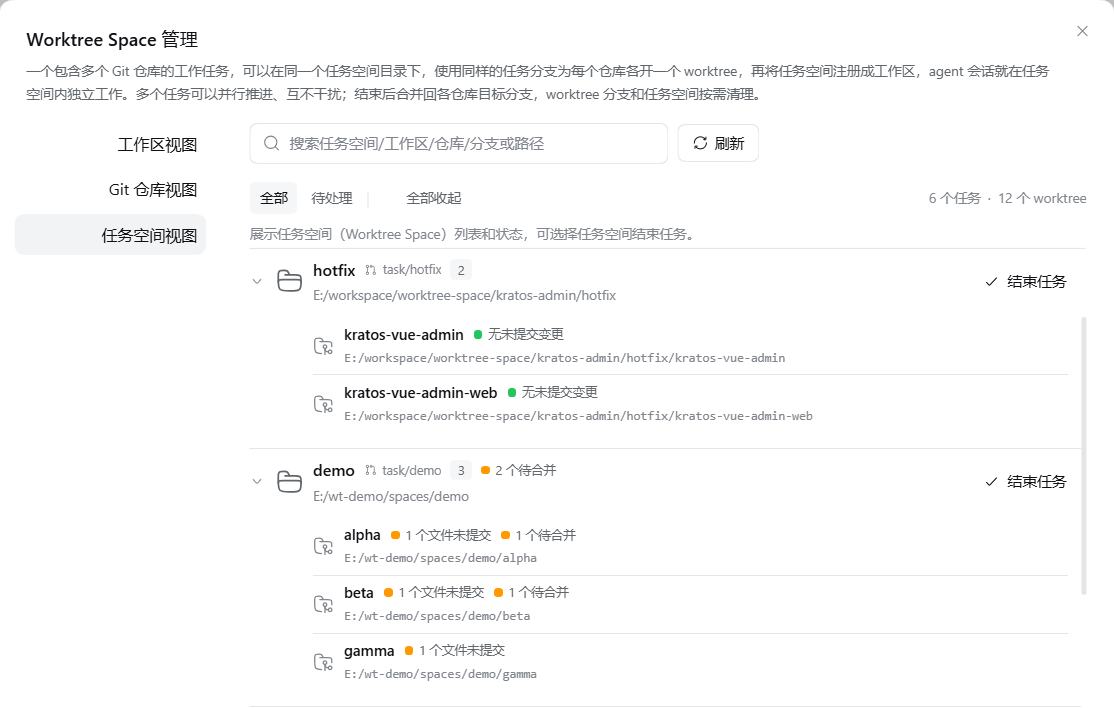 Open the **management page** — two ways in:
- **The Worktree Space shortcut at the sidebar foot** (shown by default) — opens it as a **dialog**;
- **The Worktree Space row under New session** (hidden by default, turn it on in the
**configuration**) — opens it **full width** in the main column, leading with **Back to conversation**.
Both forms share one left-hand navigation: three entries switch between the **Workspaces**, **Git
repositories** and **Task spaces** views, and **⚙ Plugin Settings** at the foot jumps to this
plugin's configuration on the Host's Plugins page. The statistics on the right follow the view
(`N tasks` / `N workspaces` / `N repositories · M worktrees`) and show `visible / total` while a
search or filter is applied.
The panel rescans every time it is opened, but it first paints what the Host still remembers of the
previous scan, so it shows data straight away. That memory lives in the DSH instance's own process
only, and is gone when the instance exits.
### 🚢 Deploy and acceptance
A task created with deployment ticked gains a **deployment card** in its row on the management page,
answering two calls:
- **`up`** — runs the entry script to raise the environment, and writes the **acceptance URL** into
`/.state.json`;
- **`smoke`** — runs the smoke test, the script merging `lastSmoke: { result, at }` into that same
state file.
The environment identity comes from the container root, the project, the task name and a local port,
so **each task has its own and they do not crowd each other out**; that port can change with every
deploy, which is why the state — the URL, the last smoke — is read live on every call rather than
cached. When such a task is finished, its environment is taken down: what dies with the containers is
the URL, since that dynamic port is gone, while the smoke's own verdict stays in the task's record.
Before the merge there is one gate: absent a `lastSmoke` with `result: "pass"` in
`/.state.json`, the merge is refused and the dialog names what is missing, a deployment
or a smoke. **That exemption is only yours to give on the panel** — you can confirm "finish anyway"
and the task's record keeps a `delivery-gate-bypassed` warning; down the tool route, the only way past
the gate is raising the environment and running the smoke.
> How the deploy root is copied, the state file's contract, and how the environment identity is
> computed: [section 6 of the manual](USAGE.en.md#6-deploy-and-acceptance).
### 🏁 Finish a Worktree Space
Open the **management page** — two ways in:
- **The Worktree Space shortcut at the sidebar foot** (shown by default) — opens it as a **dialog**;
- **The Worktree Space row under New session** (hidden by default, turn it on in the
**configuration**) — opens it **full width** in the main column, leading with **Back to conversation**.
Both forms share one left-hand navigation: three entries switch between the **Workspaces**, **Git
repositories** and **Task spaces** views, and **⚙ Plugin Settings** at the foot jumps to this
plugin's configuration on the Host's Plugins page. The statistics on the right follow the view
(`N tasks` / `N workspaces` / `N repositories · M worktrees`) and show `visible / total` while a
search or filter is applied.
The panel rescans every time it is opened, but it first paints what the Host still remembers of the
previous scan, so it shows data straight away. That memory lives in the DSH instance's own process
only, and is gone when the instance exits.
### 🚢 Deploy and acceptance
A task created with deployment ticked gains a **deployment card** in its row on the management page,
answering two calls:
- **`up`** — runs the entry script to raise the environment, and writes the **acceptance URL** into
`/.state.json`;
- **`smoke`** — runs the smoke test, the script merging `lastSmoke: { result, at }` into that same
state file.
The environment identity comes from the container root, the project, the task name and a local port,
so **each task has its own and they do not crowd each other out**; that port can change with every
deploy, which is why the state — the URL, the last smoke — is read live on every call rather than
cached. When such a task is finished, its environment is taken down: what dies with the containers is
the URL, since that dynamic port is gone, while the smoke's own verdict stays in the task's record.
Before the merge there is one gate: absent a `lastSmoke` with `result: "pass"` in
`/.state.json`, the merge is refused and the dialog names what is missing, a deployment
or a smoke. **That exemption is only yours to give on the panel** — you can confirm "finish anyway"
and the task's record keeps a `delivery-gate-bypassed` warning; down the tool route, the only way past
the gate is raising the environment and running the smoke.
> How the deploy root is copied, the state file's contract, and how the environment identity is
> computed: [section 6 of the manual](USAGE.en.md#6-deploy-and-acceptance).
### 🏁 Finish a Worktree Space
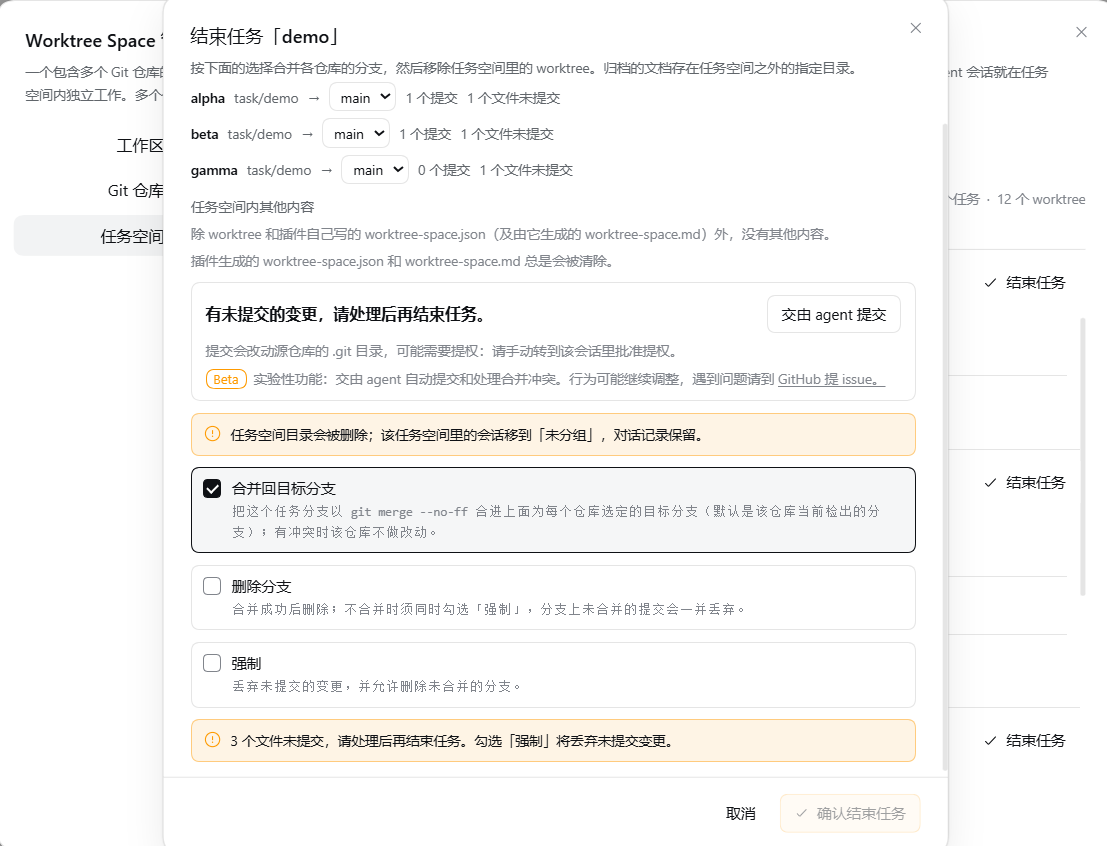 Use **Finish task** on the task row, or **Finish task space** in the workspace list's `⋯` menu. The
dialog reads the **plan** once more when it opens — it does not trust the row that opened it — and
lists, per repository, the current branch, **which branch it would merge into** (changeable), how many
commits it is ahead, how many files are uncommitted, and, only when there really is something left
behind, the **Archive the task space's documents** option.
Four tick boxes: **Merge into the target branch** (ticked), **Delete branch**, **Force**, and
**Archive the task space's documents** (ticked). Delete branch is unavailable without either a merge
or Force.
**There are only three reasons the finish button stays disabled**, and each one is named where you
can see it: a session is still working in the task space, a repository still carries uncommitted work
and Force is not ticked, or a passing smoke is still owed.
Finishing a task space is one standard path, in three steps:
**1. The commits are the user's to make; this plugin never writes one.** While the plan shows
uncommitted changes in a repository and **Force** is not ticked, the button stays unavailable — those
changes are not this side's to write, and a worktree will not be removed carrying them. Commit them in
each worktree with `git add` and `git commit` (the message is written by the user), then **close and
reopen the dialog**, which re-reads the plan; those repositories stop blocking it. **Force** is the
other way past: those changes are discarded with the worktree. **Hand the commits to the agent** does
it for you instead (experimental, see the [next section](#-experimental-handing-the-commits-and-the-conflicts-to-an-agent)).
A repository standing in an unfinished merge does not take part in this step — that one belongs to
step 3.
**2. Merge: rehearse the other way round, then merge for real.** The merge itself puts **the task
branch into the target branch** (by default the branch the source repository has checked out), and the
merge lands in the **source repository**. Before the target is touched, the target is merged into the task
branch **inside the task space's own worktree** — the opposite direction:
- **Clean** — the rehearsal is undone and the task branch is merged into the target with `--no-ff` as
usual, leaving the history in its own order;
- **Conflicted** — **not aborted, not reverted**: the rehearsal stays standing in the task branch's
worktree, with its conflict markers, and the **target branch is untouched**, as is the source
checkout.
Why it rehearses backwards: once a real merge conflicts, the site is on the source checkout and every
difference has to be reconciled there; rehearsing first puts the conflict into the plugin's own
worktree, where it can be dealt with on the spot.
**3. A conflict stops the finish and waits for you to resolve it on the spot.** A repository standing on
a conflict keeps its worktree while the others merge and go, and the report names `mergeInProgress`,
`mergeSite` (where the conflict stands) and `conflictedFiles`. The site is the task branch's own
worktree: resolve the conflict there, `git add`, and one `git commit` that says how the two sides are
reconciled concludes the merge. **Continue finishing** then carries on. **Hand the conflict to the
agent** puts a session on it instead (experimental). Left resolved but uncommitted, or still carrying
markers, the plugin does **not** commit it for you — it keeps things as they stand and says so.
#### What each combination does
| Merge into the target branch | Delete branch | Force | What happens |
| --- | --- | --- | --- |
| ✓ | | | The button is unavailable until each worktree's uncommitted changes are committed to its own task branch, and the task branch is then merged with `--no-ff` into the target branch chosen on its row; the worktrees are removed and the **branch is kept**. A repository standing on a conflict is kept as it is while the rest finish |
| ✓ | ✓ | | The same, and the branch is deleted once the merge succeeds (`git branch -d`, so an unmerged branch cannot go) |
| ✓ | | ✓ | The merge runs and **the commit step is skipped**: uncommitted changes **go with the worktree**; the branch is kept |
| ✓ | ✓ | ✓ | Merges and force-deletes the branch (`git branch -D`); it was merged, so nothing extra is lost |
| | | | Nothing merges: the changes still have to be committed yourself — they stay on the branch, which is kept — and then the worktrees and the space are removed. **The branch is kept**, and you can merge it yourself whenever you like |
| | | ✓ | The same without committing: uncommitted changes **go with the worktree**; the branch is kept |
| | ✓ | ✓ | **Abandon**: nothing merges, nothing commits, the branch is force-deleted, and **its unmerged commits go with the worktree's uncommitted changes** |
(Without a merge and without Force, Delete branch is unavailable — hence the missing row.) Any
combination carrying **Force** skips the commit step.
Three things hold whatever you pick:
1. **The plugin's own metadata is always cleared.** The task record under `.worktree-space/` (the JSON
and the Markdown rendered from it) and the copied deploy root go with every finish.
2. **What is left behind follows the documents tick box.** It appears only when something other than
build output is there: ticked, those documents are copied into `//-/`;
**unticking deletes them**, and unticking names what will go. Build output and editor state are
always cleared — they live in a working directory by nature, not to be kept.
3. **Unfinished repositories are kept exactly as they are.** A repository whose changes nobody
committed, or whose merge stands on a conflict, is kept and reported as unfinished while the others
finish; the task space directory and its Workspace registration stay too. Only once every
repository really is gone do the directory and the registration go together — and the sessions in it
fall back to Ungrouped with their conversations intact.
The finish button's colour follows that: **amber** is an ordinary finish, where a merge can be
reverted and nothing is lost; **red** appears only when the dialog can list exactly what will be
thrown away — abandoning a space (no merge, force-deleted branch) while a worktree still holds
uncommitted files or a branch still holds unmerged commits.
> This table is the quick reference. What each tick box really means, and what to do after a refusal:
> [section 7 of the manual](USAGE.en.md#7-finishing-a-task).
## 🤖 Advanced: letting an agent orchestrate end to end
Beyond driving the panel by hand, a second equally supported route exists: give one agent the
`wts_worktree_space` and `wts_session_tool_*` tools and it can run the whole chain itself — create the
space, dispatch, watch progress, steer mid-flight, deploy and accept, merge at the finish — with no
press in the panel at any point.
Two roles on that route: the **leader** is the orchestrating one, the one you are talking to, and the
**member** is the session it opens in the task space to do the work. Both are defined in
[section 11](USAGE.en.md#11-more-terms-the-leader-and-the-member) of the manual.
| Stage | What the leader does |
| --- | --- |
| Read the layout first | `suggest-root`: which repositories are under a source root, and which container root it recommends |
| Create + first dispatch | `create` does it in one call: make the directory and the worktrees, register the Workspace, open a member session and hand it the brief |
| Dispatch the work after that | `dispatch` opens another session in that task space — **never dispatch the same piece of work twice**, as two sessions editing the same files interrupt each other's commits |
| Add a repository mid-task | `add` gives an existing task one more worktree |
| Watch progress | `lastActivity` from `wts_session_tool_status` tells "stuck" from "busy with a long step" - no polling |
| Change the requirement | `wts_session_tool_send` with `mode: "steer"`, which lands even inside one long turn |
| Recover a failure | an abnormal turn reports itself; the notice names the member session id to pull back to work |
| Finish and merge | `done` with `merge` merges, removes the worktrees and files what was left in one call; a conflict or uncommitted work is handed back to the member, then `done` again |
| Deploy and accept | for a deploying task, the space's own entry runs `up` / `smoke` to pass the smoke gate |
Keeping a hold on one session is the work of eight tools: `wts_session_tool_find` / `_status` /
`_read` / `_send` / `_create` / `_resume` / `_wait` / `_cancel`. Their arguments and "which one when"
are in the [manual's appendix](USAGE.en.md#appendix-the-session-control-tools).
Both routes run **the same flow**; only the driver differs. The full chain, and **which steps still
have to be done by the user** (abandoning a task, discarding what was left behind, exempting the smoke
gate), are in the manual's
[part two, agent orchestration end to end](USAGE.en.md#part-two--an-agent-orchestrating-end-to-end).
## 🤖 Experimental: handing the commits and the conflicts to an agent
The finish dialog can open a DSH agent session to do two things: **Hand the commits to the agent**
(for repositories with uncommitted work) and **Hand the conflict to the agent** (for repositories
stopped on a merge). Neither pushes, touches other repositories or the task space, or merges the
branch into its target — that step is the plugin's. Shown by default; the configuration can hide
both entries.
- **Hand the commits to the agent** opens one session that `git add`s and commits each worktree's
changes, the message saying what changed and why, in the language and style that repository already
keeps;
- **Hand the conflict to the agent** opens one session that reads both sides, works out what each is
trying to do, writes the version keeping both intentions, `git add`s it, and commits with a message
saying how the two were reconciled.
Those repositories **share one session** — the conflict reuses the one the commits ran in, because it
has already read those changes. Its working directory is the common ancestor of their boundaries, and
where that cannot reach a source repository's `.git`, the elevation is yours to approve in that
session.
The working directory is chosen by the layout, not by the plugin, so those sessions land in whichever
Workspace happens to sit there, and fall into Ungrouped where none does. The configuration's **Full
access for the sessions handed to the agent for conflicts and commits** (off by default) changes that:
turned on, both sessions are opened on the **container root** and widened to `danger-full-access`,
because the container root cannot reach a source repository's `.git`. **The cost is that such a
session can afterwards write anywhere the DSH process can**, without asking again, and the grant is a
session-log event that survives a restart. It governs **only the sessions opened after it**, and the
finish dialog switches it where the choice is made.
The steps are short: press the button → the session works (once it stops, the plan is read again and
the headline turns green with "you can continue finishing") → you press **Finish task** or **Continue
finishing** yourself. **That last press is always the user's**; a session stopping never carries on by
itself.
> What each button does, how the working directory is chosen, and the full steps:
> [section 7.6 of the manual](USAGE.en.md#76-optional-handing-the-commits-and-the-conflicts-to-an-agent-experimental).
## 📝 The operation log
A `worktree-space-log.jsonl` sits at the container root, **on by default**, recording every step this
task space has been through:
- **git commands that change repository state**, and **any git command that fails** - including a read
that fails. A successful read is not recorded, or the file would be nothing but the echo of `git status`.
- **The outcome of every operation**: whether a create worked, which worktrees a finish removed.
- **Every error and warning the plugin hits**, carrying an error code that points straight at the line in
the source that went wrong.
**The switch** is in the plugin settings. Turning it off only stops new records being written - **a log
already on disk is left exactly where it is**, because it is often the only account of some piece of
work. Delete the file yourself if you want it gone.
**Nothing is sent anywhere**: it is a file in the container root, and deleting the container root takes
it with it. Failing to write it never affects any operation.
## 📄 Companion documents
| Document | What it covers |
| --- | --- |
| [USAGE.en.md](USAGE.en.md) | **The Worktree Space manual** in two independent parts — **the manual route** (sections 1–9: the management page, creating, working, adding repositories, deploy and acceptance, finishing, conflicts, troubleshooting) and **agent orchestration end to end** (sections 10–14) — plus an error-code reference and a session-control appendix. The Chinese edition is [USAGE.md](USAGE.md) |
| [PERMISSIONS.en.md](PERMISSIONS.en.md) | The full permissions and failure boundaries: what is read, what is written, which `git` subcommands run, and what happens when one fails |
| [docs/store-evidence.md](docs/store-evidence.md) | The disposable-profile install, start, uninstall and rollback acceptance steps, with per-release records |
| [CHANGELOG.en.md](CHANGELOG.en.md) | Release history |
| [GitHub Issues](https://github.com/kangtsang/dsh-worktree-space/issues) | Problem reports |
Use **Finish task** on the task row, or **Finish task space** in the workspace list's `⋯` menu. The
dialog reads the **plan** once more when it opens — it does not trust the row that opened it — and
lists, per repository, the current branch, **which branch it would merge into** (changeable), how many
commits it is ahead, how many files are uncommitted, and, only when there really is something left
behind, the **Archive the task space's documents** option.
Four tick boxes: **Merge into the target branch** (ticked), **Delete branch**, **Force**, and
**Archive the task space's documents** (ticked). Delete branch is unavailable without either a merge
or Force.
**There are only three reasons the finish button stays disabled**, and each one is named where you
can see it: a session is still working in the task space, a repository still carries uncommitted work
and Force is not ticked, or a passing smoke is still owed.
Finishing a task space is one standard path, in three steps:
**1. The commits are the user's to make; this plugin never writes one.** While the plan shows
uncommitted changes in a repository and **Force** is not ticked, the button stays unavailable — those
changes are not this side's to write, and a worktree will not be removed carrying them. Commit them in
each worktree with `git add` and `git commit` (the message is written by the user), then **close and
reopen the dialog**, which re-reads the plan; those repositories stop blocking it. **Force** is the
other way past: those changes are discarded with the worktree. **Hand the commits to the agent** does
it for you instead (experimental, see the [next section](#-experimental-handing-the-commits-and-the-conflicts-to-an-agent)).
A repository standing in an unfinished merge does not take part in this step — that one belongs to
step 3.
**2. Merge: rehearse the other way round, then merge for real.** The merge itself puts **the task
branch into the target branch** (by default the branch the source repository has checked out), and the
merge lands in the **source repository**. Before the target is touched, the target is merged into the task
branch **inside the task space's own worktree** — the opposite direction:
- **Clean** — the rehearsal is undone and the task branch is merged into the target with `--no-ff` as
usual, leaving the history in its own order;
- **Conflicted** — **not aborted, not reverted**: the rehearsal stays standing in the task branch's
worktree, with its conflict markers, and the **target branch is untouched**, as is the source
checkout.
Why it rehearses backwards: once a real merge conflicts, the site is on the source checkout and every
difference has to be reconciled there; rehearsing first puts the conflict into the plugin's own
worktree, where it can be dealt with on the spot.
**3. A conflict stops the finish and waits for you to resolve it on the spot.** A repository standing on
a conflict keeps its worktree while the others merge and go, and the report names `mergeInProgress`,
`mergeSite` (where the conflict stands) and `conflictedFiles`. The site is the task branch's own
worktree: resolve the conflict there, `git add`, and one `git commit` that says how the two sides are
reconciled concludes the merge. **Continue finishing** then carries on. **Hand the conflict to the
agent** puts a session on it instead (experimental). Left resolved but uncommitted, or still carrying
markers, the plugin does **not** commit it for you — it keeps things as they stand and says so.
#### What each combination does
| Merge into the target branch | Delete branch | Force | What happens |
| --- | --- | --- | --- |
| ✓ | | | The button is unavailable until each worktree's uncommitted changes are committed to its own task branch, and the task branch is then merged with `--no-ff` into the target branch chosen on its row; the worktrees are removed and the **branch is kept**. A repository standing on a conflict is kept as it is while the rest finish |
| ✓ | ✓ | | The same, and the branch is deleted once the merge succeeds (`git branch -d`, so an unmerged branch cannot go) |
| ✓ | | ✓ | The merge runs and **the commit step is skipped**: uncommitted changes **go with the worktree**; the branch is kept |
| ✓ | ✓ | ✓ | Merges and force-deletes the branch (`git branch -D`); it was merged, so nothing extra is lost |
| | | | Nothing merges: the changes still have to be committed yourself — they stay on the branch, which is kept — and then the worktrees and the space are removed. **The branch is kept**, and you can merge it yourself whenever you like |
| | | ✓ | The same without committing: uncommitted changes **go with the worktree**; the branch is kept |
| | ✓ | ✓ | **Abandon**: nothing merges, nothing commits, the branch is force-deleted, and **its unmerged commits go with the worktree's uncommitted changes** |
(Without a merge and without Force, Delete branch is unavailable — hence the missing row.) Any
combination carrying **Force** skips the commit step.
Three things hold whatever you pick:
1. **The plugin's own metadata is always cleared.** The task record under `.worktree-space/` (the JSON
and the Markdown rendered from it) and the copied deploy root go with every finish.
2. **What is left behind follows the documents tick box.** It appears only when something other than
build output is there: ticked, those documents are copied into `//-/`;
**unticking deletes them**, and unticking names what will go. Build output and editor state are
always cleared — they live in a working directory by nature, not to be kept.
3. **Unfinished repositories are kept exactly as they are.** A repository whose changes nobody
committed, or whose merge stands on a conflict, is kept and reported as unfinished while the others
finish; the task space directory and its Workspace registration stay too. Only once every
repository really is gone do the directory and the registration go together — and the sessions in it
fall back to Ungrouped with their conversations intact.
The finish button's colour follows that: **amber** is an ordinary finish, where a merge can be
reverted and nothing is lost; **red** appears only when the dialog can list exactly what will be
thrown away — abandoning a space (no merge, force-deleted branch) while a worktree still holds
uncommitted files or a branch still holds unmerged commits.
> This table is the quick reference. What each tick box really means, and what to do after a refusal:
> [section 7 of the manual](USAGE.en.md#7-finishing-a-task).
## 🤖 Advanced: letting an agent orchestrate end to end
Beyond driving the panel by hand, a second equally supported route exists: give one agent the
`wts_worktree_space` and `wts_session_tool_*` tools and it can run the whole chain itself — create the
space, dispatch, watch progress, steer mid-flight, deploy and accept, merge at the finish — with no
press in the panel at any point.
Two roles on that route: the **leader** is the orchestrating one, the one you are talking to, and the
**member** is the session it opens in the task space to do the work. Both are defined in
[section 11](USAGE.en.md#11-more-terms-the-leader-and-the-member) of the manual.
| Stage | What the leader does |
| --- | --- |
| Read the layout first | `suggest-root`: which repositories are under a source root, and which container root it recommends |
| Create + first dispatch | `create` does it in one call: make the directory and the worktrees, register the Workspace, open a member session and hand it the brief |
| Dispatch the work after that | `dispatch` opens another session in that task space — **never dispatch the same piece of work twice**, as two sessions editing the same files interrupt each other's commits |
| Add a repository mid-task | `add` gives an existing task one more worktree |
| Watch progress | `lastActivity` from `wts_session_tool_status` tells "stuck" from "busy with a long step" - no polling |
| Change the requirement | `wts_session_tool_send` with `mode: "steer"`, which lands even inside one long turn |
| Recover a failure | an abnormal turn reports itself; the notice names the member session id to pull back to work |
| Finish and merge | `done` with `merge` merges, removes the worktrees and files what was left in one call; a conflict or uncommitted work is handed back to the member, then `done` again |
| Deploy and accept | for a deploying task, the space's own entry runs `up` / `smoke` to pass the smoke gate |
Keeping a hold on one session is the work of eight tools: `wts_session_tool_find` / `_status` /
`_read` / `_send` / `_create` / `_resume` / `_wait` / `_cancel`. Their arguments and "which one when"
are in the [manual's appendix](USAGE.en.md#appendix-the-session-control-tools).
Both routes run **the same flow**; only the driver differs. The full chain, and **which steps still
have to be done by the user** (abandoning a task, discarding what was left behind, exempting the smoke
gate), are in the manual's
[part two, agent orchestration end to end](USAGE.en.md#part-two--an-agent-orchestrating-end-to-end).
## 🤖 Experimental: handing the commits and the conflicts to an agent
The finish dialog can open a DSH agent session to do two things: **Hand the commits to the agent**
(for repositories with uncommitted work) and **Hand the conflict to the agent** (for repositories
stopped on a merge). Neither pushes, touches other repositories or the task space, or merges the
branch into its target — that step is the plugin's. Shown by default; the configuration can hide
both entries.
- **Hand the commits to the agent** opens one session that `git add`s and commits each worktree's
changes, the message saying what changed and why, in the language and style that repository already
keeps;
- **Hand the conflict to the agent** opens one session that reads both sides, works out what each is
trying to do, writes the version keeping both intentions, `git add`s it, and commits with a message
saying how the two were reconciled.
Those repositories **share one session** — the conflict reuses the one the commits ran in, because it
has already read those changes. Its working directory is the common ancestor of their boundaries, and
where that cannot reach a source repository's `.git`, the elevation is yours to approve in that
session.
The working directory is chosen by the layout, not by the plugin, so those sessions land in whichever
Workspace happens to sit there, and fall into Ungrouped where none does. The configuration's **Full
access for the sessions handed to the agent for conflicts and commits** (off by default) changes that:
turned on, both sessions are opened on the **container root** and widened to `danger-full-access`,
because the container root cannot reach a source repository's `.git`. **The cost is that such a
session can afterwards write anywhere the DSH process can**, without asking again, and the grant is a
session-log event that survives a restart. It governs **only the sessions opened after it**, and the
finish dialog switches it where the choice is made.
The steps are short: press the button → the session works (once it stops, the plan is read again and
the headline turns green with "you can continue finishing") → you press **Finish task** or **Continue
finishing** yourself. **That last press is always the user's**; a session stopping never carries on by
itself.
> What each button does, how the working directory is chosen, and the full steps:
> [section 7.6 of the manual](USAGE.en.md#76-optional-handing-the-commits-and-the-conflicts-to-an-agent-experimental).
## 📝 The operation log
A `worktree-space-log.jsonl` sits at the container root, **on by default**, recording every step this
task space has been through:
- **git commands that change repository state**, and **any git command that fails** - including a read
that fails. A successful read is not recorded, or the file would be nothing but the echo of `git status`.
- **The outcome of every operation**: whether a create worked, which worktrees a finish removed.
- **Every error and warning the plugin hits**, carrying an error code that points straight at the line in
the source that went wrong.
**The switch** is in the plugin settings. Turning it off only stops new records being written - **a log
already on disk is left exactly where it is**, because it is often the only account of some piece of
work. Delete the file yourself if you want it gone.
**Nothing is sent anywhere**: it is a file in the container root, and deleting the container root takes
it with it. Failing to write it never affects any operation.
## 📄 Companion documents
| Document | What it covers |
| --- | --- |
| [USAGE.en.md](USAGE.en.md) | **The Worktree Space manual** in two independent parts — **the manual route** (sections 1–9: the management page, creating, working, adding repositories, deploy and acceptance, finishing, conflicts, troubleshooting) and **agent orchestration end to end** (sections 10–14) — plus an error-code reference and a session-control appendix. The Chinese edition is [USAGE.md](USAGE.md) |
| [PERMISSIONS.en.md](PERMISSIONS.en.md) | The full permissions and failure boundaries: what is read, what is written, which `git` subcommands run, and what happens when one fails |
| [docs/store-evidence.md](docs/store-evidence.md) | The disposable-profile install, start, uninstall and rollback acceptance steps, with per-release records |
| [CHANGELOG.en.md](CHANGELOG.en.md) | Release history |
| [GitHub Issues](https://github.com/kangtsang/dsh-worktree-space/issues) | Problem reports |