







---
Point Kage at a suspect Windows host and it runs the whole triage in one chain:
**CyLR** collects the artefacts, **Hayabusa** correlates the event logs against
Sigma, **THOR Lite** scans for YARA matches, **VirusTotal** and **AbuseIPDB**
qualify the indicators, and the AI provider of your choice drafts the write-up.
Every stage streams live, seals what it produced, and can be replayed alone.
```bash
pip install -r requirements.txt
python -m dfirconsole # → http://127.0.0.1:8787
```
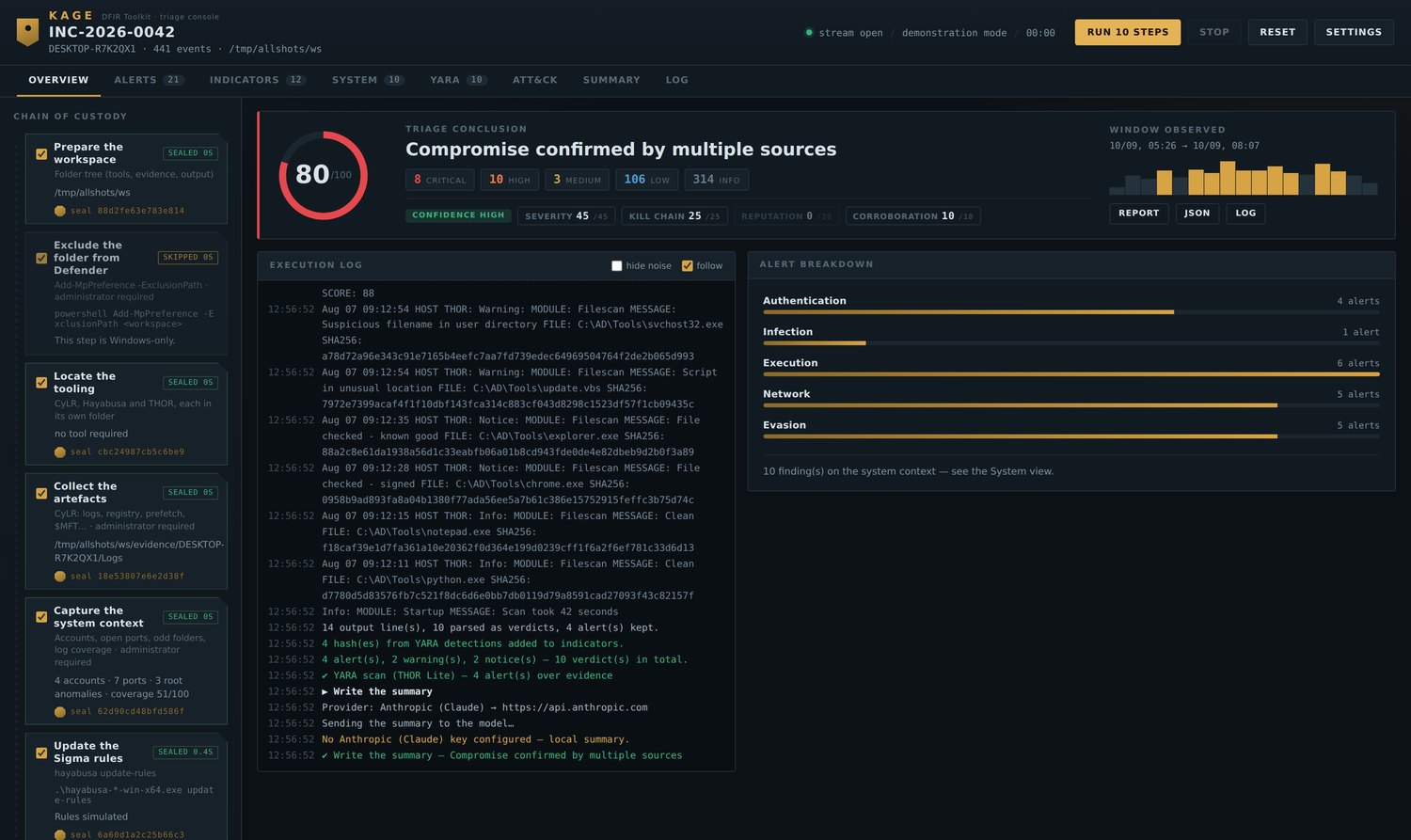
The overview: eleven sealed steps on the left, the execution log
streaming, and the score broken into its four components.
---
## 📑 Table of contents
- [Installation](#-installation)
- [Running your first scan](#-running-your-first-scan)
- [Adding THOR Lite manually](#-adding-thor-lite-manually)
- [The chain](#-the-chain)
- [Risk score](#-risk-score)
- [Alerts](#-alerts)
- [System context](#-system-context)
- [Logging & audit](#-logging--audit)
- [YARA](#-yara)
- [Seals](#-seals)
- [Views](#-views)
- [Configuration](#-configuration)
- [CLI reference](#-cli-reference)
- [Troubleshooting](#-troubleshooting)
- [Linux version](#-linux-version--in-progress)
- [Credits](#-credits)
---
## 📦 Installation
### Requirements
| | |
|---|---|
| OS | Windows 10 / 11 or Windows Server |
| Python | 3.10+ from [python.org](https://www.python.org/downloads/), **installed for all users** |
| Rights | **Administrator** |
| Disk | a few GB free for the collection |
### Install
```powershell
# 1. Extract Kage anywhere — Desktop, C:\Kage, a USB stick, it does not matter
cd C:\Kage
# 2. Install the dependencies
pip install -r requirements.txt
# 3. Check the environment before touching a host
python preflight.py
```
`preflight.py` reports what is ready and what is missing.
```
Workspace : C:\Kage
System : Windows 11
Python : 3.12.3
Dependencies
[ok] module fastapi
[ok] module uvicorn
[ok] module httpx
Rights and disk space
[ok] console running as administrator
[ok] free space: 84.2 GB
Tooling
[!] CyLR in C:\Kage\tools\cylr
→ the "Locate the tooling" step downloads it
[!] THOR Lite
→ optional step — it will simply be skipped
```
### Launch — as Administrator
```powershell
python -m dfirconsole
```
Or right-click **`launch.bat`** → *Run as administrator*, which handles the
virtualenv, the install and opens the browser for you.
```
Kage DFIR Toolkit 1.5.0
code C:\Kage\dfirconsole
workspace C:\Kage
open http://127.0.0.1:8787
```
> **The workspace is wherever you launched from.** Nothing to configure. Tools,
> evidence and output all land next to the console.
### Try it with no risk first
```powershell
python -m dfirconsole --demo
```
Demonstration mode builds a synthetic intrusion — malicious attachment, encoded
PowerShell, Defender disabled, credential theft, persistence, C2, shadow copies
deleted — and runs the entire chain on it. Nothing on your machine is touched.
The best way to learn the interface before a real incident.
---
## 🚀 Running your first scan
### Step 1 — Open the console
Launch as administrator, open , and check the status bar
reads **`live run · Windows`** and not `demonstration mode`.
### Step 2 — Name the case
Click **Settings**:
| Field | Example | Why it matters |
|---|---|---|
| Case reference | `INC-2026-0042` | names the report, the log and the archive |
| Analyst | `N. Delaunay` | appears on the report header |
Leave **Workspace folder** empty it tracks the launch folder on its own.
Click **Save**.
### Step 3 — Warm up before committing
The left column is the **chain of custody**. Every step has a checkbox; all are
ticked by default except the YARA scan.
**For a first run, untick everything except:**
```
☑ Prepare the workspace
☑ Exclude the folder from Defender
☑ Locate the tooling
☑ Update the Sigma rules
```
Click **Run 4 steps**. About a minute. This downloads CyLR and Hayabusa and
confirms your elevation actually works *before* anything long begins.
### Step 4 — Collect and analyse
Once those four are sealed, tick the rest:
```
☑ Collect the artefacts CyLR — a few minutes, several GB
☑ Capture the system context accounts, sockets, disk root, log coverage
☑ Build the timeline Hayabusa correlates against Sigma
☑ Analyse the timeline score, alert families, indicators
```
Click **Run** and watch the execution log stream. Each finished step gets a
**seal** — a SHA-256 you can verify later.
### Step 5 — Read the results
| Where | What you get |
|---|---|
| **Overview** | risk score with its four components, alerts by family |
| **Alerts** | every alert, filterable by severity and family |
| **System** | accounts, sockets tied to processes, odd folders, log coverage |
| **Indicators** | hashes, IPs and domains extracted from the timeline |
**Click any table row** to open the reading pane: every field, the full command
line, all raw data. `←` `→` to move between items, `Esc` to close.
### Step 6 — Enrich and conclude *(optional)*
With API keys configured:
```
☑ Enrich the indicators VirusTotal + AbuseIPDB reputation
☑ Write the summary the AI drafts the report
```
Without keys, both are marked *skipped* and a **local write-up** is produced
instead — same structure, no network call.
### Step 7 — Export
Top right of the dashboard:
- **Report** — printable HTML, thirteen numbered sections, ready for PDF
- **JSON** — the complete state, seals included
- **Log** — everything the console produced
> 💡 **Replay a single step:** double-click its tag in the left column. Useful
> when Hayabusa fails but the collection is fine — no need to collect twice.
---
## 🔦 Adding THOR Lite manually
The YARA scan is the one step Kage **cannot** set up for you. Nextron requires
registration, so the binary cannot be fetched by a script. CyLR and Hayabusa
download themselves; THOR does not.
### 1. Get the archive
Register and download at
[nextron-systems.com/thor-lite](https://www.nextron-systems.com/thor-lite/).
You receive the scanner **and a licence file** (`.lic`) — usually by email.
### 2. Drop it in `tools\thor\`
Kage already created that folder for you at first launch. Copy the archive's
contents into it, **keeping everything together**:
```
C:\Kage\
└── tools\
└── thor\ ← everything goes here
├── thor64-lite.exe the scanner
├── yourname.lic the licence — THOR will not start without it
├── config\ from the archive
├── signatures\ from the archive — the YARA rules themselves
└── custom-signatures\ from the archive
```
> **Why keep them together?** THOR runs from the directory holding its
> executable and resolves its signatures relative to that directory. Copying
> the binary alone gives you a scanner with nothing to scan for.
The other two tools live beside it, each in its own folder:
```
tools\
├── cylr\ CyLR.exe ← downloaded automatically
├── hayabusa\ hayabusa-.exe ← downloaded automatically
└── thor\ thor64-lite.exe + .lic ← you place this one
```
### 3. Verify
```powershell
python preflight.py
```
```
Tooling
[ok] CyLR in C:\Kage\tools\cylr
[ok] Hayabusa in C:\Kage\tools\hayabusa
[ok] THOR Lite: C:\Kage\tools\thor\thor64-lite.exe
[ok] THOR licence file (*.lic)
```
If the licence line shows `[!]`, THOR will start and stop immediately.
### 4. Choose the scope — this decides everything
**Settings → YARA scan folder:**
| Value | Scans | Takes |
|---|---|---|
| *(empty)* | the artefacts CyLR just collected | minutes |
| `C:\Users\target` | one user profile | minutes |
| `C:\` | the whole system volume | **hours** |
Tick **YARA scan** in the chain and run it. Verdicts appear live as files are
examined — alerts, warnings, notices *and* clean files, each with its hash.
**No time limit by default.** A three-hour sweep is a decision, not an anomaly.
Set one in minutes if you want a ceiling.
> Without THOR, the step reports itself as *skipped* and the chain carries on.
> You lose the YARA axis of the score — nothing else.
---
## 🔗 The chain
Eleven steps. Tick what you need, double-click a tag to replay one alone.
| # | Step | What actually runs |
|---|---|---|
| 01 | Prepare the workspace | folder tree, elevation and free-space check |
| 02 | Exclude from Defender | `Add-MpPreference -ExclusionPath ` |
| 03 | Locate the tooling | resolves and downloads CyLR + Hayabusa from GitHub releases |
| 04 | Collect the artefacts | `CyLR.exe -od evidence\ -of .zip -v` |
| 05 | Capture the system context | `systeminfo` · `Get-LocalUser` · `netstat -ano` · `tasklist` · `auditpol` |
| 06 | Update the Sigma rules | `hayabusa update-rules` |
| 07 | Build the timeline | `hayabusa -timeline -d -o hayabusa-output.csv -r ` |
| 08 | Analyse the timeline | score, alert families, indicator extraction |
| 09 | YARA scan *(optional)* | `thor64-lite.exe --nocsv -p ` |
| 10 | Enrich the indicators | VirusTotal v3 · AbuseIPDB v2 |
| 11 | Write the summary | your AI provider, or a local write-up |
The Hayabusa subcommand is read from its own help output, so v3
(`csv-timeline`) and v4 (`dfir-timeline`) both work, and unsupported flags are
dropped rather than failing the command.
---
## 🎯 Risk score
A **triage priority, not a proof** — and never published without its breakdown.
```
80 / 100 Compromise confirmed by multiple sources
CONFIDENCE HIGH · 441 events analysed
SEVERITY 45 / 45 8 critical, 10 high, 3 medium
KILL CHAIN 25 / 25 10 ATT&CK tactics, 7 decisive
REPUTATION 0 / 20 no indicator confirmed externally
CORROBORATION 10 / 10 3 YARA detections · 3 active connections to public hosts
```
Four independent axes, **each capped**. That is what stops one noisy rule firing
three hundred times from reaching the same verdict as a genuine multi-stage
intrusion.
**Confidence is separate from severity.** It counts how many independent sources
agree and whether logging coverage was sufficient — so a high score built on
Sigma alone reads as a strong lead, never a confirmation:
| Score | Confidence high | Confidence low |
|---|---|---|
| ≥ 70 | Compromise confirmed by multiple sources | Compromise highly likely — corroboration still limited |
| ≥ 45 | Likely compromise — containment recommended | Strong indications from a single source |
| ≥ 25 | Suspicious activity requiring qualification | |
| ≥ 10 | Weak signals, no established compromise | |
| < 10 | Nothing conclusive | |
Recomputed each time a new source lands — after the timeline, after YARA, after
enrichment.
---
## 🚨 Alerts
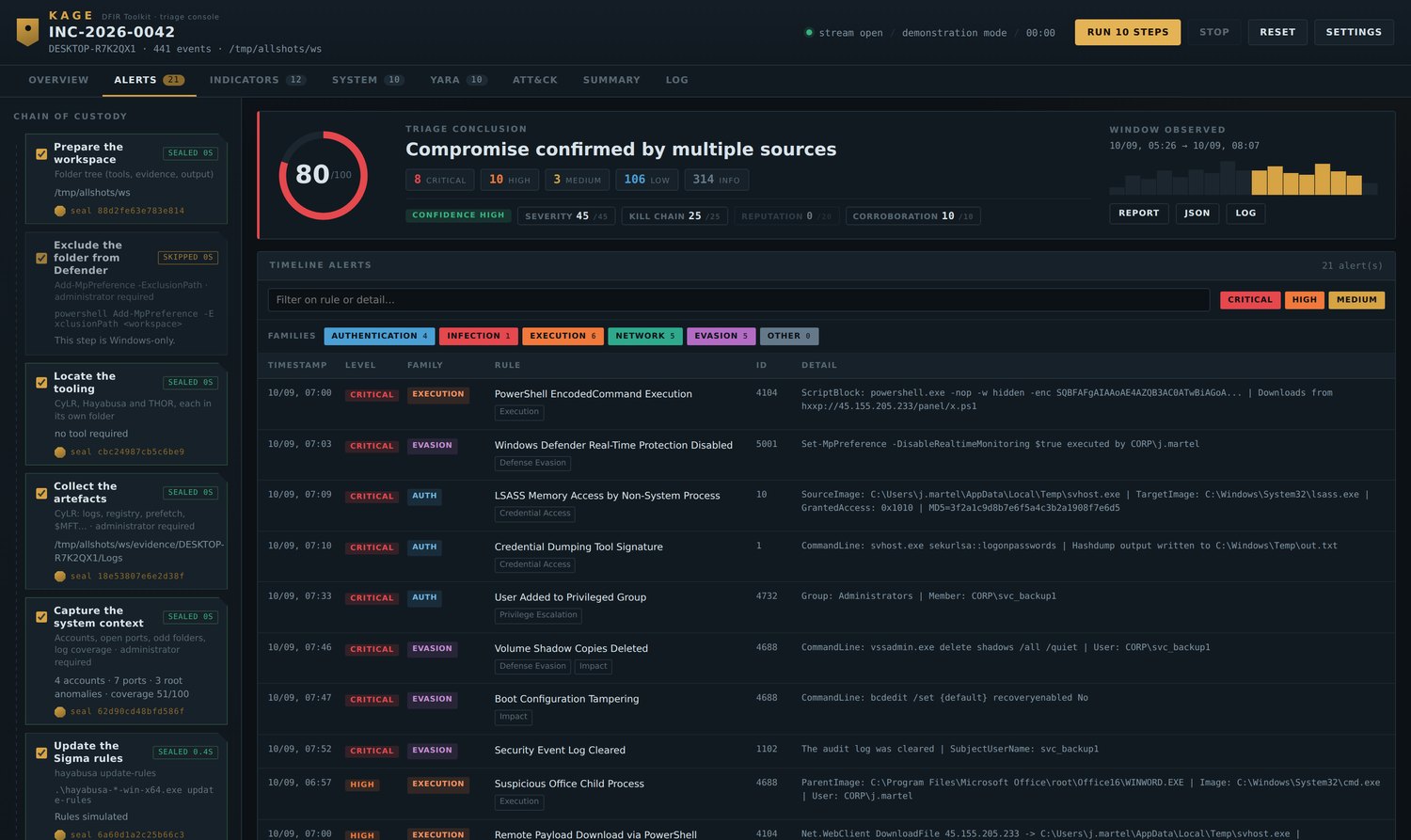
Severity says how urgent. Families say what kind.
```
FAMILIES AUTHENTICATION 4 INFECTION 1 EXECUTION 6
NETWORK 5 EVASION 5 OTHER 0
TIMESTAMP LEVEL FAMILY RULE ID
09/09 10:26 CRITICAL EVASION Windows Defender Disabled 5001
09/09 11:09 CRITICAL EVASION Volume Shadow Copies Deleted 4688
09/09 11:15 CRITICAL EVASION Security Event Log Cleared 1102
09/09 10:32 CRITICAL AUTH LSASS Memory Access 10
```
Classified by event ID first, wording second. **When the two disagree, the text
wins**: a `4688` is a process creation, but `vssadmin delete shadows` belongs
under Evasion, because that is where an analyst will look for it.
**The family counts always match the table.** Computed over the alerts that
actually reach the list — a badge promising rows you cannot find is a bug, not a
detail.
**The histogram follows the selection.** With one family active, the observed
window is redrawn in that family's colour and a tick marks its busiest moment.
**The triage does not flag itself.** THOR writes to the Windows event log while
it runs, and scanning a folder of offensive binaries makes Hayabusa flag our own
scanner. Those events are excluded, counted apart, and the total reported.
---
## 🖥️ System context
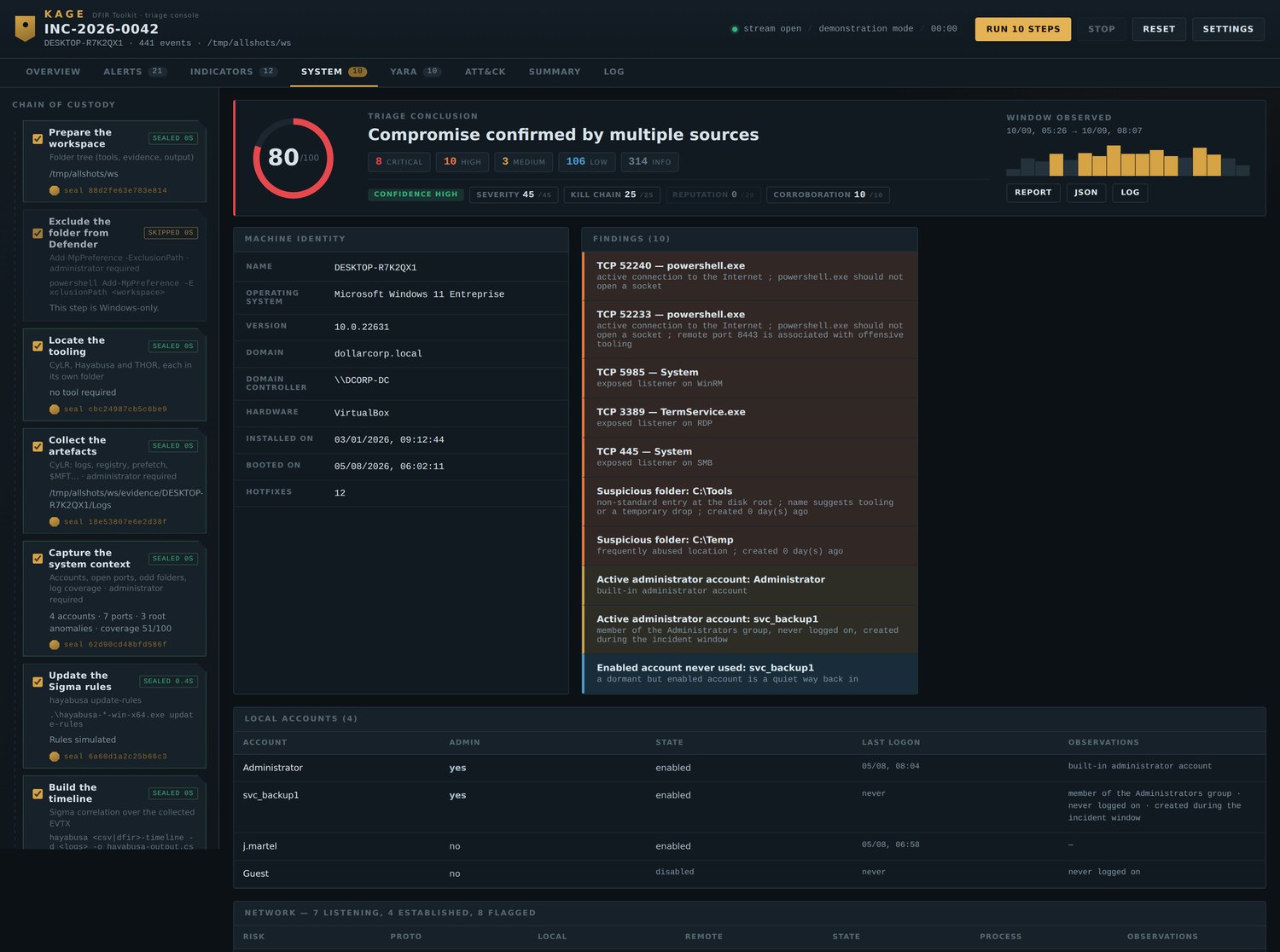
What no event log tells you, captured read-only:
```
NETWORK — 7 listening, 4 established, 8 flagged
RISK PROTO LOCAL REMOTE PROCESS
HIGH TCP 10.20.4.11:52233 45.155.205.233:8443 powershell.exe
→ active connection to the Internet · powershell.exe should not
open a socket · remote port 8443 associated with offensive tooling
HIGH TCP 0.0.0.0:3389 — TermService.exe
→ exposed listener on RDP
ROOT C:\ — 3 flagged entries
HIGH C:\Tools folder created 0 day(s) ago
→ non-standard entry at the disk root · name suggests tooling
HIGH C:\Temp folder → frequently abused location
```
Every socket is matched to its owning process by **PID** — that cross-reference
is what makes `powershell.exe` holding a connection to a public host readable at
a glance.
Local accounts are checked for Administrators membership, dormant-but-enabled
state and last logon. Public addresses from **established** connections join the
indicator list automatically: an address being talked to during triage is worth
at least as much as one read from a three-day-old log entry.
---
## 📋 Logging & audit
A triage is only worth what the machine agreed to record.
```
LOGGING & AUDIT — coverage 51/100 · partial coverage
Blind spots: Sysmon · PowerShell (script blocks) · Process creation
· Credential validation
STATE CHANNEL IMPORTANCE EVENTS
ACTIVE Security critical 84 213
MISSING Sysmon critical —
EMPTY PowerShell (script blocks) critical —
ACTIVE System important 12 045
DISABLED WinRM important —
```
Sixteen channels classified **active / empty / disabled / missing** — the
distinction matters: an empty channel is one command away from fixed, a missing
one needs a deployment. Thirteen `auditpol` subcategories read alongside.
The coverage score sits next to the risk score. *Risk 80, coverage 51* means the
verdict rests on half the available information — and the report says so.
---
## 🔬 YARA
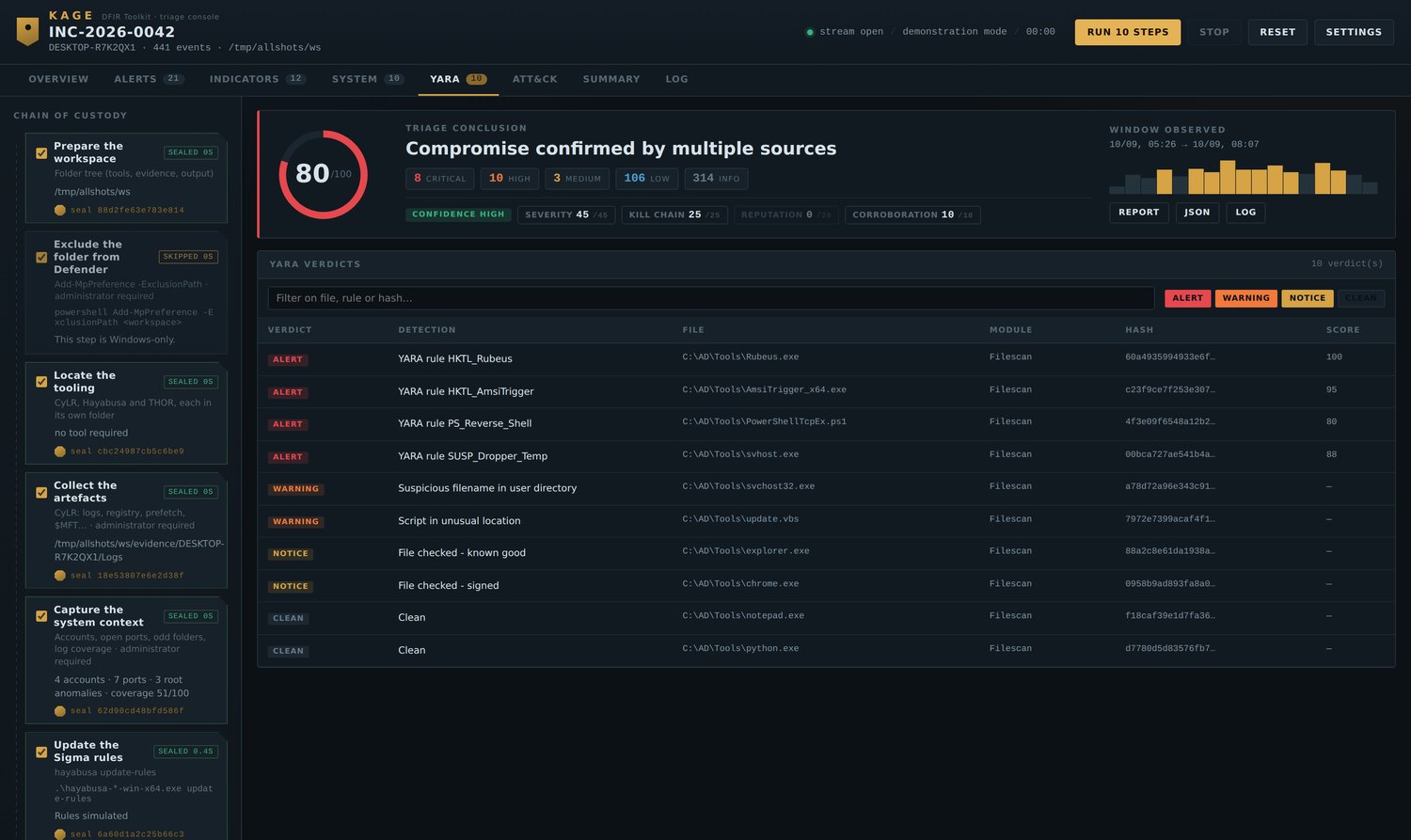
```
8 verdicts
VERDICT DETECTION FILE HASH SCORE
ALERT YARA rule HKTL_Rubeus C:\AD\Tools\Rubeus.exe 9c4133ee… 100
ALERT YARA rule HKTL_AmsiTrigger C:\AD\Tools\AmsiTrigger.exe af7af55c… 95
ALERT YARA rule PS_Reverse_Shell C:\AD\Tools\PowerShellTcp… ab1e98e8… 80
WARNING Suspicious filename C:\AD\Tools\svchost32.exe 6b6f1901… —
NOTICE File checked - signed C:\AD\Tools\chrome.exe c5a10bff… —
CLEAN Clean C:\AD\Tools\notepad.exe 20eded6a… —
```
The page fills up **during** the scan, not only when something is found. That is
what separates *found nothing* from *looked at nothing*.
**The scan starts at the first real finding.** THOR opens every run with a dozen
banner lines — version, build, hostname, working directory, argument list,
uptime — and closes with a summary. None of it describes the host being
examined, so none of it reaches the view. Hashes from alerts are pushed into the
indicator list, ready for VirusTotal.
---
## 🔐 Seals
Each completed step is sealed with a SHA-256, and the seal **states what it
covers**:
```
✔ Analyse the timeline SEALED 0.1s
seal 31d1991a65598de8 — content of hayabusa-output.csv
✔ Exclude the folder from Defender SEALED 6.2s
seal 8f2c04b71ae93d55 — execution record (no file produced)
```
When a step produced files, the seal is the hash **of their contents** — rerun
it later and you have proof the artefact was not altered. When it produced none,
the seal covers only the execution record, and says so rather than implying
more.
---
## 🧭 Views
Every view has its own URL, reloads nothing and loses nothing — the analysis
lives server-side and a full refresh restores it.
| Address | Content |
|---|---|
| `/` | pipeline, execution log, breakdown by family |
| `/alerts` | alerts by severity and family |
| `/indicators` | indicators with VirusTotal / AbuseIPDB reputation |
| `/system` | machine, accounts, network, disk root, coverage |
| `/yara` | THOR verdicts, live during the scan |
| `/attack` | inferred ATT&CK tactics |
| `/summary` | written report |
| `/log` | full log, downloadable |
### Live execution
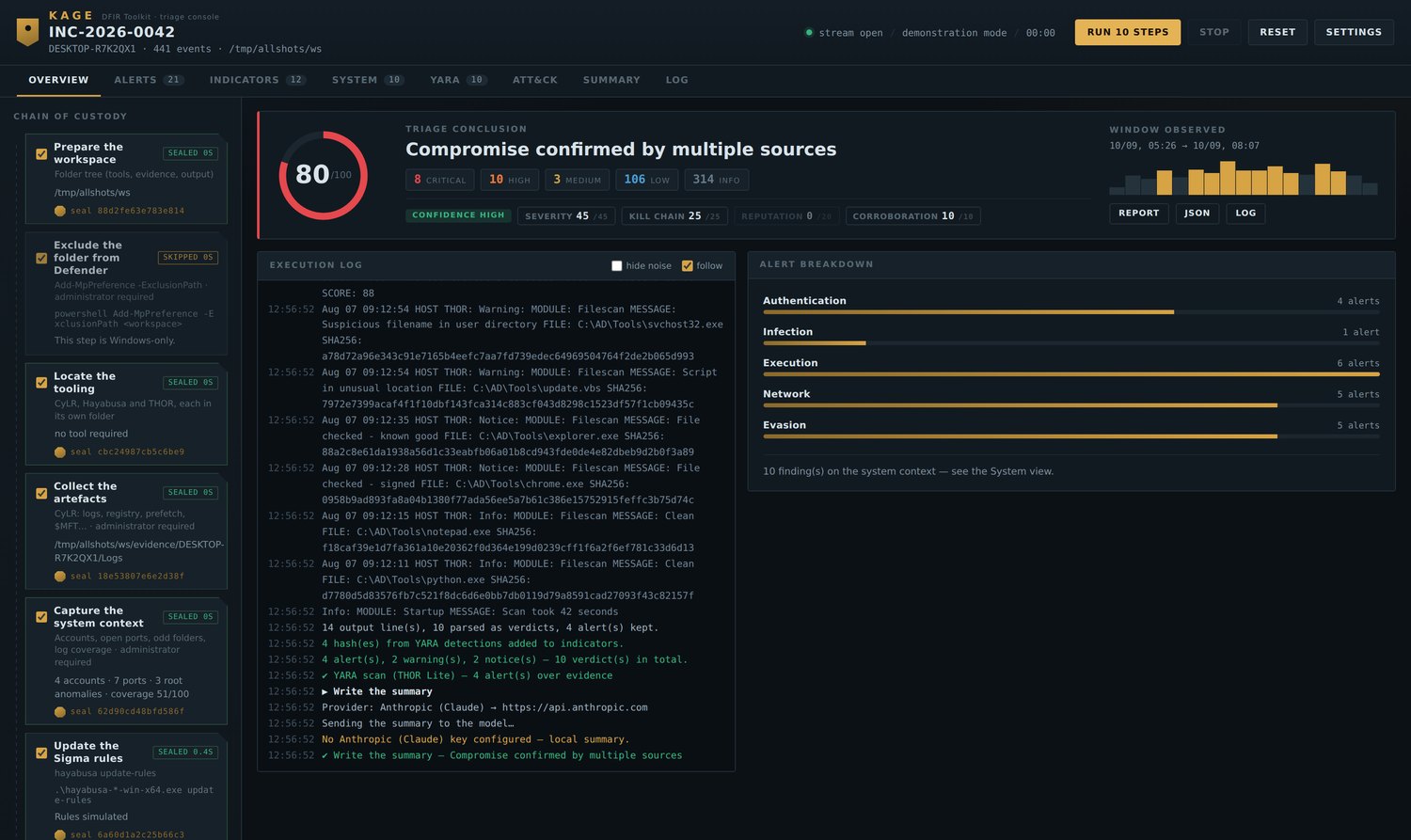
Every command streams as it runs. Steps seal one by one; the clock stops when
the chain does.
### Indicators
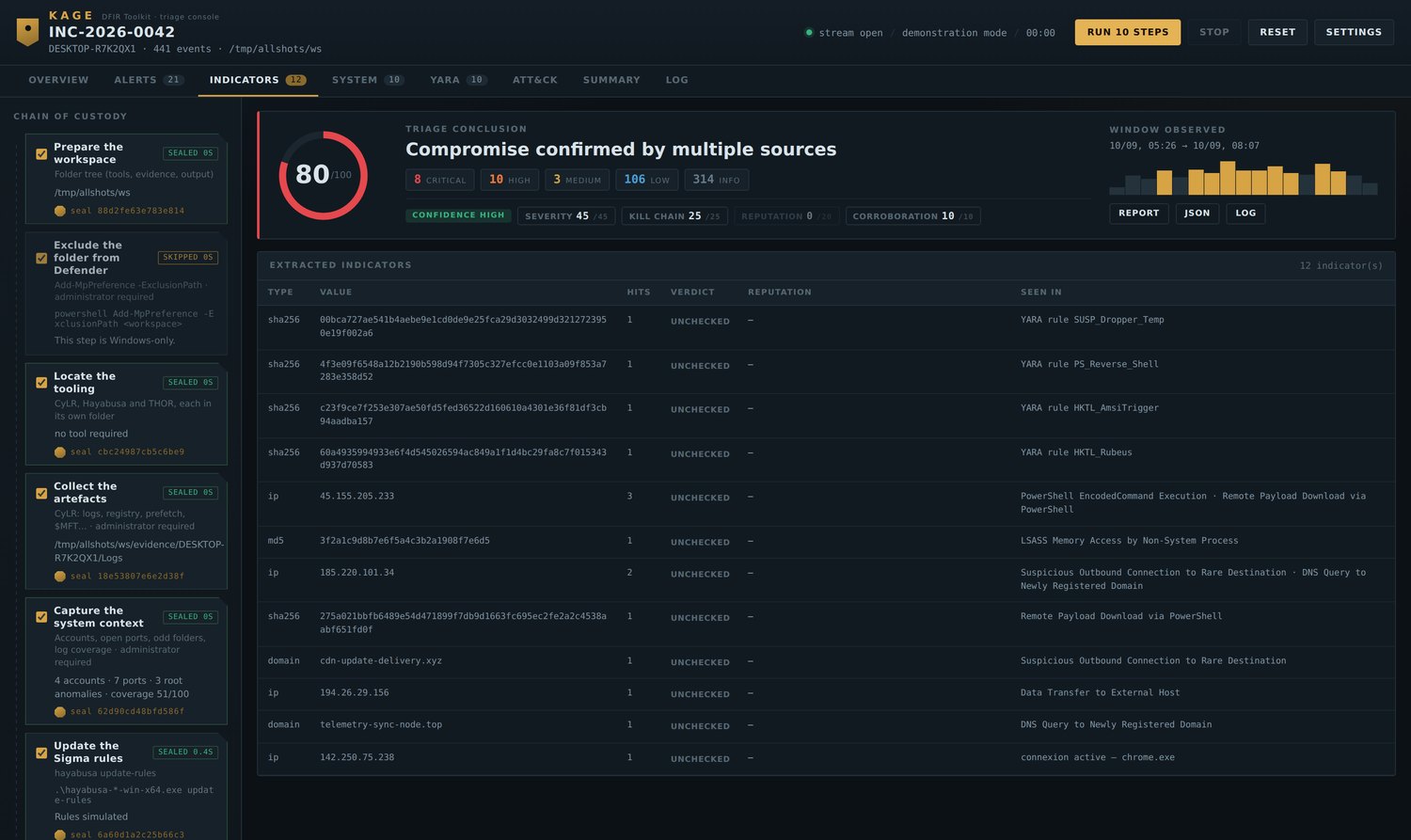
Hashes, IPs and domains pulled from the timeline, from active sockets, and from
YARA hits — each with its reputation once enrichment has run.
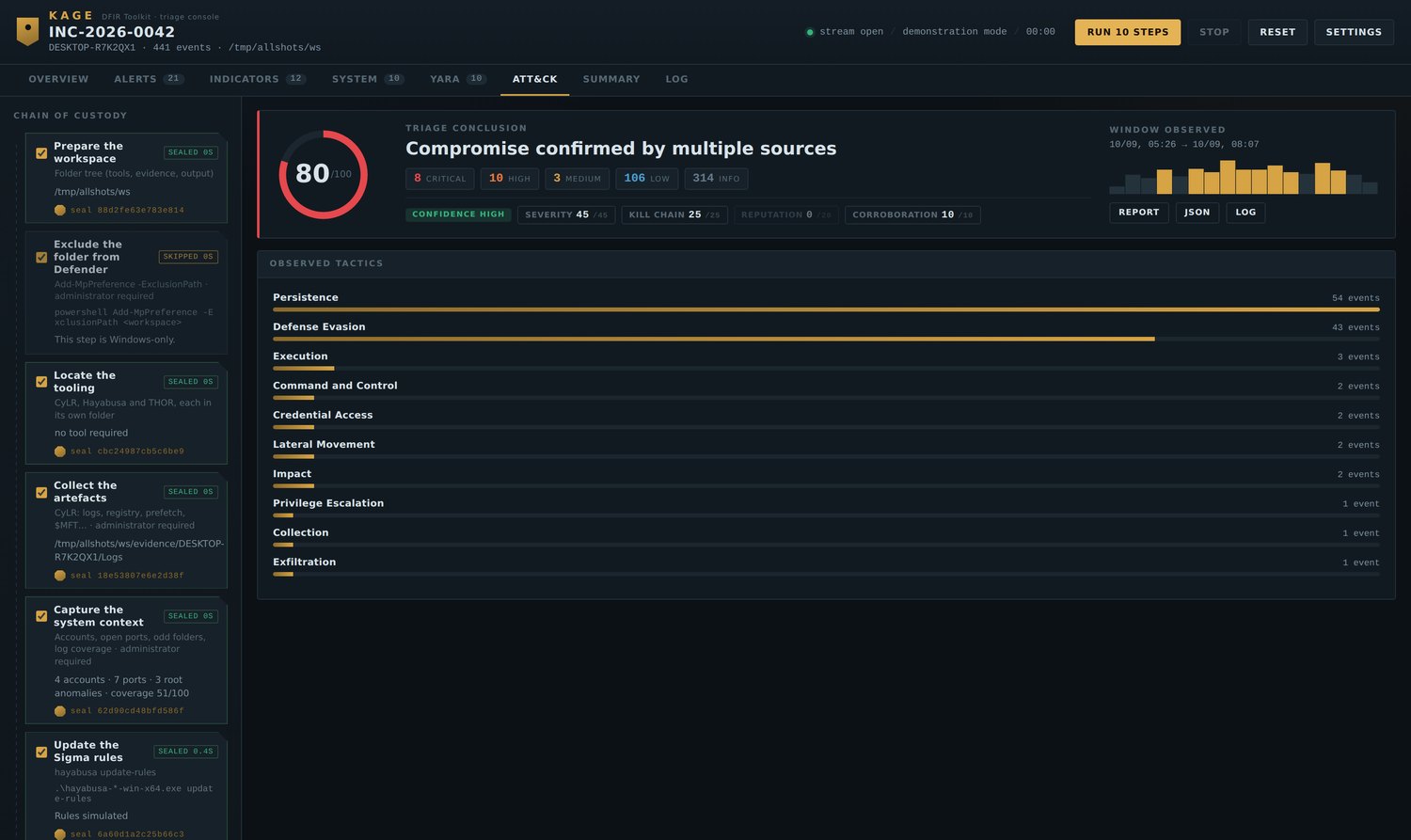
### ATT&CK tactics
### Reading pane
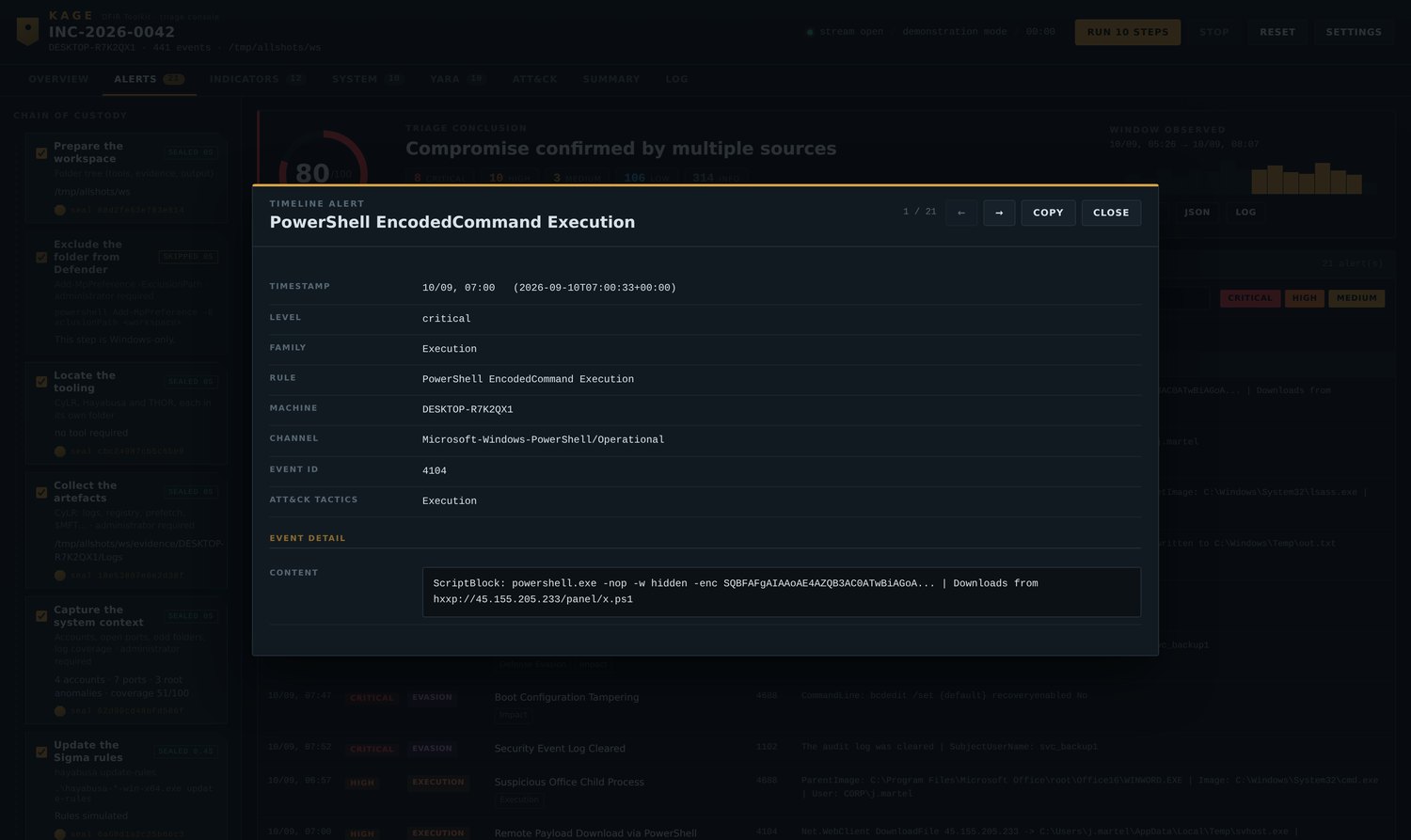
Any row, anywhere, opens in full: every field, the complete command line, the
raw THOR data. `←` `→` to move between items, `Esc` to close, **Copy** for JSON.
### Written summary
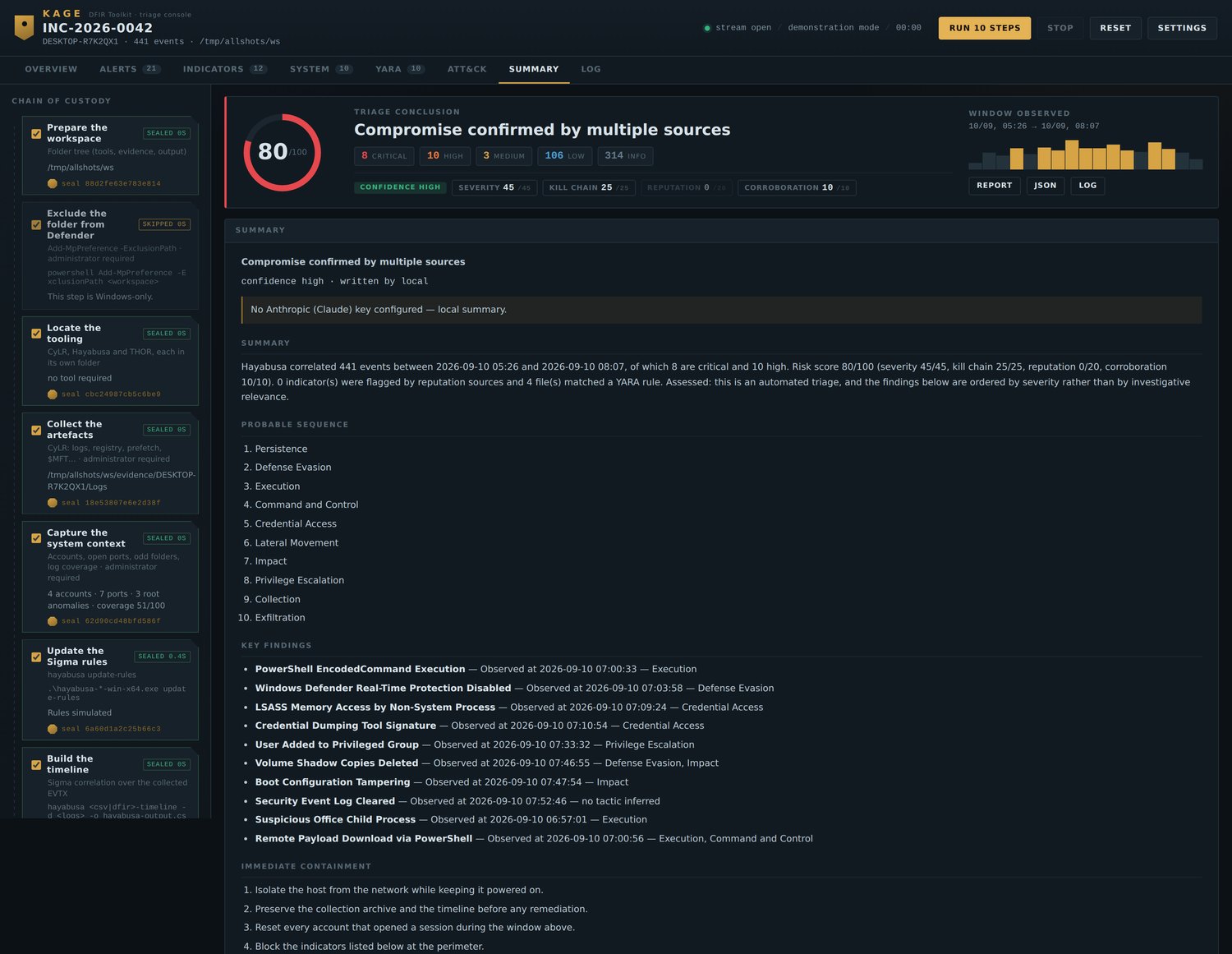
Observed facts separated from assessed ones, calibrated language, and an
explicit evidence-gaps section naming what the logging could not have shown.
### Settings
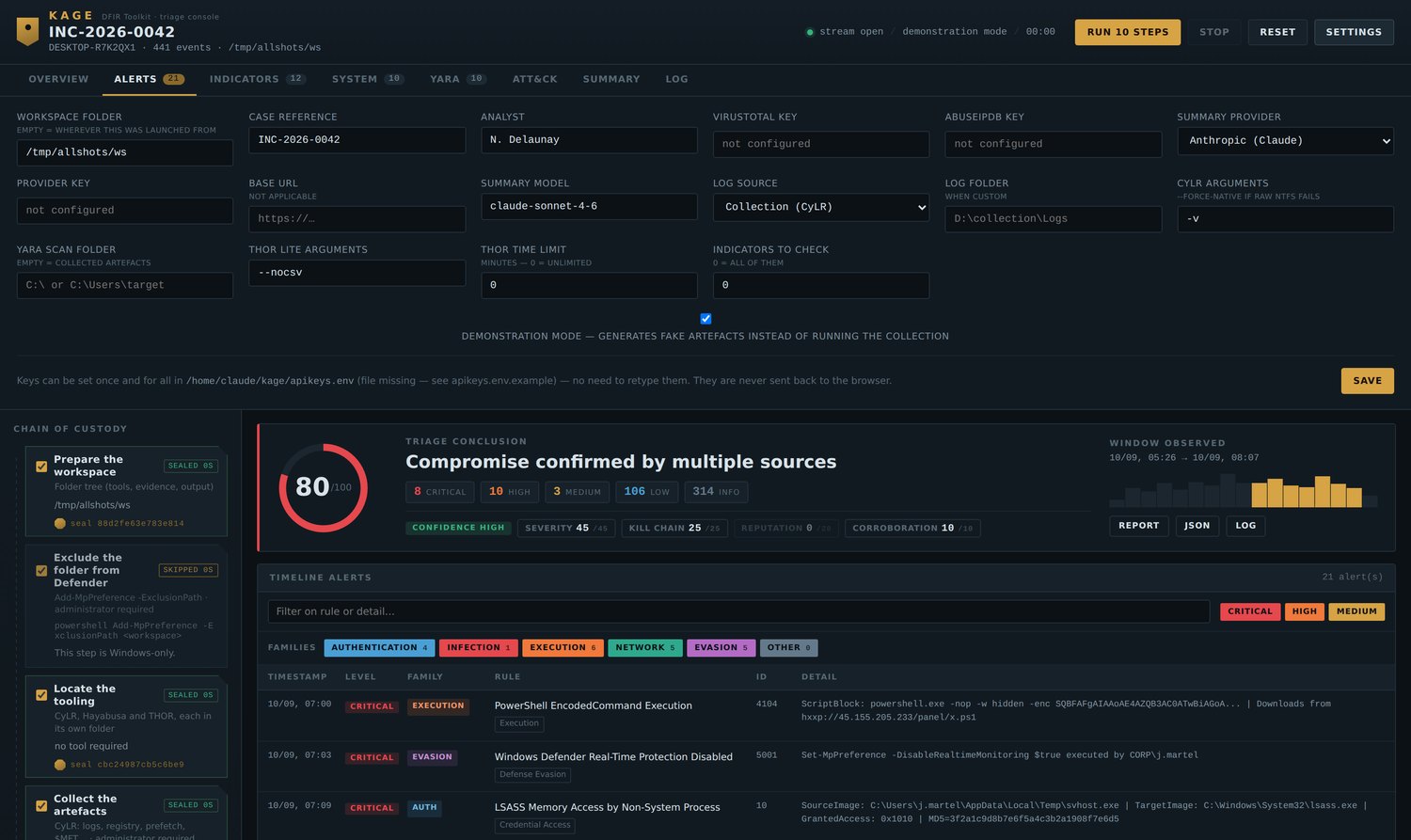
### Execution log
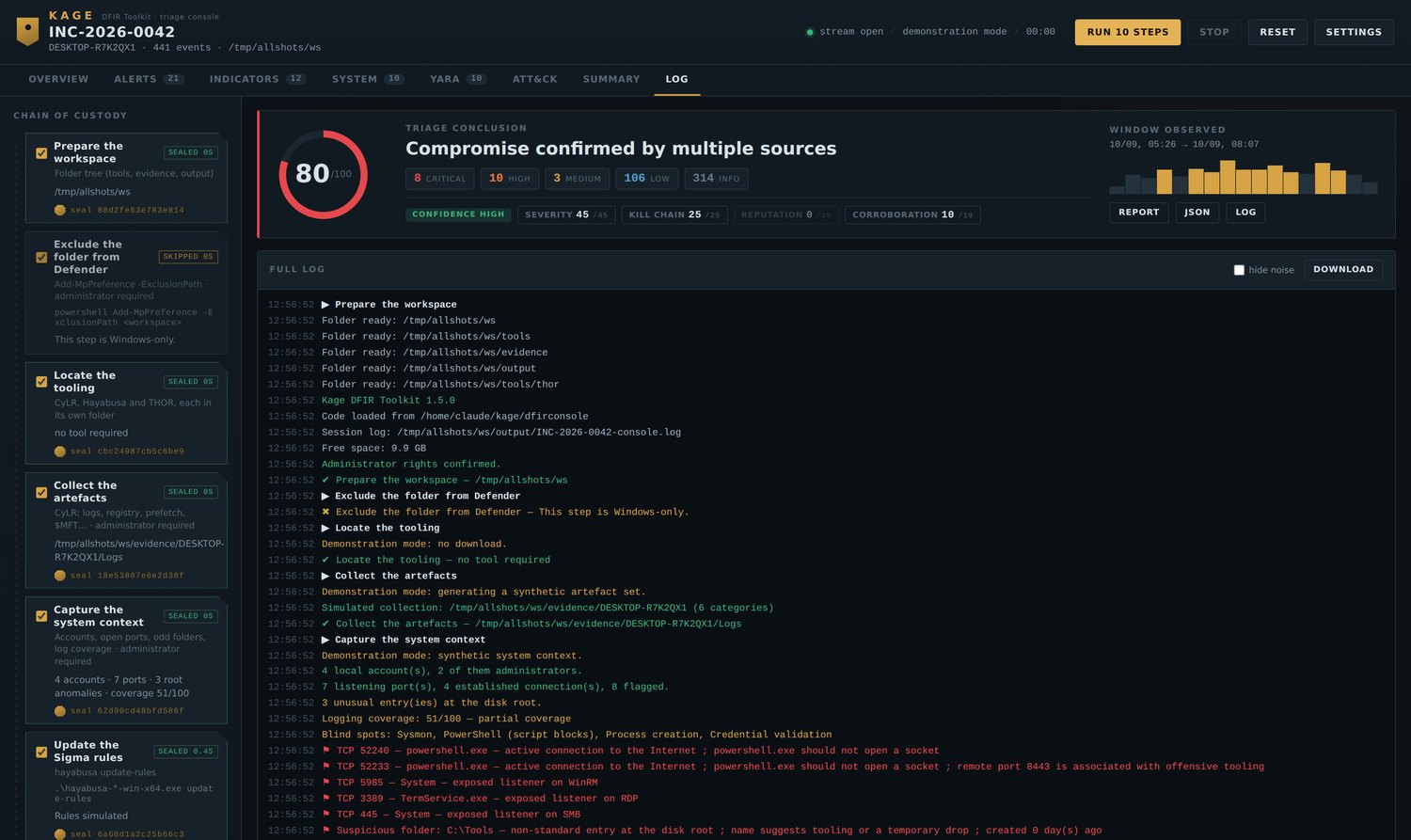
---
## 📄 The report
`/api/report.html` — self-contained, dark, thirteen numbered sections, ready to
print to PDF. No external resource: it stays readable in ten years on an offline
machine.
### Verdict and score
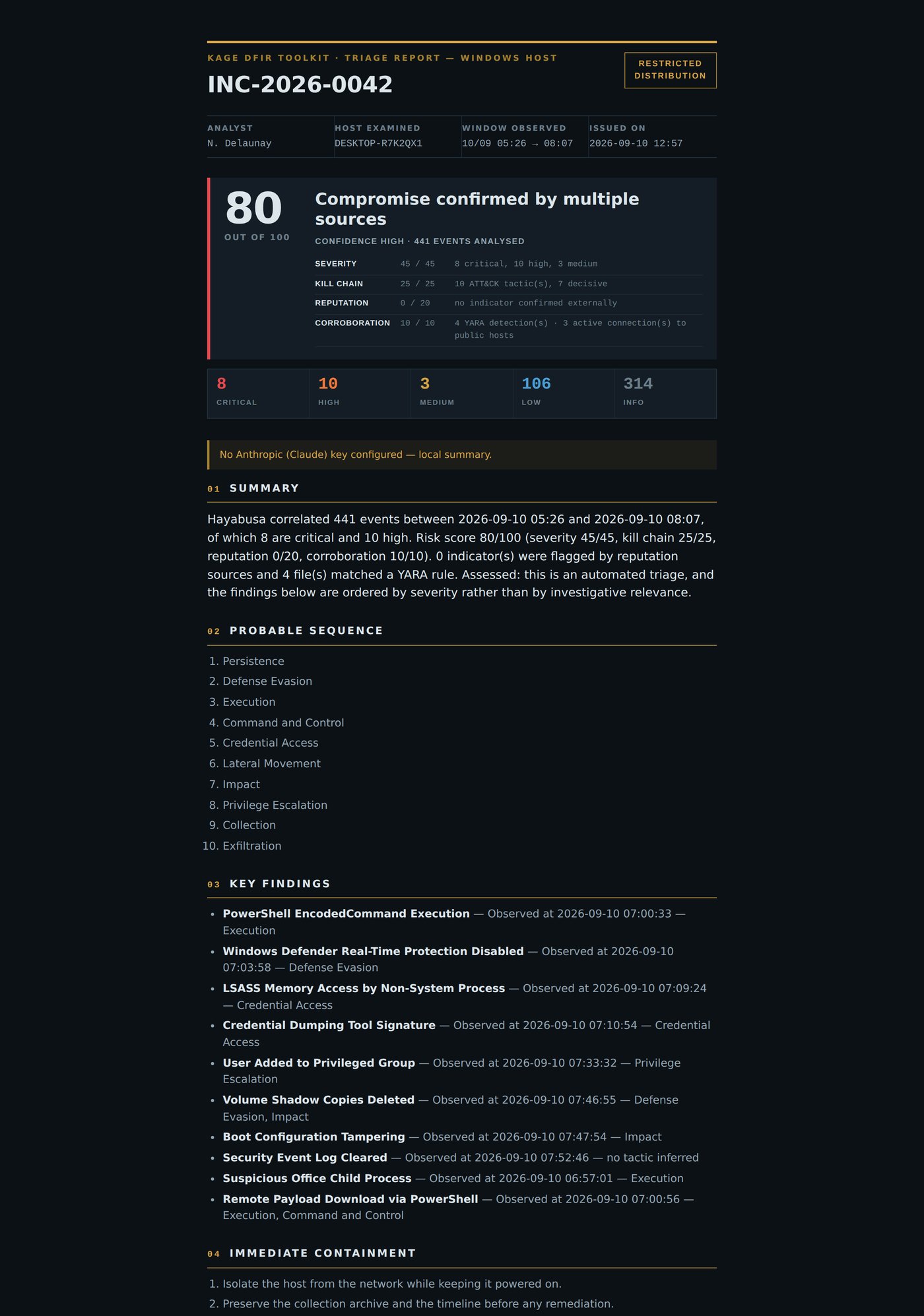
The score never appears without its four components, so a reader can challenge
one axis rather than an opaque number.
### Findings and containment
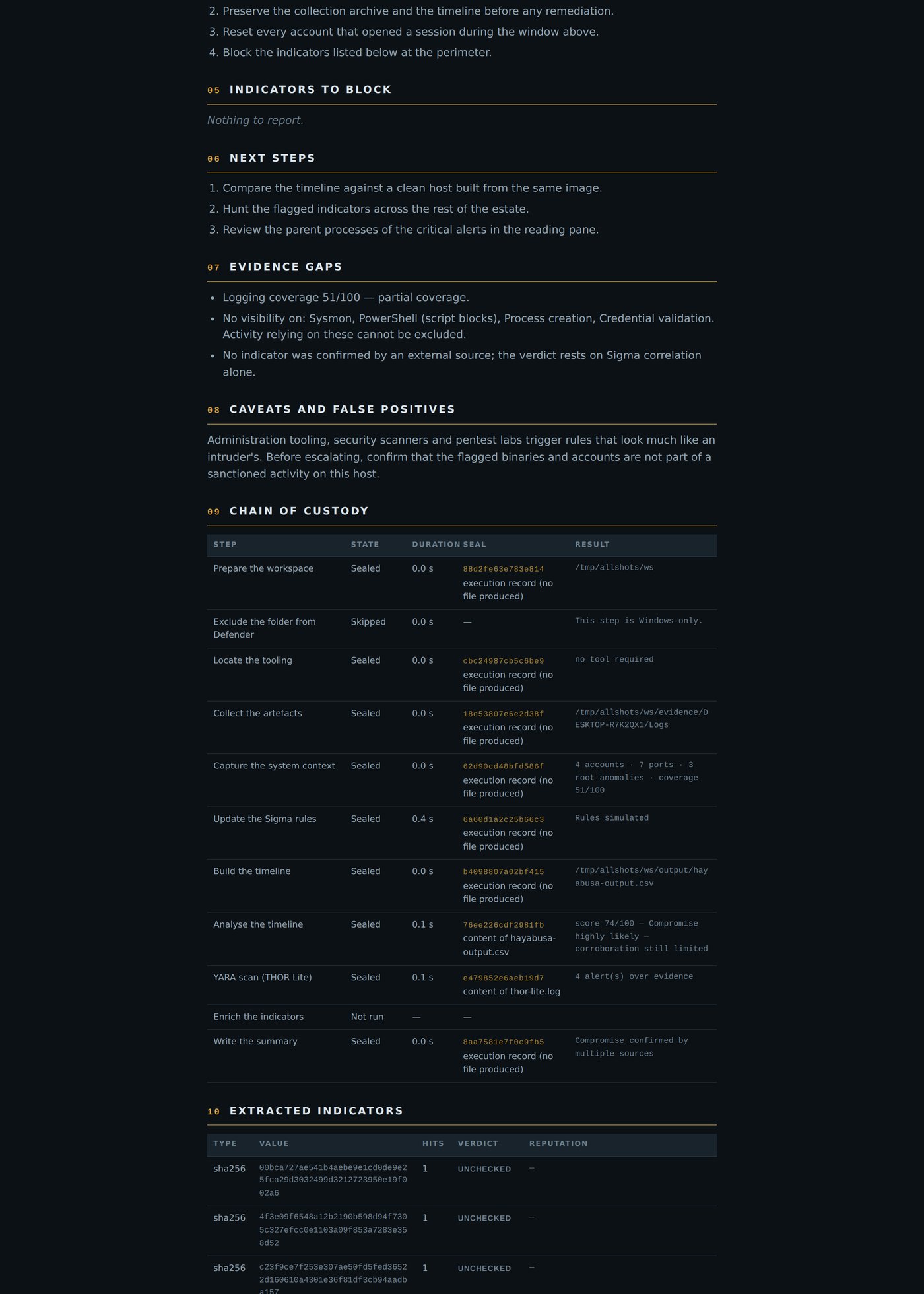
### Evidence gaps and chain of custody
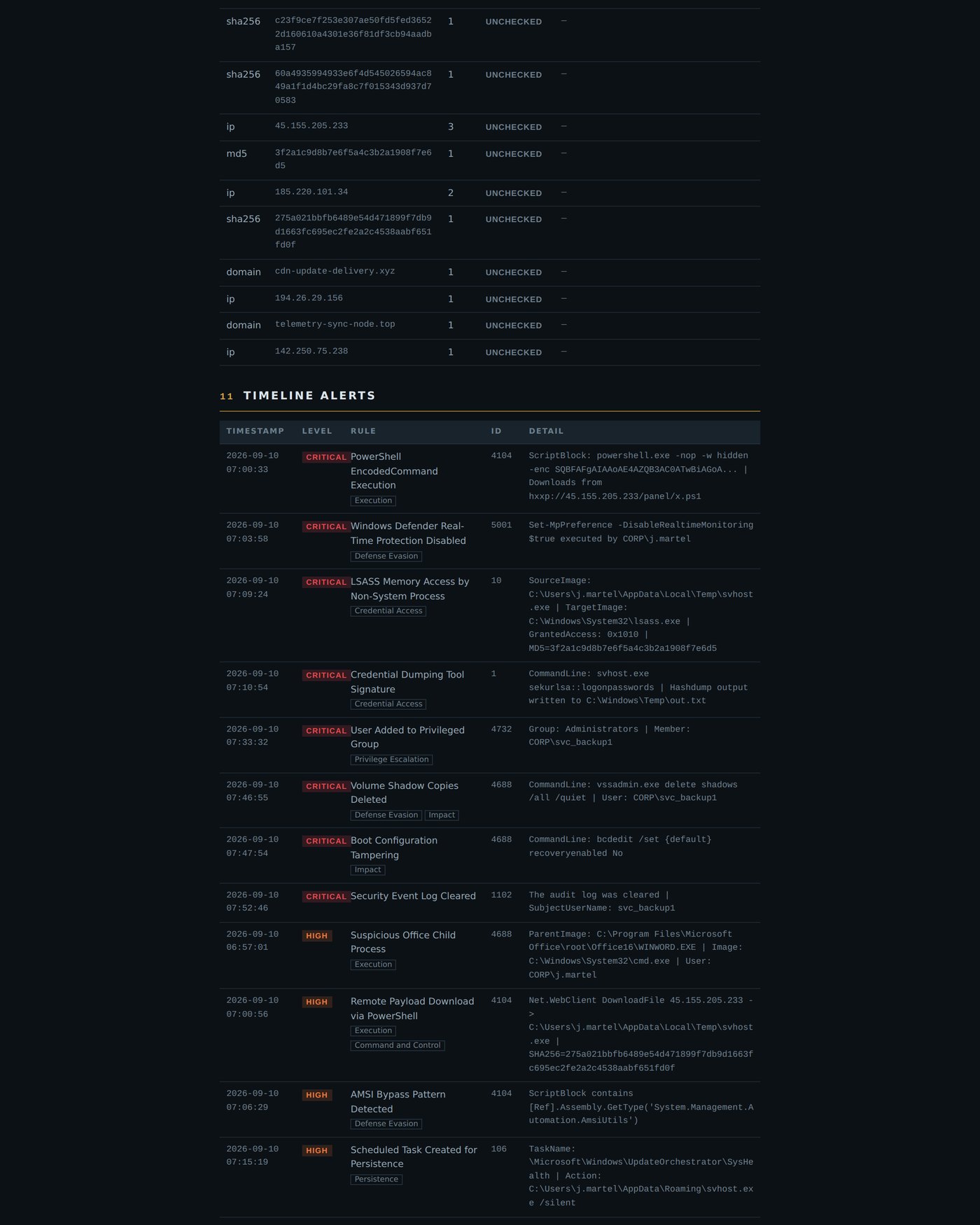
Every step with its seal and **what that seal covers** — the content of a named
file, or the execution record alone.
> When printing to PDF, tick *Background graphics* in the browser options,
> otherwise the dark background is dropped.
---
## ⚙️ Configuration
### Tooling layout
Each tool owns a folder, and each ships with a README explaining what goes in it.
```
/
├── tools/
│ ├── cylr/ CyLR.exe ← downloaded automatically
│ ├── hayabusa/ hayabusa-.exe ← downloaded automatically
│ └── thor/ thor64-lite.exe + .lic ← manual, registration required
├── evidence/ collection archive, unpacked
└── output/ timeline, logs, enrichment cache
```
**CyLR and Hayabusa install themselves.** The *Locate the tooling* step queries
the GitHub releases API, picks the current Windows x64 asset and unpacks it into
the right folder. Pinning a version means the download breaks the day upstream
moves on; resolving it means the console keeps working unattended. A pinned URL
takes over if the API is unreachable.
### API keys — all optional
Everything works without a single key. Unconfigured steps are marked *skipped*,
never *failed*.
**Where credentials go.** The repository ships `apikeys.env.example`, a template
with empty values. Copy it, keep the copy local:
```powershell
copy apikeys.env.example apikeys.env
notepad apikeys.env
```
```ini
# apikeys.env — sits next to launch.bat
VT_API_KEY=your_virustotal_key
ABUSEIPDB_API_KEY=your_abuseipdb_key
AI_PROVIDER=groq
AI_API_KEY=your_provider_key
AI_MODEL=
```
**Where to get them**
| Key | Free tier | Sign up |
|---|---|---|
| `VT_API_KEY` | 4 requests/minute, 500/day | [virustotal.com](https://www.virustotal.com/gui/join-us) |
| `ABUSEIPDB_API_KEY` | 1 000 checks/day | [abuseipdb.com](https://www.abuseipdb.com/register) |
| `AI_API_KEY` | varies — Groq and Ollama are free | see the provider table below |
You can also set them as environment variables instead of a file, which is
usually what you want in a container or on a shared responder workstation:
```powershell
$env:VT_API_KEY = "..."
python -m dfirconsole
```
### Summary providers
Each has its own endpoint, wired explicitly, so choosing Groq never sends your
key to OpenAI.
| Provider | Endpoint | Default model |
|---|---|---|
| Anthropic | `api.anthropic.com` | `claude-sonnet-4-6` |
| OpenAI | `api.openai.com/v1` | `gpt-4o` |
| Groq | `api.groq.com/openai/v1` | `llama-3.3-70b-versatile` |
| Mistral | `api.mistral.ai/v1` | `mistral-large-latest` |
| OpenRouter | `openrouter.ai/api/v1` | `anthropic/claude-sonnet-4` |
| Ollama | `localhost:11434/v1` | `llama3.1` — no key |
| None | — | local write-up |
Small free tiers are handled: Groq allows 12 000 tokens per minute, so the
payload is measured against that ceiling and, on a size rejection, replayed with
fewer alerts and shorter details. The verdict survives; only the supporting
evidence thins out.
The model is held to a standard — observed separated from assessed, calibrated
language, quantified statements, explicit evidence gaps, and the benign
explanation considered.
---
## 📟 CLI reference
```
python -m dfirconsole console on 127.0.0.1:8787
python -m dfirconsole --port 9000 custom port
python -m dfirconsole --demo synthetic data, no collection
python preflight.py environment check
python preflight.py D:\CASE42 check another workspace
python -m pytest tests/ -q 115 tests
python tests/ui_check.py browser: full chain, reading pane
python tests/ui_nav.py browser: navigation, counts, histogram
python tests/ui_flood.py browser: 6000 log lines at once
```
Browser runs need `pip install playwright && playwright install chromium`.
---
## 🔧 Troubleshooting
**"Administrator rights required" / Defender exclusion refused**
Kage is not elevated. Close it, right-click `launch.bat` → *Run as
administrator*, or open PowerShell as administrator first.
**`did not find executable … python.exe`**
Your Python came from the Microsoft Store, which installs per user and vanishes
in an administrator session. Reinstall from python.org, *for all users*.
**CyLR produced no archive / the collection is empty**
Add `--force-native` to **Settings → CyLR arguments**. It drops raw NTFS reading
for the Windows API, which works when partition detection fails on a disk.
**THOR starts then goes silent**
Its licence is missing or expired, or `signatures\` was not copied next to the
binary. Run `preflight.py` to confirm.
---
## 🐧 Linux version — in progress
A Linux triage chain is being built on the same console, same views, same
scoring model. The parsers are already platform-agnostic; what changes is the
evidence layer:
| Windows | Linux (in progress) |
|---|---|
| CyLR collection | UAC / CyLR Linux collection |
| EVTX + Hayabusa Sigma | `journald` / `auth.log` / `syslog` + Sigma |
| `Get-LocalUser` · `auditpol` | `/etc/passwd` · `/etc/shadow` · `auditd` rules |
| `netstat -ano` + `tasklist` | `ss -tunap` |
| Disk root anomalies | `/tmp` · `/dev/shm` · `/var/tmp` · cron · systemd units |
| THOR Lite | THOR Lite for Linux |
Star or watch the repo to catch the release.
---
## 🙏 Credits
Kage is a console, not a collector or a scanner. The heavy lifting belongs to
these projects, and they deserve the star far more than this repo does:
| Tool | Repository | Role in the chain |
|---|---|---|
| **CyLR** | [orlikoski/CyLR](https://github.com/orlikoski/CyLR) | live artefact collection over raw NTFS |
| **Hayabusa** | [Yamato-Security/hayabusa](https://github.com/Yamato-Security/hayabusa) | Sigma correlation, timeline generation |
| **Sigma** | [SigmaHQ/sigma](https://github.com/SigmaHQ/sigma) | the detection rules behind every alert |
| **THOR Lite** | [NextronSystems/thor-lite](https://github.com/NextronSystems/thor-lite) | YARA and IOC scanning |
| **VirusTotal** | [virustotal.com](https://www.virustotal.com) | hash, IP and domain reputation |
| **AbuseIPDB** | [abuseipdb.com](https://www.abuseipdb.com) | IP abuse scoring |
| **MITRE ATT&CK** | [attack.mitre.org](https://attack.mitre.org) | the tactic framework behind the kill-chain axis |
Respect each project's own licence and terms of use — THOR Lite in particular
requires registration with Nextron and is not redistributable.
---
## 🌐 Ecosystem
| | Tool | Domain |
|---|---|---|
| ☁️ | [**Kumo** 蜘蛛](https://github.com/karim852/KUMO-Domain-Recon-Tool) | domain OSINT & reconnaissance |
| 🌑 | **Kage** 影 | DFIR host triage |
---
> ⚠️ **For authorized incident response only.**
> Only run Kage on hosts you own or have explicit written permission to examine.
Built for those who arrive after. 影